Maximize Email Impact with an Animated GIF Signature Maker
Animated GIFs present a unique opportunity for brands to enhance their email marketing efforts, yet they also pose significant challenges. Using an animated
Sophie Grant
Email Signature Specialist, Scribe
Introduction
Animated GIFs present a unique opportunity for brands to enhance their email marketing efforts, yet they also pose significant challenges. Using an animated GIF signature maker, brands can create email signatures that are visually appealing and effective at driving engagement. Many brands struggle to find the right balance between creativity and professionalism in their email marketing. If not executed properly, these GIFs may undermine the brand's credibility. Organizations must navigate these challenges carefully to ensure their email marketing remains effective and professional.
Understand Animated GIF Email Signatures
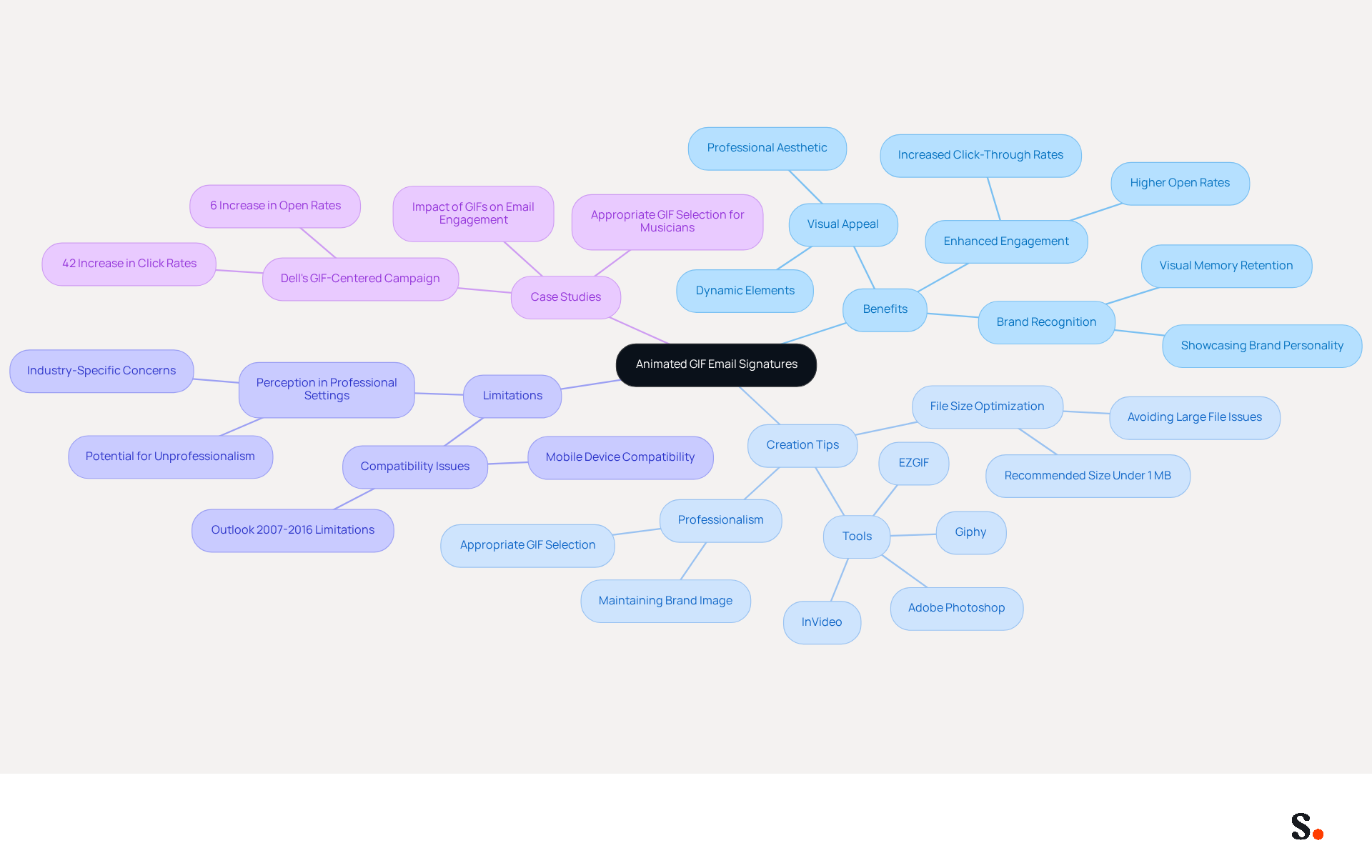
An animated gif signature maker allows users to create dynamic visual elements that can significantly enhance email communication effectiveness. These animated images can showcase logos, promotional messages, or even brief animations that reflect a brand's personality. Incorporating movement in GIFs enhances engagement and makes emails visually appealing. Studies indicate that messages featuring moving images can boost engagement rates significantly, with some research revealing click-through rates rise by up to 42% (Sophie Grant, Email Signature Specialist).
To create an effective animated gif signature maker, it’s important to ensure that the GIF is optimized for size and quality, maintaining a balance between visual impact and loading speed. The suggested file size for animated images in signature lines should be below 1 MB to prevent problems with message deliverability and loading durations. However, using alternative providers may lead to larger file sizes, which can affect email performance. Tools like Adobe Photoshop, EZGIF, Giphy, and InVideo can facilitate the use of an animated gif signature maker, allowing users to customize their designs easily while maintaining professionalism.
There are many advantages to using moving images in email signatures. They can enhance brand recognition, as 90% of information transmitted to the brain is visual, and visuals are processed 60,000 times faster than text. Moreover, a well-placed call to action (CTA) within a dynamic signature can drive engagement and encourage recipients to take action.
This limitation can lead to inconsistent experiences for recipients, impacting the effectiveness of the communication. For example, Outlook versions 2007 to 2016 do not support animated images, displaying only the first frame as a still picture, which can lead to inconsistent experiences for recipients. Moreover, incorporating animated images in professional correspondence may be viewed as unprofessional in certain sectors, possibly damaging a firm's reputation. Therefore, selecting suitable animated images that align with the brand's image is vital.
Research has indicated that brands incorporating an animated gif signature maker for moving visuals in their signatures can experience notable enhancements in engagement metrics. For instance, Dell's GIF-centered campaign resulted in a 6% increase in open rates and a 42% rise in click rates, showcasing the effectiveness of this strategy. By following optimal methods and thoughtfully incorporating moving images, businesses can enhance their communications, leaving a lasting impact on clients and prospects.
Leverage Benefits of Animated GIFs in Email Marketing
Animated GIFs serve as a strategic asset in email marketing, significantly enhancing engagement and brand visibility:
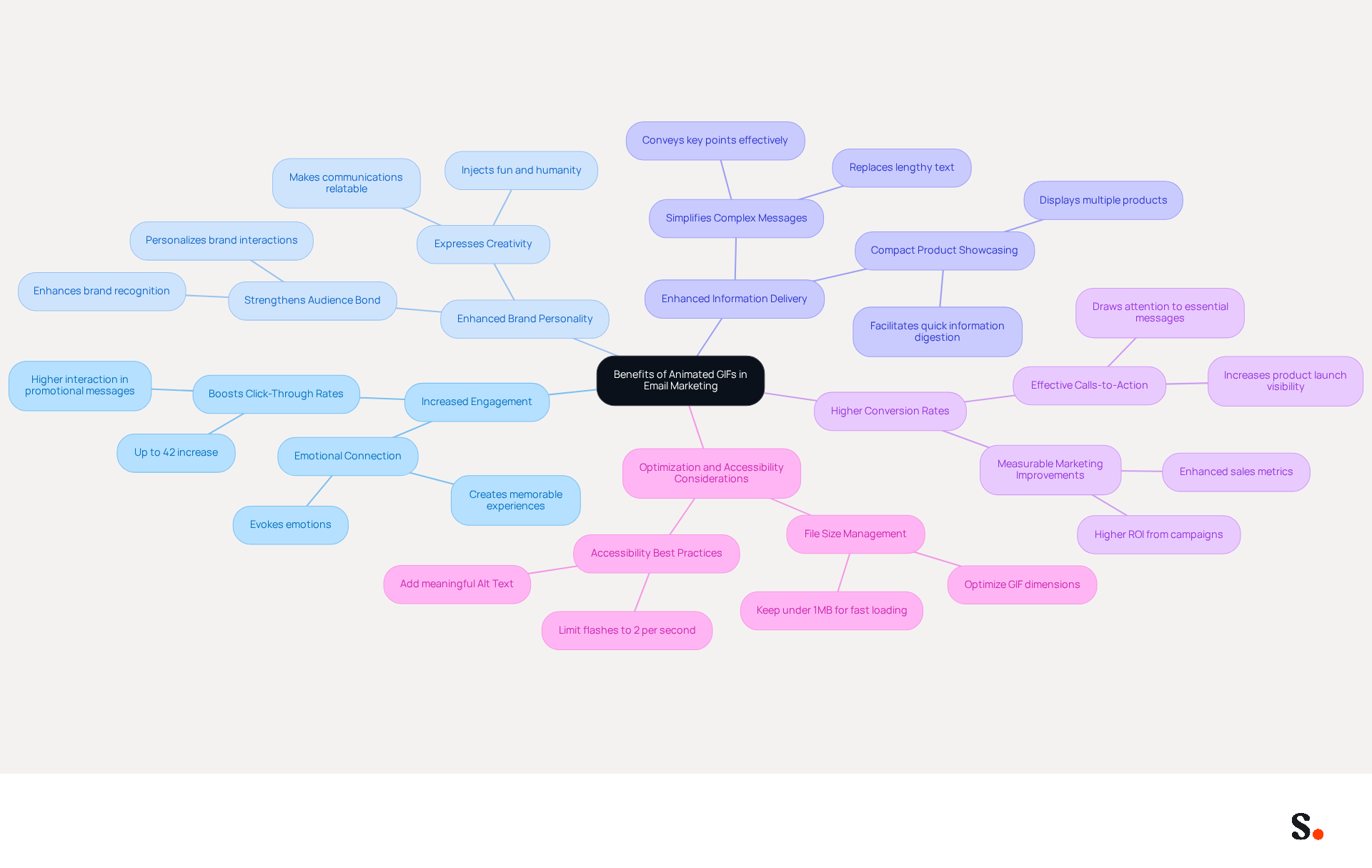
- Increased Engagement: Research shows that using moving images can boost click-through rates by up to 42% in marketing emails. This demonstrates their effectiveness in capturing attention and encouraging interaction.
- Enhanced Brand Personality: Animated visuals enable brands to express their identity and creativity, making communications feel more personal and relatable. This helps build a better bond with the audience, as animated content can inject fun and humanity into emails, allowing a brand's personality to shine through.
- Enhanced Information Delivery: Animated images can simplify complex messages or showcase multiple products in a compact format, making it easier for recipients to digest information quickly. Many recipients struggle to digest lengthy text, making concise visuals essential. A well-placed GIF can replace lengthy paragraphs, effectively conveying key points without overwhelming the reader.
- Higher Conversion Rates: Incorporating calls-to-action within animated images can drive more conversions, as the movement draws attention to essential messages. For instance, a company that utilizes a moving GIF to highlight a new product launch may experience a notable increase in click-through rates compared to a static image. This shift in strategy can lead to measurable improvements in marketing outcomes.
- Optimization and Accessibility Considerations: To maximize the effectiveness of animated images, it is crucial to optimize them for messaging by keeping file sizes under 1MB to ensure fast loading times. Additionally, accessibility should be prioritized by adding meaningful Alt Text and limiting flashes to no more than two per second, ensuring that all recipients can engage with the content.
Case studies demonstrate these advantages: brands that have incorporated moving visuals into their campaigns report increased engagement and better conversion metrics. For instance, Ann Taylor Loft effectively utilized an animated gif signature maker in their promotional messages, leading to enhanced subscriber engagement and sales.
Incorporating animated images into marketing strategies can fundamentally transform how brands connect with their audience, leading to lasting impressions and increased loyalty.
Implement Effective Strategies for GIF Email Signatures
To maximize the impact of animated GIFs in email signatures, it is essential to adopt effective strategies that enhance communication:
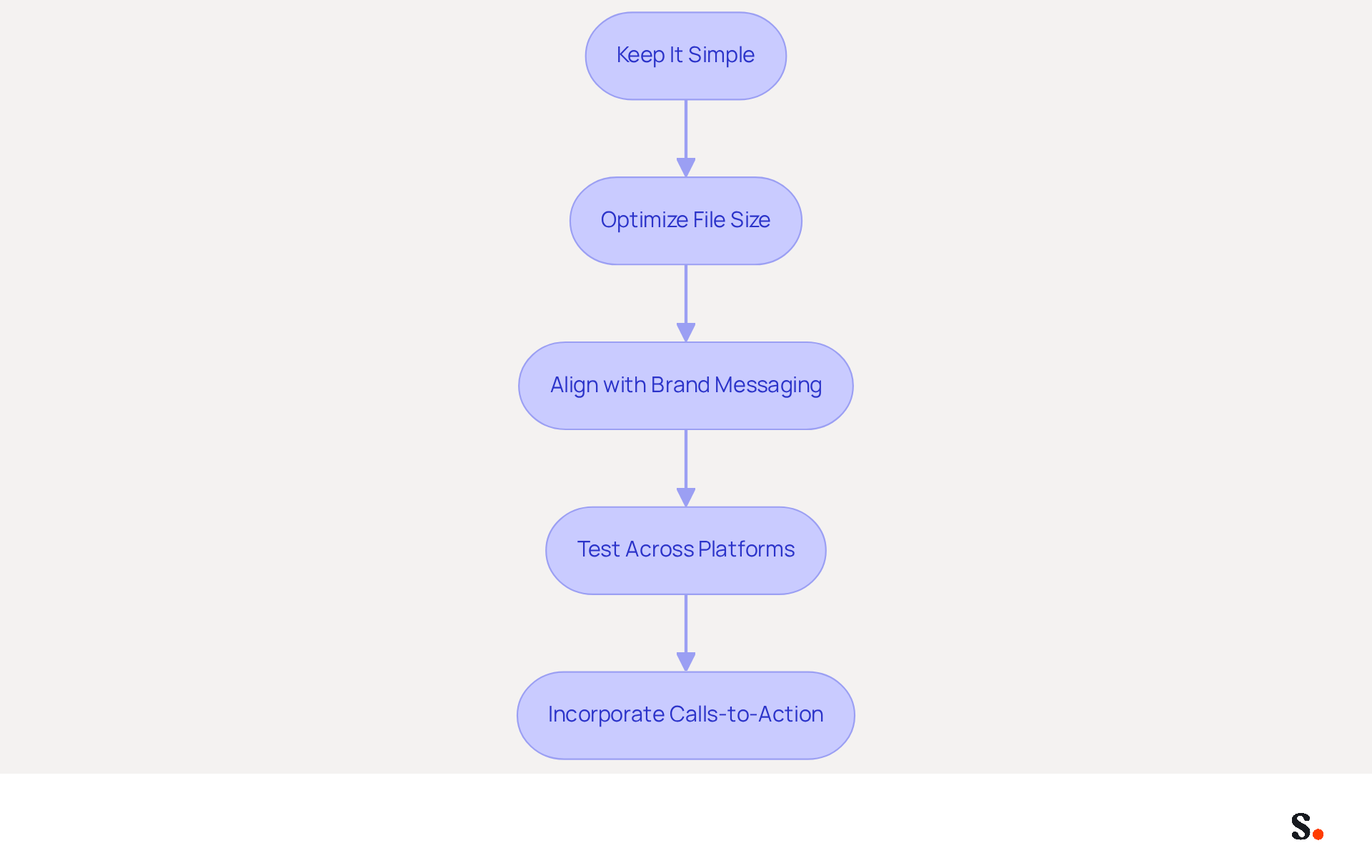
- Keep It Simple: A simple 2-4 second loop is usually more effective, keeping the focus on the message.
- Optimize File Size: Aim to keep animated images under 1 MB to ensure quick loading times and avoid triggering spam filters. Larger file sizes can lead to performance issues or removal by email clients, which can hinder communication effectiveness. Utilizing tools like EZGif can help compress animated images without compromising quality.
- Align with Brand Messaging: Ensure that the GIF complements your brand's messaging and tone. It should enhance communication rather than distract from it, maintaining professionalism.
- Test Across Platforms: Before finalizing your GIF signature, conduct tests across various messaging clients, such as Gmail and Outlook, to confirm compatibility and proper display. Notably, some clients, particularly Outlook versions 2007 to 2016, may only show the first frame of the GIF.
- Incorporate Calls-to-Action: Use animated images strategically to highlight important calls-to-action, such as promotions or events, making them more prominent and engaging for recipients.
By implementing these strategies, businesses can significantly improve their email signature effectiveness and engagement rates with an animated gif signature maker. Studies indicate that using GIFs in marketing can boost click-through rates by up to 42%.
Measure Impact and Optimize GIF Signature Performance
To effectively measure the impact of an animated gif signature maker and optimize their performance, businesses must adopt a systematic approach.
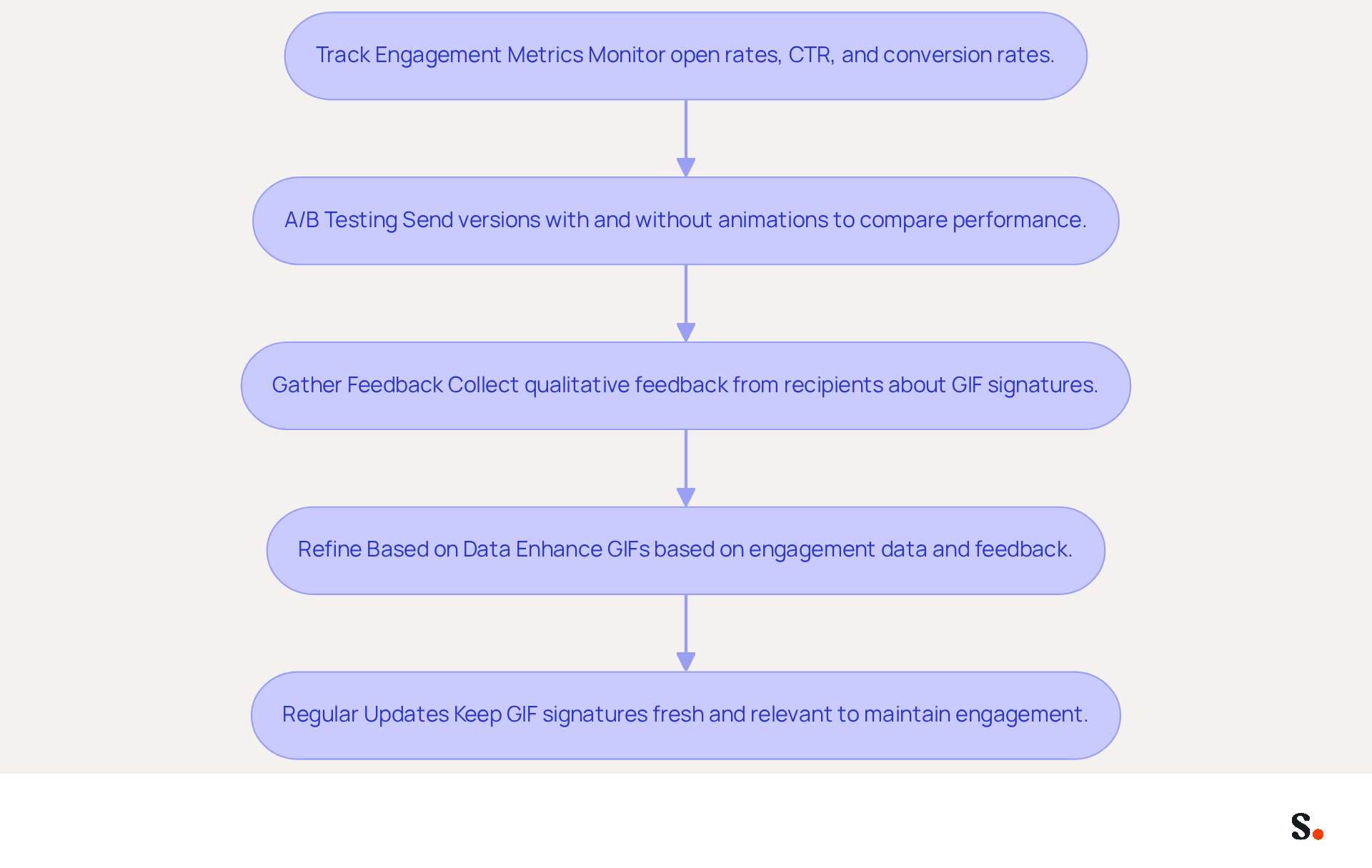
- Track Engagement Metrics: Monitor essential metrics such as open rates, click-through rates (CTR), and conversion rates. For instance, sending 1,000 messages with a 25% open rate results in approximately 250 impressions generated by your signature. Tools like Google Analytics can provide valuable insights into how your GIF signatures are performing.
- A/B Testing: Implement A/B testing by sending different versions of your email signatures-one with animations and one without. This approach helps identify which design and content resonate more with your audience. Research indicates that companies utilizing an animated gif signature maker experience a 26% increase in click-through rates compared to those using static versions, highlighting the potential advantages of using animated formats.
- Gather Feedback: Solicit qualitative feedback from recipients regarding their perceptions of the GIF signatures. Measuring the effectiveness of GIF signatures can be challenging without proper feedback mechanisms, but understanding how your audience engages with the content can provide insights into its effectiveness and areas for improvement.
- Refine Based on Data: Use the collected data to enhance your animated images. If specific animations lead to higher engagement, consider incorporating similar elements in future designs. Regularly updating your GIF signatures to reflect current promotions or brand messaging is crucial; failure to update GIF signatures may lead to decreased engagement over time.
- Regular Updates: Keep your GIF signatures fresh by regularly updating them. This not only maintains interest but also encourages repeat engagement. Consider using an animated gif signature maker to create mini billboards for your marketing events and promotions; they can effectively drive clicks and boost your brand's visibility. Remember to optimize GIF sizes to around 120x120 pixels to ensure they display correctly across various messaging clients.
By continuously refining your approach based on data, you can ensure that your email communications remain effective and engaging.
Conclusion
Incorporating animated GIFs into email signatures offers brands a powerful tool for enhancing communication and engagement. Using an animated GIF signature maker, organizations can craft eye-catching signatures that effectively showcase their brand personality. This approach has been shown to increase engagement rates significantly, with studies indicating a boost of up to 42% in click-through rates, making emails more memorable and impactful.
The article highlights several key benefits of using animated GIFs, including:
- Improved brand recognition
- Enhanced information delivery
- Higher conversion rates
Additionally, implementing effective strategies-such as optimizing file sizes, aligning with brand messaging, and conducting A/B testing-ensures that GIF signatures are both professional and effective across various email platforms.
However, many brands struggle to quantify the effectiveness of their email signatures. Without proper measurement, brands may miss opportunities for improvement. Ultimately, the integration of animated GIFs into email signatures is not just a trend but a strategic move that can transform how brands connect with their audience. By leveraging this innovative tool, brands can not only enhance their marketing strategies but also build lasting relationships with their audience.
Frequently Asked Questions
What is an animated GIF email signature maker?
An animated GIF email signature maker allows users to create dynamic visual elements, such as logos and promotional messages, that enhance email communication effectiveness.
How do animated GIFs improve email engagement?
Incorporating movement in GIFs makes emails visually appealing and can significantly boost engagement rates, with studies showing click-through rates can rise by up to 42%.
What file size should animated GIFs be for email signatures?
The suggested file size for animated images in email signatures should be below 1 MB to prevent issues with message deliverability and loading times.
What tools can be used to create animated GIF email signatures?
Tools like Adobe Photoshop, EZGIF, Giphy, and InVideo can help users customize their animated GIF designs while maintaining professionalism.
What are the advantages of using moving images in email signatures?
Moving images enhance brand recognition, as 90% of information transmitted to the brain is visual, and visuals are processed 60,000 times faster than text. They can also include effective calls to action (CTAs) to drive engagement.
Are there any limitations to using animated GIFs in email signatures?
Yes, some email clients, like Outlook versions 2007 to 2016, do not support animated images and will only display the first frame as a still picture, leading to inconsistent experiences for recipients.
Can using animated GIFs in professional emails be viewed negatively?
In certain sectors, incorporating animated images may be seen as unprofessional, potentially damaging a firm's reputation, so it's important to choose suitable images that align with the brand's image.
What impact can animated GIF email signatures have on engagement metrics?
Brands that use animated GIFs in their signatures can see notable enhancements in engagement metrics, such as Dell's campaign, which resulted in a 6% increase in open rates and a 42% rise in click rates.
List of Sources
- Understand Animated GIF Email Signatures
- Animated GIF's and Email Signatures - Everything You Need to Know - Gimmio (https://blog.gimm.io/animated-gifs-and-email-signatures-everything-you-need-to-know)
- Best Practices for Animated GIF Email Signatures to Boost Engagement (https://scribe-mail.com/en-US/blog/best-practices-for-animated-gif-email-signatures-to-boost-engagement)
- Benefits of animated email signatures in marketing — salamandra.uk (https://salamandra.uk/news/success-with-animated-email-signatures)
- How not to go overboard with GIF email signatures | Signitic (https://signitic.com/en/resources/gif-email-signature)
- Leverage Benefits of Animated GIFs in Email Marketing
- Why Animated GIFs in Email Are so Important — Stripo.email (https://stripo.email/blog/why-animated-gifs-in-email-are-so-important)
- E-Mail-GIFs: Wann und wie du GIFs in Marketing-E-Mails verwenden solltest | Mailchimp (https://mailchimp.com/resources/when-to-use-gifs-in-marketing-emails)
- Mastering Email Marketing with Animated GIFs: A Comprehensive Guide | Screen Story (https://screenstory.io/blog/mastering-email-marketing-with-animated-gifs-a-comprehensive-guide)
- Best Practices for Animated GIF Email Signatures to Boost Engagement (https://scribe-mail.com/en-US/blog/best-practices-for-animated-gif-email-signatures-to-boost-engagement)
- When to use an animated GIF in email marketing - Emma (https://myemma.com/blog/when-to-use-an-animated-gif-in-email-marketing)
- Implement Effective Strategies for GIF Email Signatures
- Best Practices for Animated GIF Email Signatures to Boost Engagement (https://scribe-mail.com/en-US/blog/best-practices-for-animated-gif-email-signatures-to-boost-engagement)
- How to create an eye-catching GIF email signature — Stripo.email (https://stripo.email/blog/how-to-create-an-eye-catching-gif-email-signature)
- Animated GIFs in Email: 10 Tips for Keeping File Sizes Small (https://litmus.com/blog/animated-gifs-in-email-10-tips-for-keeping-files-sizes-small)
- Animated GIFs in Email Signatures: Pros & Cons | Exclaimer (https://exclaimer.com/email-signature-handbook/animated-gifs-in-email-signatures)
- Measure Impact and Optimize GIF Signature Performance
- How to Track Clicks & Impressions in Email Signature Marketing (https://linkedin.com/pulse/how-track-clicks-impressions-email-signature-marketing-mbhre)
- Animated GIF Email Signature Maker by WiseStamp (https://wisestamp.com/examples/animated-gif-email-signature-maker)
- Animated GIF's and Email Signatures - Everything You Need to Know - Gimmio (https://blog.gimm.io/animated-gifs-and-email-signatures-everything-you-need-to-know)
- Best Practices for Animated GIF Email Signatures to Boost Engagement (https://scribe-mail.com/en-US/blog/best-practices-for-animated-gif-email-signatures-to-boost-engagement)
- How to create an eye-catching GIF email signature — Stripo.email (https://stripo.email/blog/how-to-create-an-eye-catching-gif-email-signature)
Get started with Scribe
Build a professional email signature
Free 14-day trial — no credit card.