Maximize Your Microsoft Office 365 Outlook Signature for Marketing Success
In an era where digital communication defines brand identity, many organizations overlook a critical element: their email signatures. Establishing a strong
Sophie Grant
Email Signature Specialist, Scribe
Introduction
In an era where digital communication defines brand identity, many organizations overlook a critical element: their email signatures. Establishing a strong brand presence in digital communications is more crucial than ever, especially as organizations navigate the complexities of remote work and global outreach. Email signatures, often overlooked, serve as powerful marketing tools that can enhance brand consistency and engagement.
However, how can businesses effectively leverage these digital footers to not only maintain a professional image but also drive marketing success? In this article, we’ll explore how to maximize Microsoft Office 365 Outlook signatures effectively, offering insights into:
- Design elements
- Automation strategies
- The importance of cohesive branding to elevate marketing efforts
By optimizing email signatures, businesses can transform a simple digital footer into a strategic asset that enhances their brand presence.
Establish Brand Consistency in Your Signature
To ensure a professional image in your communications, establishing consistency in your email footer is crucial. Begin by integrating your company logo, colors, and fonts to reflect your visual identity. Here are actionable steps to achieve this:
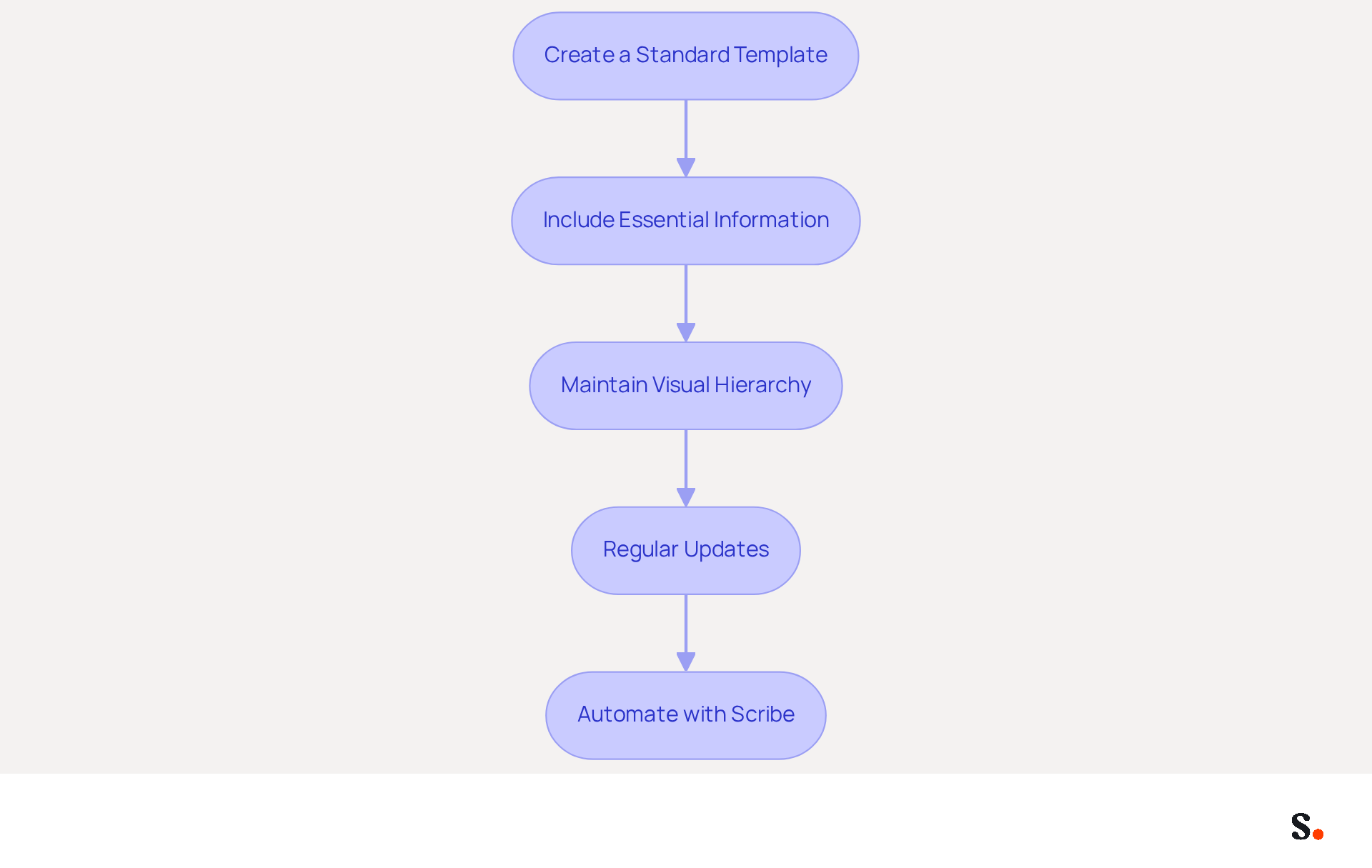
- Create a Standard Template: Develop a personalized template that incorporates your logo, company colors, and fonts. This ensures uniformity across all employee signatures, reinforcing corporate identity.
- Include Essential Information: Always feature your name, job title, company name, and contact details. This not only provides clarity but also strengthens your brand's presence in communications.
- Maintain Visual Hierarchy: Utilize varying font sizes and styles to create a visual hierarchy. For example, your name should be the most prominent element, followed by your title and contact details.
- Regular Updates: Periodically review and refresh your branding to reflect any changes in company information. This practice keeps your communications relevant and engaging.
Scribe automates this process, guaranteeing that your messages remain current and compliant with regulations such as GDPR. Scribe's SOC 2 Type II compliance ensures that your data is handled securely, providing peace of mind as you manage your branding. According to recent studies, 76% of recipients indicate that branded identifiers enhance trust in the sender, while consistent messaging can result in a 22% rise in response rates. By prioritizing cohesive branding, you not only enhance your organization's image but also foster greater trust and engagement with your audience. Furthermore, Scribe's automated syncing from your business phone system guarantees that any updates to employee information are reflected in real-time, further improving consistency. Case studies indicate that organizations that standardized their digital communication identifiers experienced notable enhancements in brand perception and engagement, further affirming the significance of cohesive branding in electronic communications. It's also essential to ensure adherence to regulations like GDPR to safeguard your organization from potential legal risks related to managing digital identifiers.
Incorporate Effective Design Elements
To create an impactful email signature, it is crucial to focus on essential design elements that enhance professionalism:
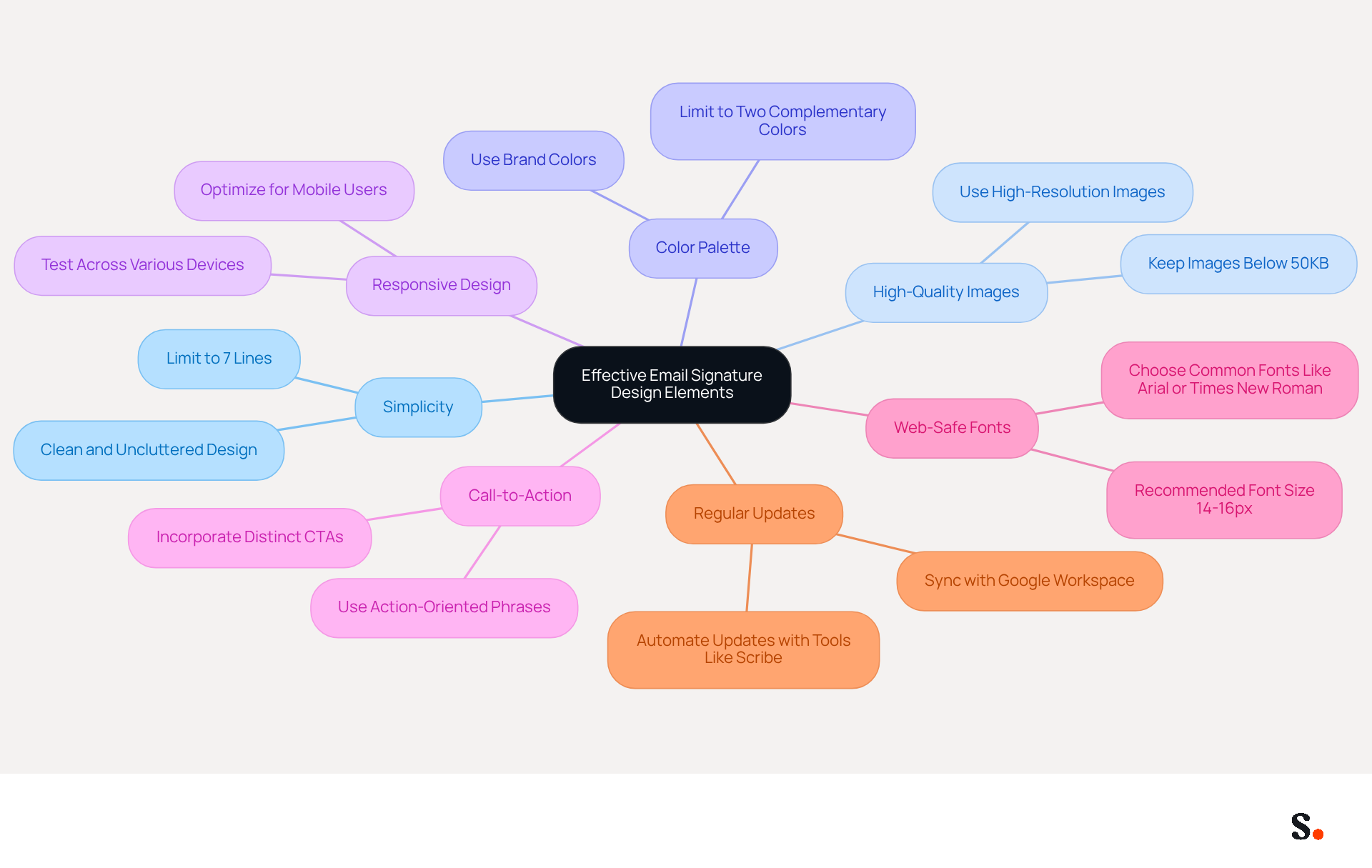
- Simplicity is Key: An effective email signature must prioritize a clean and uncluttered design. Avoid excessive graphics or text that can distract from the main message. A minimalist approach ensures that the content remains the focus, making it easier for readers to process the information.
- Use High-Quality Images: Ensure that your logo and any images used are high-resolution. Blurry or pixelated images can detract from your professionalism. Keeping images below 50KB helps maintain quick loading times and enhances the overall user experience.
- Color Palette: Stick to your organization's color palette. This not only reinforces brand identity but also creates a visually cohesive look. Restricting the color palette to two complementary hues prevents the design from appearing cluttered and enhances recall.
- Responsive Design: Ensure your email looks good on both desktop and mobile devices. With 60% of business correspondence openings originating from mobile users, testing across various messaging clients is essential to ensure consistent appearance and functionality. This guarantees that your mark is effective for all recipients, regardless of the device they utilize.
- Call-to-Action: Incorporating a call-to-action (CTA) button or link can significantly enhance engagement, with personalized CTAs increasing conversions by 202%. Making CTAs visually distinct through buttons can enhance conversion rates by 28% compared to hyperlinks.
- Use Web-Safe Fonts: Choose web-safe fonts such as Arial or Times New Roman to guarantee that your correspondence displays correctly across all devices. Recommended font sizes for body text are between 14-16px to prevent rendering issues and enhance professionalism.
- Regular Updates: When you focus on these design elements and utilize Scribe's automated updates, you can consistently review and refresh your contact information to reflect current branding or marketing strategies. By syncing your Google Workspace with Scribe, you can automate this process, ensuring that any changes in your team’s details are reflected in real-time without manual input. This involves using Scribe's attribute feature for auto-filling identification details, which saves time and ensures that your communications are always current and consistent throughout your organization.
By prioritizing these design elements, your email signature can become a powerful tool for brand reinforcement and engagement.
Leverage Signatures as Marketing Tools
Transforming your email signatures into effective marketing tools requires strategic implementation of various techniques:
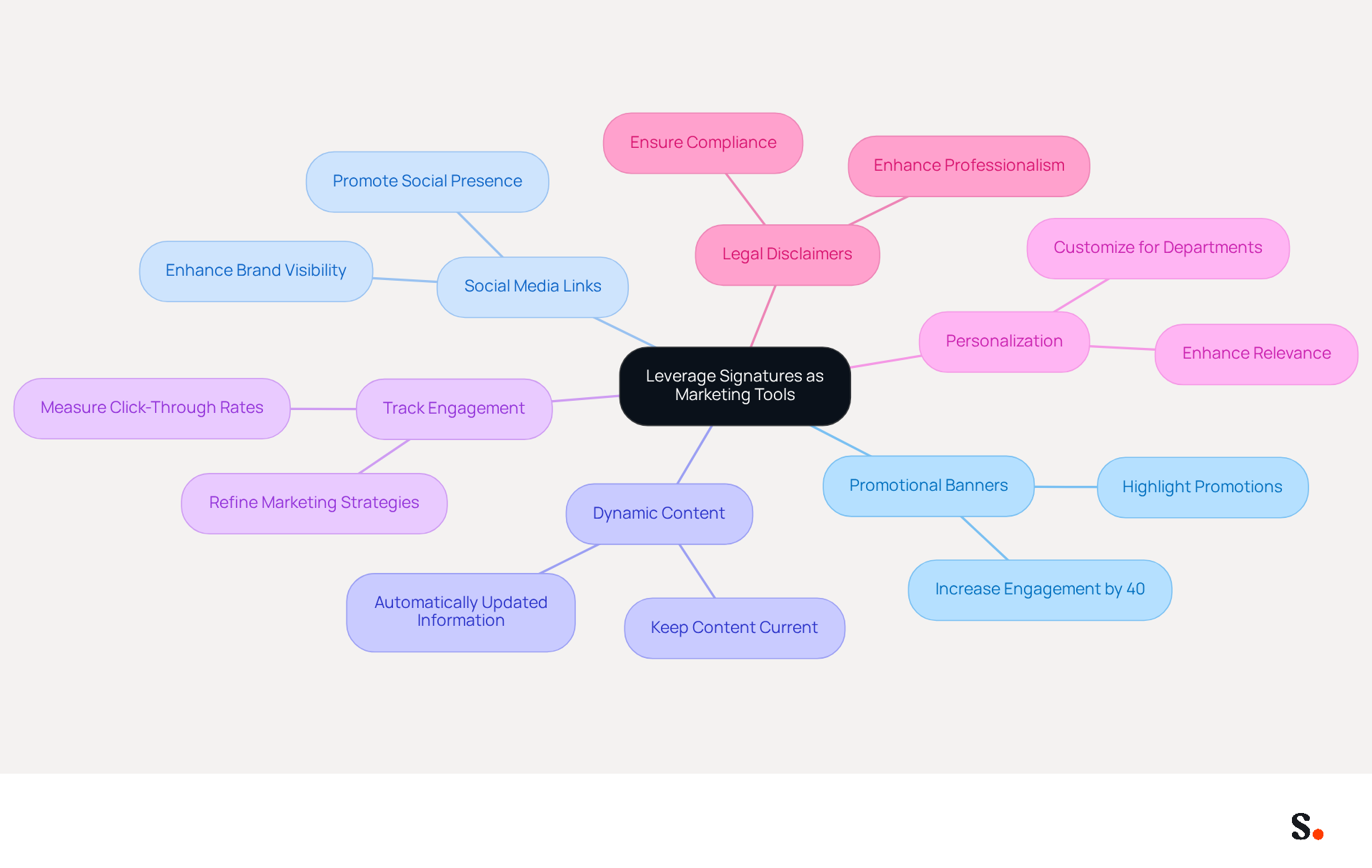
- Promotional Banners: Incorporate banners in your email footer that highlight current promotions, events, or new products. Research shows that adding promotional content can effectively grab recipients' attention and encourage action, with well-placed CTAs increasing engagement by as much as 40%. As Sophie Grant, an Email Signature Specialist, states, "When strategically positioned, CTAs can potentially boost engagement by 40%."
- Social Media Links: Add icons linking to your social media profiles. This not only promotes your social presence but also encourages recipients to engage with your brand across multiple platforms, enhancing overall brand visibility.
- Dynamic Content: Utilize dynamic content that can be updated automatically, such as upcoming events or new blog posts. This ensures your content stays current and engaging without the need for constant manual updates, ensuring that recipients always receive the latest information.
- Track Engagement: Implement tracking links in your email to measure engagement. Organizations using well-designed digital identifiers can achieve a 12% average click-through rate on banner links, providing insights into what resonates with your audience and allowing you to refine your marketing strategies based on real user interactions.
- Personalization: Customize identifiers for various departments or campaigns. For example, sales teams may incorporate specific CTAs that vary from those utilized by support teams, enhancing the closing more pertinent and effective for the recipient.
- Legal Disclaimers: Consider including legal disclaimers in your correspondence footers, especially if your organization operates in regulated industries. This not only ensures compliance but also enhances professionalism in your communications.
By adopting these strategies, you not only enhance your marketing efforts but also ensure your brand remains top-of-mind for your audience.
Automate Signature Management for Consistency
To streamline email signature management effectively, organizations must adopt strategic best practices:
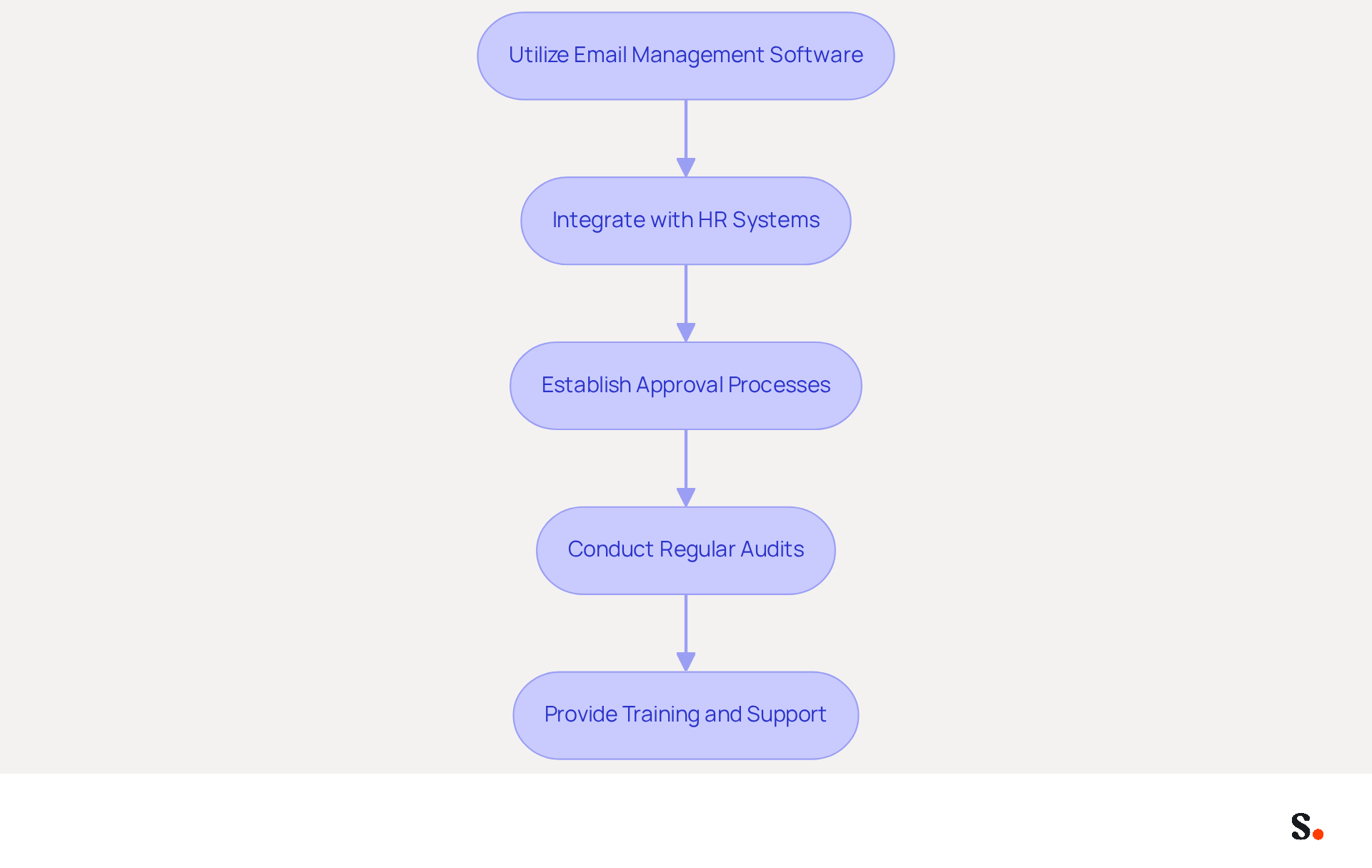
- Utilize Email Management Software: Invest in a robust email management tool like Scribe, which offers centralized control over email identities. This ensures uniformity in branding across all employee communications.
- Integrate with HR Systems: Connect your Scribe management tool with HR systems to automatically update records whenever employee details change, such as job titles or contact numbers. This integration helps keep information current and ensures compliance with branding standards.
- Establish Approval Processes: Create a structured approval process for any modifications to template designs. This step is crucial in preventing unauthorized changes that could lead to inconsistencies in branding.
- Conduct Regular Audits: Implement periodic reviews of email branding to ensure adherence to guidelines. Regular reviews help identify discrepancies and maintain a professional appearance in all communications.
- Provide Training and Support: It's essential to provide training sessions for employees to help them use the document management tool effectively. Ensuring that everyone understands the significance of consistency will foster a culture of compliance and professionalism.
By automating document management, organizations can save time, minimize errors, and maintain consistent brand representation in all communications. Research indicates that companies using automated solutions experience up to 30% time savings in email management tasks. Furthermore, studies show that consistent branding in digital correspondence can increase trust among recipients, with 76% of participants believing that a professional digital identity enhances sender credibility. A well-executed email signature strategy not only enhances brand consistency but also builds trust with clients and partners.
Conclusion
A consistent email signature is crucial for organizations seeking to strengthen their brand identity and marketing impact. By integrating key design elements and maintaining uniformity across all communications, businesses can significantly improve their professional image and foster trust with their audience. Tools like Scribe simplify this process and ensure compliance with regulations like GDPR and CCPA, allowing for secure and efficient management of email signatures.
The article highlights several best practices, including:
- The importance of a standard template
- Effective design elements
- Leveraging signatures as marketing tools
By incorporating promotional banners, social media links, and dynamic content, organizations can transform their email signatures into powerful marketing assets. Additionally, automating signature management through Scribe streamlines the process, ensuring that all employee communications reflect the latest branding and information, ultimately saving time and enhancing consistency.
Digital communication's importance makes a well-crafted email signature essential. Organizations are encouraged to adopt these best practices and leverage tools like Scribe to maximize their marketing potential. This not only reinforces their brand identity but also fosters greater engagement and trust with their audience. Implementing these strategies not only enhances brand visibility but also drives meaningful interactions with clients and prospects.
Frequently Asked Questions
Why is brand consistency important in email signatures?
Brand consistency in email signatures is crucial for establishing a professional image and reinforcing corporate identity in communications.
What elements should be included in a standard email signature template?
A standard email signature template should include your logo, company colors, fonts, your name, job title, company name, and contact details.
How can visual hierarchy be maintained in an email signature?
Visual hierarchy can be maintained by using varying font sizes and styles, making your name the most prominent element, followed by your title and contact details.
How often should email signatures be updated?
Email signatures should be periodically reviewed and refreshed to reflect any changes in company information, ensuring communications remain relevant and engaging.
How does Scribe assist in maintaining brand consistency in email signatures?
Scribe automates the process of managing email signatures, ensuring they remain current and compliant with regulations like GDPR, while also syncing updates from the business phone system in real-time.
What are the benefits of using branded identifiers in communications?
Branded identifiers enhance trust in the sender, with studies showing that 76% of recipients feel more trust towards branded communications, and consistent messaging can lead to a 22% increase in response rates.
What compliance standards does Scribe adhere to?
Scribe is SOC 2 Type II compliant, ensuring that data is handled securely and providing peace of mind when managing branding.
What impact does standardizing digital communication identifiers have on organizations?
Organizations that standardized their digital communication identifiers experienced notable enhancements in brand perception and engagement, highlighting the importance of cohesive branding.
List of Sources
- Establish Brand Consistency in Your Signature
- Email Signature Branding: Consistency and Impact | Crossware365 (https://crossware365.com/blog/mastering-email-signature-branding-market-presence)
- The impact of email signatures on your branding (https://signitic.com/en/resources/the-impact-of-email-signatures-on-your-branding)
- Why Team Email Signatures Matter More Than You Think: The Hidden Impact on Brand Trust and Customer Experience (https://getmailbird.com/why-team-email-signatures-matter-brand-trust)
- Incorporate Effective Design Elements
- Master Best Email Signature Design for Maximum Engagement (https://scribe-mail.com/en-US/blog/master-best-email-signature-design-for-maximum-engagement)
- Email Signature Design Best Practices Illustrated with 20+ Examples (https://chamaileon.io/resources/email-signature-design-best-practices)
- Best Practices Designing Email Signatures - Lynne Golodner (https://lynnegolodner.com/articles/best-practices-designing-email-signatures)
- Crafting the Perfect Email Signature: Tips, Types, and Best Practices for Today's Professionals - Frey Design (https://freydesigngroup.com/blog/crafting-the-perfect-email-signature)
- Best email signature inspirations for 2023 (https://mail-signatures.com/articles/the-best-email-signatures-for-2023)
- Leverage Signatures as Marketing Tools
- Exclaimer Research: 67% of Marketers Expect Email Signatures to Support With Lead Gen In 2023 (https://businesswire.com/news/home/20230612141095/en/Exclaimer-Research-67-of-Marketers-Expect-Email-Signatures-to-Support-With-Lead-Gen-In-2023)
- Using Email Signatures as a Marketing Tool: Ideas for Generating Leads and Promoting Business (https://blog.ringostat.com/en/using-email-signatures-as-a-marketing-tool-ideas-for-generating-leads-and-promoting-business)
- All the Best Email Signature Practices for Marketing Success (https://scribe-mail.com/en-US/blog/all-the-best-email-signature-practices-for-marketing-success)
- Recognizing marketing potential of email signatures (https://codetwo.com/guides/email-signatures-for-marketing)
- Email signature marketing: everything you need to know (https://templafy.com/email-signature-marketing-everything-you-need-to-know)
- Automate Signature Management for Consistency
- Automating Email Signatures: How IT Teams Streamline Processes & Reduce Risk (https://exclaimer.com/blog/streamlining-it-processes-automated-email-signatures)
- 4 Best Practices for Your Work Email Signature Strategy (https://scribe-mail.com/en-US/blog/4-best-practices-for-your-work-email-signature-strategy)
- The Hidden Power Behind Email Signature Management | Black Pearl Mail (https://blackpearlmail.com/blog/the-hidden-power-behind-email-signature-management)
- Central and automatic email signatures for Office 365 (https://codetwo.com/email-signatures/central-and-automatic)
- The Signitic blog: expert advice on email branding (https://signitic.com/en/resources)
Get started with Scribe
Signatures for every role on your team
Free 14-day trial — no credit card.