Scribe vs. Competitors: Best Email Signature Software for Office 365
As digital communication becomes increasingly vital, organizations face challenges in managing their email signatures effectively. Organizations face numerous
Sophie Grant
Email Signature Specialist, Scribe
On this page
- Introduction
- Overview of Email Signature Management Solutions: Scribe and Competitors
- Key Features and Benefits of Scribe's Email Signature Management
- User Experience and Implementation: Scribe vs. Other Solutions
- Conclusion: Choosing the Right Email Signature Software for Your Business Needs
- Conclusion
- Frequently Asked Questions
- List of Sources
Introduction
As digital communication becomes increasingly vital, organizations face challenges in managing their email signatures effectively. Organizations face numerous options, and choosing the right software is essential for maintaining brand consistency and enhancing marketing effectiveness. In this article, we will explore the competitive landscape of email signature solutions, highlighting Scribe's unique advantages and how it stacks up against its rivals. Scribe stands out as the preferred choice for businesses looking to improve their email communications while ensuring security and compliance.
Overview of Email Signature Management Solutions: Scribe and Competitors
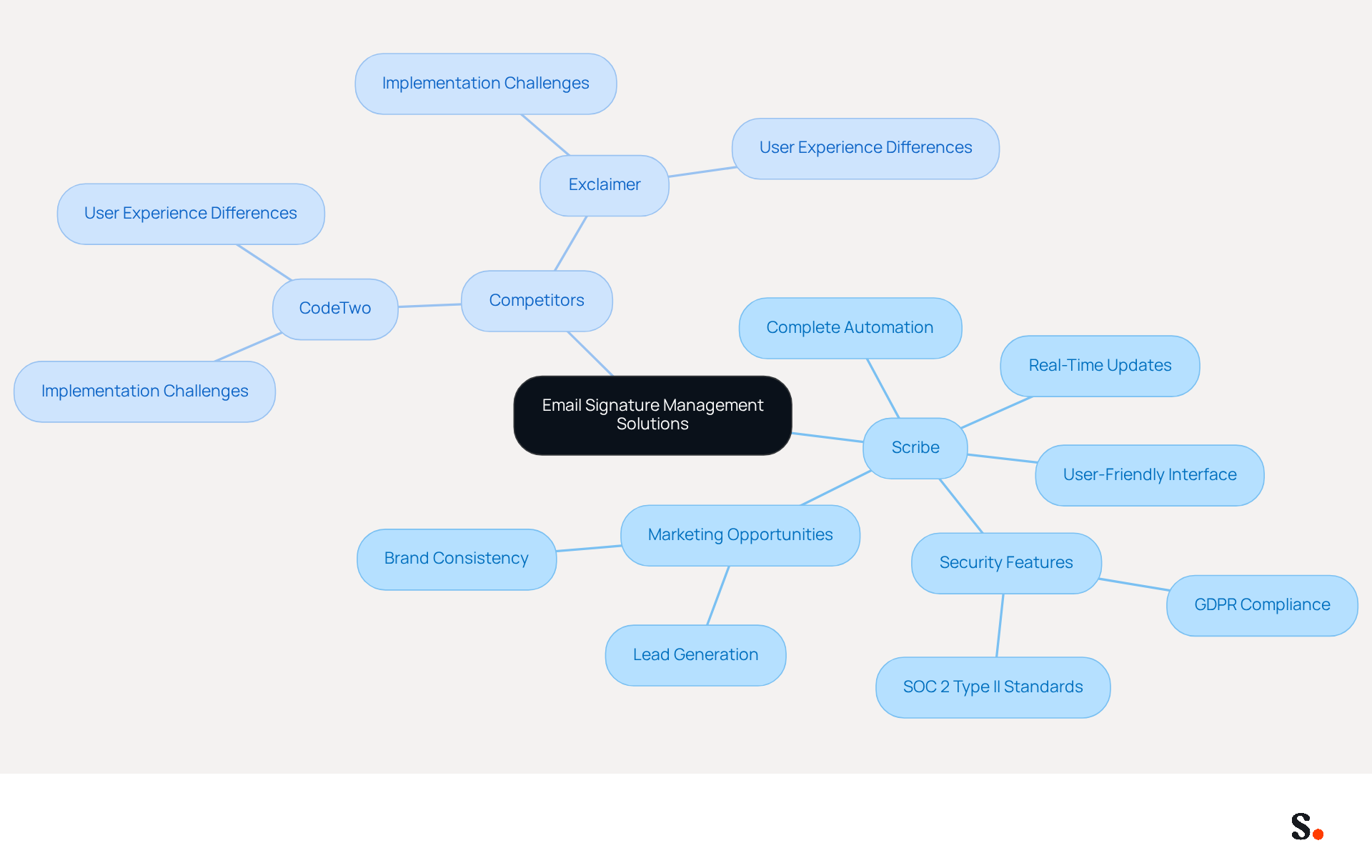
As management solutions for Office 365 evolve, the need for seamless automation and consistent branding using email signature software Office 365 has never been more critical. This platform sets itself apart with its completely automated method, allowing seamless updates and maintaining uniform branding across all communications. Competitors like CodeTwo and Exclaimer also provide valuable features; however, users often find that the implementation and experience differ significantly across platforms, leading to potential challenges.
Scribe is celebrated for its complete automation and user-friendly interface. This feature ensures brand consistency and boosts marketing opportunities, turning every email into a potential lead generator. Plus, Scribe syncs with business phone systems, so any updates to signing information show up in real-time without any extra effort from users. Additionally, Scribe's integration with SAML single sign-on enhances security by allowing employees to access the platform through their identity provider, while its adherence to GDPR and SOC 2 Type II standards ensures that data handling is secure and trustworthy.
Recent studies show that organizations are prioritizing automation and user-friendly solutions for digital signatures. As organizations increasingly acknowledge the significance of consistent branding and effective marketing through digital communication, solutions such as Scribe are positioned to lead the market. Recent statistics indicate that automated handling of electronic signatures can save organizations considerable time and resources, with companies reporting up to 2,505 hours saved annually for larger teams.
Case studies highlight the effectiveness of automated solutions. For example, organizations employing Scribe have effectively optimized their onboarding procedures and improved lead generation through well-organized identifiers. This trend underscores the importance of adopting a solution that not only simplifies oversight but also aligns with broader marketing strategies.
Overall, choosing Scribe as email signature software Office 365 not only simplifies email signature management but also positions businesses to leverage every communication as a strategic marketing opportunity.
Key Features and Benefits of Scribe's Email Signature Management
Managing digital signatures effectively is crucial for organizations aiming to maintain brand consistency and enhance communication. This platform simplifies digital signature management for organizations of all sizes by utilizing email signature software office 365. The use of email signature software office 365 can enhance communication. Key functionalities include:
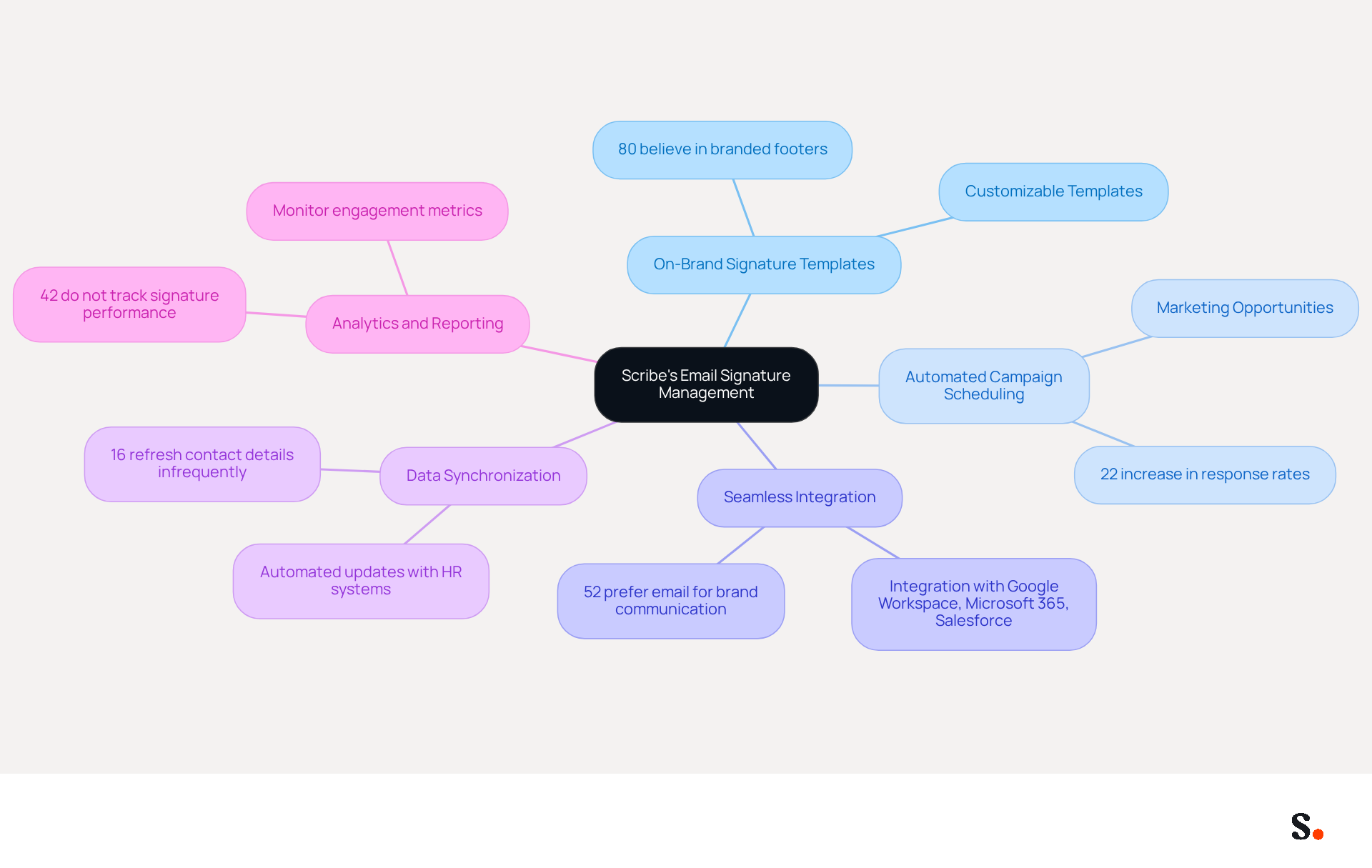
- On-Brand Signature Templates: Users can create customizable templates that embody their brand identity, ensuring consistency across all communications. This is essential, as 80% of participants believe a branded digital footer is important for a company's brand identity.
- Automated Campaign Scheduling: Scribe allows users to arrange marketing campaigns directly through their correspondence, turning each message into a potential marketing opportunity. Research shows that businesses using consistent branded headers see over a 22% increase in response rates.
- Seamless Integration: The platform integrates effortlessly with popular tools such as Google Workspace, Microsoft 365, and Salesforce, facilitating easy implementation within existing workflows. This integration is crucial, as 52% of prospects and customers favor electronic mail as their primary communication channel with brands.
- Data Synchronization: Scribe supports automated data synchronization with HR and identity management systems, ensuring that all records are always current. This feature addresses the issue where 16% of professionals refresh their contact details only once every few years, leading to outdated information.
- Analytics and Reporting: The platform provides comprehensive analytics to monitor engagement metrics, enabling businesses to assess the effectiveness of their campaigns. With 42% of organizations not monitoring signature performance, Scribe's analytics features offer a considerable benefit in enhancing marketing efforts.
By leveraging these features, businesses can significantly improve their communication strategies and drive better engagement with their audience.
User Experience and Implementation: Scribe vs. Other Solutions
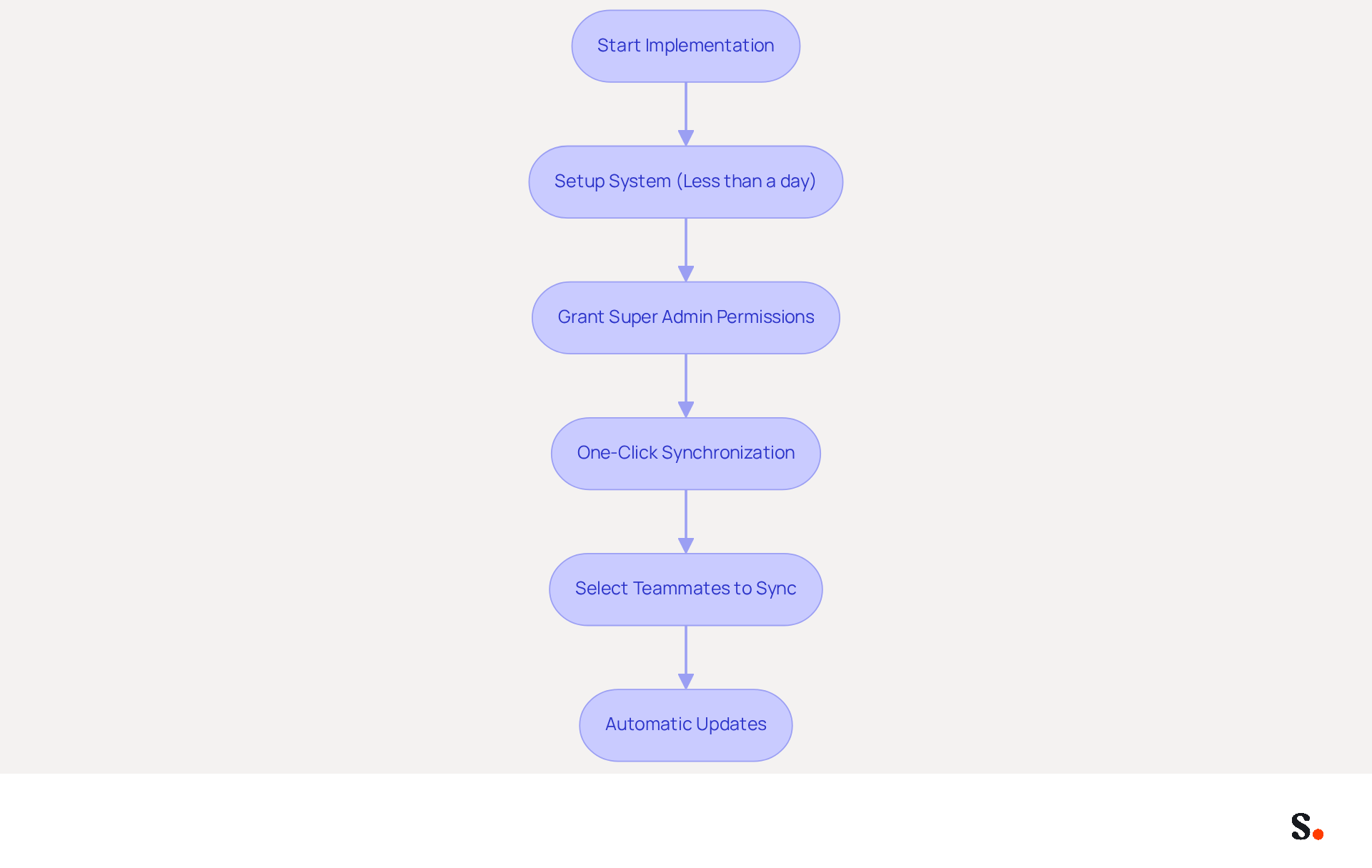
In user experience and implementation, Scribe's intuitive platform simplifies rapid deployment, addressing common barriers to adoption. Setting up the system takes less than a day and does not require technical expertise. To enable one-click synchronization, Super Admin permissions must be granted to connect with the provider. This one-click installation process allows for swift deployment of digital identifiers throughout the organization, enabling marketing and IT teams to manage and update them effortlessly without extensive training. Users have the flexibility to select which teammates they want to sync with the platform, ensuring brand consistency and adherence to security standards, as all modifications made in the provider directory are automatically synced.
Scribe's commitment to user-friendliness and rapid implementation, combined with its SOC 2 Type II compliance and GDPR adherence, positions it as an appealing choice for businesses aiming to enhance email management without extensive IT resources. Case studies further support this emphasis on user experience, showing that organizations using the platform have experienced a 14% increase in lead generation, highlighting the effectiveness of its automated approach. Moreover, Scribe boasts an average click-through rate of 12% on banners, demonstrating its significant impact on engagement and marketing success. Ultimately, Scribe's user-centric design not only enhances operational efficiency but also drives measurable business outcomes.
Conclusion: Choosing the Right Email Signature Software for Your Business Needs
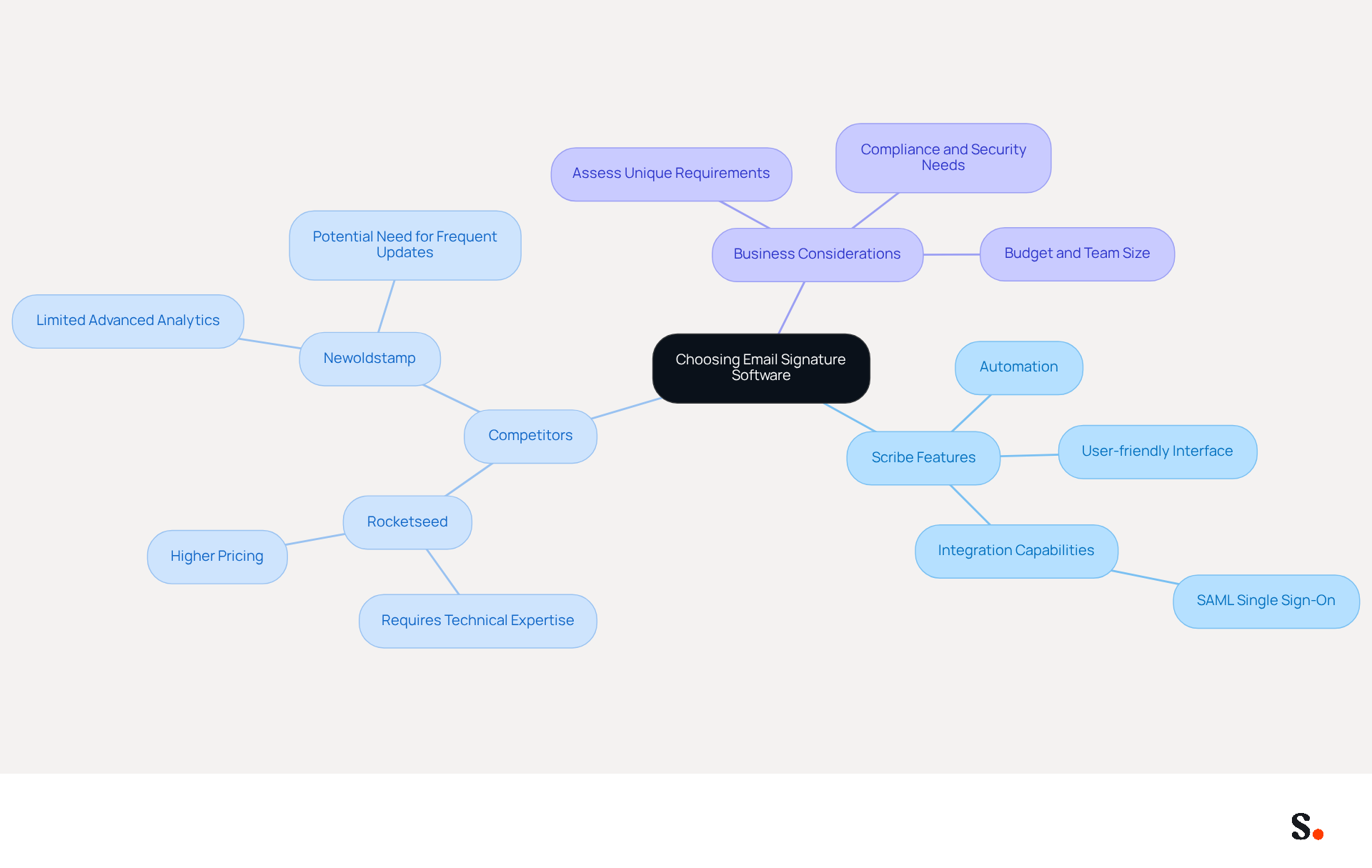
Many businesses find it challenging to maintain consistent brand visibility and effective communication without the right tools. Choosing the appropriate email signature software Office 365 for managing digital signatures is essential for organizations that aim to enhance their brand presence and streamline communication.
Scribe stands out due to its:
- Automation
- User-friendly interface
- Robust integration capabilities, including SAML single sign-on for secure access through identity providers
Its commitment to GDPR compliance and SOC 2 Type II certification ensures that client information is handled with the highest security standards, making it an ideal choice for organizations looking to improve their digital footer coordination without extensive IT involvement.
While competitors like Rocketseed and Newoldstamp provide features such as campaign segmentation and analytics, they often necessitate more technical expertise and time for implementation.
By thoroughly assessing their unique requirements, businesses can confidently choose the email signature software Office 365 as the management solution that will drive their success.
Conclusion
Many organizations face challenges in maintaining brand consistency and effective communication. Scribe stands out as a premier solution, offering complete automation, a user-friendly interface, and robust integration capabilities. Its adherence to GDPR and SOC 2 Type II standards further solidifies its position as a secure and reliable choice for businesses looking to optimize their email signature management.
Throughout the article, key features of Scribe have been highlighted, including:
- Customizable templates
- Automated campaign scheduling
- Seamless integration with popular tools
- Comprehensive analytics
These functionalities not only improve communication strategies but also transform every email into a potential marketing opportunity, driving engagement and lead generation. In contrast, while competitors may offer valuable features, they often require more technical expertise and time for implementation, making Scribe a more accessible option for organizations of all sizes.
By choosing Scribe, businesses can effectively maintain brand consistency and enhance their marketing ROI. Leveraging Scribe's unique capabilities ensures that every email sent contributes to overarching marketing goals, reinforcing the importance of choosing the right tools for effective digital communication strategies.
Frequently Asked Questions
What is the primary function of email signature management solutions like Scribe?
Email signature management solutions like Scribe automate the process of managing email signatures, ensuring consistent branding and seamless updates across all communications.
How does Scribe differentiate itself from its competitors?
Scribe stands out due to its complete automation, user-friendly interface, real-time updates, and integration with business phone systems, which enhances brand consistency and marketing opportunities.
What security features does Scribe offer?
Scribe enhances security through integration with SAML single sign-on, allowing access via identity providers, and adheres to GDPR and SOC 2 Type II standards for secure data handling.
What benefits do organizations experience by using automated email signature solutions?
Organizations report significant time savings, with studies indicating up to 2,505 hours saved annually for larger teams, as well as improved onboarding procedures and lead generation.
Why is consistent branding important in digital communication?
Consistent branding is crucial as it enhances marketing effectiveness and ensures that every email serves as a potential lead generator, aligning with broader marketing strategies.
What are some challenges users may face with competitors like CodeTwo and Exclaimer?
Users often find that the implementation and overall experience with competitors differ significantly from Scribe, which can lead to potential challenges in managing email signatures effectively.
How does Scribe support marketing opportunities through email signatures?
Scribe turns every email into a potential lead generator by ensuring brand consistency and optimizing the presentation of signing information, which can enhance marketing efforts.
List of Sources
- Overview of Email Signature Management Solutions: Scribe and Competitors
- Microsoft 365 email signature software | CodeTwo (https://codetwo.com/email-signatures)
- Create Organization-wide Email Signatures and Disclaimers - Microsoft 365 admin (https://learn.microsoft.com/en-us/microsoft-365/admin/setup/create-signatures-and-disclaimers?view=o365-worldwide)
- Why Email Signatures Must Be In Your 2026 Marketing Plan | Rocketseed (https://rocketseed.com/blog/what-are-the-biggest-email-trends-for-2026)
- Microsoft 365 Email Signature Management | Crossware (https://crossware365.com/microsoft-365-email-signatures)
- Top 10 Email Signature Management Tools in 2026 (Compared) (https://mailbutler.io/blog/email/email-signature-management-tools)
- Key Features and Benefits of Scribe's Email Signature Management
- Email Signature Statistics: A Closer Look at Email Signatures in 2026 (https://mysignature.io/blog/email-signature-statistics)
- 40+ Email Signature Statistics for 2026 (Data + Insights) (https://wavecnct.com/blogs/email-signature-statistics)
- Automating Email Signatures: How IT Teams Streamline Processes & Reduce Risk (https://exclaimer.com/blog/streamlining-it-processes-automated-email-signatures)
- Email Signature Trends 2026: Centralized Control & Automation | SIGNandGO posted on the topic | LinkedIn (https://linkedin.com/posts/signngo_email-signature-trends-to-watch-in-2026-activity-7401523471786217473-zAVL)
- WiseStamp Sets a New Standard for Email Signature Creation (https://prnewswire.com/news-releases/wisestamp-sets-a-new-standard-for-email-signature-creation-302689811.html)
- User Experience and Implementation: Scribe vs. Other Solutions
- Top 10 Email Signature Management Tools in 2026 (Compared) (https://mailbutler.io/blog/email/email-signature-management-tools)
- Best Email Signature Management Software: Top 12 Tools (2026)
- NEWOLDSTAMP (https://newoldstamp.com/blog/email-signature-software)
- 10 Best CodeTwo Alternatives for Effective Email Signatures (https://scribe-mail.com/en-US/blog/10-best-codetwo-alternatives-for-effective-email-signatures)
- Best Email Signature Managers for 2026 (https://textexpander.com/blog/best-email-signature-managers)
- 10 Best Email Signature Software Reviewed In 2026 (https://thecmo.com/tools/best-email-signature-software)
- Conclusion: Choosing the Right Email Signature Software for Your Business Needs
- Top 10 Email Signature Management Tools in 2026 (Compared) (https://mailbutler.io/blog/email/email-signature-management-tools)
- The 5 IT Factors When Choosing an Email Signature Solution (https://exclaimer.com/blog/5-it-factors-email-signature-solution)
- Best Email Signature Management Software: Top 12 Tools (2026)
- NEWOLDSTAMP (https://newoldstamp.com/blog/email-signature-software)
- Best Email Signature Software for Google Workspace and Microsoft 365 in 2026 (https://bulksignature.com/blog/best-email-signature-software)
- 10 Best Email Signature Software Reviewed In 2026 (https://thecmo.com/tools/best-email-signature-software)
Get started with Scribe
See why teams switch to Scribe
Free 14-day trial — no credit card.