What is the Best Email Signature Size and Why It Matters
Many professionals underestimate the importance of maintaining the right email signature size, which is essential for effective digital communication. The
Sophie Grant
Email Signature Specialist, Scribe
Introduction
Many professionals underestimate the importance of maintaining the right email signature size, which is essential for effective digital communication. The optimal dimensions not only enhance the visual appeal of emails but also ensure that essential contact information is easily accessible, reinforcing brand identity. As standards evolve and mobile device usage increases, organizations must navigate common pitfalls to create signatures that effectively represent their brand. This article outlines essential best practices for optimizing email signature sizing, exploring its impact on professionalism and branding in today's fast-paced digital landscape.
Define Email Signature Size: Key Dimensions and Importance
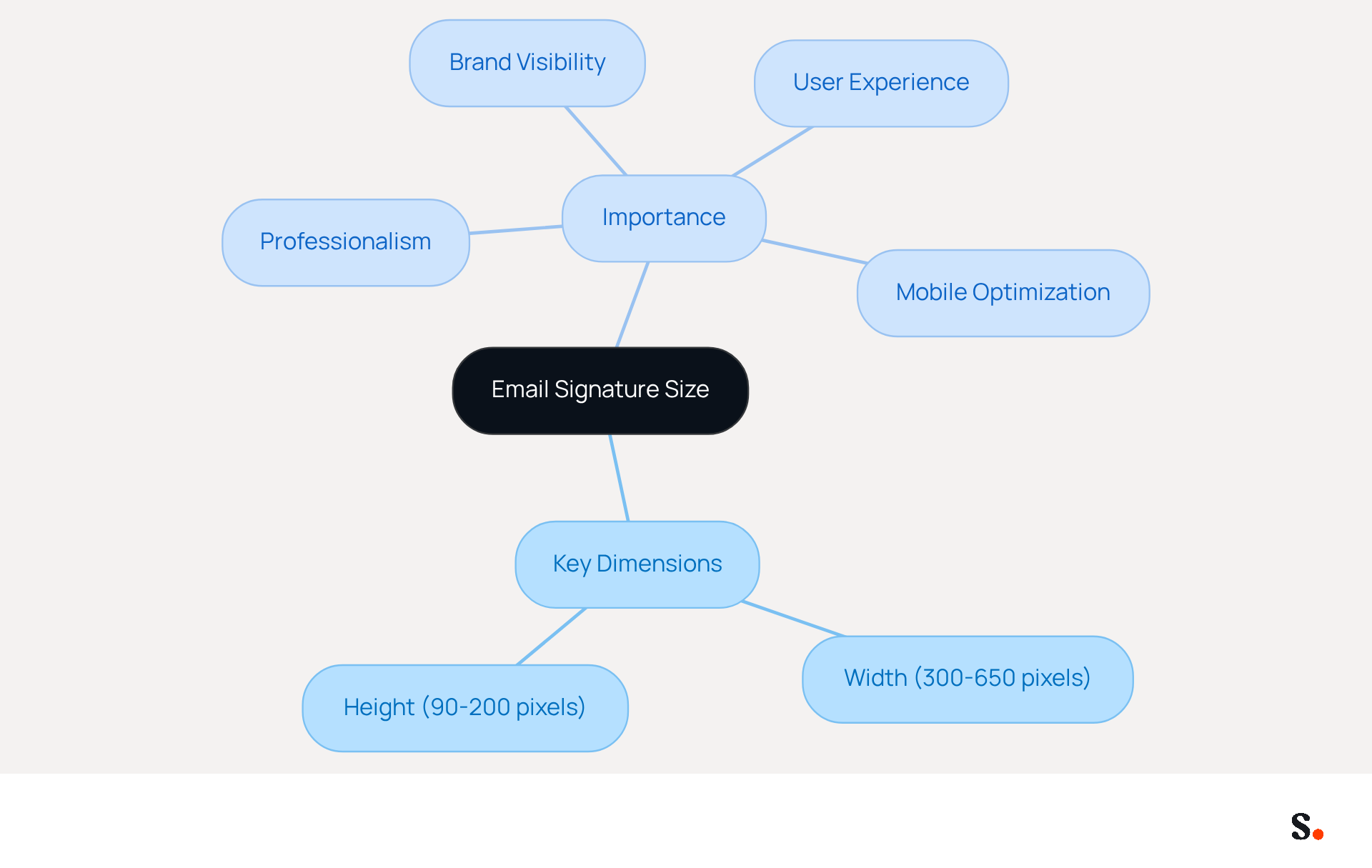
Maintaining the best email signature size is vital for ensuring professionalism in digital communications. The best email signature size is typically between 300 to 650 pixels in width and 90 to 200 pixels in height. These dimensions guarantee that the design is visually attractive and functional across various messaging clients and devices. Proper sizing is essential to achieve the best email signature size, as it prevents names from being cut off or distorted, which can negatively impact the professionalism of your correspondence. A well-sized mark that adheres to the best email signature size enhances brand visibility and ensures that important contact information is easily accessible to recipients. For example, a mark that is too wide may result in horizontal scrolling, while one that is too tall can dominate the content, leading to a negative user experience.
Organizations that utilize Scribe benefit from automatic synchronization with Google Workspace, which saves time by eliminating the need for manual updates. Any changes in your Google Workspace, such as moving teammates from one group to another or updating their information, will be automatically reflected in Scribe. This guarantees that digital identifiers remain uniform and current, improving brand coherence and professionalism in communications. This consistency not only enhances professionalism but also reinforces brand identity. Companies using Scribe have found that it boosts their brand consistency and professionalism, emphasizing the significance of following dimension guidelines.
Current statistics indicate that more than half of all message openings happen on mobile devices, making it crucial for footers to be optimized for different screen dimensions. Signatures that are too large can clutter messages and slow delivery, while those that are too small may render contact information unreadable. Thus, maintaining the best email signature size is crucial for ensuring clarity and professionalism in electronic correspondence. Testing digital identifiers on both desktop and mobile devices is also essential to ensure they display correctly across various platforms.
Explore the Evolution of Email Signature Size Standards
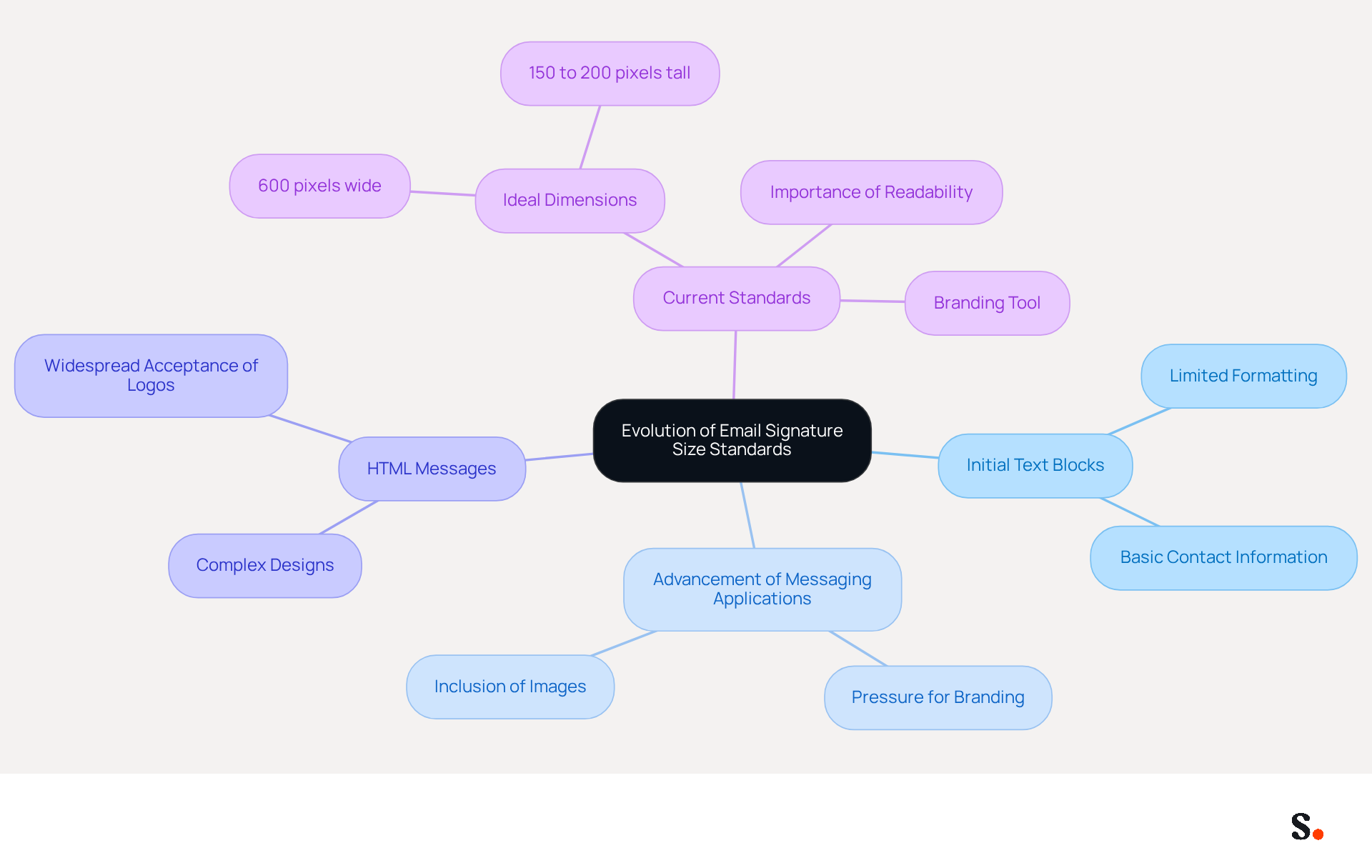
The evolution of message footer size standards illustrates the intersection of technology and user expectations. Initially, electronic correspondence identifiers consisted of basic text blocks with limited formatting options. However, as messaging applications advanced, brands faced increasing pressure to create visually appealing and branded designs. By the mid-2000s, the emergence of HTML messages allowed for more complex designs, resulting in the widespread acceptance of images and logos within sign-offs.
Currently, the ideal dimensions for digital correspondences are commonly regarded as the best email signature size, which is approximately 600 pixels in width and between 150 to 200 pixels in height. This standard accommodates both desktop and mobile viewing, highlighting their importance as essential branding tools for businesses.
Studies show that sticking to these dimensions not only makes messages easier to read but also helps maintain a consistent brand image, which is crucial for effective communication. As digital communication continues to evolve, adhering to these standards will be essential for maintaining a competitive edge.
Identify Best Practices for Optimal Email Signature Dimensions
Creating an effective email signature requires careful attention to specific dimensions and design elements:
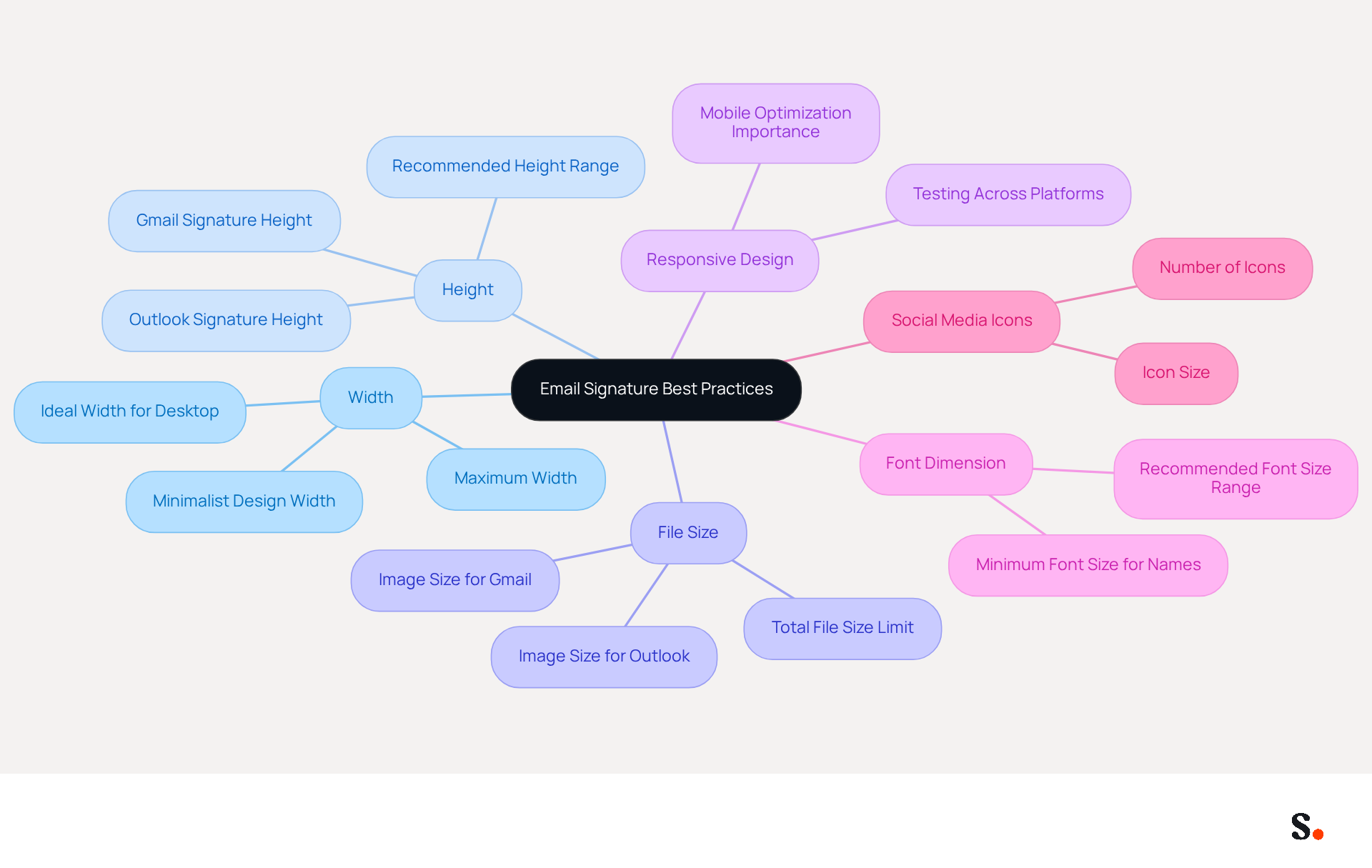
- Width: For desktop displays, a width of 600 units is ideal, while minimalist designs typically measure around 300 units. This range ensures compatibility with the best email signature size across various messaging clients.
- To achieve the best email signature size, maintain a height of 170 to 200 units to avoid overwhelming the email content. This range is frequently recommended for professional appearances, with the best email signature size specifically suggested to be 170 pixels high for Outlook email footers.
- File Size: Ensure that the total file size of the document, including images, does not exceed 50KB. Exceeding the file size limit can lead to slow loading times and hinder message deliverability.
- Responsive Design: With over 81% of emails opened on mobile devices, consider how the signature will appear on smartphones. Testing the signature across different platforms is crucial to ensure it displays correctly and maintains legibility.
- Font Dimension: It's best to use a minimum font size of 14px for names and titles to ensure clarity, with a recommended range between 8pt (11px) and 20pt (26px) for overall readability.
- Social Media Icons: When adding social media icons, size them at 24x24 pixels to maintain a consistent and professional appearance.
By adhering to these optimal methods, businesses can create identifiers that not only appear professional but also improve their branding initiatives, ensuring consistency and effectiveness in communications. Ultimately, these practices not only enhance professionalism but also strengthen brand identity in every communication.
Avoid Common Mistakes in Email Signature Sizing
Mistakes in achieving the best email signature size can severely impact professionalism and communication effectiveness. Here are key pitfalls to avoid:
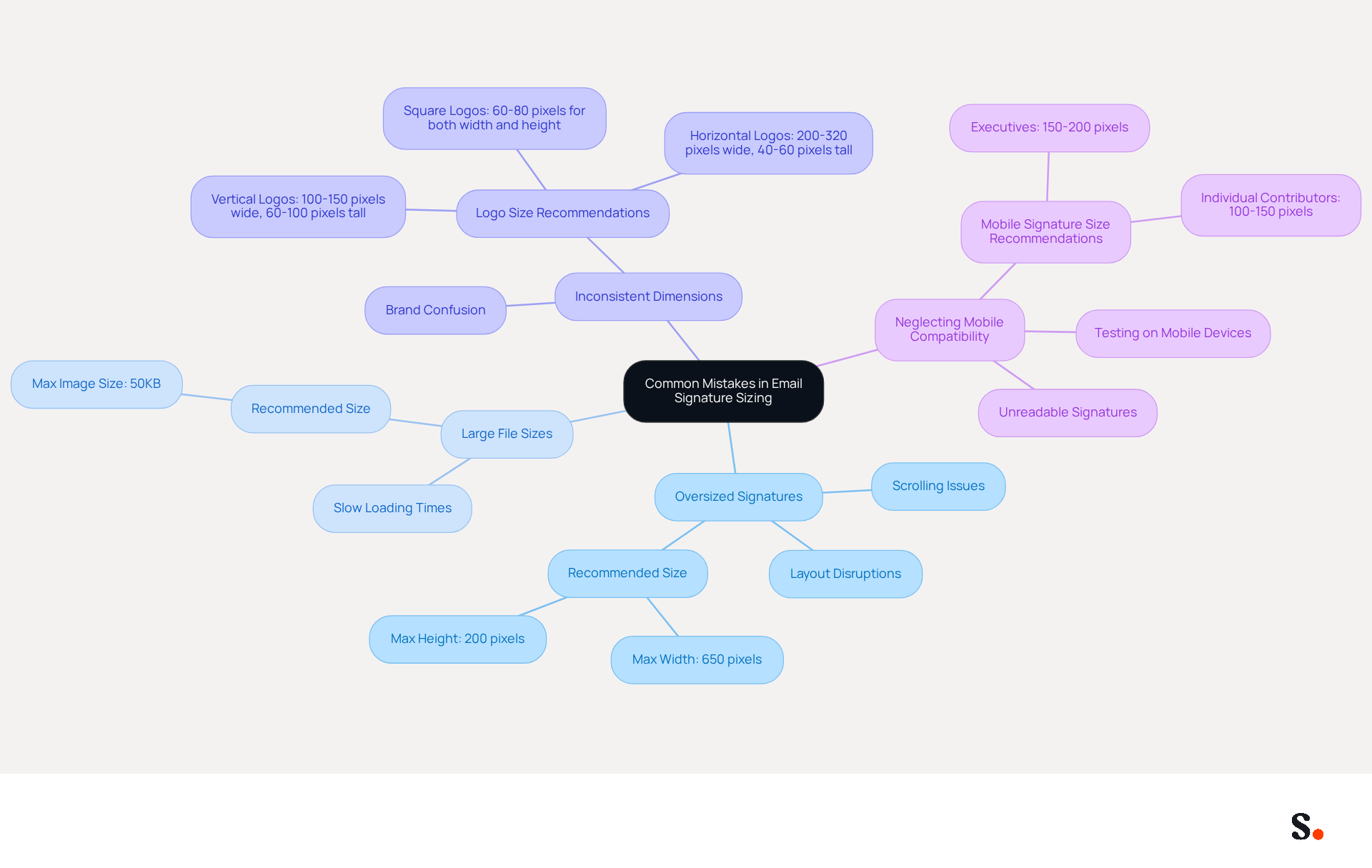
- Oversized Signatures: Oversized signatures can lead to layout disruptions, making emails less user-friendly. Signatures that exceed the best email signature size of 650 pixels in width or 200 pixels in height can disrupt layouts, resulting in scrolling issues that detract from the user experience.
- Large File Sizes: Images larger than 50KB can slow down email loading times, frustrating recipients and potentially causing them to overlook important content.
- Inconsistent Dimensions: Utilizing varying sizes for different marks within the same organization can create confusion and dilute brand consistency, making it harder for recipients to recognize your brand. For optimal clarity, logos should ideally fit within the best email signature size of 150-320 units wide and 50-70 units tall.
- Neglecting Mobile Compatibility: Neglecting mobile compatibility can result in unreadable signatures, diminishing the effectiveness of communication. Failing to test marks on mobile devices can lead to distorted or unreadable marks, as many messages are accessed on smartphones and tablets. Mobile message block sizes should differ by position, with executives utilizing more extensive blocks (150-200 pixels) and individual contributors employing shorter versions (100-150 pixels).
Furthermore, frequently refreshing contact details is essential to prevent broken links and outdated information. Scribe makes it easy by automatically filling in your team's identification info straight from your business phone system, ensuring that all approvals are consistently updated without requiring action from individual team members. This automated synchronization not only enhances brand consistency but also aligns with Scribe's commitment to security, as it is SOC 2 Type II compliant, ensuring that your data is safe.
Moreover, by joining Scribe's Affiliate Program, you can promote brand consistency while earning a $30 credit for referrals and a 50% commission on subscriptions. This opportunity enables marketing managers to utilize their network while ensuring that their digital identifiers remain professional and effective. By addressing these common pitfalls, businesses can significantly improve their email communication and brand representation.
Conclusion
Maintaining the appropriate email signature size is essential for projecting professionalism and enhancing brand visibility in digital communications. The ideal dimensions, typically between 300 to 650 pixels in width and 90 to 200 pixels in height, not only prevent distortion but also ensure that essential contact information is easily accessible. Adhering to these standards helps organizations create signatures that are visually appealing and clear across devices.
Throughout the article, key insights were discussed, including:
- The evolution of email signature size standards
- Best practices for optimal dimensions
- Common mistakes to avoid
Emphasizing the importance of responsive design, file size limitations, and mobile compatibility highlights how these factors contribute to effective communication. Utilizing tools like Scribe can further streamline the process, ensuring that email signatures remain consistent and up-to-date, thereby reinforcing brand coherence.
The significance of an effective email signature is clear in today’s digital communication landscape. Organizations are encouraged to implement best practices for email signature sizing to enhance professionalism and brand identity. Using solutions like Scribe allows businesses to maintain brand consistency and see a positive impact on engagement and communication.
Frequently Asked Questions
What is the best email signature size?
The best email signature size is typically between 300 to 650 pixels in width and 90 to 200 pixels in height.
Why is proper email signature sizing important?
Proper sizing is essential to prevent names from being cut off or distorted, which can negatively impact the professionalism of your correspondence.
How does email signature size affect brand visibility?
A well-sized email signature enhances brand visibility and ensures that important contact information is easily accessible to recipients.
What issues can arise from an improperly sized email signature?
An email signature that is too wide may result in horizontal scrolling, while one that is too tall can dominate the content, leading to a negative user experience.
How does Scribe help with email signature management?
Organizations that utilize Scribe benefit from automatic synchronization with Google Workspace, which saves time by eliminating the need for manual updates.
What happens when changes are made in Google Workspace while using Scribe?
Any changes in Google Workspace, such as moving teammates or updating their information, will be automatically reflected in Scribe, ensuring uniform and current digital identifiers.
Why is it important to optimize email signatures for mobile devices?
More than half of all message openings happen on mobile devices, making it crucial for signatures to be optimized for different screen dimensions to ensure clarity and professionalism.
What can happen if an email signature is too large or too small?
Signatures that are too large can clutter messages and slow delivery, while those that are too small may render contact information unreadable.
How can I ensure my email signature displays correctly?
Testing digital identifiers on both desktop and mobile devices is essential to ensure they display correctly across various platforms.
List of Sources
- Define Email Signature Size: Key Dimensions and Importance
- Best Email Signature Size - Guide to Email Signatures Size - MySignature (https://mysignature.io/email-signature-size)
- What Is The Best Email Signature Size? | Rocketseed (https://rocketseed.com/resources/email-design-guidelines)
- What is the Best Email Signature Design Size? Expert Guide (https://publicate.it/blog/email-signature-design-size)
- What Is the Ideal Email Signature Size? (https://oppora.ai/blog/email-signature-size)
- Explore the Evolution of Email Signature Size Standards
- The History of Email Signatures: From Simple Sign-Offs to Smart Branding (https://digicomm360.com/history-of-email-signatures)
- The Evolution of Email Signatures: From Plain Text to Marketing Tool (https://chillisign.io/blog/evolution-signatures)
- What Email Signatures Really Mean for Your Marketing Strategy (https://scribe-mail.com/en-US/blog/what-email-signatures-really-mean-for-your-marketing-strategy)
- What Size Should Email Signature Be? Key Insights for Marketers (https://scribe-mail.com/en-US/blog/what-size-should-email-signature-be-key-insights-for-marketers)
- The Evolution of Email Signatures | Rocketseed (https://rocketseed.com/blog/email-signature-evolution)
- Identify Best Practices for Optimal Email Signature Dimensions
- What Is The Best Email Signature Size? | Rocketseed (https://rocketseed.com/resources/email-design-guidelines)
- Email Signature Size and Layout Tips (https://linkedin.com/pulse/email-signature-size-layout-tips-bulksignature-nuy7f)
- What Size Should Email Signature Be? Key Insights for Marketers (https://scribe-mail.com/en-US/blog/what-size-should-email-signature-be-key-insights-for-marketers)
- What Is the Ideal Email Signature Size for 2026? (https://mailmodo.com/guides/email-signature-size)
- Email Signature Size and Layout Tips (https://bulksignature.com/blog/email-signature-size-and-layout-tips)
- Avoid Common Mistakes in Email Signature Sizing
- 11 Common Email Signature Mistakes to Avoid - Gimmio (https://blog.gimm.io/email-signature-mistakes)
- Compare Email Signature Structure: Best Practices vs. Common Mistakes (https://scribe-mail.com/en-US/blog/compare-email-signature-structure-best-practices-vs-common-mistakes)
- Email Signature Size and Layout Tips (https://bulksignature.com/blog/email-signature-size-and-layout-tips)
- 5 Common Mistakes You’re Making With Your Email Signature (https://fastcompany.com/3025208/5-common-mistakes-youre-making-with-your-email-signature)
- 5 Common Mistakes Companies Make with Email Signatures | Crossware365 (https://crossware365.com/blog/5-common-mistakes-companies-make-with-email-signatures)
Get started with Scribe
Manage signatures across your whole team
Free 14-day trial — no credit card.