What is the Best Image Format for Your Email Signature?
Selecting the appropriate image format for email signatures is crucial, as it significantly impacts professional communication and brand visibility. With a
Sophie Grant
Email Signature Specialist, Scribe

Introduction
Selecting the appropriate image format for email signatures is crucial, as it significantly impacts professional communication and brand visibility. With a staggering 42% of emails accessed on mobile devices, the need for visually appealing and compatible images has never been more critical. In this article, we’ll explore the various image formats available, like JPEG, PNG, and GIF, and their unique characteristics to help you make informed choices.
Choosing the wrong image format can result in frustrating user experiences, such as pixelation or slow loading times. Ultimately, the right image format can enhance email engagement and strengthen a brand's digital identity.
Define Image Formats: Understanding the Basics
Choosing the best image format for email signature is essential for effective digital communication, as it directly influences engagement and visual quality. Image types refer to the specific methods in which digital images are encoded and stored. Each type has its own characteristics, advantages, and limitations, making them suitable for different applications. Common types include:
- JPEG
- PNG
- GIF
- SVG
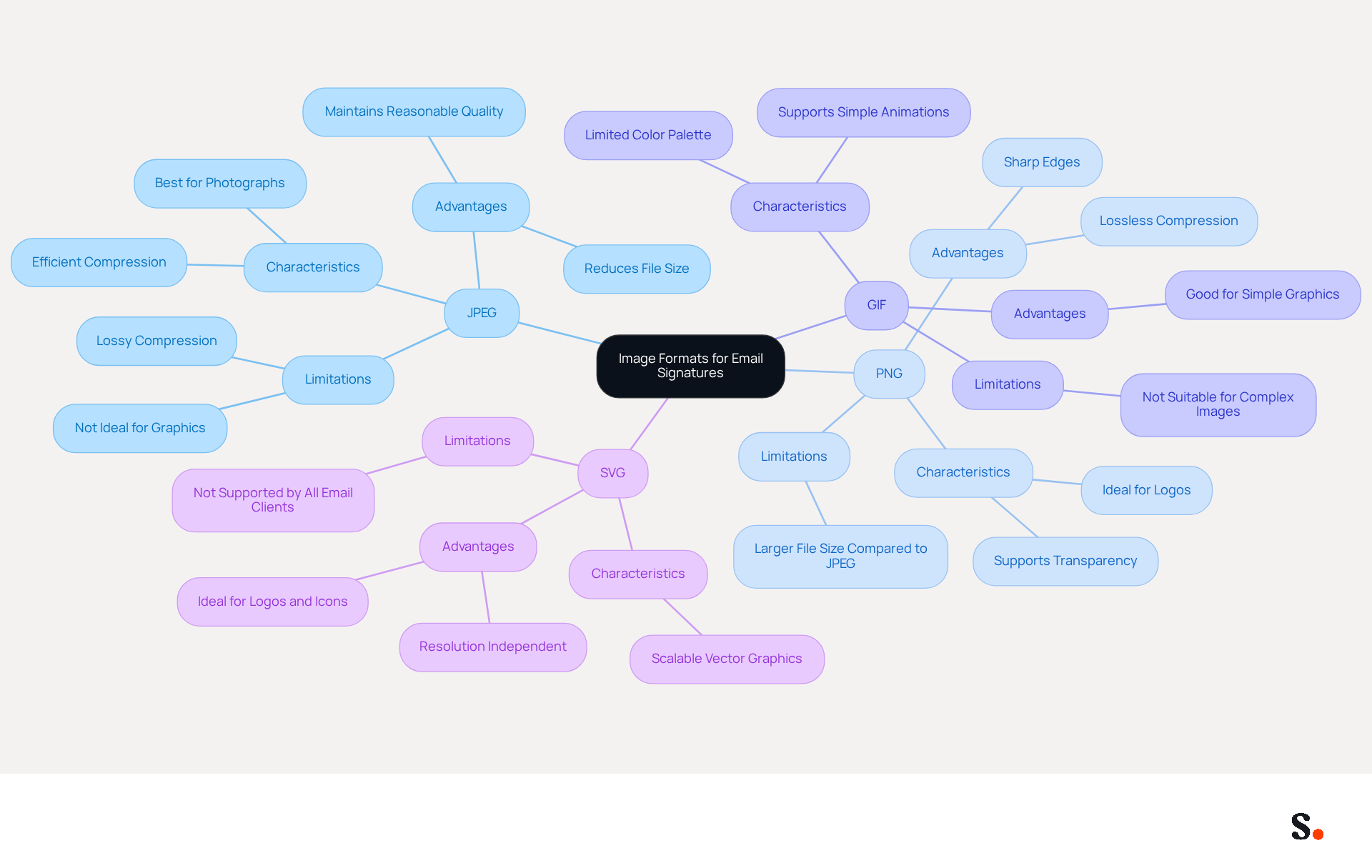
JPEG (Joint Photographic Experts Group) is widely used for photographs due to its efficient compression, which reduces file size while maintaining reasonable quality. PNG (Portable Network Graphics) supports transparency and is ideal for logos and graphics that require sharp edges. GIF (Graphics Interchange Format) is commonly used for simple animations and graphics with limited colors. Understanding these styles is key to selecting the best image format for email signature in your digital communications, as it impacts both visual quality and loading times.
As of 2023, 42% of messages are accessed on mobile devices, highlighting the necessity for mobile-friendly visuals in correspondence footers. Moreover, businesses using branded digital identifiers see a 22% rise in response rates, emphasizing the significance of choosing the appropriate visual type to enhance engagement. Expert insights indicate that the best image format for email signature is JPEG and PNG, as they guarantee compatibility across various messaging clients while preserving visual quality. Additionally, the growing emphasis on sustainability in digital communications is prompting businesses to choose styles that enhance both loading speed and visual quality, making it essential to remain updated on the latest advancements in graphic types.
Explore Common Image Formats for Email Signatures
Selecting the best image format for email signature is crucial for ensuring professional communication and compatibility across various platforms. The most common image formats for email signatures include:
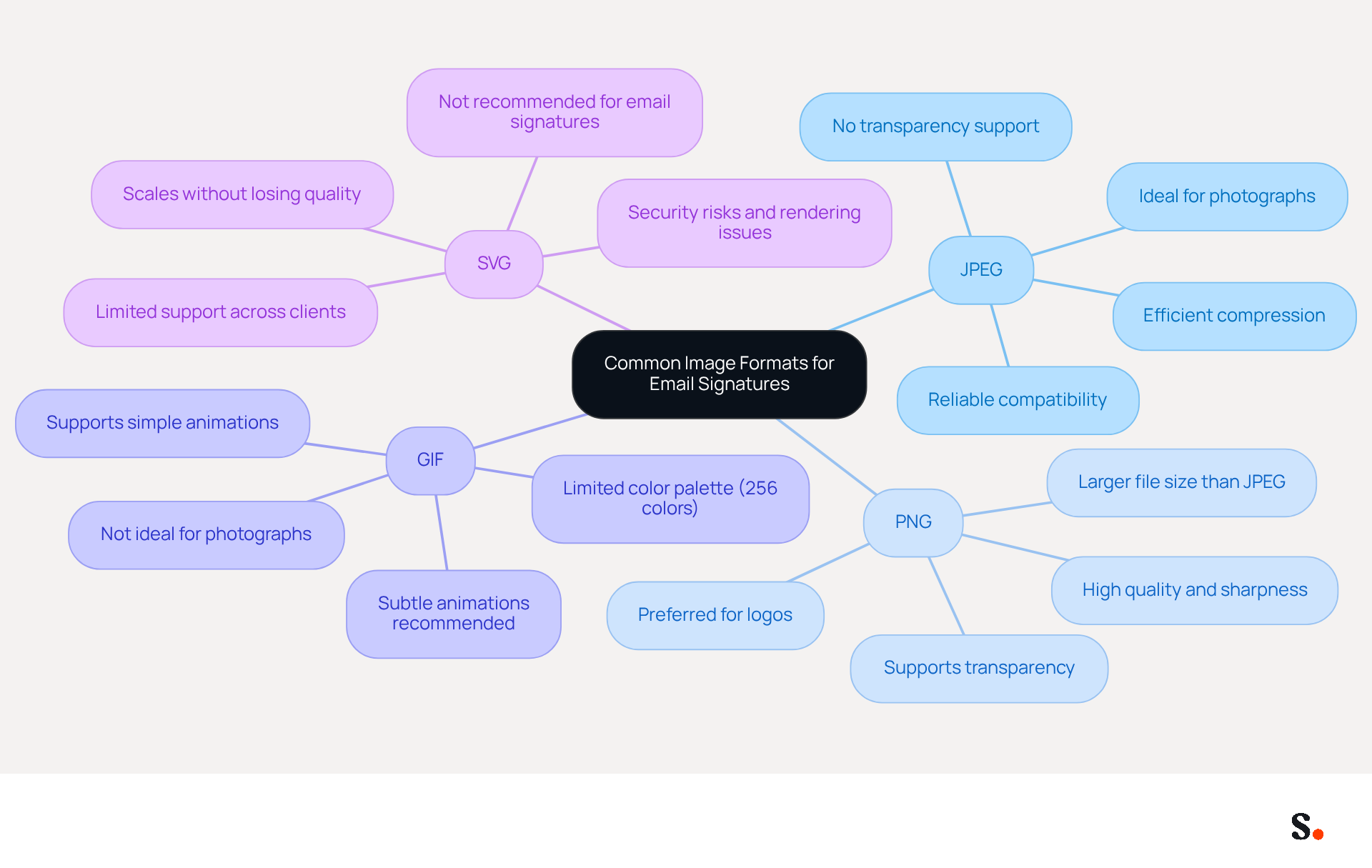
- JPEG: This format is ideal for photographs and visuals with gradients due to its efficient compression, resulting in smaller file sizes. However, it does not support transparency, which can limit its use for logos. Research indicates that using JPEG is a reliable choice for ensuring compatibility across various messaging clients, making it a dependable option for professional communications.
- PNG: Best suited for logos and visuals requiring transparency, PNG files maintain high quality and sharpness, making them a preferred choice for professional branding. Its ability to support transparency enhances visual appeal in email signatures, ensuring that logos appear crisp and clear.
- GIF: Commonly used for simple animations and graphics, GIF supports transparency but is limited to a palette of 256 colors. This restriction may not be suitable for all images, particularly those requiring a broader color range. While GIF is favored for simple animations, it is important to keep animations subtle and file sizes low to ensure compatibility.
- SVG: As a vector type, SVG scales without losing quality, making it perfect for logos and icons. However, its limited support across messaging clients can restrict its effectiveness, as many clients, including Outlook, Gmail, and Apple Mail, do not render SVG files properly due to security risks and rendering inconsistencies.
In 2026, choosing the right visual type is vital for maintaining compatibility and a professional image in your correspondence. Grasping these formats assists organizations in enhancing their communication branding for improved visibility and interaction. Furthermore, it is advisable to incorporate visuals in correspondence footers instead of linking them to guarantee visibility upon message arrival. Always include height and width attributes for visuals to maintain clarity and professionalism. Ultimately, selecting the best image format for email signature can significantly enhance the effectiveness of your email communications, leaving a lasting impression on recipients.
Understand the Importance of Choosing the Right Image Format
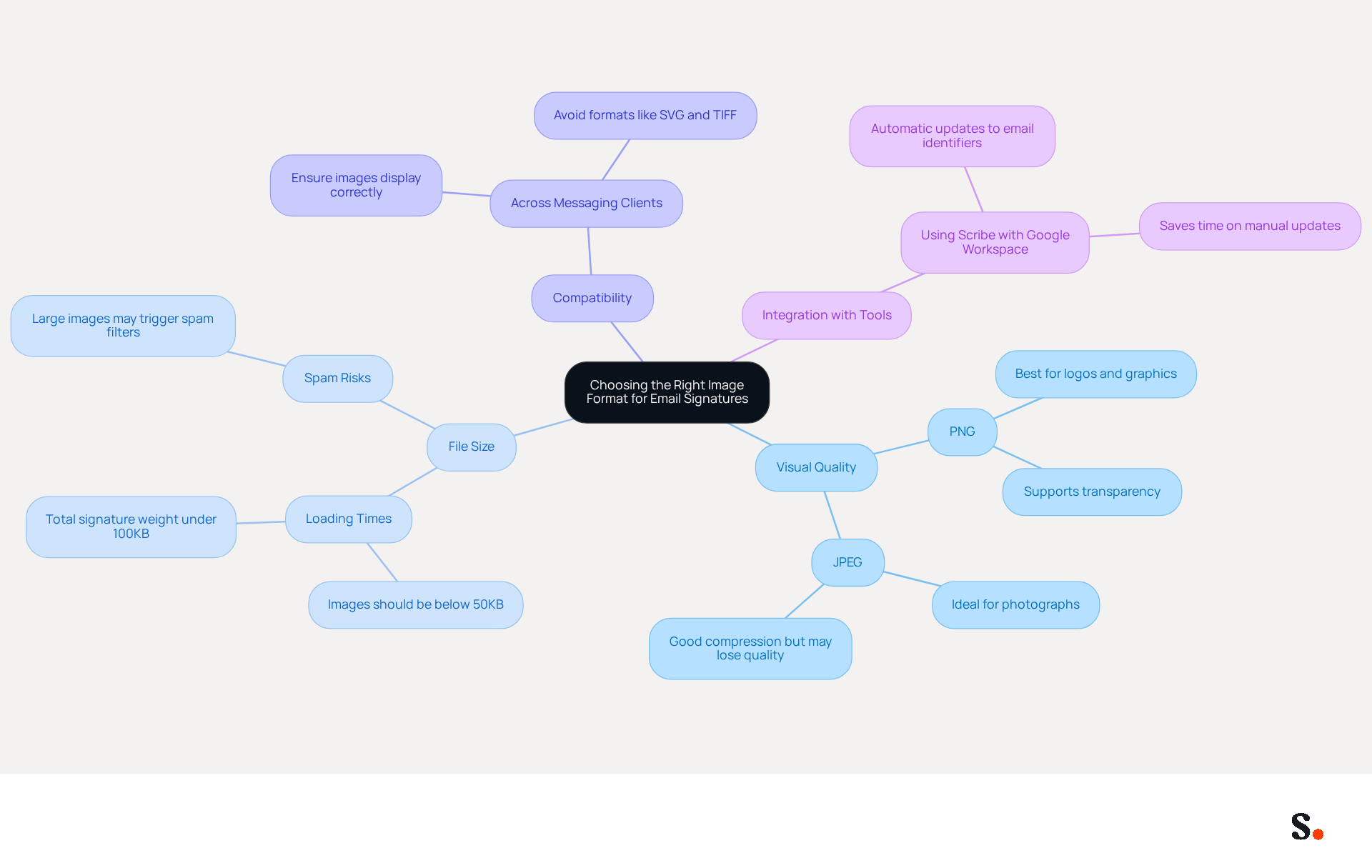
Selecting the best image format for email signature is crucial for maintaining a professional online identifier. The visual quality of the signature can be significantly impacted by the choice of style; a poorly selected image may result in pixelation or loss of detail. Additionally, different image types come with varying file sizes, which can influence loading times for messages. Large images may slow down message delivery and could even lead to messages being marked as spam. Moreover, using the best image format for email signature ensures compatibility across various messaging clients, which is vital for maintaining a professional appearance. For example, utilizing PNG for logos guarantees a crisp and clear presentation, while JPEG is more suitable for photographs.
Furthermore, integrating Scribe with Google Workspace enables automatic updates to your email identifiers, conserving time and ensuring that any modifications in your team’s information are reflected instantly. This synchronization allows you to focus on crafting the perfect sign-off, eliminating concerns about manual updates. Ultimately, the appropriate selection of visual type, combined with Scribe's capabilities, enhances brand perception and improves engagement with recipients.
Implement Best Practices for Image Formats in Email Signatures
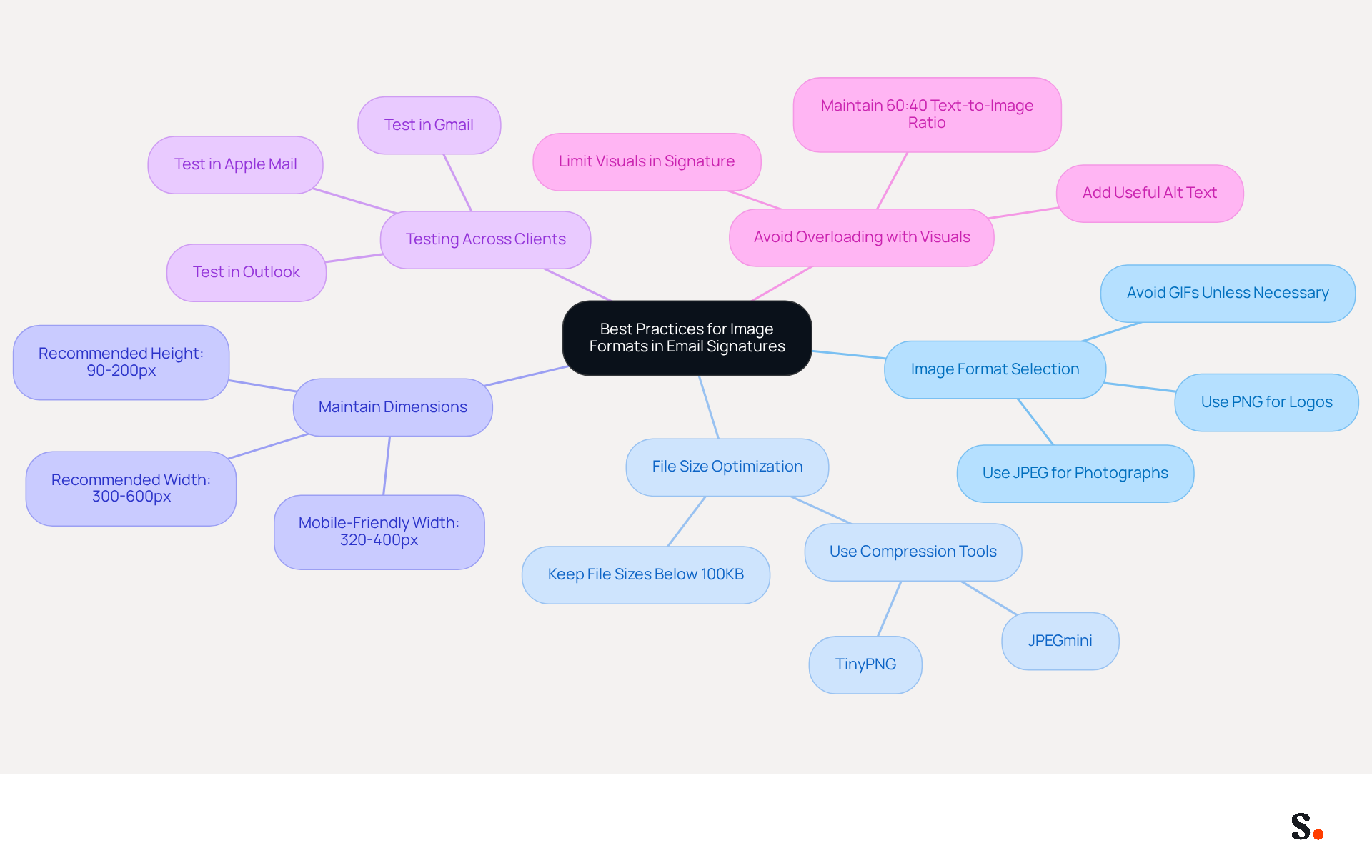
Optimizing the best image format for email signature is crucial for enhancing both performance and professionalism. Consider the following best practices:
- To determine the best image format for email signature, use PNG for logos and visuals requiring transparency, while JPEG is suitable for photographs. Avoid using GIFs unless necessary for animations, as they can increase file size and distract from the message.
- Optimize File Size: Keep file sizes below 100KB to ensure quick loading times. Compress pictures without sacrificing quality using tools like TinyPNG or JPEGmini. This optimization has been linked to a notable increase in engagement, with organizations reporting an average click-through rate of 12% on branded banners, highlighting the importance of using the best image format for email signature.
- Maintain Dimensions: Stick to recommended dimensions for email footers, typically between 300-600 pixels wide and 90-200 pixels high. A width of 320 to 400 pixels improves readability on mobile devices, ensuring images display correctly across devices. An image between 320 and 600 pixels wide and 90-200 pixels high provides the right balance for readability and professionalism.
- Test Across Clients: Always test your email footer in various email clients (like Outlook, Gmail, and Apple Mail) to ensure compatibility and appearance. Testing on different platforms helps catch any performance issues and ensures everything works smoothly, even if images don’t load.
- Avoid Overloading with Visuals: Limit the number of visuals in your email footer to maintain a clean and professional appearance. A cluttered sign-off can detract from your message, and maintaining a text-to-image ratio of at least 60:40 enhances message performance. Additionally, ensure that every image has useful alt text to improve accessibility and provide context if images fail to load.
By adhering to these best practices, businesses can significantly enhance their branding and communication efforts, including using the best image format for email signature, leading to higher engagement and conversion rates. Ultimately, effective email signatures not only reflect a brand's professionalism but also drive meaningful engagement with recipients.
Conclusion
The choice of image format for email signatures significantly impacts professional digital communication. The chosen format affects both the visual quality of the signature and its engagement and compatibility across different platforms. By understanding the characteristics of formats like JPEG, PNG, GIF, and SVG, organizations can make better decisions that enhance their branding and ensure a polished appearance in every email.
Throughout the article, key insights were shared regarding the strengths and limitations of each image format:
- JPEG is ideal for photographs.
- PNG excels with logos requiring transparency.
- GIFs can be useful for simple animations, but their limitations in color range may not suit all needs.
Additionally, the importance of optimizing file sizes and maintaining appropriate dimensions was emphasized, as these factors significantly impact loading times and overall user experience. Implementing best practices, such as testing across different email clients and ensuring a clean design, can further enhance the effectiveness of email signatures.
Ultimately, the choice of image format plays a vital role in shaping how a brand is perceived in digital communications. Prioritizing the right image formats in email signatures can fundamentally enhance brand perception and engagement in digital communications.
Frequently Asked Questions
What are the main image formats discussed in the article?
The main image formats discussed are JPEG, PNG, GIF, and SVG.
What is the primary use of JPEG images?
JPEG is widely used for photographs due to its efficient compression, which reduces file size while maintaining reasonable quality.
When should PNG images be used?
PNG images should be used for logos and graphics that require transparency and sharp edges.
What is the purpose of GIF images?
GIF images are commonly used for simple animations and graphics with limited colors.
Why is it important to choose the right image format for email signatures?
Choosing the right image format for email signatures is essential for effective digital communication, as it influences engagement and visual quality.
How does mobile device usage impact image format selection?
As of 2023, 42% of messages are accessed on mobile devices, highlighting the necessity for mobile-friendly visuals in email signatures.
What benefits do businesses see from using branded digital identifiers?
Businesses using branded digital identifiers see a 22% rise in response rates, emphasizing the importance of selecting the appropriate visual type.
Which image formats are recommended for email signatures?
The recommended image formats for email signatures are JPEG and PNG, as they ensure compatibility across various messaging clients while preserving visual quality.
What trend is influencing the choice of image formats in digital communications?
The growing emphasis on sustainability in digital communications is prompting businesses to choose image formats that enhance both loading speed and visual quality.
List of Sources
- Define Image Formats: Understanding the Basics
- Email signature statistics and trends in 2024 (https://wisestamp.com/blog/email-signature-statistics)
- 40+ Email Signature Statistics for 2026 (Data + Insights) (https://wavecnct.com/blogs/email-signature-statistics)
- Email signature statistics: Why every business should optimize their email signatures — Stripo.email (https://stripo.email/blog/email-signature-statistics-why-every-business-should-optimize-their-email-signatures)
- Best image formats for email signatures: Compatibility guide (https://set-outlooksignatures.com/blog/2026/03/05/image-formats)
- Explore Common Image Formats for Email Signatures
- Best image formats for email signatures: Compatibility guide (https://set-outlooksignatures.com/blog/2026/03/05/image-formats)
- Best image format for email signatures (JPG, PNG, GIF) (https://support.xink.io/support/solutions/articles/1000045416-what-is-the-best-image-format-for-email-signatures-)
- Email Signature Format: Best Practices & Examples | Exclaimer (https://exclaimer.com/email-signature-handbook/email-signature-format)
- Best Image Formats for Email Signatures - Gimmio (https://blog.gimm.io/best-image-formats-for-email-signatures)
- Understand the Importance of Choosing the Right Image Format
- Best Image Formats for Email Signatures - Gimmio (https://blog.gimm.io/best-image-formats-for-email-signatures)
- Best image formats for email signatures: Compatibility guide (https://set-outlooksignatures.com/blog/2026/03/05/image-formats)
- Best Email Signature Size - Guide to Email Signatures Size - MySignature (https://mysignature.io/email-signature-size)
- What Is the Best Image Format for the Email Signature? - NEWOLDSTAMP (https://newoldstamp.com/blog/best-image-format-for-email-signature)
- Implement Best Practices for Image Formats in Email Signatures
- Email Signature Size and Image Best Practices (https://maileditor.net/blog/email-signature-size-and-image-best-practices)
- Top 10+ best practices for email signatures design in 2026 (https://mysignature.io/blog/email-signature-best-practices)
- Best Image Size for Email Signature: Optimize for Performance and Branding (https://scribe-mail.com/en-US/blog/best-image-size-for-email-signature-optimize-for-performance-and-branding)
Get started with Scribe
See why teams switch to Scribe
Free 14-day trial — no credit card.