Why Did My Outlook Signature Disappear? Common Causes Explained
The management of email signatures in Outlook presents significant challenges that can undermine professionalism in digital communications. Users frequently
Sophie Grant
Email Signature Specialist, Scribe
On this page
Introduction
The management of email signatures in Outlook presents significant challenges that can undermine professionalism in digital communications. Users frequently encounter challenges when their email signatures vanish unexpectedly. In this article, we explore the common causes of these issues and provide insights and solutions to restore missing signatures while enhancing brand consistency. By implementing effective strategies, organizations can safeguard their email signatures, ensuring they convey a consistent and professional brand image.
Identify Common Causes of Outlook Signature Disappearance
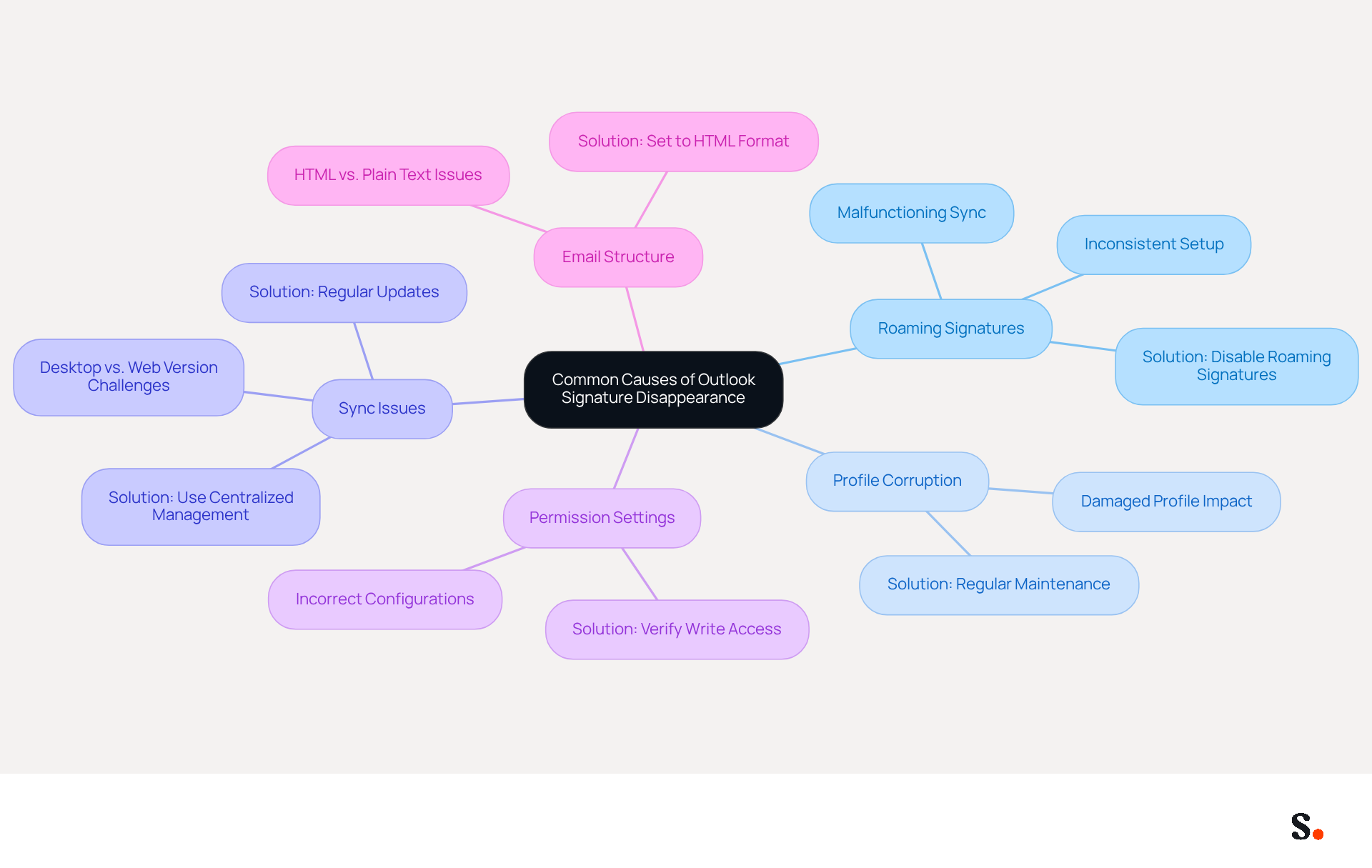
Several common factors can cause email identifiers in Outlook to unexpectedly disappear, which raises the question of why did my outlook signature disappear, complicating effective communication. Understanding these causes is essential for troubleshooting and resolution:
- The feature known as Roaming Signatures, designed to sync signatures across devices, can sometimes malfunction, causing users to ask, 'why did my outlook signature disappear'. Improper setup of Roaming Signatures can result in significant inconsistencies. Disabling this feature can help prevent identifiers from disappearing, leading to concerns about why did my outlook signature disappear.
- Profile Corruption: A damaged profile in the application can disrupt its normal functioning, including management of email identifiers. It's important to regularly maintain profiles by backing them up and recreating them when necessary to avoid disruptions.
- Sync Issues: Users often face challenges when switching between desktop and web versions due to synchronization issues. Regular updates to the Outlook application help mitigate synchronization issues, ensuring smoother functionality. Additionally, syncing your Google Workspace with Scribe can streamline this process, as any changes in your Google Workspace, such as moving teammates or updating their information, will be automatically reflected in Scribe without any manual input.
- Permission Settings: Incorrect permission configurations may hinder the saving or displaying of signatures. If permission settings are not configured correctly, users may encounter issues and ask themselves why did my outlook signature disappear when managing their email signatures. Users should confirm that Outlook has the necessary write access to the folder containing email signatures to avoid these complications.
- The structure of the email (HTML vs. plain text) can greatly influence whether the signatures appear as intended. Configuring the message format to HTML is essential for proper display compatibility.
By addressing these common causes, organizations can enhance their email signature management and uphold professionalism in communications. Consistent backups and organized management of digital identifiers are essential for preserving brand integrity and avoiding complications. By utilizing Scribe's capabilities, organizations can ensure 100% brand consistency and save time through automatic updates, enhancing their overall management of digital identifiers.
Explore Specific Scenarios Leading to Signature Issues
Email signatures in Outlook can disappear due to various scenarios that disrupt user settings and branding consistency:
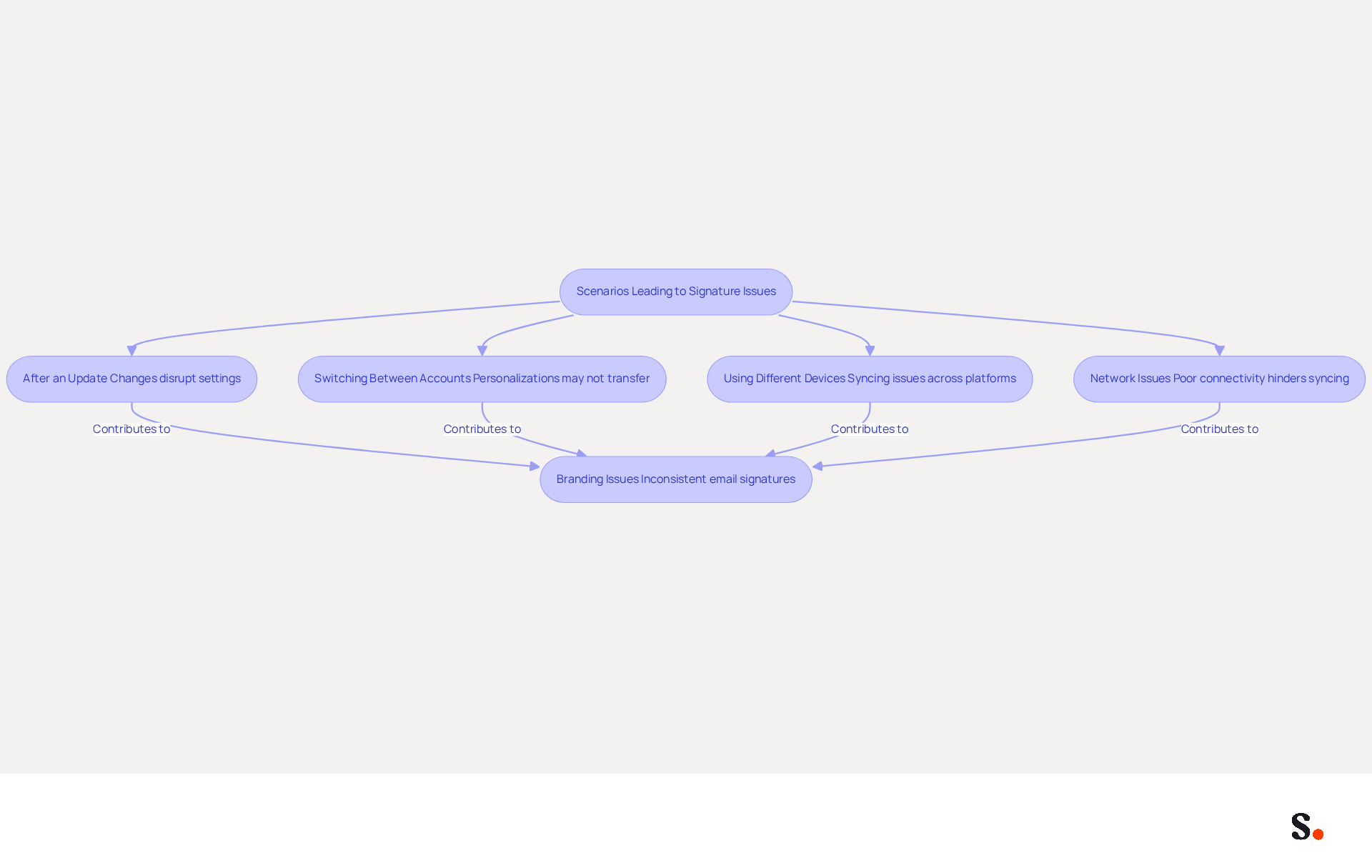
- After an update, users frequently ask why did my Outlook signature disappear along with their email identifiers. This often happens due to changes in how the application manages files, disrupting established settings. Considering that the typical office employee sends 30 business messages daily, the visibility of message identifiers is essential for upholding a professional image. Using Scribe guarantees that any modifications made in your Aircall configuration are automatically reflected in your correspondence identifiers, maintaining consistency even after updates. Scribe also adheres to SOC 2 Type II compliance and GDPR/CCPA regulations, ensuring secure data handling.
- Switching Between Accounts: When users toggle between multiple accounts, personalizations may not transfer, particularly if they are not set as default for each account. This inconsistency can confuse recipients and diminish professionalism, prompting concerns such as 'why did my Outlook signature disappear,' as studies show that 76% of people trust senders with branded email identifiers. Scribe's automated management assists in alleviating this issue by ensuring that all endorsements are current across accounts, while also upholding compliance with data protection regulations.
- Using Different Devices: Signatures may appear on one device but not on another due to syncing issues, particularly when transitioning from the classic version to the new app. This can lead to a disjointed experience for users who switch between devices, highlighting the importance of effective management strategies. With Scribe, users can enjoy seamless synchronization across devices, ensuring that their marks are always consistent and compliant with security standards.
I am trying to understand why did my Outlook signature disappear. If you are wondering why did my Outlook signature disappear, it may be due to the reinstallation of Outlook, which can lead to the loss of saved personalizations if they have not been backed up properly. Regular backups are crucial to avoid data loss and ensure that branding elements remain current and representative of the brand. Scribe's automated updates assist in keeping approvals current, minimizing the risk of loss during reinstallation, while also ensuring compliance with data protection laws.
- Network Issues: Poor internet connectivity can hinder the syncing process, causing user identifiers to go missing when individuals attempt to access their accounts remotely. This highlights the importance of dependable network access when managing digital identifiers. The integration with Aircall guarantees that any modifications are synced effectively, even under different network conditions, while upholding compliance with security protocols.
These situations demonstrate the different environments in which users may face branding issues, highlighting the importance of effective management strategies to uphold brand consistency and professionalism in communications. By implementing Scribe, organizations can safeguard their branding integrity, ensuring that every communication reflects their professionalism and reliability.
Implement Effective Solutions to Restore Missing Signatures
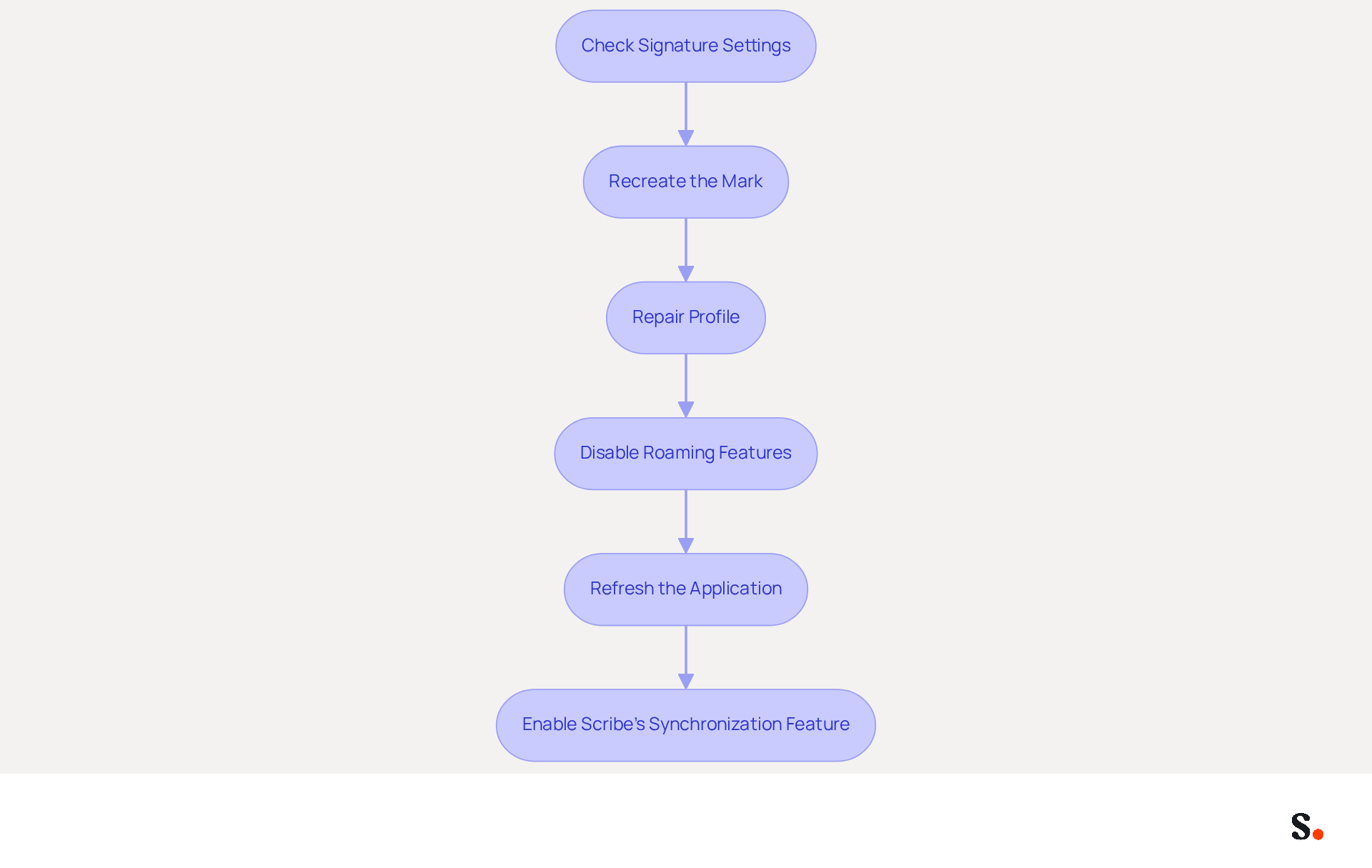
Restoring missing email signatures in Outlook requires a systematic approach to ensure consistency and reliability in professional communication. Users can follow these practical steps:
- Check Signature Settings: Access the settings by navigating to File > Options > Mail > Signatures. Ensure that the appropriate mark is chosen for both new messages and replies.
- Recreate the Mark: If the mark is absent, users can recreate it by copying the content from a previous email or a backup file, ensuring that branding remains consistent.
- Repair Profile: In cases of suspected profile corruption, creating a new email profile can resolve the issue. To create a new email profile, navigate to the Control Panel, select Mail, and then choose Show Profiles.
- Disable Roaming Features: Users may encounter complications due to roaming functionalities, which can disrupt their email signature management. Disabling this option in the settings can prevent further issues.
- Refresh the Application: Regularly updating the application can effectively address issues related to email signature identifiers. Users should check for updates frequently and install them promptly.
To improve the restoration process, enabling Scribe's one-click synchronization feature allows for seamless updates of messaging identifiers directly from your provider. This ensures that any changes are seamlessly updated in Outlook, enhancing the user experience.
Implementing these solutions not only helps in restoring digital identifiers but also significantly enhances overall productivity and communication efficiency. Considering that 44.4% of users update their identifiers infrequently, maintaining an active management approach is essential for utilizing branding tools effectively. Moreover, with 76% of marketers believing that branded identifiers enhance trust, ensuring that these elements are current and correctly displayed is essential for professional communication. By prioritizing the management of email signatures, organizations can foster trust and professionalism in their communications, ultimately driving better engagement with clients and stakeholders.
Leverage Automation for Consistent Email Signature Management
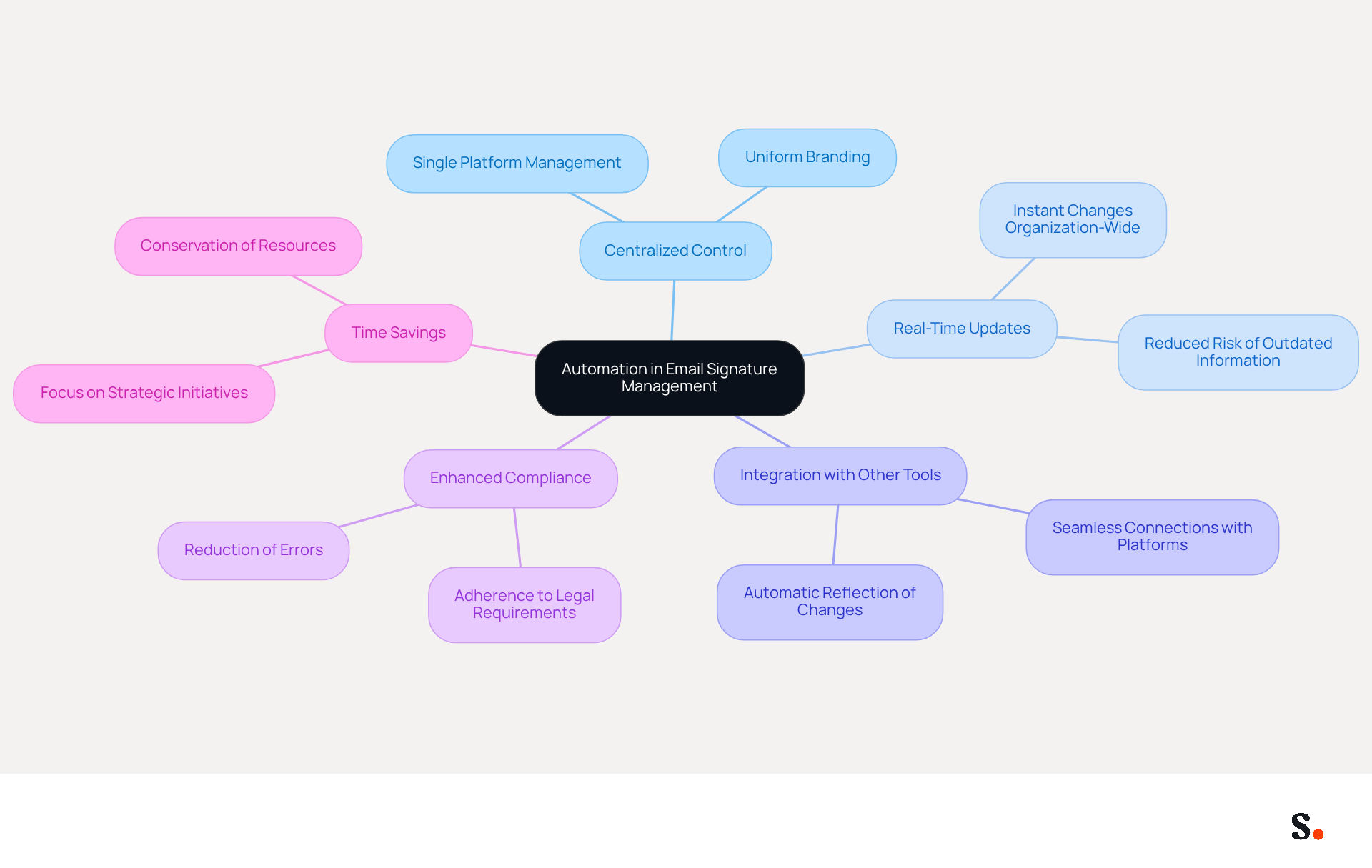
The implementation of automated email management systems addresses the challenges of consistency and reliability in communication identifiers. Automating the management of communication identifiers not only resolves issues but also enhances brand consistency and professionalism in interactions. Here are some key benefits of leveraging automation:
- Centralized Control: Automated systems enable businesses to manage approvals from a single platform, ensuring uniform branding and messaging across all employees.
- Real-Time Updates: Changes to identifiers can be implemented instantly organization-wide, eliminating the need for manual updates and reducing the risk of outdated information. Manual updates often lead to inconsistencies and outdated information, creating potential confusion among employees and clients.
- Integration with Other Tools: Many automated document management solutions, like Scribe, seamlessly connect with platforms such as Google Workspace, Microsoft 365, and Aircall, further enhancing the process. This integration ensures that any changes made in your Aircall configuration are automatically reflected in your Scribe branding, enhancing brand consistency.
- Enhanced Compliance: Automated systems ensure that all approvals adhere to legal and branding requirements, including compliance with GDPR and CCPA, significantly reducing the risk of errors. As noted by Yuliia Savchuk, legal requirements can vary by geography or industry, necessitating compliance considerations.
- Time Savings: By automating document management, businesses can conserve time and resources, allowing teams to concentrate on more strategic initiatives.
This shift to automation not only enhances brand consistency but also fosters a more professional image in communications. Research indicates that companies utilizing automated solutions such as Scribe experience a notable increase in website click-through rates (CTR), attributed to improved visibility of their branding. Furthermore, organizations that uphold standardized electronic identifiers can prevent potential legal complications by ensuring adherence to relevant regulations. This approach builds trust and turns digital identifiers into effective marketing tools, which can significantly boost lead generation. According to research, 64-70% of participants believe a professional branded sign-off enhances trust and credibility, further highlighting the significance of consistent branding in digital communications. Moreover, by joining Scribe's affiliate program, you can earn a 50% commission while promoting brand consistency across email signatures, making it a win-win for marketing managers looking to enhance their strategies. Ultimately, embracing automation in email signature management can transform how organizations present themselves, leading to greater trust and engagement with their audience.
Conclusion
The disappearance of Outlook signatures poses significant challenges for organizations aiming to maintain effective communication and brand integrity. Identifying common causes like Roaming Signatures malfunctions and profile corruption helps organizations take proactive steps to prevent disruptions. Implementing effective solutions, including regular backups and utilizing automated management tools like Scribe, helps maintain a professional image in all communications, as seen in organizations that utilize automated management tools.
The article highlights specific scenarios that can lead to signature issues, such as:
- Updates
- Account switching
- Device changes
- Network problems
Each of these situations underscores the importance of a robust email signature management strategy. By leveraging Scribe's capabilities, organizations can automate updates and maintain compliance with security regulations, ensuring that their branding remains intact and professional, regardless of the circumstances.
Embracing automation in email signature management can solve existing issues and make your brand more consistent and professional. With Scribe, organizations can streamline their processes, save time, and foster trust with clients and stakeholders. By prioritizing effective email signature management, businesses can significantly improve their communication strategies and drive better engagement, reinforcing the importance of maintaining a strong and consistent brand presence in every interaction.
Frequently Asked Questions
What are common causes for Outlook signatures disappearing?
Common causes include malfunctioning Roaming Signatures, profile corruption, sync issues, incorrect permission settings, and the email format (HTML vs. plain text).
How does Roaming Signatures affect Outlook signatures?
Roaming Signatures is designed to sync signatures across devices, but improper setup can lead to inconsistencies and cause signatures to disappear.
What should I do if my Outlook profile is corrupted?
Regularly maintain your Outlook profile by backing it up and recreating it when necessary to avoid disruptions in managing email signatures.
How can sync issues impact my Outlook signatures?
Sync issues often arise when switching between desktop and web versions of Outlook, which can disrupt the display of signatures. Regular updates to the Outlook application can help mitigate these issues.
How do permission settings affect Outlook signatures?
Incorrect permission configurations can prevent signatures from being saved or displayed. Users should ensure that Outlook has the necessary write access to the folder containing email signatures.
Why does the email format matter for Outlook signatures?
The structure of the email, whether HTML or plain text, can influence the appearance of signatures. Configuring the message format to HTML is essential for proper display compatibility.
How can Scribe help with managing Outlook signatures?
Scribe can streamline the process by syncing changes in Google Workspace automatically, ensuring 100% brand consistency and saving time through automatic updates.
List of Sources
- Identify Common Causes of Outlook Signature Disappearance
- Why Does My Email Signature Keep Disappearing in Outlook? (https://scribe-mail.com/en-US/blog/why-does-my-email-signature-keep-disappearing-in-outlook)
- Outlook Signature Disappears? 6 Common Problems + Fixes (https://conbool.com/blog/outlook-signature-disappears-fixes-problems)
- Email Signatures vanishing - New Outlook | Microsoft Community Hub (https://techcommunity.microsoft.com/discussions/outlookgeneral/email-signatures-vanishing---new-outlook/4418809)
- Explore Specific Scenarios Leading to Signature Issues
- 40+ Email Signature Statistics for 2026 (Data + Insights) (https://wavecnct.com/blogs/email-signature-statistics)
- neowin.net (https://neowin.net/news/microsoft-admits-one-of-the-most-basic-useful-outlook-features-is-broken)
- Fix Outlook Signature Disappears: 4 Steps to Restore Yours (https://scribe-mail.com/en-US/blog/fix-outlook-signature-disappears-4-steps-to-restore-yours)
- Implement Effective Solutions to Restore Missing Signatures
- 40+ Email Signature Statistics for 2026 (Data + Insights) (https://wavecnct.com/blogs/email-signature-statistics)
- Email signature statistics and trends in 2024 (https://wisestamp.com/blog/email-signature-statistics)
- neowin.net (https://neowin.net/news/microsoft-admits-one-of-the-most-basic-useful-outlook-features-is-broken)
- Leverage Automation for Consistent Email Signature Management
- 40+ Email Signature Statistics for 2026 (Data + Insights) (https://wavecnct.com/blogs/email-signature-statistics)
- Email signature statistics: Why every business should optimize their email signatures — Stripo.email (https://stripo.email/blog/email-signature-statistics-why-every-business-should-optimize-their-email-signatures)
- WiseStamp Launches the Industry's First AI-Powered Email Signature Platform, Eliminating the Gap Between Brand Design and Instant Deployment (https://prnewswire.com/news-releases/wisestamp-launches-the-industrys-first-ai-powered-email-signature-platform-eliminating-the-gap-between-brand-design-and-instant-deployment-302774232.html)
- Top Email Signature Management Software for Google Workspace (https://bignewsnetwork.com/news/278548159/top-email-signature-management-software-for-google-workspace)
- WiseStamp Launches AI Email Signature Platform for Brands (https://martech360.com/news/ai-automation/wisestamp-unveils-ai-powered-email-signature-platform-for-enterprise-brand-management)
Get started with Scribe
Create your signature in minutes
Free 14-day trial — no credit card.