Why Is My Email Signature Not Showing Up in Gmail? Key Reasons Explained
The absence of email signatures in Gmail can significantly undermine a user's professional image. It's important to know why email signatures often don't show
Sophie Grant
Email Signature Specialist, Scribe
On this page
Introduction
The absence of email signatures in Gmail can significantly undermine a user's professional image. It's important to know why email signatures often don't show up if you want to keep a polished digital presence. What factors contribute to the invisibility of these crucial branding elements, and how can users ensure their signatures are consistently displayed? By examining these issues, we can see how technical challenges can affect professional credibility and engagement. Addressing this issue is crucial for maintaining a strong professional presence in digital communications.
Identify Common Reasons for Missing Gmail Signatures
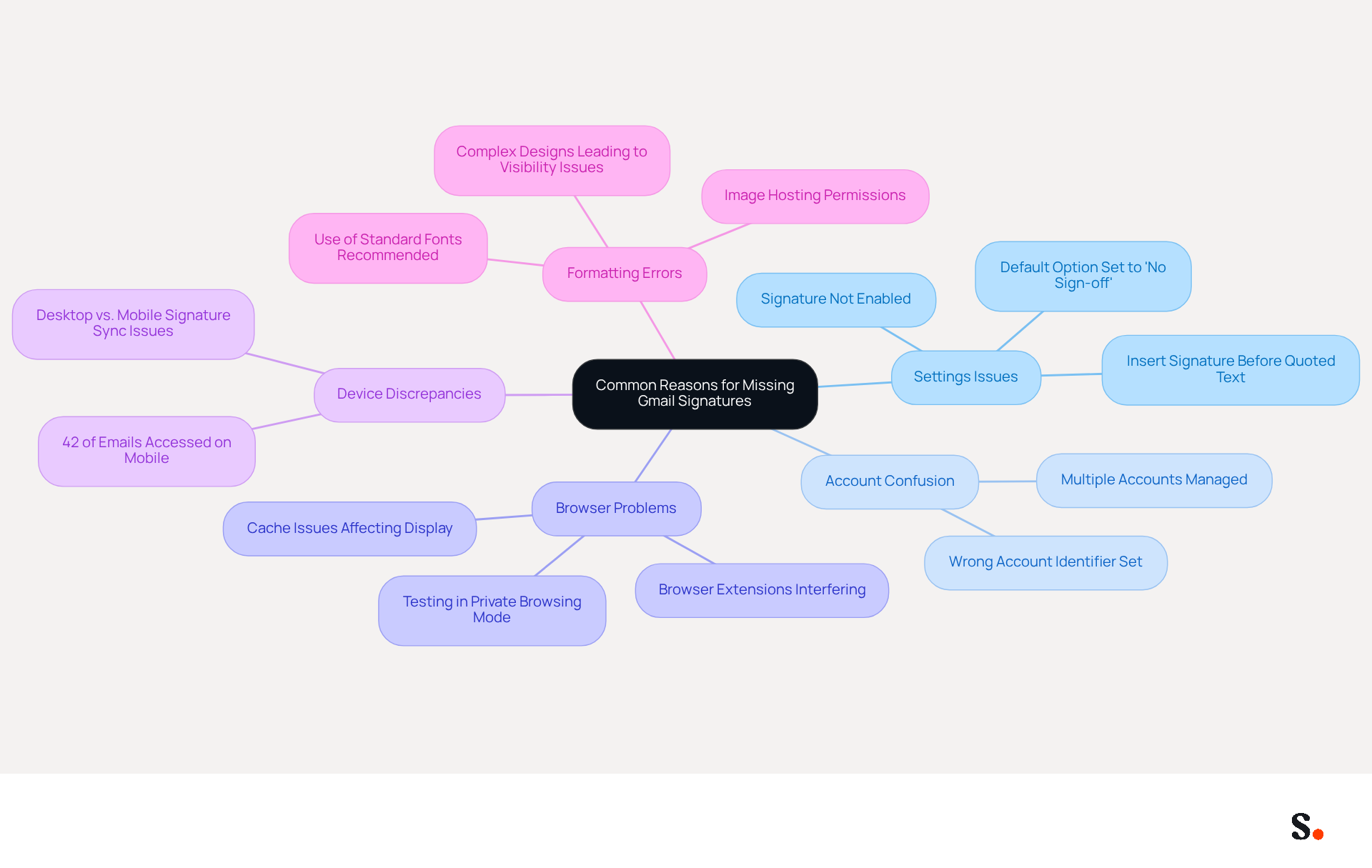
Gmail users often encounter challenges with footer visibility that can undermine their professional communication. Several factors can explain why my email signature is not showing up in Gmail as expected. Understanding these common issues is crucial for resolving visibility problems:
- Users may forget to enable their sign-off in the settings or may have inadvertently selected 'No sign-off' as the default option, leading to the question of why is my email signature not showing up in Gmail. Many users overlook this detail, leading to missing endorsements.
- Managing multiple accounts can lead to confusion, which is why is my email signature not showing up in Gmail, as users may set the identifier for the wrong account.
- Browser issues, including settings or extensions, can interfere with Gmail's functionality, which may explain why is my email signature not showing up in Gmail. Testing the authentication in private browsing mode can help determine if the issue is browser-related.
- Mobile vs. One reason for desktop discrepancies could be why my email signature is not showing up in Gmail, as signatures configured on desktop may not sync automatically to mobile devices, leading to inconsistencies in appearance across platforms. This is particularly important given that 42% of all messages are accessed on mobile devices.
- Users often struggle with formatting errors that hinder signature visibility, which makes them wonder why is my email signature not showing up in Gmail. It's advisable to keep the design simple and use standard fonts to avoid these issues.
To enable one-click synchronization with Scribe, ensure that you provide the necessary permissions as a Super Admin of your service provider. This enables seamless updates, ensuring that any modifications made in your provider directory are automatically reflected in Scribe without manual input. Statistics show that 31.6% of companies infrequently refresh their electronic communication identifiers, doing so every few years, which can greatly affect visibility and effectiveness. Furthermore, 42% of organizations do not monitor messaging branding performance, creating a significant blind spot that can hinder effective branding. Moreover, 69% of consumers think it is essential for companies to uphold a consistent, professional email format. As Sophie Grant, an Email Signature Specialist, observes, "Visibility problems with email can greatly obstruct professional branding and communication efforts." By resolving these issues, users can significantly improve their email branding and communication effectiveness.
Examine Technical Issues Affecting Signature Visibility
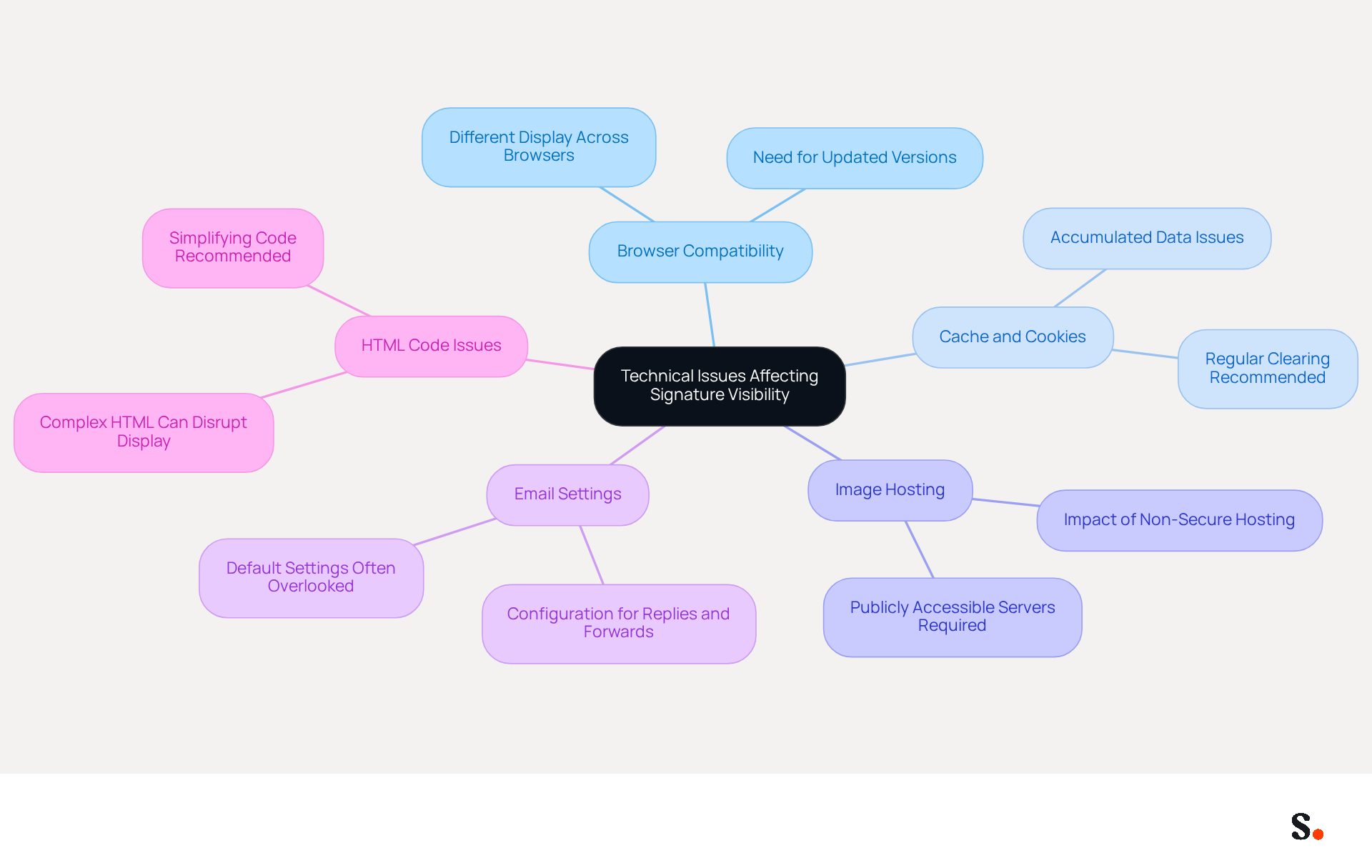
Technical problems can severely hinder the visibility of email identifiers, impacting professional communication. Key factors include:
- Browser Compatibility: Various browsers might display Scribe email footers in different ways. Users should ensure they are using an updated version of a compatible browser to avoid display discrepancies.
- Cache and Cookies: Accumulated cache and cookies can lead to display issues. Regularly clearing these can often resolve issues related to why is my email signature not showing up in gmail, as outdated data may interfere with the email service's functionality.
- Image Hosting: If a document includes images, they must be hosted on a publicly accessible server. Images stored on private servers or non-secure (HTTP) servers may not display, leading to a lack of professionalism in communications.
- Email Settings: Users must ensure that their personal mark is configured to show in replies and forwards, as this option can often be overlooked. By default, Gmail may conceal personal identifiers in message threads, leading recipients to question why is my email signature not showing up in gmail.
- HTML Code Issues: Complex HTML code often leads to rendering problems that can disrupt communication. Simplifying the HTML of the email can help ensure it displays correctly across different platforms, avoiding potential formatting issues that could lead to missing elements.
Understanding these technical issues is essential for maintaining professionalism and brand consistency in communication. Scribe underscores the importance of ensuring that electronic correspondence identifiers are consistently displayed; it is essential for maintaining trust and maximizing engagement. Additionally, research shows that 76% of recipients believe branded marks enhance trust in the sender. By addressing these factors, users can enhance the visibility and effectiveness of their marketing tools.
Understand the Consequences of an Invisible Email Signature
The lack of a visible email signature can significantly undermine professional credibility and communication effectiveness:
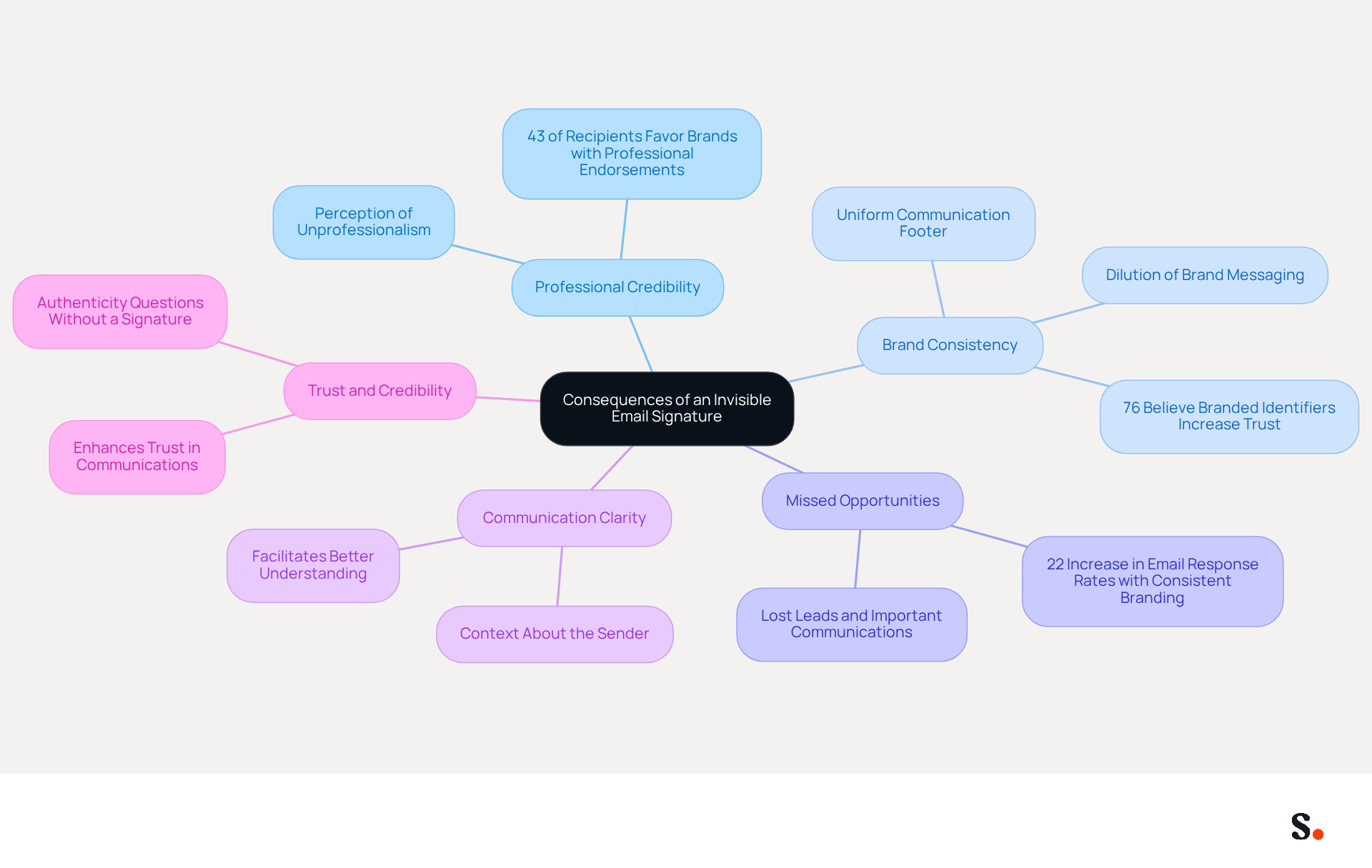
- Think of your email signature as your digital business card. This absence can lead to perceptions of unprofessionalism, which raises the question of why is my email signature not showing up in gmail, jeopardizing valuable connections. Studies indicate that 43% of recipients develop a more favorable perception of brands with professional endorsements, highlighting the importance of maintaining a professional image through visible email signatures.
- Brand Consistency: A uniform communication footer is essential for strengthening brand identity. Lacking endorsements can create confusion and dilute brand messaging, undermining the organization’s credibility. In fact, 76% of recipients believe that branded identifiers increase trust in the sender.
- Missed Opportunities: Signatures often include essential contact information and calls to action. Their absence can result in lost leads and important communications, hindering business growth. Research indicates that consistent email branding can lead to a 22% increase in email response rates, emphasizing the significance of maintaining visible branding for maximizing engagement.
- Communication Clarity: A personal mark provides context about the sender, including their role and contact details, which facilitates better communication and understanding.
- A well-crafted mark enhances trust and credibility. An unseen mark may lead recipients to question the authenticity of the message, making them wonder why is my email signature not showing up in gmail, which could affect future communications. The potential marketing prospects missed without efficient communication footers can greatly influence a firm's profitability.
Recognizing these outcomes underscores the necessity of maintaining visible electronic correspondence identifiers. They are crucial for upholding a refined brand image and facilitating effective communication. Furthermore, with automated synchronization of email branding with Aircall, any modifications made in your Aircall setup will automatically be reflected in your email branding, ensuring brand consistency. Additionally, Scribe's SOC 2 Type II compliance guarantees secure data handling, reinforcing trust and credibility in your communications.
Implement Best Practices for Consistent Signature Visibility
To enhance the visibility of Gmail signatures, it is crucial to adopt effective management practices:
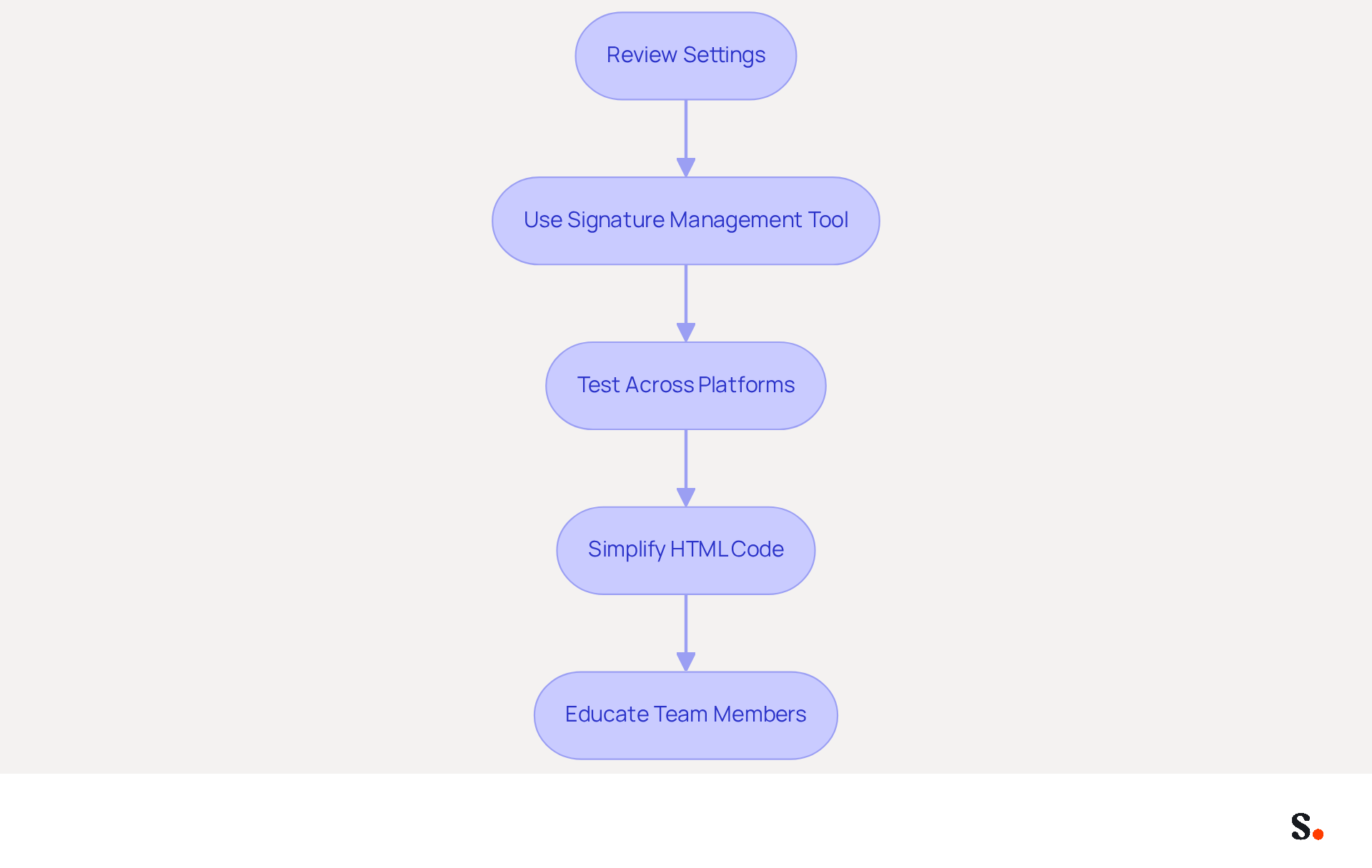
- Regularly review settings to confirm that the identifier is enabled and correctly set up for all message types in Gmail, as this may help resolve the issue of why is my email signature not showing up in gmail.
- Use a Signature Management Tool: Implementing a professional management tool like Scribe can automate and standardize signatures across the organization, ensuring uniformity and compliance with branding guidelines. Joining Scribe's Affiliate Program allows you to earn a 50% commission and offer new users a $30 credit, all while promoting brand consistency. Scribe is also SOC 2 Type II compliant and adheres to GDPR and CCPA regulations, ensuring the security of your data.
- Test Across Platforms: Regularly evaluate how identifiers appear on various devices and messaging clients to ensure compatibility and visibility. This aids in maintaining a professional appearance and boosts engagement, which makes me wonder why is my email signature not showing up in gmail, as emails with branded elements receive a 22% higher response rate than those without.
- Simplify HTML Code: Keep the HTML code straightforward to avoid rendering issues. Excessive formatting and large images can lead to display issues, which may hinder the effectiveness of the branding.
- Educate Team Members: Provide training for team members on how to set up and maintain their email identifiers effectively. Many professionals neglect to update their contact details, risking outdated information. Regular updates are essential for maintaining brand consistency.
By applying these optimal methods, users can improve the visibility and effectiveness of their electronic correspondences. Ultimately, neglecting these practices can diminish the impact of your brand in digital communications.
Conclusion
Invisible email signatures can undermine professionalism and hinder effective communication. Understanding the reasons behind an invisible email signature in Gmail is essential for maintaining professionalism and effective communication. Common issues such as incorrect settings, browser compatibility, and formatting errors can significantly impact the visibility of email signatures. Addressing these challenges helps users display their signatures consistently, which reinforces brand identity and builds trust with recipients.
Key insights discussed include:
- The importance of regularly reviewing settings
- Utilizing management tools like Scribe for standardized signatures
- Simplifying HTML code to avoid rendering issues
Without a visible signature, professionals risk losing credibility and potential business opportunities. Statistics show that branded emails lead to higher response rates, highlighting the importance of effective email branding.
In conclusion, prioritizing email signature visibility is crucial for any organization aiming to uphold a professional image and maximize engagement. Implementing best practices and leveraging tools like Scribe can streamline this process, ensuring that email signatures not only appear consistently but also contribute to a cohesive brand presence. Addressing visibility issues now can transform communication effectiveness and foster stronger professional connections.
Frequently Asked Questions
Why is my email signature not showing up in Gmail?
There are several common reasons for missing email signatures in Gmail, including forgetting to enable the signature in settings, selecting 'No sign-off' as the default option, managing multiple accounts incorrectly, browser issues, discrepancies between desktop and mobile configurations, and formatting errors.
How can I check if my email signature is enabled in Gmail?
You can check if your email signature is enabled by going to the settings in Gmail and ensuring that the signature option is selected and not set to 'No sign-off'.
What should I do if I manage multiple Gmail accounts and my signature is missing?
If you manage multiple accounts, ensure that you have set the signature for the correct account, as confusion can lead to the signature not appearing.
How can browser issues affect my Gmail signature visibility?
Browser settings or extensions can interfere with Gmail's functionality, potentially causing your email signature not to show. Testing in private browsing mode can help determine if the issue is browser-related.
Why might my email signature not sync between desktop and mobile devices?
Signatures configured on desktop may not automatically sync to mobile devices, leading to inconsistencies in appearance across platforms.
What formatting errors should I avoid to ensure my email signature is visible?
To avoid visibility issues, keep your email signature design simple and use standard fonts.
How can I enable one-click synchronization with Scribe for my email signature?
To enable one-click synchronization with Scribe, you need to provide the necessary permissions as a Super Admin of your service provider, allowing seamless updates from your provider directory.
What impact does infrequent updates of email signatures have on branding?
Infrequent updates can greatly affect visibility and effectiveness, as many companies do not monitor their messaging branding performance, leading to a lack of consistency in professional email formats.
List of Sources
- Identify Common Reasons for Missing Gmail Signatures
- Solving a Gmail signature problem (https://signitic.com/en/guides/solving-a-gmail-signature-problem)
- 40+ Email Signature Statistics for 2026 (Data + Insights) (https://wavecnct.com/blogs/email-signature-statistics)
- 4 Best Practices to Fix Why Your Signature Isn't Showing in Gmail (https://scribe-mail.com/en-US/blog/4-best-practices-to-fix-why-your-signature-isn-t-showing-in-gmail)
- What To Do When Your Gmail Signature is Not Showing Up (https://appointlet.com/blog/gmail-signature-not-showing-up)
- Examine Technical Issues Affecting Signature Visibility
- Solving a Gmail signature problem (https://signitic.com/en/guides/solving-a-gmail-signature-problem)
- Fix Your Missing Gmail Signature: 8 Troubleshooting Steps & Best Practices | Newoldstamp - NEWOLDSTAMP (https://newoldstamp.com/blog/gmail-signature-not-showing-up)
- Why Is My Gmail Signature Not Showing Up? Common Causes Explained (https://scribe-mail.com/en-US/blog/why-is-my-gmail-signature-not-showing-up-common-causes-explained)
- What To Do When Your Gmail Signature is Not Showing Up (https://appointlet.com/blog/gmail-signature-not-showing-up)
- Email signature statistics and trends in 2024 (https://wisestamp.com/blog/email-signature-statistics)
- Understand the Consequences of an Invisible Email Signature
- The impact of email signatures on your branding (https://signitic.com/en/resources/the-impact-of-email-signatures-on-your-branding)
- Why Team Email Signatures Matter More Than You Think: The Hidden Impact on Brand Trust and Customer Experience (https://getmailbird.com/why-team-email-signatures-matter-brand-trust)
- Why Is My Email Signature Not Showing Up in Outlook? (https://scribe-mail.com/en-US/blog/why-is-my-email-signature-not-showing-up-in-outlook)
- The Hidden Power Behind Email Signature Management | Black Pearl Mail (https://blackpearlmail.com/blog/the-hidden-power-behind-email-signature-management)
- Signature Mail Pro : Pourquoi je recommande Email Impact – Gekkode (https://gekkode.com/en/actualites/professional-email-signature-email-impact)
- Implement Best Practices for Consistent Signature Visibility
- 40+ Email Signature Statistics for 2026 (Data + Insights) (https://wavecnct.com/blogs/email-signature-statistics)
- Email Signature Best Practices - NEWOLDSTAMP (https://newoldstamp.com/blog/email-signature-best-practices)
- 4 Best Practices for Your Google Gmail Signature Strategy (https://scribe-mail.com/en-US/blog/4-best-practices-for-your-google-gmail-signature-strategy)
- Email signature statistics: Why every business should optimize their email signatures — Stripo.email (https://stripo.email/blog/email-signature-statistics-why-every-business-should-optimize-their-email-signatures)
- WiseStamp Sets a New Standard for Email Signature Creation (https://prnewswire.com/news-releases/wisestamp-sets-a-new-standard-for-email-signature-creation-302689811.html)
Get started with Scribe
Create your signature in minutes
Free 14-day trial — no credit card.