Why Is My Email Signature Not Showing Up in Outlook?
The absence of an email signature in Outlook can significantly impact professional communication and brand perception. It's essential to understand why email
Sophie Grant
Email Signature Specialist, Scribe
On this page
- Introduction
- Identify Common Causes of Missing Email Signatures in Outlook
- Implement Troubleshooting Steps to Restore Email Signatures
- Understand the Impact of Missing Signatures on Brand Consistency
- Explore Automated Solutions for Effective Email Signature Management
- Conclusion
- Frequently Asked Questions
- List of Sources
Introduction
The absence of an email signature in Outlook can significantly impact professional communication and brand perception. It's essential to understand why email signatures might not show up, as this can affect how polished your brand appears online. Readers will explore practical troubleshooting steps and the significant impact of missing signatures on brand identity. Identifying the challenges that lead to these signature issues is vital for organizations looking to enhance their branding efforts. By implementing effective solutions, organizations can significantly enhance their brand image and communication effectiveness.
Identify Common Causes of Missing Email Signatures in Outlook
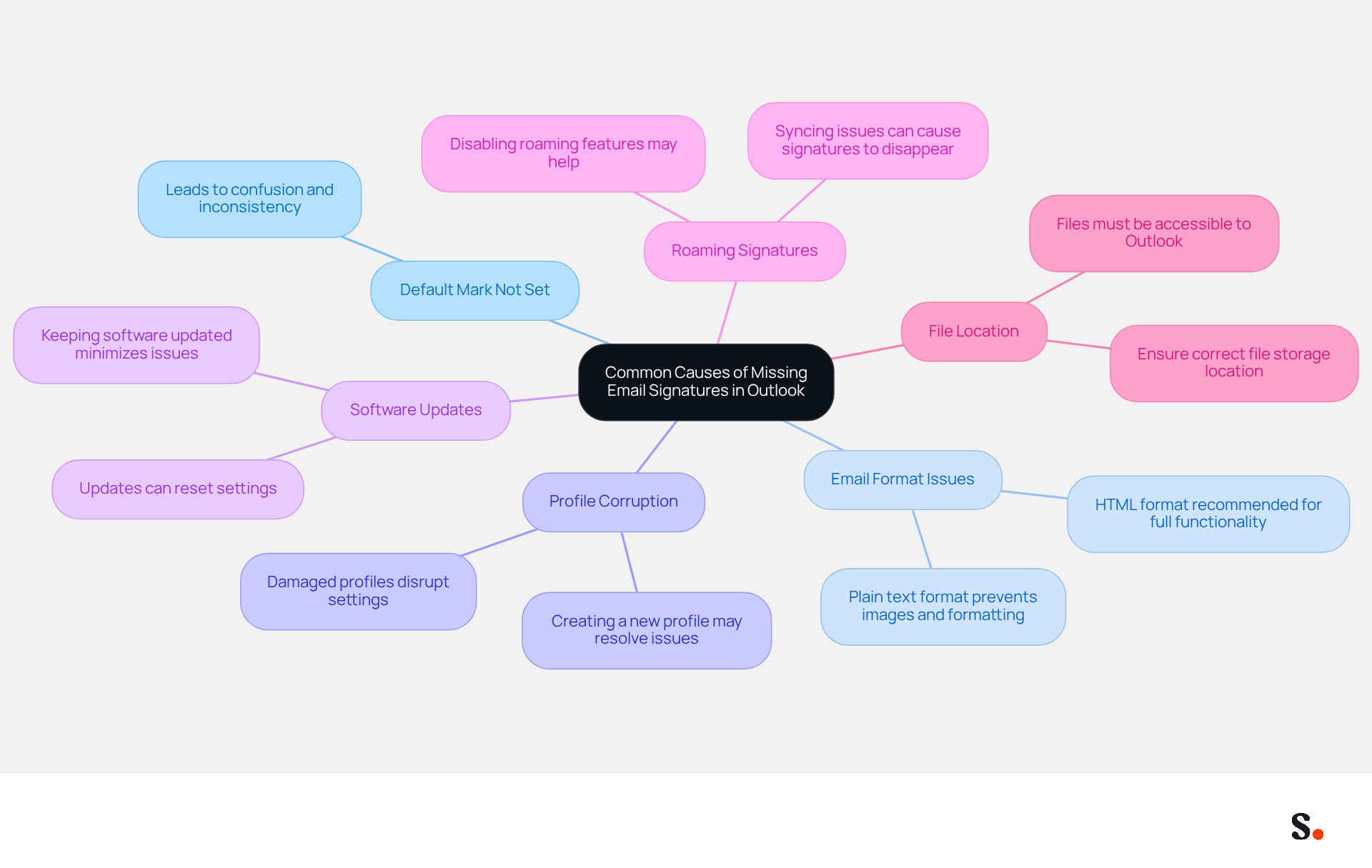
Identifying the root causes of why my email signature is not showing up in Outlook is essential for maintaining a professional image. Multiple elements can contribute to the issue of why is my email signature not showing up in Outlook in the messaging application. Common causes include:
- Default Mark Not Set: This oversight can lead to confusion and inconsistency in email communication. If this setting is not enabled, you might be asking yourself why is my email signature not showing up in Outlook.
- Email Format Issues: When the email format is plain text, images and formatting in the footer might not show up properly. Using HTML format is advised for complete functionality, especially when considering why is my email signature not showing up in Outlook.
- Profile Corruption: User profiles can become damaged, leading to issues with configuration settings. Creating a new profile may resolve the issue of why is my email signature not showing up in Outlook and restore functionality.
- Software Updates: Keeping your software updated is key to minimizing synchronization issues. Updates to Outlook or the operating system can reset settings or cause temporary glitches, which may explain why my email signature is not showing up in Outlook.
- Roaming Signatures: In organizations utilizing roaming identifiers, syncing issues can result in these elements disappearing or not displaying correctly. Disabling this feature may prevent complications in managing identifiers, which could explain why my email signature is not showing up in Outlook.
- File Location: If the files are stored in a place that Outlook cannot access, they will not show up in messages. Users should ensure that the signature files are correctly located and accessible to resolve the issue of why is my email signature not showing up in Outlook.
Statistics show that 44.4% of users update their contact identifiers infrequently, emphasizing the necessity for active management to uphold brand consistency. Addressing these common issues not only enhances brand consistency but also reinforces a professional image in all communications.
Implement Troubleshooting Steps to Restore Email Signatures
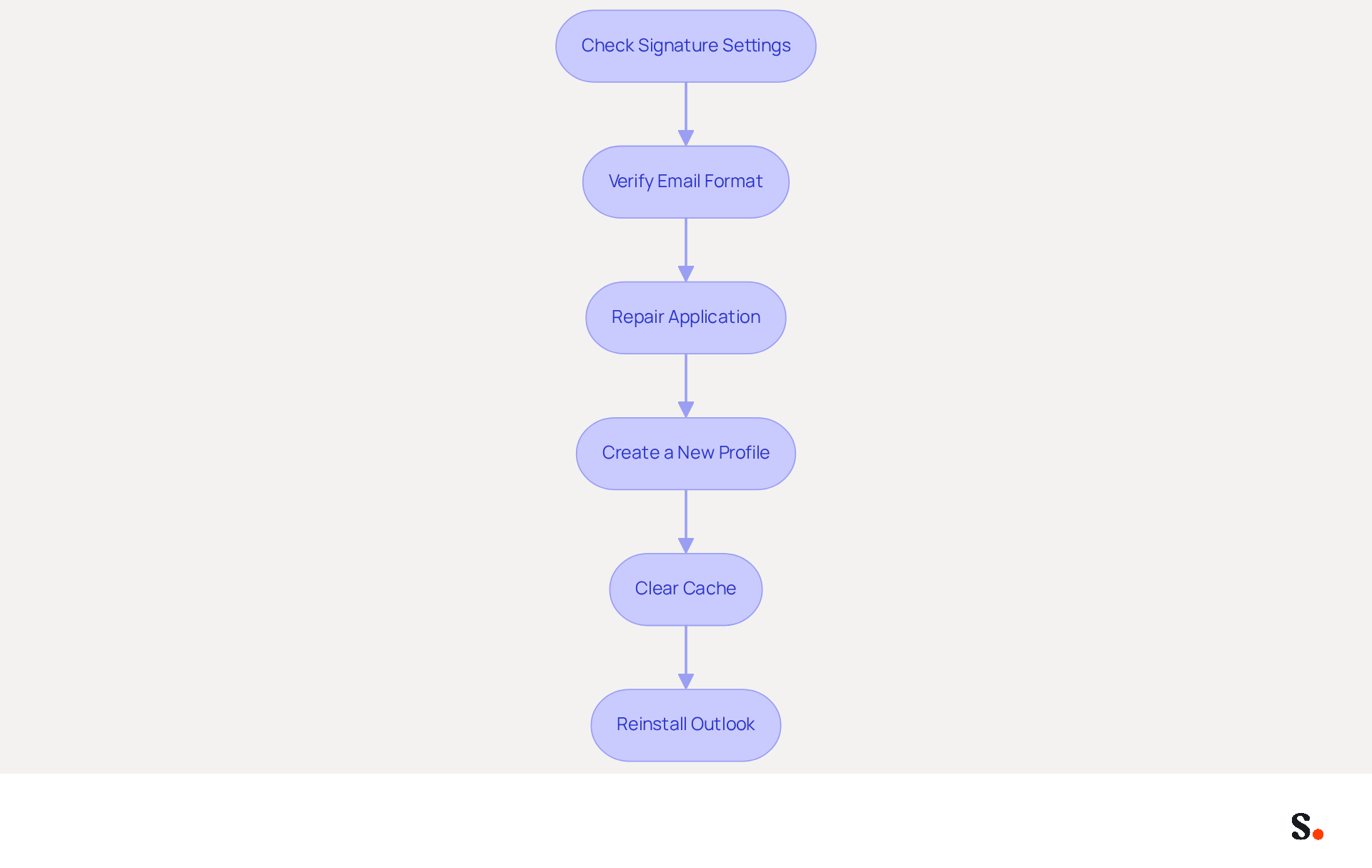
Restoring missing email signatures in Outlook requires a systematic approach to troubleshooting:
- Check Signature Settings: Navigate to Outlook > File > Options > Mail > Signatures. Ensure that a default signature is selected for new messages and replies/forwards.
- Verify Email Format: Confirm that the email format is set to HTML by checking under File > Options > Mail > Compose messages.
- Repair Application: If users encounter persistent issues that hinder their ability to manage email signatures effectively, consider fixing the application installation. This can be done through Control Panel > Programs > Programs and Features, selecting Microsoft Office, and choosing 'Change' to initiate a repair.
- Create a New Profile: If the profile is suspected to be corrupted, create a new email profile via Control Panel > Mail > Show Profiles > Add.
- Clear Cache: Occasionally, removing the email application's temporary files can resolve display problems. Close the email application, navigate to the cache folder, and delete its contents.
- Reinstall Outlook: If all else fails, uninstalling and reinstalling Outlook could be the solution to ongoing issues. Ensure to back up any important data before proceeding.
By following these steps, users can effectively troubleshoot and restore their email signatures, especially when they encounter the problem of why is my email signature not showing up in Outlook. Importantly, organizations that adopt systematic methods for managing digital identifiers, such as using Scribe, report significant enhancements in brand consistency and user engagement. With over 10,000 marketing and IT teams using Scribe globally, branded identifiers drive a 22% increase in response rates, and 42% of consumers show negative sentiments towards businesses that do not include a branded identifier, emphasizing the essential need for effective management of branded communications. Additionally, Scribe's automated synchronization of signatures with Aircall ensures that any changes made in your Aircall configuration will be automatically reflected in your Scribe signatures, keeping your team's signature information current without requiring action from individual users. This feature not only enhances brand consistency but also reinforces the importance of maintaining professional communication standards. Moreover, Scribe's SOC 2 Type II compliance guarantees that your data is managed securely, underscoring the critical importance of maintaining professional communication standards in today's digital landscape.
Understand the Impact of Missing Signatures on Brand Consistency
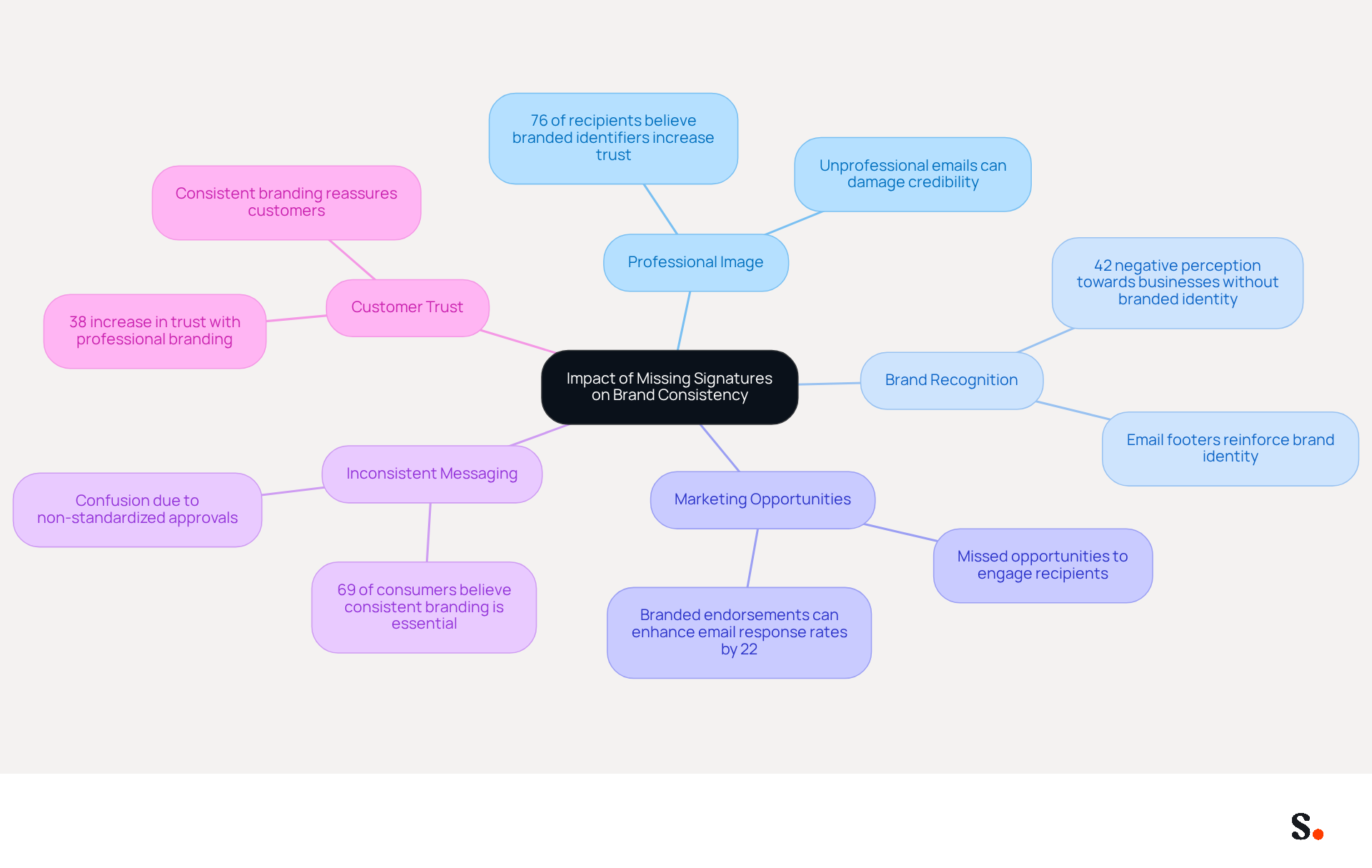
The absence of digital identifiers can severely undermine a brand's consistency and marketing effectiveness. Here are the key impacts:
- Professional Image: An email missing a closing can appear unprofessional, leading recipients to question the sender's credibility. This can damage trust and hinder business relationships, as 76% of recipients believe that branded identifiers increase trust in the sender.
- Brand Recognition: Email footers act as vital branding tools, reinforcing brand identity with every communication. Without them, chances for brand reinforcement are lost, potentially resulting in a 42% negative perception among consumers towards businesses that lack a branded identity.
- Marketing Opportunities: Signatures can include promotional banners or calls to action. Lacking endorsements means missed opportunities to engage recipients and drive traffic to websites or campaigns, with studies indicating that branded endorsements can enhance email response rates by 22%.
- Inconsistent Messaging: When approvals are not standardized across an organization, it can lead to inconsistent messaging and branding, confusing recipients and diluting brand identity. Research shows that 69% of consumers believe a consistent professional branded identity is essential for companies.
- Customer Trust: Consistent branding fosters trust. When customers notice a professional mark, it reassures them of the legitimacy of the communication, enhancing their overall experience. A well-organized mark can enhance consumer trust in the authenticity of a business by 38%.
To ensure a cohesive and professional image, it is imperative to address the absence of digital identifiers without delay.
Explore Automated Solutions for Effective Email Signature Management
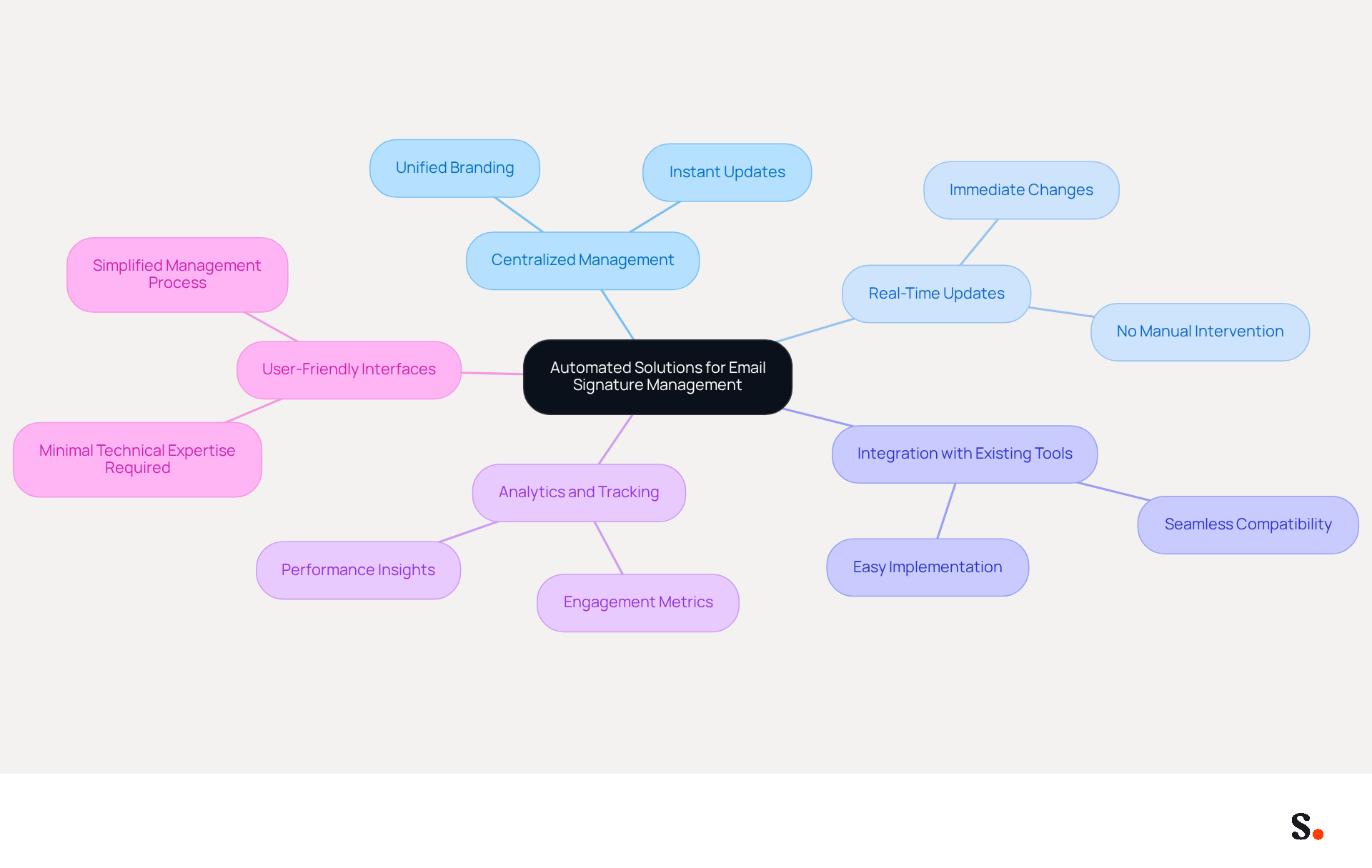
Managing digital identities manually can lead to inefficiencies and inconsistencies that hinder organizational branding efforts. Automated solutions for managing digital identities can significantly enhance efficiency and consistency across an organization. Here are some key benefits and options:
- Centralized Management: Automated tools enable centralized control over email branding, ensuring that all employees utilize the same branding elements, which is crucial for maintaining a cohesive brand image across all communications, particularly when addressing concerns such as why is my email signature not showing up in Outlook.
- Real-Time Updates: With automated solutions, any changes to branding or promotional content can be updated instantly across all email footers, eliminating the need for manual updates.
- Integration with Existing Tools: Many automated document management solutions integrate seamlessly with platforms like Microsoft 365 and Google Workspace, making implementation straightforward.
- Analytics and Tracking: Some tools provide analytics features that enable businesses to monitor engagement metrics related to digital identifiers, offering insights into their effectiveness as marketing instruments.
- User-Friendly Interfaces: Most automated solutions are designed for ease of use, requiring minimal technical expertise from users, which simplifies the management process.
Scribe offers dedicated customer support, allowing you to connect with a knowledgeable representative to address any concerns promptly. Additionally, we are committed to environmental sustainability, directing 1% of our revenue to support emerging carbon removal technologies through Stripe Climate. This commitment not only strengthens our service offering but also resonates with organizations aiming to contribute positively to environmental sustainability.
Examples of popular automated tools for managing signatures include Scribe, which enables Marketing teams to handle them independently after initial IT setup, ensuring 100% brand consistency and measurable marketing ROI. With Scribe, you can streamline your email signature processes and resolve the question of why is my email signature not showing up in Outlook, ensuring that branding remains consistent and effective.
Conclusion
Organizations face significant challenges when email signatures are missing, impacting their professional image and brand consistency. This article identifies several common causes for this issue, such as default settings, email format problems, and profile corruption. By understanding these factors, users can effectively troubleshoot and restore their email signatures, thereby reinforcing their brand identity in every communication.
Key insights discussed include:
- The importance of maintaining a cohesive professional image
- The impact of missing signatures on brand recognition
- The potential marketing opportunities lost without effective email signatures
Organizations utilizing automated solutions like Scribe can significantly enhance their branding efforts, ensuring that all employees present a unified front in their communications. With Scribe's capabilities, marketing teams can independently manage email signatures, achieving 100% brand consistency and measurable marketing ROI.
In conclusion, addressing email signature issues is essential for maintaining brand integrity and trust. Organizations must prioritize effective management of digital identifiers to foster trust, enhance brand recognition, and capitalize on marketing opportunities. By leveraging automated solutions, businesses can streamline their processes and ensure that their email communications reflect their brand's professionalism and integrity. By prioritizing email signature management, organizations can build a stronger brand presence that resonates with their audience and fosters trust.
Frequently Asked Questions
What are the common causes of missing email signatures in Outlook?
Common causes include not setting the default mark, email format issues, profile corruption, software updates, roaming signatures, and file location problems.
How does the default mark affect email signatures in Outlook?
If the default mark is not set, it can lead to confusion and inconsistency in email communication, resulting in the email signature not showing up.
Why do email format issues prevent signatures from displaying?
When the email format is set to plain text, images and formatting in the signature may not appear correctly. Using HTML format is recommended for full functionality.
What should I do if my Outlook profile is corrupted?
If your user profile is damaged, creating a new profile may resolve the issue and restore the functionality of your email signature.
How can software updates impact email signatures in Outlook?
Keeping your software updated is important as updates can reset settings or cause temporary glitches, which may lead to the email signature not showing up.
What are roaming signatures and how do they affect email signatures?
Roaming signatures are used in organizations with roaming identifiers. Syncing issues can cause these signatures to disappear or not display correctly.
What should I check regarding file location for my email signature?
Ensure that the signature files are stored in a location that Outlook can access; if they are not, the signatures will not show up in messages.
Why is it important to manage email signatures actively?
Active management is necessary to uphold brand consistency, as statistics show that 44.4% of users update their contact identifiers infrequently.
List of Sources
- Identify Common Causes of Missing Email Signatures in Outlook
- Outlook Signature Disappears? 6 Common Problems + Fixes (https://conbool.com/blog/outlook-signature-disappears-fixes-problems)
- Resolved: Why is My Email Signature Not Showing in Outlook | Crossware365 (https://crossware365.com/blog/resolved-why-is-my-email-signature-not-showing-in-outlook)
- Why Did My Outlook Signature Disappear? Common Causes Explained (https://scribe-mail.com/en-US/blog/why-did-my-outlook-signature-disappear-common-causes-explained)
- Implement Troubleshooting Steps to Restore Email Signatures
- 40+ Email Signature Statistics for 2026 (Data + Insights) (https://wavecnct.com/blogs/email-signature-statistics)
- Email Signature Statistics: A Closer Look at Email Signatures in 2026 (https://mysignature.io/blog/email-signature-statistics)
- Email Signatures vanishing - New Outlook | Microsoft Community Hub (https://techcommunity.microsoft.com/discussions/outlookgeneral/email-signatures-vanishing---new-outlook/4418809)
- Why Did My Outlook Signature Disappear? Common Causes Explained (https://scribe-mail.com/en-US/blog/why-did-my-outlook-signature-disappear-common-causes-explained)
- How to Troubleshoot Outlook Roaming Signatures - Missing or Duplicate Signatures (https://help.opensense.com/docs/how-to-troubleshoot-outlook-roaming-signatures-missing-or-duplicate-signatures)
- Understand the Impact of Missing Signatures on Brand Consistency
- Research Recap: Branded Email Signatures Increase Company Recognition, Trust - Demand Gen Report (https://demandgenreport.com/industry-news/research-recap-branded-email-signatures-increase-company-recognition-trust/47252)
- Why Team Email Signatures Matter More Than You Think: The Hidden Impact on Brand Trust and Customer Experience (https://getmailbird.com/why-team-email-signatures-matter-brand-trust)
- Exclaimer Research: 67% of Marketers Expect Email Signatures to Support With Lead Gen In 2023 (https://businesswire.com/news/home/20230612141095/en/Exclaimer-Research-67-of-Marketers-Expect-Email-Signatures-to-Support-With-Lead-Gen-In-2023)
- The impact of email signatures on your branding (https://signitic.com/en/resources/the-impact-of-email-signatures-on-your-branding)
- Optimize Your Email Signatures with Office 365 for Brand Consistency (https://scribe-mail.com/en-US/blog/optimize-your-email-signatures-with-office-365-for-brand-consistency)
- Explore Automated Solutions for Effective Email Signature Management
- Automating Email Signatures: How IT Teams Streamline Processes & Reduce Risk (https://exclaimer.com/blog/streamlining-it-processes-automated-email-signatures)
- Research Recap: Branded Email Signatures Increase Company Recognition, Trust - Demand Gen Report (https://demandgenreport.com/industry-news/research-recap-branded-email-signatures-increase-company-recognition-trust/47252)
- Why you should be using an email signature manager (https://blinq.me/blog/why-you-should-be-using-an-email-signature-manager)
- Why Email Signature Management Matters for Your Business (https://vectorchoice.com/blog/why-email-signature-management-is-more-important-than-you-think)
- Compare Email Signature Management Solutions for Your Marketing Needs (https://scribe-mail.com/en-US/blog/compare-email-signature-management-solutions-for-your-marketing-needs)
Get started with Scribe
Create your signature in minutes
Free 14-day trial — no credit card.