Why Isn't My Signature Showing Up in Outlook? Common Causes Explained
Understanding why email signatures may be missing in Outlook is crucial for effective communication and maintaining a professional image. In this article, we
Sophie Grant
Email Signature Specialist, Scribe
On this page
- Introduction
- Identify Common Causes for Missing Email Signatures in Outlook
- Explore Troubleshooting Steps to Fix Signature Issues
- Understand the Impact of Missing Signatures on Brand Consistency
- Leverage Automated Solutions for Effective Email Signature Management
- Conclusion
- Frequently Asked Questions
- List of Sources
Introduction
Understanding why email signatures may be missing in Outlook is crucial for effective communication and maintaining a professional image. In this article, we explore the common reasons signatures might go missing, offering insights into troubleshooting steps that can resolve these issues.
What happens when these digital business cards fail to show up? This absence can lead to confusion and miscommunication, undermining brand credibility and prompting the need for automated solutions that ensure seamless management of email signatures across all platforms.
Identify Common Causes for Missing Email Signatures in Outlook
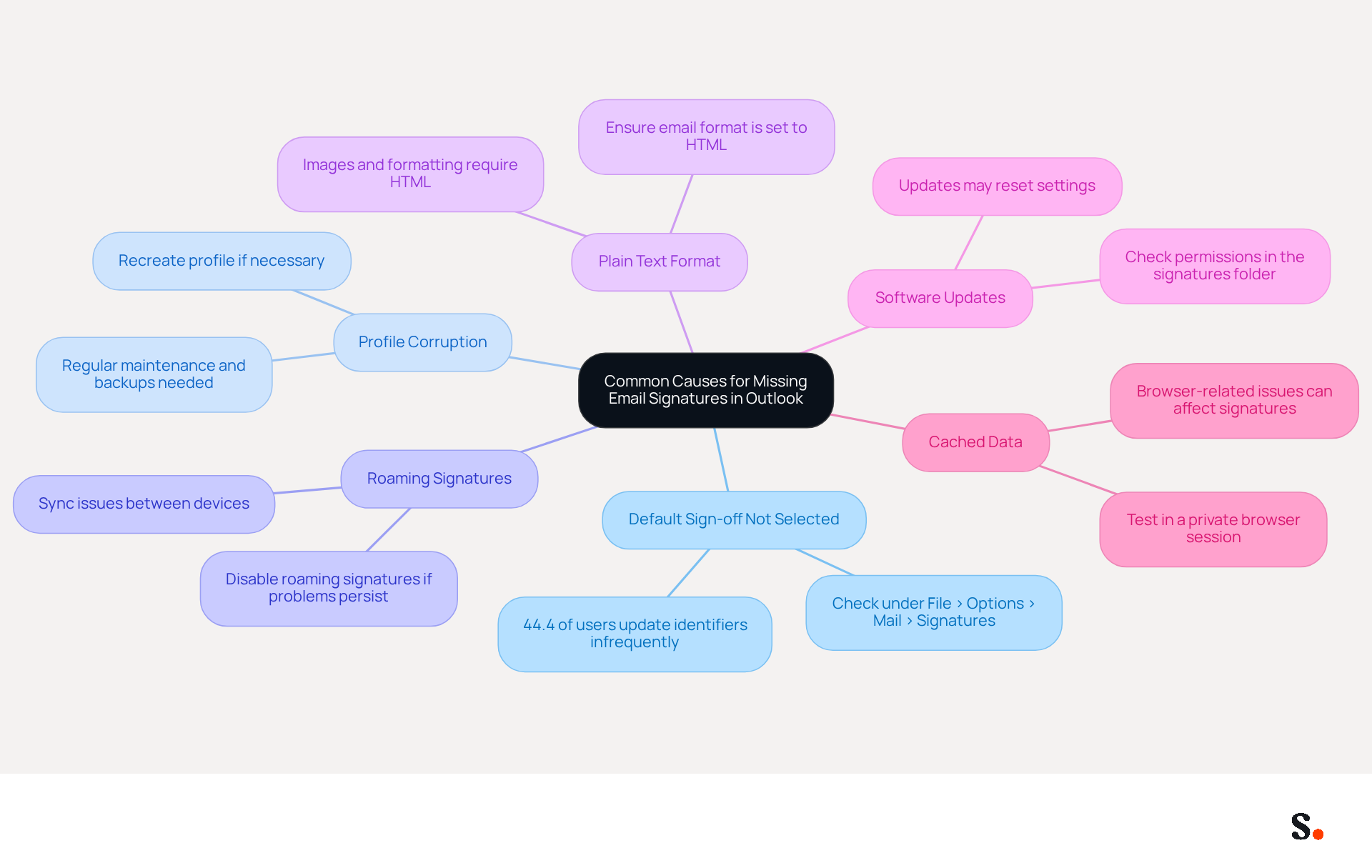
Identifying why isn't my signature showing up in Outlook is crucial for effective email communication. There are multiple elements that can explain why isn't my signature showing up in Outlook. Common causes include:
- Users often overlook selecting a default sign-off for new messages, which is why isn't my signature showing up in Outlook. As of 2023, 44.4% of users update their contact identifiers infrequently, underscoring the importance of proactive management for effective branding.
- Profile Corruption: Damaged profiles can disrupt the normal functioning of messages, causing them to vanish. Regular maintenance of the email profile, including backups and recreating it when necessary, helps avoid disruptions in managing email identifiers.
- The use of roaming signatures, which sync settings across devices, can sometimes lead to issues like why isn't my signature showing up in Outlook if there are sync problems. Users have reported that enabling roaming features can cause inconsistencies, particularly when switching between desktop and web versions of Outlook.
- If the message format is set to plain text instead of HTML, it can lead to issues such as why isn't my signature showing up in Outlook, as sign-offs often include images and formatting that require HTML. Users should ensure that the email format is configured to HTML for proper display compatibility.
- Changes to the email application or the operating system through software updates can unintentionally reset or modify settings, which may explain why isn't my signature showing up in Outlook. For example, newly created email identifiers may vanish after updates due to lacking write permissions in the folder, which can be resolved by granting full control permissions.
- Cached Data: Browser-related issues, such as cached data or extensions, can prevent identifiers from loading correctly, especially in the web version of Outlook. Testing behavior in a private browser session can help rule out browser-related issues.
Understanding these common causes is the first step in troubleshooting related issues effectively. Case studies reveal that users often encounter difficulties with marks disappearing or not saving, emphasizing the importance of proper configuration and management across all platforms. By addressing these common issues, users can ensure their email signatures consistently reflect their professional branding.
Explore Troubleshooting Steps to Fix Signature Issues
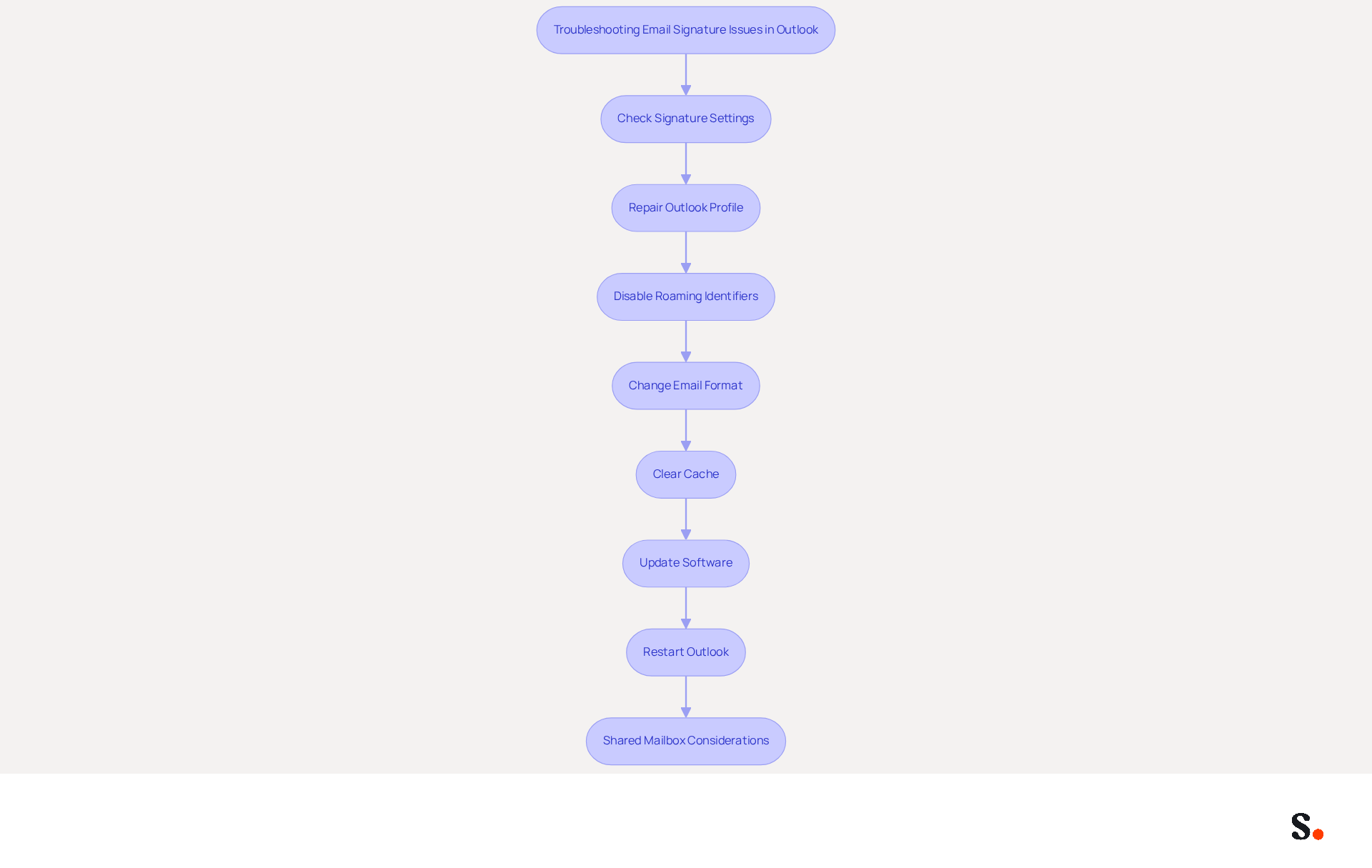
The issue of why isn't my signature showing up in Outlook can undermine professional communication and brand integrity. To resolve issues with missing email signatures, users can follow these troubleshooting steps:
- Check Signature Settings: Navigate to Outlook's settings and ensure that a default sign-off is assigned for both new messages and replies/forwards. This is vital; without a professional email signature, potential clients may question your credibility. 64-70% of respondents believe a professional branded email footer enhances trust and credibility.
- Repair Outlook Profile: If the profile is suspected to be corrupted, creating a new Outlook profile can restore functionality. If the current profile is causing issues, this step is essential.
- Disable Roaming Identifiers: If using roaming identifiers, consider disabling this feature temporarily to see if it resolves the issue. Roaming identifiers may not sync properly across devices, leading to visibility issues.
- Change Email Format: Ensure that the email format is set to HTML. This can be accomplished in the settings under the Mail section, as identifiers with logos, links, or colors may not load correctly if the format is set to Plain Text.
- Clear Cache: For users accessing the email service via a web browser, clearing the browser cache and cookies can help resolve loading issues. This step is often overlooked but can significantly improve performance.
- Update Software: Ensure that both the email client and the operating system are current, as updates can resolve issues that impact functionality. Regular updates are essential for maintaining software integrity.
- Restart Outlook: Sometimes, a simple restart can save you time and hassle. This quick fix can often resolve temporary issues that prevent the email identification from showing.
- Shared Mailbox Considerations: If using shared mailboxes, remember that they often require manual selection of a sign-off each time, as they do not always trigger the default user sign-off. This can result in confusion, particularly for IT staff who may be troubleshooting visibility issues related to identifiers.
By following these steps, users can effectively troubleshoot and resolve issues related to why isn't my signature showing up in Outlook. Furthermore, integrating Scribe with Google Workspace enables automatic updates and time savings, ensuring that any changes in your team’s information are reflected in their identifiers without manual input. Scribe's automated synchronization with Aircall improves consistency and adherence to SOC 2 Type II, GDPR, and CCPA standards, making it a secure option for managing digital identities. Addressing these issues not only enhances brand perception but also fosters trust with clients and partners.
Understand the Impact of Missing Signatures on Brand Consistency
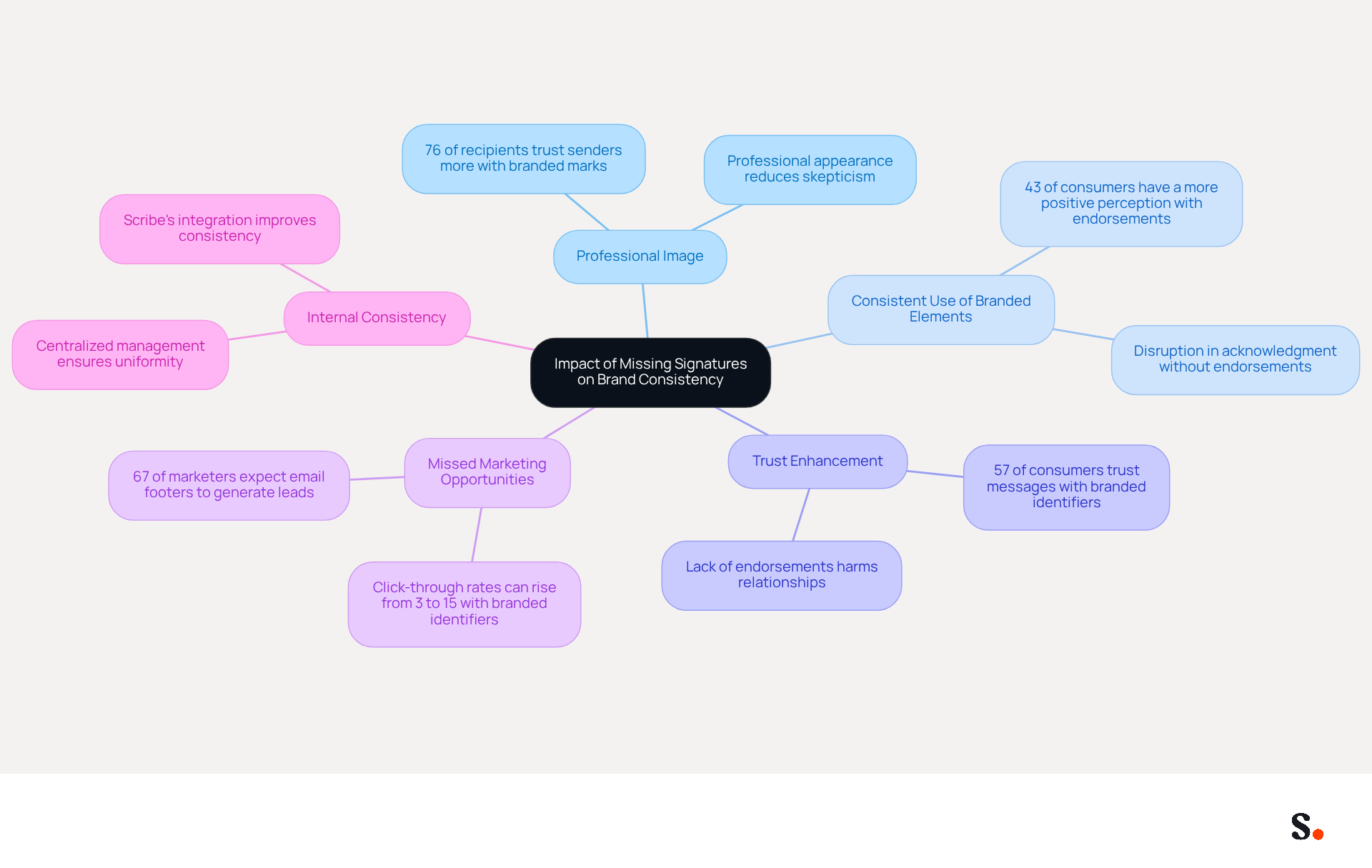
The absence of digital identifiers can significantly undermine a brand's credibility and marketing effectiveness. Here are several key considerations:
- Professional Image: A digital business card functions as a virtual identifier. This lack of professionalism can lead to skepticism about the sender's reliability. A study reveals that 76% of recipients trust senders more when they see branded marks, emphasizing the significance of a professional appearance.
- Consistent use of branded elements reinforces identity. When endorsements are missing, it disrupts this acknowledgment, making it difficult for recipients to connect emails with the identity. A study indicates that 43% of consumers develop a more positive perception of brands with professional endorsements.
- A well-crafted mark enhances trust. Lacking endorsements can lead recipients to view the sender as less trustworthy or organized, potentially harming relationships. Indeed, 57% of consumers have confidence in messages from businesses that employ branded identifiers, highlighting their importance in establishing trust.
- Missed Marketing Opportunities: Signatures can include promotional banners or calls to action. This oversight can result in lost engagement and conversion opportunities. Click-through rates for messages with branded identifiers can rise from 3% to 15%, demonstrating their effectiveness as powerful marketing tools. Furthermore, 67% of marketers anticipate that email footers will assist in generating leads this year, further highlighting their marketing potential.
- Internal Consistency: When employees present different representations, it can confuse clients and dilute the messaging. Centralized management of digital identifiers ensures consistency, which is essential for maintaining a unified presence. Scribe's automated synchronization with Aircall guarantees that any modifications made in your Aircall setup will automatically be reflected in your Scribe profiles, improving consistency in your identity. Furthermore, Scribe's SOC 2 Type II compliance guarantees secure data handling, addressing important security concerns.
Ultimately, neglecting digital identifiers can jeopardize not just communication but also long-term brand reputation and marketing success. Organizations that emphasize consistent and professional digital communication formats can improve their overall brand image and effectiveness in interaction.
Leverage Automated Solutions for Effective Email Signature Management
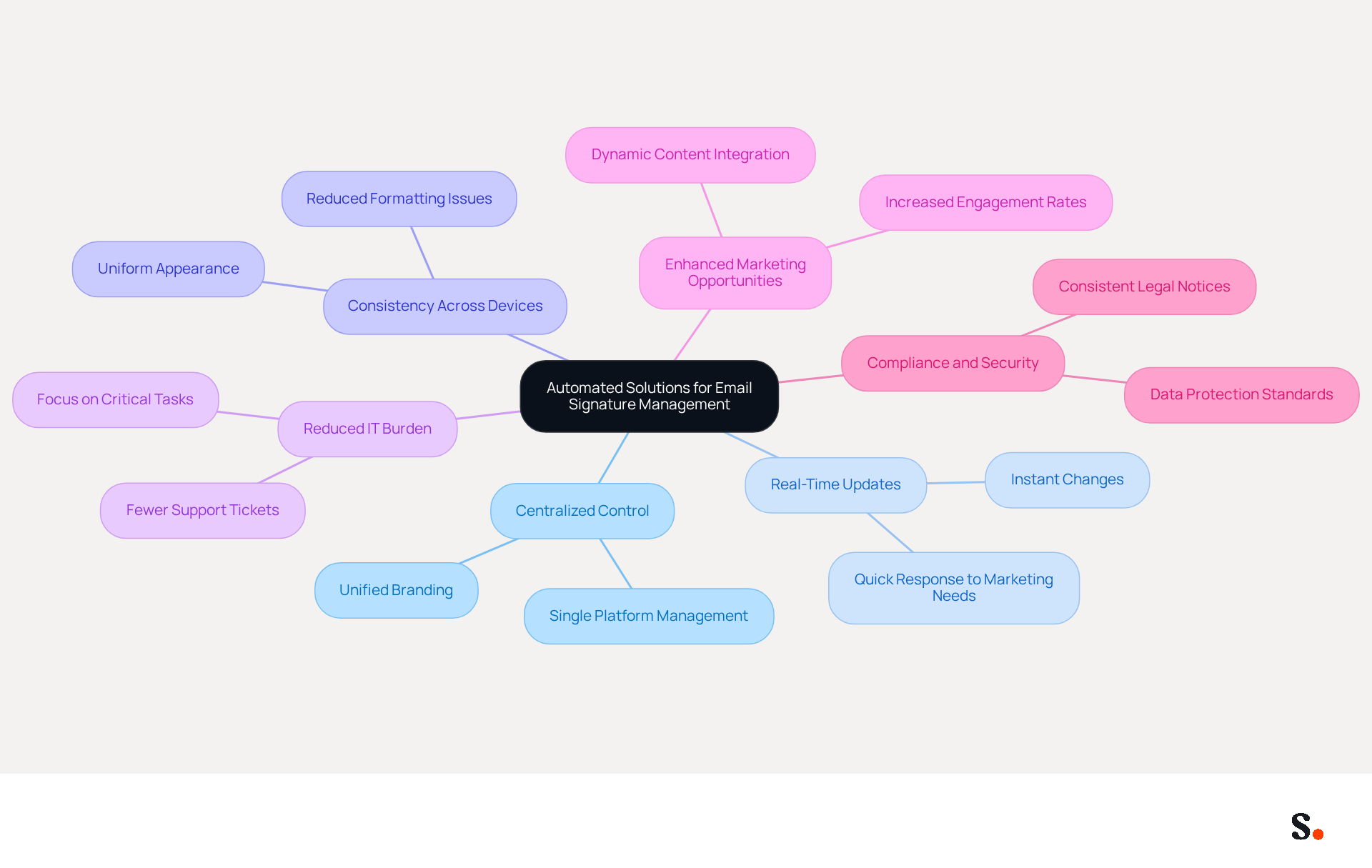
Automated solutions for managing digital footers not only enhance efficiency but also ensure brand consistency across all communications. Here are some key benefits of leveraging such tools:
- Centralized Control: Automated systems enable organizations to manage email branding from a single platform, ensuring that all employees utilize the same branding elements. This centralization is crucial for maintaining a unified brand image across communications.
- Real-Time Updates: Changes to branding, such as logos or promotional messages, can be implemented instantly across all email footers. This eliminates the need for time-consuming manual updates, allowing businesses to respond quickly to marketing needs. Now, updates that used to take days can happen in just minutes with automated digital signature management.
- Consistency Across Devices: Automated solutions ensure that identifiers appear uniformly across different devices and messaging clients, reducing the risk of formatting problems that can undermine professionalism. This consistency is essential for maintaining a professional image in all communications.
- Reduced IT Burden: By automating management of digital approvals, IT teams can significantly decrease the number of support tickets related to issues with them. This allows them to redirect their focus toward more critical tasks, enhancing overall operational efficiency. As Dave Willis, Senior Content Manager, states, "Automating digital identifiers helps IT teams eliminate manual updates, reduce support tickets, and maintain brand consistency across all users and devices."
- Enhanced Marketing Opportunities: Automated identifiers can incorporate dynamic content, such as promotional banners or social media links, enabling businesses to leverage every message as a marketing opportunity. This capability can lead to increased engagement and conversion rates, turning each email into a potential marketing channel. Significantly, Scribe's average click-through rate on banners is 12%, demonstrating the effectiveness of this approach.
- Compliance and Security: As highlighted in Scribe's report on compliance risks in email signatures, automating updates for digital disclaimers allows IT to consistently enforce compliant notices across all departments, reducing the risk of costly penalties. Scribe's SOC 2 Type II compliance ensures that your data remains secure and meets high standards. This is particularly important in regulated industries where compliance is critical to avoid penalties.
Incorporating automated email management solutions not only streamlines the process but also enhances consistency and marketing effectiveness, making it a strategic choice for businesses of all sizes. Moreover, defining governance and ownership roles prior to implementing automation is essential for ensuring compliance and branding, as it clarifies responsibilities for upholding established standards. Furthermore, marketing managers can join Scribe's Affiliate Program to earn a 50% commission while promoting brand consistency, making it a win-win for both marketing efforts and revenue generation. Scribe's fast deployment and ease of use for non-technical users ensure that company-wide signature installation typically takes under one day, allowing marketing teams to manage email signatures independently after the initial IT setup.
Conclusion
Missing email signatures in Outlook can significantly hinder effective communication and damage a professional brand image. Understanding the reasons behind these issues is essential for maintaining a strong presence. Common causes include:
- Overlooked settings
- Profile corruption
- Email formatting problems
However, many users struggle with ensuring their signatures appear consistently due to various technical issues. By addressing these factors, organizations can reinforce their credibility and brand identity.
Key insights discussed include:
- The importance of selecting default signatures
- The impact of software updates
- The role of automated solutions in managing email signatures
This oversight can ultimately undermine their professional image and marketing efforts. Implementing tools like Scribe not only streamlines the management process but also enhances brand consistency and compliance with security standards such as SOC 2 Type II, GDPR, and CCPA.
Ultimately, organizations must prioritize the management of their email signatures to uphold their professional image and maximize marketing potential. Using automated solutions helps businesses keep their digital identities consistent, which builds trust and engagement with clients. Taking proactive steps to resolve signature issues will not only improve communication but also strengthen the overall brand presence in the digital landscape.
Frequently Asked Questions
What are common reasons for an email signature not showing up in Outlook?
Common reasons include not selecting a default sign-off for new messages, profile corruption, issues with roaming signatures, message format set to plain text instead of HTML, software updates altering settings, and cached data or browser-related issues.
How can not selecting a default sign-off affect my email signature in Outlook?
If users do not select a default sign-off for new messages, their email signature may not appear, leading to inconsistent branding in communications.
What is profile corruption and how does it affect email signatures?
Profile corruption refers to damaged email profiles that disrupt normal message functioning, potentially causing signatures to vanish. Regular maintenance, including backups and recreating profiles, can help avoid these issues.
What are roaming signatures and how can they cause problems?
Roaming signatures sync settings across devices, but sync problems can lead to inconsistencies, particularly when switching between desktop and web versions of Outlook, resulting in signatures not displaying correctly.
Why does the message format affect the visibility of my email signature?
If the message format is set to plain text instead of HTML, signatures may not display properly, as they often include images and formatting that require HTML for correct visibility.
How can software updates impact my email signature settings?
Software updates can unintentionally reset or modify settings, which may cause newly created email identifiers to vanish due to lacking write permissions in the folder. Granting full control permissions can resolve this issue.
What role does cached data play in email signature visibility?
Cached data or browser-related issues can prevent signatures from loading correctly, especially in the web version of Outlook. Testing in a private browser session can help identify if this is the cause.
How can I troubleshoot issues with my email signature in Outlook?
To troubleshoot, check if a default sign-off is selected, ensure the profile is not corrupted, verify the message format is set to HTML, review permissions after updates, and clear cached data or test in a private browser session.
List of Sources
- Identify Common Causes for Missing Email Signatures in Outlook
- Outlook Signature Disappears? 6 Common Problems + Fixes (https://conbool.com/blog/outlook-signature-disappears-fixes-problems)
- Outlook Signature Not Working in Office 365: Causes & Fixes (https://exclaimer.com/email-signature-handbook/outlook-signature-not-working-in-office-365)
- Why Did My Outlook Signature Disappear? Common Causes Explained (https://scribe-mail.com/en-US/blog/why-did-my-outlook-signature-disappear-common-causes-explained)
- How to solve problems with email signatures in Microsoft 365? (https://mail-signatures.com/articles/problems-email-signatures-office-365)
- Explore Troubleshooting Steps to Fix Signature Issues
- Outlook Signature Troubleshooting (Manual/Copy Paste Setup) | WiseStamp Help Center (https://support.wisestamp.com/en/articles/12811647-outlook-signature-troubleshooting-manual-copy-paste-setup)
- Email Signatures vanishing - New Outlook | Microsoft Community Hub (https://techcommunity.microsoft.com/discussions/outlookgeneral/email-signatures-vanishing---new-outlook/4418809)
- Email signature statistics: Why every business should optimize their email signatures — Stripo.email (https://stripo.email/blog/email-signature-statistics-why-every-business-should-optimize-their-email-signatures)
- 40+ Email Signature Statistics for 2026 (Data + Insights) (https://wavecnct.com/blogs/email-signature-statistics)
- Understand the Impact of Missing Signatures on Brand Consistency
- Exclaimer Research: 67% of Marketers Expect Email Signatures to Support With Lead Gen In 2023 (https://businesswire.com/news/home/20230612141095/en/Exclaimer-Research-67-of-Marketers-Expect-Email-Signatures-to-Support-With-Lead-Gen-In-2023)
- Optimize Your Email Signatures with Office 365 for Brand Consistency (https://scribe-mail.com/en-US/blog/optimize-your-email-signatures-with-office-365-for-brand-consistency)
- The impact of email signatures on your branding (https://signitic.com/en/resources/the-impact-of-email-signatures-on-your-branding)
- Research Recap: Branded Email Signatures Increase Company Recognition, Trust - Demand Gen Report (https://demandgenreport.com/industry-news/research-recap-branded-email-signatures-increase-company-recognition-trust/47252)
- Why Team Email Signatures Matter More Than You Think: The Hidden Impact on Brand Trust and Customer Experience (https://getmailbird.com/why-team-email-signatures-matter-brand-trust)
- Leverage Automated Solutions for Effective Email Signature Management
- Why you should be using an email signature manager (https://blinq.me/blog/why-you-should-be-using-an-email-signature-manager)
- Automating Email Signatures: How IT Teams Streamline Processes & Reduce Risk (https://exclaimer.com/blog/streamlining-it-processes-automated-email-signatures)
- 2026 Email Signature Trends for Companies | Bybrand posted on the topic | LinkedIn (https://linkedin.com/posts/bybrand_top-email-signature-trends-for-companies-activity-7458274214513483776-q9NB)
- The campaign every brand already owns, but few optimise (https://marketingweek.com/email-signature-marketing-campaign)
Get started with Scribe
Create your signature in minutes
Free 14-day trial — no credit card.