10 Grad Student Email Signature Examples to Impress Employers
In a competitive job market, graduate students must find ways to distinguish themselves from their peers. Creating a strong email signature goes beyond looks
Sophie Grant
Email Signature Specialist, Scribe
On this page
- Introduction
- Scribe: Automate Your Email Signature for Professional Impact
- Example 1: Showcase Your Academic Credentials and Contact Information
- Example 2: Include Links to Your LinkedIn and Portfolio for Networking
- Example 3: Use Design Elements to Reflect Your Personal Style
- Example 4: Add a Call-to-Action to Encourage Engagement
- Example 5: Incorporate a Professional Photo for a Personal Touch
- Example 6: Communicate Multiple Roles Clearly in Your Signature
- Example 7: Follow Institutional Branding Guidelines for Consistency
- Example 8: Use Concise Language for Clarity and Professionalism
- Example 9: Add a Personal Quote or Motto for Inspiration
- Conclusion
- Frequently Asked Questions
- List of Sources
Introduction
In a competitive job market, graduate students must find ways to distinguish themselves from their peers. Creating a strong email signature goes beyond looks; it’s a vital tool for highlighting academic achievements and personal branding. In this article, we’ll look at ten email signature examples that can make a real difference for grad students, showing how Scribe's automation simplifies the process and boosts professional communication.
How can a well-crafted email signature enhance a student’s outreach and networking in a competitive job market?
Scribe: Automate Your Email Signature for Professional Impact
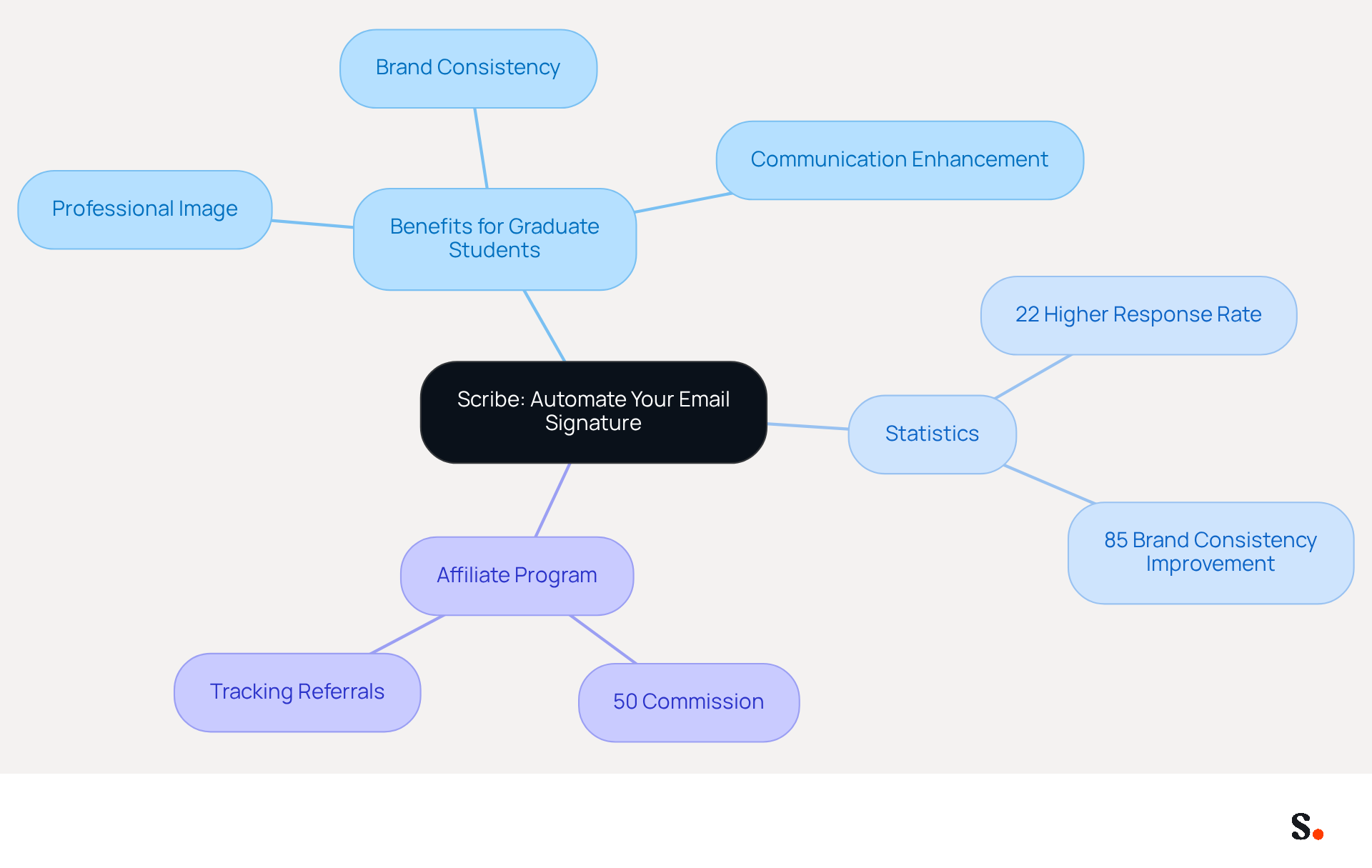
Graduate students often face challenges in presenting a polished and professional image in their digital communications, which can be improved by using effective grad student email signature examples. Scribe offers an innovative platform that automates the creation and management of digital identifiers, allowing students to showcase their academic credentials and personal style effortlessly. With Scribe, students can create on-brand templates that reduce the time spent on manual updates by up to 50%. This automation enhances brand consistency and turns message footers into effective marketing tools, making every correspondence a valuable networking opportunity.
Research indicates that messages featuring branded identifiers can improve company recognition and trust, leading to a 22% higher response rate. Moreover, organizations that adopt centralized management of digital correspondence branding can improve brand consistency by up to 85% and boost campaign engagement threefold. These statistics emphasize the essential function that formal digital identifiers, including grad student email signature examples, have in effective communication, particularly for graduate students keen to create a lasting impact on prospective employers.
Additionally, students who use grad student email signature examples with organized contact information display enhanced communication with potential employers and a more polished image. By utilizing Scribe's automated solutions, graduate students can ensure their contact details are always up to date, reflecting their latest accomplishments and information without the need for technical expertise. This capability is essential in today's fast-paced digital landscape, where maintaining a professional presence is crucial for career advancement.
Moreover, marketing managers can leverage Scribe's affiliate program to enhance their promotional efforts. By referring paying customers, they can earn a 50% commission on all subscriptions for the first 12 months. This program helps promote Scribe's brand consistency and offers a $30 credit for leads, making it a smart choice for any marketing strategy. With a self-serve affiliate platform for tracking referrals and commissions, promoting Scribe becomes a seamless and efficient part of any marketing initiative. Ultimately, leveraging Scribe's solutions can redefine how graduate students engage with potential employers, setting them apart in a competitive job market.
Example 1: Showcase Your Academic Credentials and Contact Information
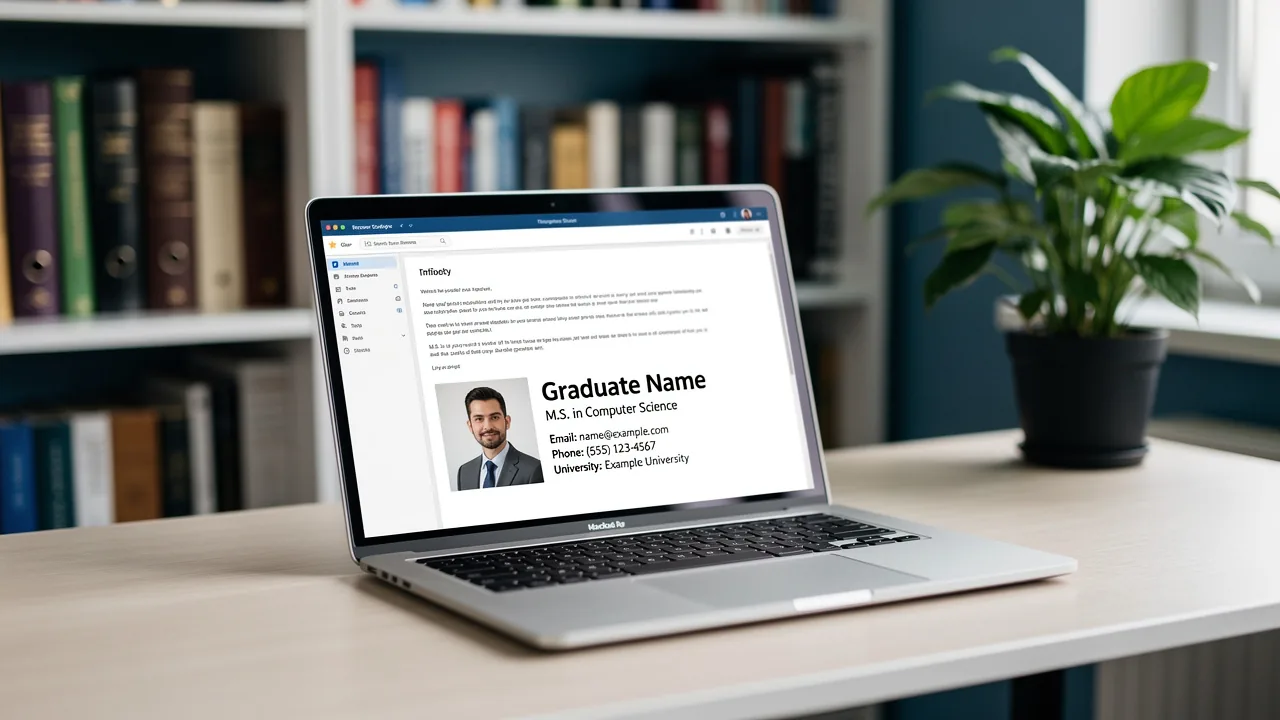
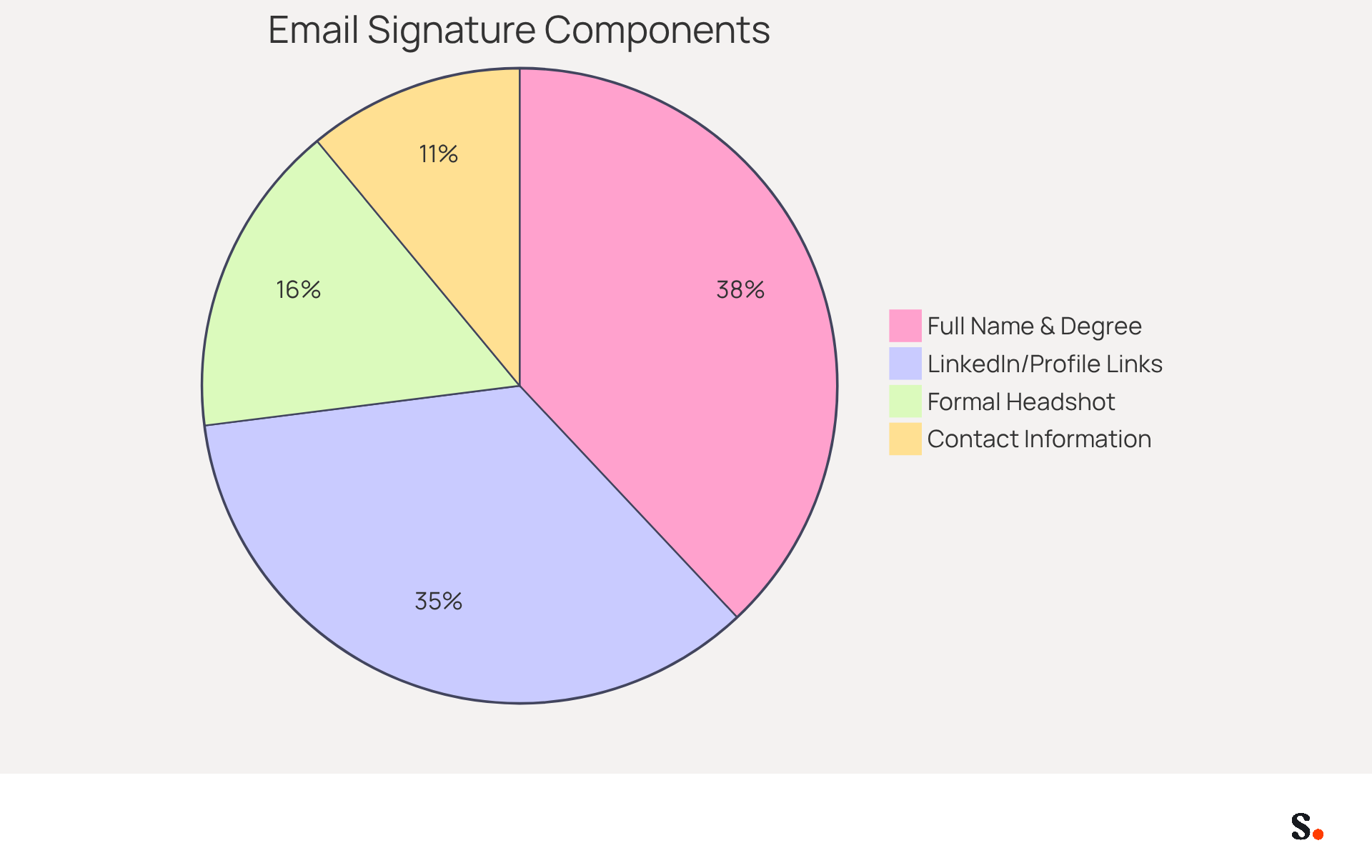
A well-crafted email signature, such as those found in grad student email signature examples, is essential for establishing credibility and professionalism in academic and professional communications. It should prominently feature your full name, degree, and current academic program. This format not only provides essential contact information but also establishes your academic standing, making it easier for employers to recognize your qualifications. Adding your degree to your email can boost your credibility. Research indicates that 76% of people view senders with academic credentials as more trustworthy. Moreover, a well-structured contact block can improve response rates by 22%, demonstrating the importance of a well-structured contact block for all professionals.
To further enhance your contact information, consider adding links to your LinkedIn profile or personal website, which can showcase your work and accomplishments. Approximately 70% of users of digital signatures believe that having a formal footer enhances their credibility, making it advantageous to include such links. Additionally, including a formal headshot can increase response rates by 32%, making your communications more engaging.
Using these strategies can help you create grad student email signature examples that not only look professional but also encourage engagement with potential employers. Remember, a well-structured contact information block can greatly influence how you are viewed in academic and professional environments. Maintaining uniformity in digital communication formats across institutions is also crucial for reinforcing brand identity.
Example 2: Include Links to Your LinkedIn and Portfolio for Networking
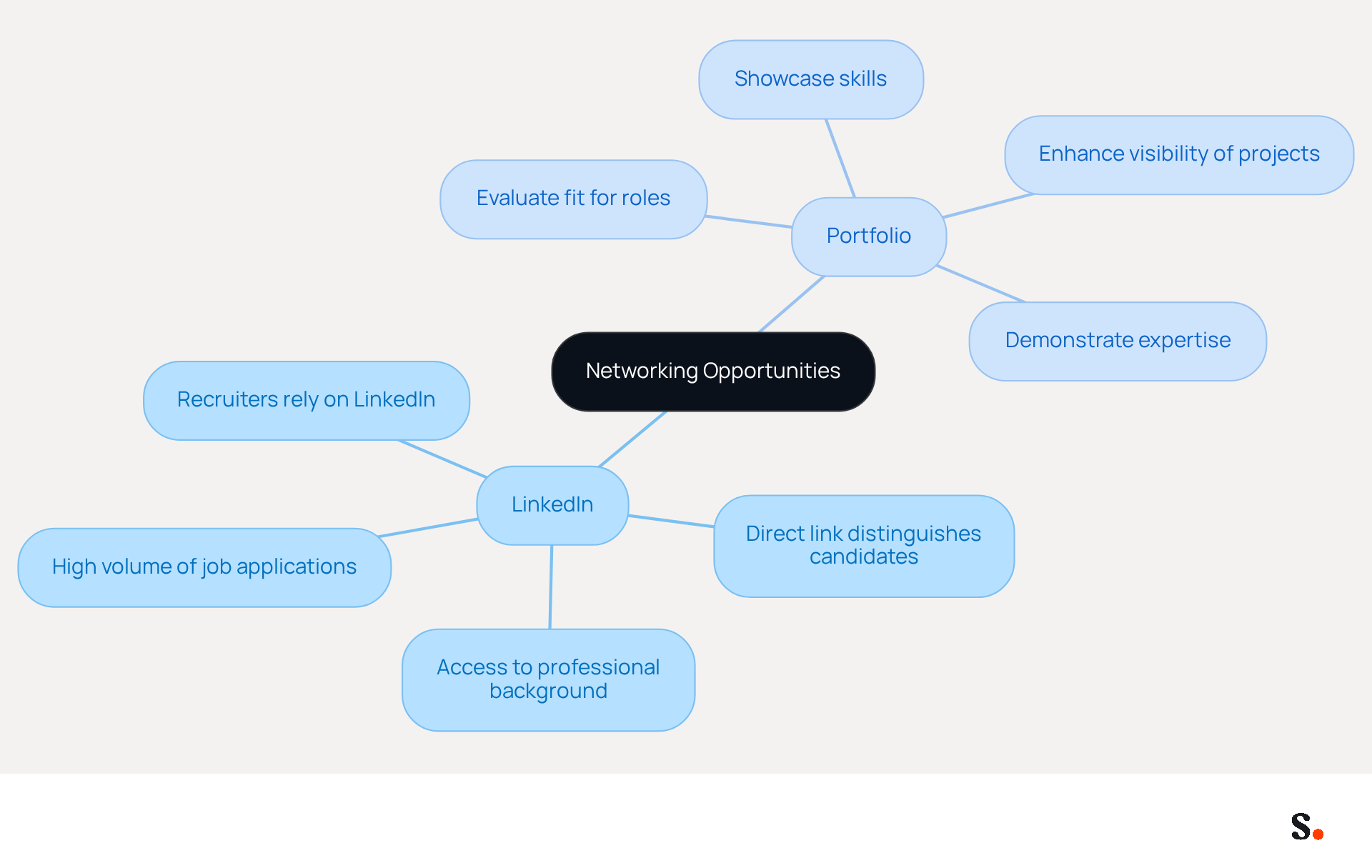
Including hyperlinks to your LinkedIn profile and relevant online portfolios in your message footer is essential for maximizing networking opportunities.
- LinkedIn: linkedin.com/in/janedoe
- Portfolio: janedoeportfolio.com
These links allow potential employers to access your professional background and work samples, enhancing your networking opportunities. Given the high volume of job applications on LinkedIn, a direct link to your profile can distinguish you from other candidates. Additionally, including your portfolio allows you to showcase your skills and projects, making it easier for employers to evaluate your fit for their roles. Since many recruiters rely on LinkedIn during hiring, ensuring your profile is accessible can greatly improve your chances of making a positive impression.
Example 3: Use Design Elements to Reflect Your Personal Style
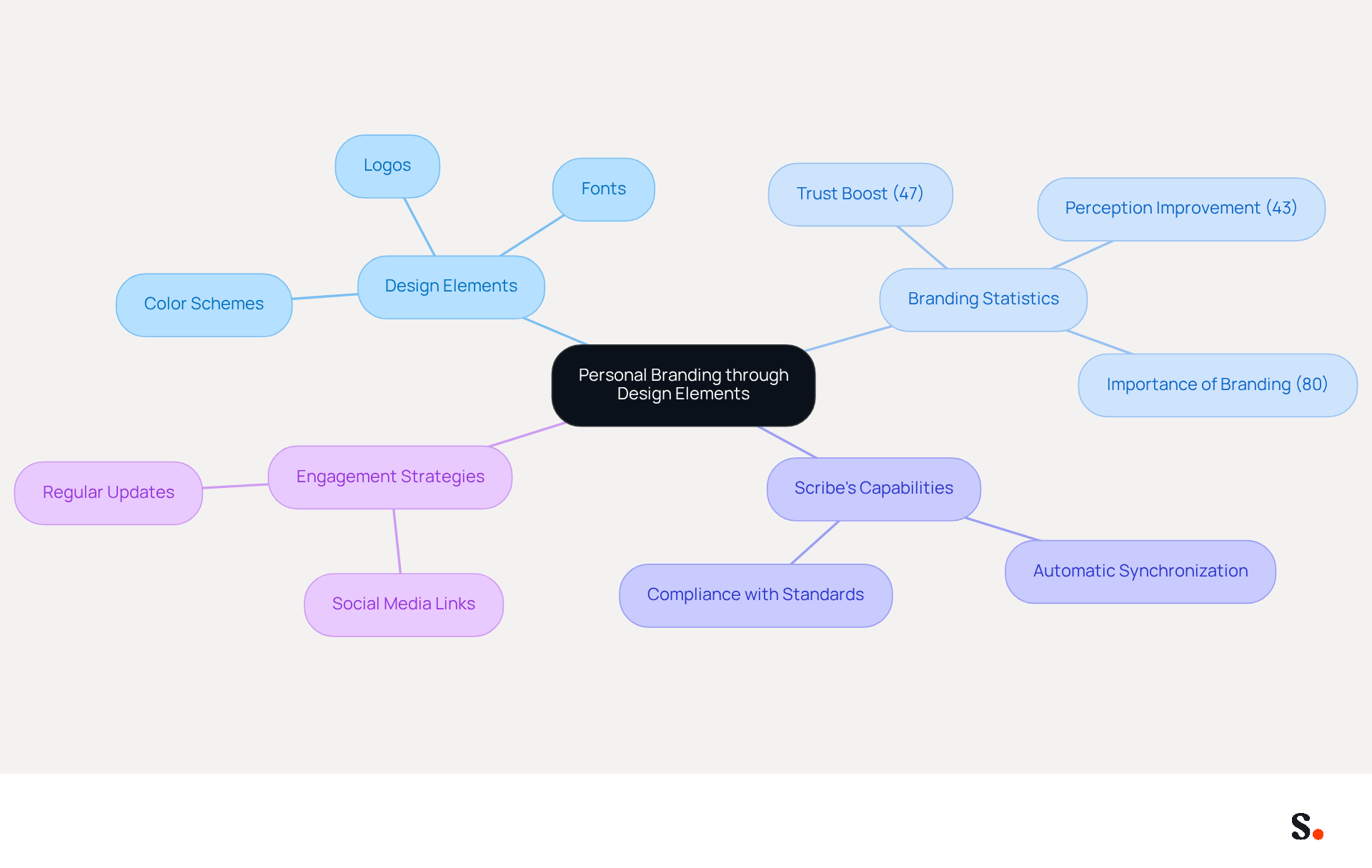
Creating a memorable email footer requires careful consideration of design elements that reflect your personal brand. Incorporating color schemes, fonts, and logos that resonate with your identity is essential. For instance, using your university's colors or a professional logo related to your field of study can enhance the visual appeal of your email footer. A well-designed email footer conveys professionalism and makes a memorable impact on recipients.
This research indicates that effective branding can boost consumer trust by 47% and improve brand perception for 43% of recipients. In fact, 80% of consumers believe that having a branded digital identifier is crucial for a company's identity, highlighting the need for consistent and appealing designs.
Furthermore, Scribe guarantees that every modification made in your Aircall configuration is automatically mirrored in your communication identifiers, promoting seamless synchronization and brand consistency across all interactions. This capability enables marketing managers to maintain control over digital identifiers independently after the initial IT setup, ensuring compliance with security standards such as SOC 2 Type II, GDPR, and CCPA.
By effectively utilizing design elements and including links to your social media or website, you can transform your digital identifier into a powerful tool for personal branding and engagement. Regularly updating your contact information will keep the content fresh and engaging, further enhancing your brand visibility. By prioritizing design and consistency, you can elevate your brand's presence and foster stronger connections with your audience.
Example 4: Add a Call-to-Action to Encourage Engagement
Incorporating a clear call-to-action in your message footer can significantly enhance engagement and drive results. For instance, consider using a phrase like: Let’s connect on LinkedIn! This straightforward CTA encourages recipients to engage further, fostering valuable networking opportunities and potential collaborations.
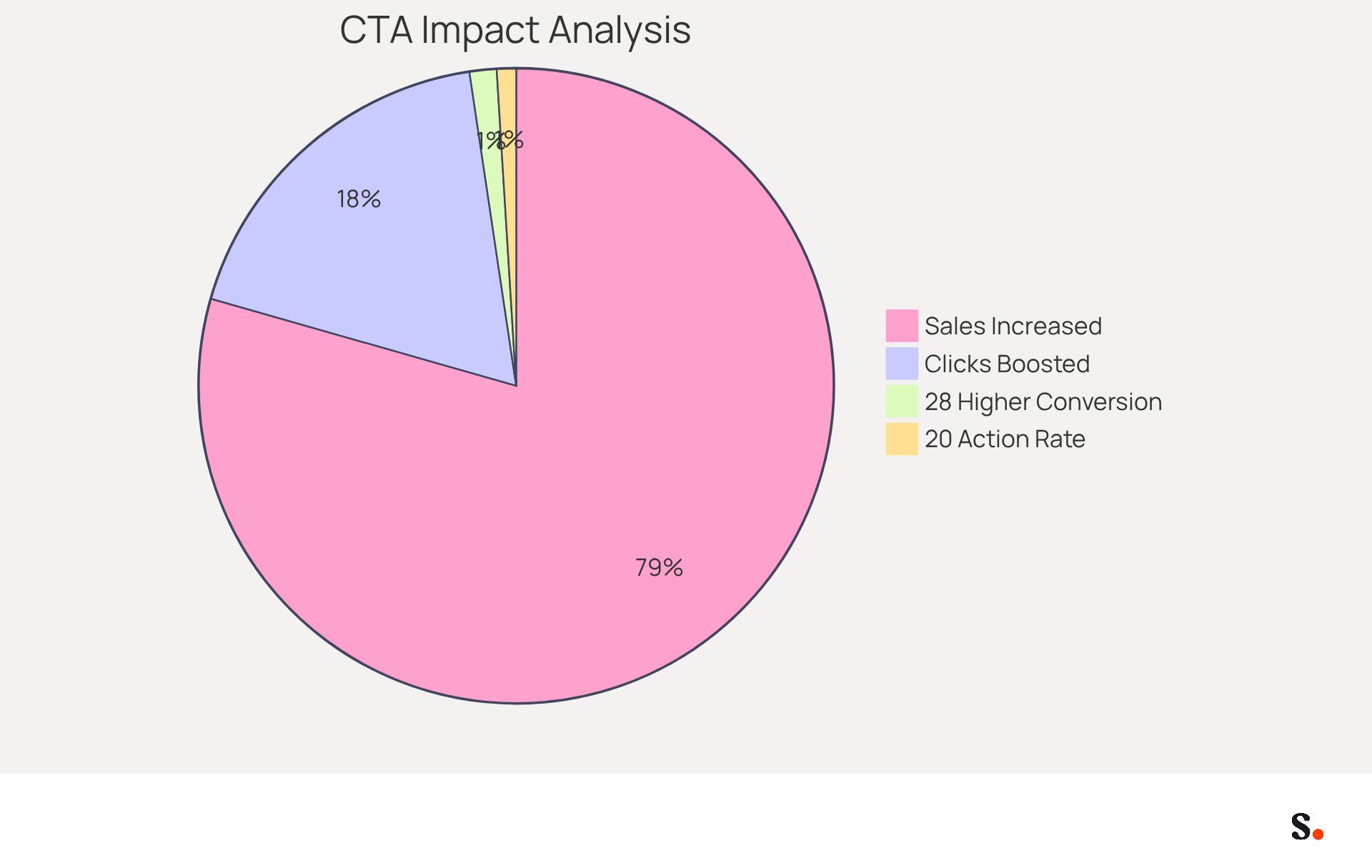
Studies show that including a CTA can boost clicks by 371% and sales by an impressive 1617%, underscoring the impact of CTAs on user engagement. Moreover, a case study revealed that an inline CTA offering Book a demo resulted in 20% of recipients taking action, demonstrating how even simple prompts can yield substantial results.
Effective CTAs can take various forms, such as buttons or hyperlinks, with buttons reportedly increasing conversion rates by 28% compared to traditional hyperlinks. By strategically placing CTAs in your contact information, you can transform each message into a potential lead-generating tool, making it an essential component of your communication strategy.
With Scribe, any modifications made in your Aircall configuration will automatically sync with your communication identifiers, ensuring brand consistency across all interactions. This smooth integration not only enhances your brand image but also makes managing your identifiers easier, enabling you to concentrate on cultivating valuable connections.
Example 5: Incorporate a Professional Photo for a Personal Touch
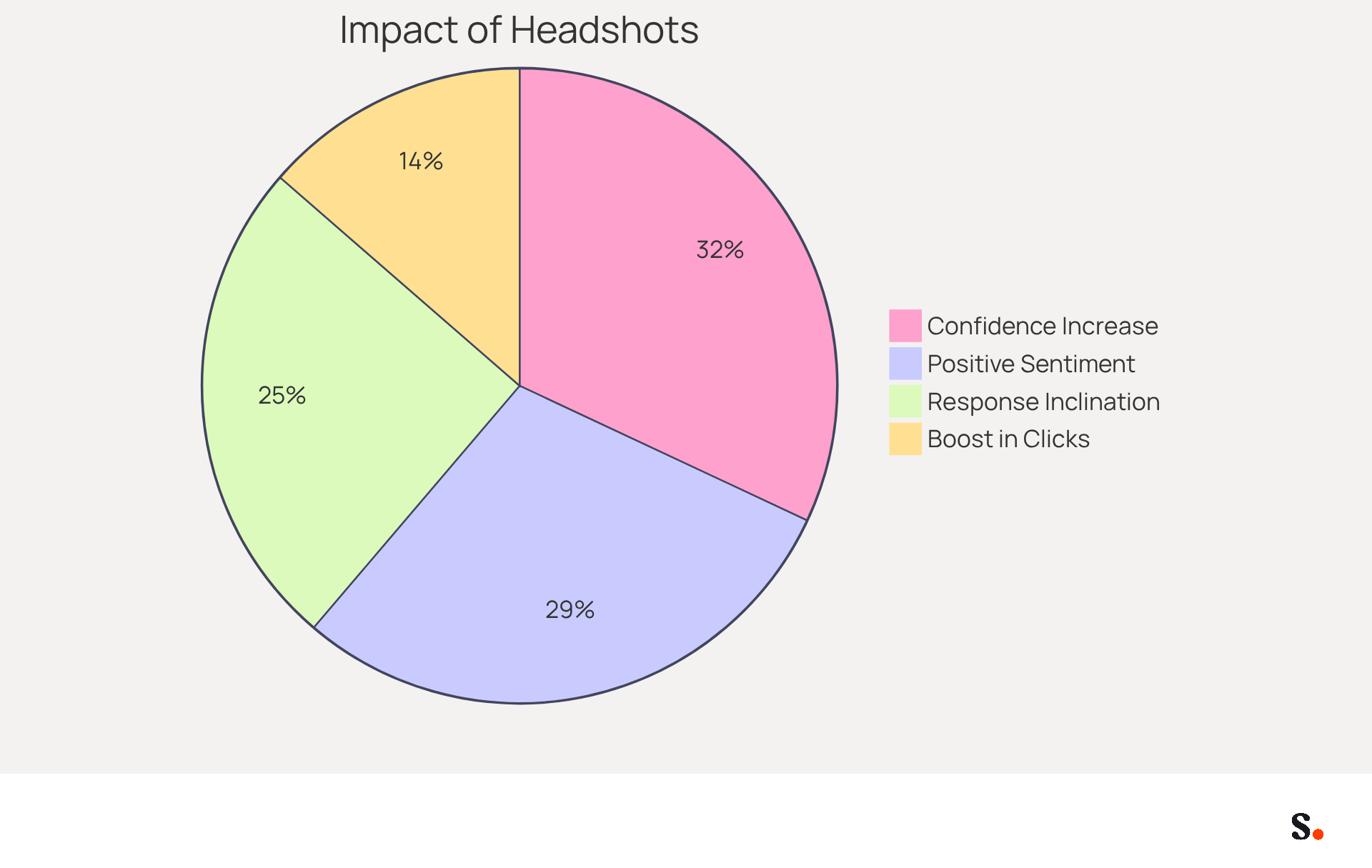
Incorporating a high-quality headshot in your communication footer is essential for enhancing engagement and credibility. A high-quality photo that reflects your professional demeanor enhances credibility and fosters personal connections with recipients. For instance, research indicates that messages with professional sign-offs can make recipients feel:
- 47% more confident
- 43% more positive about the sender's organization
- 37% more inclined to respond
This visual element can make your messages more engaging and memorable, increasing the likelihood of a favorable response.
Furthermore, a well-placed headshot can enhance the overall impact of your digital representation. One case study showed that adding a high-quality photo led to a 20% boost in clicks and conversions, demonstrating the tangible benefits of this simple addition. Additionally, dynamic banners in signatures can achieve click-through rates surpassing 5%, exceeding typical digital advertising standards, which underscores the effectiveness of visual elements in signatures.
To maximize impact, ensure your photo is clear, suitably sized, and aligns with your career image. Avoid casual images or selfies, as these can detract from the professionalism you aim to convey. Ultimately, a well-chosen headshot can be a pivotal element in establishing trust and professionalism in your communications.
Example 6: Communicate Multiple Roles Clearly in Your Signature
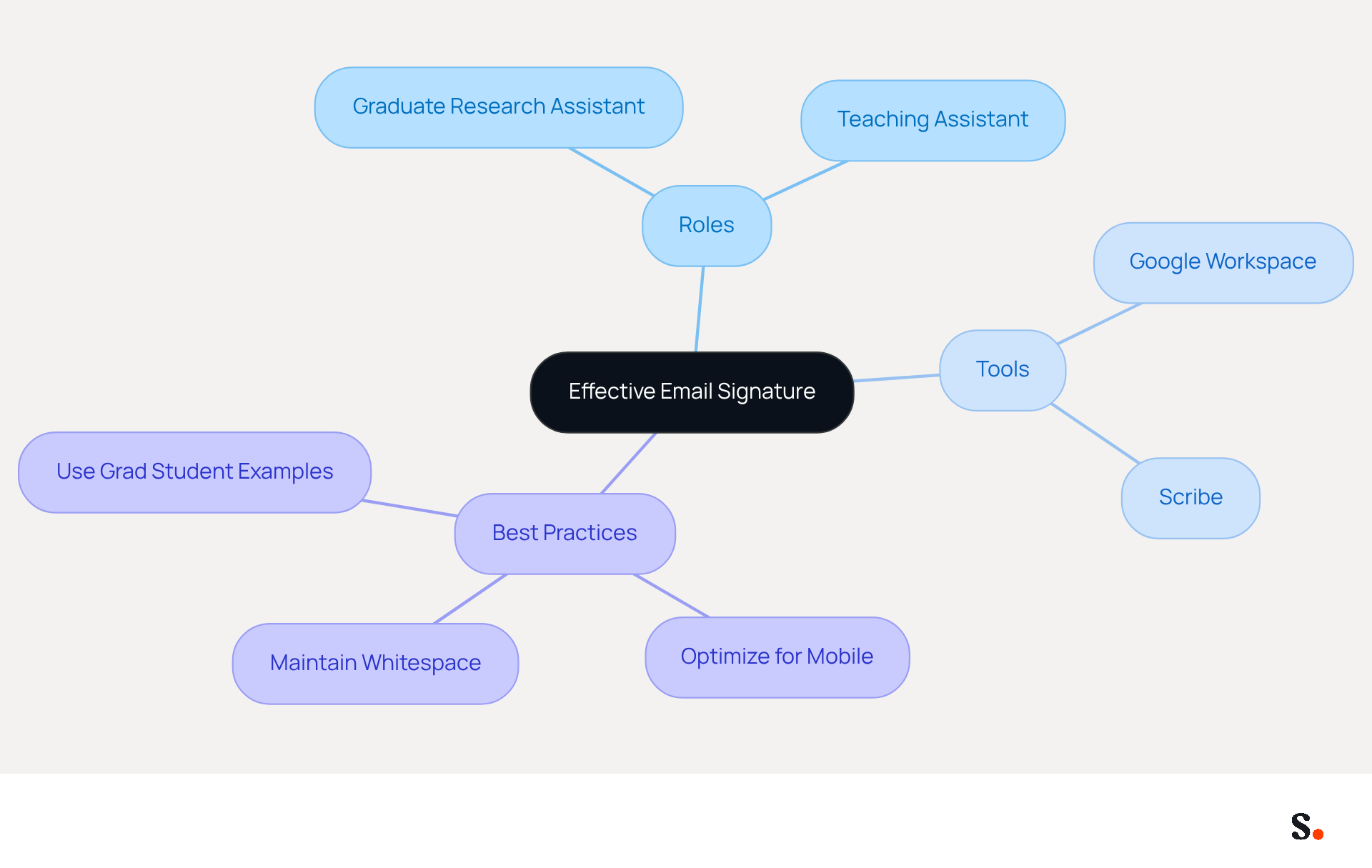
Clearly presenting multiple roles in your contact information is essential for effective communication. For instance:
- Jane Doe
- Graduate Research Assistant | Teaching Assistant
- University of XYZ
- Email: jane.doe@email.com
- Phone: (123) 456-7890
This format clarifies your roles and boosts your professional image. Research indicates that messages featuring branded identifiers achieve a 22% higher response rate. Effective communication of multiple roles can significantly improve engagement rates, as recipients are more likely to understand your expertise and how it relates to their needs.
By syncing your Google Workspace with Scribe, you can simplify the management of your messaging identifiers. This integration not only saves time but also enhances the professionalism of your communications. It automatically updates your teammates' information, ensuring that any changes-such as job positions or group assignments-are reflected in Scribe without manual input. This feature not only boosts your communication professionalism but also allows for quick updates, keeping your information fresh and relevant. Scribe is compliant with security standards such as SOC 2 Type II, GDPR, and CCPA, ensuring that your data is handled securely.
Research examples, such as those on integrating calls to action in contact details, show that individuals who clearly define their roles experience higher response rates and enhanced networking opportunities. Furthermore, making sure your message footer is optimized for mobile devices is essential, as mobile applications represent 41.6% of message openings. By adopting this approach, you can ensure that your communications reflect your multifaceted professional identity, making a strong impression on potential employers. Additionally, maintaining adequate whitespace in your email enhances readability and professionalism, making it easier for recipients to digest your information. By optimizing your email signature with grad student email signature examples, you position yourself as a well-organized professional, ready to engage with potential opportunities.
Example 7: Follow Institutional Branding Guidelines for Consistency
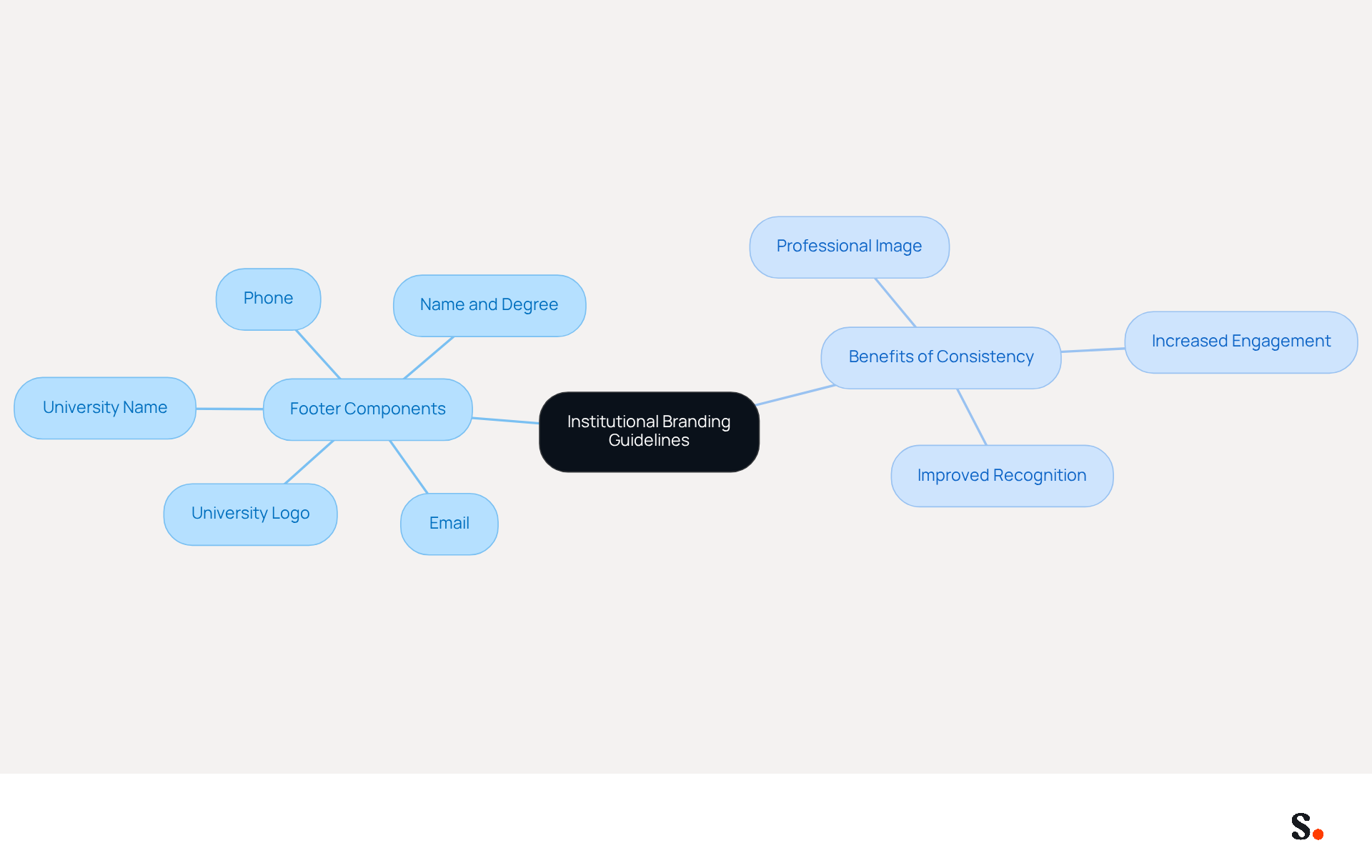
Aligning your correspondence footer with your institution's branding guidelines is essential for establishing a professional image. Ensure your footer includes specific fonts, colors, and logos, such as:
- [University Logo]
- Jane Doe, M.A. in Psychology
- University of XYZ
- Email: jane.doe@email.com
- Phone: (123) 456-7890
Following these guidelines not only boosts your professional image but also strengthens your connection to your institution. A significant 80% of businesses view branded electronic identifiers as essential for effective branding. Moreover, consistent branding in digital communication can significantly boost engagement and improve overall marketing outcomes. Case studies indicate that institutions implementing strict branding guidelines see improved recognition and trust among recipients. Therefore, it is crucial for students to present themselves in a manner that reflects their academic affiliation. With Scribe, every modification made in your Aircall configuration will automatically be reflected in your correspondence identifiers, ensuring seamless synchronization and brand consistency. Ignoring these guidelines can damage your professional reputation and reduce your chances of meaningful engagement.
Example 8: Use Concise Language for Clarity and Professionalism
A well-crafted email footer is essential for effective communication in professional settings. For example:
Jane Doe
Graduate Student | University of XYZ
Email: jane.doe@email.com
Phone: (123) 456-7890
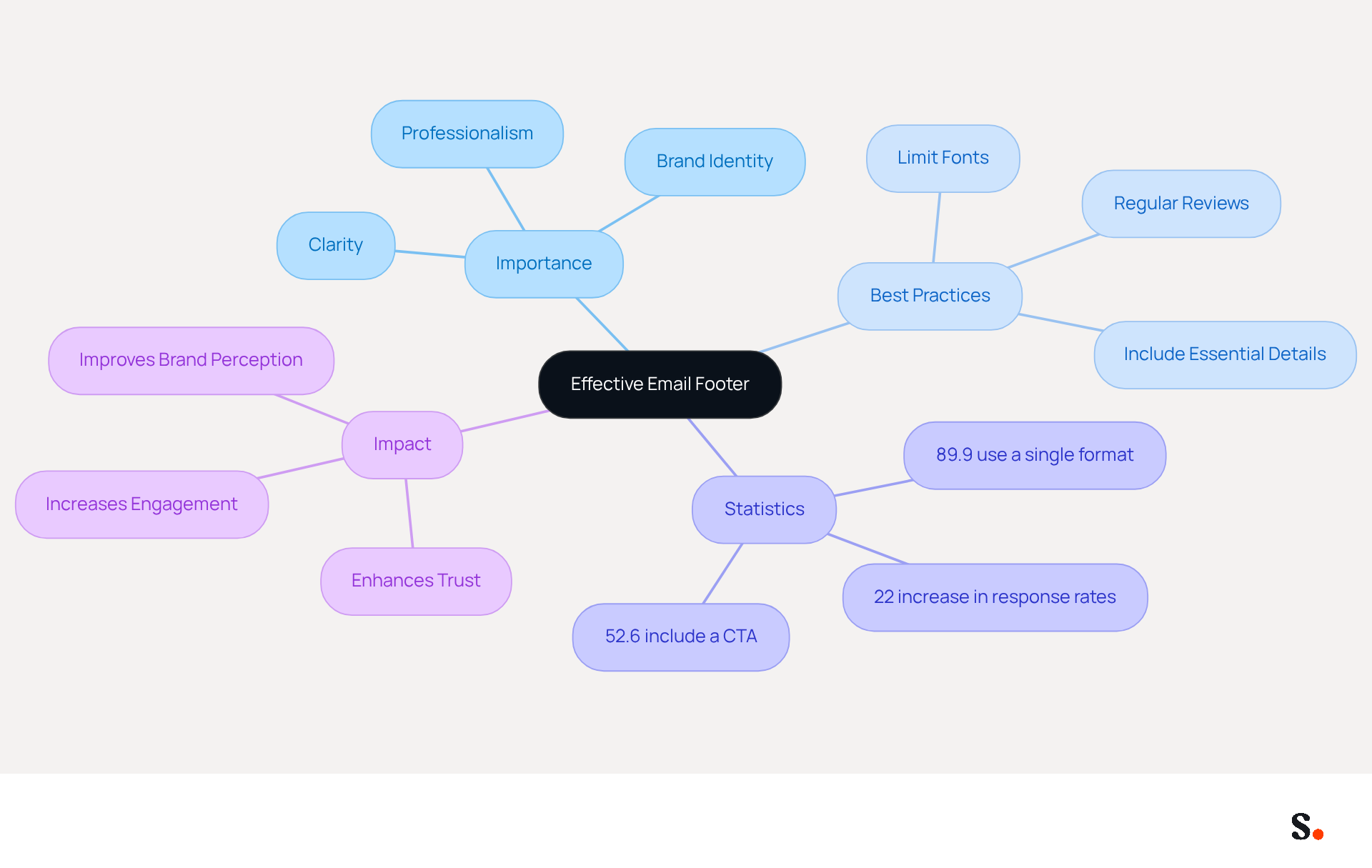
This straightforward format allows recipients to quickly find your contact information without unnecessary clutter. Research shows that 89.9% of workers use a single digital format, and a concise layout significantly enhances clarity. In fact, branded digital identifiers can enhance response rates by 22%, demonstrating how clear communication can drive results.
To ensure your correspondence remains polished, limit the number of fonts to one or two for readability, and include only essential details such as your full name, job title, and contact information. Regularly reviewing your digital identification helps keep it consistent and up-to-date with your current role and contact methods. A well-structured email footer, such as grad student email signature examples, not only conveys professionalism but also reinforces your brand identity, as 64-70% of respondents believe a professional branded footer enhances trust and credibility.
Incorporating concise language in your contact information is not just about aesthetics; it’s a strategic approach to effective communication that can leave a lasting impression on potential employers. Additionally, consider including a call-to-action (CTA) in your email footer, as 52.6% of users do, to further engage recipients and prompt immediate action. With Scribe, all modifications made to your Calendly setup automatically sync with your contact details, ensuring effortless updates and maintaining brand consistency. These words in addition to simplifying the process comply with SOC 2 Type II standards for secure data handling. Ultimately, a polished email footer can significantly influence how you are perceived in your professional interactions.
Example 9: Add a Personal Quote or Motto for Inspiration
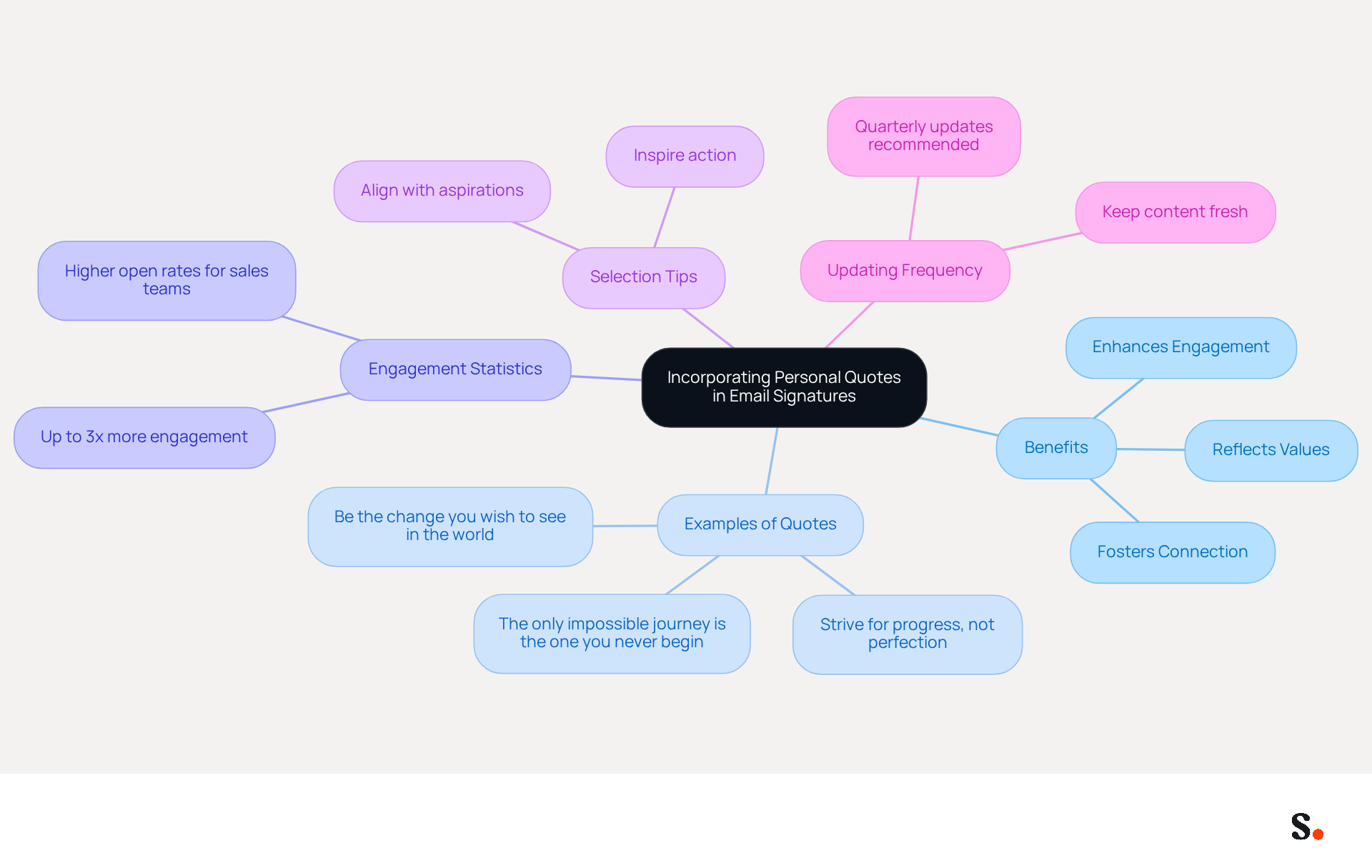
Incorporating a personal quote into your email signature can significantly enhance engagement and communication effectiveness. For instance, a quote like 'Strive for progress, not perfection' reflects your values and offers a glimpse into your personality, making your messages more engaging for recipients.
Research shows that companies can see up to three times more engagement in their campaigns by using effective email signature strategies, especially those that include thoughtful quotes. This is particularly advantageous in workplace environments, where forming a connection can lead to improved responses.
When selecting a personal quote, consider one that aligns with your aspirations or career philosophy. Quotes that inspire action or reflect resilience, such as 'The only impossible journey is the one you never begin' by Tony Robbins, can inspire action and foster connection with your recipients.
Interestingly, professionals who use motivational quotes in their emails often see better engagement and response rates. For instance, sales teams employing strategic quotes have achieved higher open rates and improved follow-up responses.
Failing to update your quote may lead to diminished engagement over time, so regularly updating it is recommended, ideally on a quarterly basis, to keep your email signature fresh and relevant. By selecting a quote that resonates with your audience, you not only enhance your professional image but also foster meaningful connections. Quotes can serve as conversation starters, cultural signals, and professional differentiators, further emphasizing their multifaceted benefits.
Conclusion
In a competitive job market, the way graduate students present themselves digitally can make a significant difference. Graduate students can significantly enhance their professional image and networking potential through well-crafted email signatures. By utilizing Scribe's automated solutions, students can create polished, on-brand signatures that reflect their academic credentials and streamline the management of their digital identifiers. This method saves time and ensures that each email contributes to a strong professional presence.
The article highlights several key strategies for creating effective email signatures, including:
- Showcasing academic credentials
- Incorporating links to professional profiles
- Utilizing design elements that reflect personal style
Additionally, the importance of clear communication, concise language, and the inclusion of calls-to-action is crucial for boosting engagement and response rates. When graduate students adopt these best practices, they enhance their appeal to potential employers.
Ultimately, leveraging Scribe's capabilities allows graduate students to maintain brand consistency and professionalism in their communications. As the job market becomes increasingly competitive, investing in a strong digital presence through effective email signatures is not just beneficial - it's essential. Investing in a professional email signature is a strategic move that can open doors to future career opportunities.
Frequently Asked Questions
What is Scribe and how does it help graduate students?
Scribe is an innovative platform that automates the creation and management of digital identifiers, allowing graduate students to showcase their academic credentials and personal style in their email signatures. It reduces the time spent on manual updates by up to 50%, enhances brand consistency, and turns email footers into effective marketing tools.
How can a well-crafted email signature impact a graduate student's professional image?
A well-crafted email signature establishes credibility and professionalism in communications. It should include the student's full name, degree, and current academic program, which helps employers recognize their qualifications. Research shows that 76% of people view senders with academic credentials as more trustworthy.
What are the benefits of including links to LinkedIn and portfolios in email signatures?
Including hyperlinks to a LinkedIn profile and relevant online portfolios maximizes networking opportunities by allowing potential employers to access the student's professional background and work samples. This can distinguish candidates in a competitive job market and improve their chances of making a positive impression.
What statistics support the effectiveness of using branded email signatures?
Research indicates that messages featuring branded identifiers can lead to a 22% higher response rate. Additionally, organizations that centralize the management of digital correspondence branding can improve brand consistency by up to 85% and boost campaign engagement threefold.
How does Scribe's affiliate program work for marketing managers?
Scribe's affiliate program allows marketing managers to earn a 50% commission on all subscriptions for the first 12 months by referring paying customers. It also offers a $30 credit for leads and includes a self-serve affiliate platform for tracking referrals and commissions.
Why is maintaining a professional presence important for graduate students?
In today's fast-paced digital landscape, maintaining a professional presence is crucial for career advancement. Using Scribe's automated solutions ensures that graduate students' contact details are always up to date, reflecting their latest accomplishments and information without requiring technical expertise.
List of Sources
- Scribe: Automate Your Email Signature for Professional Impact
- AI Creative: New Tool Is Designed To Flow In Email Signatures At Scale (https://mediapost.com/publications/article/415165/ai-creative-new-tool-is-designed-to-flow-in-email.html)
- 4 Best Practices for Effective Email Signature Automation (https://scribe-mail.com/en-US/blog/4-best-practices-for-effective-email-signature-automation)
- Master Automatic Email Signatures: Boost Branding and Efficiency (https://scribe-mail.com/en-US/blog/master-automatic-email-signatures-boost-branding-and-efficiency)
- WiseStamp Sets a New Standard for Email Signature Creation (https://prnewswire.com/news-releases/wisestamp-sets-a-new-standard-for-email-signature-creation-302689811.html)
- Example 1: Showcase Your Academic Credentials and Contact Information
- Email signature statistics and trends in 2024 (https://wisestamp.com/blog/email-signature-statistics)
- Best Practices for a Proper Email Signature for Graduate Students (https://scribe-mail.com/en-US/blog/best-practices-for-a-proper-email-signature-for-graduate-students)
- 4 Best Practices for Using Email Signature Degrees Effectively (https://scribe-mail.com/en-US/blog/4-best-practices-for-using-email-signature-degrees-effectively)
- Example 2: Include Links to Your LinkedIn and Portfolio for Networking
- How to Add Your LinkedIn Profile to Your Email Signature (https://topechelon.com/blog/how-add-linkedin-email-signature-button)
- Exclaimer Integrates LinkedIn with Email Signatures for Enhanced Social Reach (https://businesswire.com/news/home/20250423565498/en/Exclaimer-Integrates-LinkedIn-with-Email-Signatures-for-Enhanced-Social-Reach)
- 41 Essential LinkedIn Statistics You Need to Know in 2026 (https://thesocialshepherd.com/blog/linkedin-statistics)
- 30 LinkedIn statistics that marketers must know in 2026 (https://sproutsocial.com/insights/linkedin-statistics)
- Example 3: Use Design Elements to Reflect Your Personal Style
- Email Signature Tips | Perfecting Your Personal Brand | CSU Global (https://csuglobal.edu/blog/keep-it-professional-nailing-down-perfect-email-signature)
- Research Recap: Branded Email Signatures Increase Company Recognition, Trust - Demand Gen Report (https://demandgenreport.com/industry-news/research-recap-branded-email-signatures-increase-company-recognition-trust/47252)
- The impact of email signatures on your branding (https://signitic.com/en/resources/the-impact-of-email-signatures-on-your-branding)
- Why Are Email Signatures Key to Brand Awareness? | QuickMail (https://quickmail.com/role-of-email-signatures-in-brand-awareness)
- Example 4: Add a Call-to-Action to Encourage Engagement
- Effective Call to Actions for Email Marketing - critical impact (https://criticalimpact.com/2022/11/14/effective-call-to-actions-for-your-marketing-email-campaigns)
- The Ultimate Guide to Email Signature Call-to-Action - NEWOLDSTAMP (https://newoldstamp.com/blog/the-ultimate-guide-to-email-signature-call-to-action)
- Effective calls-to-action for reader engagement - BlueLena (https://bluelena.io/2023/08/01/best-practices-for-calls-to-action-or-ctas)
- Why and how to add an effective CTA to your email signature? (https://signitic.com/en/resources/why-and-how-to-add-an-effective-cta-to-your-email-signature)
- 4 Best Practices to Enhance Your Signature Client Engagement (https://scribe-mail.com/en-US/blog/4-best-practices-to-enhance-your-signature-client-engagement)
- Example 5: Incorporate a Professional Photo for a Personal Touch
- Do's and Don'ts for the Perfect Email Signature (https://boomerangapp.com/l/etc/email-signatures.html)
- Top Examples of Email Signatures with a Photo (https://wisestamp.com/examples/email-signature-with-a-photo)
- The impact of email signatures on your branding (https://signitic.com/en/resources/the-impact-of-email-signatures-on-your-branding)
- 40+ Email Signature Statistics for 2026 (Data + Insights) (https://wavecnct.com/blogs/email-signature-statistics)
- Create a professional email signature with your headshot using our email signature generator. Boost conversions and enhance your digital presence on any platform! - NEWOLDSTAMP (https://newoldstamp.com/blog/email-signature-with-headshot)
- Example 6: Communicate Multiple Roles Clearly in Your Signature
- Email Signature Best Practices - NEWOLDSTAMP (https://newoldstamp.com/blog/email-signature-best-practices)
- Email Signature Best Practices Guide With Examples - MailerLite (https://mailerlite.com/blog/email-signature-best-practices)
- 7 Reasons You Need Multiple Email Signatures (https://wisestamp.com/guides/why-you-need-multiple-versions-of-your-email-signature)
- Email signature statistics: Why every business should optimize their email signatures — Stripo.email (https://stripo.email/blog/email-signature-statistics-why-every-business-should-optimize-their-email-signatures)
- 40+ Email Signature Statistics for 2026 (Data + Insights) (https://wavecnct.com/blogs/email-signature-statistics)
- Example 7: Follow Institutional Branding Guidelines for Consistency
- 4 Best Practices for Your Work Email Signature Strategy (https://scribe-mail.com/en-US/blog/4-best-practices-for-your-work-email-signature-strategy)
- 100+ Email Signature Examples You'll Want to Copy (https://mailbakery.com/blog/email-signature-examples)
- The impact of email signatures on your branding (https://signitic.com/en/resources/the-impact-of-email-signatures-on-your-branding)
- Research Recap: Branded Email Signatures Increase Company Recognition, Trust - Demand Gen Report (https://demandgenreport.com/industry-news/research-recap-branded-email-signatures-increase-company-recognition-trust/47252)
- Email - Brand and Identity (https://utmb.edu/brand/usage-guidelines/email)
- Example 8: Use Concise Language for Clarity and Professionalism
- Email signature statistics: Why every business should optimize their email signatures — Stripo.email (https://stripo.email/blog/email-signature-statistics-why-every-business-should-optimize-their-email-signatures)
- 40+ Email Signature Statistics for 2026 (Data + Insights) (https://wavecnct.com/blogs/email-signature-statistics)
- Email Signature Etiquette: 6 Do’s and Don’ts (https://insightglobal.com/blog/email-signature-etiquette)
- Example 9: Add a Personal Quote or Motto for Inspiration
- Best Email Signature Quotes (2026) - HubSpot (https://hubspot.com/email-signature-generator/best-signature-quotes)
- Best Practices for Crafting an Inspirational Email Signature (https://scribe-mail.com/en-US/blog/best-practices-for-crafting-an-inspirational-email-signature)
- 100 Professional Email Signature Quotes: Best Ideas - NEWOLDSTAMP (https://newoldstamp.com/blog/email-signature-quotes)
- Best Email Signature Quotes - Top 10 Inspirational Quotes (https://wisestamp.com/examples/email-signature-quotes)
- 48 Best Quotes for an Unforgettable, Personalized Email Signature (https://thoughtco.com/cool-quotes-and-sayings-2832773)
Get started with Scribe
Build a professional email signature
Free 14-day trial — no credit card.