4 Best Practices for a Modern Email Signature That Engages
Creating an effective email signature can be a daunting task, yet it holds the potential to be a powerful branding tool that enhances communication. By
Sophie Grant
Email Signature Specialist, Scribe
Introduction
Creating an effective email signature can be a daunting task, yet it holds the potential to be a powerful branding tool that enhances communication. By incorporating key elements and design strategies, organizations can transform their email signatures into engaging digital identifiers that convey professionalism and drive marketing results.
Navigating the complexities of email signature design can be overwhelming for many organizations. How can they ensure their email signatures stand out while maintaining brand consistency? This article explores four best practices that will empower organizations to craft modern email signatures that captivate recipients and elevate their brand presence.
By implementing these best practices, organizations can ensure their email signatures not only stand out but also reinforce their brand identity in every communication.
Get started with Scribe
Manage signatures across your whole team
Free 14-day trial — no credit card.
Define Key Elements of a Modern Email Signature
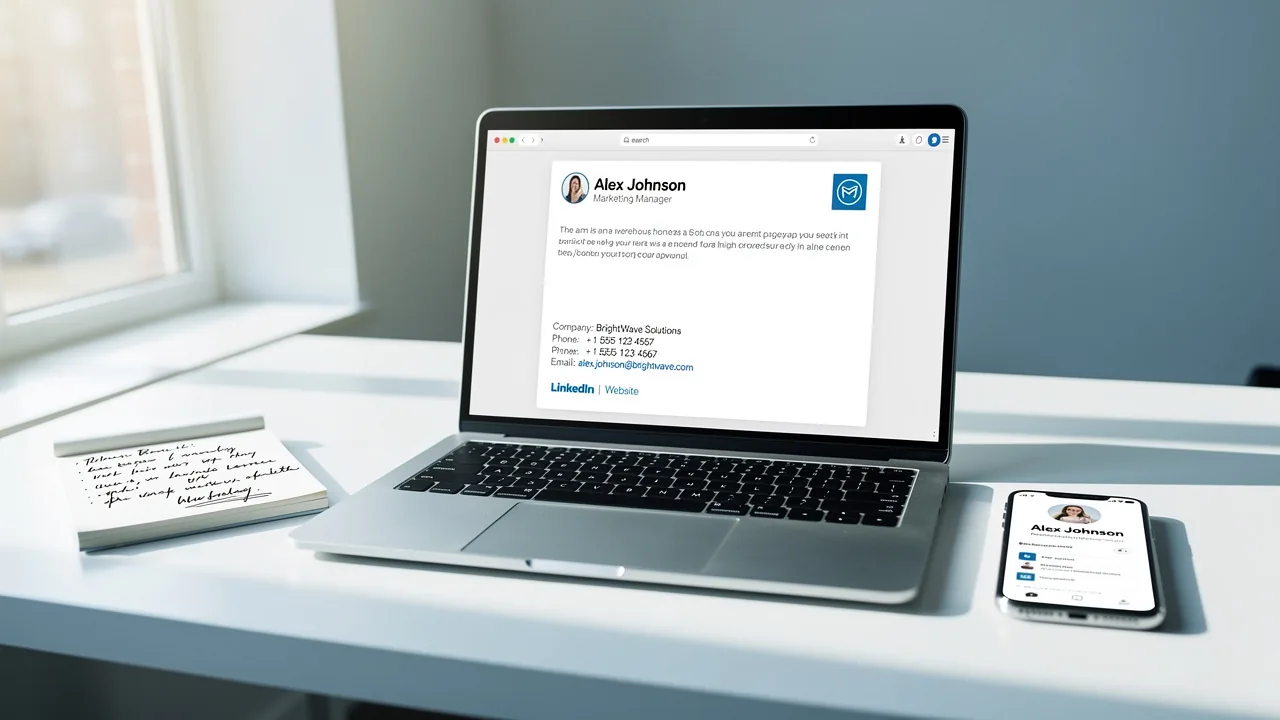
To create an impactful email signature, several key elements must be included to ensure effectiveness and strengthen brand identity:
- Full Name: Clearly stating the sender's name personalizes the communication, making it more relatable.
- Job Title: Including the sender's position establishes authority and provides context for the recipient, reinforcing the professional nature of the correspondence.
- Company Name: This element reinforces brand identity and offers context, helping recipients recognize the organization behind the message.
- Contact Information: Essential details such as phone number and email address facilitate easy follow-up, ensuring that recipients can reach out without hassle.
- Website URL: A link to the company website encourages further exploration of services or products, driving traffic and potential leads.
- Social Media Links: Including links to professional social media profiles enhances engagement and provides additional avenues for connection, fostering a broader relationship with recipients.
- Logo: A company logo adds a visual element that enhances brand recognition, making the mark more memorable.
- Legal Disclaimers: Depending on the industry, including legal disclaimers may be necessary to protect the company and ensure compliance with regulations.
Incorporating these elements not only creates a mark that is informative but also visually appealing and aligned with branding strategies. Studies reveal that 80% of businesses see a branded email signature as vital for branding, while 76% of recipients feel it boosts trust in the sender. Moreover, consistent branding can result in a 22% rise in response rates for messages, while click rates to websites from messages with identifiers can grow from 3% to 15%. Real-world examples show that companies using consistent email formats not only build credibility but also streamline their communication, making these elements essential for a modern email signature. Furthermore, utilizing centralized management tools can enhance consistency across teams by 85%, ensuring uniform branding in all communications. Scribe's automated synchronization with Aircall ensures that any modifications made in your Aircall configuration will be automatically reflected in your Scribe profiles, streamlining the process and guaranteeing that your team's information is always current. Ignoring these design principles can lead to poor user experience and lost opportunities. Lastly, including legal disclaimers is vital for compliance and professionalism, and with Scribe's SOC 2 Type II compliance, you can be assured that your data is handled securely.

Implement Design and Content Strategies for Engagement
To create engaging email signatures, businesses must prioritize clarity and professionalism in their design and content strategies:
- Keep It Simple: Limit the amount of text and use a clean layout to avoid clutter. Cluttered designs can confuse recipients and diminish the perceived professionalism of your communications.
- Use Brand Colors and Fonts: Align the colors and fonts of your branding with your brand guidelines to ensure consistency across all communications. This approach can improve brand consistency by 85% for teams using centralized management, especially when changes in your Aircall settings are automatically updated in your Scribe features.
- Incorporate a Call to Action: Encourage recipients to take action by including a call to action (CTA), such as 'Visit our website' or 'Schedule a meeting'. In fact, tailored CTAs can boost click-through rates by as much as 5%.
- Add Visual Elements: Use images or banners that reflect current promotions or campaigns, ensuring they are optimized for quick loading and display correctly on all devices. For instance, a well-placed banner can drive between 500 to 2,000 downloads over a quarter, and with Scribe's automated synchronization, these updates can be made seamlessly.
- Mobile Optimization: Design elements to be mobile-friendly, ensuring they look good on both desktop and mobile devices. This includes using responsive design techniques and limiting image sizes to under 100KB for fast loading.
- Test for Accessibility: Ensure that the mark is accessible to all users, including those with visual impairments. Use alt text for images and ensure sufficient contrast between text and background colors to enhance readability.
Implementing these strategies allows businesses to craft polished communications with a modern email signature that engage recipients, turning every email into a strategic marketing opportunity. For instance, a tech firm with 200 employees boosted webinar registrations by 180% by updating their contact information with registration links, showcasing the effectiveness of these strategies. With Scribe, organizations can attain 100% brand uniformity and measurable marketing ROI from their digital identifiers.

Utilize Automation and Integration for Consistency and Efficiency
To enhance efficiency and consistency in email signature management, businesses must adopt strategic practices:
- Implement Signature Management Software: Utilize tools like Scribe for centralized management of digital identifiers across the organization. This ensures that updates are automatically applied to all identifiers, maintaining brand consistency. With Scribe, modifications made in your Aircall configuration will automatically reflect in your correspondence identifiers, streamlining the process further.
- Integrate with HR Systems: Connect the management tool for electronic signatures with HR systems to automatically update them when employee information changes, such as job titles or contact details. Manual updates often lead to errors and outdated information, creating inefficiencies.
- Schedule Regular Updates: Establish a routine for reviewing and updating electronic correspondences to ensure they remain relevant and reflect any changes in branding or messaging.
- Use Templates: Develop standardized templates that can be easily customized for different departments or campaigns. This approach ensures brand consistency while allowing for personalization, which is crucial for engagement.
- Monitor Performance: Utilize analytics to track the performance of digital footers, focusing on metrics such as click-through rates (CTR), conversion rates, and engagement rates. Significantly, companies utilizing branded footers experience a 22% higher response rate and a 15% higher website CTR, highlighting how effective management of these footers boosts engagement and trust. Furthermore, 76% of participants indicated that branded electronic identifiers enhance their trust in the sender, underscoring the importance of trust in digital communications.
By utilizing automation and integration, like Scribe's ability to auto-fill team information and sync with Aircall, businesses can streamline communication, save time, and ensure all interactions reflect the latest branding. Moreover, Scribe's SOC 2 Type II compliance guarantees secure data management, making it a trustworthy option for organizations aiming to improve their messaging branding administration. Ultimately, prioritizing effective modern email signature management can significantly elevate brand perception and communication effectiveness.

Test and Optimize for Cross-Platform Compatibility
To ensure email signatures are effective across various platforms and devices, it is crucial to follow established best practices:
- Conduct Cross-Client Testing: Utilize testing tools to evaluate how identifiers appear in various communication clients, such as Outlook, Gmail, and Apple Mail, as well as on different devices including desktops, tablets, and mobiles. This step is crucial because 40% of messages reviewed have at least one major mistake that affects engagement. Furthermore, messages with branded identifiers achieve a 22% greater response rate compared to those lacking, underscoring the importance of following best practices.
- Check for HTML Compatibility: Ensure the HTML code used in the signature is clean and works well with various messaging clients. This helps avoid display issues that can arise from using unsupported CSS or JavaScript, which many email clients do not support.
- Optimize Image Formats: Use web-friendly image formats like PNG or JPEG, and make sure images are appropriately sized to prevent loading issues. High-quality images sized between 150px-300px for logos and 50px-100px for headshots can significantly enhance professionalism and engagement.
- Review on Different Devices: Test identifiers on multiple devices to ensure they render correctly, paying attention to how they look in both light and dark modes. With 60% of business correspondence now accessed on mobile devices, ensuring mobile-friendliness is essential.
- Gather Feedback: Encourage team members to provide input on how signatures appear in their messaging clients. This collaborative approach can help identify issues that may not be apparent during initial testing.
- Regularly Update Testing Protocols: As communication clients and devices advance, frequently refresh your testing protocols to guarantee ongoing compatibility. Conduct quarterly reviews and check links monthly to maintain a professional appearance and confirm that contact information is current.
By syncing your Google Workspace with Scribe, you can save time and ensure that any modifications made to your teammates' information are automatically reflected in their communications through the auto-fill feature. This automated sync helps keep your brand consistent and makes updates easy. Scribe's SOC 2 Type II compliance ensures secure data handling, building trust with your audience. For example, a sales team that revamped their communication headers captured 312 new CRM contacts in just 30 days, demonstrating the effect of optimized communication headers. By prioritizing these strategies, businesses can significantly enhance their email signature effectiveness and overall brand engagement.

Conclusion
Effective email signatures are more than just a design choice; they are a strategic asset that can elevate brand engagement and communication. By incorporating essential elements such as full names, job titles, and contact information, organizations can foster a professional image while ensuring that their communications are easily recognizable and trustworthy.
The article outlines key strategies for designing engaging email signatures, emphasizing:
- Simplicity
- Brand consistency
- The importance of mobile optimization
Utilizing tools like Scribe for centralized management allows businesses to maintain uniformity across all communications, ensuring that updates are seamlessly integrated. Furthermore, testing for cross-platform compatibility is crucial to avoid display issues that could undermine the professionalism of the correspondence.
Ultimately, the right email signature can be a game-changer in how your brand is perceived and how effectively you connect with your audience. By implementing proven strategies and utilizing automation tools, businesses can transform every email into a powerful marketing opportunity. Embrace these strategies to ensure that your email signatures not only reflect your brand identity but also engage recipients effectively, driving measurable results and fostering lasting connections.
Frequently Asked Questions
What are the key elements of a modern email signature?
The key elements of a modern email signature include the full name, job title, company name, contact information, website URL, social media links, logo, and legal disclaimers.
Why is including a full name in an email signature important?
Including a full name personalizes the communication, making it more relatable to the recipient.
How does a job title in an email signature benefit the sender?
A job title establishes authority and provides context for the recipient, reinforcing the professional nature of the correspondence.
What role does the company name play in an email signature?
The company name reinforces brand identity and helps recipients recognize the organization behind the message.
Why is contact information essential in an email signature?
Contact information, such as phone number and email address, facilitates easy follow-up, ensuring that recipients can reach out without hassle.
How can a website URL in an email signature be beneficial?
A website URL encourages further exploration of services or products, driving traffic and potential leads.
What is the advantage of including social media links in an email signature?
Social media links enhance engagement and provide additional avenues for connection, fostering a broader relationship with recipients.
How does a logo contribute to an email signature?
A company logo adds a visual element that enhances brand recognition, making the brand more memorable.
Why might legal disclaimers be necessary in an email signature?
Legal disclaimers may be necessary to protect the company and ensure compliance with regulations, depending on the industry.
What impact does a branded email signature have on business communication?
Studies show that 80% of businesses view a branded email signature as vital for branding, and 76% of recipients feel it boosts trust in the sender.
How can consistent branding in email signatures affect response rates?
Consistent branding can lead to a 22% increase in response rates for messages, and click rates to websites can grow from 3% to 15% with identifiable signatures.
What is the benefit of using centralized management tools for email signatures?
Centralized management tools can enhance consistency across teams by 85%, ensuring uniform branding in all communications.
How does Scribe ensure that email signature information is current?
Scribe's automated synchronization with Aircall ensures that any modifications made in Aircall configurations are automatically reflected in Scribe profiles.
What are the consequences of ignoring email signature design principles?
Ignoring these design principles can lead to poor user experience and lost opportunities.
How does Scribe ensure data security in email signatures?
Scribe's SOC 2 Type II compliance assures that data is handled securely, which is vital for professionalism and compliance.
List of Sources
- Define Key Elements of a Modern Email Signature
- The impact of email signatures on your branding (https://signitic.com/en/resources/the-impact-of-email-signatures-on-your-branding)
- Best practices for business email signatures in 2026 (https://bybrand.io/blog/best-practices)
- What Should an Email Signature Look Like for Maximum Impact? (https://scribe-mail.com/en-US/blog/what-should-an-email-signature-look-like-for-maximum-impact)
- Email Signature Best Practices - NEWOLDSTAMP (https://newoldstamp.com/blog/email-signature-best-practices)
- Email Signature Best Practices for 2026 (+ 15 Pro Examples) (https://wavecnct.com/blogs/email-signature-best-practices-2026)
- Implement Design and Content Strategies for Engagement
- Email Signature Best Practices - NEWOLDSTAMP (https://newoldstamp.com/blog/email-signature-best-practices)
- Email Signature Best Practices for 2026 (+ 15 Pro Examples) (https://wavecnct.com/blogs/email-signature-best-practices-2026)
- Why Email Signatures Must Be In Your 2026 Marketing Plan | Rocketseed (https://rocketseed.com/blog/2026-marketing-plan-email-signatures)
- 12 email signature marketing examples that drive clicks (2026) (https://signitic.com/en/resources/12-email-signature-marketing-examples-that-actually-drive-clicks)
- 4 Essential Email Signature Ideas to Boost Marketing Engagement (https://scribe-mail.com/en-US/blog/4-essential-email-signature-ideas-to-boost-marketing-engagement)
- Utilize Automation and Integration for Consistency and Efficiency
- Research Recap: Branded Email Signatures Increase Company Recognition, Trust - Demand Gen Report (https://demandgenreport.com/industry-news/research-recap-branded-email-signatures-increase-company-recognition-trust/47252)
- WiseStamp Launches the Industry's First AI-Powered Email Signature Platform, Eliminating the Gap Between Brand Design and Instant Deployment (https://prnewswire.com/news-releases/wisestamp-launches-the-industrys-first-ai-powered-email-signature-platform-eliminating-the-gap-between-brand-design-and-instant-deployment-302774232.html)
- Email signature statistics: Why every business should optimize their email signatures — Stripo.email (https://stripo.email/blog/email-signature-statistics-why-every-business-should-optimize-their-email-signatures)
- Email signature statistics and trends in 2024 (https://wisestamp.com/blog/email-signature-statistics)
- Email Signature Trends 2026: Centralized Control & Automation | SIGNandGO posted on the topic | LinkedIn (https://linkedin.com/posts/signngo_email-signature-trends-to-watch-in-2026-activity-7401523471786217473-zAVL)
- Test and Optimize for Cross-Platform Compatibility
- Email Signature Best Practices for 2026 (+ 15 Pro Examples) (https://wavecnct.com/blogs/email-signature-best-practices-2026)
- Email signature statistics: Why every business should optimize their email signatures — Stripo.email (https://stripo.email/blog/email-signature-statistics-why-every-business-should-optimize-their-email-signatures)
- 12 Best Email Signature and Disclaimer Practices (https://cloud-awards.com/12-tips-for-effective-use-of-email-signatures-and-disclaimers)
- Email Signature Best Practices Guide With Examples - MailerLite (https://mailerlite.com/blog/email-signature-best-practices)
- Top email signature trends for companies in 2026 (https://bybrand.io/blog/trends-email-signatures)
Get started with Scribe
Manage signatures across your whole team
Free 14-day trial — no credit card.