4 Best Practices for an Effective HTML Signature Template
An HTML email signature is not merely a digital sign-off; it serves as a crucial element of brand communication that can enhance engagement and
Sophie Grant
Email Signature Specialist, Scribe

Introduction
An HTML email signature is not merely a digital sign-off; it serves as a crucial element of brand communication that can enhance engagement and professionalism. When organizations master the key elements of an HTML signature, they not only ensure brand consistency but also enhance their marketing efforts, leading to measurable results.
Businesses often find it challenging to create email signatures that are both creative and compliant with branding standards. This challenge can result in lost engagement and diminished brand presence in email communications.
Understanding best practices can elevate a simple signature into a strategic marketing asset that drives engagement and brand recognition.
Identify Key Components of an Effective HTML Signature Template
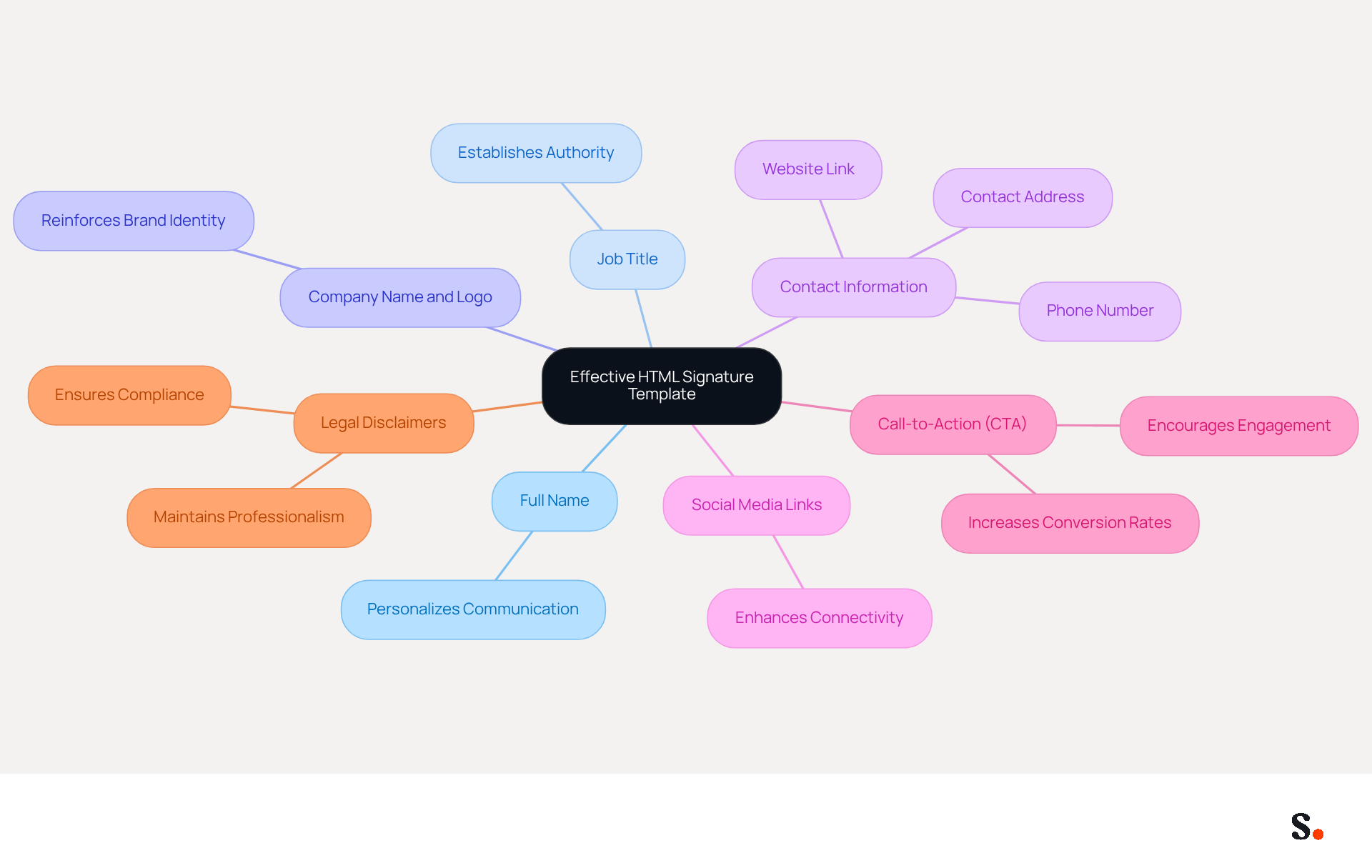
Creating an impactful HTML signature template is essential for effective communication and representing the brand. An effective signature should encompass several key components to maximize its impact:
- Full Name: Clearly displaying the sender's full name personalizes communication, making it more relatable.
- Job Title: Including the sender's position establishes authority and provides context for the recipient.
- Company Name and Logo: This reinforces brand identity and aids in recognition, crucial for maintaining a professional image.
- Contact Information: Essential details such as phone number, contact address, and website link should be provided to facilitate easy communication.
- Social Media Links: Incorporating icons that link to professional social media profiles enhances connectivity and engagement with recipients.
- Call-to-Action (CTA): A subtle prompt that encourages recipients to take action, like visiting a website or signing up for a newsletter, can greatly enhance engagement. Research shows that well-placed CTAs can increase conversion rates by up to 40% compared to standard links.
- Legal Disclaimers: If necessary, including required legal disclaimers ensures compliance with regulations while maintaining professionalism. These disclaimers should be unobtrusive to prevent diverting attention from the main elements.
By incorporating these components, many businesses find it challenging to create email signatures that effectively represent their brand and engage recipients. Scribe automates the synchronization of your identifiers with Aircall, so any changes you make are instantly reflected, saving you time and ensuring your brand stays consistent. Furthermore, Scribe's SOC 2 Type II compliance ensures that your data is managed securely, offering peace of mind as you handle your messaging branding. Regularly updating your email signatures not only enhances professionalism but also strengthens your brand's presence in every interaction.
Ensure Brand Consistency Across Email Signatures
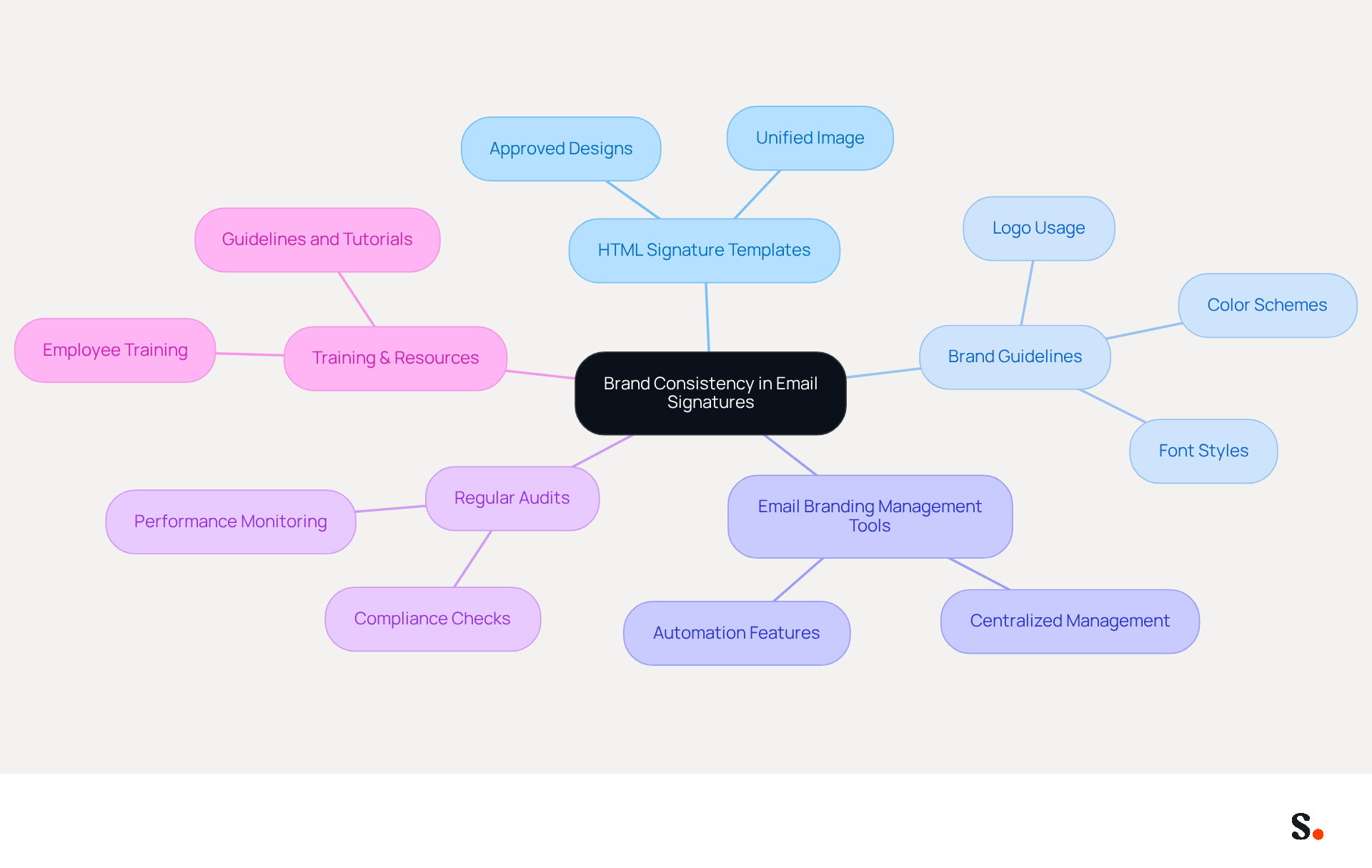
To maintain a strong corporate identity, organizations must prioritize consistency across their html signature templates. Implementing an html signature template is essential; establishing a set of approved designs ensures that all employees present a unified image, thereby reinforcing the brand's identity.
Creating detailed brand guidelines is another critical step. These guidelines should outline the proper use of logos, colors, fonts, and other design elements in digital correspondence. Clear instructions are vital for achieving consistency and enhancing professionalism.
Utilizing a centralized email branding management tool, such as Scribe, can further ensure consistency and facilitate easy updates across the organization. Scribe can automatically fill in your teammates' names using your business phone system, keeping information synced and up to date. This method not only saves time but also guarantees that all endorsements align with the latest branding standards while maintaining SOC 2 Type II compliance for data security.
Conducting regular audits of digital identifiers is also necessary. Periodic reviews help verify adherence to standards and allow for necessary adjustments. This ongoing monitoring is crucial for maintaining alignment with evolving visual identities and legal requirements.
Training and resources for employees are equally important. When staff understand the importance of consistency, it cultivates a culture of professionalism and meticulousness in their html signature template.
By adhering to these practices, organizations can project a cohesive image that enhances professionalism and builds trust with recipients. This is underscored by research indicating that 80% of companies view customized digital footers as vital for their corporate identity. Uniform footers can lead to a 22% increase in response rates, and 76% of recipients report that personalized identifiers boost their confidence in the sender. Failing to implement these practices risks eroding trust and engagement with your audience. Ultimately, implementing an html signature template as a unified approach to email signatures can significantly enhance your organization's credibility and effectiveness in communication. Additionally, consider joining Scribe's Affiliate Program to earn a 50% commission while promoting consistency, and offer a $30 credit to new subscribers, further enhancing your marketing efforts.
Incorporate Marketing Elements to Enhance Engagement
Incorporating marketing elements into an html signature template can significantly enhance engagement and conversion rates.
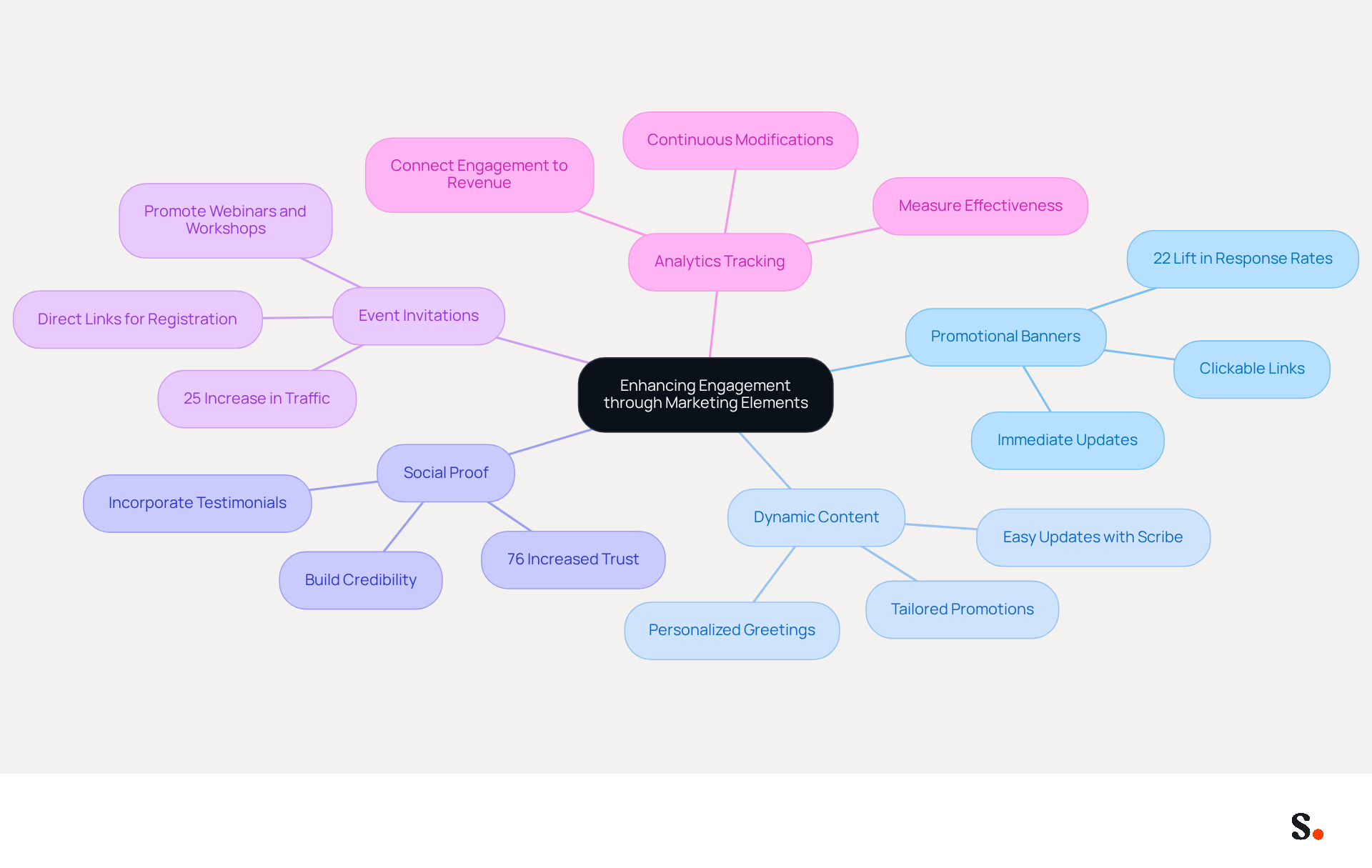
- Promotional Banners: Make these banners clickable to direct traffic to relevant landing pages and boost engagement. With Scribe's automated synchronization with Aircall, updates to these banners appear immediately, maintaining brand consistency. An html signature template for branded email footers can drive a 22% lift in response rates, making this a powerful strategy.
- Dynamic Content: Utilize dynamic content that adapts based on the recipient or context. This could include personalized greetings or tailored promotions that resonate with the recipient's interests, increasing the likelihood of interaction. Scribe's features allow for easy updates to this content, ensuring it remains relevant and engaging.
- Social Proof: Incorporate testimonials or awards within the closing to build credibility. This social proof can motivate recipients to engage further with your brand, as 76% of consumers indicate increased trust in senders with branded elements. As Yuliia Savchuk observes, "Messages that feature a branded footer receive a 22% higher response rate compared to those lacking one."
- Event Invitations: Use the identifier to invite recipients to upcoming webinars, workshops, or events. Providing direct links for easy registration can significantly boost attendance and engagement. For example, a multinational corporation standardized its email formats, leading to a 25% increase in traffic to targeted landing pages. Scribe's fast deployment allows for company-wide installation typically under one day, making it easy to implement these strategies.
- Analytics Tracking: Implement tracking links to measure the effectiveness of the marketing elements in the email footer. This data-driven method enables continuous modifications and enhancements, ensuring that the digital identifier remains a powerful tool for engagement. Scribe's conversion tracking capabilities connect engagement to revenue, offering valuable insights into performance.
The potential for increased engagement through a well-crafted html signature template is substantial, making it a strategic priority for businesses.
Automate Email Signature Management for Efficiency
Effective management of an html signature template is crucial for maintaining brand consistency and minimizing errors. To automate this process effectively, consider the following approaches:
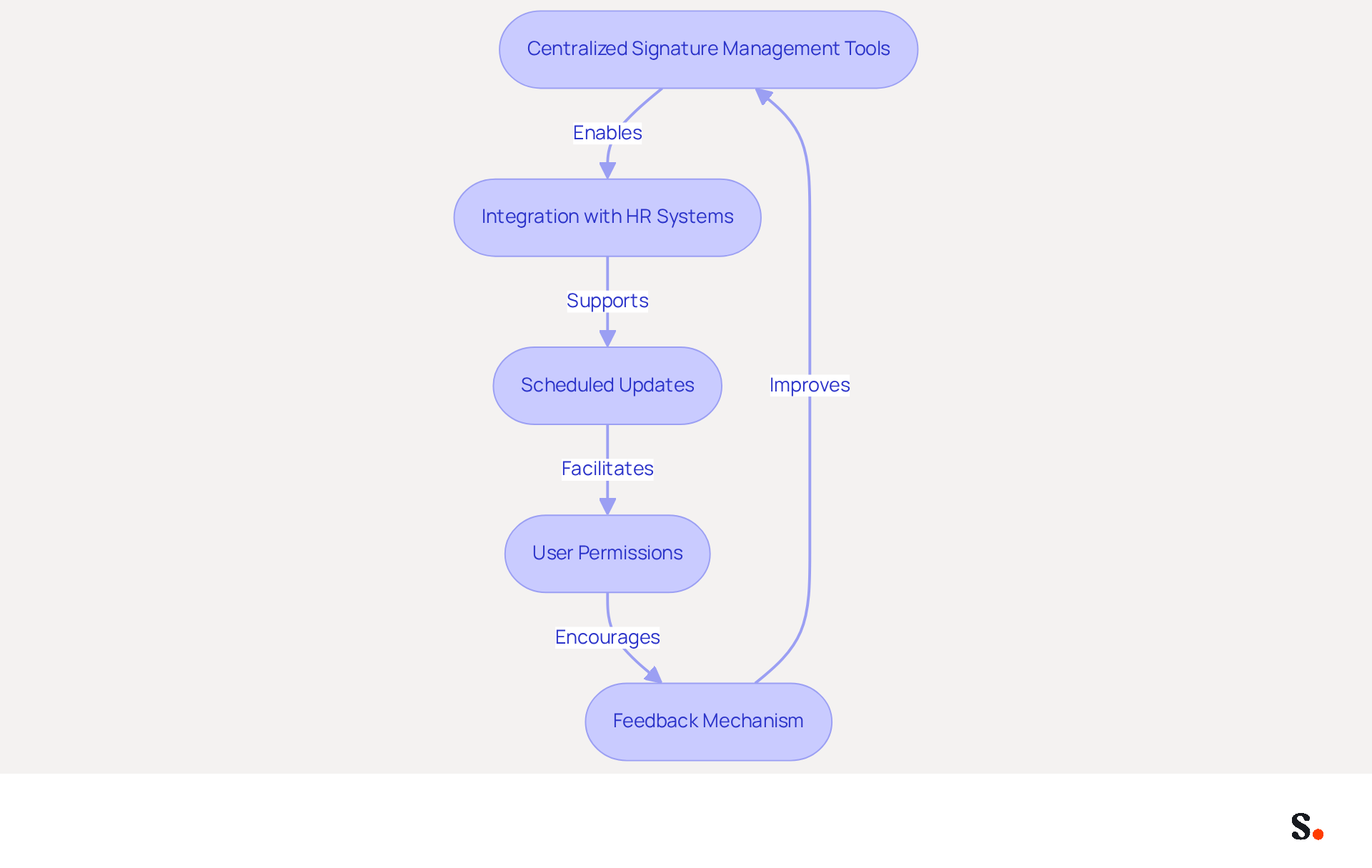
- Centralized Signature Management Tools: Utilize platforms that facilitate the easy creation, deployment, and management of signatures across the organization. This centralization enhances brand consistency and reduces the risk of errors associated with manual updates in the html signature template. To enable one-click synchronization, grant permission for Scribe to connect with your email provider, ensuring real-time updates from your directory.
- Integration with HR Systems: With Scribe, you can easily keep teammate information updated from HR software, ensuring approvals are accurate and consistent. Automating data synchronization with HR systems guarantees that employee information is always current in documents.
- Scheduled Updates: Implement scheduled updates for promotional content or seasonal changes, ensuring that all identifiers reflect the latest marketing initiatives. Keeping content fresh can significantly boost engagement, with effective calls-to-action in email footers increasing click-through rates by up to 12%.
- User Permissions: Define user permissions to control who can edit marks, preserving brand integrity while allowing for necessary customization. This tool allows you to manage these permissions efficiently, ensuring that only authorized personnel can make modifications. This fosters collaboration between IT and marketing teams, enabling agile updates without compromising compliance.
- Feedback Mechanism: Establish a feedback system to gather insights from users about the management process, allowing for continuous improvement. Scribe's intuitive interface allows team members to easily share their feedback on their experience.
By automating email signature management with Scribe, organizations can save time, reduce errors, and maintain a consistent brand image across all communications by utilizing an html signature template while ensuring compliance with data security standards like SOC 2 Type II. Ultimately, embracing automation in email signature management not only enhances efficiency but also strengthens brand integrity.
Conclusion
An effective HTML signature template serves as a strategic asset, not merely an aesthetic choice. By focusing on key components such as full names, job titles, company logos, and contact information, organizations can ensure that their email signatures serve as powerful branding assets. However, many organizations struggle to keep their email signatures consistent and up-to-date. Integrating marketing elements and maintaining brand consistency through automated management tools like Scribe can significantly elevate engagement and professionalism in every email interaction.
The article highlights essential practices for crafting impactful HTML signatures, including:
- The importance of legal disclaimers
- The use of promotional banners
- The incorporation of dynamic content
By leveraging tools that automate signature management, businesses can maintain up-to-date and consistent branding across all communications, ultimately leading to increased trust and engagement from recipients. Regular audits and training help ensure that everyone on the team recognizes the importance of a unified digital presence.
In a world where first impressions matter, investing in a well-designed HTML signature template is crucial. Organizations are encouraged to adopt these best practices and consider utilizing Scribe for seamless email signature management. Ultimately, a well-crafted HTML signature can transform routine emails into impactful touchpoints that foster lasting connections.
Frequently Asked Questions
What are the key components of an effective HTML signature template?
An effective HTML signature template should include the following key components: Full Name, Job Title, Company Name and Logo, Contact Information, Social Media Links, Call-to-Action (CTA), and Legal Disclaimers.
Why is it important to include the sender's full name in an email signature?
Including the sender's full name personalizes communication, making it more relatable for the recipient.
How does a job title in an email signature benefit communication?
A job title establishes authority and provides context for the recipient, helping them understand the sender's role.
What role does the company name and logo play in an email signature?
The company name and logo reinforce brand identity and aid in recognition, which is crucial for maintaining a professional image.
What contact information should be included in an email signature?
Essential contact information includes the phone number, contact address, and website link to facilitate easy communication.
How can social media links enhance an email signature?
Incorporating social media links allows for enhanced connectivity and engagement with recipients, making it easier for them to connect with the sender on professional platforms.
What is a Call-to-Action (CTA) in an email signature, and why is it important?
A Call-to-Action (CTA) is a subtle prompt that encourages recipients to take action, such as visiting a website or signing up for a newsletter. Well-placed CTAs can increase conversion rates by up to 40% compared to standard links.
Why might legal disclaimers be included in an email signature?
Legal disclaimers may be included to ensure compliance with regulations while maintaining professionalism. They should be unobtrusive to avoid distracting from the main elements of the signature.
How does Scribe assist with managing email signatures?
Scribe automates the synchronization of identifiers with Aircall, ensuring that any changes made are instantly reflected, saving time and maintaining brand consistency.
What compliance does Scribe offer regarding data management?
Scribe is SOC 2 Type II compliant, ensuring that data is managed securely, providing peace of mind while handling messaging branding.
Why is it important to regularly update email signatures?
Regularly updating email signatures enhances professionalism and strengthens the brand's presence in every interaction.
List of Sources
- Identify Key Components of an Effective HTML Signature Template
- Email Signature Best Practices for 2026 (+ 15 Pro Examples) (https://wavecnct.com/blogs/email-signature-best-practices-2026)
- Top 10+ best practices for email signatures design in 2026 (https://mysignature.io/blog/email-signature-best-practices)
- 20 best email signature design examples for 2026 — Stripo.email (https://stripo.email/blog/10-best-email-signature-design-examples)
- Best practices for business email signatures in 2026 (https://bybrand.io/blog/best-practices)
- Email Signature Design Trends in 2026: What Works and What to Drop (https://bulksignature.com/blog/email-signature-design-trends)
- Ensure Brand Consistency Across Email Signatures
- The impact of email signatures on your branding (https://signitic.com/en/resources/the-impact-of-email-signatures-on-your-branding)
- Research Recap: Branded Email Signatures Increase Company Recognition, Trust - B2BMX INSIGHTS (https://demandgenreport.com/industry-news/research-recap-branded-email-signatures-increase-company-recognition-trust/47252)
- Easy Steps to Maintain Brand Consistency in Email Marketing — Stripo.email (https://stripo.email/blog/easy-steps-to-maintain-brand-consistency-in-email-marketing)
- Why Are Email Signatures Key to Brand Awareness? | QuickMail (https://quickmail.com/role-of-email-signatures-in-brand-awareness)
- Email Signature Branding: Consistency and Impact | Crossware365 (https://crossware365.com/blog/mastering-email-signature-branding-market-presence)
- Incorporate Marketing Elements to Enhance Engagement
- Email Signature Statistics: A Closer Look at Email Signatures in 2026 (https://mysignature.io/blog/email-signature-statistics)
- 10 ideas for marketing campaigns in email signatures (https://signitic.com/en/resources/10-ideas-for-marketing-campaigns-in-email-signatures)
- 40+ Email Signature Statistics for 2026 (Data + Insights) (https://wavecnct.com/blogs/email-signature-statistics)
- Don't Underestimate the Marketing Power of Your Email Signature (https://marketingprofs.com/opinions/2015/29032/dont-underestimate-the-marketing-power-of-your-email-signature)
- Email signature statistics: Why every business should optimize their email signatures — Stripo.email (https://stripo.email/blog/email-signature-statistics-why-every-business-should-optimize-their-email-signatures)
- Automate Email Signature Management for Efficiency
- Automating Email Signatures: How IT Teams Streamline Processes & Reduce Risk (https://exclaimer.com/blog/streamlining-it-processes-automated-email-signatures)
- MSP Guide to Choosing the Right Email Signature Management Solution (https://channelpronetwork.com/2025/09/21/email-signature-management-msp-guide)
- Email Signature Automation with Azure and Intune | Xpand (https://xpandsoftware.com/knowledge-hub/news/250706-from-manual-to-autonomous-the-evolution-of-signature-updates)
- 4 Best Practices for Your Work Email Signature Strategy (https://scribe-mail.com/en-US/blog/4-best-practices-for-your-work-email-signature-strategy)
- Company-Wide Email Signature Management | CloudM (https://cloudm.io/resources/blog/optimize-your-process-with-company-wide-email-signature-management)
Get started with Scribe
Build a professional email signature
Free 14-day trial — no credit card.