System Integrations: Choose the Right Interface for Your Workflow
Learn how system integrations work and choose between REST APIs, webhooks, CLI workflows, polling, and hybrid patterns.
Sophie Grant
Email Signature Specialist, Scribe

On this page
- Start with the integration decision, not the tool
- Define system integration in practical terms
- Separate integration types from integration interfaces
- Trace the data direction before choosing a pattern
- Use REST APIs when the receiving system controls timing
- Use webhooks when an event should start the workflow
- Use CLI workflows for repeatable operational execution
- Map Dependencies Before Scaling the Integration
- Apply the pattern to signature data and events
- Choose between polling and event delivery deliberately
- Avoid a fast point-to-point path that cannot grow
- Turn the selected pattern into an implementation plan
- Test the connection against business behavior
- Set Operating Rules for One Integration Before Expanding It
- Sources
Start with the integration decision, not the tool
System integration is a workflow-design decision before it is a tool-selection decision. Start by describing what should happen, which system owns the relevant data, what event or schedule starts the work, where the data must go, and how quickly the destination needs it. Those answers narrow the interface choice more reliably than beginning with a familiar platform or implementation preference.
APIs support on-demand queries, while webhooks support event-driven automation; the two approaches are complementary. An API fits a workflow in which your system decides when to request information. A webhook fits a workflow in which an event in another system should notify your system that work may be needed. A command-line workflow fits a repeatable operation that you run from a script, shell, scheduler, or administration process.
The first decision is therefore not “Which integration product should you buy?” It is “What must move, in which direction, and under whose control?” That question keeps the implementation tied to the operational result.
A practical integration decision starts with a short inventory rather than a long technical specification. Use this sequence:
- Audit the tools. Name the source system, destination system, data owner, and existing interface options.
- Map the flow. Describe the object or event moving between systems, its direction, and the transformation required.
- Prioritize one connection. Select a workflow with a defined trigger, destination, and useful acceptance condition.
- Choose the implementation approach. Decide whether an API, webhook, CLI workflow, or combination matches the timing and operating context.
- Add monitoring and plan for growth. Decide how you will observe failures, retries, missing data, and future connections.
This sequence gives you a decision record before implementation begins. It also creates a boundary: if you cannot name the trigger, direction, destination, or success condition, you are not ready to choose an interface.
Define system integration in practical terms
System integration brings component subsystems together and helps ensure they function as a whole. The subsystems may be applications, data stores, operational tools, or services with different responsibilities. Integration gives them a defined relationship so information or actions can cross the boundary between them.
The practical problem is not simply that several tools exist. The problem is that a useful business workflow crosses those tools. A team may need information collected in one application to become available in another, or an event in one system to start work somewhere else. Without an intentional connection, people or separate scripts must bridge the gap manually.
System integration can therefore be described through three questions:
- What are the components? Identify every system that creates, receives, stores, or transforms the relevant information.
- What must work together? State the business process rather than naming only the products.
- What does automation mean here? Specify the action that should happen after data arrives or an event occurs.
The third question matters because systems integrators also solve problems of automation. A connection is useful when it supports a defined operation, not merely because two systems can exchange data.
Application integration connects software applications so workflows between them can be automated. That definition separates a technical connection from a business outcome. Sending a record from one system to another is only part of the design; you also need to know what the receiving application should do with that record.
For example, a source may provide an event, a destination may retrieve additional fields, and a downstream workflow may store or analyze the result. Each step has a different responsibility. Naming those responsibilities helps you choose whether the flow needs a request, an event notification, a scheduled command, or several interfaces working together.
A useful integration brief can fit on one page:
- Source: Which system owns the first reliable version of the data?
- Trigger: What starts the workflow: a user request, a system event, a schedule, or an administrative command?
- Payload: Which fields or identifiers must move?
- Destination: Which system receives the data or action?
- Timing: Does the destination need the result immediately, on demand, or in a batch?
- Failure handling: What should happen if the destination is unavailable or the data is incomplete?
Once those answers are explicit, interface selection becomes a consequence of the workflow rather than an isolated technical choice.
Separate integration types from integration interfaces
Integration types describe the context of the connection, while integration interfaces describe how the connection operates. Keeping those categories separate prevents a common design mistake: treating “data integration,” “application integration,” or “cloud integration” as if each were a single technical interface.
The main contexts have different jobs:
- Data integration unifies data from multiple sources into a single view. The emphasis is on combining information so it can be accessed or interpreted together.
- Application integration: The emphasis is on coordinated application behavior.
- Legacy-system integration can connect older technologies, such as on-premise systems from the 1990s, with modern cloud-based systems. The emphasis is on bridging different technical generations.
- Cloud integration connects cloud-based systems with legacy on-premise systems or other cloud systems. The emphasis is on the operating locations and boundaries of the systems.
These contexts can overlap. A cloud application may participate in data integration, and a legacy system may be part of an automated application workflow. The context tells you what problem you are solving; it does not by itself select the interface.
Integration interfaces describe the mechanism used to move information or initiate work. REST APIs, webhooks, and command-line workflows answer different operational questions:
- REST API: How can one system request information or submit an operation when the receiving system controls the timing?
- Webhook: How can one system notify another when a specified event occurs?
- CLI workflow: How can a person, script, scheduler, or administration process run a repeatable command-line operation?
A single project may use more than one interface. A cloud-to-cloud data flow might use a webhook to signal a change and an API to retrieve the associated details. A scheduled command-line process might call an API and write the returned data into another system. The integration type describes the surrounding problem, while the interface describes the operating path.
Use this distinction in planning documents. Write the context first, then the interface: for example, “application integration using event notification,” “data integration using scheduled API queries,” or “legacy-system integration using a scripted command-line process.” That language keeps the business requirement visible while leaving room to change the implementation when the workflow changes.
Trace the data direction before choosing a pattern
Data direction determines who initiates the exchange. In a pull flow, your system asks for information when it needs it. In a push flow, another system notifies your system when an event occurs. In an operational command flow, a script or administrator starts a defined action.
Direct REST API calls let applications send requests and receive responses in real time. That pattern suits synchronous operations in which the initiating system can wait for the result. Webhooks send real-time event notifications to another system when specific events occur, reducing the need for repeated polling and supporting timely updates. A CLI workflow places the operator, script, or scheduler in control of execution.
Map the direction with a sentence such as:
- “The reporting service requests the data every morning.”
- “The destination receives a notification when a record changes.”
- “The operations script runs the synchronization after an approved change.”
Each sentence points toward a different interface. The wording also exposes an ambiguous design. If you cannot identify who starts the exchange, the integration still needs a workflow decision.
The operating context determines how a command-line workflow can run. Bash is common on Linux and macOS, while CMD and PowerShell provide command-line environments on Windows. PowerShell is designed for administration and automation.
That distinction is practical rather than cosmetic. A script must run in an environment that has the required shell, credentials, network access, schedule, and output handling. A command that works in one shell may require different syntax or invocation in another. Record the execution environment before you treat a CLI workflow as portable.
Use the following decision questions:
- Who starts the exchange? Your application, the source system, or an operator or scheduler?
- Where does the source of truth live? The answer determines which system should be queried or allowed to emit events.
- How much control does the destination need? On-demand retrieval favors a request path; immediate notification favors an event path.
- Where will execution occur? An application runtime, receiving endpoint, workstation, server, or operations environment changes the implementation requirements.
These questions produce a workflow description before they produce code. That order makes it easier to reject an interface that is technically available but operationally mismatched.
Use REST APIs when the receiving system controls timing
REST APIs fit workflows in which the receiving system decides when to request data or submit an operation. Direct REST API calls support real-time requests and responses and are suited to synchronous operations. The initiating application sends a request, receives a response, and can use that response in the next step of its process.
An API is a natural fit when you need to:
- retrieve information for a user-facing screen;
- run a query at a known point in a business process;
- request details after another system has identified a relevant record;
- control the timing of a synchronization; or
- combine the response with logic in your own application.
APIs support on-demand queries, while webhooks support event-driven automation. The distinction is about control of timing, not about whether one method is modern or complete. Choose an API when your application needs to ask a question or perform a request on its own schedule.
Direct REST API calls may be less suitable for large data volumes or asynchronous tasks. A request-and-response design assumes that the initiating process can manage the request, response, and any work that follows. That assumption becomes less comfortable when the task is long-running, event-driven, or too large to handle in one synchronous exchange.
Test the API fit with a concrete timing statement:
- Good fit: “When an analyst opens this record, the application requests the associated data.”
- Possible poor fit: “The system must notice every change immediately without repeatedly checking.”
- Possible poor fit: “The operation processes a large volume over time and should not depend on one waiting request.”
The second and third cases may require event delivery, scheduled batching, or a different processing design. Do not treat the API as an automatic replacement for every integration problem. Define the response time, request scope, and failure behavior first.
A practical API decision record should name the initiating system, requested resource, expected response, timing, and retry boundary. Those fields give you something specific to test before production.
API implementation should preserve the receiving system’s control over timing. Let the application request data when the business process needs it, then handle the response as a defined step rather than assuming that every request represents a complete workflow.
Build the first version around one narrow question. Identify the smallest useful resource, define the fields the destination actually needs, and record what the application should do when the response is delayed or unavailable. This bounded approach makes the interface easier to test and leaves room to add an event signal later if the timing requirement changes.
If the workflow begins with an event outside your application, an API can still remain part of the design. The event can identify what changed, and the receiving system can make an API request for the details. That combined pattern belongs in the next decision rather than being forced into a pure pull model.
Use webhooks when an event should start the workflow
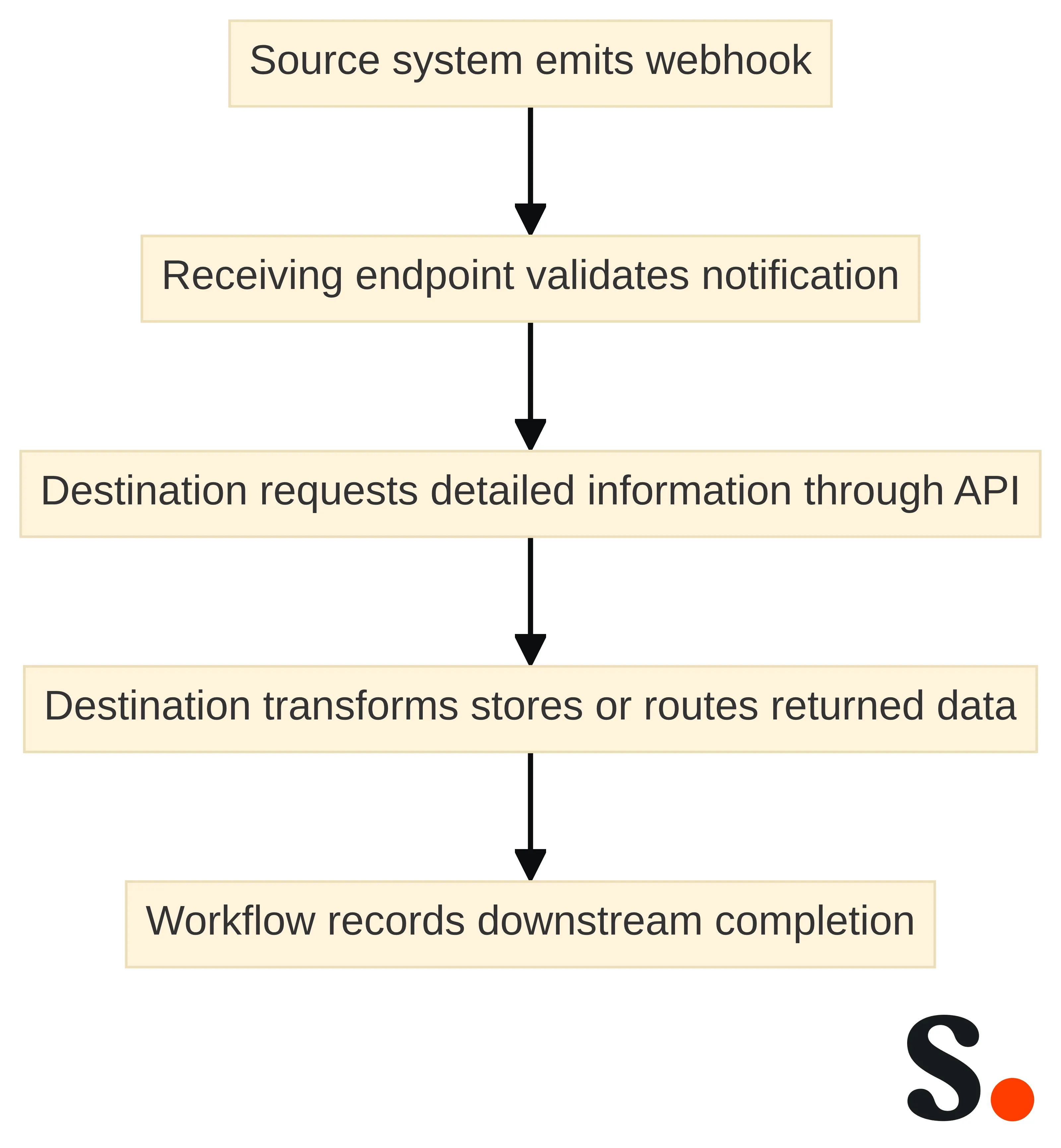
Webhooks fit workflows in which an event should start work in another system. Webhooks send real-time event notifications to other systems when specific events occur, reducing polling and supporting timely data updates. The receiving application does not need to keep asking whether something has changed just to discover that an event occurred.
Use a webhook when your workflow can be expressed as:
- A source system observes a defined event.
- The source sends a notification to a receiving endpoint.
- The receiving system validates and records the notification.
- The receiving system performs the next operation or requests more detail.
The event notification should be treated as a trigger, not automatically as the complete business record. Decide whether the notification contains enough information for the destination or whether the destination must make a follow-up API request. That choice affects payload design, error handling, and the test cases you need.
A webhook requires a reliable receiving endpoint. If the receiving system is down, webhook deliveries may fail and retry, while an API lets your system pull data when it is ready. Availability on the receiving side is therefore part of the interface decision.
Before selecting webhook delivery, define these operating conditions:
- Endpoint ownership: Which team owns the receiving URL and its deployment lifecycle?
- Availability: How will the endpoint receive notifications during planned and unplanned interruptions?
- Acknowledgment: What response tells the sender that the notification was accepted?
- Duplicate handling: What should happen if the same event is delivered again?
- Processing boundary: Will the endpoint process the event immediately or place it into a later workflow?
- Recovery: How will you find and handle notifications that could not be processed?
These are implementation requirements, not optional refinements. A webhook is appropriate when event timing matters and the receiving system can operate a dependable endpoint. If the destination cannot accept inbound notifications reliably, use an API-driven flow or another pattern that lets the destination control retrieval.
Polling asks your application to read an API on a schedule and detect changes itself. Across many customers or integrations, that responsibility includes schedulers, checkpoints, retries, rate-limit coordination, and reconciliation. Polling can be a deliberate choice, but the supporting operations become part of the integration rather than disappearing.
Compare the two designs in plain language:
- Webhook: “Tell the destination when the event occurs.”
- Polling: “Let the destination ask on a schedule and determine whether anything changed.”
Choose the webhook path when prompt event notification matters and the receiving endpoint can meet its operating requirements. Choose polling when scheduled retrieval is acceptable, the destination must control timing, or inbound delivery is not suitable. Record that reason so the team can revisit it when the workflow or operating context changes.
Use CLI workflows for repeatable operational execution
Scribe provides structured JSON via CLI and real-time events through webhooks. That combination supports two distinct operating choices: use the CLI when a repeatable command should produce structured output, and use webhooks when an event should notify another system.
Keep the first CLI workflow narrow. Define the command’s input, the JSON fields that the next system needs, the location where the result will be stored or passed, and the response to a failed execution. A structured output format makes the handoff easier to inspect, but it does not decide how the destination should process the data.
Use this implementation checklist:
- Name the command or operation in ordinary workflow language.
- Identify whether a person, scheduler, deployment process, or another automation starts it.
- Define the input and expected JSON output.
- Decide how credentials are supplied without placing them in scripts or logs.
- Record the exit condition and the action that follows failure.
- Run the command in the shell and environment that will operate it in practice.
That checklist keeps a CLI integration operationally explicit rather than treating it as a shortcut around interface design.
A CLI workflow should not be described as event delivery merely because it can be automated. Its defining feature is repeatable command execution in a shell or comparable operational context. If the requirement is “start work when an event happens,” begin with a webhook or another event mechanism. If the requirement is “run this controlled operation on demand or on a schedule,” a CLI workflow may fit.
The distinction matters for ownership. Operations teams often need a command they can run, inspect, schedule, and repeat. Application teams may instead need a request path inside a service. Choose the interface according to the workflow owner and execution point, then test the handoff with the same permissions and environment that the production process will use.
Map Dependencies Before Scaling the Integration
An integration architecture is the set of connections that lets component subsystems function as a whole. At small scale, a direct point-to-point link can be quick. As applications multiply, however, the connection map becomes harder to scale and manage. The architecture question is therefore not only how one message moves; it is how the full set of dependencies will remain understandable as the system grows.
A practical starting artifact is a dependency map. List each system, the data it supplies or receives, the workflow it supports, and the direction of each flow. This keeps data integration—unifying data from multiple sources into a single view—separate from application integration, which connects applications so workflows between them can be automated.
The hybrid pattern fits when three conditions hold:
- An event matters: The destination should know that a relevant change occurred without waiting for its next scheduled query.
- Details are requested selectively: The notification does not need to carry every field, or the destination needs to retrieve the current detail after the event.
- The endpoint can operate reliably: The receiving system can accept notifications, handle retries, and record the work required to complete the flow.
The pattern is less suitable when the destination cannot maintain a reliable receiving endpoint or when a scheduled query is sufficient. In those cases, a direct API workflow may be easier to operate. Do not add a webhook simply because the API exists; add it when event timing changes the business process.
A hybrid design needs two separate failure paths. The notification may fail to arrive or may be delivered more than once. The follow-up API request may fail after the notification has been accepted. Treat those as separate states in the workflow.
Record at least these conditions:
- notification received and detail request not started;
- notification received and detail request successful;
- notification received and detail request temporarily unavailable;
- repeated notification for an already processed event; and
- notification delivery that requires retry or reconciliation.
This separation makes the implementation easier to inspect. It also keeps the interface decision honest: event delivery starts the work, while API retrieval supplies the detail. The receiving system must be prepared for both responsibilities.
Apply the pattern to signature data and events
Signature data provides a bounded example of system integration without requiring a guide to signature setup. Scribe offers a REST API for accessing Scribe data, including signature status and conversions. Scribe integrates with CRM, data warehouses, and marketing tools via API and webhook.
A practical workflow might begin with a business question such as, “Which signature-related data should our marketing or operations system receive?” The answer determines the direction and interface:
- If a destination needs to request signature status or conversion information at a chosen time, an API-driven flow may fit.
- If a destination should react when a defined signature event occurs, a webhook-driven flow may fit.
- If an operations process needs a repeatable structured export, a CLI workflow may fit.
- If the destination needs an event signal and detailed data, combine a webhook with a follow-up API request.
The example stays within the integration boundary. It concerns the movement and use of data between systems, not the design, installation, or organization-wide management of email signatures.
A signature-data integration should begin with a data-flow record. Name the source, the destination, the purpose of the transfer, and the interface that controls timing. Then define what the destination must do after it receives or retrieves the data.
For example, a CRM workflow could use an API to request signature-related conversion information when a reporting process runs. A data warehouse workflow could use a repeatable command-line operation that returns structured JSON for a scheduled process. A marketing workflow could receive a webhook notification and then retrieve the details required for its next step.
Do not assume that every destination needs every available field. Select the smallest useful data set for the stated workflow, identify the transformation between systems, and write the acceptance condition in business terms. “The destination stores the expected conversion record” is more useful than “the request returned a response.”
Choose the interface according to the workflow rather than the feature list.
Use a bounded pilot:
- Choose one destination, such as a CRM, data warehouse, or marketing tool.
- Select one data object or event that has a clear operational purpose.
- Choose the interface based on timing: request, notification, command, or hybrid.
- Define the expected fields, transformation, and failure response.
- Test the handoff with representative data before expanding the flow.
The pilot should answer whether the selected systems exchange the intended information and whether the destination performs the intended business action. Keep the pilot separate from broader signature-management decisions so that the integration can be evaluated on its own terms.
Choose between polling and event delivery deliberately
Polling requires your application to read an API on a schedule and manage change detection. Across many customers and integrations, that management can include schedulers, checkpoints, retries, rate-limit coordination, and reconciliation. Polling is therefore an operating model, not merely a timer placed around an API request.
Polling can fit a workflow when scheduled retrieval is acceptable, the destination must control when it reads data, or the source does not provide a suitable event path. Define the interval and the change boundary in practical terms. Decide what identifies a new or changed record, where the last successful position is stored, and how the process behaves after an interruption.
A polling design should answer:
- What schedule starts each read?
- Which records or changes does the read cover?
- How does the process avoid processing the same change incorrectly?
- What happens when the API request fails?
- How are missed changes found after an outage?
- How will you reconcile the destination with the source?
If those questions remain unanswered, the design is not yet ready for production.
Event delivery shifts the initial timing decision to the source system. A webhook notifies the receiving system when a specified event occurs, while the receiving system must accept the notification, manage retries, and continue the downstream work. The design reduces repeated checks for event detection but adds endpoint and delivery responsibilities.
Compare the operating duties directly:
| Criterion | Polling | Event delivery |
|---|---|---|
| Timing control | The destination chooses when to read | The source initiates notification after an event |
| Detection work | The destination checks for changes | The destination receives an event signal |
| Receiving requirement | A process must run on schedule | A reliable receiving endpoint is required |
| Recovery focus | Checkpoints, missed ranges, retries, and reconciliation | Delivery retries, duplicate handling, and event recovery |
| Natural follow-up | Process the scheduled response | Process the event or retrieve more detail |
The table is a decision aid, not a ranking. Choose the pattern whose operating duties match the team that will own the integration.
Make the polling-versus-event decision explicit in the integration record. Write why the workflow needs scheduled retrieval or event delivery, then name the material conditions that make the choice workable.
Choose polling when your system needs to pull data when it is ready and can manage scheduled change detection. Choose event delivery when a source event should start work promptly and your system can operate a reliable receiving endpoint. Choose the hybrid pattern when the workflow needs event timing and controlled detail retrieval.
Neither method removes the need for recovery planning. Polling needs reconciliation when scheduled reads miss or repeat changes. Webhooks may retry failed deliveries, so the receiving system needs duplicate handling and a path for events that were not processed. Make those conditions part of the initial design rather than adding them after the first failure.
Avoid a fast point-to-point path that cannot grow
Point-to-point integration can be quick for a small-scale system, but it becomes difficult to scale and manage as applications grow. A direct connection may appear efficient when only two systems need to exchange information. The management burden changes when each additional application needs its own separate connection.
Use point-to-point integration deliberately when the system is small, the workflow is simple, and the connection has a clear owner. Record those conditions rather than treating the first successful connection as a general architecture. A design that fits two systems may create unnecessary coordination work after more systems, data flows, or teams join the environment.
The practical scale questions are:
- How many applications need to exchange information now?
- How many additional connections are likely to follow?
- Does each connection require its own transformation, credentials, monitoring, and recovery process?
- Can the team identify one owner for the whole set of connections?
- What happens when one application changes its data or interface?
The answers show whether a direct path remains manageable or whether the integration design needs a shared pattern, intermediary, or clearer boundary.
A point-to-point example connects six modules through 15 integrations. The example illustrates how connection count can grow faster than the number of applications. It is not a universal estimate for every architecture; it is a scale warning for a design in which each module connects directly to the others.
Apply the warning to your own plan by counting relationships, not only systems. A list of six applications may look contained until you enumerate which applications exchange data, which direction each flow takes, and which transformations each connection requires. Add monitoring, authentication, retries, and ownership to that count.
A point-to-point design can remain appropriate for a bounded workflow. The boundary is reached when connection ownership, change management, or failure recovery becomes difficult to track. At that point, stop adding direct links and reassess the integration pattern before expanding the scope.
Add a scale gate before approving a new direct connection. The gate should ask whether the connection has one source, one destination, a stable purpose, a named owner, and a manageable recovery path. It should also ask whether the connection is likely to become one of many similar links.
Approve a direct path when the workflow is small and the management responsibilities are clear. Pause and redesign when every new application will require several additional links or when separate teams will own related connections without a shared operating model. The goal is not to remove direct integrations; the goal is to prevent a quick implementation from creating an unmanaged network of dependencies.
Turn the selected pattern into an implementation plan
An implementation plan should convert the interface decision into a bounded sequence of work. Begin by auditing your tools, mapping data flows, prioritizing integrations, choosing an implementation approach, adding monitoring, and planning for growth.
Use the following sequence for one connection:
- Audit the tools. Record the source, destination, interface options, ownership, and operating environment.
- Map the data flow. Identify the source of truth, direction, trigger, payload, transformation, destination, and expected action.
- Prioritize the connection. Choose one workflow with a specific business purpose and a clear acceptance condition.
- Choose the approach. Select REST API, webhook, CLI, polling, or a hybrid pattern based on timing and operating duties.
- Define failure handling. Record retry, duplicate, outage, reconciliation, and manual recovery behavior.
- Add monitoring. Decide what confirms receipt, processing, and business completion.
- Plan for growth. Record how another source, destination, field, or workflow would affect the design.
The sequence creates an implementation boundary. Finish one connection’s design before treating the overall integration program as complete.
A useful implementation record names the workflow in language that both technical and operations teams can understand. Include:
- Workflow purpose: The business activity the connection supports.
- Source and destination: The systems that create and receive the information.
- Trigger and timing: The event, request, schedule, or command that begins execution.
- Data contract: The required fields, identifiers, format, and transformation.
- Interface: The selected API, webhook, CLI, polling, or hybrid path.
- Ownership: The team responsible for the source, destination, endpoint, job, and recovery.
- Observability: The signals that show receipt, processing, failure, and completion.
- Growth boundary: The point at which more systems or flows require a design review.
This record is more useful than a list of tools because it preserves the reason for each technical choice. Update it when the workflow changes, not only when the code changes.
Build the smallest connection that proves the selected workflow. Limit the first implementation to one source, one destination, one trigger, and the fields required for one business action. A narrow build gives you a defined test target and makes failure investigation more direct.
Do not expand the connection merely because the first request succeeds. Confirm that the destination receives the expected data, applies the intended process, and records a useful result. Then add the monitoring and recovery behavior that the production workflow requires.
Plan for growth after the first path is understood. Ask whether additional destinations will need the same information, whether more event types will follow, and whether the selected interface can support those changes without multiplying unmanaged connections. The growth plan should influence the design before expansion, not after it.
Test the connection against business behavior
Integration tests verify that APIs communicate correctly across systems, platforms, and services. A successful unit test for one component does not establish that the connected systems exchange the expected information or interpret the response correctly.
Test the connection at the boundaries where assumptions can fail:
- the source produces the expected event, response, or command output;
- the interface carries the required fields and identifiers;
- the destination accepts the format and applies the intended transformation;
- authentication and permissions support the intended operation;
- retries or duplicate deliveries do not create an incorrect result; and
- an unavailable system produces the defined recovery state.
The test should use the same interface and operating context that the implemented workflow will use. A webhook test should exercise the receiving endpoint. A polling test should exercise the schedule, checkpoint, and reconciliation behavior. A CLI test should run the command in the intended shell and environment.
Integration testing checks whether combined APIs meet business requirements, move data correctly, and execute processes as intended. Technical communication is necessary, but it is not the full acceptance condition.
Write tests in two layers:
- Interface behavior: Confirm that requests, notifications, responses, formats, identifiers, authentication, retries, and failure states behave as designed.
- Business behavior: Confirm that the destination stores, routes, reports, or acts on the data in the way the workflow requires.
For signature-related data, the business test might confirm that the destination receives the selected status or conversion information and places it in the intended CRM, data warehouse, or marketing workflow. The test does not need to expand into signature setup. It needs to prove that the chosen data crosses the system boundary and supports the stated downstream action.
Use a release gate before expanding the connection. The gate should require evidence that the systems communicate correctly, the required data moves correctly, and the intended process executes correctly. Include a failure test, not only a successful example.
A compact release record can contain:
- the workflow and interface tested;
- the source and destination used;
- the input, event, or command that started the test;
- the expected data and business action;
- the observed result;
- the failure and recovery cases exercised; and
- the person or team accepting the result.
Release the connection when the stated behavior passes. If the interface works but the business action fails, keep the connection bounded and correct the data mapping or downstream process before adding more systems.
Set Operating Rules for One Integration Before Expanding It
Use the next integration as an operating-design exercise, not a catalog of interfaces. Create a decision record for one connection: identify the source and destination, describe the trigger and data direction, note the timing, and record the operating context. Treat the API, webhook, or CLI as an implementation detail in that record, alongside the conditions that govern its operation.
Before implementation, make the operating questions explicit. Name who monitors the connection, state what happens when the receiving endpoint is unavailable, and note how the workflow accounts for webhook retries or scheduled change detection. Webhooks may retry failed deliveries, while APIs let a system pull data when it is ready.
Add a scale check before expanding the connection. Record whether the connection remains bounded, what monitoring it needs, and how the design will be reviewed as the number of applications increases.
Release only after integration tests verify communication across systems, platforms, and services. Confirm that the combined APIs move data correctly and execute the required business process as intended. The next step is to complete the decision record for one connection, make its operating behavior explicit, and validate that connection before expanding the design.
Get started with Scribe
Build a professional email signature
Free 14-day trial — no credit card.