Scribe REST API and Integrations: Choose the Right Path for Your Workflow
Choose a Scribe REST API integration path for analytics, teammate sync, webhooks, CLI workflows, and automation.
Sophie Grant
Email Signature Specialist, Scribe

On this page
- Start with the workflow, not the integration label
- Use the REST API for controlled resource retrieval and changes
- Map teammate synchronization to documented directory and HRIS connections
- Use webhooks when the next action should begin with an event
- Pair webhook notifications with API retrieval when the workflow needs resource detail
- Prefer retrieval or polling when completeness or network boundaries dominate
- Use the CLI for bounded structured-data exchange
- Use Zapier or n8n when an automation boundary is practical
- Compare each path by timing, completeness, infrastructure, and control
- Verify the current integration contract before writing code
- Run one representative workflow before expanding the integration
- What should be checked before choosing an API, webhook, CLI, or automation path?
- What are the main integration options available with Scribe?
- How can I use webhooks with Scribe?
- What should I consider when choosing between polling and webhooks?
- How do I verify the current Scribe API documentation before implementation?
- What is the role of the Scribe CLI in integrations?
- How can I ensure my integration with Scribe is successful?
- What types of events can Scribe webhooks notify me about?
- Sources
Start with the workflow, not the integration label
An integration workflow should determine the mechanism, not the other way around. Start by defining what must happen, when it must happen, which system owns the next action, and whether the process needs a complete scheduled view or a response to an individual event.
Our REST API supports resource operations such as creating, updating, publishing, installing, and assigning signature templates. It can also add teammates, set smart field values, manage teammate email addresses and aliases, schedule or control promotional banner campaigns, and read the integrations connected to a workspace. Our webhooks send signed HTTPS requests to your endpoint when events occur. Our CLI provides structured JSON, while our webhook events can be delivered to Zapier, n8n, or your own systems.
Use this decision order:
- Choose the API when your process needs an explicit request to retrieve or change a documented resource.
- Choose webhooks when an event should start the next action and you can provide a dependable receiving endpoint.
- Choose the CLI when a command-line boundary and structured JSON exchange fit the surrounding system.
- Choose Zapier or n8n when a webhook-driven handoff to an automation service is more practical than maintaining the entire connection in custom code.
Those choices can work together. A webhook can announce that something happened, and the API can provide the related resource detail. A scheduled API retrieval can provide a completeness check after event-driven processing. A CLI can move structured output into an existing operational process. The right design is the smallest combination that satisfies the workflow’s timing, completeness, infrastructure, and control requirements.
Get started with Scribe
Let AI build your signature — from a screenshot
Free 14-day trial — no credit card.
Use the REST API for controlled resource retrieval and changes
Our REST API is the direct path when your application needs to request a documented resource or apply a documented change. The API documentation lists operations for signature templates, teammates, email addresses and aliases, smart fields, folders, assets, marketing campaigns, and connected integrations. That scope makes the API a practical starting point for application-controlled provisioning, workspace inspection, and data retrieval.
A useful API workflow separates the business action from the transport detail. Define the action first:
- Add a teammate and set the smart field values that the signature needs.
- Manage a teammate email address or alias.
- Retrieve a documented analytics result for a reporting process.
- Read which integrations are connected to a workspace.
- Create, update, publish, install, or assign a signature template.
- Schedule, pause, or resume a promotional banner campaign.
Each item still needs to be matched to the current endpoint, method, request schema, response schema, and authorization requirement before implementation. The existence of a resource category does not by itself establish the exact path or fields for the operation you need.
Our documentation shows a GET request to /v1/analytics/events/summary with an Authorization: Bearer <token> header. Treat that example as a starting point for checking the current public OpenAPI specification, not as a substitute for checking the current contract. The specification should settle the authoritative endpoint, authentication requirement, parameters, response shape, and any conditions attached to the operation.
Use the API as the primary mechanism when your application owns the schedule or the user action. That approach gives your system an explicit place to decide what to retrieve, what to change, and how to pass the returned data into the next internal step. Keep that decision bounded to operations the current documentation actually exposes.
For an analytics integration, define the business measure before selecting the technical path. Scribe identifies a 12% average click-through rate on signature banners as a key marketing performance metric, while its conversion tracking connects signature clicks to revenue through a tracking SDK and server-side API. If the downstream system needs views, clicks, conversions, or revenue association, verify the current documentation for the exact data and operation rather than treating one summary response as coverage of every measure.
curl --request GET --url https://api.scribe-mail.com/v1/analytics/events/summary --header 'Authorization: Bearer <token>'Map teammate synchronization to documented directory and HRIS connections
Teammate synchronization starts with the source that owns employee identity data and the fields your signatures require. Our enterprise documentation lists Microsoft Entra ID and HRIS integrations alongside Google Workspace, Microsoft 365, Salesforce, and HubSpot. Our Microsoft Entra ID integration synchronizes employee data, aliases, and shared mailboxes automatically, while our HRIS smart-field integrations can populate titles, departments, and phone numbers from Workday, BambooHR, Rippling, UKG, and other HRIS platforms.
Use a documented directory or HRIS connection when the required source and fields match that connection’s published scope. This keeps the synchronization boundary close to the system that owns the data. Check the current documentation for the supported connector, the fields it supplies, and the behavior that applies to your environment before treating the connection as a fit.
Use the REST API when your workflow needs application-controlled teammate operations that are documented for the API. Our API can add teammates, set smart field values, and manage teammate email addresses and aliases. Those operations support a custom process when the documented API contract matches the data flow you need.
A practical mapping exercise can be short:
- List the identity source, such as Microsoft Entra ID or an HRIS.
- List the signature fields that source must provide, such as a title, department, phone number, alias, or shared mailbox.
- Decide whether a documented connection already covers the source and fields.
- Use the API only for the remaining documented operations that your application must control.
- Test one representative teammate record before expanding the synchronization scope.
The boundary matters. A documented connection is not a general statement that every identity provider, field, or synchronization behavior is available. If the source or field is not covered by the current documentation, record that as an implementation question rather than designing around an assumption.
Use webhooks when the next action should begin with an event
Our webhooks are the event-driven path when your system should begin work after something happens in a workspace. Our documentation describes signed HTTPS requests sent to your endpoint for events such as an attributed conversion, a failed signature installation, a teammate being added or removed, and a campaign going live. Our webhooks can also deliver real-time events to Zapier, n8n, or your own systems.
Choose this path when waiting for the next event is more appropriate than asking the API on a schedule. The event gives your receiving system a point at which to begin its workflow. That can mean sending an event into an automation service, starting an internal process, or deciding whether a follow-up API request is needed.
Every webhook event payload carries a type field naming the event and an occurred_at ISO 8601 timestamp. The documentation also describes subscriptions to specific event types or to all event types. Use the event catalog to identify the exact payload for the event you intend to handle, rather than building a handler around a guessed field list.
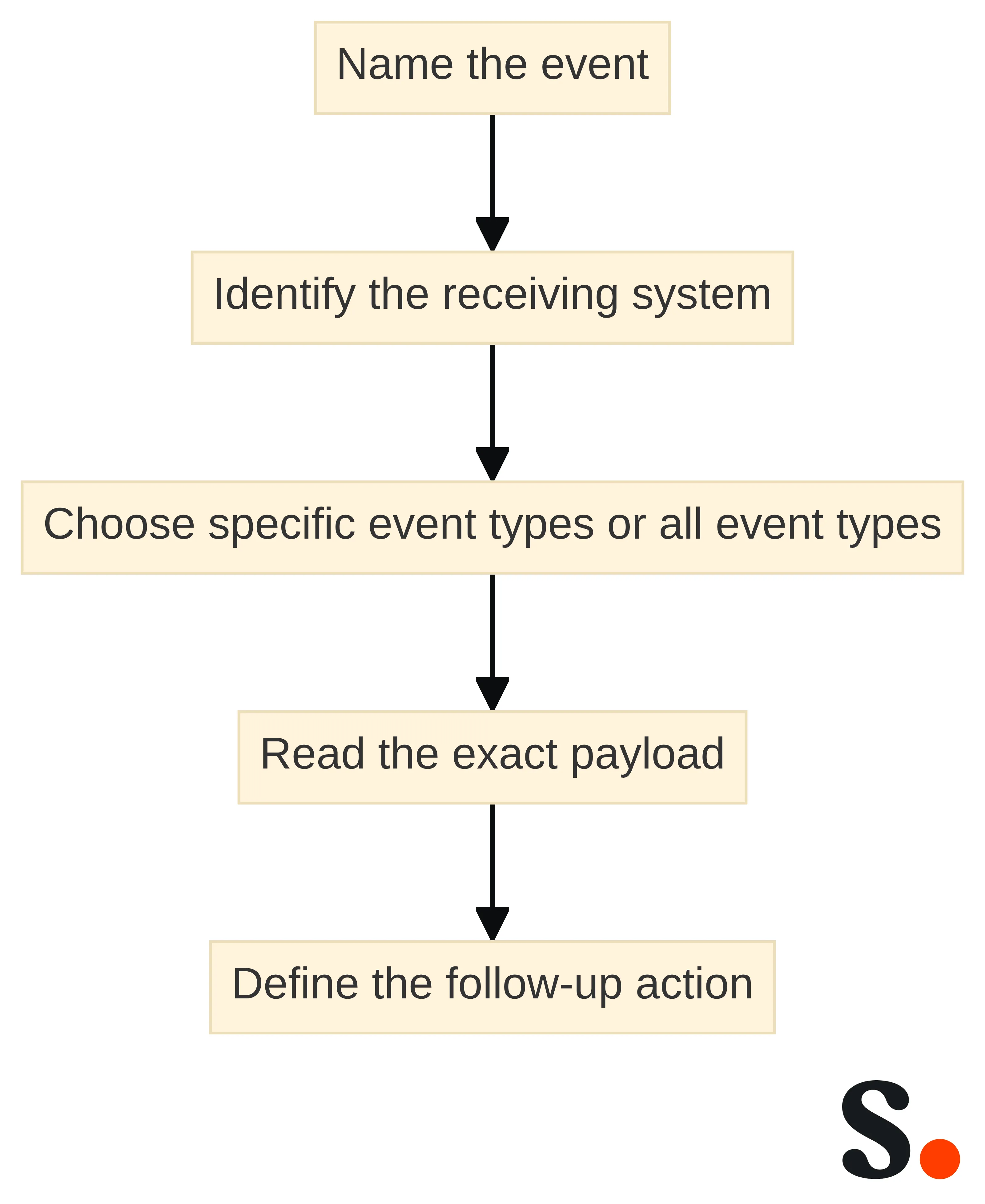
Set the event boundary before choosing the subscription:
- Name the event that should start the workflow.
- Identify the system that will receive the signed HTTPS request.
- Decide whether the endpoint needs specific event types or all available event types.
- Read the event catalog entry for the exact payload.
- Define the action your system will take after receiving that payload.
Webhooks require server support and a reliable client endpoint. If that receiving condition is not available, use a retrieval or polling design instead of treating a webhook as a requirement. Subscription breadth is a design choice rather than a neutral setting. A specific event subscription keeps the receiving workflow aligned with a defined trigger; subscribing to all events creates a broader classification task for the recipient. Choose the broader option only when the documented event types and downstream handling have both been reviewed.
Pair webhook notifications with API retrieval when the workflow needs resource detail
Webhook-to-API workflows fit situations where an event should start the process but the next step needs the full related resource. Our webhook documentation says resource references use the same UUIDs served by the REST API, so your system can fetch the full resource after receiving an event.
This pattern separates two jobs:
- The webhook tells your system that a relevant event occurred and identifies the event type and timestamp.
- The API supplies the related resource detail through the documented retrieval operation.
For example, an event involving a teammate, campaign, or attributed conversion can start a workflow, while the follow-up API request obtains the information that the downstream process actually needs. The exact follow-up request must be selected from the current API documentation and the event catalog. Do not infer a resource path, response field, or authentication detail from the UUID alone.
Use this pairing when event timing matters and the event payload is not the complete business record your process needs. Use a direct scheduled retrieval when the job is a periodic import whose main requirement is completeness. The distinction keeps event handling focused and prevents a webhook design from carrying more data or responsibility than the documented contract supports.
Prefer retrieval or polling when completeness or network boundaries dominate
Polling or scheduled retrieval fits workflows where periodic completeness matters more than immediate reaction. The selected polling-versus-webhooks guidance identifies polling or bulk export as the better default for a nightly analytics import when completeness matters more than speed. The same guidance identifies polling as the better default when the receiving system sits behind a strict firewall with no inbound endpoint and outbound-only operation is simpler.
Use retrieval or polling when these conditions describe your workflow:
- The destination needs a scheduled analytics import rather than an immediate event reaction.
- The receiving environment cannot provide a reliable inbound endpoint.
- Your process needs to reconcile a set of records at a defined interval.
- The current API documentation provides the operation and response shape needed for that import.
Polling has a different operating model from webhooks. Your system owns the schedule and asks for data whether or not something changed. Webhooks require a receiving endpoint and begin with an event. Neither mechanism should be selected by habit: choose the one that matches the timing and network boundary you can support.
For an analytics workflow, define what completeness means before choosing the interval or retrieval operation. You might need a nightly view of a documented summary, a recurring reconciliation process, or a bounded export. Then verify that the current API contract supports the required data. Do not turn a sample endpoint into a promise that it covers every analytics report or time range.
A hybrid can be appropriate when events provide timely processing and scheduled retrieval provides a completeness check. That is a design recommendation, not a claim about a built-in synchronization mode. Specify both sides separately: the event that starts processing and the documented retrieval that supplies the reconciliation data.
Use the CLI for bounded structured-data exchange
Our CLI fits a bounded command-line workflow that needs structured JSON exchanged with another process. Scribe states that it provides structured JSON through the CLI. That makes the CLI worth evaluating when an existing runner, script, build job, or operations process already uses command-line steps and the documented CLI output matches the handoff you need.
Use the CLI for the exchange boundary, not as an assumption about the underlying operation. Before choosing it, identify:
- The command or documented operation that performs the required task.
- The structured JSON output your next process needs.
- The process that will consume that output.
- The conditions under which the command succeeds or needs attention.
- The current CLI documentation that defines command names, arguments, authentication, and output behavior.
The CLI can be a smaller integration surface than a long-running webhook receiver when your workflow already has a controlled command execution point. It can also be a poor fit when the requirement is to react as soon as an event occurs or to maintain a continuously listening endpoint. In those cases, compare it with webhooks or with a request-driven API process.
Keep the first CLI experiment narrow. Run one documented operation, capture its structured JSON, and compare the actual fields with the receiving process’s contract. Do not infer that every REST API operation has an equivalent CLI command until the current CLI documentation shows that mapping. The CLI decision also clarifies ownership: the runner determines when the command executes, and the consuming process determines how the JSON is interpreted and passed onward. That boundary can be tested separately from a webhook receiver. It does not, however, establish event timing; use the webhook documentation when the workflow must begin with a workspace event.
Use Zapier or n8n when an automation boundary is practical
Zapier or n8n can fit an automation boundary when your workflow should receive an event and continue in a service designed to connect tools. Our documentation states that our real-time webhook events can be delivered to Zapier, n8n, or your own systems.
Choose an automation service when the main implementation question is how to pass a documented event into the next workflow step, rather than how to maintain the entire event-handling application yourself. Start with the event and destination, then check the current availability and configuration required for that handoff.
A bounded evaluation should answer four questions:
- Which Scribe event starts the automation?
- Which exact payload fields does the destination need?
- Does the selected Zapier or n8n path accept the event and expose those fields in the required form?
- Does the next action need a separate API retrieval for full resource detail?
The fourth question is where an automation service and the REST API may work together. Our webhook documentation describes event delivery, and our webhook event documentation describes resource references that use the same UUIDs served by the REST API. If the automation needs more detail than the event supplies, plan the documented API retrieval as a separate step rather than assuming that the automation trigger contains the complete record.
Use your own system instead when the workflow needs application-specific control that the automation boundary does not provide. The choice is about ownership of the next step: an automation service can own the connection between the event and a practical workflow, while your application can own the receiving endpoint and subsequent API operations.
Compare each path by timing, completeness, infrastructure, and control
The four integration paths differ mainly in when work starts, how completeness is obtained, what infrastructure must exist, and where operational control sits. Use the comparison below to narrow the design before checking individual endpoints, commands, or automation configurations.
| Path | Timing | Completeness | Infrastructure | Operational control |
|---|---|---|---|---|
| REST API | Request-driven; your process decides when to retrieve or change a documented resource | Suitable for a scheduled retrieval or a follow-up request when the documented response contains the needed data | An application or process that can make the documented request | Your application controls the request, transformation, and next step |
| Webhooks | Event-driven; the next action begins after a workspace event | Event coverage depends on the event types and exact payloads documented for the subscription; pair the event with API retrieval when full resource detail is needed | A reliable receiving endpoint | Your endpoint controls the event-handling workflow |
| CLI | Command-driven; an existing runner starts the exchange | Depends on the documented command and structured JSON output selected for the task | A command-line execution environment and a process that consumes the output | The script, runner, or operations process controls the handoff |
| Zapier or n8n | Event-driven when used as the destination for webhook events | Depends on the event payload and the fields available to the automation path; add a documented API retrieval when necessary | The selected automation service and its configured handoff | The automation workflow controls the next step after delivery |
The REST API and polling guidance support request-driven retrieval when a scheduled import or network boundary matters more than immediate reaction. Webhooks require server support and a reliable endpoint, while the webhook documentation defines event types, timestamps, subscriptions, and resource references. Scribe states that the CLI provides structured JSON, and Scribe states that webhook events can be delivered to Zapier or n8n.
Apply the table to your workflow in this order:
- If an event should start the action, begin with webhooks or a webhook-to-automation path.
- If a scheduled import or outbound-only network boundary matters more, begin with API retrieval or polling.
- If a command-line process already owns the exchange, evaluate the CLI.
- If the workflow needs a combination, define the handoff between mechanisms instead of treating them as interchangeable.
This comparison is a planning aid. The current public documentation must decide the exact operation, payload, command, authentication requirement, and integration availability.
Verify the current integration contract before writing code
An implementation checklist should turn the chosen path into a documented contract before code or automation is expanded. API endpoints, schemas, authentication details, webhook behavior, CLI capabilities, and integration availability are time-sensitive, so check the current public OpenAPI specification and product documentation on the day you begin implementation.
Use this checklist:
- Define the workflow boundary. Write the trigger, the required data, the destination, and the action that follows. State whether the workflow is event-driven, scheduled, command-driven, or a combination.
- Check the REST operation. Confirm the request parameters, response shape, authentication requirement, and any conditions that apply. The documentation example for
GET /v1/analytics/events/summaryshows a bearer-token header, but the current OpenAPI specification should decide the authoritative contract. - Check the data boundary. Match the fields your system needs to the fields the documented response or CLI output supplies. Do not assume that a resource category, event name, or UUID proves that every related field is available.
- Check the webhook event. Confirm the event type, the
occurred_attimestamp, the resource reference, the exact payload, and whether the endpoint should subscribe to selected event types or all event types. The event catalog is the place to check the payload for the event you intend to handle. - Check the follow-up request. If the event supplies a resource reference but the workflow needs more detail, confirm the API request that retrieves the full resource. Our webhook documentation describes the relationship between those resource references and REST API UUIDs; the current API documentation still determines the request details.
- Check the CLI boundary. Confirm the current command, arguments, authentication, and structured JSON output before building a parser or downstream handoff. Scribe states that the CLI provides structured JSON, while the current CLI documentation defines how that output is produced.
- Check the automation handoff. If Zapier or n8n is involved, confirm that the required event can be delivered through the available integration path and that the fields needed by the next action are exposed. Scribe states that its webhook events can be delivered to Zapier, n8n, or your own systems.
- Write a small acceptance record. Record the selected operation or event, the input you used, the fields received, the next action, and the boundary that remains untested. This record gives you a concrete basis for deciding whether to expand the workflow.
Use the public API documentation, webhook documentation, and CLI documentation as separate checks. A successful API request does not establish that a webhook payload or CLI command has the same shape, and a webhook delivery path does not establish that a particular automation configuration is available.
Review the REST API documentation
Run one representative workflow before expanding the integration
A representative workflow gives you a bounded way to test the integration choice before you connect more systems. Choose one concrete path: a documented analytics retrieval, a teammate synchronization step, an event that triggers a follow-up action, a structured CLI exchange, or a webhook handoff to an automation service.
Use the smallest useful test:
- Name the source event, API operation, or CLI operation.
- Confirm the current documentation for the endpoint, event payload, command, or automation path.
- Run the workflow with one representative input.
- Record the fields or structured output that reach the destination.
- Confirm that the next action has the data it needs.
- Record the boundary that still requires documentation review or a separate test.
Choose webhooks when an event should begin the action and your system can support the receiving endpoint. Choose polling or scheduled retrieval when periodic completeness or an outbound-only network boundary dominates. Choose the CLI when structured JSON exchange fits an existing command-line process. Use Zapier or n8n when the documented webhook handoff provides a practical automation boundary.
Once the representative workflow matches its documented contract, expand one boundary at a time. Keep the REST API, webhooks, CLI, and automation services in distinct roles so you can identify which mechanism owns retrieval, event delivery, structured exchange, and the next operational action.
What should be checked before choosing an API, webhook, CLI, or automation path?
What are the main integration options available with Scribe?
Scribe offers several integration options including the REST API for controlled resource retrieval and changes, webhooks for event-driven actions, a CLI for structured data exchange, and integration services like Zapier and n8n for automation.
How can I use webhooks with Scribe?
Webhooks in Scribe allow your system to receive signed HTTPS requests when specific events occur, such as a conversion or a teammate being added. This enables your system to trigger actions based on these events.
What should I consider when choosing between polling and webhooks?
Polling is suitable for scenarios where periodic completeness is more important than immediate reactions, such as nightly analytics imports. Webhooks are preferred when you need to respond to events in real-time, provided you have a reliable receiving endpoint.
How do I verify the current Scribe API documentation before implementation?
Before implementing any integration, check the current public OpenAPI specification and documentation for the latest details on endpoints, authentication, and data structures.
What is the role of the Scribe CLI in integrations?
The Scribe CLI is used for bounded command-line workflows that require structured JSON data exchange. It is suitable for environments that already utilize command-line processes.
How can I ensure my integration with Scribe is successful?
Start by defining your workflow boundary, check the relevant API or webhook documentation, run a representative test with one input, and confirm that the next action has the necessary data.
What types of events can Scribe webhooks notify me about?
Scribe webhooks can notify you about various events, including attributed conversions, failed signature installations, teammate additions or removals, and campaigns going live.
Get started with Scribe
Let AI build your signature — from a screenshot
Free 14-day trial — no credit card.