4 Best Practices for Classic Email Signatures That Drive Engagement
Creating an impactful email signature presents a challenge for many organizations, as it is more than just a digital sign-off; it is a crucial touchpoint for
Sophie Grant
Email Signature Specialist, Scribe
Introduction
Creating an impactful email signature presents a challenge for many organizations, as it is more than just a digital sign-off; it is a crucial touchpoint for brand representation and engagement. By implementing best practices, organizations can transform their email signatures into powerful marketing tools that convey professionalism and drive meaningful interactions.
Many organizations struggle to create email signatures that effectively represent their brand while maintaining consistency across communications. This article will explore four essential practices that can elevate email signatures, enhance brand consistency, and ultimately boost engagement across communications.
By adopting these essential practices, businesses can ensure their email signatures not only reflect their brand identity but also foster stronger connections with their audience.
Get started with Scribe
Manage signatures across your whole team
Free 14-day trial — no credit card.
Incorporate Essential Elements for Professional Signatures
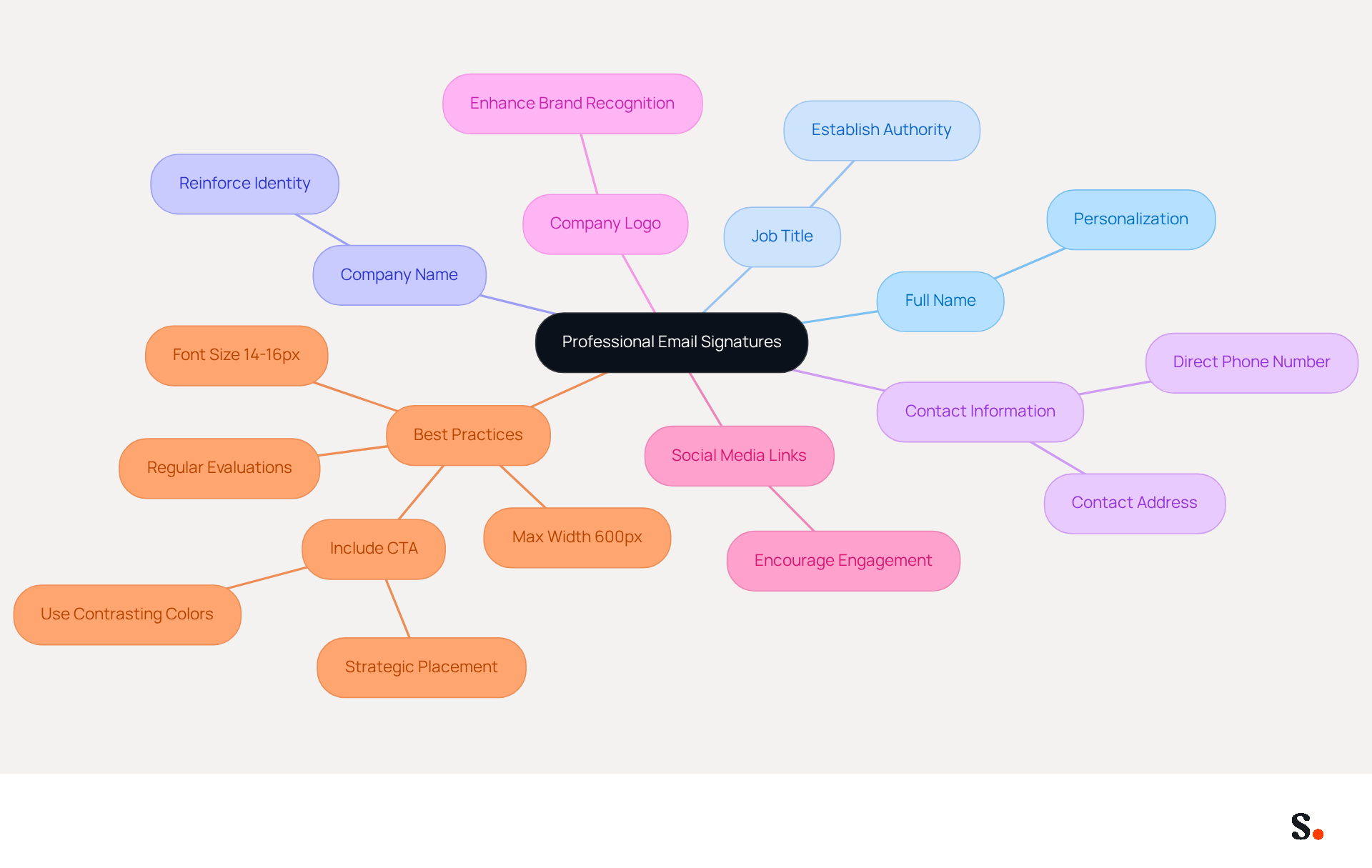
Creating classic email signatures is essential for effective communication and brand representation. To achieve this, include the following key elements:
- Full Name: Clearly state the sender's name to personalize the communication.
- Job Title: Indicate the sender's position to establish authority and context.
- Company Name: Include the organization’s name to reinforce identity.
- Contact Information: Provide a direct phone number and contact address for easy follow-up.
- Company Logo: Incorporate a small, high-quality logo to enhance brand recognition.
- Social Media Links: Add links to professional social media profiles to encourage further engagement.
In 2026, it is crucial for digital identifiers to adhere to best practices, including a maximum width of 600px for mobile-friendliness and a font size of 14-16px for optimal readability. Including a clear call-to-action (CTA) can significantly boost engagement, with strategic CTAs converting 40% better than generic options. Furthermore, it is essential to steer clear of typical traps such as data overload and obsolete content. Regular evaluations of digital identifiers are advised to maintain consistency in branding and accurate information.
By integrating Scribe with Google Workspace, you can streamline the management of these signatures. To set up one-click synchronization, simply grant Scribe the necessary permissions to connect with your email provider, ensuring you have the required administrative privileges. This synchronization allows for automatic updates, meaning any changes in your Google Workspace, such as moving teammates or updating their information, will be reflected in Scribe without manual input. This not only saves time but also improves consistency across your organization. Furthermore, Scribe is SOC 2 Type II compliant, ensuring the safety of your data. By prioritizing classic email signatures, you not only enhance your professional image but also facilitate meaningful connections with your audience.
Ensure Brand Consistency Across All Signatures
Inconsistent classic email signatures can undermine a company's professional image and erode client trust. To maintain brand consistency in email signatures, adhere to the following best practices:
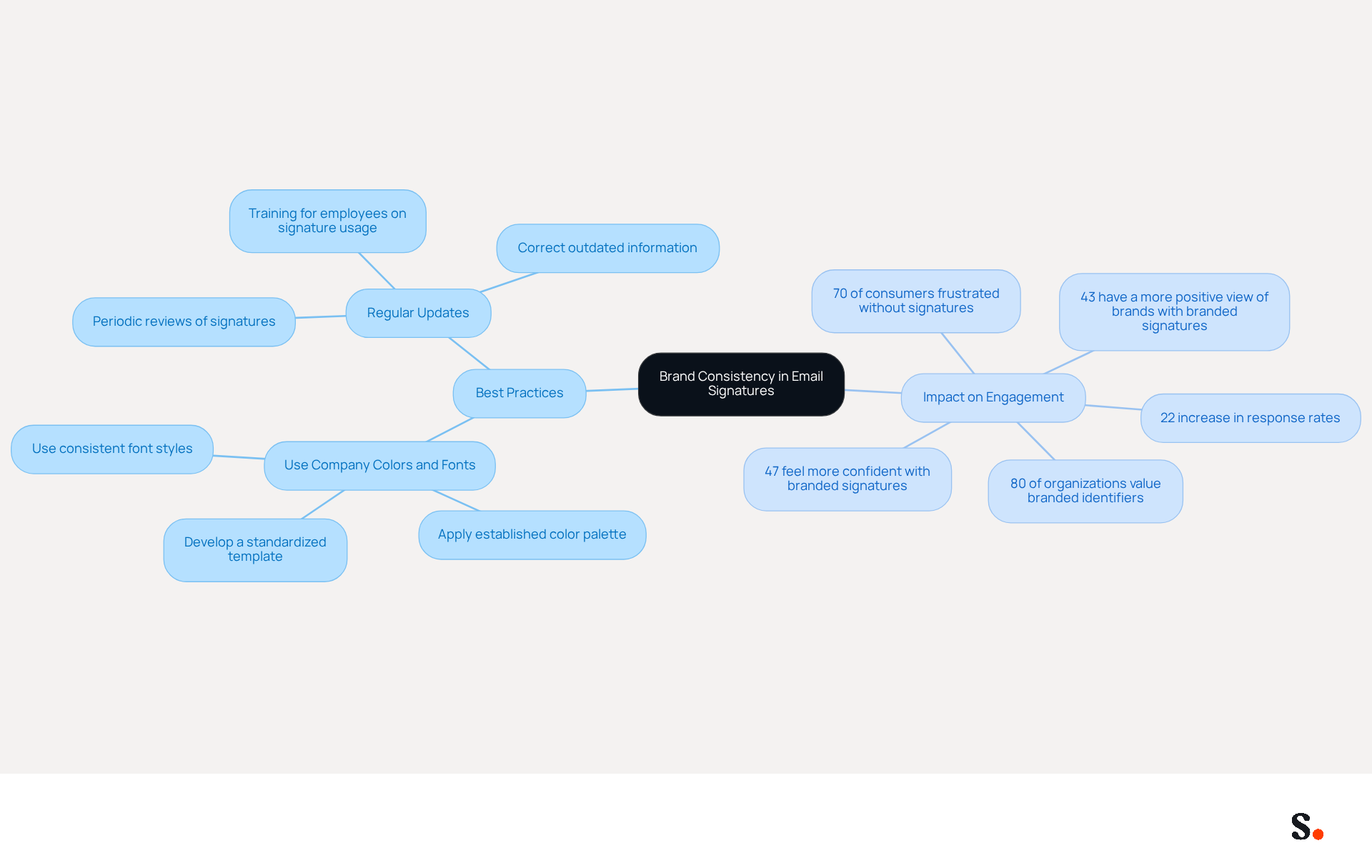
- Use Company Colors and Fonts: Consistently apply the established color palette and font styles to ensure that every signature aligns with the brand's visual identity. This practice is crucial, as 80% of organizations consider branded digital identifiers essential for building trust in communications. To standardize classic email signatures, develop a template that all employees must use, ensuring uniformity in layout and design. Standardization can lead to a 22% increase in email response rates, reinforcing the importance of classic email signatures for a cohesive brand image.
- Regular Updates: Periodically review and refresh the marks to reflect any changes in branding or company details. Regular reviews help ensure that branding guidelines are followed and to correct outdated information, which can otherwise lead to disengagement. Training and guidelines should provide clear instructions for employees on how to correctly implement the classic email signatures template. This training is essential, as 70% of consumers show frustration when companies do not include any form of signature in their messages.
Ultimately, neglecting classic email signatures consistency can lead to missed opportunities and diminished client relationships. Consistent branding not only enhances customer trust but also significantly influences overall engagement, making it a strategic necessity for effective communication.
Utilize Call-to-Action Elements to Boost Engagement
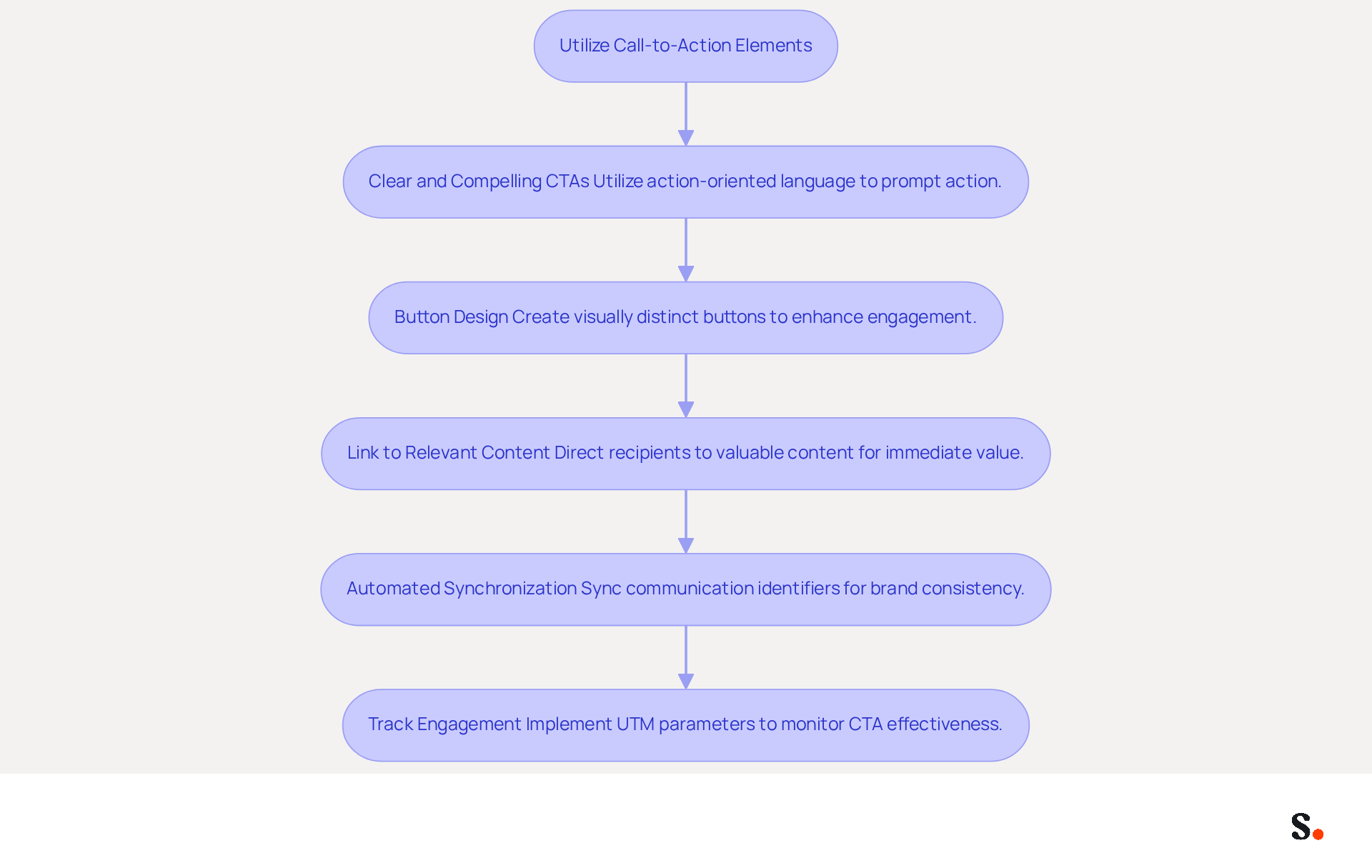
Incorporating call-to-action (CTA) elements in message footers is essential for maximizing engagement and driving conversions. Here are some effective strategies:
- Clear and Compelling CTAs: Utilize action-oriented language that prompts recipients to take action, such as 'Schedule a Demo' or 'Download Our Guide.' Studies show that personalized CTAs significantly boost engagement, with click-through rates increasing by 371% and sales by 1617%, underscoring the importance of specificity in messaging.
- Button Design: Create visually distinct buttons that stand out within the branding. Buttons can increase conversion rates by 28% compared to hyperlinks, making them a preferred choice for driving engagement.
- Link to Relevant Content: Ensure that the CTA directs recipients to valuable content, such as a landing page, blog post, or promotional offer. This approach delivers immediate value while reinforcing the broader marketing strategy, enhancing the likelihood of conversion.
- Automated Synchronization: Syncing your communication identifiers with tools like Aircall and Google Workspace through Scribe means any updates to your team’s information are automatically reflected, making management easier and ensuring brand consistency across all communications.
- Track Engagement: Implement UTM parameters to monitor the effectiveness of CTAs in message footers. This data-driven approach allows for ongoing adjustments to improve performance, ensuring that marketing efforts are optimized for maximum impact.
By strategically placing CTAs in digital correspondences and leveraging Scribe's automated synchronization capabilities, businesses can effectively guide recipients toward desired actions, enhancing overall engagement and conversion rates. Ultimately, the strategic use of CTAs can transform digital communications into powerful tools for engagement and conversion.
Leverage Automation for Efficient Signature Management
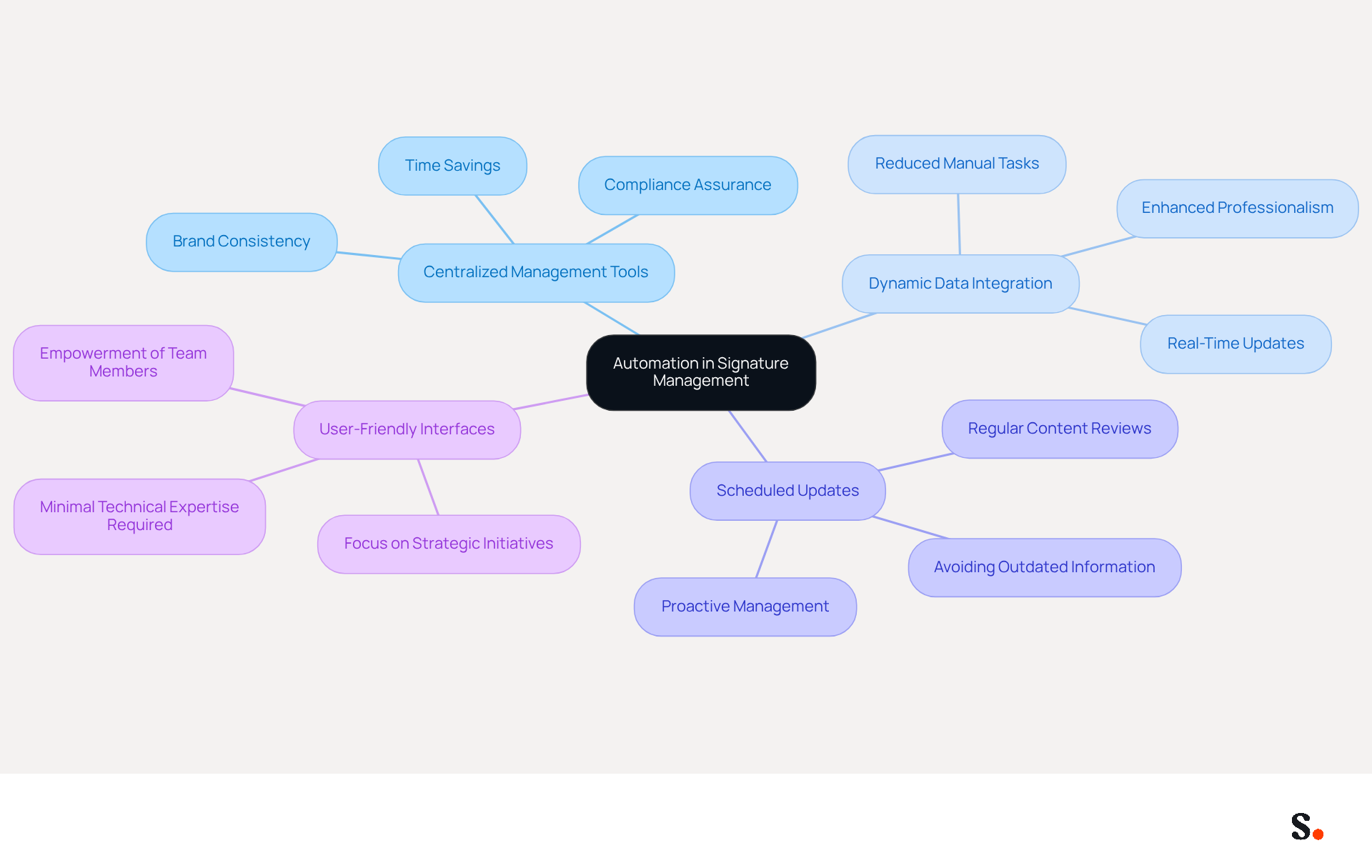
Effective management of classic email signatures is crucial for maintaining brand consistency and professionalism in communications. To optimize this process, consider implementing the following automation strategies:
- Centralized Management Tools: Utilize platforms like Scribe to oversee signatures organization-wide, facilitating easy updates and ensuring brand consistency across all communications. A 2025 Signific report indicates that email footers generate thousands of brand impressions each day, showcasing their value as marketing tools.
- Dynamic Data Integration: Automate the synchronization of employee data from HR systems, ensuring that records consistently reflect the most up-to-date details, which is essential for upholding professionalism. With Scribe's integration capabilities alongside top HRIS platforms and Aircall, IT teams can cut down on manual tasks, boosting their efficiency.
- Scheduled Updates: Set up automated reminders for regular reviews of key content, ensuring that branding and details remain current and pertinent. This proactive approach helps avoid common pitfalls such as outdated contact information and misaligned branding.
- User-Friendly Interfaces: Opt for tools that require minimal technical expertise, empowering all team members to manage their identifiers effortlessly. Dave Willis emphasizes that automating digital identifiers helps IT teams regain control, enabling them to concentrate on strategic initiatives.
By implementing these automation strategies, organizations can greatly save time, reduce manual errors, and ensure that their classic email signatures maintain a polished appearance in all communications. Scribe's one-click synchronization feature guarantees that any modifications made in your provider directory are automatically reflected in your identifiers, improving consistency in representation. Additionally, Scribe's SOC 2 Type II compliance ensures the security of your data, making it a trustworthy option for organizations aiming to optimize their management of digital signatures. Case studies have demonstrated that companies utilizing centralized tools experience enhanced workflow efficiency and a stronger brand presence, transforming everyday communications into effective marketing channels. Current trends indicate that automation not only enhances compliance with legal requirements but also allows for dynamic personalization of marks, further engaging recipients. Expert insights highlight that automating classic email signatures management restores control to IT teams, enabling them to focus on strategic initiatives while ensuring consistent branding across all devices. Ultimately, embracing automation in email signature management not only streamlines processes but also elevates brand perception across all communications.
Conclusion
Effective email signatures are more than just a visual element; they are a critical component of strategic communication. By incorporating essential elements, ensuring brand consistency, utilizing compelling call-to-action elements, and leveraging automation, organizations can transform their email signatures into powerful tools for engagement and professionalism.
Key practices discussed include the importance of including vital information such as full names, job titles, and contact details, while also maintaining a cohesive brand image through consistent use of colors and fonts. The strategic placement of CTAs can significantly boost engagement, with personalized messages leading to remarkable increases in click-through rates. Furthermore, automating the management of email signatures through tools like Scribe not only saves time but also ensures that all communications reflect the most current and accurate information.
The importance of well-crafted email signatures is clear in today's digital communication landscape. It's essential for organizations to focus on these best practices to boost their professional image and build stronger connections with their audience. By embracing automation and focusing on brand consistency, businesses can turn their email signatures into effective marketing channels that drive engagement and contribute to overall success.
Frequently Asked Questions
What are the essential elements to include in a professional email signature?
The essential elements to include in a professional email signature are: Full Name, Job Title, Company Name, Contact Information, Company Logo, and Social Media Links.
Why is it important to have a professional email signature?
A professional email signature enhances communication and brand representation, personalizes the message, establishes authority, reinforces identity, and facilitates easy follow-up.
What are the best practices for digital identifiers in email signatures as of 2026?
Best practices for digital identifiers include a maximum width of 600px for mobile-friendliness, a font size of 14-16px for optimal readability, and including a clear call-to-action (CTA) to boost engagement.
How can a clear call-to-action (CTA) impact engagement in email signatures?
A clear call-to-action (CTA) can significantly boost engagement, with strategic CTAs converting 40% better than generic options.
What common pitfalls should be avoided when creating email signatures?
Common pitfalls to avoid include data overload and using obsolete content.
How can Scribe help in managing email signatures?
Scribe can streamline the management of email signatures by allowing one-click synchronization with Google Workspace, ensuring automatic updates and consistency across the organization.
What permissions are needed to set up Scribe with Google Workspace?
To set up Scribe with Google Workspace, you need to grant Scribe the necessary permissions to connect with your email provider and ensure you have the required administrative privileges.
What compliance standard does Scribe meet to ensure data safety?
Scribe is SOC 2 Type II compliant, ensuring the safety of your data.
How does prioritizing classic email signatures benefit professional image?
Prioritizing classic email signatures enhances your professional image and facilitates meaningful connections with your audience.
List of Sources
- Incorporate Essential Elements for Professional Signatures
- The Complete Email Signature Guide 2026: Best Practices and Policy (https://opensense.com/complete-email-signature-guide)
- Email Signature Best Practices for 2026 (+ 15 Pro Examples) (https://wavecnct.com/blogs/email-signature-best-practices-2026)
- The effectiveness of the email signature as a “point of contact” (https://signitic.com/en/resources/the-effectiveness-of-the-email-signature-as-a--point-of-contact)
- Email signature statistics: Why every business should optimize their email signatures — Stripo.email (https://stripo.email/blog/email-signature-statistics-why-every-business-should-optimize-their-email-signatures)
- Why Email Signatures Must Be In Your 2026 Marketing Plan | Rocketseed (https://rocketseed.com/blog/what-are-the-biggest-email-trends-for-2026)
- Ensure Brand Consistency Across All Signatures
- demandgenreport.com (https://demandgenreport.com/industry-news/research-recap-branded-email-signatures-increase-company-recognition-trust/47252)
- The impact of email signatures on your branding (https://signitic.com/en/resources/the-impact-of-email-signatures-on-your-branding)
- Top 10+ best practices for email signatures design in 2026 (https://mysignature.io/blog/email-signature-best-practices)
- Master Corporate Email Signature Management for Brand Consistency (https://scribe-mail.com/en-US/blog/master-corporate-email-signature-management-for-brand-consistency)
- Why Email Signatures Must Be In Your 2026 Marketing Plan | Rocketseed (https://rocketseed.com/blog/2026-marketing-plan-email-signatures)
- Utilize Call-to-Action Elements to Boost Engagement
- The Ultimate Guide to Email Signature Call-to-Action - NEWOLDSTAMP (https://newoldstamp.com/blog/the-ultimate-guide-to-email-signature-call-to-action)
- All the Best Email Signature Practices for Marketing Success (https://scribe-mail.com/en-US/blog/all-the-best-email-signature-practices-for-marketing-success)
- 7 tips for an effective CTA in your email signature (https://letsignit.com/blog/efficient-call-to-action-signature)
- Why and how to add an effective CTA to your email signature? (https://signitic.com/en/resources/why-and-how-to-add-an-effective-cta-to-your-email-signature)
- How to Create Effective CTA Email Signatures That Drive Conversions? - RoundPie (https://theroundpie.com/blog.html/2021/09/27/how-to-create-effective-cta-email-signatures-that-drive-conversions)
- Leverage Automation for Efficient Signature Management
- Top Email Signature Management Software for Google Workspace (https://bignewsnetwork.com/news/278548159/top-email-signature-management-software-for-google-workspace)
- Central and automatic email signatures for Office 365 (https://codetwo.com/email-signatures/central-and-automatic)
- Company-Wide Email Signature Management | CloudM (https://cloudm.io/blog/optimize-your-process-with-company-wide-email-signature-management)
- Automating Email Signatures: How IT Teams Streamline Processes & Reduce Risk (https://exclaimer.com/blog/streamlining-it-processes-automated-email-signatures)
- How To Automate Your Email Signature Management in Google Workspace (https://seaislenews.com/news/2025/oct/08/how-to-automate-your-email-signature-management-in-google-workspace)
Get started with Scribe
Manage signatures across your whole team
Free 14-day trial — no credit card.