4 Best Practices for Effective Signature en HTML Design
An effective HTML email signature serves as a crucial branding element, yet many organizations overlook its potential impact on marketing success. By following
Sophie Grant
Email Signature Specialist, Scribe

Introduction
An effective HTML email signature serves as a crucial branding element, yet many organizations overlook its potential impact on marketing success. By following best practices in design and integration, organizations can ensure their signatures reflect their brand identity while also driving engagement and conversions.
Many organizations find it difficult to maintain a cohesive brand image through their email signatures, which can result in lost engagement and potential conversions.
What strategies can we use to turn these digital identifiers into powerful marketing tools?
Understand HTML Basics for Signature Design
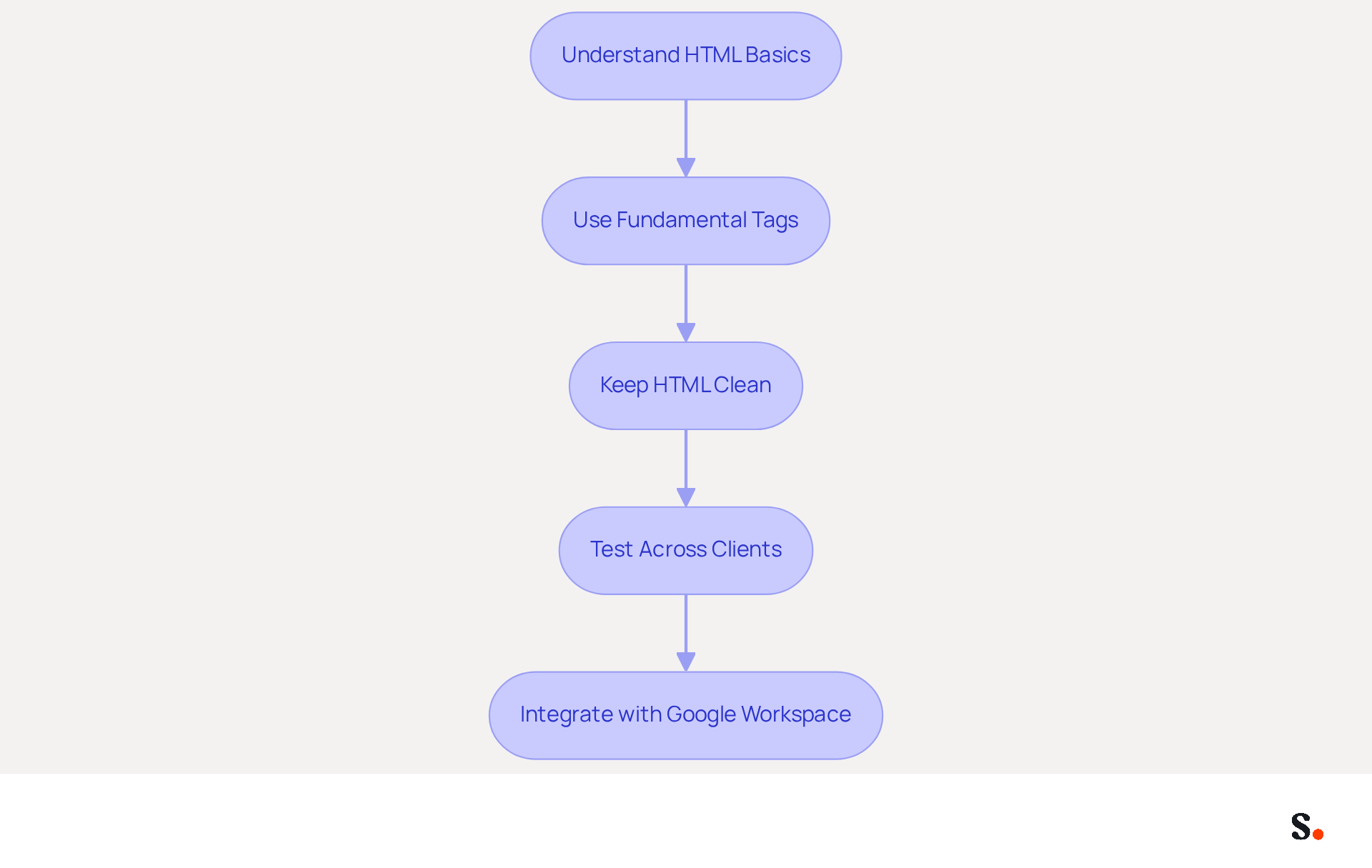
To create effective HTML messages, understanding the foundational elements of HTML is crucial. Start with fundamental tags like <table>, <tr>, and <td>, which are essential for organizing your layout. Tables ensure your identifier displays correctly across different messaging clients, which often have varying support for CSS. Keeping your HTML clean and simple is vital; complex styles and scripts often lead to rendering issues across different clients. For instance, using inline styles for fonts and colors helps maintain consistency. It's also essential to test your mark across different messaging clients to ensure it looks good everywhere. Adopting these best practices can significantly enhance the effectiveness of your digital identifiers, turning them into powerful marketing tools.
By syncing your Google Workspace with Scribe, you can simplify management of messaging identifiers, conserving time and ensuring that any updates to your teammates' details are automatically reflected in your identifiers. This integration not only saves time but also enhances brand consistency throughout your organization.
Ensure Brand Consistency in Signature Design
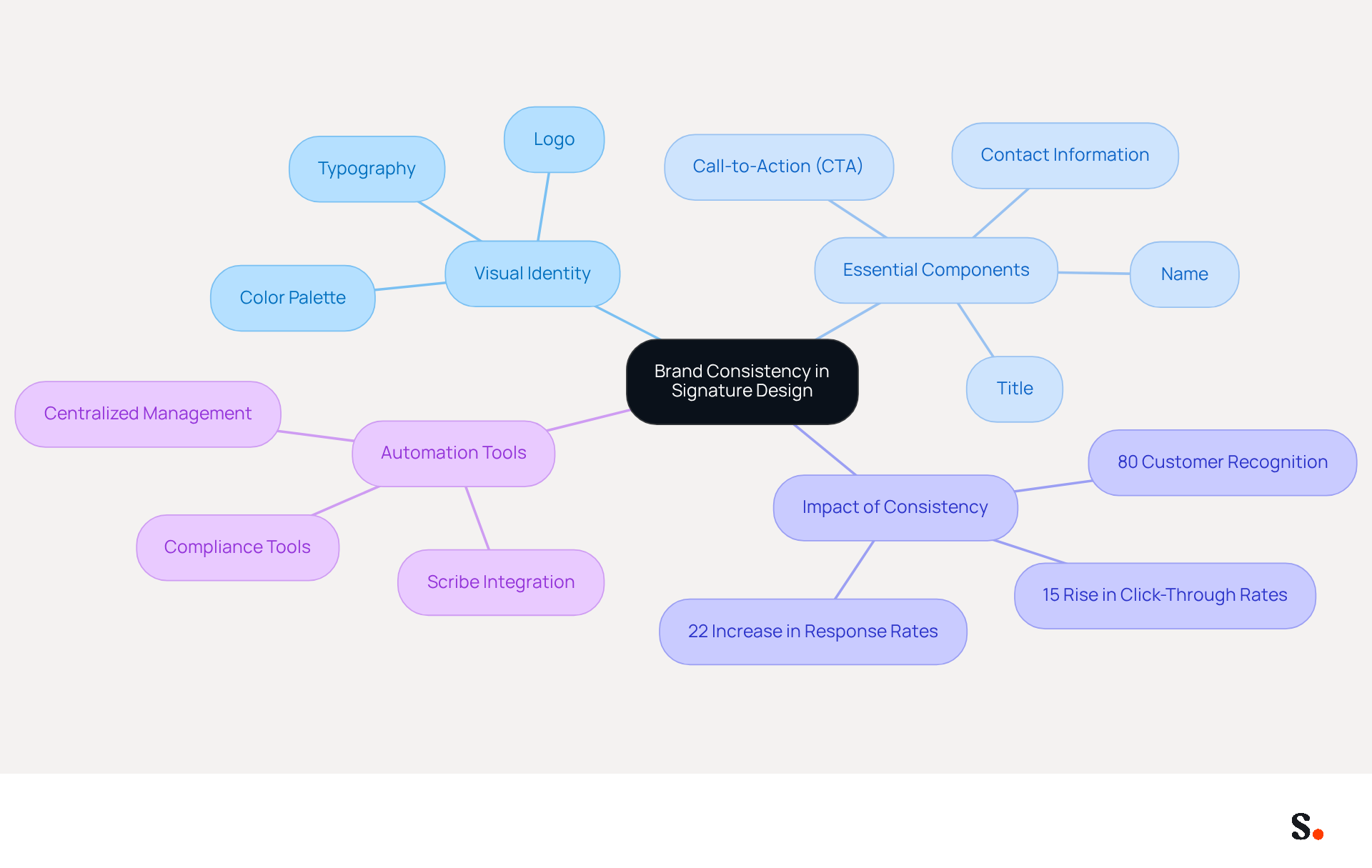
Aligning your correspondence with your company's visual identity is essential for maintaining brand consistency. All elements must reflect your brand's visual identity, including the correct logo, color palette, and typography. For instance, if your brand colors are blue and white, your emblem should adhere to this scheme. Essential components such as your name, title, and contact information should be presented clearly and professionally. Adding a call-to-action (CTA) or promotional banner can greatly boost engagement levels.
Studies indicate that consistent branding can improve customer recognition by up to 80%, according to industry research. Furthermore, companies that maintain consistent branding report a 22% increase in response rates and a 15% rise in click-through rates to their websites. These tools facilitate the automation of update processes across your organization, ensuring compliance with branding standards and maximizing marketing opportunities.
With Scribe's automated synchronization with Aircall, any modifications made in your configuration will be reflected in your correspondence, enhancing brand consistency effortlessly. By joining Scribe's Affiliate Program, you can earn a 50% commission while offering a $30 credit to new subscribers, further promoting brand consistency in signature en html.
Scribe's features, including SOC 2 Type II certification and compliance with GDPR and CCPA, help teams handle data securely while effortlessly maintaining brand integrity. By utilizing these strategies, organizations can not only enhance their branding but also safeguard against costly compliance failures.
Integrate Signatures into Marketing Campaigns
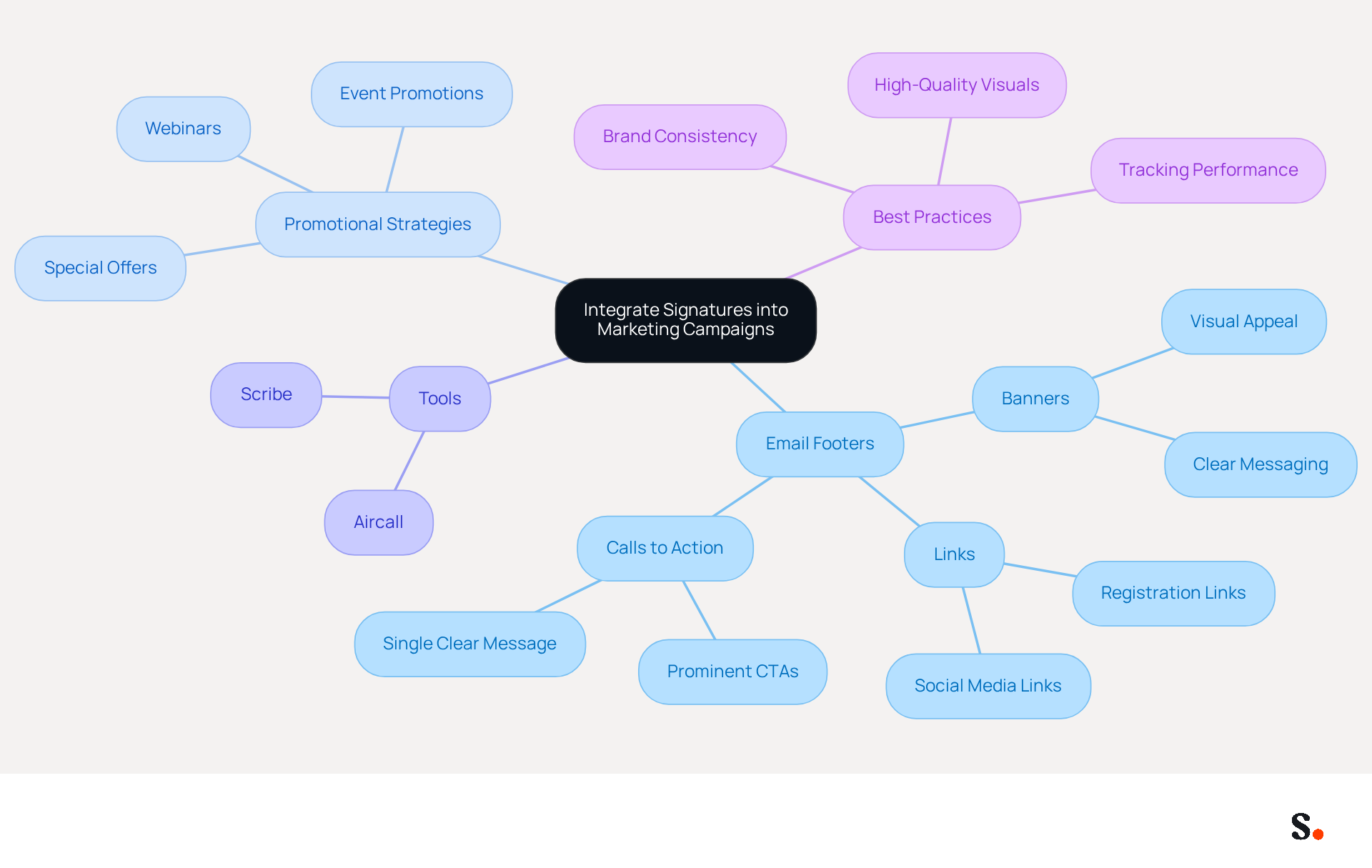
Many organizations struggle to effectively integrate email footers into their promotional strategies, yet they can serve as a powerful medium for promotional campaigns. To enhance your promotional strategy, consider incorporating banners or links to upcoming events, product launches, or special offers. For example, if your organization is hosting a webinar, including a banner in your email that directs recipients to the registration page can significantly boost participation. Utilizing trackable links is essential for measuring the effectiveness of these campaigns, as they provide insights into engagement and conversion rates.
Tools such as Scribe assist in scheduling and managing these promotional elements, ensuring that your identifiers are regularly updated with the latest offers. Each change made in your Aircall configuration will automatically reflect in your Scribe profiles, as we sync the data from there. Think of your digital identifiers as dynamic promotional assets that can boost your outreach and engagement rates. Research indicates that messaging campaigns achieve an average click-through rate of 12% on banners and a 32% increase in responses. This demonstrates their effectiveness as a cost-efficient marketing tool. Furthermore, case studies indicate that businesses utilizing digital branding effectively have experienced notable increases in traffic to their targeted pages, emphasizing the importance of this approach.
Incorporating clear calls to action in your messages can further drive immediate engagement, making it crucial to focus on a single, clear message to avoid clutter. Every banner should include a clear call to action to guide the recipient on the desired next step. Ensuring brand consistency and utilizing high-quality visuals is essential for effectively promoting products or services. This approach creates digital representations that not only reflect your brand professionally but also act as efficient promotional channels. Furthermore, Scribe's adherence to SOC 2 Type II, GDPR, and CCPA guarantees that your marketing efforts are secure and reliable. By leveraging these strategies, businesses can transform their email footers into impactful promotional tools that drive measurable results.
Utilize Automation for Efficient Signature Management
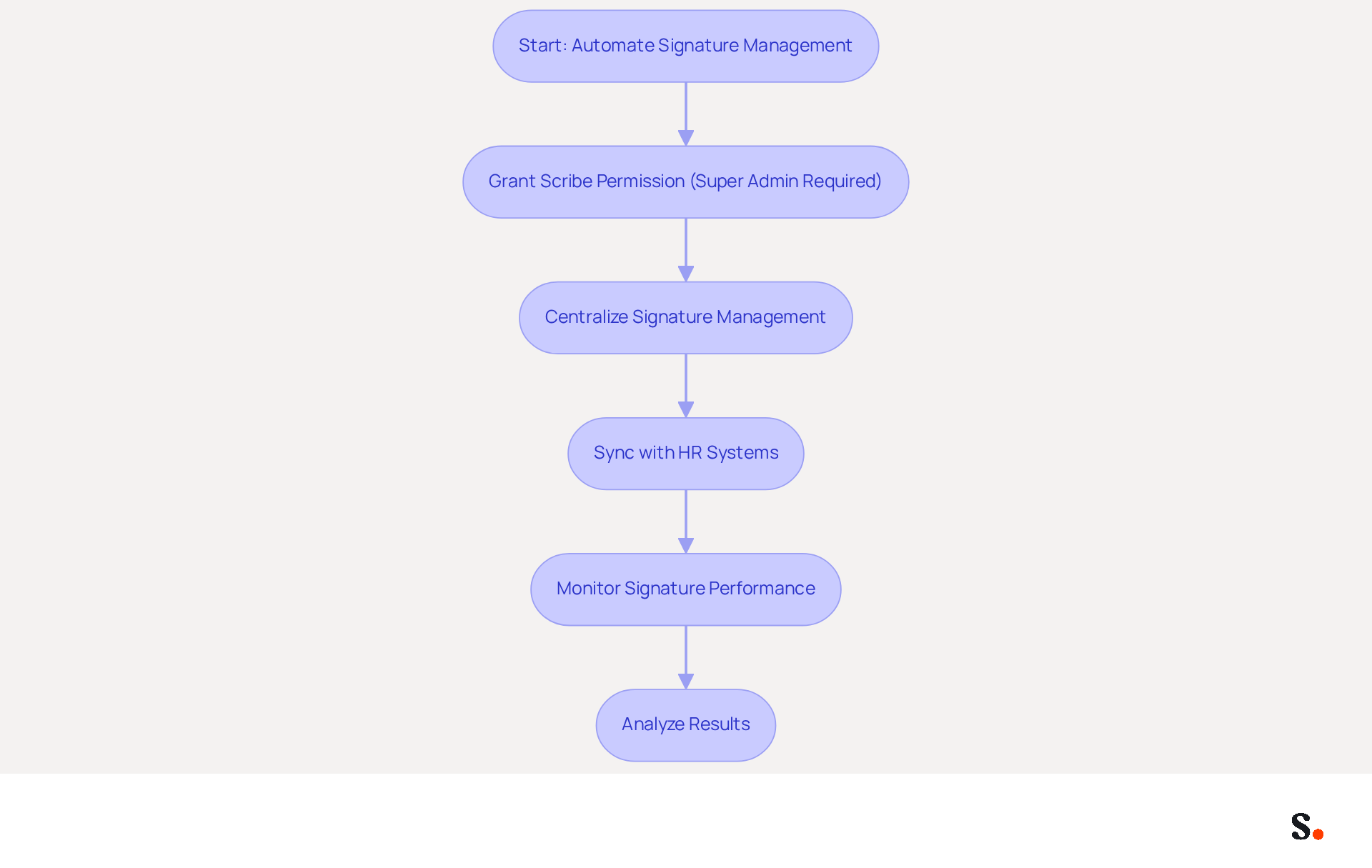
Managing electronic correspondence identifiers can be challenging, often leading to inefficiencies that impact your organization. Automating this management greatly improves efficiency and guarantees uniformity throughout your organization. By using Scribe, you can centralize the management of autographs, including the signature en html, enabling swift updates that comply with branding guidelines. For one-click synchronization, grant Scribe permission to connect with your email provider; you must be a Super Admin to do this. This automation removes the risk of costly mistakes that often arise from manual updates. Furthermore, it synchronizes identifiers with HR systems, ensuring that employee information remains current and precise.
Implementing automated solutions not only streamlines processes but also provides valuable analytics on signature performance. For example, monitoring click-through rates on promotional banners can provide insights that guide future promotional strategies. Organizations that have adopted such automation report substantial benefits, including a 14% increase in lead generation and a 22% rise in response rates due to consistent messaging.
Customer Success Stories:
- A multinational company successfully maintained brand consistency while incorporating region-specific information in external communications.
- A healthcare provider streamlined its internal and external communications, enhancing professionalism and compliance.
These examples clearly show how automating the management of digital identifiers can boost marketing efforts and reinforce brand identity. Using Scribe, you can improve teammate information from HR software, further streamlining the process. Additionally, Scribe is SOC 2 Type II compliant, ensuring the safety of your data while you focus on creating impactful signature en html. By embracing automation, organizations can ensure their branding remains consistent and professional, allowing teams to concentrate on strategic growth.
Conclusion
HTML signature design is essential for reinforcing brand identity and enhancing marketing efforts, going beyond mere aesthetics. Organizations can transform their email signatures into powerful tools for engagement by understanding HTML fundamentals, ensuring brand consistency, integrating signatures into marketing campaigns, and utilizing automation.
The article highlights several best practices, including:
- The importance of clean HTML coding
- The necessity of aligning signatures with brand visuals
- The strategic use of promotional elements within signatures
Additionally, leveraging automation tools like Scribe can streamline the management of email signatures, ensuring that updates are made efficiently and consistently across the organization. This approach saves time and helps ensure that branding standards and marketing strategies are consistently met.
Maintaining brand consistency and effectively utilizing email signatures for marketing are crucial for success in a competitive landscape. By adopting these best practices and embracing automation, businesses can maximize their marketing ROI and ensure that every email sent serves as a cohesive representation of their brand. Exploring these strategies and leveraging Scribe can lead to improved engagement and brand recognition, making a significant difference in marketing effectiveness.
Frequently Asked Questions
Why is understanding HTML important for signature design?
Understanding HTML is crucial for creating effective HTML messages as it helps in organizing the layout and ensuring that the signature displays correctly across different messaging clients.
What are the fundamental HTML tags to use for signature design?
The fundamental tags to use include
| , which are essential for organizing the layout of your signature. |
How do tables help in email signature design?
Tables help ensure that your identifier displays correctly across different messaging clients, which often have varying support for CSS.
What should be considered to avoid rendering issues in HTML signatures?
Keeping your HTML clean and simple is vital; complex styles and scripts can lead to rendering issues across different clients.
What is the benefit of using inline styles in HTML signatures?
Using inline styles for fonts and colors helps maintain consistency in how the signature appears across different messaging clients.
Why is it important to test HTML signatures across different messaging clients?
Testing your mark across different messaging clients ensures that it looks good everywhere, which is essential for effective communication.
How can syncing Google Workspace with Scribe benefit signature management?
Syncing Google Workspace with Scribe simplifies the management of messaging identifiers, conserves time, and ensures that updates to teammates' details are automatically reflected in the identifiers.
What overall impact can adopting best practices in HTML signature design have?
Adopting best practices can significantly enhance the effectiveness of your digital identifiers, turning them into powerful marketing tools.
List of Sources
- Understand HTML Basics for Signature Design
- Email Signatures - HTML best practices (https://support.templafy.com/hc/en-us/articles/360015097757-Email-Signatures-HTML-best-practices)
- What are the restrictions in email signature coding | Email Signature Rescue Blog (https://emailsignaturerescue.com/blog/what-are-the-restrictions-in-email-signature-coding)
- 12 Best Email Signature and Disclaimer Practices (https://cloud-awards.com/12-tips-for-effective-use-of-email-signatures-and-disclaimers)
- Master Gmail Signature HTML: Best Practices for Marketing Success (https://scribe-mail.com/en-US/blog/master-gmail-signature-html-best-practices-for-marketing-success)
- Make Your Brand Stand Out: Easily Add an HTML Email Signature to Gmail and Outlook.
Here at Legal Growth, we help to make your brand stand out in customer emails. Add a professionally designed flare to each email sent from Gmail and Outlook with HTML email signatures. They can help promote important information such as contact details. Read on to learn how adding an HTML signature to your business emails is easy.
What HTML email signatures are and why they matter
HTML email signatures are necessary because they allow you to include stylised text and images in your email signature. It helps promote your brand or website or add personality to your emails. Additionally, HTML email signatures can include clickable links, making it easy for recipients to contact or visit your website. A good example is when you get an email from one of us here at Legal Growth.
Create an HTML email signature, Simply today.
When it comes to creating an HTML email signature, there are a few simple steps that you need to follow. To get started, you'll need to create a file called signature.html and then save it in your email signature folder. In this file, you can include any text or images you'd like to appear in your signature.
Next, you'll need to add the following code to your email template:
Your HTML content goes here.
Be sure to replace "Your HTML content goes here." with the actual content of your signature. You can also customise the appearance of your signature by adding some CSS styling. For example, you can add the following code to create a border around your signature:
.signature {
border: 1px solid black;
}
How to add an HTML email signature in Outlook and Gmail
Adding an HTML email signature in Outlook and Gmail is a great way to show your brand personality and add some flair to your emails. It can also be a great way to promote your business or website. This post will show you how to add an HTML email signature in Outlook and Gmail.
To add an HTML email signature in Outlook, follow these steps:
1. Open Outlook and click on the File tab.
2. Select Options from the menu.
3. Click on the Mail tab.
4. Select the Signature option and click on the Edit button in the Signature section.
5. In the Edit Signature window, enter your signature text in the text box and click on the OK button.
6. Click the OK button in the Options window to save your changes.
To add an HTML email signature in Gmail, follow these steps:
1. Open Gmail and click on the Settings gear icon.
2. Select Settings from the menu.
3. Click on the General tab.
4. In the Signature section, type your signature text in the text box and click on the Save Changes button.
Of course, if you are struggling to follow any of these tips or tricks, then please email or phone one of our team at Legal Growth, where we can take all the stress of it, smooth the process out and get you a professional-looking Signature that fits your brand the best.
Here are some tips for creating an HTML email signature:
-Keep your signature file size small. Large files can slow down the loading of your email messages.
-Include a link to your website or social media profile. It will help your contacts learn more about you and your business.
-Include a tagline that expresses who you are and what you do.
-Make sure your signature looks good on all devices. Test it on different devices and browsers to ensure that it looks correct.
Following these simple steps will help you create an HTML email signature that is both stylish and professional. If you want to learn more about adding an HTML email signature in Outlook and Gmail, check out our other post.
— Legal Growth (https://legalgrowth.co.uk/news/make-your-brand-stand-out-easily-add-an-html-email-signature-to-gmail-and-outlook)
- Ensure Brand Consistency in Signature Design
- 4 Best Practices for Brand Consistency in Email Signatures (https://scribe-mail.com/en-US/blog/4-best-practices-for-brand-consistency-in-email-signatures)
- Why Consistent Email Signatures Matter More Than You Think - Signite (https://signite.io/blog/consistent-email-signatures-matter-more-than-you-think)
- The impact of email signatures on your branding (https://signitic.com/en/resources/the-impact-of-email-signatures-on-your-branding)
- Brand Consistency Statistics (2026): 52+ Data Points on Revenue, Trust, and AI Visibility (https://omnibound.ai/blog/brand-consistency-statistics)
- Is Your Customer Rebrand Stuck on Email Signatures? (https://wisestamp.com/blog/rebrand-email-signatures)
- Integrate Signatures into Marketing Campaigns
- 10 ideas for marketing campaigns in email signatures (https://signitic.com/en/resources/10-ideas-for-marketing-campaigns-in-email-signatures)
- The Quantifiable Marketing Value of Email Signatures (https://ama.org/2022/06/20/the-quantifiable-marketing-value-of-email-signatures)
- Exclaimer Research: 67% of Marketers Expect Email Signatures to Support With Lead Gen In 2023 (https://businesswire.com/news/home/20230612141095/en/Exclaimer-Research-67-of-Marketers-Expect-Email-Signatures-to-Support-With-Lead-Gen-In-2023)
- Email Signature Banners: Turn Every Email Into a Marketing Channel (https://bulksignature.com/blog/email-signature-banners-turn-every-email-into-a-marketing-channel)
- 12 clever ways to use your email signature to support your marketing campaigns (https://blog.hubspot.com/blog/tabid/6307/bid/31054/10-clever-ways-your-email-signature-can-support-your-marketing.aspx)
- Utilize Automation for Efficient Signature Management
- Company-Wide Email Signature Management | CloudM (https://cloudm.io/blog/optimize-your-process-with-company-wide-email-signature-management)
- Maximizing Efficiency with Automated Email Signatures for Internal and External Communications | Crossware365 (https://crossware365.com/blog/maximizing-efficiency-with-automated-email-signatures-for-internal-and-external-communications)
- Automating Email Signatures: How IT Teams Streamline Processes & Reduce Risk (https://exclaimer.com/blog/streamlining-it-processes-automated-email-signatures)
- 4 Best Practices for Automated Email Signature with Office 365 (https://scribe-mail.com/en-US/blog/4-best-practices-for-automated-email-signature-with-office-365)
- Why Scribe is the Best Email Signature Management Tool for Marketers (https://scribe-mail.com/en-US/blog/why-scribe-is-the-best-email-signature-management-tool-for-marketers)
Get started with Scribe
Build a professional email signature
Free 14-day trial — no credit card.