4 Best Practices for Email Etiquette to Boost Engagement
Effective email communication is a critical skill that can greatly enhance engagement and productivity. By mastering the nuances of email etiquette
Sophie Grant
Email Signature Specialist, Scribe
Introduction
Effective email communication is a critical skill that can greatly enhance engagement and productivity. By mastering the nuances of email etiquette, individuals can enhance clarity, foster better relationships, and ensure their messages are not only read but also acted upon. Standing out in a crowded inbox is increasingly challenging for professionals. This piece outlines four best practices for email etiquette that can elevate communication effectiveness and boost engagement.
Prioritize Clarity in Communication
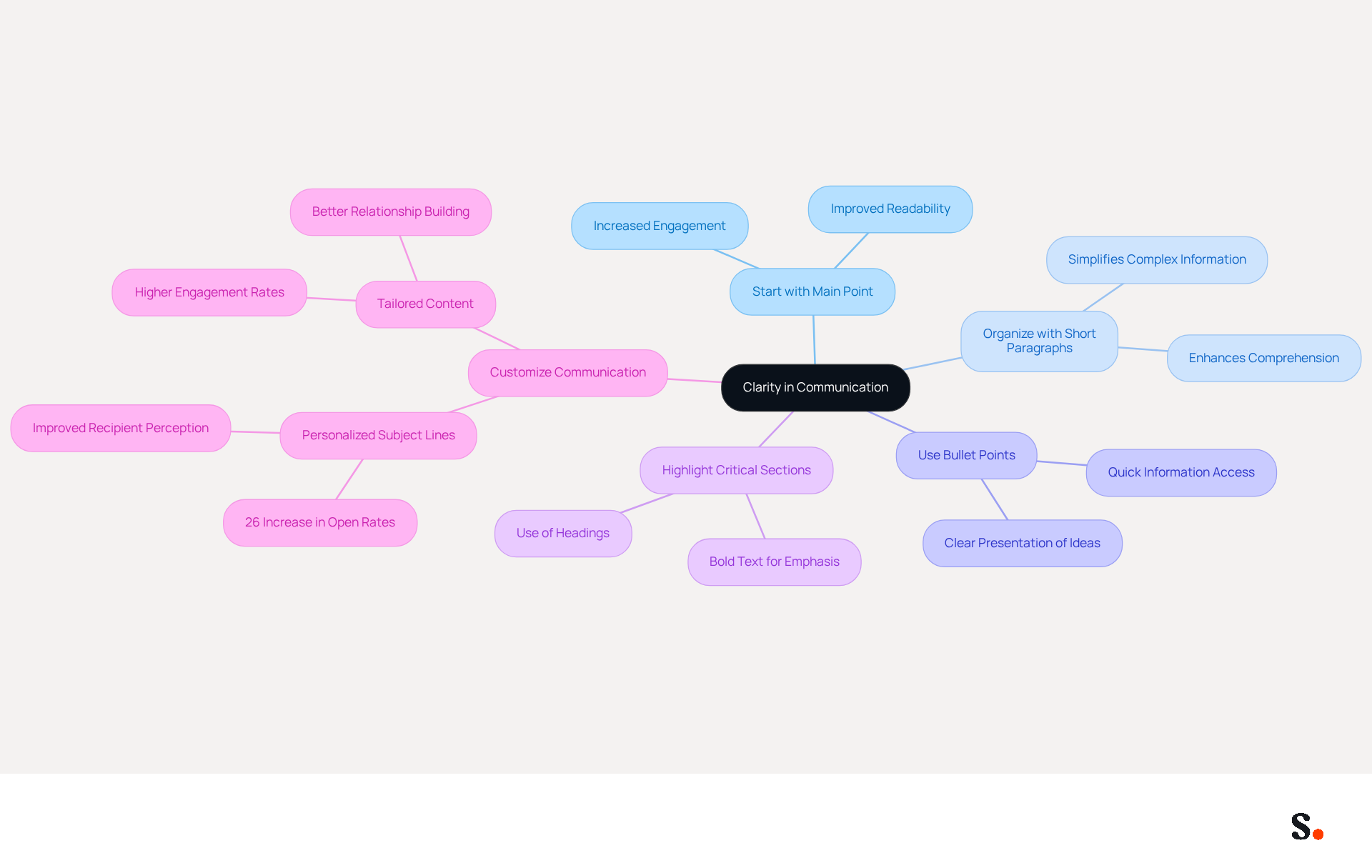
Effective communication hinges on clarity and organization, which are often overlooked in email and email etiquette. Start your messages with the main point to enhance clarity. Organizing your message with short paragraphs and bullet points simplifies complex information. For example, instead of writing a long-winded explanation, summarize key points in a list format. This method not only makes your message easier to read but also enables the receiver to grasp the key information swiftly. Additionally, consider using headings or bold text to highlight critical sections, ensuring that your message stands out and is easily navigable.
One effective method to streamline your correspondence signature management is by syncing your Google Workspace with Scribe. This integration streamlines the process by ensuring your teammates' signatures are always up-to-date, reflecting any changes made in Google Workspace without manual input. Clear communication, particularly through email and email etiquette, is key to boosting engagement; messages that are well-organized and simple to comprehend are more likely to provoke favorable replies from recipients. Indeed, messages with customized subject lines experience a 26% increase in open rates, highlighting the significance of clarity and personalization in your interactions. Moreover, inadequate communication can diminish productivity for 49% of employees, emphasizing the necessity for efficient messaging practices. Remember, 88% of respondents view messages that seem personally crafted for them more positively, so customizing your communication can improve engagement and cultivate better relationships.
Craft Descriptive Subject Lines
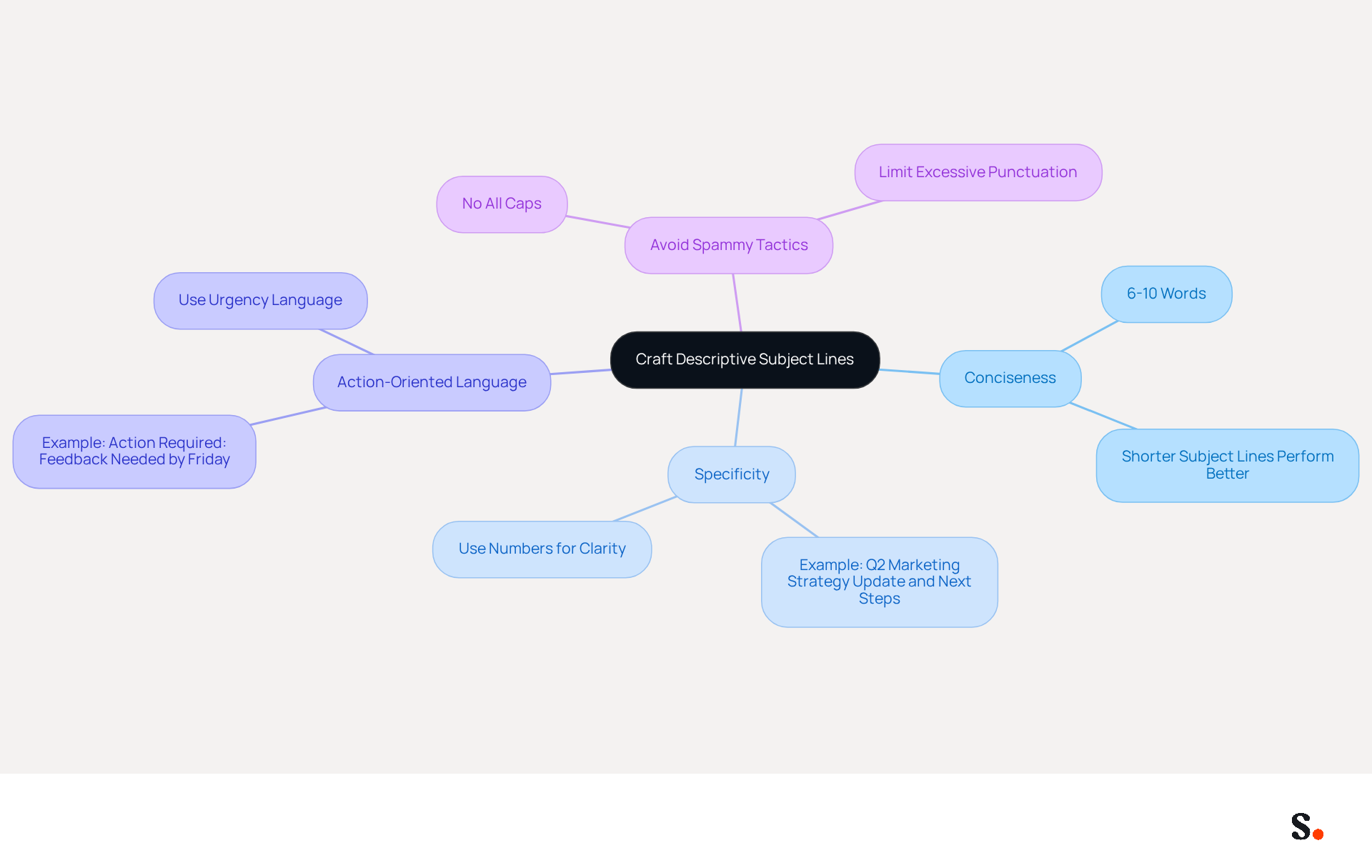
Crafting an effective subject line is crucial for ensuring your email captures attention and conveys its purpose. Strive for a concise 6-10 word summary that encapsulates the essence of your message. For instance, instead of a vague subject like 'Update', use 'Q2 Marketing Strategy Update and Next Steps'. Being specific helps grab attention and clarifies what the reader can expect. Incorporating action-oriented language can also encourage prompt responses, such as 'Action Required: Feedback Needed by Friday'. Avoid using all caps or excessive punctuation, as these can be perceived as spammy and may discourage recipients from opening your message.
Optimize Timing for Email Delivery
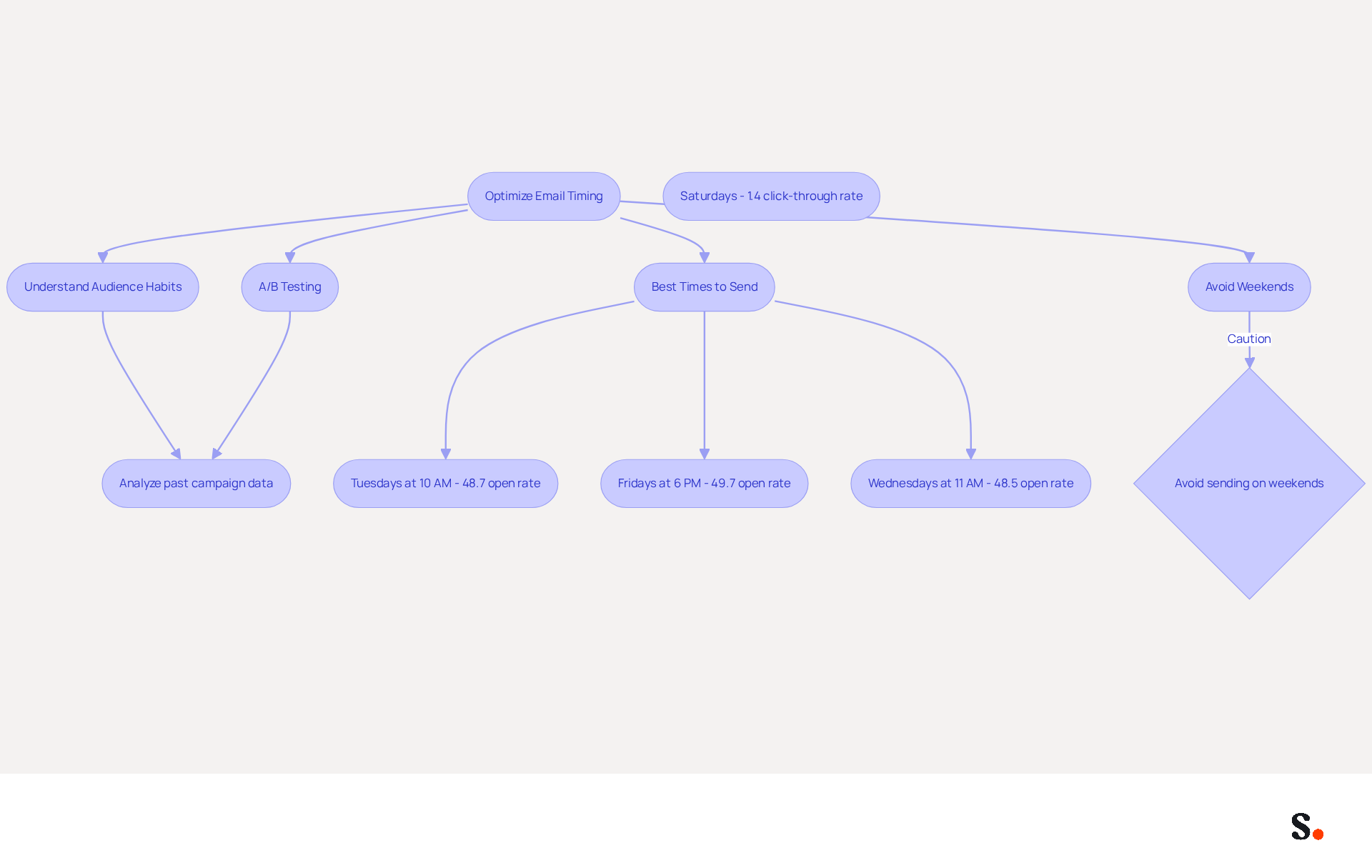
Understanding your audience's habits is crucial for effective message delivery. Studies show that messages dispatched on Tuesdays and Thursdays during mid-morning (around 10 AM) attain higher open percentages, with Tuesday at 10 AM achieving an impressive open percentage of 48.7%. Analytics tools track audience activity effectively, allowing you to adjust your sending schedule accordingly.
Refrain from sending messages on weekends or late evenings to prevent overlooked communications; Saturdays, in particular, have the lowest performance, with a click-through rate of just 1.4%. For messages needing prompt attention, consider sending them at the beginning of the workday when recipients are more likely to check their inboxes.
Furthermore, A/B testing various send times can provide valuable insights into your audience's behavior, allowing you to enhance your communication strategies for improved engagement. MailerLite states, 'the best method to determine when to send a campaign is, and always will be, to test, test, test!'
Ultimately, optimizing your send times can transform your communication effectiveness.
Ensure Thorough Proofreading
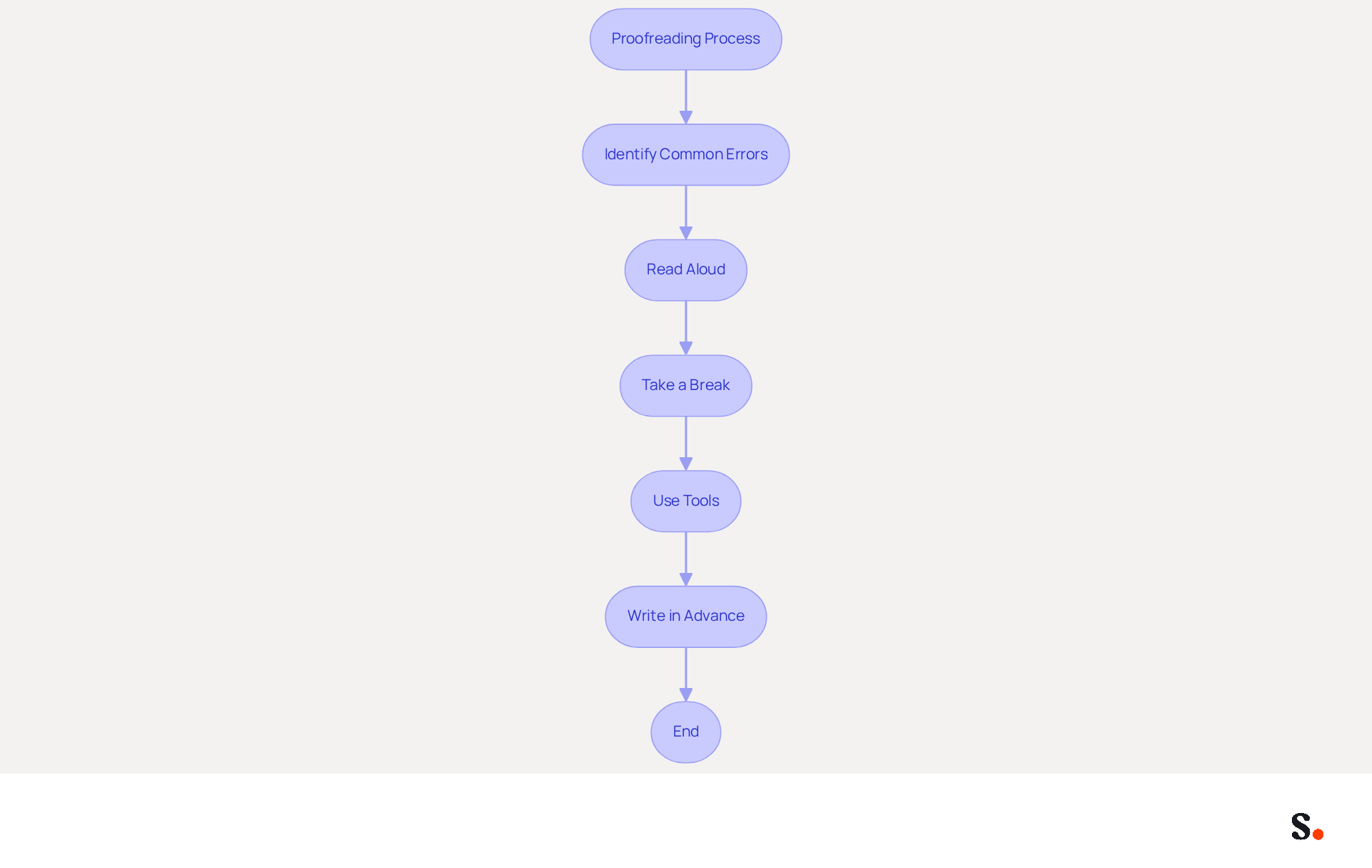
In the fast-paced world of business communication, adhering to email and email etiquette is essential, as even minor errors can lead to significant misunderstandings. Before hitting 'send', invest time in thoroughly proofreading your message to adhere to proper email and email etiquette. Common errors to watch for include:
- Typos
- Grammatical mistakes
- Formatting issues
Reading your message aloud can help you catch awkward phrasing and unclear sentences. Taking a brief break after writing your message allows for a fresh perspective, making it easier to spot overlooked mistakes. Using tools like Grammarly can really help you catch errors and boost your message's readability. A well-proofread email and email etiquette not only reflect professionalism but also demonstrate attention to detail, ultimately enhancing your credibility with the recipient.
Clarity and precision in messages, particularly in email and email etiquette, are essential for sustaining a positive impression and effective engagement, as studies show. Many professionals struggle with miscommunication, leading to unintended consequences. With the typical business individual receiving 121 messages daily and spending 111 workdays per year managing correspondence, effective proofreading, along with email and email etiquette, becomes crucial to uphold professionalism.
Additionally, consider writing important emails in advance to allow for thorough proofreading later, and be cautious of rushing the process, as this can lead to mistakes that jeopardize your professional reputation and relationships. As Ivy B. Grey emphasizes, clear communication is essential in any professional setting.
Conclusion
Effective email communication is often a challenge for many professionals, yet it is crucial for fostering engagement and building relationships. By prioritizing clarity, crafting descriptive subject lines, optimizing delivery timing, and ensuring thorough proofreading, individuals can significantly enhance their email etiquette. These practices enhance the chances that messages will be read and responded to, while also showcasing professionalism and attention to detail.
Key insights from the article emphasize the importance of:
- Starting with the main point
- Using concise subject lines
- Understanding the best times to send emails
Additionally, the necessity of proofreading to avoid common mistakes cannot be overstated, as it directly impacts the clarity and professionalism of the communication. Each of these strategies contributes to a more effective email experience, ultimately leading to better engagement and productivity.
Many professionals struggle with email communication, yet taking the time to implement these best practices can truly set individuals apart. By committing to clear, organized, and well-timed emails, professionals can not only enhance their own credibility but also foster a more collaborative and responsive environment. Ultimately, mastering these email etiquette strategies can redefine professional interactions and drive meaningful engagement.
Frequently Asked Questions
What is the importance of clarity in communication?
Clarity in communication is essential as it enhances understanding and organization, making messages easier to read and comprehend.
How can I improve the clarity of my emails?
To improve clarity, start your messages with the main point, use short paragraphs, bullet points for summarizing key information, and consider using headings or bold text to highlight critical sections.
What are the benefits of organizing messages with bullet points?
Organizing messages with bullet points simplifies complex information, making it easier for the receiver to grasp key points quickly.
How can syncing Google Workspace with Scribe help in communication?
Syncing Google Workspace with Scribe streamlines correspondence signature management by ensuring that teammates' signatures are always up-to-date without manual input.
What impact does well-organized communication have on engagement?
Well-organized and clear messages are more likely to provoke favorable replies from recipients, boosting engagement.
How does personalization affect email open rates?
Customized subject lines can lead to a 26% increase in email open rates, highlighting the importance of clarity and personalization in communication.
What is the effect of inadequate communication on productivity?
Inadequate communication can diminish productivity for 49% of employees, emphasizing the need for efficient messaging practices.
How does personalized communication influence relationships?
Messages that appear personally crafted are viewed more positively by 88% of respondents, indicating that customization can improve engagement and foster better relationships.
List of Sources
- Prioritize Clarity in Communication
- 12 Best Email Practices for Effective Communication (https://tandemhr.com/email-best-practices-for-effective-communication)
- 36+ essential workplace communication statistics for 2026 (https://zoom.com/en/blog/workplace-communication-statistics)
- Internal Communication Email Software - ContactMonkey (https://contactmonkey.com/blog/effective-email-communication)
- Effective Email Communication – The Writing Center (https://writingcenter.unc.edu/tips-and-tools/effective-e-mail-communication)
- 100 Compelling Email Statistics for 2026 | PGM Solutions (https://porchgroupmedia.com/blog/100-compelling-email-statistics-to-inform-your-strategy-in-2023)
- Craft Descriptive Subject Lines
- Association Email Benchmarks: 7 Insights That Should Inform Your 2026 Strategy | Higher Logic (https://higherlogic.com/blog/association-email-benchmark-insights-for-2026)
- Average Email Open Rates in 2026 (+16 Ways to Improve) (https://insiderone.com/average-email-open-rates)
- How to Write Email Subject Lines Journalists Actually Open (https://linkedin.com/pulse/how-write-email-subject-lines-journalists-actually-open-steph-spyro-f8yme)
- The 47 best email subject lines for sales in 2026 (https://enginy.ai/blog/email-subject-lines-sales)
- 29 Subject Line Effectiveness Statistics Every E-commerce Brand Needs to Know - Mailmend: The Best Email Deliverability Software (https://mailmend.io/blogs/subject-line-effectiveness-statistics)
- Optimize Timing for Email Delivery
- The Best Time To Send Marketing Emails (2026) (https://salesforce.com/marketing/email/best-time-to-send-emails)
- What Is the Best Time to Send an Email Blast? | Mailchimp (https://mailchimp.com/resources/insights-from-mailchimps-send-time-optimization-system)
- What is the best time to send emails in 2026? Data-backed guide (https://blog.superhuman.com/best-time-to-send-sales-emails)
- The Best Time to Send Email in 2026 (Statistical Analysis) - MailerLite (https://mailerlite.com/blog/best-time-to-send-email)
- Best Time To Send an Email: Research & Tips To Optimize Send Times | Mailjet (https://mailjet.com/blog/email-best-practices/best-time-to-send-email-newsletters)
- Ensure Thorough Proofreading
- Tools to Help You Proofread Emails (https://thenextweb.com/news/email-proofread-tools)
- 5 Reasons to Proofread Your Emails (https://robertsoncollege.com/blog/career-advice/5-reasons-to-proofread-your-emails)
- Why You Must Edit Your Business Emails (https://wordrake.com/resources/why-you-must-edit-your-business-emails)
- Why is proofreading important in business communication? (https://proofcommunications.com.au/proofreading-tips/why-is-proofreading-so-important-in-business-communications)
- The Importance of Proofreading: Why It Matters for Your Writing (https://gotranscript.com/en/blog/the-importance-of-proofreading-why-it-matters-for-your-writing)
Get started with Scribe
Build a professional email signature
Free 14-day trial — no credit card.