4 Best Practices for Email Signature Management for Undergraduates
In a digital landscape where first impressions are often made through email, undergraduates face the challenge of establishing a professional identity
Sophie Grant
Email Signature Specialist, Scribe
Introduction
In a digital landscape where first impressions are often made through email, undergraduates face the challenge of establishing a professional identity. Effective email signature management not only enhances personal branding but also fosters trust and recognition among peers and potential employers. However, how can students ensure their email signatures are both impactful and consistent while adapting to the fast-paced demands of academic life? Let’s delve into four best practices that can help students craft email signatures that truly reflect their professionalism and individuality.
- Keep it simple and concise.
- Include essential contact information.
- Use a professional font and color scheme.
- Update your signature regularly to reflect changes.
Get started with Scribe
Manage signatures across your whole team
Free 14-day trial — no credit card.
Define Essential Components of an Email Signature
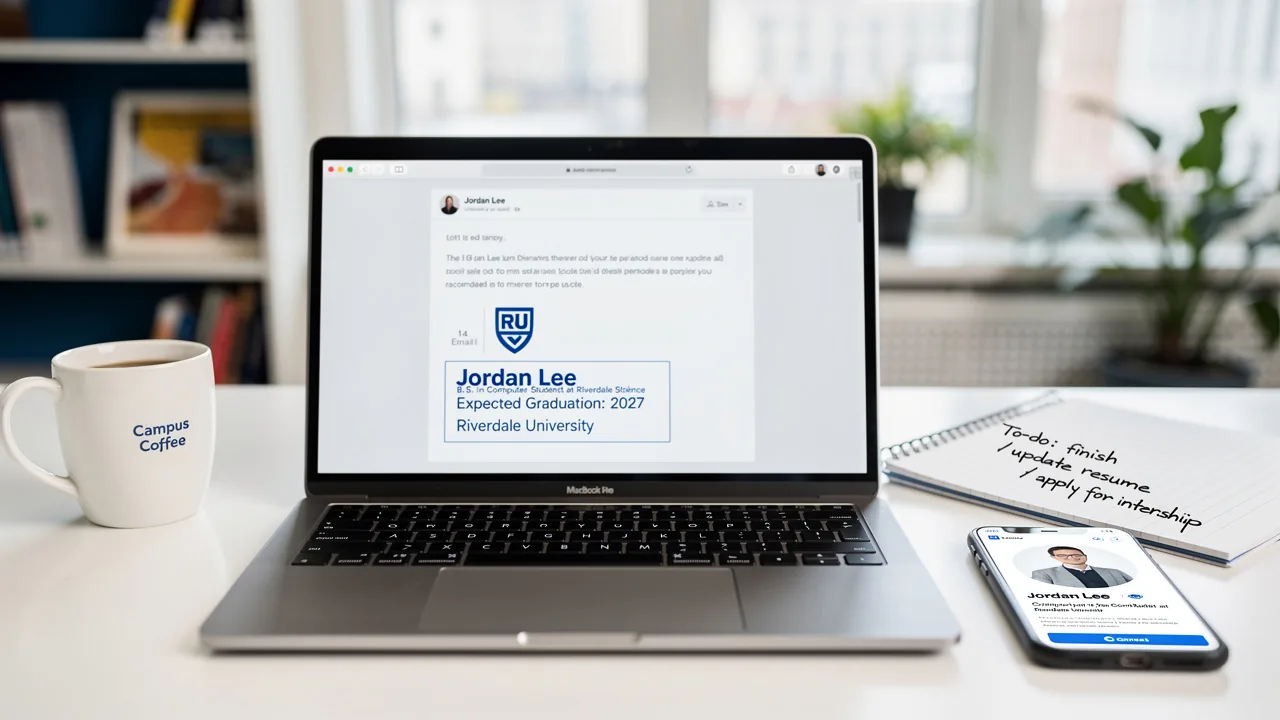
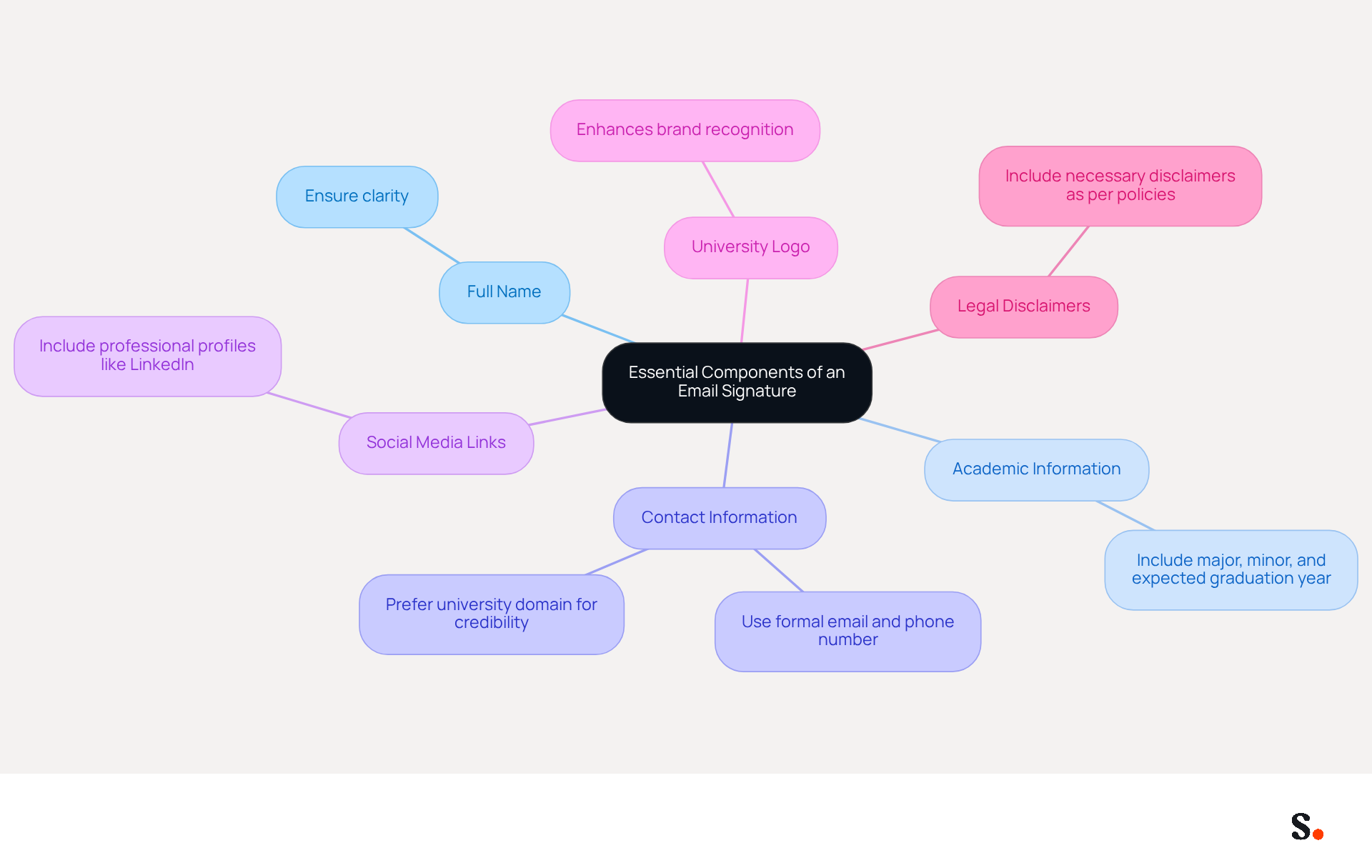
An effective email signature undergraduate is essential for establishing a professional identity in digital communications. It should include the following essential components:
- Full Name: Always start with your full name to ensure clarity.
- In your email signature undergraduate, include your major, minor, and expected graduation year to provide context about your academic background. This helps establish your current status and future aspirations.
- Contact Information: Provide a formal email address and phone number, ideally using your university domain. This enhances credibility and ensures recipients can easily reach you.
- Social Media Links: If applicable, include links to professional social media profiles like LinkedIn to enhance networking opportunities. Including a LinkedIn profile can facilitate connections with potential employers and peers.
- University Logo: Incorporating your university's logo can improve brand recognition and provide credibility to your endorsement. This visual element reinforces your affiliation and professionalism.
- Legal Disclaimers: If required, include any necessary legal disclaimers to comply with institutional policies. This ensures that your communications adhere to university guidelines.
Alongside these elements, it is essential to verify that your message footer is optimized for mobile devices. Aim for a maximum width of 600px and keep the total size under 100KB to ensure optimal display on various devices. Regularly review and update your email signature undergraduate, especially after any changes in your academic status or contact details, to maintain professionalism and accuracy.
Using Scribe can streamline the process of updating your email signature. With its seamless integration with Google Workspace and business phone systems, any updates made to your academic or contact information will automatically sync with your correspondence, saving you time and ensuring accuracy. Scribe's SOC 2 Type II compliance ensures that your data is managed securely, offering peace of mind as you oversee your image. Studies indicate that well-crafted digital identifiers can increase engagement rates by up to 32%, making them an essential tool for effective communication. Avoid common pitfalls such as information overload or outdated details, which can diminish the effectiveness of your message. Failing to do so can lead to missed opportunities and diminished professional image.
Ensure Brand Consistency Across Signatures
To ensure a polished and professional image in email communications, adopting best practices for email signatures is essential:
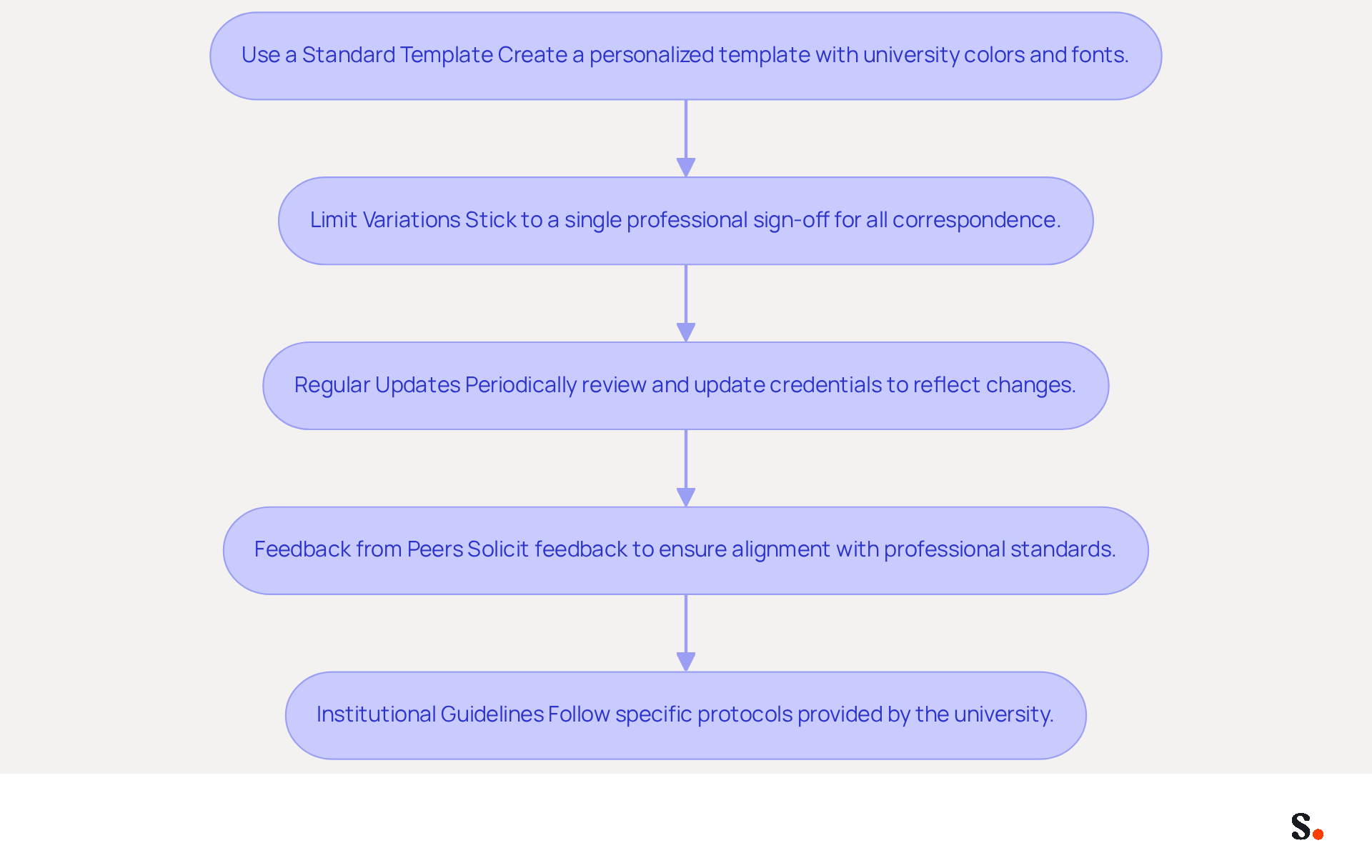
- Use a Standard Template: Create a personalized template that incorporates your university's colors and fonts, ensuring a uniform appearance across all communications. Uniformity in communication formats is essential for conveying a polished image and enhancing brand awareness.
- Limit Variations: Stick to a single professional sign-off for all correspondence to avoid confusion and reinforce your brand identity. A study indicates that organizations using centralized management solutions like Scribe can see up to an 85% improvement in brand consistency, emphasizing the importance of a cohesive strategy for digital branding.
- Regular Updates: Periodically review and update your credentials to reflect any changes in your academic status or contact information, ensuring it remains current and relevant. With Scribe, updates can be automated, enabling effortless management of your correspondence footer.
- Feedback from Peers: Solicit feedback from peers or mentors to ensure your signature aligns with professional standards and expectations.
- Institutional Guidelines: Follow any specific communication footer protocols provided by your university to ensure compliance and maintain a cohesive brand image. This involves ensuring that your contact information indicates official affiliation with the University of Cincinnati, which is essential for maintaining brand consistency.
By following these practices and leveraging Scribe's automated synchronization features, undergraduates can effectively present a professional and cohesive email signature in their communications, which is crucial for establishing trust and recognition. Furthermore, consider joining Scribe's Affiliate Program to earn a $30 credit while promoting brand consistency in digital formats, further enhancing your marketing efforts.
Utilize Automation for Efficient Signature Management
Implementing automation in managing digital footers can significantly enhance efficiency for students, addressing common challenges in maintaining accurate contact information. Here are some effective strategies:
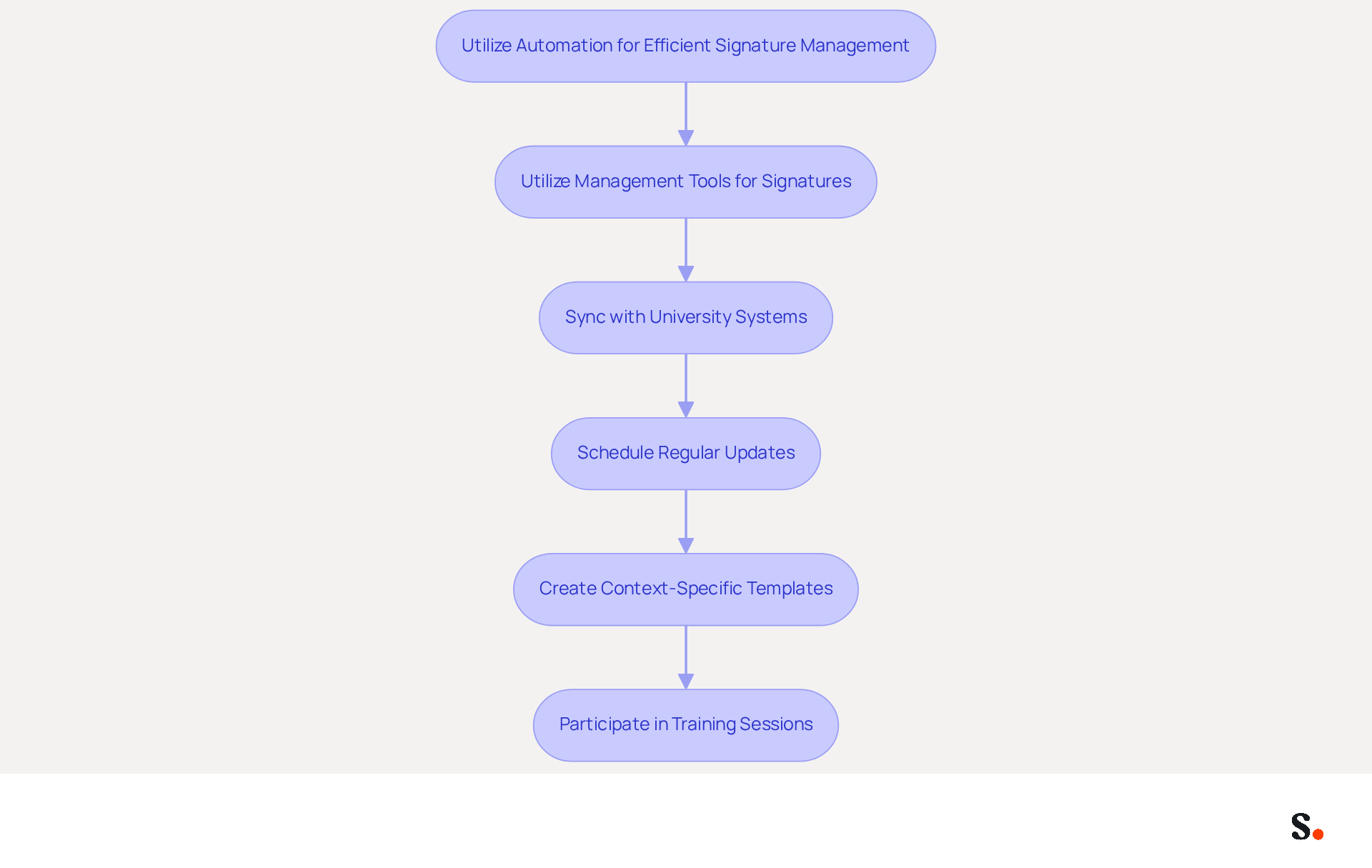
- Utilize Management Tools for Signatures: Platforms like Scribe facilitate centralized creation and management of sign-offs, ensuring that all updates are applied automatically across all communications. Scribe allows digital identifiers to serve as engagement channels, helping Marketing evaluate performance through click-through rates and conversions. Scribe's automated system synchronizes identification information with your business phone system, ensuring real-time updates without needing teammate intervention.
- Sync with University Systems: Ensure your email signature undergraduate is connected to your university's email management system, allowing for automatic updates to reflect any changes in your contact information. Scribe's integration capabilities with various systems guarantee that details are always up to date, minimizing the risk of obsolete information in communications. Additionally, Scribe's SOC 2 Type II compliance ensures that your data is secure throughout this process.
- Schedule Regular Updates: Set reminders to review and refresh your personal mark at the start of each semester or academic year, ensuring it remains current and professional. Automated systems like Scribe maintain a complete log of changes, supporting compliance reviews and audits, while also ensuring that your digital identifiers are always aligned with your institution's branding.
- Create Context-Specific Templates: Develop various templates tailored for different situations, such as academic correspondence or internship applications, and automate the selection process based on the type of message. Dynamic content personalization allows for targeted marketing messages based on recipient profiles, enhancing engagement and brand consistency.
- Participate in Training Sessions: Attend workshops or training on effective use of management tools to maximize their benefits and streamline your management process. Additionally, consider the compliance and security features of the platform to ensure that your communications meet necessary standards, including GDPR adherence for data protection.
By leveraging these strategies, students can ensure their communications reflect professionalism and accuracy, ultimately enhancing their academic and professional relationships.
Incorporate Personalization to Enhance Engagement
To maximize the impact of your email signature, consider these effective personalization strategies:
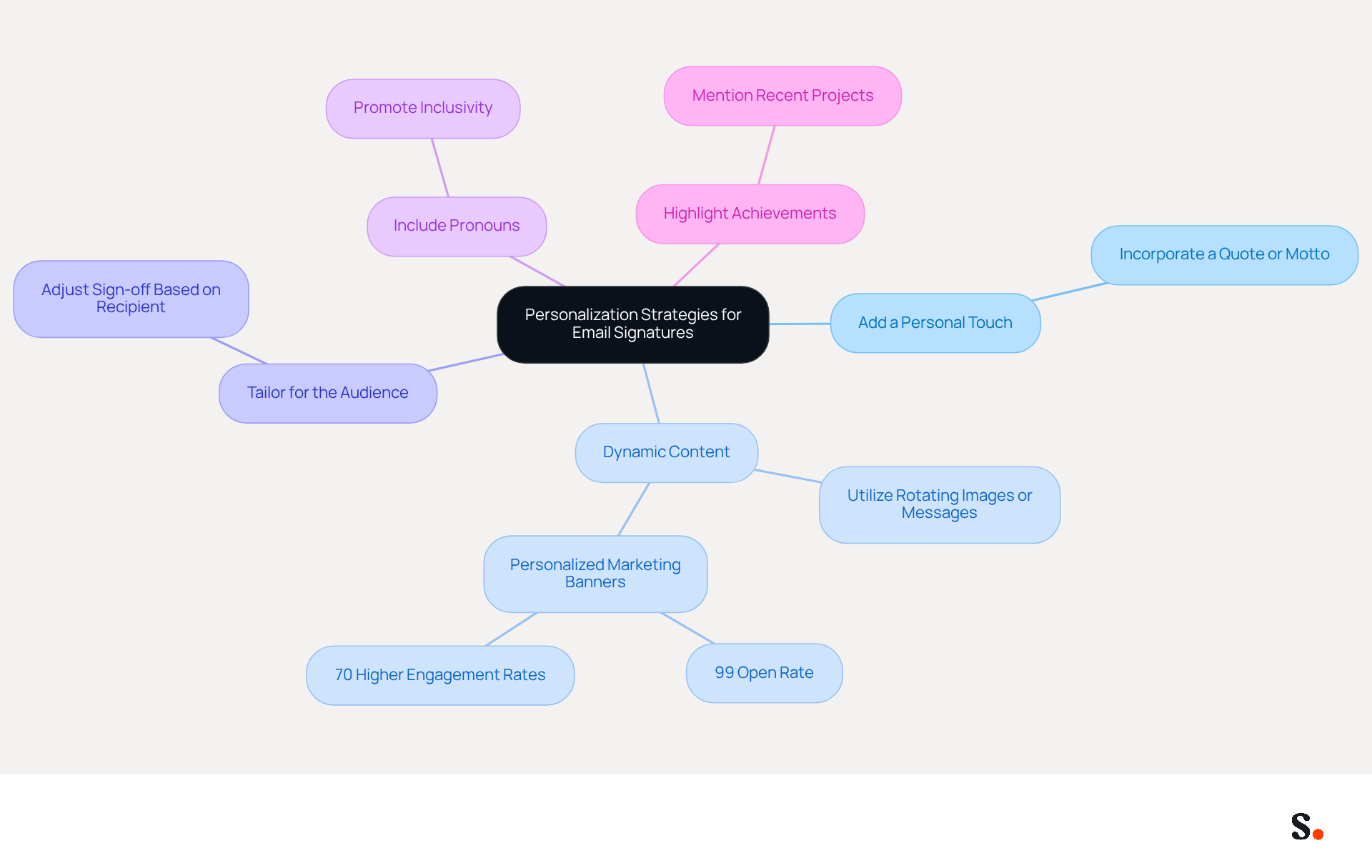
- Add a Personal Touch: Incorporate a quote or personal motto that resonates with your values or aspirations, making your mark more relatable.
- Dynamic Content: Utilize tools that enable dynamic content in your email footer, such as rotating images or messages that adapt based on the recipient. Personalized marketing banners in emails can lead to a 99% open rate and engagement rates that are 70% higher than those of mass campaigns, demonstrating the effectiveness of this approach.
- Tailor for the Audience: Slightly adjust your sign-off depending on the recipient; for instance, use a more formal closing for professors and a casual one for friends to match the context of your communication.
- Include Pronouns: Adding your pronouns promotes inclusivity and personalizes your communication, making it more welcoming.
- Highlight Achievements: If relevant, briefly mention recent achievements or projects to spark interest and encourage conversation. Many professionals struggle to engage their audience effectively. This trust can lead to stronger professional relationships and opportunities.
Personalizing message footers significantly enhances engagement and leaves a memorable impression on recipients. In fact, 76% of consumers report increased trust in emails featuring branded identifiers, underscoring the significance of thoughtful personalization in professional communications. Sophie Grant, an Email Signature Specialist, emphasizes that an email signature goes beyond being a simple sign-off; it is essential for boosting brand visibility and engagement. Ultimately, thoughtful personalization can transform your email signature into a strategic asset for building trust and engagement.
Conclusion
For undergraduates, a professional email signature is not just an accessory; it is a vital component of their digital identity. Incorporating key elements like full name, contact information, and university affiliation helps students build credibility and make meaningful connections. Utilizing tools like Scribe simplifies the management of these signatures, ensuring they remain consistent and up-to-date, which reflects the professionalism vital in academic and professional communications.
The article highlights several best practices for effective email signature management. These include:
- Maintaining brand consistency
- Leveraging automation
- Personalizing signatures for greater engagement
When students stick to a standardized template and keep their information updated, they create a cohesive image that reflects their university's branding. Furthermore, automation tools like Scribe facilitate seamless updates, allowing students to focus on their studies while ensuring their digital presence remains polished and professional.
Investing in a professional email signature can significantly influence how students are perceived in their academic and professional journeys. By embracing these best practices and utilizing automation, undergraduates can enhance their professional image and open doors to new opportunities. Refining and personalizing email signatures enhances engagement and leaves a lasting impression on recipients.
Frequently Asked Questions
What are the essential components of an effective email signature for undergraduates?
An effective email signature for undergraduates should include the following components: full name, major, minor, expected graduation year, contact information (formal email address and phone number), social media links (like LinkedIn), university logo, and any necessary legal disclaimers.
Why is it important to include your full name in an email signature?
Including your full name ensures clarity and helps establish your professional identity in digital communications.
How can including a university logo in an email signature enhance professionalism?
Incorporating your university's logo improves brand recognition and provides credibility to your endorsement, reinforcing your affiliation and professionalism.
What should be considered regarding the size and format of an email signature?
The email signature should be optimized for mobile devices, with a maximum width of 600px and a total size under 100KB to ensure optimal display on various devices.
How often should an undergraduate update their email signature?
An undergraduate should regularly review and update their email signature, especially after any changes in academic status or contact details, to maintain professionalism and accuracy.
How can Scribe assist in managing email signatures?
Scribe can streamline the process of updating your email signature by automatically syncing any changes made to your academic or contact information with your correspondence, saving time and ensuring accuracy.
What is the significance of legal disclaimers in an email signature?
Including necessary legal disclaimers ensures compliance with institutional policies and helps maintain adherence to university guidelines.
What are the potential benefits of a well-crafted email signature?
A well-crafted email signature can increase engagement rates by up to 32%, making it an essential tool for effective communication.
What common pitfalls should be avoided when creating an email signature?
Common pitfalls include information overload and outdated details, which can diminish the effectiveness of your message and lead to missed opportunities.
List of Sources
- Define Essential Components of an Email Signature
- Email Signature Best Practices for 2026 (+ 15 Pro Examples) (https://wavecnct.com/blogs/email-signature-best-practices-2026)
- Email Signature Best Practices - NEWOLDSTAMP (https://newoldstamp.com/blog/email-signature-best-practices)
- Best practices for business email signatures in 2026 (https://bybrand.io/blog/best-practices)
- Email Signature for Students: Professional Templates for Internships & Networking (https://syncsignature.com/blog/email-signature-for-students)
- Ensure Brand Consistency Across Signatures
- 4 Best Practices for Your Work Email Signature Strategy (https://scribe-mail.com/en-US/blog/4-best-practices-for-your-work-email-signature-strategy)
- Email Signature (https://uc.edu/about/marketing-communications/brand-guide/content/email-signature.html)
- E-Mail Signature Standards | SUNY Downstate Health Sciences University (https://downstate.edu/news-events/communications-marketing/new-media-services/design-resources/signature.html)
- Email Signature (https://onmessage.nd.edu/university-branding/email-signature)
- Why Email Signatures Must Be In Your 2026 Marketing Plan | Rocketseed (https://rocketseed.com/blog/2026-marketing-plan-email-signatures)
- Utilize Automation for Efficient Signature Management
- Turn Everyday Emails Into Lead Opportunities in 2026 - Email Signature Automation (https://emailsignatureautomation.com/blogs/post/turn-everyday-emails-into-lead-opportunities-in-2026)
- 12 best email signature software tools for 2026 - Guideflow Blog (https://guideflow.com/blog/best-email-signature-software)
- 10 Best Email Signature Software Reviewed In 2026 (https://thecmo.com/tools/best-email-signature-software)
- How to Automate Email Signature Updates | Exclaimer (https://exclaimer.com/email-signature-handbook/automate-email-signature-updates)
- Email Signature Trends 2026: Centralized Control & Automation | SIGNandGO posted on the topic | LinkedIn (https://linkedin.com/posts/signngo_email-signature-trends-to-watch-in-2026-activity-7401523471786217473-zAVL)
- Incorporate Personalization to Enhance Engagement
- 2026 Marketing Trends for Business Emails Outreach | Rocketseed (https://rocketseed.com/blog/2024-marketing-trends-for-business-emails)
- demandgenreport.com (https://demandgenreport.com/industry-news/research-recap-branded-email-signatures-increase-company-recognition-trust/47252)
- Marketer’s guide to email personalization best practices for 2024 (https://insiderone.com/email-personalization)
- Email Signature Trends 2026: What Designers Are Actually Using (https://markaplugin.com/blog/email-signature-trends-2026)
- 4 Creative Email Signature Practices to Boost Engagement and ROI (https://scribe-mail.com/en-US/blog/4-creative-email-signature-practices-to-boost-engagement-and-roi)
Get started with Scribe
Manage signatures across your whole team
Free 14-day trial — no credit card.