4 Best Practices for Word Email Signature Templates That Boost Branding
Crafting an effective email signature is crucial for establishing a strong brand presence in professional communication. It serves as a powerful branding tool
Sophie Grant
Email Signature Specialist, Scribe

Introduction
Crafting an effective email signature is crucial for establishing a strong brand presence in professional communication. It serves as a powerful branding tool that can significantly influence how messages are perceived. By implementing best practices in email signature design, organizations can enhance their brand visibility and foster trust with every message sent.
Many organizations struggle to maintain consistency and effectiveness in their email signatures, which can dilute their branding efforts. How can businesses effectively transform their email signatures into impactful branding assets while ensuring compliance and security? Addressing these challenges is essential for businesses aiming to leverage email signatures as powerful branding tools.
Identify Essential Components of Email Signatures
Crafting effective word email signature templates is crucial for establishing trust and enhancing professional communication. To achieve this, it is essential to include the following components:
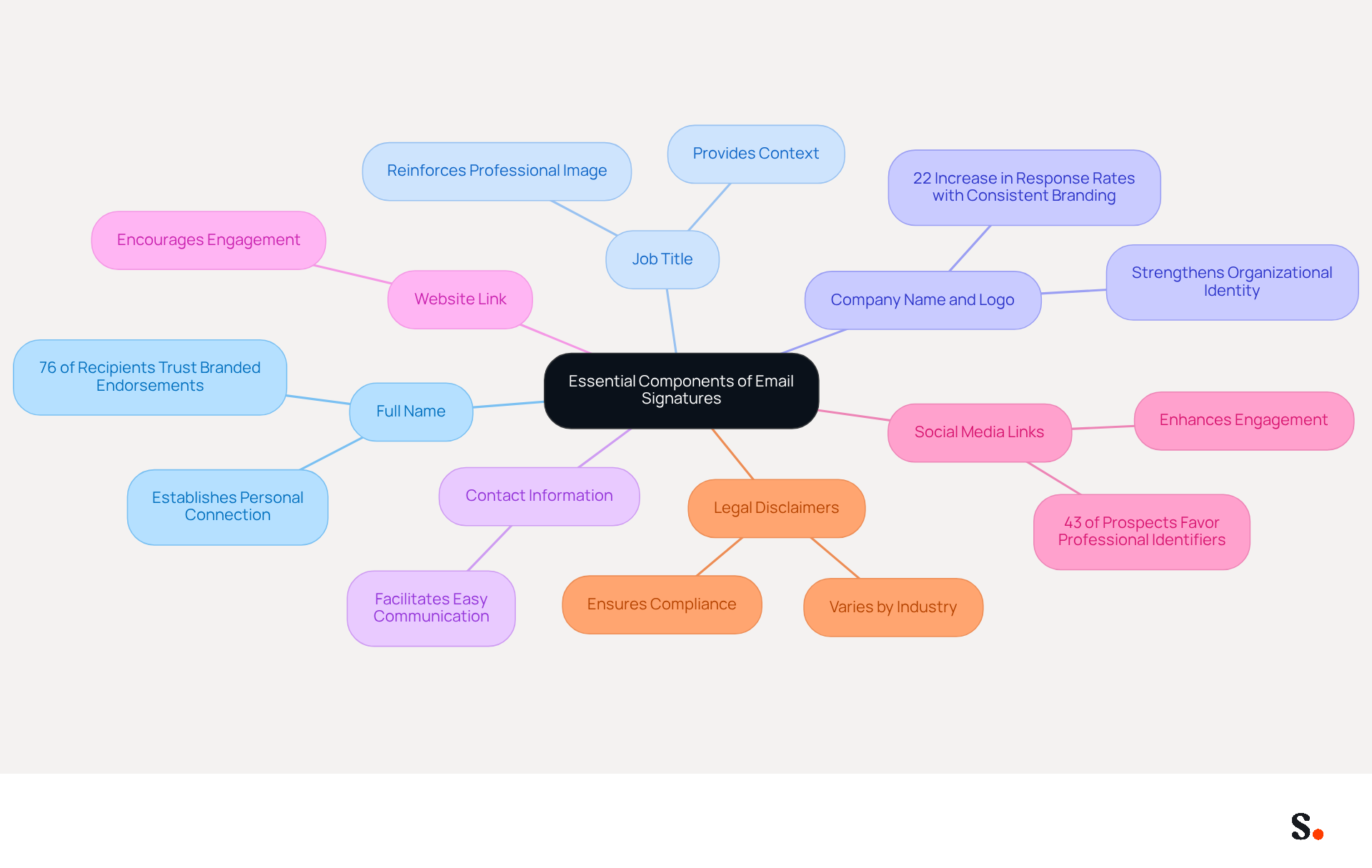
- Full Name: Clearly stating the sender's full name establishes a personal connection and enhances trust, as 76% of recipients feel that branded endorsements increase their trust in the sender.
- Job Title: Including the sender's position provides context about their role within the organization, reinforcing the professional image.
- Company Name and Logo: This element strengthens organizational identity and assists recipients in recognizing the entity, leading to a 22% rise in response rates when identifiers are consistent and labeled.
- Contact Information: Including your phone number and email makes it easy for recipients to get in touch.
- Website Link: A link to the company website encourages recipients to learn more about the business, driving traffic and engagement.
- Social Media Links: Including links to professional social media profiles can enhance engagement and provide additional avenues for connection, as 43% of prospects develop a more favorable perception of a company with professional identifiers.
- Legal Disclaimers: Depending on the industry, including legal disclaimers may be necessary to comply with regulations, ensuring that the organization adheres to legal standards.
By incorporating these elements, businesses can ensure their digital identifiers are not only informative and professional but also strategically aligned with branding efforts. This strategic approach not only enhances professionalism but also significantly boosts engagement rates.
With Scribe, the automated synchronization of identifiers with Aircall ensures that any modifications made in your Aircall setup are automatically reflected in your Scribe identifiers, enhancing consistency without requiring additional action from your teammates. Moreover, Scribe's SOC 2 Type II compliance ensures that your data is handled securely, fulfilling employee data management standards for safe automation of digital identifiers. Ultimately, a well-structured email signature created with word email signature templates can be the difference between a missed opportunity and a valuable connection.
Ensure Brand Consistency in Signature Design
To ensure brand consistency in email signatures, businesses must adhere to specific best practices that enhance professionalism and trust:
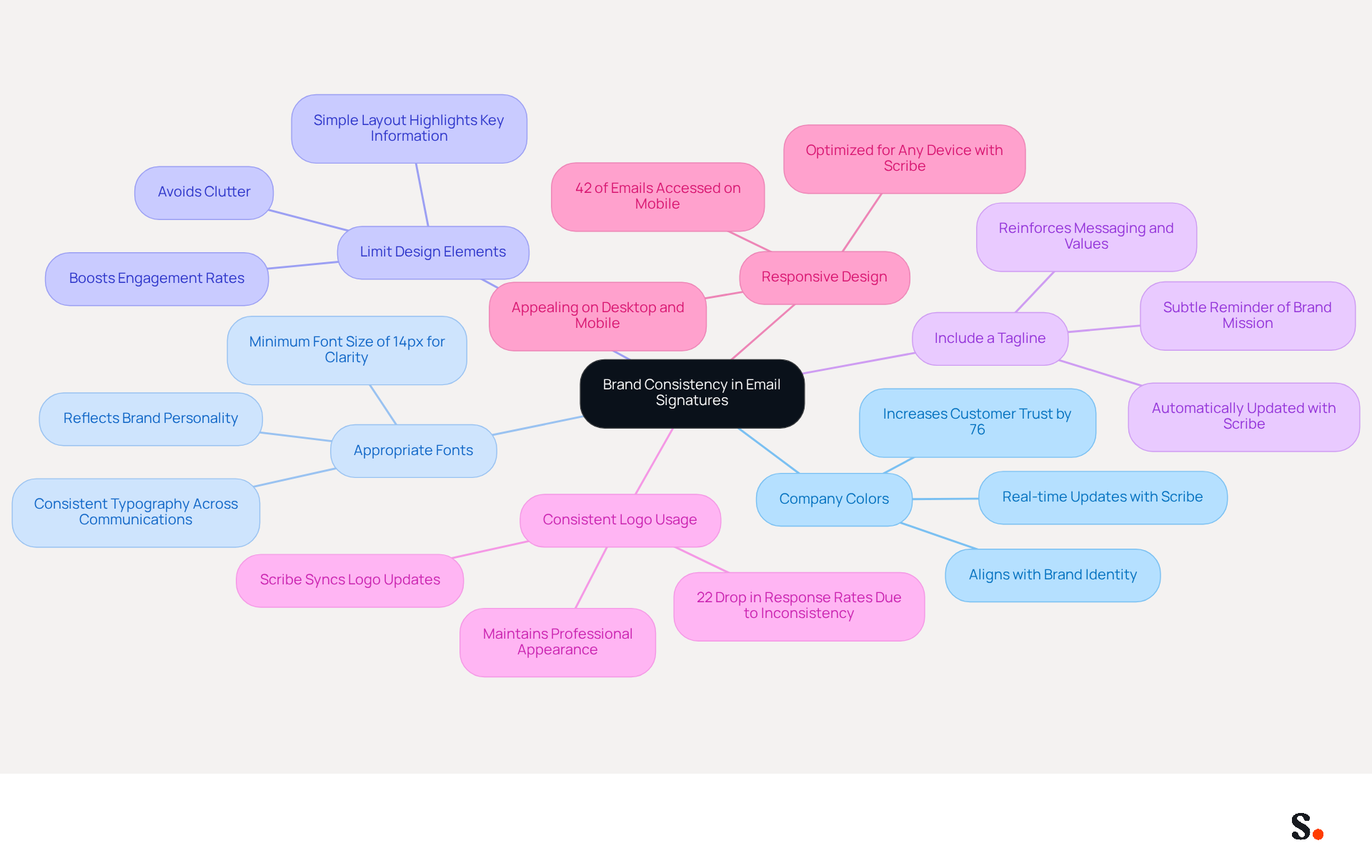
- Use Company Colors: Incorporate Scribe's color palette to align the emblem with the overall identity. When brands maintain consistency, they can increase customer trust significantly, by up to 76%. With Scribe's automated synchronization with Aircall, any updates to company colors are reflected in real-time across all signatures.
- Select Appropriate Fonts: Choose fonts that reflect the brand's personality and are easy to read across different devices. Legible typography, with a minimum font size of 14 pixels, is crucial for ensuring clarity. Scribe simplifies font updates, ensuring consistent typography across all communications.
- Limit Design Elements: Avoid clutter by using a simple layout that highlights key information without overwhelming the recipient. A well-designed signature is essential for establishing professionalism and credibility, which can significantly boost engagement rates. Scribe allows for precise adjustments to design elements, ensuring a clean and effective signature.
- Include a Tagline: If applicable, adding a company tagline can reinforce messaging and values. This serves as a subtle reminder of the brand's mission and vision. The integration of Scribe with Aircall guarantees that any modifications to taglines are automatically reflected in all branding elements.
- Consistent Logo Usage: Ensure that the logo is used consistently in terms of size and placement to maintain a professional appearance. Maintaining consistent branding is crucial, as inconsistency can result in a 22% drop in response rates. Scribe helps maintain logo consistency by syncing updates across all branding elements.
- Responsive Design: Ensure the email appearance is appealing on both desktop and mobile devices, as 42% of all emails are accessed on mobile. A mobile-friendly design ensures that the mark remains effective across various platforms. With Scribe, your signatures are always optimized for any device, ensuring a seamless experience for recipients.
By adhering to these guidelines, businesses can create professional email footers using word email signature templates that strengthen their identity with every email dispatched. Ultimately, organizations that prioritize consistent branding across all communications foster greater trust and engagement with their customers.
Implement Effective Signature Management Strategies
Effectively managing word email signature templates is crucial for maintaining a professional brand image across an organization. Consider the following strategies:
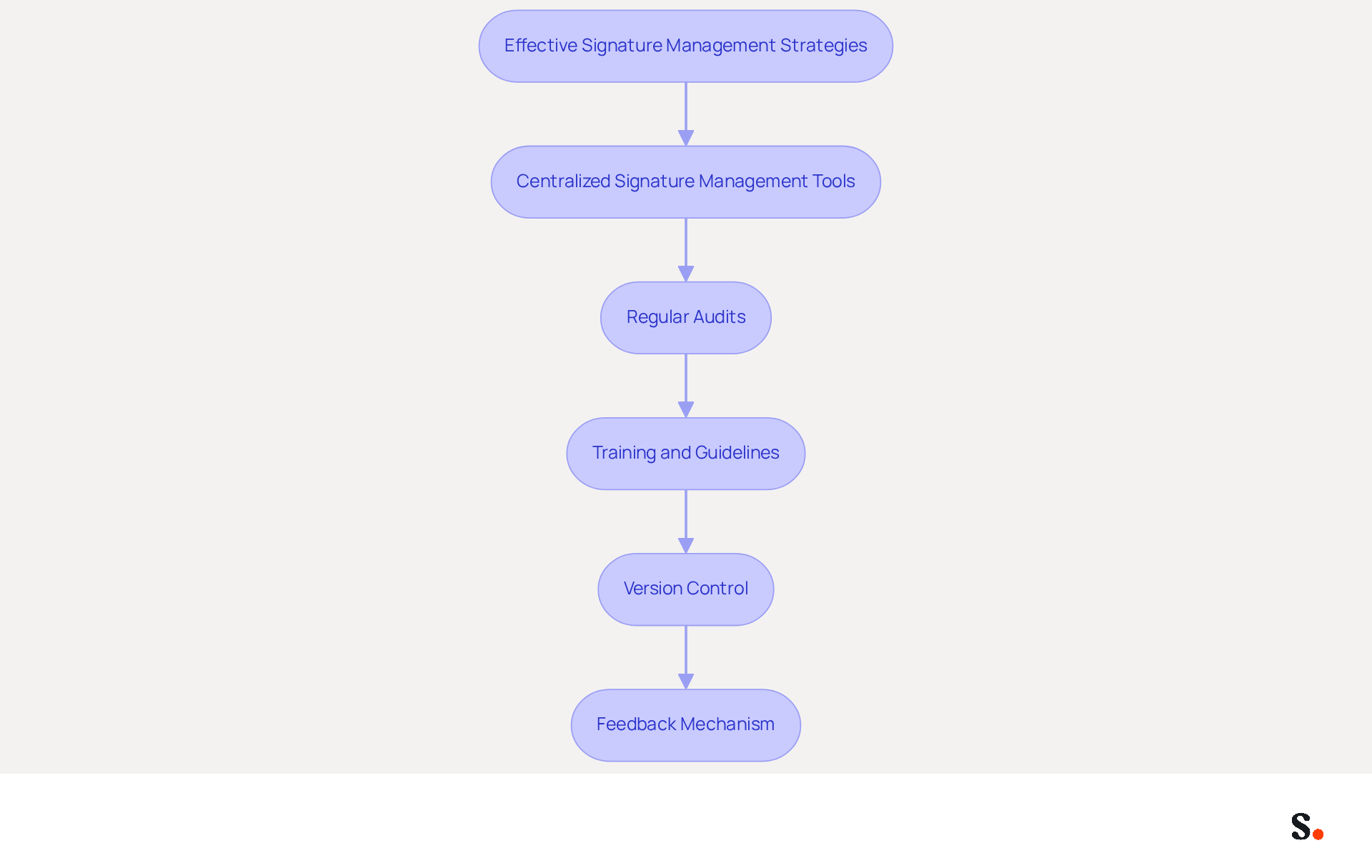
- Centralized Signature Management Tools: Leverage platforms like Scribe to create, manage, and update electronic marks from a single dashboard. This ensures that everyone is on the same page, turning word email signature templates into effective marketing tools.
- Regular Audits: Conduct periodic evaluations of email branding to ensure compliance with guidelines. This practice helps in identifying and updating any outdated information, maintaining a professional appearance in all communications.
- Training and Guidelines: Provide comprehensive training for employees on how to utilize the management tool effectively. Establish clear guidelines for logo usage to ensure everyone adheres to the brand standards.
- Version Control: Implement version control to monitor changes in template designs. This ensures that all employees are using the most current version, reducing the risk of inconsistencies.
- Feedback Mechanism: Create a feedback system that enables employees to report issues or propose enhancements concerning electronic identifiers. This promotes involvement and ongoing improvement of the management process.
By implementing these strategies, organizations can streamline their communication management process, ensuring that all interactions reflect a consistent and professional brand image. Ultimately, using word email signature templates in a well-managed email signature strategy can transform routine communications into powerful branding opportunities.
Leverage Automation for Signature Management and Marketing
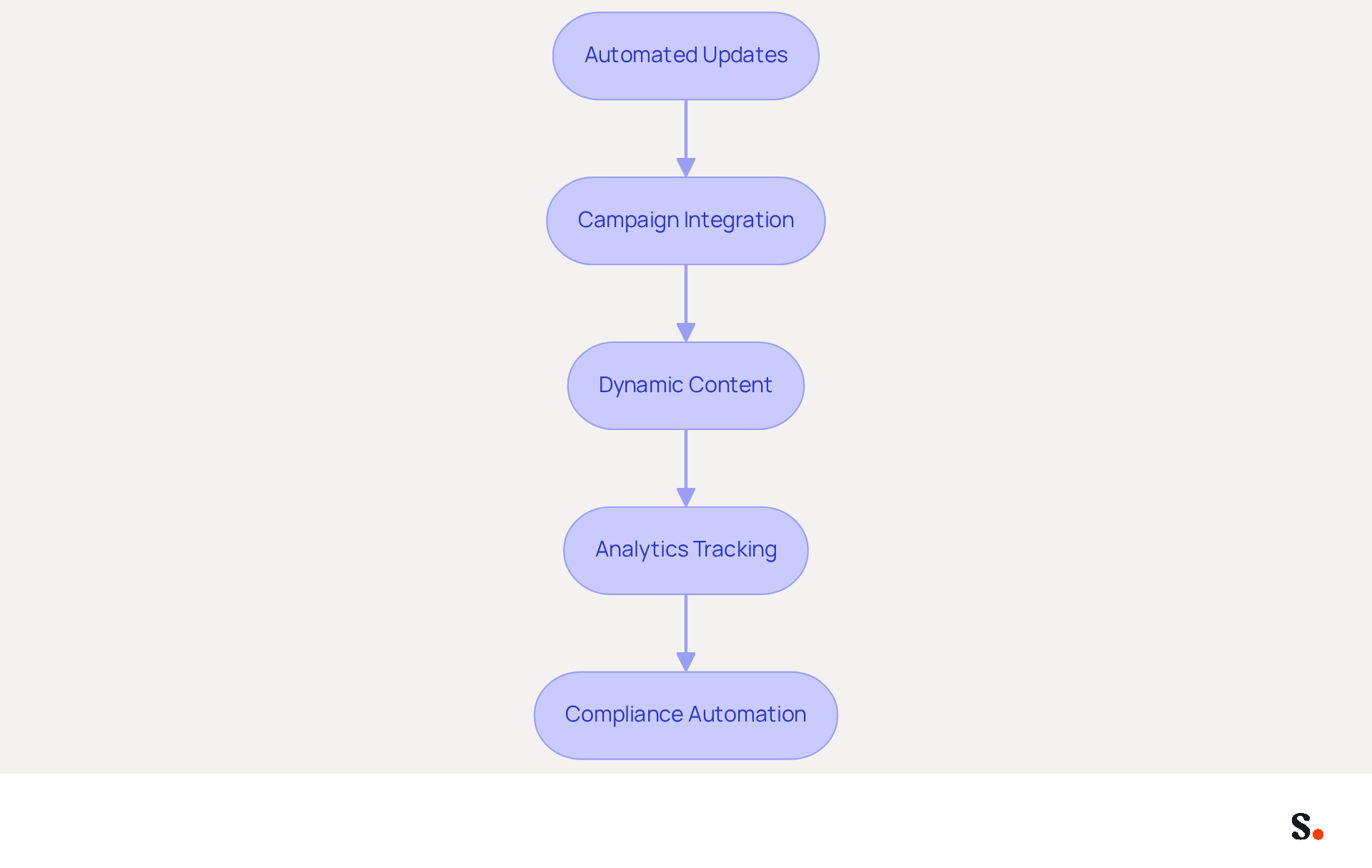
To maximize the effectiveness of email signature management and marketing, businesses must adopt strategic automation practices:
- Automated Updates: Utilize Scribe to automatically refresh identifiers across the organization whenever there are changes in branding or employee information. This ensures that all communications reflect the most current branding, reducing the risk of inconsistencies that can arise during mergers or employee transitions.
- Campaign Integration: Combine digital identifiers with marketing initiatives to promote new products, services, or events directly within communication messages. This strategy turns each email into a valuable marketing opportunity, enhancing engagement and driving conversions.
- Dynamic Content: Incorporate dynamic elements in email footers, such as rotating banners or calls to action, to keep the design fresh and engaging. Studies indicate that branded digital identifiers attract twice as much attention as their unbranded counterparts, emphasizing the effectiveness of engaging content in capturing recipient attention.
- Analytics Tracking: Implement tracking to assess the effectiveness of digital identifiers in driving engagement and conversions. By analyzing performance metrics, businesses can make data-driven adjustments to optimize their marketing strategies.
- Compliance Automation: Ensure that all approvals adhere to legal requirements by automating the inclusion of necessary disclaimers and compliance information. This reduces the risk of fines and reputational damage, particularly in industries where compliance is critical.
By leveraging automation, businesses can enhance their email signature management processes with word email signature templates, ensuring consistency while maximizing marketing opportunities with every email sent. Ultimately, embracing automation in email signature management not only mitigates risks but also transforms every email into a strategic marketing opportunity.
Conclusion
Organizations often overlook the strategic importance of email signatures, yet they play a crucial role in branding and professional communication. Focusing on essential components like full names and job titles, ensuring brand consistency, and implementing effective management strategies can transform email signatures into powerful branding tools that enhance trust and engagement.
Including key elements such as full names, job titles, company logos, and contact information is essential for effective email signatures. Furthermore, effective management strategies, such as centralized tools and regular audits, are vital for maintaining a professional image. Automation enhances this process, allowing for real-time updates and integration with marketing campaigns, ultimately turning every email into a valuable opportunity for engagement.
In today's digital landscape, well-crafted email signatures are essential for effective communication and branding. Organizations that prioritize these best practices not only foster greater trust with their audience but also maximize their marketing potential. Ultimately, organizations that invest in effective email signature management will find themselves better positioned to engage their audience and enhance their brand reputation.
Frequently Asked Questions
What are the essential components of an effective email signature?
The essential components of an effective email signature include the sender's full name, job title, company name and logo, contact information, website link, social media links, and legal disclaimers.
Why is including a full name in an email signature important?
Including a full name establishes a personal connection and enhances trust, as 76% of recipients feel that branded endorsements increase their trust in the sender.
How does a job title in an email signature benefit communication?
A job title provides context about the sender's role within the organization, reinforcing a professional image.
What role does the company name and logo play in an email signature?
The company name and logo strengthen organizational identity and help recipients recognize the entity, leading to a 22% rise in response rates when identifiers are consistent and labeled.
Why should contact information be included in an email signature?
Including contact information, such as a phone number and email, makes it easy for recipients to get in touch with the sender.
How does a website link in an email signature benefit a business?
A link to the company website encourages recipients to learn more about the business, driving traffic and engagement.
What is the advantage of including social media links in an email signature?
Including links to professional social media profiles can enhance engagement and provide additional avenues for connection, as 43% of prospects develop a more favorable perception of a company with professional identifiers.
Are legal disclaimers necessary in email signatures?
Yes, including legal disclaimers may be necessary depending on the industry to comply with regulations and ensure that the organization adheres to legal standards.
How does Scribe enhance the management of email signatures?
Scribe automates the synchronization of identifiers with Aircall, ensuring that any modifications made in the Aircall setup are automatically reflected in Scribe identifiers, enhancing consistency without requiring additional action from teammates.
What compliance standard does Scribe meet regarding data management?
Scribe is SOC 2 Type II compliant, ensuring that data is handled securely and fulfilling employee data management standards for safe automation of digital identifiers.
List of Sources
- Identify Essential Components of Email Signatures
- The Complete Email Signature Guide 2026: Best Practices and Policy (https://opensense.com/complete-email-signature-guide)
- The impact of email signatures on your branding (https://signitic.com/en/resources/the-impact-of-email-signatures-on-your-branding)
- What's a Good Email Signature? Key Components vs. Common Mistakes (https://scribe-mail.com/en-US/blog/what-s-a-good-email-signature-key-components-vs-common-mistakes)
- Email signature branding: importance, tips & best practices (https://exclaimer.com/email-signature-handbook/email-signature-branding-importance)
- Why Team Email Signatures Matter More Than You Think: The Hidden Impact on Brand Trust and Customer Experience (https://getmailbird.com/why-team-email-signatures-matter-brand-trust)
- Ensure Brand Consistency in Signature Design
- 40+ Email Signature Statistics for 2026 (Data + Insights) (https://wavecnct.com/blogs/email-signature-statistics)
- Why Team Email Signatures Matter More Than You Think: The Hidden Impact on Brand Trust and Customer Experience (https://getmailbird.com/why-team-email-signatures-matter-brand-trust)
- Why Email Signatures Must Be In Your 2026 Marketing Plan | Rocketseed (https://rocketseed.com/blog/2026-marketing-plan-email-signatures)
- Master Corporate Email Signature Management for Brand Consistency (https://scribe-mail.com/en-US/blog/master-corporate-email-signature-management-for-brand-consistency)
- Why Are Email Signatures Key to Brand Awareness? | QuickMail (https://quickmail.com/role-of-email-signatures-in-brand-awareness)
- Implement Effective Signature Management Strategies
- Why Email Signatures Must Be In Your 2026 Marketing Plan | Rocketseed (https://rocketseed.com/blog/what-are-the-biggest-email-trends-for-2026)
- Top 10 Email Signature Management Tools in 2026 (Compared) (https://mailbutler.io/blog/email/email-signature-management-tools)
- Centralized Email Signature Management: A Guide for IT (https://exclaimer.com/email-signature-handbook/centralized-email-signature-management)
- 40+ Email Signature Statistics for 2026 (Data + Insights) (https://wavecnct.com/blogs/email-signature-statistics)
- Email Signature Trends 2026: Centralized Control & Automation | SIGNandGO posted on the topic | LinkedIn (https://linkedin.com/posts/signngo_email-signature-trends-to-watch-in-2026-activity-7401523471786217473-zAVL)
- Leverage Automation for Signature Management and Marketing
- Email Signature Trends 2026: Centralized Control & Automation | SIGNandGO posted on the topic | LinkedIn (https://linkedin.com/posts/signngo_email-signature-trends-to-watch-in-2026-activity-7401523471786217473-zAVL)
- Automating Email Signatures: How IT Teams Streamline Processes & Reduce Risk (https://exclaimer.com/blog/streamlining-it-processes-automated-email-signatures)
- WiseStamp Launches the Industry's First AI-Powered Email Signature Platform, Eliminating the Gap Between Brand Design and Instant Deployment (https://prnewswire.com/news-releases/wisestamp-launches-the-industrys-first-ai-powered-email-signature-platform-eliminating-the-gap-between-brand-design-and-instant-deployment-302774232.html)
- WiseStamp Sets a New Standard for Email Signature Creation (https://prnewswire.com/news-releases/wisestamp-sets-a-new-standard-for-email-signature-creation-302689811.html)
- Master Automatic Email Signatures: Boost Branding and Efficiency (https://scribe-mail.com/en-US/blog/master-automatic-email-signatures-boost-branding-and-efficiency)
Get started with Scribe
Build a professional email signature
Free 14-day trial — no credit card.