4 Best Practices for Your Google Email Signature Template
An effective email signature serves as a critical component of professional communication, yet many organizations overlook its potential impact. By adopting
Sophie Grant
Email Signature Specialist, Scribe

Introduction
An effective email signature serves as a critical component of professional communication, yet many organizations overlook its potential impact. By adopting best practices for designing a Google email signature template, professionals can boost engagement and create a consistent brand presence.
Many organizations find it challenging to keep their email signatures compliant and current, leading to potential miscommunication and brand inconsistency. This oversight can result in diminished brand credibility and lost opportunities for engagement.
How can businesses leverage their email signatures not only to convey professionalism but also to drive marketing results and foster trust with their audience? By optimizing email signatures, businesses can not only enhance their professionalism but also unlock new avenues for audience engagement and trust.
Define Key Elements of an Effective Email Signature
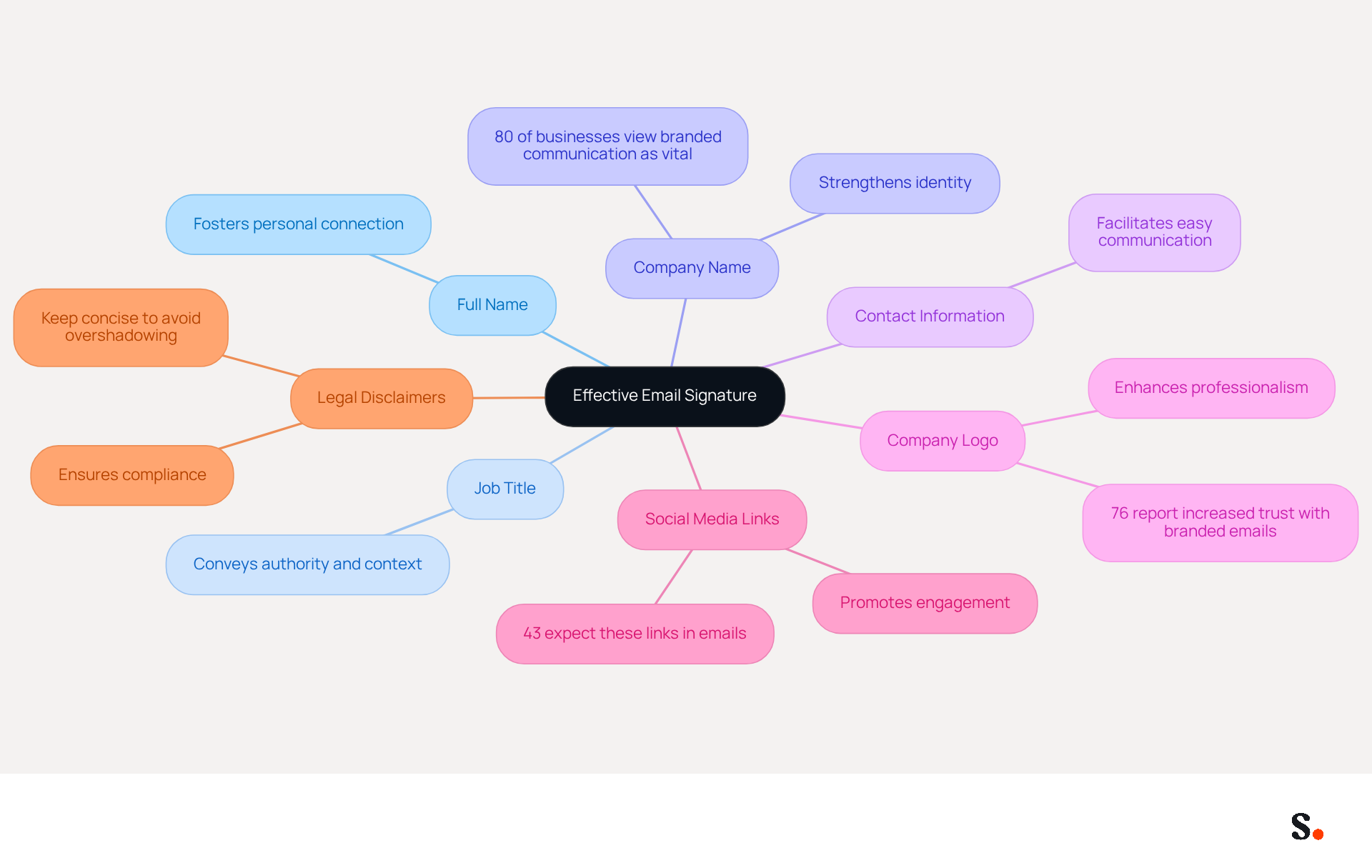
An effective google email signature template is not just a formality; it serves as a crucial element that can significantly impact your professional image and communication effectiveness. To maximize its impact, an effective email signature should encompass several key elements:
- Full Name: Clearly stating your name fosters a personal connection with the audience.
- Job Title: Including your position conveys authority and context, establishing your role within the organization.
- Company Name: This strengthens identity and assists in recognition, as 80% of businesses view branded communication tools as vital for their strategy.
- Contact Information: Providing a phone number and contact address facilitates easy communication, ensuring individuals can reach you without hassle.
- Company Logo: A visual representation of your brand enhances professionalism and can increase trust, with 76% of recipients reporting that branded emails boost their confidence in the sender.
- Social Media Links: Incorporating icons that connect to your professional social media profiles promotes additional engagement and connectivity, as 43% of consumers anticipate these links in correspondence.
- Legal Disclaimers: If applicable, adding necessary legal disclaimers ensures compliance with regulations, although it's crucial to keep them concise to avoid overshadowing the primary purpose of the endorsement.
When you include these elements in your google email signature template, your digital correspondence becomes a powerful virtual business card that enhances your professional image and facilitates effective communication. Regular updates and adherence to best practices can lead to a 22% increase in response rates, making it a strategic investment for any professional. With Scribe, the automated synchronization of communication identifiers with your business phone system ensures that any modifications made are reflected in real-time, maintaining brand consistency effortlessly. Additionally, Scribe's SOC 2 Type II compliance guarantees that your data is secure, further enhancing trust in your communications. By investing in a well-structured email signature, you position yourself for greater engagement and success in your professional interactions.
Design a Visually Appealing and Informative Template
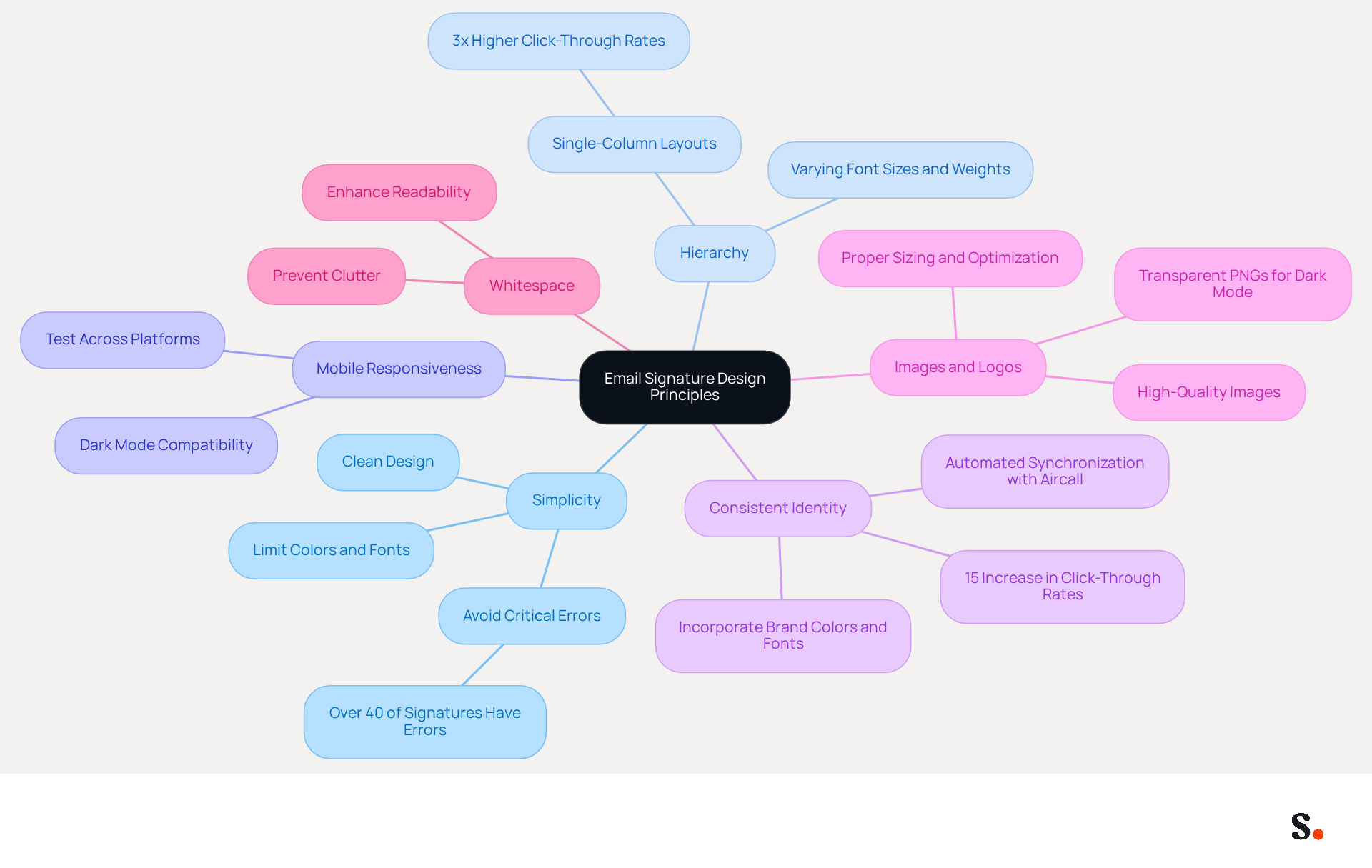
To create an effective email signature template that aligns with your Aircall configuration, it is crucial to adhere to key design principles:
- Simplicity: Maintain a clean and uncluttered design. Restricting the use of colors and fonts contributes to a professional look, which is essential since over 40% of email footers reviewed contain critical errors that impact engagement.
- Hierarchy: Utilize varying font sizes and weights to establish a visual hierarchy, making it easier for recipients to scan the information quickly. This approach aligns with the preference for single-column layouts, which have been shown to achieve 3x higher click-through rates compared to multi-column designs.
- Mobile Responsiveness: Ensure that the signature is visually appealing on both desktop and mobile devices. Since many messaging clients default to dark mode, it's vital to test across platforms to ensure compatibility and functionality.
- Consistent Identity: Incorporate colors and fonts to ensure uniformity with your overall identity. Branded digital identifiers can result in a 15% rise in website click-through rates, demonstrating the clear benefits of cohesive branding in online communications. Automated synchronization with Aircall ensures that any changes made to your configuration are reflected in your Scribe branding, enhancing brand consistency.
- Images and Logos: Use high-quality images and logos, ensuring they are properly sized and optimized for email to avoid loading issues. For instance, using transparent PNG logos can enhance visibility in dark mode, which is increasingly relevant in 2026.
- Whitespace: Incorporate adequate whitespace to enhance readability and prevent the element from feeling cramped. This principle is crucial, as cluttered designs often lead to information overload, undermining effectiveness.
By following these design principles and utilizing the automated synchronization with Aircall, you can create a professional-looking communication footer with a google email signature template that effectively conveys your brand identity, ultimately boosting engagement and trust with your audience.
Incorporate Marketing Elements to Drive Engagement
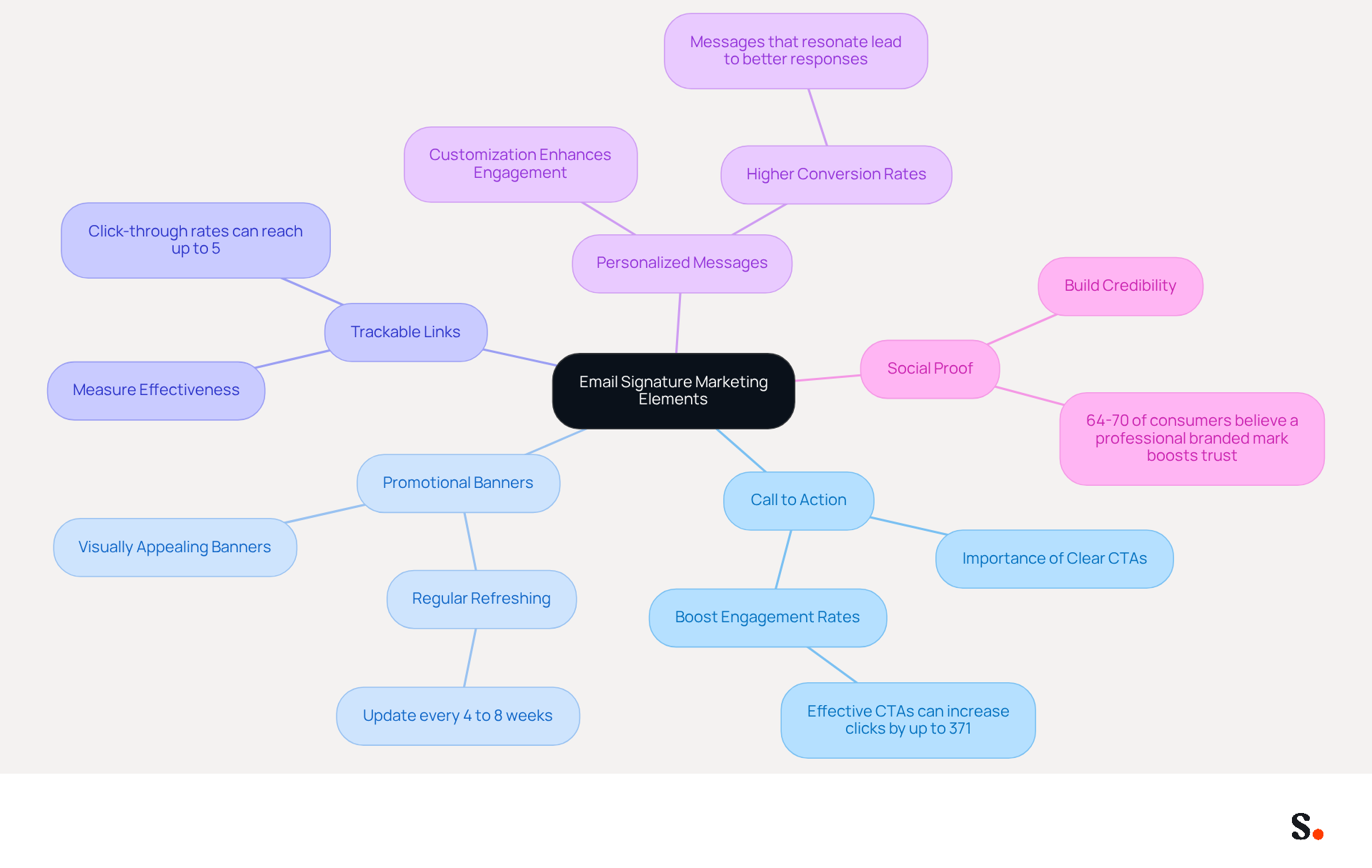
Transforming your email signature into a marketing tool requires strategic elements that drive engagement and conversions. Consider incorporating the following components:
- Call to Action (CTA): A clear CTA is essential. Guide individuals to take specific actions, such as visiting your website, signing up for a newsletter, or exploring current promotions. Well-crafted CTAs can really boost engagement rates, with studies showing that effective CTAs can increase clicks by up to 371%.
- Promotional Banners: Utilize visually appealing banners to highlight special offers, events, or new products. Regularly refreshing these banners every 4 to 8 weeks can help maintain engagement levels and keep your audience informed about your latest offerings.
- Trackable Links: Implement trackable links to measure the effectiveness of your email marketing efforts. This allows for the analysis of click-through rates, which can reach up to 5% for well-designed campaigns, enabling you to refine your strategies based on real-time data.
- Personalized Messages: Customize your unique content to reflect the individual's interests or past interactions. Personalization enhances engagement and can lead to higher conversion rates, as recipients are more likely to respond to messages that resonate with them.
- Social Proof: Incorporate testimonials or awards in your email footer to build credibility and foster trust in your brand. Highlighting positive customer feedback can significantly enhance your reputation, as 64-70% of consumers believe a professional branded mark boosts trust and credibility.
Incorporating these elements can turn your google email signature template into a vital asset for enhancing engagement and driving conversions. Neglecting these components may result in missed opportunities for engagement and conversion, ultimately impacting your marketing effectiveness.
Ensure Consistency and Compliance in Signature Management
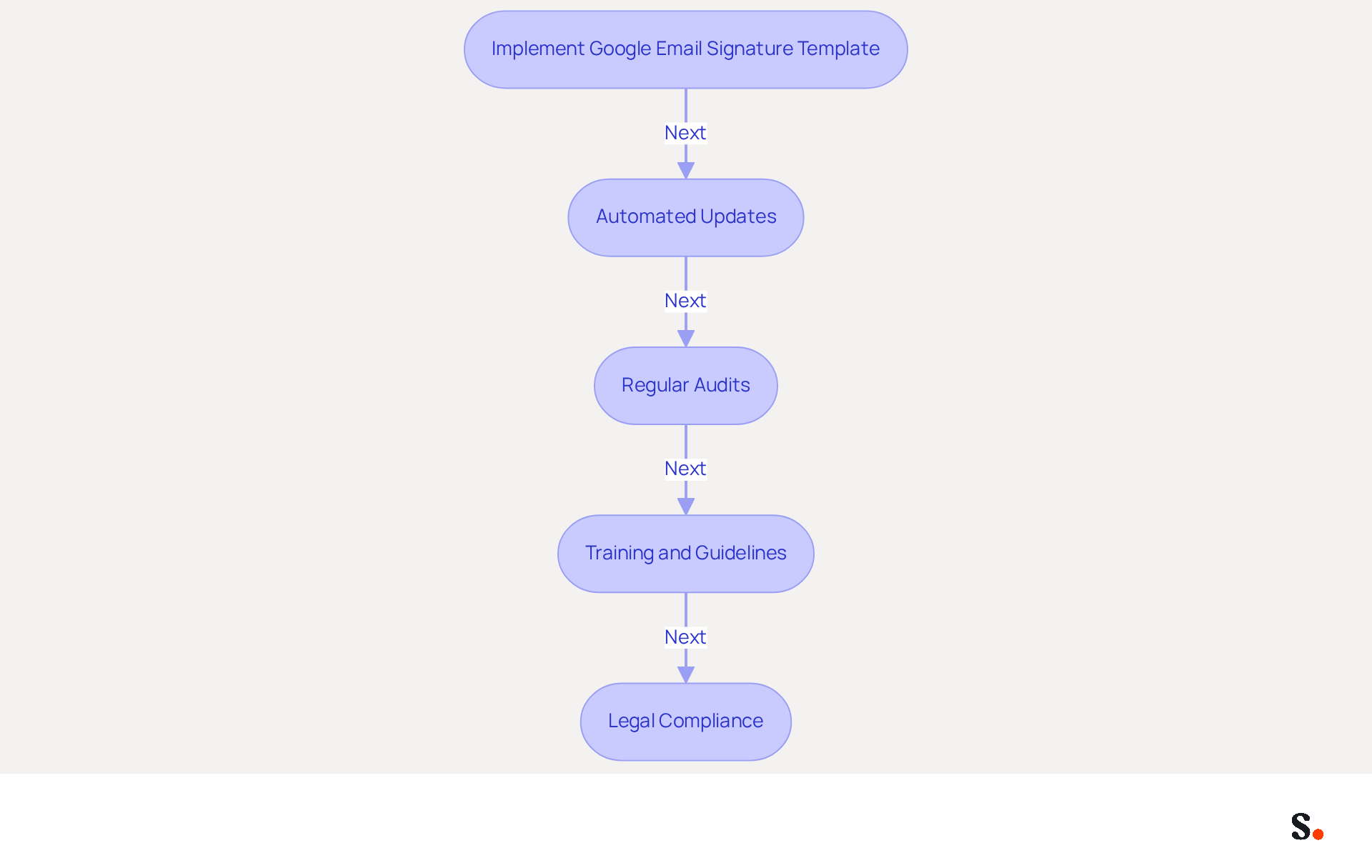
To maintain consistency and compliance in email signature management, organizations must adopt best practices that enhance professionalism and efficiency:
- Implement a Google email signature template as a standardized template for all employees. This approach enhances brand recognition. It also simplifies the management process across the organization.
- Automated Updates: Utilize tools like Scribe that enable automated modifications to identifiers. By syncing your Google Workspace with Scribe, any changes in your organization, such as moving teammates from one group to another or updating their information, are automatically reflected in Scribe without manual intervention, just like a Google email signature template updates automatically. Managing outdated information can lead to confusion and inefficiencies. Automating updates allows organizations to concentrate on strategic initiatives instead of getting bogged down by administrative tasks. Scribe's SOC 2 Type II compliance and adherence to GDPR ensure that your electronic identifiers meet legal standards, further enhancing trust with recipients. Furthermore, 42% of organizations do not monitor messaging branding performance, emphasizing the necessity of utilizing automated solutions to ensure effectiveness.
- Regular Audits: Conduct routine evaluations of electronic communications to verify compliance with branding guidelines and legal standards. Research shows that 44.4% of users modify their electronic correspondences 2-4 times a year, highlighting the importance of audits to ensure that all formats reflect the most up-to-date information, including job titles and contact details.
- Training and Guidelines: Provide comprehensive training for employees on the significance of consistent email formats, specifically utilizing a Google email signature template. Establish clear guidelines for usage to reinforce the importance of maintaining a professional image in all communications.
- Legal Compliance: Ensure that all endorsements include necessary legal disclaimers and comply with relevant regulations, such as GDPR. This not only safeguards the organization but also fosters trust with recipients; 42% of consumers have a negative perception of businesses that do not utilize branded marks.
By implementing these strategies, organizations not only protect their reputation but also leverage every email as a branding opportunity. As Sophie Grant, an Email Signature Specialist with extensive experience in digital branding, notes, "Many organizations overlook the strategic value of email signatures, missing opportunities for engagement and brand reinforcement.
Conclusion
A well-designed Google email signature template is crucial for projecting professionalism and facilitating effective communication. By incorporating key elements such as your full name, job title, company name, and contact information, the signature serves as a powerful tool that not only identifies you but also reinforces your brand. Utilizing Scribe's automated synchronization and compliance features can significantly enhance your branding efforts, ensuring that these elements are consistently updated and compliant with regulations, thereby enhancing trust and engagement in your communications.
The article outlines several best practices for creating an impactful email signature. These include:
- Designing a visually appealing template that adheres to simplicity and hierarchy
- Incorporating marketing elements like calls to action and promotional banners
- Ensuring compliance through standardized templates and automated updates
By following these guidelines, organizations can significantly improve their email engagement rates and maintain brand consistency across all communications.
When managed strategically, email signatures can become valuable marketing assets. By leveraging tools like Scribe, which offers automated synchronization and compliance with GDPR and CCPA, organizations can enhance their branding efforts while ensuring that every email sent is an opportunity for engagement. By adopting these strategies, organizations can turn their email signatures into powerful tools for engagement and brand loyalty.
Frequently Asked Questions
What is the purpose of an effective email signature?
An effective email signature serves as a crucial element that impacts your professional image and communication effectiveness.
What are the key elements of an effective email signature?
The key elements include your full name, job title, company name, contact information, company logo, social media links, and legal disclaimers if applicable.
Why is it important to include your full name in an email signature?
Clearly stating your full name fosters a personal connection with the audience.
How does including a job title in an email signature benefit communication?
Including your job title conveys authority and context, establishing your role within the organization.
What role does the company name play in an email signature?
The company name strengthens identity and assists in recognition, as many businesses view branded communication tools as vital for their strategy.
Why should contact information be included in an email signature?
Providing a phone number and contact address facilitates easy communication, ensuring individuals can reach you without hassle.
How does a company logo enhance an email signature?
A company logo serves as a visual representation of your brand, enhances professionalism, and can increase trust among recipients.
What is the significance of including social media links in an email signature?
Incorporating social media links promotes additional engagement and connectivity, as many consumers expect these links in correspondence.
When should legal disclaimers be added to an email signature?
Legal disclaimers should be added if applicable, ensuring compliance with regulations while keeping them concise to avoid overshadowing the primary purpose of the email.
How can a well-structured email signature impact response rates?
Regular updates and adherence to best practices can lead to a 22% increase in response rates, making it a strategic investment for professionals.
What advantages does Scribe offer for email signatures?
Scribe provides automated synchronization of communication identifiers with your business phone system, ensuring real-time updates and maintaining brand consistency. Additionally, Scribe's SOC 2 Type II compliance guarantees data security, enhancing trust in communications.
List of Sources
- Define Key Elements of an Effective Email Signature
- The impact of email signatures on your branding (https://signitic.com/en/resources/the-impact-of-email-signatures-on-your-branding)
- Research Recap: Branded Email Signatures Increase Company Recognition, Trust - Demand Gen Report (https://demandgenreport.com/industry-news/research-recap-branded-email-signatures-increase-company-recognition-trust/47252)
- Email Signature Best Practices for 2026 (+ 15 Pro Examples) (https://wavecnct.com/blogs/email-signature-best-practices-2026)
- 12 email signature marketing examples that drive clicks (2026) (https://signitic.com/en/resources/12-email-signature-marketing-examples-that-actually-drive-clicks)
- 4 Best Practices for a Modern Email Signature That Engages (https://scribe-mail.com/en-US/blog/4-best-practices-for-a-modern-email-signature-that-engages)
- Design a Visually Appealing and Informative Template
- Email Signature Trends 2026: What Designers Are Actually Using (https://markaplugin.com/blog/email-signature-trends-2026)
- Email Signature Design Trends in 2026: What Works and What to Drop (https://bulksignature.com/blog/email-signature-design-trends)
- Email Signature Best Practices for 2026 (+ 15 Pro Examples) (https://wavecnct.com/blogs/email-signature-best-practices-2026)
- Email signature statistics: Why every business should optimize their email signatures — Stripo.email (https://stripo.email/blog/email-signature-statistics-why-every-business-should-optimize-their-email-signatures)
- Incorporate Marketing Elements to Drive Engagement
- Achieve a high conversion rate thanks to email signatures (https://signitic.com/en/resources/what-conversion-rate-can-we-expect-thanks-to-email-signatures)
- 4 Best Practices for Your Outlook Signature Line in Marketing (https://scribe-mail.com/en-US/blog/4-best-practices-for-your-outlook-signature-line-in-marketing)
- The ultimate guide to email signatures in 2026 (https://signitic.com/en/resources/email-signature)
- Email signature statistics: Why every business should optimize their email signatures — Stripo.email (https://stripo.email/blog/email-signature-statistics-why-every-business-should-optimize-their-email-signatures)
- Why Email Signatures Must Be In Your 2026 Marketing Plan | Rocketseed (https://rocketseed.com/blog/what-are-the-biggest-email-trends-for-2026)
- Ensure Consistency and Compliance in Signature Management
- WiseStamp Sets a New Standard for Email Signature Creation (https://prnewswire.com/news-releases/wisestamp-sets-a-new-standard-for-email-signature-creation-302689811.html)
- 5 Benefits of Standardized Email Signatures (https://signature.email/blog/benefits-of-standardized-email-signatures)
- 40+ Email Signature Statistics for 2026 (Data + Insights) (https://wavecnct.com/blogs/email-signature-statistics)
- Email signature statistics: Why every business should optimize their email signatures — Stripo.email (https://stripo.email/blog/email-signature-statistics-why-every-business-should-optimize-their-email-signatures)
- Maximize Marketing Impact with an Email Signature Template Generator (https://scribe-mail.com/en-US/blog/maximize-marketing-impact-with-an-email-signature-template-generator)
Get started with Scribe
Build a professional email signature
Free 14-day trial — no credit card.