4 Simple Email Signature Templates to Boost Your Marketing Strategy
Email signatures represent an untapped resource in marketing, often underestimated yet capable of driving significant brand engagement. When businesses
Sophie Grant
Email Signature Specialist, Scribe
Introduction
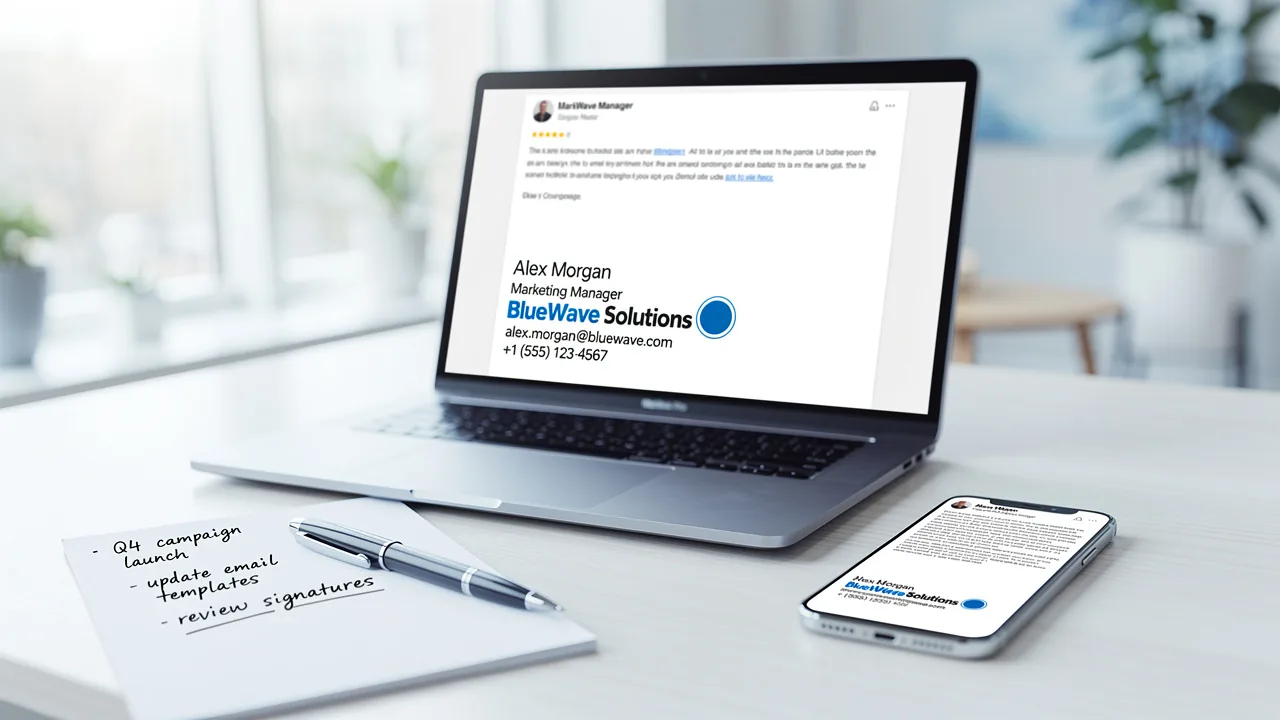
Email signatures represent an untapped resource in marketing, often underestimated yet capable of driving significant brand engagement. When businesses incorporate essential elements and strategic design, they can turn their email footers into powerful promotional assets. Despite their potential, many organizations fail to utilize email signatures effectively for marketing purposes.
What key components can transform an email signature from a mere formality into a catalyst for marketing success? This article will examine four effective email signature templates designed to enhance marketing strategies and deliver measurable results.
Define Essential Elements of Effective Email Signatures
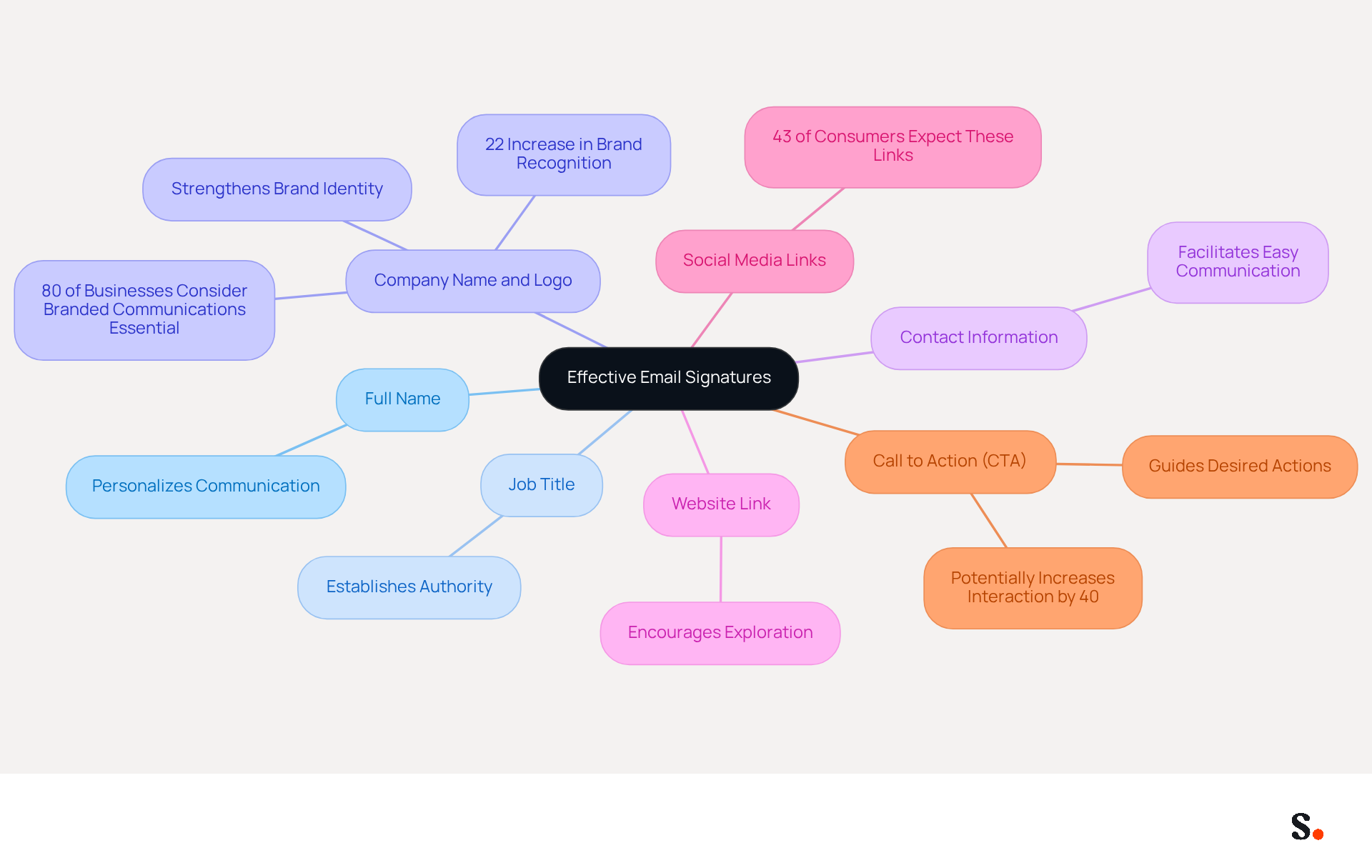
An effective email signature is not just a formality; it serves as a powerful marketing tool that can significantly enhance brand visibility and engagement. To maximize its impact, an email signature should incorporate several essential elements:
- Full Name: Clearly stating the sender's name personalizes the communication, fostering a connection with the recipient.
- Job Title: Including the sender's position establishes authority and context, enhancing the credibility of the message.
- Company Name and Logo: This strengthens brand identity and recognition, as 80% of businesses consider branded communications essential for trust and professionalism. A logo enhances brand visibility and professionalism, contributing to a 22% increase in brand recognition and trust among companies with branded digital identifiers.
- Contact Information: Providing a direct phone number and contact address facilitates easy communication, ensuring recipients can reach out without hassle.
- Website Link: A link to the company website encourages recipients to explore more about the business, driving traffic and potential conversions.
- Social Media Links: Incorporating icons that connect to professional social media profiles improves connectivity and interaction, as 43% of consumers anticipate these links in correspondence.
- Call to Action (CTA): A strategically placed CTA can guide recipients towards desired actions, such as visiting a landing page or signing up for a newsletter, potentially increasing interaction by 40%.
By combining these components, businesses can develop professional-looking identifiers that also function as effective promotional tools. Furthermore, a well-designed electronic correspondence footer can lead to 200 extra engaged interactions each month for organizations sending 10,000 messages, highlighting the effectiveness of such footers as promotional tools. Moreover, with Scribe's automated synchronization of messages with Aircall, any modifications made in your Aircall setup will be automatically reflected in your Scribe branding, ensuring consistent identity across all communications. Neglecting to optimize your email signature could mean losing valuable opportunities for connection and engagement in your communications.
Leverage Email Signatures as Marketing Tools
Email footers can serve as effective promotional tools when crafted with purpose. Many businesses underestimate the marketing potential of email footers, missing out on significant engagement opportunities. Here are effective strategies to leverage them:
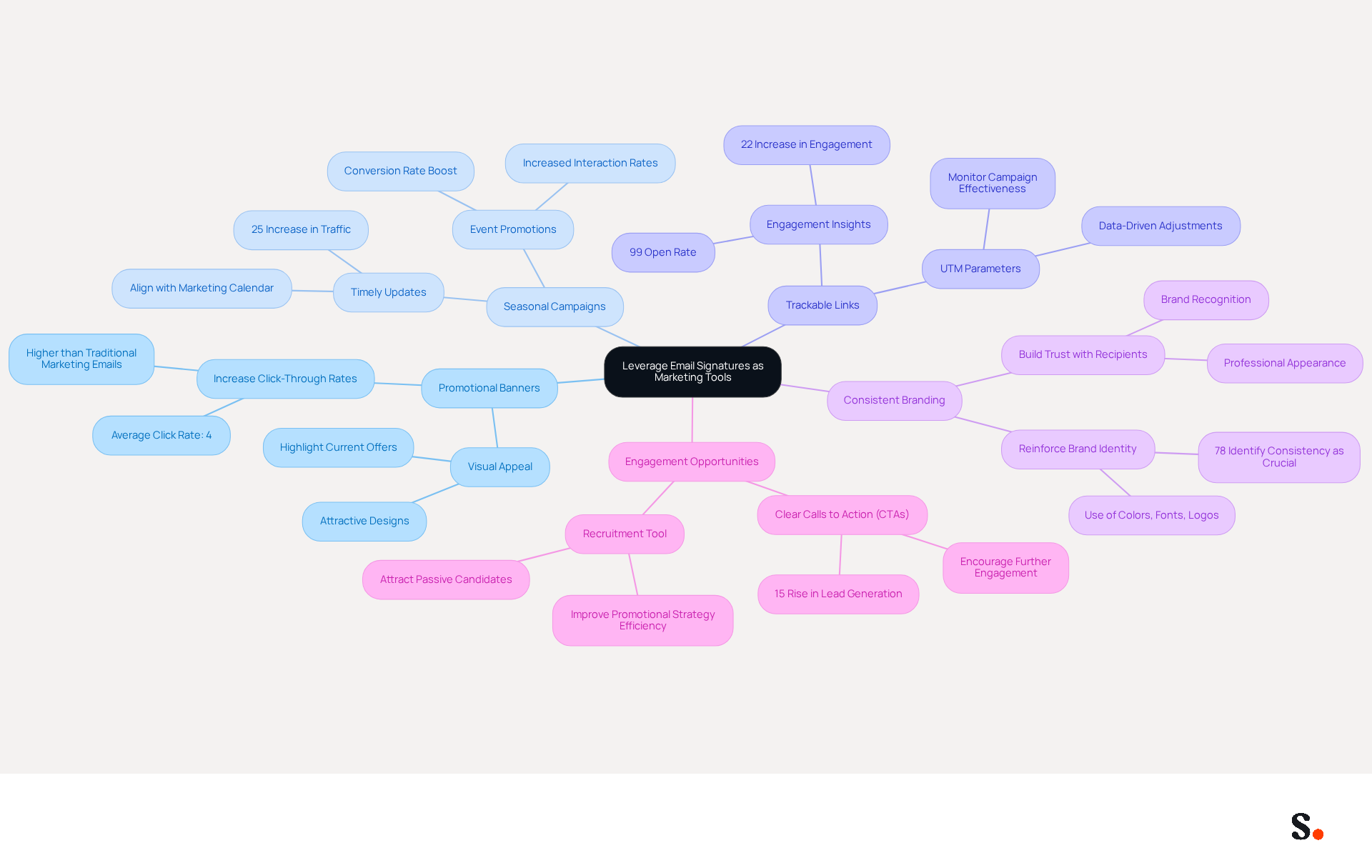
- Promotional Banners: Incorporate visually appealing banners that highlight current offers, events, or new products. Using this method can lead to a significant increase in click-through rates. In fact, campaigns with digital signatures see an average click rate of 4%, much higher than traditional promotional messages.
- Seasonal Campaigns: Regularly update branding elements to reflect seasonal promotions or campaigns, ensuring that marketing messages remain timely and relevant. A multinational corporation that standardized its digital communication identifiers globally saw a 25% increase in traffic to targeted landing pages, demonstrating the impact of timely updates. For example, a research analysis showed that incorporating event promotions into message footers resulted in increased interaction and conversion rates.
- Trackable Links: Utilize UTM parameters in links to monitor the effectiveness of campaigns related to electronic correspondence footers. This allows for data-driven adjustments, enabling businesses to refine their strategies based on measurable results. Organizations that monitor clicks from message footers can determine which campaigns generate the most interest, potentially boosting engagement by 22%. Furthermore, electronic correspondence has a 99% open rate and an average ROI of 3,600%, highlighting its effectiveness as a marketing tool.
- Consistent Branding: Ensure that electronic correspondence identifiers align with overall branding efforts by using consistent colors, fonts, and logos. This reinforces brand identity and builds trust with recipients. Indeed, 78% of participants in a survey identified consistent branding as one of the most crucial roles of electronic correspondence.
- Engagement Opportunities: Incorporate clear calls to action (CTAs) that encourage recipients to engage further, such as signing up for webinars or downloading resources. Email footer promotion can result in a 15% rise in lead generation, showing how effective CTAs can boost engagement. Moreover, utilizing digital identifiers as a recruitment tool can draw in passive candidates, improving the overall efficiency of your promotional strategy.
When businesses see digital communication identifiers as part of their marketing strategy, they can boost visibility and engagement, transforming everyday emails into powerful marketing tools. Ignoring the strategic use of email footers could mean leaving substantial marketing potential untapped.
Implement Automation for Consistent Email Signature Management
To achieve consistency and efficiency in email signature management, businesses should consider implementing automation strategies:
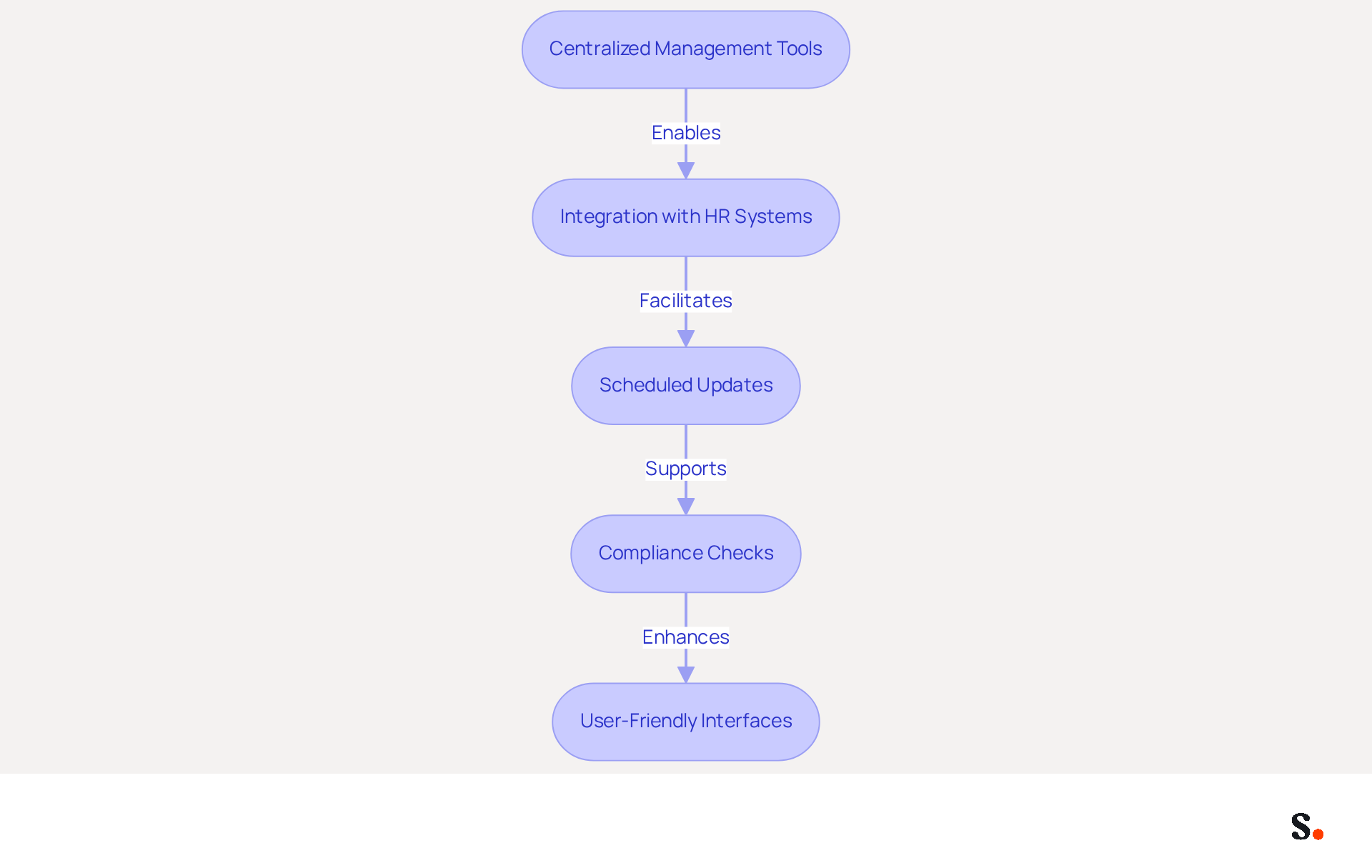
- Centralized Management Tools: Utilize platforms like Scribe that enable centralized creation and deployment of electronic identifiers across the organization. This method ensures consistent branding and professionalism in every message.
- Integration with HR Systems: Automate updates by connecting management of digital identifiers with HR systems. This integration enables real-time updates when employee information changes, minimizing the risk of outdated approvals that can lead to compliance issues and miscommunication.
- Scheduled Updates: Plan regular updates for promotional banners or seasonal messages to keep content fresh and relevant without manual effort. This approach not only engages recipients but also capitalizes on marketing opportunities, as branded digital identifiers can lead to a notable 22% increase in response rates.
- Compliance Checks: Implement automated evaluations to ensure that all approvals meet legal and branding requirements. This minimizes the risk of non-compliance, which is crucial for organizations in regulated industries where legal disclaimers are essential.
- User-Friendly Interfaces: Choose tools that require minimal technical expertise, allowing employees to focus on their core responsibilities while ensuring brand consistency. It's crucial to have user-friendly tools, especially since 70% of marketers expect that by 2026, half of their communication operations will be driven by AI.
By automating management of communication identifiers, businesses can save time, reduce mistakes, and uphold a professional image across all interactions. This shift not only enhances brand perception but also allows IT teams to focus on higher-priority projects.
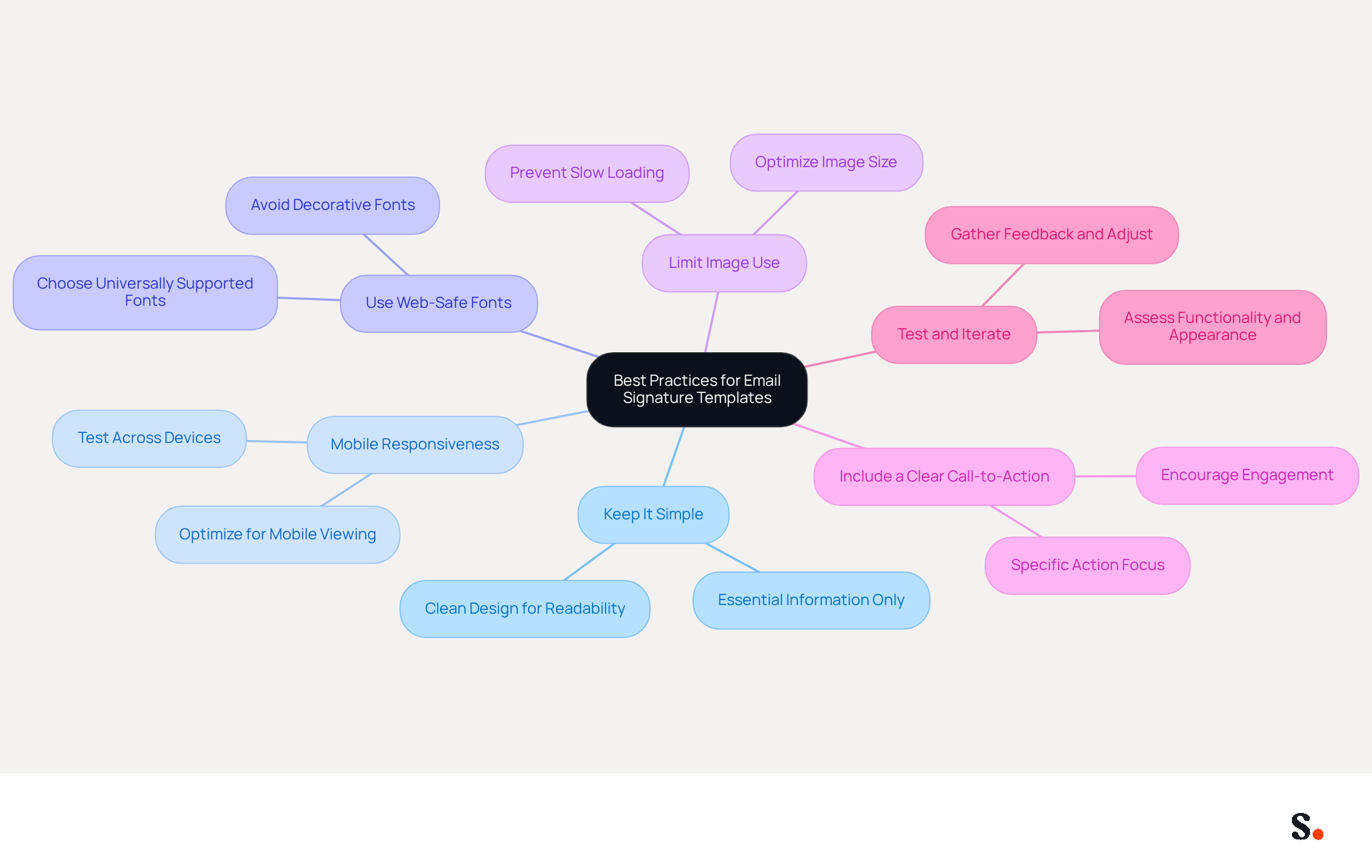
Execute Best Practices for Email Signature Templates
To create effective email signature templates, businesses must adhere to best practices that enhance professionalism and engagement:
- Keep It Simple: Limit the sign-off to essential information, such as the sender's full name, job title, company name, direct phone number, and website link. A clean design makes it easier for recipients to read and understand key details quickly.
- Mobile Responsiveness: With over 60% of business correspondence accessed on mobile devices, identifiers must be optimized for mobile viewing. Test signatures across various devices to ensure they display correctly and maintain functionality.
- Use Web-Safe Fonts: Choose fonts that are universally supported to ensure consistency across various messaging clients. Avoid overly decorative fonts that may not render properly, opting instead for simple, professional styles like Arial or Calibri.
- Limit Image Use: While images can enhance visual appeal, too many images can cause emails to load slowly, frustrating recipients. Keep images small and optimized, ideally under 100 KB, to prevent bloating messages and ensure quick loading.
- Include a Clear Call-to-Action (CTA): Incorporating a clear CTA in your correspondence can lead to higher engagement rates, encouraging recipients to take action, such as signing up for webinars or visiting your website.
- Test and Iterate: Regularly assess message headers for functionality and appearance. Gather feedback from users and make necessary adjustments to improve effectiveness. A/B testing various layouts can uncover which designs produce higher interaction rates, with left-aligned, single-column formats achieving up to 3x greater click rates for CTAs.
Ultimately, using simple email signature templates can help create a well-designed email signature that serves as a powerful tool for driving engagement and reinforcing brand identity.
Conclusion
Crafting effective email signatures is not just a task; it’s a strategic move that can significantly enhance an organization’s marketing strategy. By integrating key elements such as contact information, branding, and clear calls to action, businesses can transform their email footers into powerful marketing tools. This approach fosters brand consistency and drives engagement, leading to greater visibility and potential conversions.
The article highlights several strategies for optimizing email signatures, including:
- The use of promotional banners
- Seasonal updates
- Trackable links
These tactics can significantly boost click-through rates and engagement, showing how email footers can serve as effective marketing tools. Additionally, implementing automation through tools like Scribe ensures that email signatures remain consistent and compliant, freeing up valuable time for marketing and IT teams alike.
Every communication presents an opportunity for organizations to make an impact. It’s crucial for organizations to focus on creating automated email signatures that truly reflect their brand and marketing objectives. By doing so, they can not only enhance their professional image but also maximize the return on investment from their email communications, ultimately driving growth and success in their marketing efforts.
Frequently Asked Questions
What is the purpose of an effective email signature?
An effective email signature serves as a powerful marketing tool that enhances brand visibility and engagement.
What are the essential elements of an effective email signature?
The essential elements include the sender's full name, job title, company name and logo, contact information, website link, social media links, and a call to action (CTA).
Why is including the sender's full name important?
Clearly stating the sender's name personalizes the communication and fosters a connection with the recipient.
How does a job title in an email signature enhance credibility?
Including the sender's position establishes authority and context, which enhances the credibility of the message.
What role does the company name and logo play in an email signature?
The company name and logo strengthen brand identity and recognition, contributing to trust and professionalism in communications.
How does contact information benefit email communication?
Providing a direct phone number and contact address facilitates easy communication, ensuring recipients can reach out without hassle.
Why should a website link be included in an email signature?
A link to the company website encourages recipients to explore more about the business, driving traffic and potential conversions.
What is the significance of social media links in an email signature?
Incorporating social media links improves connectivity and interaction, as many consumers expect these links in correspondence.
How can a call to action (CTA) in an email signature be beneficial?
A strategically placed CTA can guide recipients towards desired actions, potentially increasing interaction by 40%.
What impact can a well-designed email signature have on engagement?
A well-designed email signature can lead to 200 extra engaged interactions each month for organizations sending 10,000 messages.
How does Scribe enhance email signature management?
Scribe's automated synchronization with Aircall ensures that any modifications made in the Aircall setup are automatically reflected in Scribe branding, maintaining consistent identity across communications.
What are the risks of neglecting to optimize an email signature?
Neglecting to optimize an email signature could result in losing valuable opportunities for connection and engagement in communications.
List of Sources
- Define Essential Elements of Effective Email Signatures
- Research Recap: Branded Email Signatures Increase Company Recognition, Trust - Demand Gen Report (https://demandgenreport.com/industry-news/research-recap-branded-email-signatures-increase-company-recognition-trust/47252)
- All the Best Email Signature Practices for Marketing Success (https://scribe-mail.com/en-US/blog/all-the-best-email-signature-practices-for-marketing-success)
- Email Signature Best Practices for 2026 (+ 15 Pro Examples) (https://wavecnct.com/blogs/email-signature-best-practices-2026)
- The impact of email signatures on your branding (https://signitic.com/en/resources/the-impact-of-email-signatures-on-your-branding)
- Exclaimer Research: 67% of Marketers Expect Email Signatures to Support With Lead Gen In 2023 (https://businesswire.com/news/home/20230612141095/en/Exclaimer-Research-67-of-Marketers-Expect-Email-Signatures-to-Support-With-Lead-Gen-In-2023)
- Leverage Email Signatures as Marketing Tools
- 2026 Marketing Trends: Email Signatures as a Marketing Tool (https://bluechiptt.com/blog/5-marketing-trends-for-2026-and-how-your-email-signature-fits-in)
- 10 ideas for marketing campaigns in email signatures (https://signitic.com/en/resources/10-ideas-for-marketing-campaigns-in-email-signatures)
- Why Email Signatures Must Be In Your 2026 Marketing Plan | Rocketseed (https://rocketseed.com/blog/2026-marketing-plan-email-signatures)
- Maximize Marketing Impact with Automated Email Signatures Best Practices (https://scribe-mail.com/en-US/blog/maximize-marketing-impact-with-automated-email-signatures-best-practices)
- Brands Turn To Email Signatures For Marketing: Study (https://mediapost.com/publications/article/350372/brands-turn-to-email-signatures-for-marketing-stu.html?OpenView=)
- Implement Automation for Consistent Email Signature Management
- 40+ Email Signature Statistics for 2026 (Data + Insights) (https://wavecnct.com/blogs/email-signature-statistics)
- Automating Email Signatures: How IT Teams Streamline Processes & Reduce Risk (https://exclaimer.com/blog/streamlining-it-processes-automated-email-signatures)
- 5 Benefits of Using Centrally Managed Email Signatures | Crossware365 (https://crossware365.com/blog/5-benefits-of-using-centrally-managed-email-signatures)
- Email Signature Trends 2026: Centralized Control & Automation | SIGNandGO posted on the topic | LinkedIn (https://linkedin.com/posts/signngo_email-signature-trends-to-watch-in-2026-activity-7401523471786217473-zAVL)
- Company-Wide Email Signature Management | CloudM (https://cloudm.io/blog/optimize-your-process-with-company-wide-email-signature-management)
- Execute Best Practices for Email Signature Templates
- Email Signature Best Practices for 2026 (+ 15 Pro Examples) (https://wavecnct.com/blogs/email-signature-best-practices-2026)
- Top 10+ best practices for email signatures design in 2026 (https://mysignature.io/blog/email-signature-best-practices)
- Email Signature Design Trends in 2026: What Works and What to Drop (https://bulksignature.com/blog/email-signature-design-trends)
- The Complete Email Signature Guide 2026: Best Practices and Policy (https://opensense.com/complete-email-signature-guide)
- "Email Signature Trends for 2026: What's In, What's Out" | Crossware posted on the topic | LinkedIn (https://linkedin.com/posts/crossware-ltd_new-year-new-trends-even-for-your-email-activity-7394554686046908416-vD_O)
Get started with Scribe
Build a professional email signature
Free 14-day trial — no credit card.