5 Steps to Change Your Email Signature in Outlook Effectively
A professional email signature is not merely a digital sign-off; it is a crucial element of brand identity and communication strategy. With the right approach
Sophie Grant
Email Signature Specialist, Scribe
On this page
Introduction
A professional email signature is not merely a digital sign-off; it is a crucial element of brand identity and communication strategy. With the right approach, email signatures can enhance brand recognition, provide essential contact information, and even act as a marketing tool. Navigating the complexities of Outlook can be daunting for many professionals, and this oversight can result in lost chances for effective communication and brand representation.
How can one ensure their email signature not only looks professional but also aligns with their brand's identity? By following these steps, users can ensure their email signatures reflect their brand's identity and enhance their professional image.
Understand the Importance of Email Signatures in Outlook
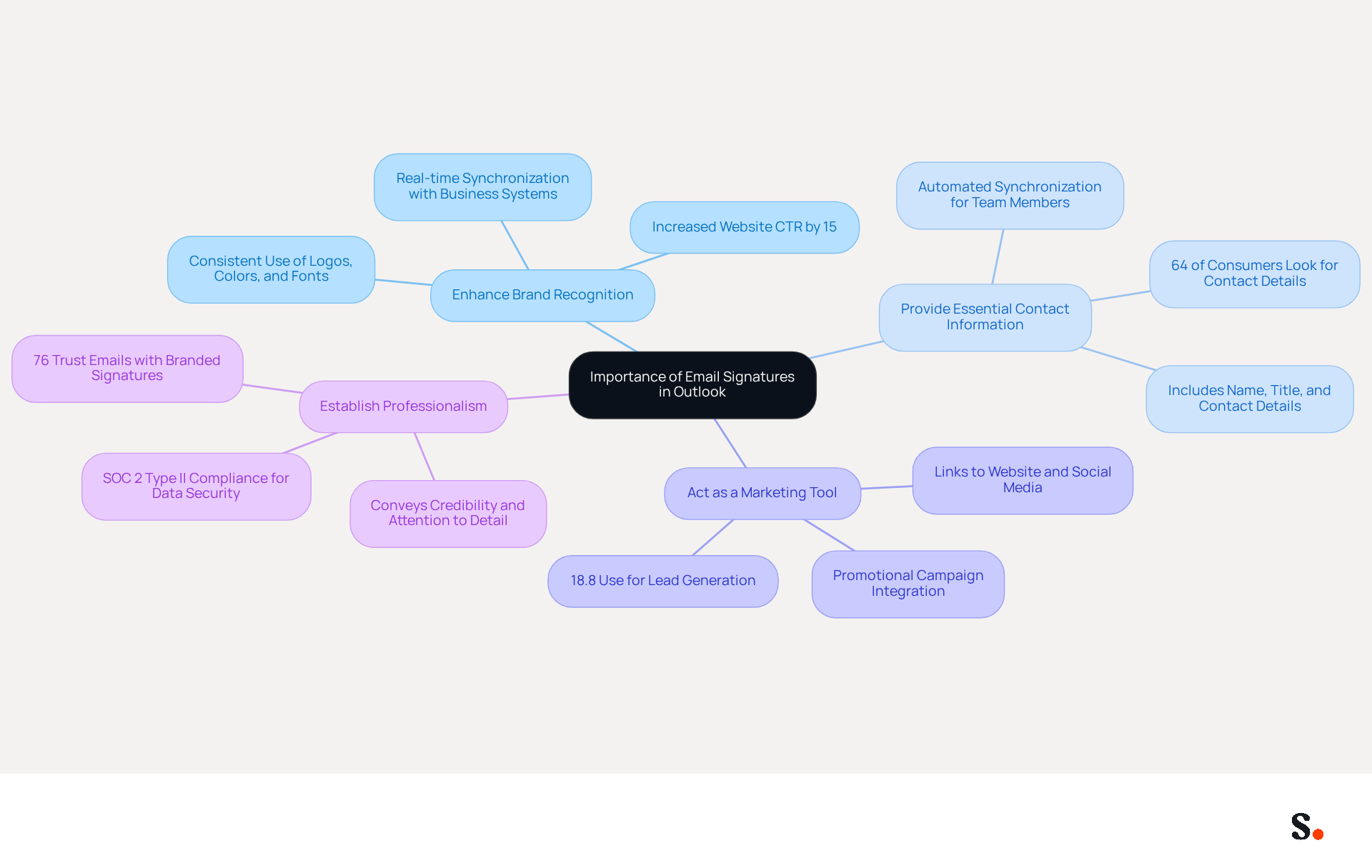
Email identifiers play a crucial role in shaping your professional identity, extending beyond mere formality. A well-designed email signature can:
- Enhance Brand Recognition: Consistent use of logos, colors, and fonts reinforces your brand identity. Scribe automatically refreshes your digital identifiers in real-time, ensuring that any modifications made in your business phone system are reflected instantly, maintaining brand consistency across all communications.
- Provide Essential Contact Information: Including your name, title, and contact details ensures recipients can easily reach you. The automated synchronization feature guarantees that your teammates' signature information is consistently current, requiring no effort from them.
- Act as a Marketing Tool: Signatures can include links to your website, social media, or promotional campaigns, transforming each email into a strategic marketing channel. With this tool, you can leverage this feature effectively, as it allows for seamless integration with tools like Calendly, enhancing your marketing efforts.
- Establish Professionalism: Without a polished email signature, you risk appearing unprofessional and careless. A refined sign-off conveys credibility and attention to detail, positively influencing how recipients perceive you and your organization. Scribe's SOC 2 Type II compliance guarantees that your data is secure, further enhancing your professional image.
By utilizing Scribe's features, you not only maintain professionalism but also stand out in a crowded marketplace.
Access Email Signature Settings in Outlook
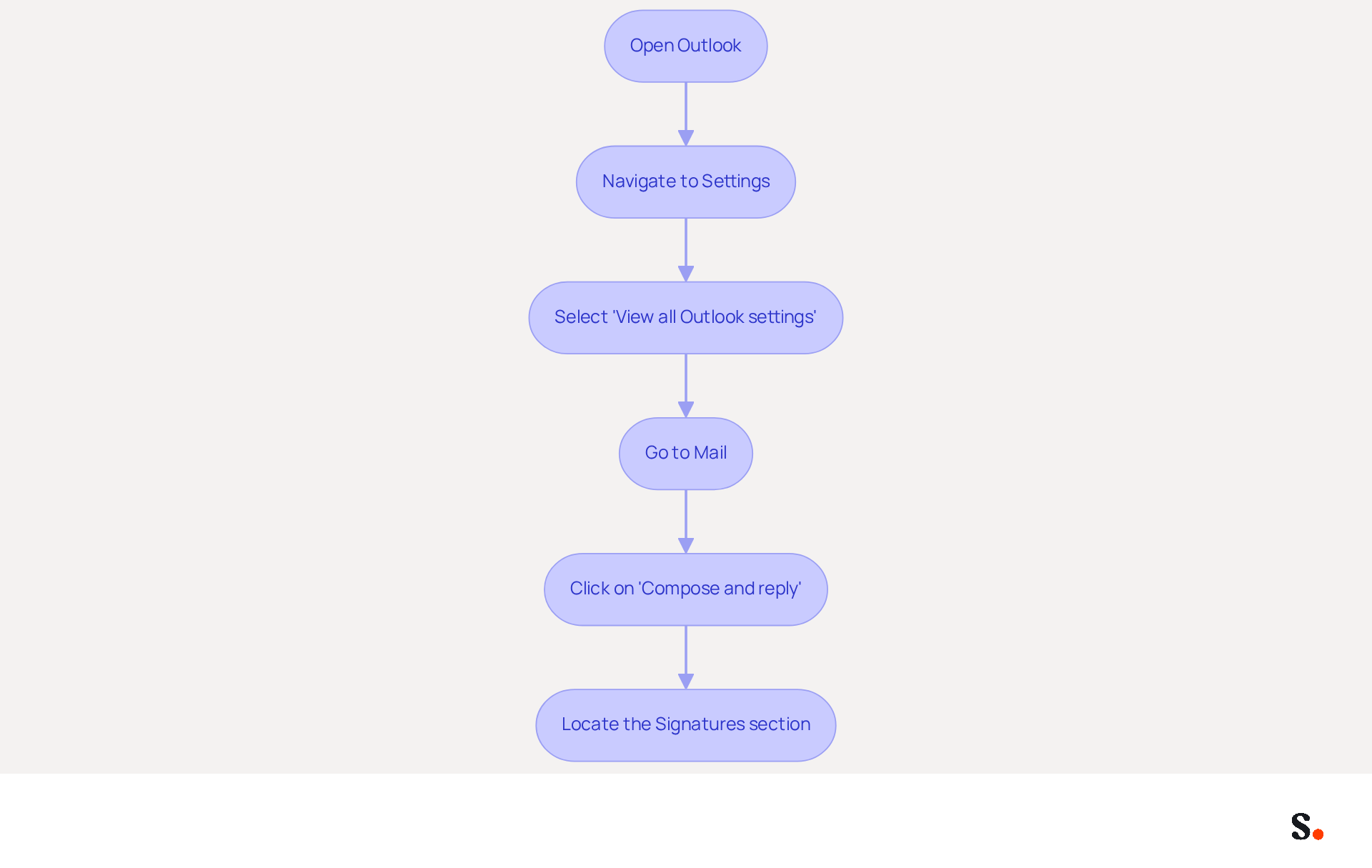
Knowing how to change email signature Outlook is essential for maintaining a professional image in digital communications. To change your email signature in Outlook, follow these steps:
- Open Outlook: Launch the Outlook application on your computer.
- Navigate to Settings: Click on the gear icon (⚙️) located in the top-right corner of the window.
- Select 'View all Outlook settings': Scroll down and click on this option to access the full settings menu.
- Go to Mail: In the settings menu, select 'Mail' from the left sidebar.
- Click on 'Compose and reply': This will direct you to the area where you can manage your email identifiers.
- Locate the Signatures section: Here, you can view existing entries or create a new one.
Following these steps will guide you on how to change email signature Outlook and access the settings to make the changes you need. Effective management of email signatures is underscored by statistics: 29% of users add disclaimers, and 75.8% include social media icons. This highlights the significance of effective management. Furthermore, organizations face challenges in adapting to the new Outlook architecture, which limits access to local files. Centralized management of digital identifiers is essential for ensuring consistency and compliance across all communications. For instance, a case study showed that organizations employing centralized management experienced enhanced governance and compliance, facilitating role-based access control and uniform application across all messaging clients. This shift to centralized management not only ensures compliance but also enhances brand visibility, simplifying the onboarding process for new employees and making it easier to uphold a professional image in every message sent. Ultimately, effective management of email signatures can significantly impact an organization's professional reputation.
Create or Edit Your Email Signature
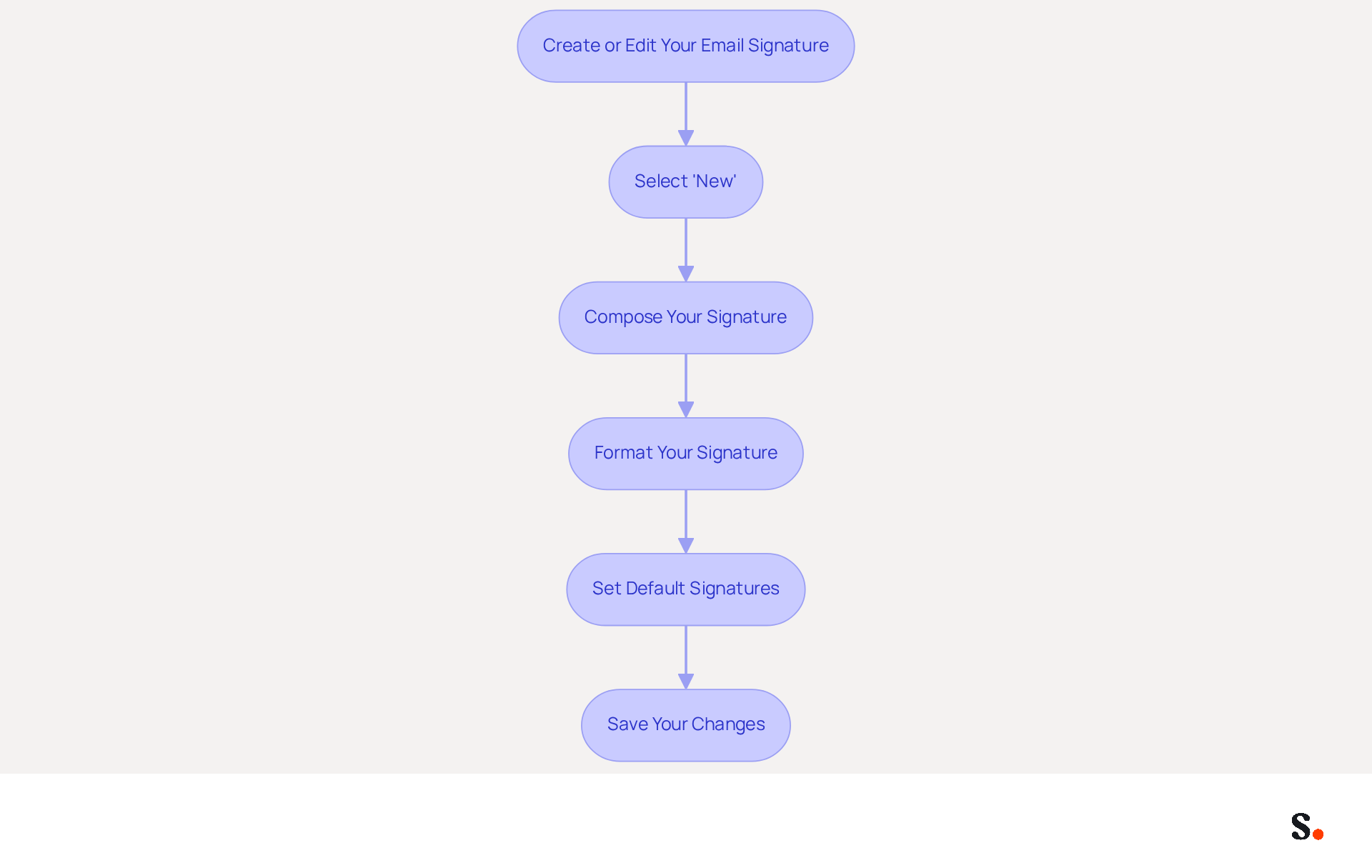
Understanding how to change email signature outlook is essential for creating a professional email signature that enhances effective communication and brand representation. To create or edit your email signature, follow these steps:
- Select 'New': Begin by clicking the 'New' button if you are creating a new document. Assign a name to your signature for easy identification later.
- Compose Your Signature: In the editing box, enter your desired signature details, which may include:
- Your full name
- Job title
- Company name
- Contact information (phone number, email address)
- Links to your website or social media profiles
- A logo or image (ensure it is appropriately sized for clarity)
- Format Your Signature: Utilize the formatting options to adjust the font style, size, and color. Aim for a professional appearance that aligns with your brand identity.
- Set Default Signatures: Decide whether this signature will be used for new messages, replies, or forwards by selecting the appropriate options in the settings.
- Save Your Changes: Once you have composed and formatted your signature, click 'Save' to apply the changes.
By understanding how to change email signature outlook, you can create a professional email signature that enhances your communication and strengthens your brand. Notably, 28.7% of users leverage digital signatures to enhance their branding efforts, emphasizing their importance in marketing strategies. Furthermore, 42.2% of users consider marketing through messages among the top three most effective channels, highlighting the potential influence of a well-designed signature. Moreover, it's crucial to recognize that the majority of users (89.96%) possess only one digital identifier, presenting a significant opportunity for businesses to employ multiple identifiers for diverse marketing objectives.
With this tool, you can automate the handling of your email signatures, ensuring they are always current with real-time synchronization from your business phone system. This means any changes you make will automatically update in the app, so your team doesn’t have to worry about it. Additionally, the platform is compliant with SOC 2 Type II, ensuring that your data is managed securely, which is essential for maintaining trust and adherence in your marketing efforts. This capability not only streamlines your branding efforts but also positions your business as a leader in professional communication.
Follow Best Practices for Professional Email Signatures
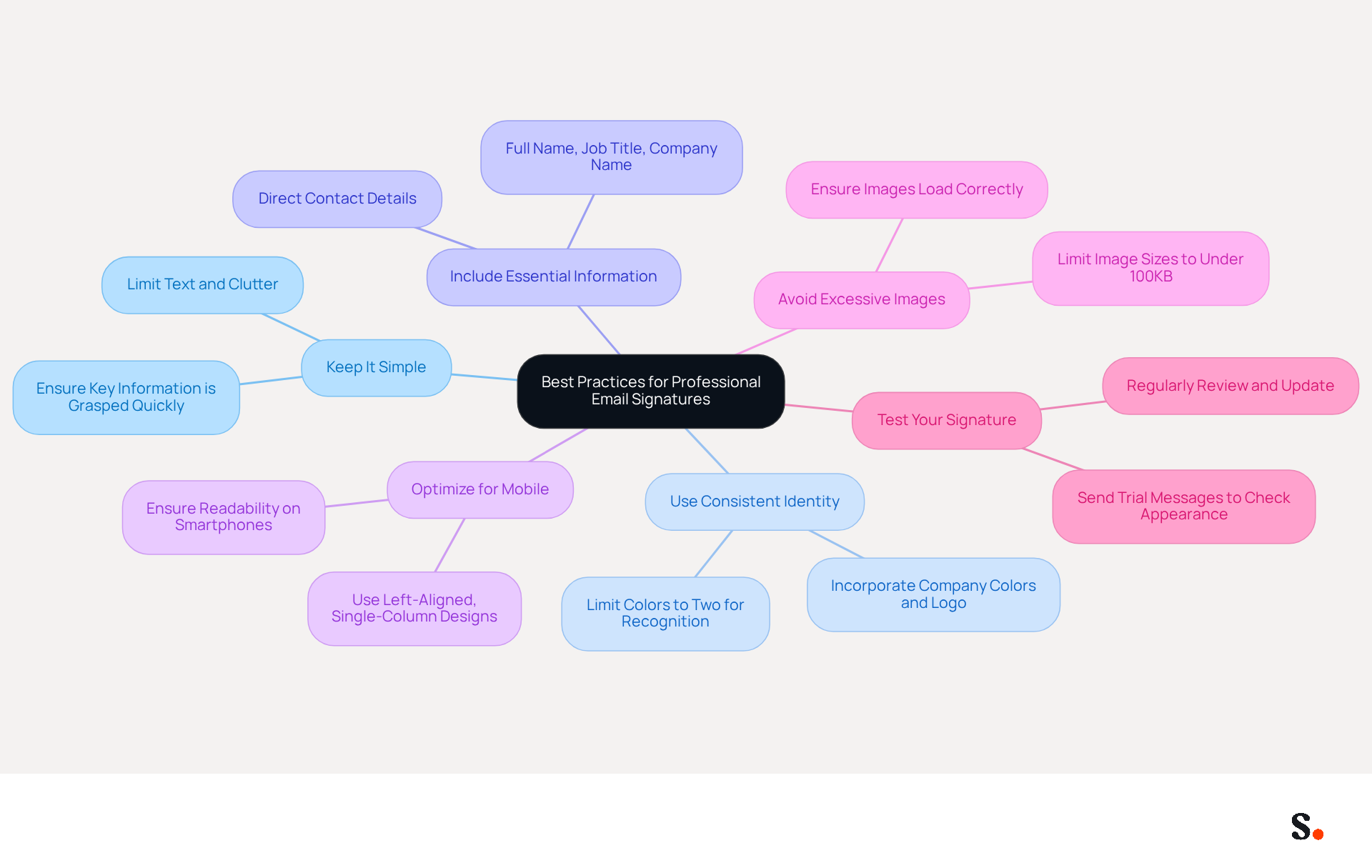
To create an effective email signature, it is crucial to follow established best practices that enhance professionalism and brand recognition:
- Keep It Simple: Limit the amount of text and avoid clutter. A clean design looks better and helps recipients grasp key information in just a few seconds. Each change made in your Aircall configuration will automatically be reflected in your Scribe signatures, as we are syncing the data from there.
- Use Consistent Identity: Incorporate your company’s colors, fonts, and logo to maintain identity consistency. Restricting the use of colors to a maximum of two improves recognition and aligns with corporate identity. Studies show that using a company logo can boost recognition and trust significantly.
- Include Essential Information: At a minimum, your sign-off should contain your full name, job title, company name, and direct contact details. This ensures clarity and professionalism in your communications. Remember, every professional correspondence footer should include these core elements to effectively convey your brand.
- Optimize for Mobile: With over 60% of business communications accessed on mobile devices, ensure your contact information appears well on smartphones. A mobile-optimized layout is essential for engagement, as compact designs are more effective on smaller screens. Testing has shown that left-aligned, single-column designs yield 3x higher CTA click rates than multi-column layouts.
- Avoid Excessive Images: While visuals can enhance your Scribe, too many can slow down loading times and may not display correctly for all recipients. Keeping image sizes under 100KB can strengthen brand recognition without compromising performance. Experts recommend limiting image sizes to enhance loading times and user experience.
- Test Your Signature: Send trial messages to yourself and colleagues to observe how the identifier looks in various mail clients. Regularly reviewing and updating your personal mark can help maintain its effectiveness and relevance. As emphasized by Sophie Grant, "Experts suggest that businesses frequently assess and refresh their electronic correspondences to ensure they stay pertinent and effective."
Incorporating these strategies not only elevates your professional image but also significantly boosts engagement and conversion rates. Additionally, consider incorporating tracking links to measure engagement and effectiveness, as strategic CTAs convert 40% better than generic 'contact me' links.
Troubleshoot Common Issues with Email Signatures
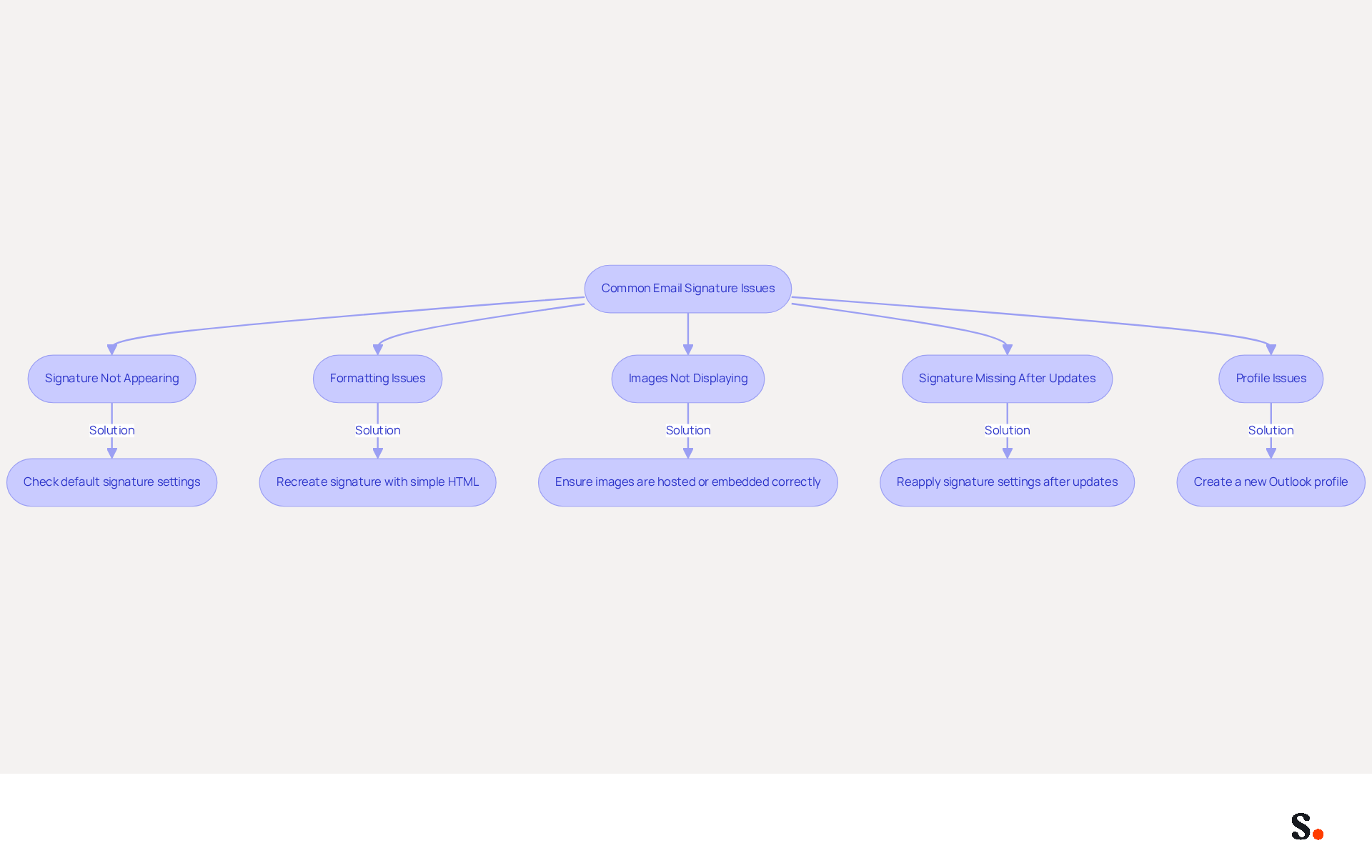
If you're facing challenges while changing your email signature in Outlook, there are effective troubleshooting strategies to consider:
- Signature Not Appearing: Ensure that you have set the correct signature as the default for new messages and replies. Verify the settings to confirm that the default assignment is in place. Many users overlook updating their signatures, leading to potential miscommunication. Using Scribe to sync with Google Workspace automates this process and fills in your teammates' information automatically.
- Formatting Issues: If your signature appears differently when sent, recreate it using simple HTML formatting. Avoid copying from Word or web pages, as this can introduce unwanted styles and lead to broken formatting. Keep in mind that Outlook on the web manages message formatting differently than the desktop application, which may lead to inconsistencies.
- Images Not Displaying: Ensure that images are either hosted online or embedded correctly. Check the image size and format for compatibility; images should be set to 72 DPI for most clients to avoid blurriness, especially on mobile devices.
- Signature Missing After Updates: Updates to Outlook can sometimes reset settings. If your signature vanishes, revisit the settings to reapply it. This is a common problem, as many users encounter loss of their email identifiers after updates, often due to roaming settings that can overwrite previously established email configurations, highlighting the importance of knowing how to change email signature outlook. Utilizing Scribe's integration with Google Workspace reduces these disruptions, ensuring that any updates to your team’s information automatically sync.
- Profile Issues: If problems persist, consider creating a new Outlook profile. Corrupted profiles are a frequent source of inconsistencies, and starting anew can effectively resolve these problems.
Implementing these strategies not only resolves common issues but also reinforces your brand's professionalism in every communication.
Conclusion
An email signature is not merely a digital sign-off; it is a crucial element of professional communication that can significantly impact brand perception. By effectively managing email signatures in Outlook, organizations can ensure consistency and professionalism across communications. This reinforces brand identity and credibility.
The article outlined a comprehensive guide on how to change your email signature in Outlook, emphasizing the importance of following best practices. Key steps include:
- Accessing the signature settings
- Creating or editing your signature
- Troubleshooting common issues
Utilizing tools like Scribe can streamline this process, ensuring that signatures are always up-to-date and compliant with security standards such as SOC 2 Type II, GDPR, and CCPA.
When organizations adopt these strategies, they not only boost individual professionalism but also strengthen their overall reputation. As email signatures become increasingly significant in business communications, leveraging tools that allow for easy management and real-time updates can lead to improved engagement and measurable marketing ROI. Investing in effective email signature management can transform routine communications into powerful branding opportunities.
Frequently Asked Questions
Why are email signatures important in Outlook?
Email signatures are crucial for enhancing brand recognition, providing essential contact information, acting as a marketing tool, and establishing professionalism. A well-designed signature reinforces brand identity and ensures recipients can easily reach you.
How does Scribe enhance email signatures?
Scribe automatically refreshes digital identifiers in real-time, ensuring that any modifications made in your business phone system are reflected instantly. This maintains brand consistency across all communications and guarantees that teammates' signature information is consistently current.
What marketing benefits do email signatures provide?
Email signatures can include links to your website, social media, or promotional campaigns, transforming each email into a strategic marketing channel. Scribe allows for seamless integration with tools like Calendly, enhancing marketing efforts.
How does a polished email signature affect professionalism?
A refined email signature conveys credibility and attention to detail, positively influencing how recipients perceive you and your organization. Without a polished signature, you risk appearing unprofessional and careless.
What steps do I need to follow to change my email signature in Outlook?
To change your email signature in Outlook, open the application, click on the gear icon for settings, select 'View all Outlook settings', go to 'Mail', click on 'Compose and reply', and locate the Signatures section to manage your email identifiers.
What statistics highlight the significance of email signature management?
Statistics show that 29% of users add disclaimers to their signatures, and 75.8% include social media icons. This underscores the importance of effective management of email signatures.
What challenges do organizations face with email signature management in Outlook?
Organizations face challenges in adapting to the new Outlook architecture, which limits access to local files. Centralized management of digital identifiers is essential for ensuring consistency and compliance across all communications.
How does centralized management of email signatures benefit organizations?
Centralized management enhances governance and compliance, facilitates role-based access control, and ensures uniform application across all messaging clients. It simplifies the onboarding process for new employees and helps maintain a professional image in every message sent.
List of Sources
- Understand the Importance of Email Signatures in Outlook
- Email Signature Statistics: A Closer Look at Email Signatures in 2026 (https://mysignature.io/blog/email-signature-statistics)
- Exclaimer Research: 67% of Marketers Expect Email Signatures to Support With Lead Gen In 2023 (https://businesswire.com/news/home/20230612141095/en/Exclaimer-Research-67-of-Marketers-Expect-Email-Signatures-to-Support-With-Lead-Gen-In-2023)
- Email signature statistics: Why every business should optimize their email signatures — Stripo.email (https://stripo.email/blog/email-signature-statistics-why-every-business-should-optimize-their-email-signatures)
- Research Recap: Branded Email Signatures Increase Company Recognition, Trust - B2BMX INSIGHTS (https://demandgenreport.com/industry-news/research-recap-branded-email-signatures-increase-company-recognition-trust/47252)
- 40+ Email Signature Statistics for 2026 (Data + Insights) (https://wavecnct.com/blogs/email-signature-statistics)
- Access Email Signature Settings in Outlook
- How to add and change an email signature in Outlook | Microsoft Support (https://support.microsoft.com/en-us/outlook/mail/how-to-add-and-change-an-email-signature-in-outlook)
- The New Outlook for Windows: An IT Guide to Email Signatures (https://exclaimer.com/email-signature-handbook/new-outlook-windows-email-signatures)
- Setting Up Your Email Signature in Office 365 Outlook (https://services.stcloudstate.edu/TDClient/1919/Portal/KB/ArticleDet?ID=118239)
- Outlook: Adding Email Signatures (https://td.usnh.edu/TDClient/60/Portal/KB/Article/4666/Outlook-Adding-Email-Signatures)
- Email Signature Statistics: A Closer Look at Email Signatures in 2026 (https://mysignature.io/blog/email-signature-statistics)
- Create or Edit Your Email Signature
- Email Signature Statistics: A Closer Look at Email Signatures in 2026 (https://mysignature.io/blog/email-signature-statistics)
- How to add and change an email signature in Outlook | Microsoft Support (https://support.microsoft.com/en-us/outlook/mail/how-to-add-and-change-an-email-signature-in-outlook)
- fyxer.com (https://fyxer.com/blog/how-to-add-or-change-email-signature-in-outlook)
- Follow Best Practices for Professional Email Signatures
- Email Signature Best Practices for 2026 (+ 15 Pro Examples) (https://wavecnct.com/blogs/email-signature-best-practices-2026)
- Email Signature Best Practices (https://uschamber.com/co/grow/thrive/email-signature-best-practices)
- Email Signature Best Practices - NEWOLDSTAMP (https://newoldstamp.com/blog/email-signature-best-practices)
- Email Signature Best Practices Guide With Examples - MailerLite (https://mailerlite.com/blog/email-signature-best-practices)
- Master Gmail Signature Settings on Mobile for Marketing Success (https://scribe-mail.com/en-US/blog/master-gmail-signature-settings-on-mobile-for-marketing-success)
- Troubleshoot Common Issues with Email Signatures
- justanswer.com (https://justanswer.com/email/lyeqn-email-signatures-no-longer-loading-automatically.html)
- Email Signature Troubleshooting - Problems & Solutions - Gimmio (https://blog.gimm.io/email-signature-troubleshooting)
- Outlook Signature Not Working in Office 365: Causes & Fixes (https://exclaimer.com/email-signature-handbook/outlook-signature-not-working-in-office-365)
- 40+ Email Signature Statistics for 2026 (Data + Insights) (https://wavecnct.com/blogs/email-signature-statistics)
- How to solve problems with email signatures in Microsoft 365? (https://mail-signatures.com/articles/problems-email-signatures-office-365)
Get started with Scribe
Create your signature in minutes
Free 14-day trial — no credit card.