5 Steps to Change Your Email Signature in Outreach Effectively
Email signatures hold untapped potential for enhancing professional communication and brand visibility. A well-crafted signature not only establishes
Sophie Grant
Email Signature Specialist, Scribe

Introduction
Email signatures hold untapped potential for enhancing professional communication and brand visibility. A well-crafted signature not only establishes credibility but also serves as a powerful marketing tool, driving engagement and fostering trust among recipients. Updating email signatures can be a complex task for many professionals, often leading to inconsistencies and missed opportunities.
How can one ensure that their digital identifier not only reflects their professionalism but also maximizes its impact across various communication channels? This guide provides a strategic approach to transforming email signatures into effective branding tools, ensuring they resonate with recipients and align with organizational branding goals.
Get started with Scribe
Manage signatures across your whole team
Free 14-day trial — no credit card.
Understand the Importance of Email Signatures
Many professionals overlook the impact of their email signatures on communication effectiveness, yet these identifiers play a crucial role in establishing credibility and enhancing brand visibility. An effective email signature serves multiple vital functions that enhance both individual and organizational effectiveness. A well-crafted email signature can:
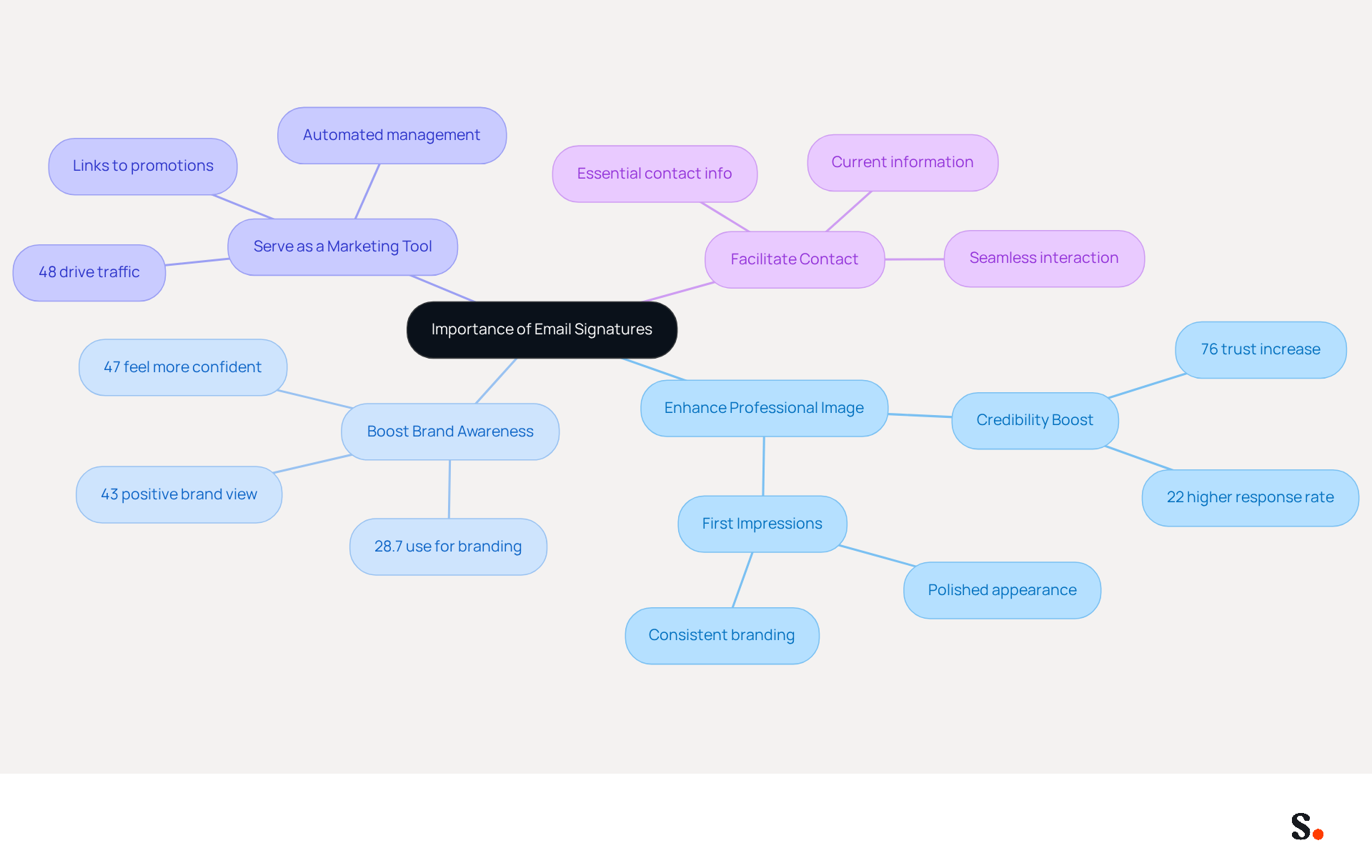
- Enhance Professional Image: A consistent and polished appearance in every email reinforces your credibility, making a strong first impression on recipients. Research shows that 76% of people believe that branded digital identifiers enhance their trust in the sender, emphasizing their significance in establishing professionalism. Moreover, messages with branded identifiers receive a 22% higher response rate than those lacking, further highlighting their effectiveness in driving engagement.
- Boost Brand Awareness: Research indicates that 28.7% of organizations utilize digital identifiers primarily to enhance branding and awareness, demonstrating their strategic importance in marketing initiatives. As highlighted by the Demand Gen Report Team, messages with professionally branded identifiers made recipients feel more confident (47%) and fostered a more positive view of the brand (43%).
- Serve as a Marketing Tool: Email footers can include links to your website, social media profiles, or promotional campaigns, turning each email into a strategic marketing opportunity. With 48% of marketers utilizing digital identifiers to drive traffic, they become a low-cost, high-impact channel for lead generation. Monitoring metrics such as click-through rates and engagement rates is essential for assessing the impact of these elements and demonstrating ROI. This tool enhances this process by automating management of electronic signatures, ensuring that all are consistently updated and compliant with security standards, including SOC 2 Type II, while saving time through automated synchronization.
- Facilitate Contact: Providing essential contact information makes it easier for recipients to reach you, fostering better communication. A complete contact block typically contains your name, job title, company name, contact details, social media links, and legal disclaimers, which are essential for establishing trust and enabling connections. With Scribe's automated synchronization from business phone systems and communication providers, your team's contact information is always current, enabling seamless interaction.
Grasping these advantages highlights the significance of dedicating time to create or update your digital identifier effectively, ensuring it aligns with your professional objectives and boosts your brand's visibility. Investing time in refining your digital identifier can significantly elevate your professional image and strengthen your brand's presence in the market.
Access Email Signature Settings in Outreach
To effectively manage your email signature in Outreach, follow these straightforward steps:
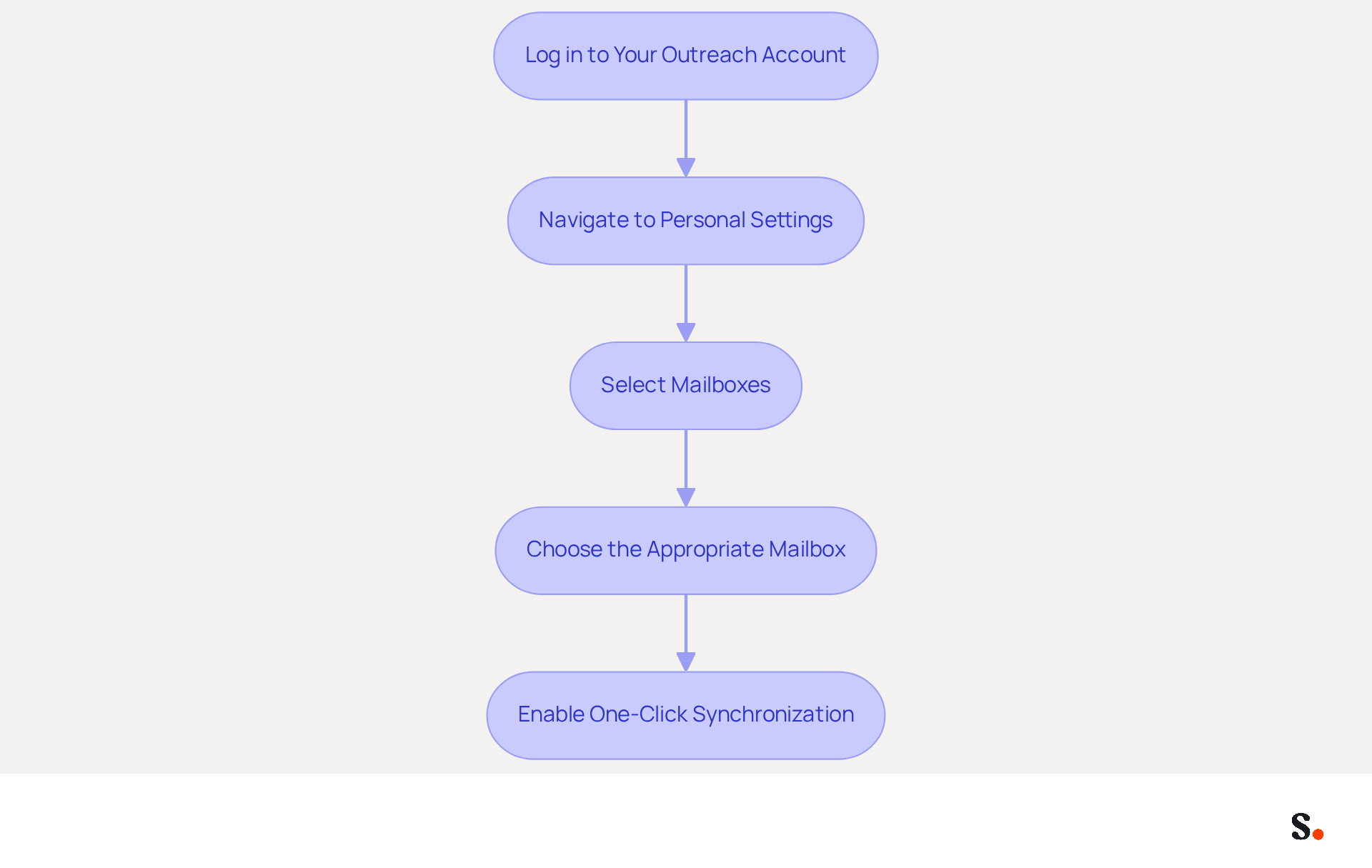
- Log in to Your Outreach Account: Start by accessing your Outreach account using your credentials.
- Navigate to Personal Settings: Click on your initials located in the bottom left corner of the navigation sidebar.
- Select Mailboxes: Under the Personal Settings menu, find the 'Mailboxes' section. Here, you will see a list of your mailboxes.
- Choose the Appropriate Mailbox: Select the mailbox for which you want to modify the signature. This is important if you manage multiple accounts.
- Enable One-Click Synchronization: To activate one-click synchronization, grant Scribe permission to connect with your service provider. Ensure you are a Super Admin of your service provider to provide these permissions.
By following these steps, you will be prepared to understand how to change email signature in Outreach. An effective digital communication footer enhances sender trust and significantly improves response rates. In 2026, companies utilizing automated management of digital identifiers with Scribe report significant increases in engagement, with a 100-person team generating between 60,000 to 80,000 impressions monthly through their branded marks. Data shows that maintaining an updated communication footer directly correlates with improved engagement rates. Common triggers for updating contact details include role changes and company rebrands; failing to update your contact details can lead to missed opportunities and hinder communication effectiveness. With Scribe's efficient one-click synchronization and SOC 2 Type II compliance, you can ensure that your digital identifiers are not only professional but also secure and adhere to data protection standards. With Scribe, you not only enhance your digital identifiers but also safeguard your communication integrity.
Create or Edit Your Email Signature
Creating a professional email signature in Outreach is essential for understanding how to change email signature in Outreach for effective communication and brand representation.
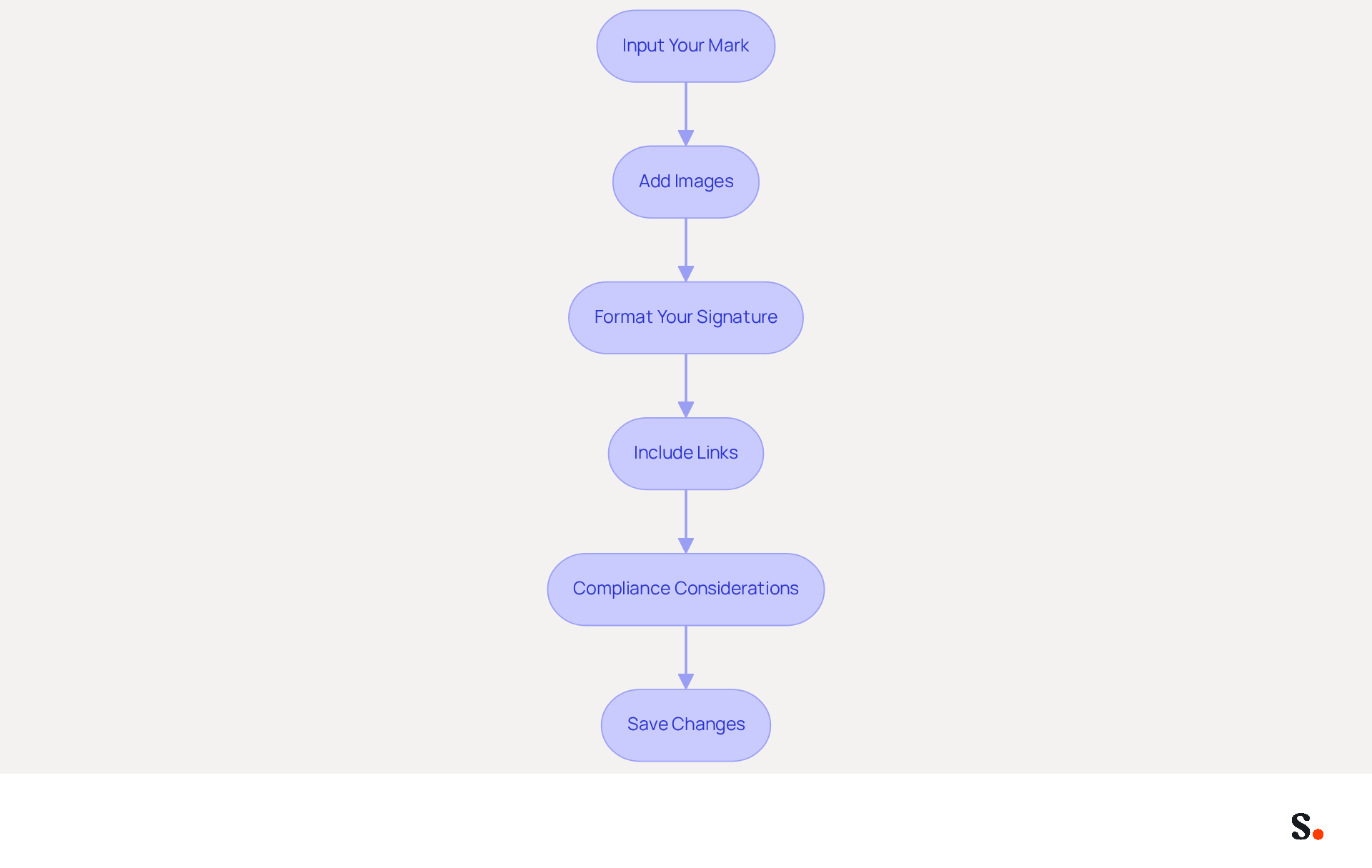
- Input Your Mark: Begin by entering your mark in the designated field. Include essential details such as your name, job title, company name, and contact information to ensure clarity and professionalism.
- Add Images: Enhance your signature by including your company logo or a formal headshot. Ensure that images are optimized for messaging, ideally at 72-96 DPI, to prevent display issues across different clients.
- Format Your Signature: Utilize simple formatting options to improve readability. Stick to web-safe fonts and limit the use of colors to maintain a professional appearance. A clean layout is vital; complex designs can obscure your message. Following best practices for email design, such as avoiding clutter and ensuring mobile optimization, will enhance user experience.
- Include Links: Incorporate hyperlinks to your website and social media profiles. This not only drives traffic but also enhances engagement with recipients, making your email footer a valuable marketing tool. Remember to include a clear call-to-action (CTA) to guide recipients toward desired actions.
- Compliance Considerations: Ensure that your mark complies with industry-specific disclaimers or confidentiality notes. This adherence not only upholds professionalism but also mitigates legal risks, as seen in various industry case studies. Scribe's SOC 2 Type II compliance guarantees that your data is managed securely throughout this process.
- Save Changes: After making your edits, be sure to save the modifications to apply your new mark effectively. With Scribe, any modifications made in your contact information will automatically sync with your connected HRIS, ensuring that your teammates' details are always current without requiring additional action from them. This automated synchronization not only saves time but also reinforces brand consistency across your organization.
Neglecting your email signature could mean missing out on valuable marketing opportunities. As of 2026, statistics show that 75.9% of professionals state that their digital footer contributed to progressing toward or finalizing a sale, emphasizing the significance of a well-designed footer in professional communication.
Test Your Email Signature for Compatibility
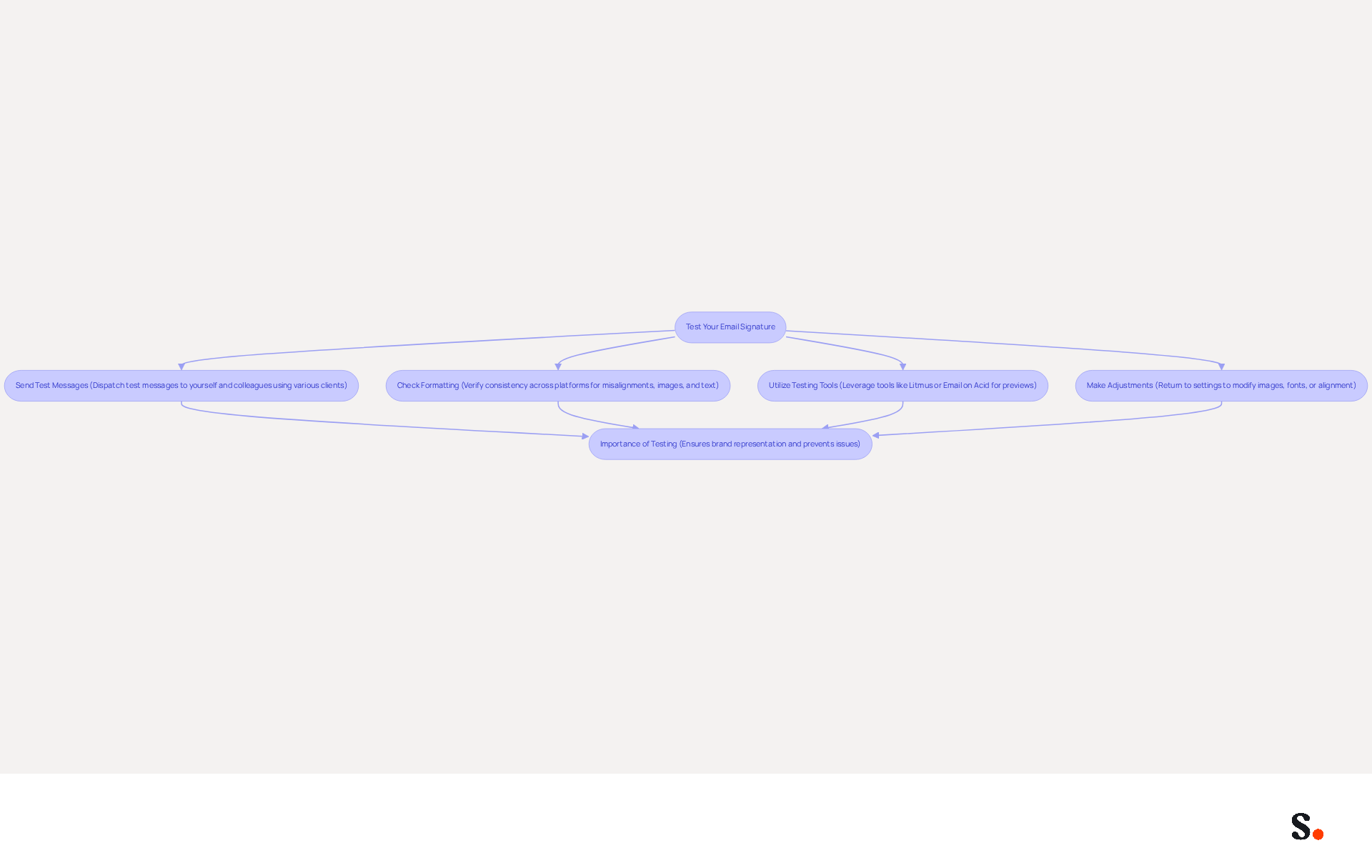
Testing your email signature is vital to ensure it accurately represents your brand across various platforms:
- Send Test Messages: Dispatch test messages to yourself and colleagues using various communication clients such as Gmail, Outlook, and Apple Mail to observe how the footer appears in each.
- Check Formatting: Verify that the formatting remains consistent across platforms. Look for any misalignments, missing images, or altered text.
- Utilize Testing Tools: Leverage online resources like Litmus or Email on Acid to preview how your identifier will render in different messaging clients, helping to identify potential issues before sending. This step is essential to ensure everything aligns and displays correctly.
- Make Adjustments: Testing your email signature may reveal issues that require adjustments to ensure optimal display across platforms. If you encounter any problems, return to the settings to make necessary modifications. This may involve resizing images, modifying font styles, or correcting alignment issues.
Additionally, consider implementing a plain-text fallback for your email footer to ensure accessibility across all email clients. Consistent testing and updates can prevent issues like broken designs or outdated information that undermine your brand's image. By syncing your Google Workspace with the application, you save time as your teammates' data is automatically updated, enabling seamless integration of their signature information. This guarantees that any modifications in your Google Workspace, such as relocating teammates or updating their details, are reflected without manual input. Furthermore, Scribe's SOC 2 Type II certification and compliance with GDPR and CCPA enhance trust and security. Well-optimized identifiers can drive engagement significantly, with strategic calls-to-action converting up to 40% better than generic 'contact me' links. Ultimately, a well-tested email signature not only enhances your brand's image but also fosters trust and engagement with your audience.
Optimize Your Email Signature for Maximum Impact
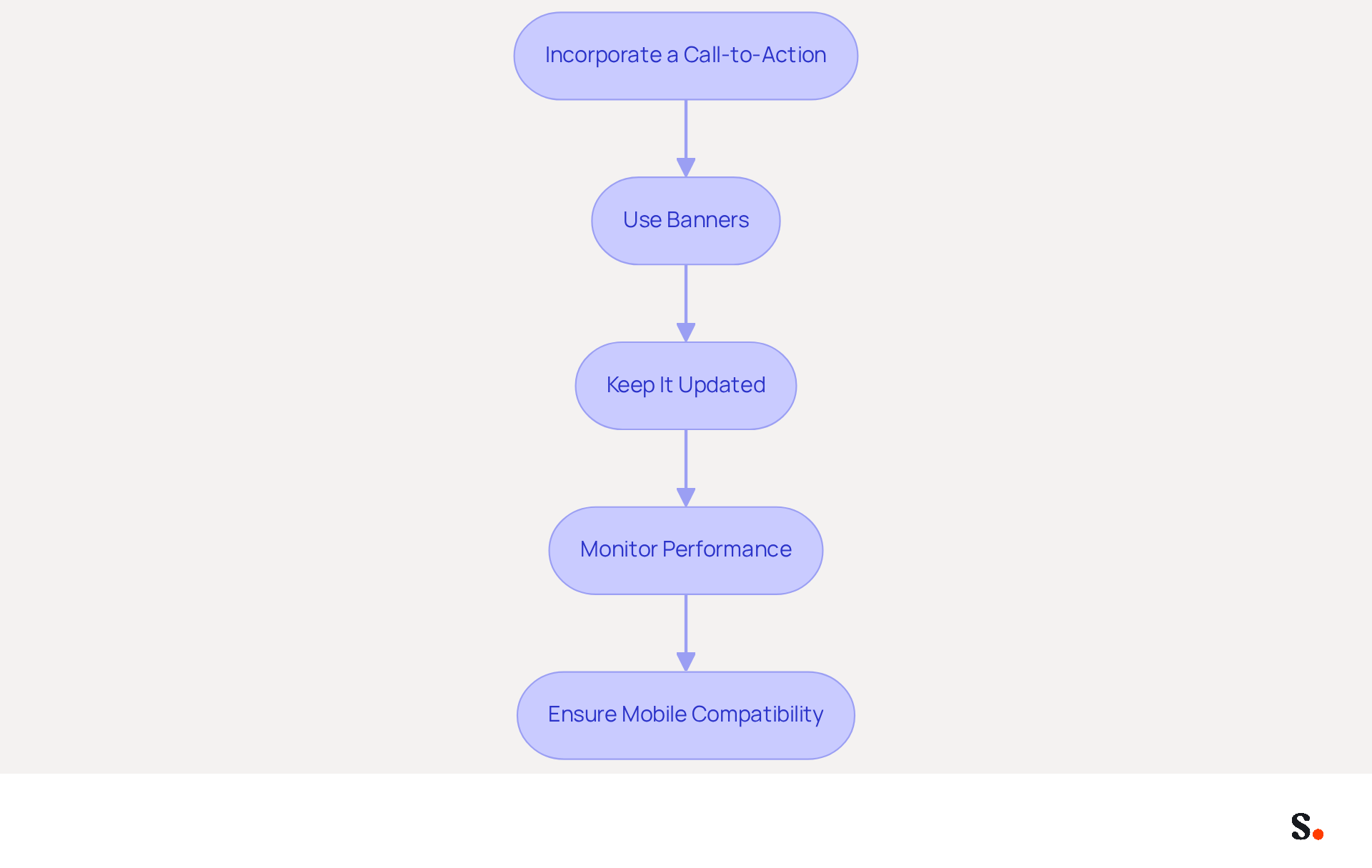
To maximize the impact of your email signature, consider implementing these optimization strategies:
- Incorporate a Call-to-Action: Include a clear call-to-action (CTA) in your email footer, such as a link to a current promotion or a newsletter signup. Effective CTAs can significantly boost click-through rates. For example, action-oriented phrases can increase engagement by as much as 371%.
- Use Banners: If applicable, add a promotional banner that highlights special offers or events. Banners can drive a 22% lift in response rates and a 15% increase in click-through rates to company websites, demonstrating their effectiveness in driving engagement. Scribe's average click-through rate on banners is 12%, showcasing their impact.
- Keep It Updated: Regularly review and refresh your email footer to reflect any changes in your role, contact information, or company branding. Consistency is vital, as 69% of consumers think a professional mark is important for brand perception. With Scribe, every modification made in your Aircall setup will automatically be reflected in your communication identifiers, ensuring that your branding stays consistent across all interactions and enhancing your brand's credibility.
- Monitor Performance: Use tracking tools to analyze how often links in your email are clicked. Many organizations overlook the importance of monitoring their email performance, leading to missed opportunities for improvement. Regular analysis can inform future adjustments and improve effectiveness, allowing you to leverage Scribe's capabilities for better insights.
- Ensure Mobile Compatibility: With 42% of all messages opened on mobile devices, make sure your identification is mobile-friendly and displays correctly on smaller screens. A well-optimized closing should be brief, ideally 3-5 lines, and ensure clarity across different messaging platforms.
Ultimately, understanding how to change email signature in outreach can significantly influence your brand's engagement.
Conclusion
An effective email signature in Outreach is more than just a visual element; it serves as a strategic asset that can elevate professional communication. Recognizing the impact of a well-crafted email signature allows professionals to build credibility, foster trust, and engage effectively with their audience.
Throughout the article, key steps were outlined to successfully change and optimize email signatures in Outreach. From accessing the email signature settings and creating a professional signature to testing for compatibility and ensuring maximum impact, each step is crucial for maintaining a polished and effective digital presence. The integration of Scribe's automated synchronization and compliance with security standards like SOC 2 Type II further underscores the importance of professionalism and security in digital communications.
In conclusion, investing time in refining email signatures can yield substantial benefits for both individual professionals and organizations. By implementing best practices and utilizing tools like Scribe, teams can ensure brand consistency, enhance engagement, and ultimately drive better marketing outcomes. Recognizing the potential of your email signature can redefine how you connect with your audience and enhance your professional image.
Frequently Asked Questions
Why are email signatures important in professional communication?
Email signatures enhance credibility, improve brand visibility, and serve as a marketing tool. They help establish professionalism and can significantly increase response rates.
How do email signatures enhance professional image?
A consistent and polished email signature reinforces credibility and makes a strong first impression. Research shows that 76% of people trust senders with branded digital identifiers, and such messages receive a 22% higher response rate.
What role do email signatures play in brand awareness?
Email signatures boost brand awareness, with 28.7% of organizations using them for this purpose. Professionally branded identifiers can make recipients feel more confident and foster a positive view of the brand.
How can email signatures serve as a marketing tool?
Email signatures can include links to websites, social media profiles, or promotional campaigns, turning each email into a marketing opportunity. They are a low-cost, high-impact channel for lead generation.
What essential information should be included in an email signature?
A complete email signature should contain your name, job title, company name, contact details, social media links, and legal disclaimers to establish trust and facilitate communication.
How can I manage my email signature in Outreach?
To manage your email signature in Outreach, log in to your account, navigate to Personal Settings, select Mailboxes, choose the appropriate mailbox, and enable one-click synchronization by granting Scribe permission.
What is the benefit of using Scribe for email signature management?
Scribe automates the management of email signatures, ensuring they are consistently updated and compliant with security standards, saving time through automated synchronization.
What are common triggers for updating email signatures?
Common triggers include role changes and company rebrands. Failing to update contact details can lead to missed opportunities and hinder communication effectiveness.
How does maintaining an updated email signature correlate with engagement rates?
Data shows that maintaining an updated communication footer directly correlates with improved engagement rates, with companies reporting significant increases in impressions and engagement when using automated management tools like Scribe.
List of Sources
- Understand the Importance of Email Signatures
- Why Are Email Signatures Key to Brand Awareness? | QuickMail (https://quickmail.com/role-of-email-signatures-in-brand-awareness)
- Email signature statistics: Why every business should optimize their email signatures — Stripo.email (https://stripo.email/blog/email-signature-statistics-why-every-business-should-optimize-their-email-signatures)
- Why Email Signatures Must Be In Your 2026 Marketing Plan | Rocketseed (https://rocketseed.com/blog/2026-marketing-plan-email-signatures)
- demandgenreport.com (https://demandgenreport.com/industry-news/research-recap-branded-email-signatures-increase-company-recognition-trust/47252)
- Why Team Email Signatures Matter More Than You Think: The Hidden Impact on Brand Trust and Customer Experience (https://getmailbird.com/why-team-email-signatures-matter-brand-trust)
- Access Email Signature Settings in Outreach
- 40+ Email Signature Statistics for 2026 (Data + Insights) (https://wavecnct.com/blogs/email-signature-statistics)
- Outreach email signature management (https://scribe-mail.com/en-US/integrations/outreach-signature)
- Opensense + Outreach: touchless onboarding of email signature and banner users | Outreach (https://outreach.ai/resources/blog/opensense-outreach-touchless-onboarding-of-email-signature-and-banner-users)
- Create or Edit Your Email Signature
- The ultimate guide to email signatures in 2026 (https://signitic.com/en/resources/email-signature)
- Top 10+ best practices for email signatures design in 2026 (https://mysignature.io/blog/email-signature-best-practices)
- Why Email Signatures Must Be In Your 2026 Marketing Plan | Rocketseed (https://rocketseed.com/blog/what-are-the-biggest-email-trends-for-2026)
- Email signature statistics: Why every business should optimize their email signatures — Stripo.email (https://stripo.email/blog/email-signature-statistics-why-every-business-should-optimize-their-email-signatures)
- The Complete Email Signature Guide 2026: Best Practices and Policy (https://opensense.com/complete-email-signature-guide)
- Test Your Email Signature for Compatibility
- Email Signature Best Practices for 2026 (+ 15 Pro Examples) (https://wavecnct.com/blogs/email-signature-best-practices-2026)
- How to solve problems with email signatures in Microsoft 365? (https://mail-signatures.com/articles/problems-email-signatures-office-365)
- Email signature alignment: How to fix it and get it right across clients — Stripo.email (https://stripo.email/blog/email-signature-alignment-how-to-fix-it-and-get-it-right-across-clients)
- How to Centralize and Standardize Email Signatures at Scale (2026) (https://wisestamp.com/guides/how-to-standardize-email-signatures-for-large-company)
- Optimize Your Email Signature for Maximum Impact
- 40+ Email Signature Statistics for 2026 (Data + Insights) (https://wavecnct.com/blogs/email-signature-statistics)
- The Ultimate Guide to Email Signature Call-to-Action - NEWOLDSTAMP (https://newoldstamp.com/blog/the-ultimate-guide-to-email-signature-call-to-action)
- 12 email signature marketing examples that drive clicks (2026) (https://signitic.com/en/resources/12-email-signature-marketing-examples-that-actually-drive-clicks)
- The Complete Email Signature Guide 2026: Best Practices and Policy (https://opensense.com/complete-email-signature-guide)
- Why Email Signatures Must Be In Your 2026 Marketing Plan | Rocketseed (https://rocketseed.com/blog/what-are-the-biggest-email-trends-for-2026)
Get started with Scribe
Manage signatures across your whole team
Free 14-day trial — no credit card.