Best Practices for a Professional Company Email Signature
While a professional email signature is crucial for establishing credibility, many organizations overlook its potential pitfalls. A well-designed email
Sophie Grant
Email Signature Specialist, Scribe

Introduction
While a professional email signature is crucial for establishing credibility, many organizations overlook its potential pitfalls. A well-designed email signature acts as a digital business card, encapsulating essential components such as a clear name, job title, and company logo. By doing so, organizations can enhance their credibility and foster trust among recipients. Yet, many organizations struggle to maintain this balance, risking their professional image. Neglecting legal disclaimers or failing to maintain brand consistency can lead to missed opportunities.
What strategies can businesses implement to create email signatures that enhance professionalism while ensuring compliance?
Get started with Scribe
Manage signatures across your whole team
Free 14-day trial — no credit card.
Define Essential Components of a Professional Email Signature
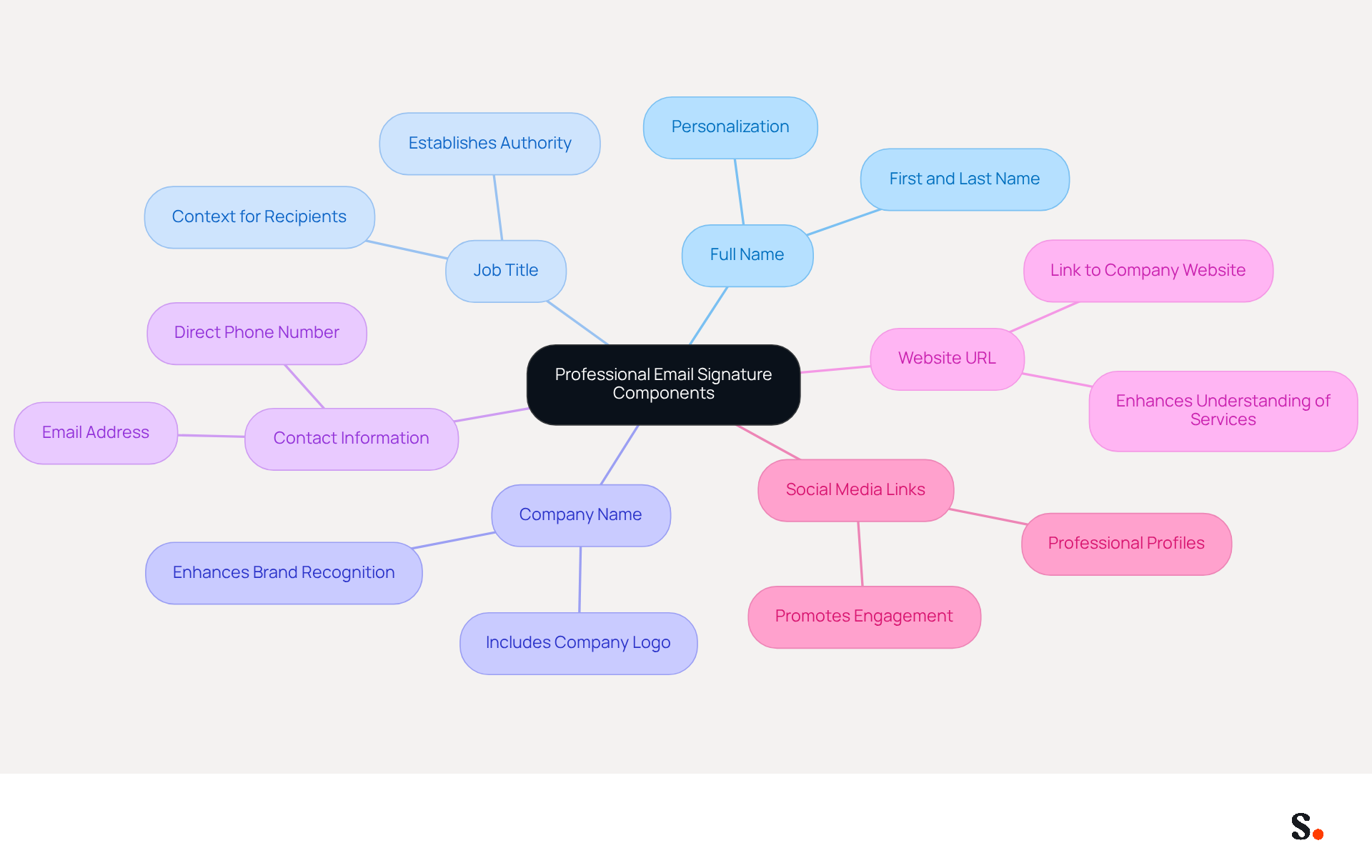
A professional company email signature is not just a formality; it is a critical component of effective communication that can significantly impact your professional image. A well-crafted signature should include the following essential components:
- Full Name: Clearly state your first and last name to personalize the communication. This element is essential as it creates a direct link with the audience.
- Job Title: Including your position helps establish authority and context, allowing recipients to understand your role within the organization.
- Company Name: Clearly mention the company you represent, ideally accompanied by the company logo. This enhances brand recognition and professionalism.
- Contact Information: Provide a direct phone number and email address to facilitate easy communication. This is essential for ensuring that individuals can contact you without difficulty.
- Website URL: Including a link to your company’s website directs recipients to more information about your services, enhancing their understanding of your offerings.
- Social Media Links: If applicable, add links to professional social media profiles. This not only improves connectivity but also promotes engagement, as 52% of prospects prefer written communication for brand interaction. Moreover, strategic positioning of CTAs in message footers can lead to a 40% increase in engagement, making it advantageous to incorporate them.
Incorporating these elements into a professional company email signature creates an identity that conveys professionalism and serves as a digital business card, making it easier for recipients to reach out or learn more about your company. Significantly, organizations that employ branded communication footers report a 22% rise in response rates, highlighting the impact of a well-designed footer in professional correspondence. Additionally, a team of 100 individuals can produce around 60,000-80,000 impressions monthly through digital branding, emphasizing the visibility and marketing possibilities they offer.
With Scribe, all modifications made to your Calendly setup automatically sync with your correspondence formats, ensuring brand consistency and effortless updates. This integration simplifies how you manage electronic identifiers while ensuring compliance with SOC 2 Type II standards for secure data handling. However, many organizations struggle to ensure that their email footers remain under 100KB, risking display issues on mobile devices, as over 60% of business correspondence is now accessed on mobile. Lastly, neglecting to keep information current can result in miscommunication and missed opportunities, which is crucial for maintaining a professional appearance.
Incorporate Branding for Consistency and Recognition
To effectively convey your brand through your email signature, it is essential to adhere to established best practices:
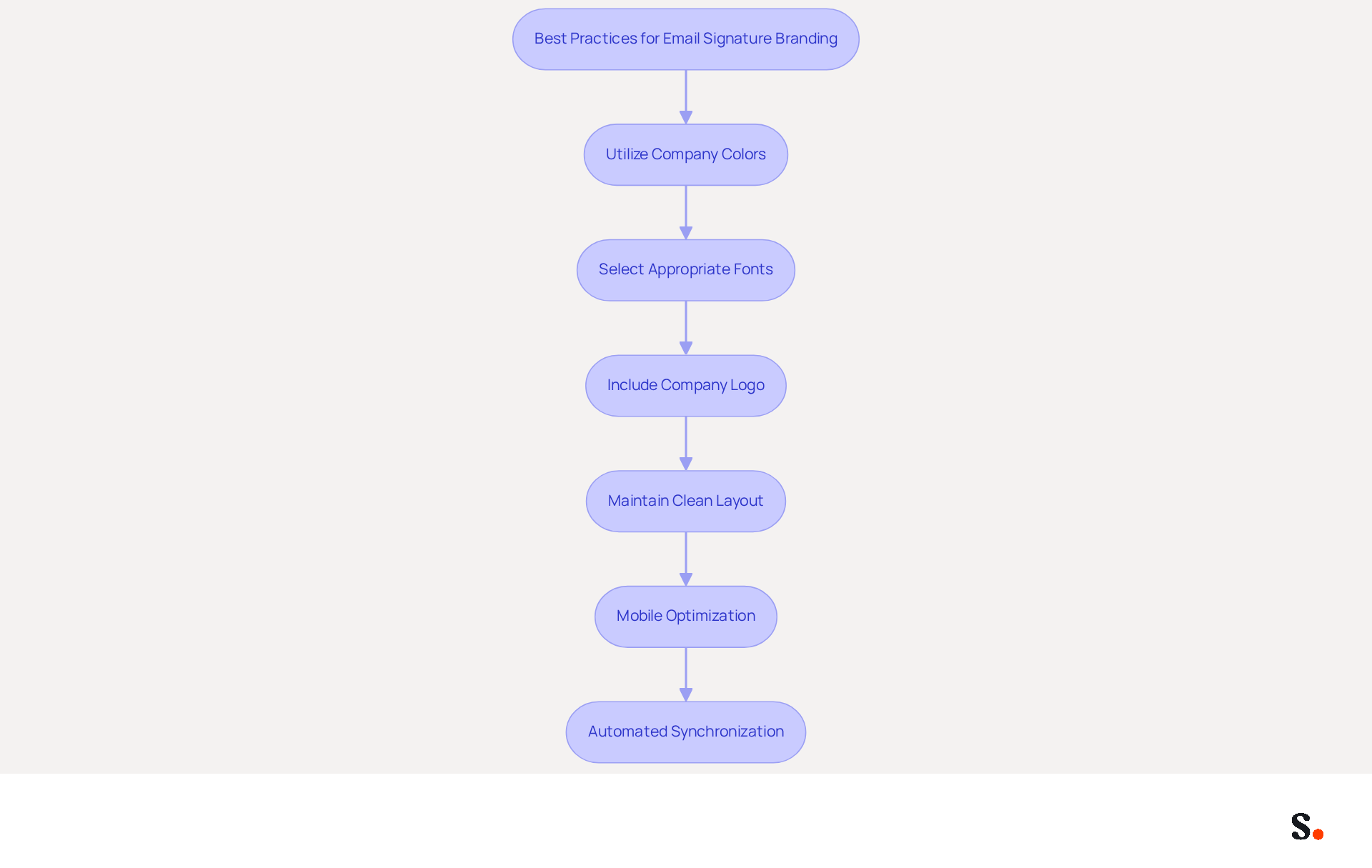
- Utilize your company's color scheme to create a visually appealing representation that aligns with your identity. This enhances recognition and fosters trust; in fact, 76% of recipients believe that a professional company email signature boosts their trust in the sender.
- Select Appropriate Fonts: Choose fonts consistent with your organization's typography to maintain a professional appearance. Typography should prioritize clarity, ensuring that essential information is easily readable.
- Include the Company Logo: Adding your logo enhances brand visibility and helps establish trust and recognition. A strategically positioned logo can greatly influence consumer views, with 47% of potential customers indicating that a professional company email signature can enhance their trust.
- Maintain a Clean Layout: A clean layout not only reflects professionalism but also significantly improves readability, keeping viewers engaged. Many recipients disengage due to poorly formatted signatures, so prioritize a simple yet effective design.
- Mobile Optimization: Create your design to be mobile-friendly, as many recipients will view messages on their mobile devices. This includes ensuring that images are properly sized and that text is legible. Testing identifiers in different messaging environments is essential to guarantee proper display across devices.
- Automated Synchronization: Utilize Scribe's integration with Aircall to guarantee that any modifications made in your Aircall configuration are automatically reflected in your correspondence. This smooth coordination improves consistency and ensures that your identifiers are always current, strengthening your identity with every message sent.
Implementing these strategies can significantly enhance the effectiveness of your professional company email signature. Consistent digital identifiers can result in a 22% boost in response rates for businesses that implement them, making them a crucial element of your overall marketing strategy.
Utilize Call-to-Action Elements to Drive Engagement
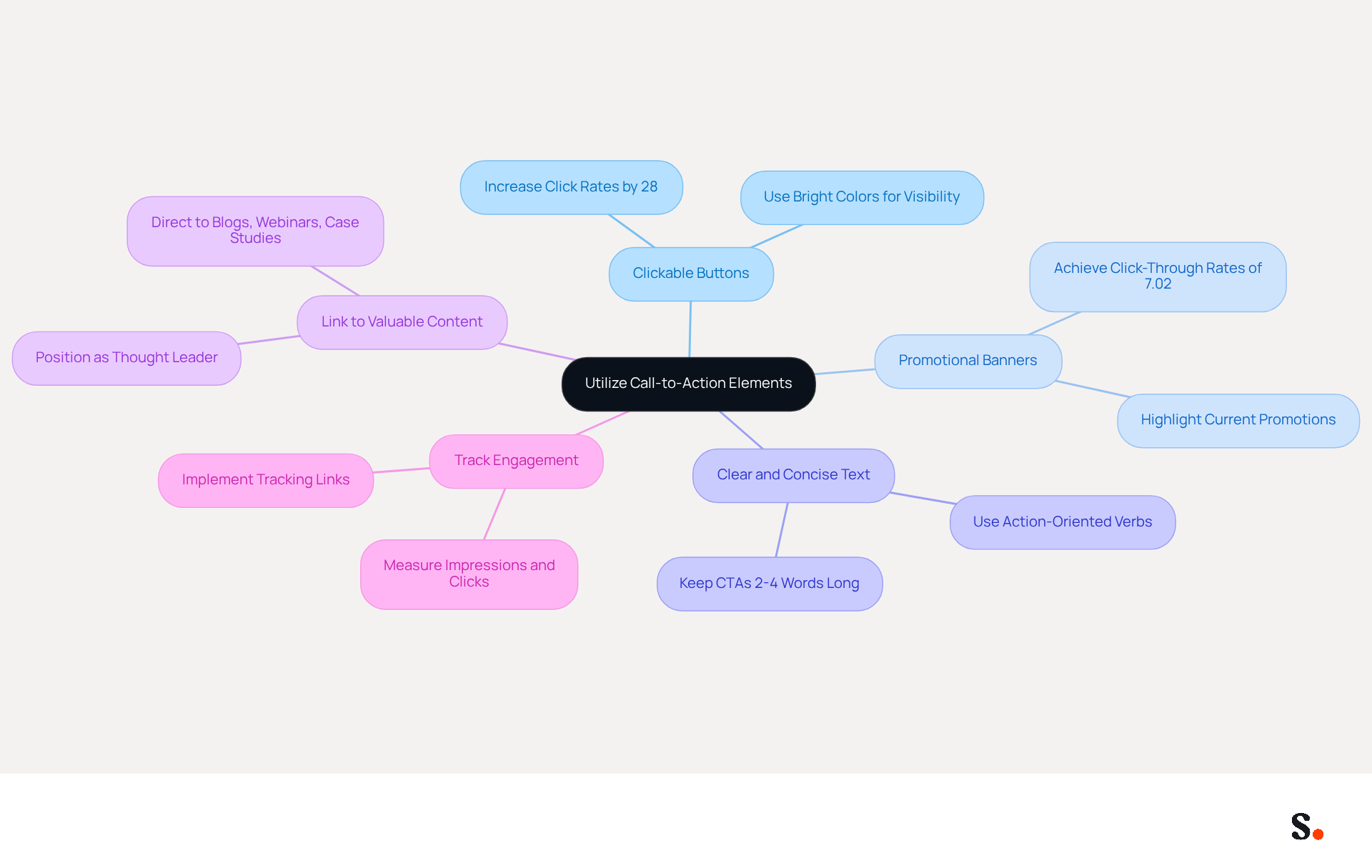
Incorporating call-to-action (CTA) elements in your professional company email signature is essential for maximizing engagement and driving conversions. Here are some effective strategies:
- Clickable Buttons: Utilize visually distinct buttons for CTAs, such as 'Schedule a Meeting' or 'Download Our Brochure', to capture attention. Buttons have been shown to increase click rates by 28% compared to traditional links.
- Promotional Banners: Adding a small banner that highlights current promotions or events can motivate viewers to click for more information. Successful campaigns have achieved click-through rates of up to 7.02% with well-placed banners.
- Clear and Concise Text: Ensure that the CTA text is straightforward and action-oriented, using verbs that prompt immediate action (e.g., 'Join Now', 'Learn More'). CTAs should ideally be 2-4 words long to maintain clarity and effectiveness.
- Link to Valuable Content: Direct recipients to valuable resources, such as blog posts, webinars, or case studies, enhancing their understanding of your offerings. This approach not only informs but also positions your brand as a thought leader.
- Track Engagement: Implement tracking links to measure the effectiveness of your CTAs, allowing for data-driven adjustments to your strategies. Advanced management tools can track impressions and clicks, offering insights into performance metrics.
Strategically placing CTAs in your professional company email signature can transform a simple tool into a powerful marketing asset that boosts engagement and conversions. This analysis underscores the significant impact that well-implemented CTAs can have on your marketing efforts, transforming standard communications into powerful engagement tools.
Ensure Compliance with Legal Disclaimers and Best Practices
To ensure your email signature meets legal standards, it is crucial to follow specific best practices:
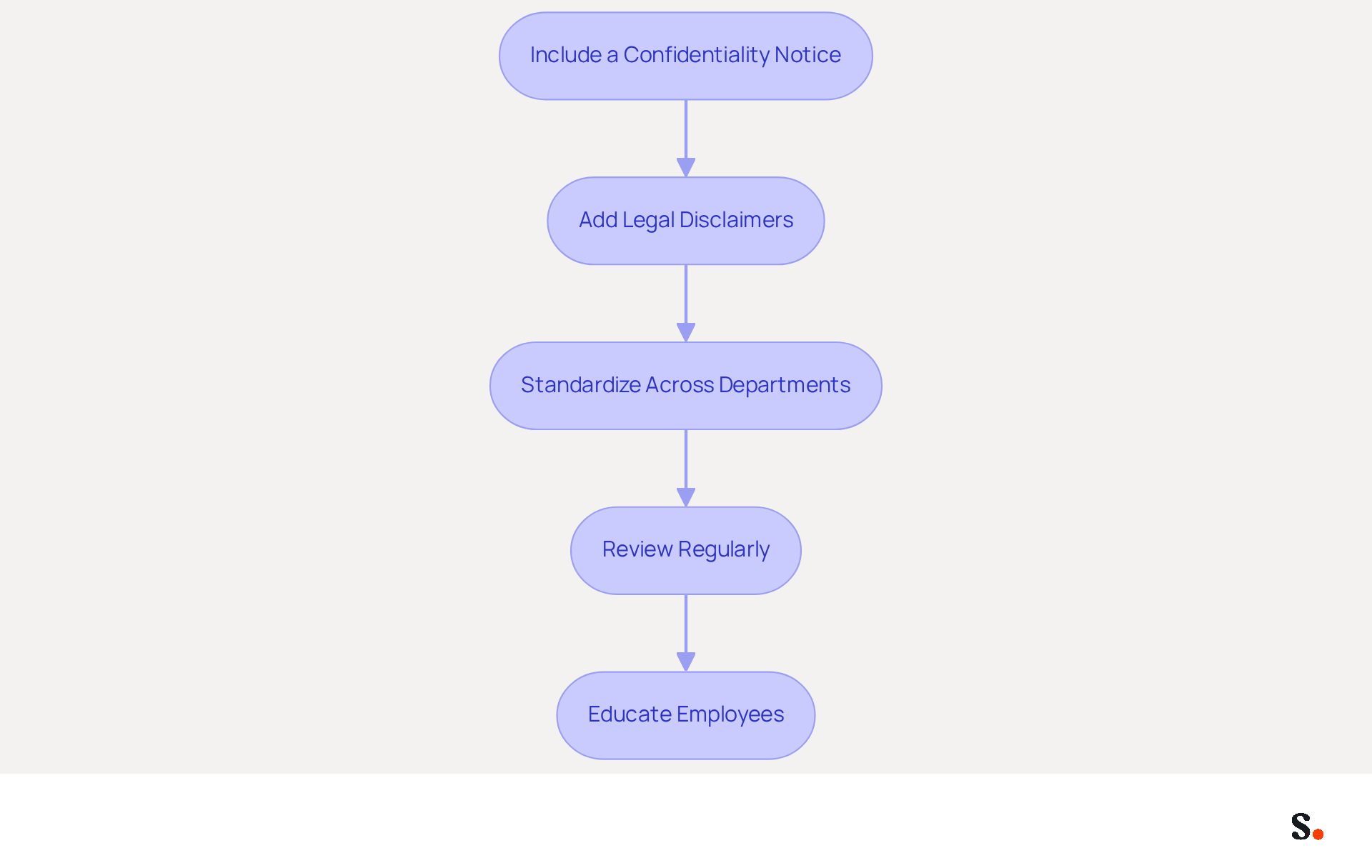
- Include a Confidentiality Notice: This notice informs recipients that the message may contain confidential information and is intended solely for them. These disclaimers establish privacy expectations and protect sensitive data.
- Add Legal Disclaimers: Depending on your industry, include disclaimers related to liability, copyright, or data protection to legally protect your company. For instance, industries like finance and healthcare often require tailored disclaimers to comply with regulations such as HIPAA and SOX, ensuring adherence to stringent legal standards.
- Standardize Across Departments: Ensure that all employees use a uniform format for their sign-offs that includes necessary legal disclaimers, maintaining consistency and compliance. Centralized management of message identifiers can eliminate mistakes and ensure that all staff send compliant communications promptly after updates.
- Review Regularly: Periodically review and update your disclaimers to ensure they comply with current laws and regulations, such as GDPR or CAN-SPAM. Regular reviews are necessary to avoid penalties. Failure to comply with these requirements could lead to significant legal repercussions.
- Educate Employees: Provide training on the significance of signature compliance and the specific elements that must be included. Regular training can enhance awareness of compliance and strengthen the organization's cybersecurity posture.
By implementing these practices, you not only safeguard your organization but also enhance your credibility through a professional company email signature.
Conclusion
A professional email signature is not merely a digital formality; it is a strategic asset that can significantly influence communication effectiveness and brand perception. By incorporating essential components such as your full name, job title, company name, contact information, website URL, and social media links, organizations can create a digital business card that enhances professionalism and facilitates easy communication. Incorporating these elements boosts brand recognition and engagement rates, highlighting the need for businesses to prioritize their email signature design.
Key strategies discussed include:
- The importance of branding for consistency
- The effective use of call-to-action elements to drive engagement
- The necessity of compliance with legal disclaimers
Utilizing Scribe's capabilities, organizations can ensure that their email signatures remain consistent and compliant while also optimizing for mobile devices. Statistics show that a well-crafted email signature can increase response rates by up to 30%.
Investing in a professional email signature goes beyond looks; it’s a smart strategy to boost brand visibility and engagement. By adopting these best practices, organizations can transform their email signatures into powerful marketing assets that reflect their professionalism and commitment to effective communication. Neglecting your email signature could mean missing out on valuable opportunities to connect and engage with your audience.
Frequently Asked Questions
What is the purpose of a professional email signature?
A professional email signature is a critical component of effective communication that significantly impacts your professional image. It serves as a digital business card, making it easier for recipients to reach out or learn more about your company.
What essential components should be included in a professional email signature?
A professional email signature should include the following components: Full Name, Job Title, Company Name, Contact Information, Website URL, and Social Media Links.
Why is it important to include your full name in an email signature?
Including your full name personalizes the communication and creates a direct link with the audience, enhancing the overall professionalism of the email.
How does including a job title in an email signature benefit communication?
Including your job title helps establish authority and context, allowing recipients to understand your role within the organization.
What role does the company name play in an email signature?
Clearly mentioning the company name, ideally with the company logo, enhances brand recognition and professionalism in the communication.
Why is contact information essential in an email signature?
Providing a direct phone number and email address facilitates easy communication, ensuring that individuals can contact you without difficulty.
How does including a website URL in an email signature benefit recipients?
Including a link to your company’s website directs recipients to more information about your services, enhancing their understanding of your offerings.
What is the advantage of adding social media links to an email signature?
Adding links to professional social media profiles improves connectivity and promotes engagement, as many prospects prefer written communication for brand interaction.
What impact can a well-designed email footer have on response rates?
Organizations that employ branded communication footers report a 22% rise in response rates, highlighting the effectiveness of a well-designed footer in professional correspondence.
How does Scribe assist with email signature management?
Scribe ensures that all modifications made to your Calendly setup automatically sync with your correspondence formats, maintaining brand consistency and simplifying updates.
What challenges do organizations face regarding email footer size?
Many organizations struggle to keep their email footers under 100KB, which can lead to display issues on mobile devices, as over 60% of business correspondence is accessed on mobile.
What are the consequences of not keeping email signature information current?
Neglecting to keep information current can result in miscommunication and missed opportunities, which is crucial for maintaining a professional appearance.
List of Sources
- Define Essential Components of a Professional Email Signature
- Email Signature Best Practices for 2026 (+ 15 Pro Examples) (https://wavecnct.com/blogs/email-signature-best-practices-2026)
- What to Include in a Business Email Signature (https://rocketseed.com/blog/email-signature-what-to-include)
- Best practices for business email signatures in 2026 (https://bybrand.io/blog/best-practices)
- 40+ Email Signature Statistics for 2026 (Data + Insights) (https://wavecnct.com/blogs/email-signature-statistics)
- 20 best email signature design examples for 2026 — Stripo.email (https://stripo.email/blog/10-best-email-signature-design-examples)
- Incorporate Branding for Consistency and Recognition
- The impact of email signatures on your branding (https://signitic.com/en/resources/the-impact-of-email-signatures-on-your-branding)
- Email Signatures and Brand Consistency: A Guide for Small Businesses (https://designhill.com/design-blog/email-signature-brand-consistency-guide)
- Research Recap: Branded Email Signatures Increase Company Recognition, Trust - Demand Gen Report (https://demandgenreport.com/industry-news/research-recap-branded-email-signatures-increase-company-recognition-trust/47252)
- Why Email Signatures Must Be In Your 2026 Marketing Plan | Rocketseed (https://rocketseed.com/blog/what-are-the-biggest-email-trends-for-2026)
- 50+ Branding Statistics for 2026 That Explain Brand Loyalty (https://wearetenet.com/blog/branding-statistics)
- Utilize Call-to-Action Elements to Drive Engagement
- The Ultimate Guide to Email Signature Call-to-Action - NEWOLDSTAMP (https://newoldstamp.com/blog/the-ultimate-guide-to-email-signature-call-to-action)
- Email Signature Best Practices for 2026 (+ 15 Pro Examples) (https://wavecnct.com/blogs/email-signature-best-practices-2026)
- Email call to action best practices: The complete guide [2026] — Stripo.email (https://stripo.email/blog/email-call-action-best-practices-examples)
- Boost Engagement with Effective Marketing Email Signature Practices (https://scribe-mail.com/en-US/blog/boost-engagement-with-effective-marketing-email-signature-practices)
- CTAs lead the way in email engagement tactics (https://emarketer.com/content/ctas-lead-way-email-engagement-tactics)
- Ensure Compliance with Legal Disclaimers and Best Practices
- Email Signature Compliance Requirements | 2026 Update (https://signandgo.io/blog/email-signature-compliance-requirements-us-uk-canada)
- Email Signature Mandatory Information 2026: Rules for GmbH & Co. (https://conbool.com/blog/e-mail-signatur-pflichtangaben-unternehmen-dsgvo-en)
- Email Disclaimers: Tips for Business Communication | Mailchimp (https://mailchimp.com/resources/email-disclaimer)
- The Importance of Email Signature Disclaimers & How to Implement Them Automatically - HiHello (https://hihello.com/blog/the-importance-of-email-signature-disclaimers)
Get started with Scribe
Manage signatures across your whole team
Free 14-day trial — no credit card.