How to Standardize Email Signature in Office 365 with Scribe
Standardizing email signatures in Office 365 is essential for enhancing an organization's professional image and ensuring brand consistency. By leveraging
Sophie Grant
Email Signature Specialist, Scribe
On this page
Introduction
Standardizing email signatures in Office 365 is essential for enhancing an organization's professional image and ensuring brand consistency. By leveraging tools like Scribe, businesses can ensure uniformity across all communications and leverage marketing potential through well-designed email footers. Organizations often face significant obstacles, including:
- Technical difficulties
- Compliance issues
Addressing these challenges is vital for organizations aiming to establish a cohesive and effective email signature strategy.
Get started with Scribe
Manage signatures across your whole team
Free 14-day trial — no credit card.
Understand the Importance of Standardizing Email Signatures
For organizations aiming to enhance their professional image, it is essential to standardize email signature Office 365, as this practice is not just beneficial. Here are the key reasons:
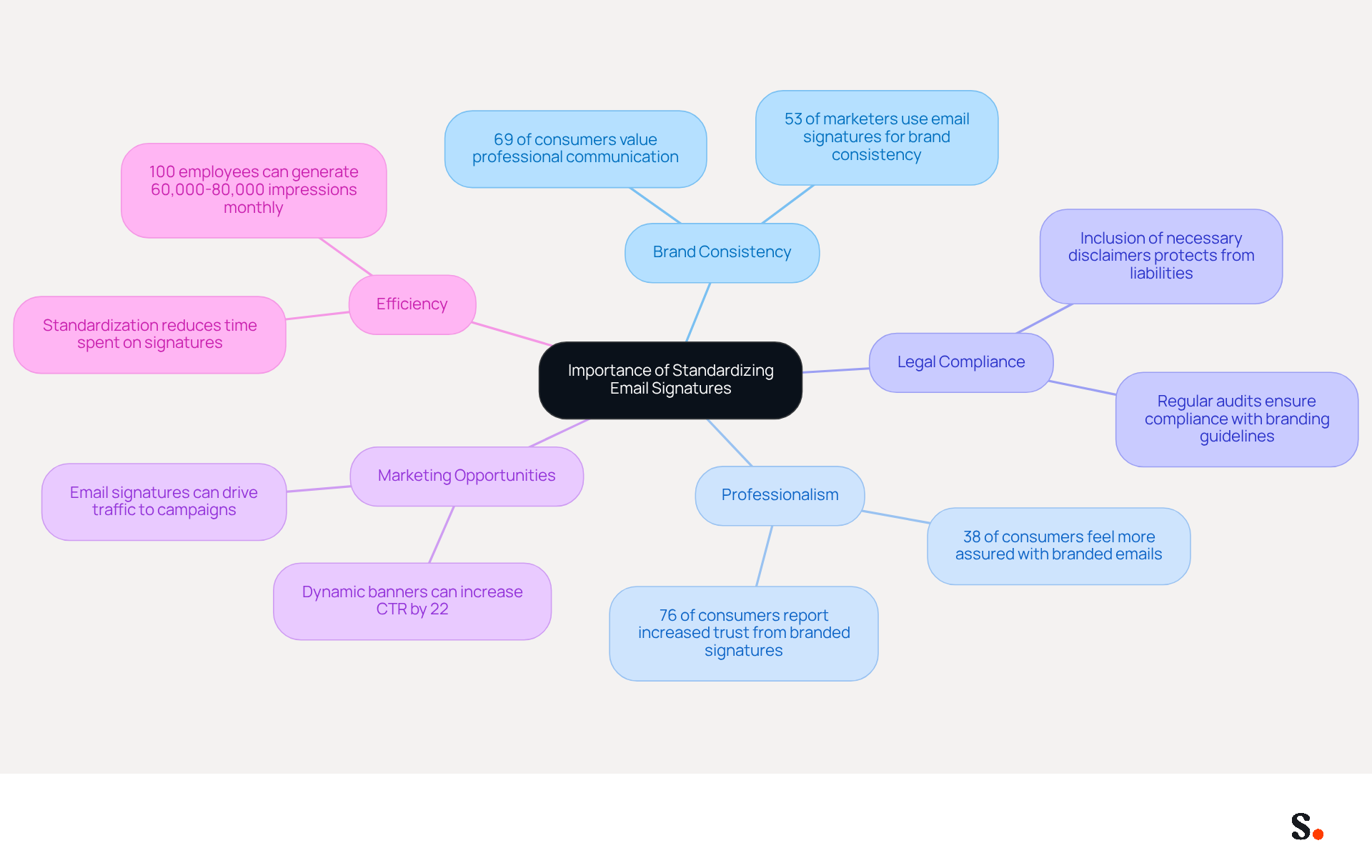
- Brand Consistency: A uniform message format ensures that every employee represents the brand consistently. Research shows that 69% of consumers think it is essential for companies to uphold a professional communication format, highlighting the importance of maintaining consistent branding in every interaction.
- A well-designed message reflects professionalism and attention to detail, improving how recipients view your organization. In fact, 38% of consumers feel more assured in a business when they receive a message with a branded closing.
- Legal Compliance: Including necessary disclaimers and legal information in a standardized format helps meet regulatory requirements, protecting the organization from potential liabilities. Regular evaluations of digital identifiers ensure adherence to branding standards and up-to-date information.
- Marketing Opportunities: Email footers can be leveraged as marketing tools, promoting campaigns, events, or social media links. Businesses that integrate campaign links into their correspondence have reported increased traffic and sales, underscoring the effectiveness of this approach.
- Efficiency: Standardizing email signature Office 365 reduces the time spent on creating and updating documents, allowing employees to focus on their core responsibilities. Without standardization, employees may struggle to manage their time effectively, leading to inefficiencies. With the average worker sending around 1,000 messages per month, a standardized approach can unlock tens of thousands of branded impressions without additional costs.
By recognizing these advantages, organizations can value the implementation of a standardized messaging system, ultimately transforming how they are perceived in the marketplace and fostering stronger customer loyalty.
Gather Required Tools and Accounts for Office 365
To standardize email signatures effectively in Office 365, specific tools and accounts are essential:
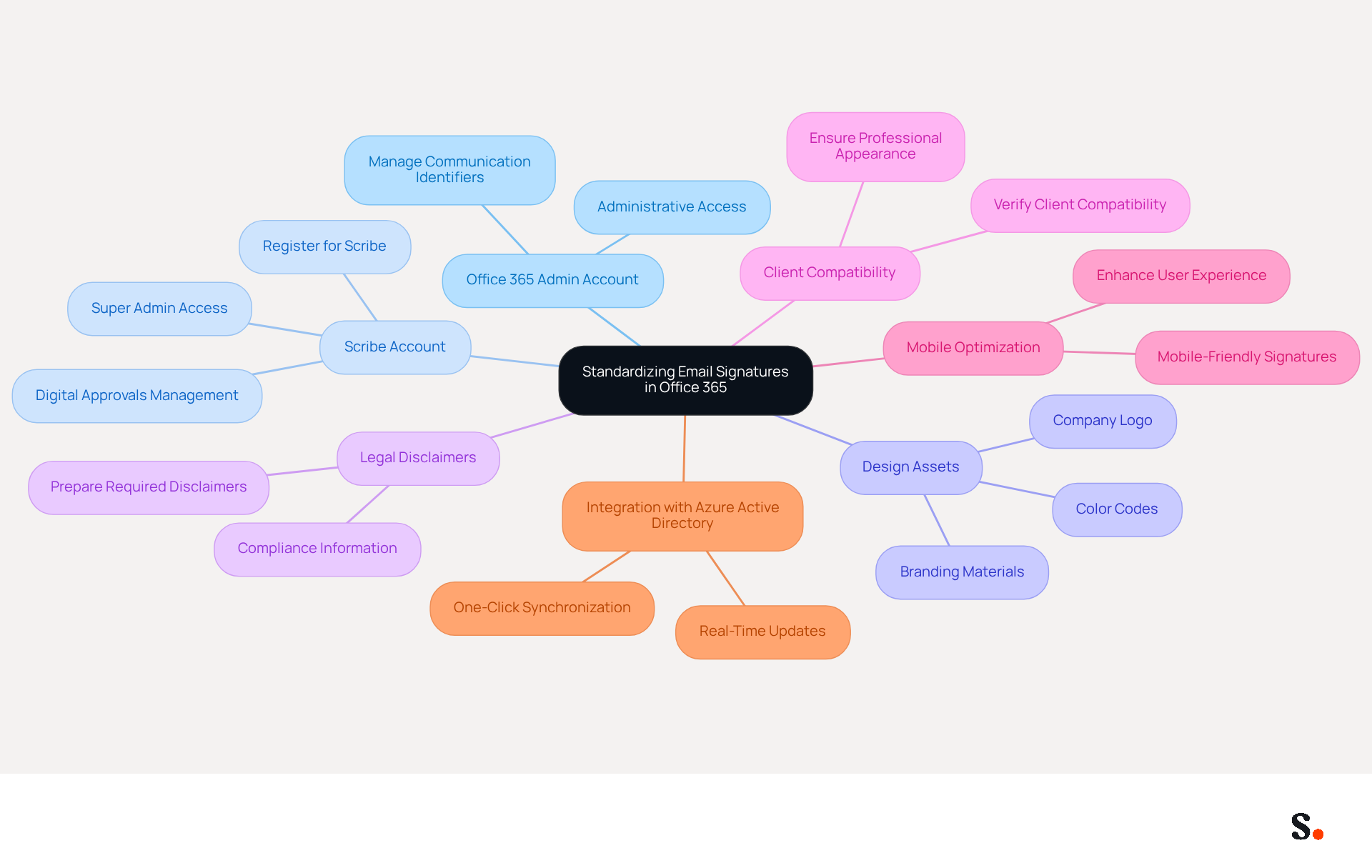
- Office 365 Admin Account: Administrative access is crucial for managing communication identifiers organization-wide, ensuring consistency and compliance across all interactions.
- Scribe Account: Register for Scribe to utilize its advanced email management features. Ensure you have the appropriate permissions, including Super Admin access, to create and manage digital approvals effectively.
- Design Assets: Gather your company logo, color codes, and any other branding materials that will be included in the email footer. This helps maintain a consistent brand identity across all communications.
- Legal Disclaimers: Prepare any required legal disclaimers or compliance information that must be included in the endorsements to mitigate risks and enhance professionalism.
- Client Compatibility: Verify that your clients (such as Outlook and webmail) are compatible with the identifiers you intend to implement. Verifying compatibility is crucial for ensuring a polished and professional appearance across various platforms.
- Mobile Optimization: Ensure that your signatures are mobile-friendly, as research indicates that over 50% of emails are accessed on mobile devices. This will enhance user experience and engagement.
- Integration with Azure Active Directory: Utilize Scribe's integration with Azure AD for real-time updates, ensuring that employee information is always current and minimizing manual errors. Scribe enables one-click synchronization with your service provider, automatically reflecting any modifications made in your directory, which saves time and improves consistency.
Having these tools and accounts prepared will simplify the process of creating and implementing a way to standardize email signature office 365. Organizations that centralize management of digital footers often see improved communication effectiveness and brand consistency. For example, a school district effectively implemented branded communication identifiers across 1,100 employees, ensuring a cohesive brand presence in all interactions. Furthermore, research shows that 67% of marketers think that digital footers can assist in lead generation, emphasizing the strategic significance of well-managed footers in marketing initiatives. By preparing these elements, organizations can not only enhance their communications but also ensure compliance with industry standards.
Create and Implement Standardized Email Signatures Using Scribe
Implementing standardized email signatures is essential for maintaining brand consistency and professionalism in electronic communications. To create and implement standardized email signatures using Scribe, follow these steps:
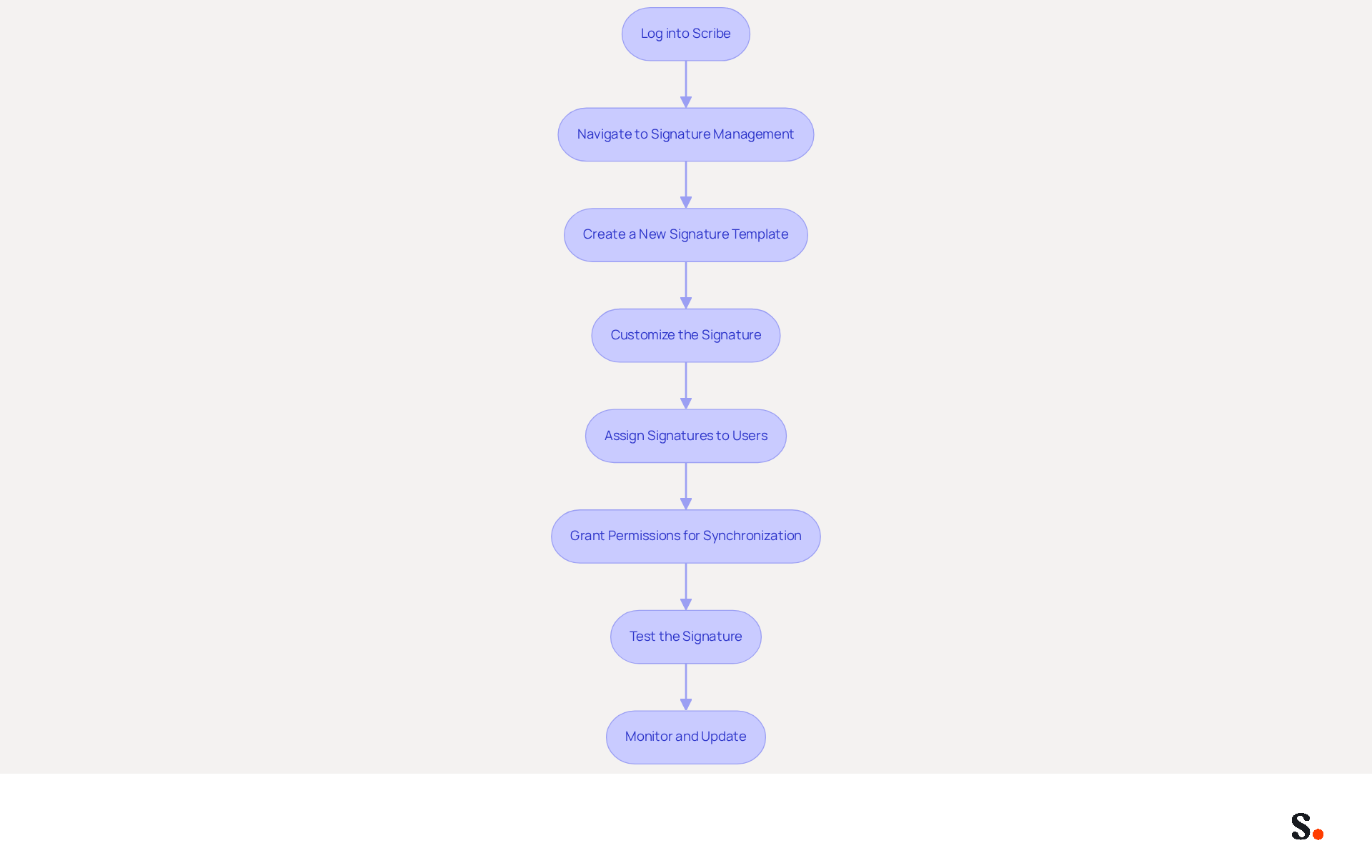
- Log into Scribe: Access your Scribe account with your credentials.
- Navigate to Signature Management: Click on the 'Signatures' tab in the dashboard.
- Create a New Signature Template:
- Click on 'Create New Signature'.
- Choose a template that aligns with your brand guidelines.
- Upload your company logo and input the necessary contact information, ensuring clarity and readability.
- Customize the Signature:
- Add any legal disclaimers or compliance information as needed.
- Include social media links and promotional banners to enhance engagement. This is important, especially considering that many users enhance engagement by including calls to action in their email signatures.
- Ensure the design is mobile-friendly, as 42% of messages are opened on mobile devices.
- Assign Signatures to Users:
- Select the users or groups who will utilize this signature.
- Be sure to set this signature as the default for all outgoing messages to keep everything consistent.
- Grant Permissions for Synchronization:
- Ensure you have Super Admin permissions to connect Scribe with your email provider for one-click synchronization.
- Test the Signature:
- Send test emails to verify that the signature displays correctly across various email clients, as formatting issues can arise unexpectedly.
- Monitor and Update:
- Regular audits are necessary to ensure that your email signatures reflect current branding and legal requirements, as many professionals refresh their credentials multiple times a year.
By following these steps, you can effectively standardize email signature office 365 across your organization, ensuring brand consistency and professionalism in every message. With Scribe's automated management, your team can ensure that all email signatures are consistently updated, enhancing your brand's professionalism and security.
Troubleshoot Common Issues in Email Signature Standardization
Standardizing digital identifiers often presents challenges that require effective troubleshooting. Here’s how to address some common issues:
-
Signature Not Appearing:
- Ensure the signature is set as the default in Scribe and that users have the correct permissions. Many IT teams struggle with managing digital identifiers due to frequent user configuration errors.
- Verify if the client settings permit HTML formats, as numerous users encounter problems with displays not appearing correctly due to plain text configurations.
-
Formatting Issues:
- If you notice the signature looks different in various email clients, take a moment to check the HTML code for compatibility. Outlook, for instance, can render HTML inconsistently, leading to formatting discrepancies.
- Simplify the design by reducing the use of images or complex formatting. Excessive formatting often leads to styles being stripped away, especially when pasted from word processors.
-
Legal Disclaimers Missing:
- Double-check that the disclaimers are included in the signature template and comply with legal requirements. This is crucial for maintaining compliance with industry regulations, such as GDPR.
-
Images Not Displaying:
- Ensure that images are hosted on a reliable server and that the links are correct. Images should be embedded instead of linked to prevent display problems, as many messaging clients block external images by default.
- Use standard image formats (JPEG, PNG) and optimize them for web use. Images should be set to the correct DPI to prevent blurriness, especially on mobile devices.
-
User-Specific Issues:
- If a specific user is having trouble, verify their email client settings and ensure they are using the latest version of the software. Problems such as disappearing marks or not syncing can often be traced back to outdated software or incorrect settings.
Addressing these issues not only resolves current problems but also helps to standardize email signature Office 365 implementations across your organization in the future.

Conclusion
Standardizing email signatures is essential for organizations aiming to project a cohesive professional image and uphold brand integrity. By implementing a uniform approach to email signatures, businesses can effectively communicate their identity and values, fostering trust and recognition among clients and partners.
The article outlines the importance of standardization, highlighting key benefits such as:
- Improved brand consistency
- Legal compliance
- Marketing opportunities
It emphasizes the need for essential tools and accounts, including:
- An Office 365 Admin Account
- A Scribe Account
to facilitate the process. Additionally, the step-by-step guide for creating and implementing standardized signatures using Scribe showcases how organizations can streamline their email communications while maintaining professionalism.
In conclusion, without standardization, organizations risk inconsistent branding and potential legal issues. Organizations that prioritize this practice not only enhance their branding but also improve communication efficiency and compliance. Scribe helps businesses maintain consistent email signatures that reflect their brand identity. Ultimately, organizations that embrace standardized email signatures position themselves for greater success in a competitive marketplace.
Frequently Asked Questions
Why is it important to standardize email signatures in Office 365?
Standardizing email signatures in Office 365 enhances an organization's professional image, ensures brand consistency, meets legal compliance, provides marketing opportunities, and improves efficiency.
How does brand consistency benefit an organization?
Brand consistency ensures that every employee represents the brand uniformly, which is crucial as 69% of consumers believe a professional communication format is essential for companies.
What impact does a well-designed email signature have on consumer perception?
A well-designed email signature reflects professionalism and attention to detail, leading to improved perceptions of the organization. In fact, 38% of consumers feel more assured in a business when they receive a message with a branded closing.
How does standardizing email signatures help with legal compliance?
Including necessary disclaimers and legal information in a standardized format helps organizations meet regulatory requirements and protects them from potential liabilities.
What marketing opportunities can be leveraged through email signatures?
Email footers can be used to promote campaigns, events, or social media links, which can lead to increased traffic and sales for businesses that integrate these links into their correspondence.
How does standardization improve efficiency for employees?
Standardizing email signatures reduces the time spent on creating and updating documents, allowing employees to focus on their core responsibilities and manage their time more effectively.
What is the potential impact of a standardized email signature approach on branding impressions?
With the average worker sending around 1,000 messages per month, a standardized approach can generate tens of thousands of branded impressions without incurring additional costs.
List of Sources
- Understand the Importance of Standardizing Email Signatures
- 5 Benefits of Standardized Email Signatures (https://signature.email/blog/benefits-of-standardized-email-signatures)
- 4 Best Practices for Enterprise Email Signature Management (https://scribe-mail.com/en-US/blog/4-best-practices-for-enterprise-email-signature-management)
- Exclaimer Research: 67% of Marketers Expect Email Signatures to Support With Lead Gen In 2023 (https://businesswire.com/news/home/20230612141095/en/Exclaimer-Research-67-of-Marketers-Expect-Email-Signatures-to-Support-With-Lead-Gen-In-2023)
- 40+ Email Signature Statistics for 2026 (Data + Insights) (https://wavecnct.com/blogs/email-signature-statistics)
- The Importance Of Email Signatures | Email Marketing Blog | Mail Blaze (https://mailblaze.com/thinking/email-signatures-in-email-marketing)
- Gather Required Tools and Accounts for Office 365
- Set Up a Company-Wide Email Signature in Office 365: A Step-by-Step Guide (https://scribe-mail.com/en-US/blog/set-up-a-company-wide-email-signature-in-office-365-a-step-by-step-guide)
- The Best Way to Manage Email Signatures in Microsoft 365 | Rocketseed (https://rocketseed.com/blog/best-way-to-manage-email-signatures-in-microsoft-365)
- Email signature statistics and trends in 2024 (https://wisestamp.com/blog/email-signature-statistics)
- Create Organization-wide Email Signatures and Disclaimers - Microsoft 365 admin (https://learn.microsoft.com/en-us/microsoft-365/admin/setup/create-signatures-and-disclaimers?view=o365-worldwide)
- Customer Success Stories - WiseStamp (https://wisestamp.com/case-studies)
- Create and Implement Standardized Email Signatures Using Scribe
- Best Practices for Email Signature Management in Google Workspace (https://scribe-mail.com/en-US/blog/best-practices-for-email-signature-management-in-google-workspace)
- How to Manage Email Signature Centrally with Scribe: A Step-by-Step Guide (https://scribe-mail.com/en-US/blog/how-to-manage-email-signature-centrally-with-scribe-a-step-by-step-guide)
- 40+ Email Signature Statistics for 2026 (Data + Insights) (https://wavecnct.com/blogs/email-signature-statistics)
- Why Scribe is the Best Email Signature Management Tool for Marketers (https://scribe-mail.com/en-US/blog/why-scribe-is-the-best-email-signature-management-tool-for-marketers)
- Troubleshoot Common Issues in Email Signature Standardization
- Email Signature Troubleshooting - Problems & Solutions - Gimmio (https://blog.gimm.io/email-signature-troubleshooting)
- Common email signature management challenges | Focus Group (https://focusgroup.co.uk/resources/blog/email-signature-management-challenges)
- How to solve problems with email signatures in Microsoft 365? (https://mail-signatures.com/articles/problems-email-signatures-office-365)
- CodaBears | Email Signature Mistakes That Hurt Your Brand (https://codabears.com/en/product/blog/10-email-signature-mistakes-how-to-fix-them--10_Email_Signature_Mistakes)
- Outlook Signature Not Working in Office 365: Causes & Fixes (https://exclaimer.com/email-signature-handbook/outlook-signature-not-working-in-office-365)
Get started with Scribe
Manage signatures across your whole team
Free 14-day trial — no credit card.