How to Centrally Manage Email Signatures in Office 365
Centralizing email signature management in Office 365 is essential for ensuring brand consistency and compliance across organizations. By centralizing this
Sophie Grant
Email Signature Specialist, Scribe

Introduction
Centralizing email signature management in Office 365 is essential for ensuring brand consistency and compliance across organizations. By centralizing this process, companies can streamline their communications and enhance collaboration among IT, Marketing, and Compliance teams. This struggle often results in inconsistent branding and legal risks. By addressing these issues, businesses can transform email signatures into effective marketing assets.
Get started with Scribe
Manage signatures across your whole team
Free 14-day trial — no credit card.
Understand Email Signature Management in Office 365
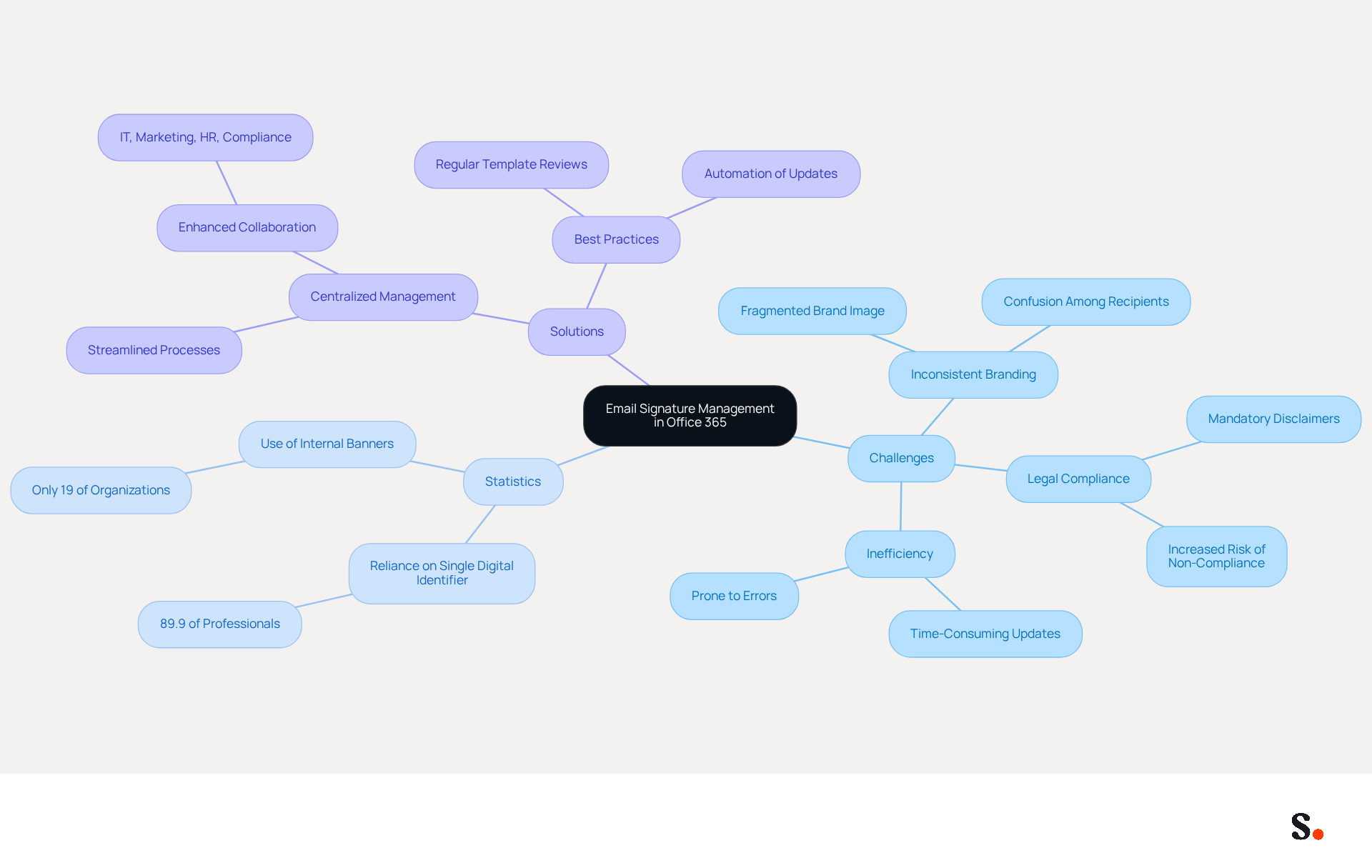
Effective email signature management in Office 365 is essential for ensuring consistent branding and legal compliance across an organization. A centralized approach guarantees that every message sent reflects the company's identity and adheres to necessary regulations. Organizations face serious risks without a centralized email signature management system. They may encounter several significant challenges:
- Inconsistent Branding: Employees often use different formats, logos, and disclaimers, resulting in a fragmented brand image that can confuse recipients and diminish trust.
- Legal Compliance: Many industries mandate specific disclaimers in email communications. A lack of centralized oversight complicates the enforcement of these requirements, increasing the risk of non-compliance.
- Inefficiency: Manually updating identifiers for all employees is not only time-consuming but also prone to errors, which can lead to outdated or incorrect information being disseminated.
Recent statistics indicate that 89.9% of professionals rely on a single digital identifier, highlighting the need for proactive management. Furthermore, only 19% of organizations currently leverage internal banners for marketing, indicating a missed opportunity for engagement.
To address these challenges, organizations need to centrally manage email signatures in Office 365 within their communications management system. This approach not only streamlines the process but also enhances collaboration across IT, Marketing, HR, and Compliance teams, ensuring that branding and messaging align with company objectives. By adopting best practices and utilizing automation, businesses can significantly enhance their communication and overall brand perception. Neglecting this critical aspect can lead to lost branding opportunities and decreased trust among clients.
Set Up Centralized Email Signatures in Office 365
To establish a unified email signature system in Office 365, organizations must follow a series of precise steps:
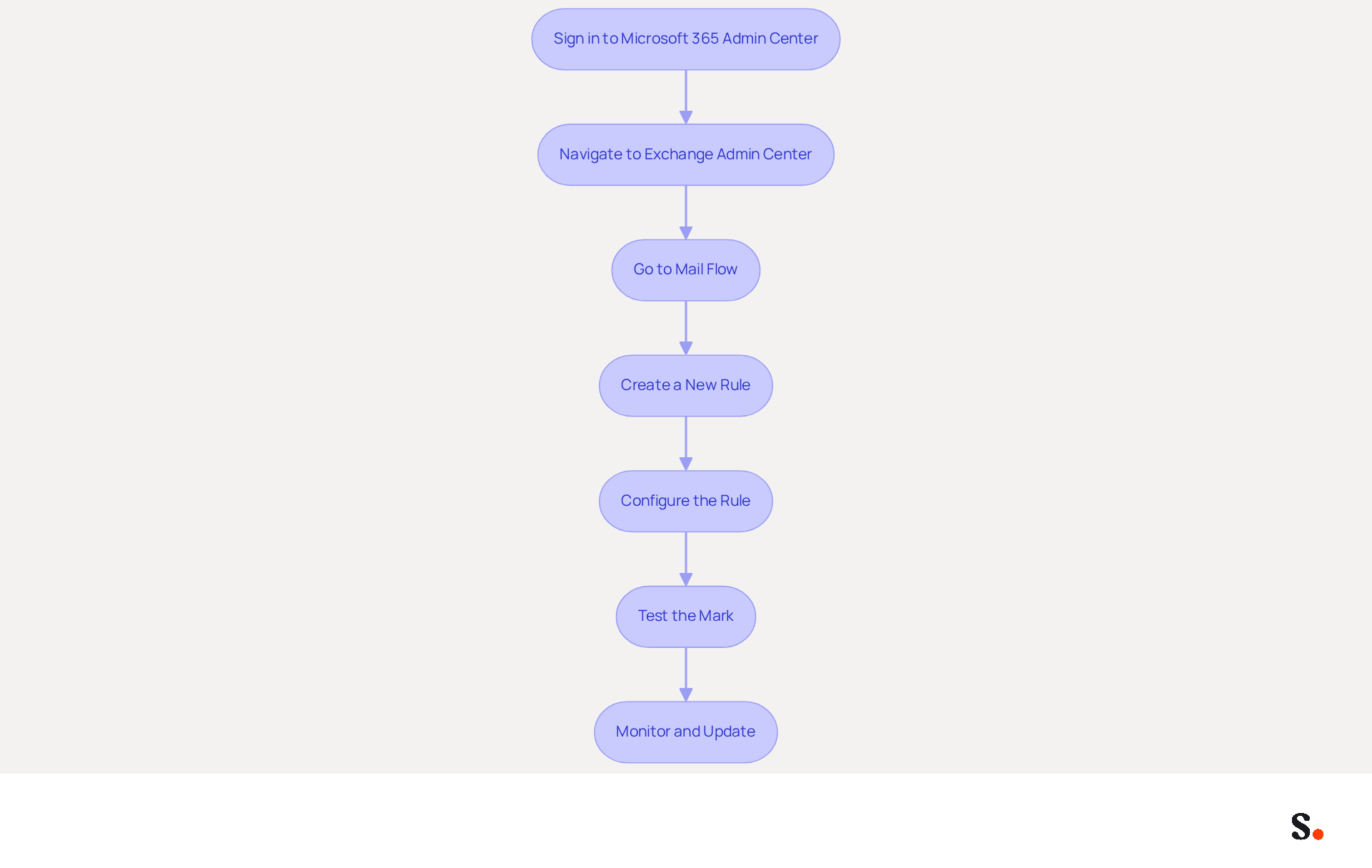
- Sign in to Microsoft 365 Admin Center: Use your admin credentials to access the admin center.
- Navigate to Exchange Admin Center: From the left-hand menu, select 'Admin centers' and then 'Exchange'.
- Go to Mail Flow: In the Exchange Admin Center, click on 'Mail flow' from the left sidebar.
- Create a New Rule: Click on 'Rules' and then 'Add a rule'. Select 'Apply disclaimers' to establish a new rule for sign-offs.
- Configure the Rule: Set conditions for when the mark should be applied (e.g., for all outgoing messages). Create your personal mark using HTML or plain text, ensuring it includes necessary branding elements and disclaimers.
- Test the Mark: Send trial messages to ensure the mark appears correctly for different users and devices.
- Monitor and Update: Regularly review and revise the endorsement as needed to reflect any changes in branding or legal requirements.
By following these steps, organizations can centrally manage email signatures in Office 365 to maintain a consistent and professional appearance in all outgoing messages. Centralized messaging identifiers not only enhance brand image but also drive engagement, with branded identifiers leading to a 22% lift in response rates and a 15% increase in click-through rates to company websites. Furthermore, 78% of marketers concur that maintaining consistent branded identifiers across all company communications is essential, and 62% of individuals utilize these identifiers for marketing. This method is crucial for optimizing marketing opportunities in every message sent, particularly given that 42% of messages are accessed on mobile devices, emphasizing the necessity for mobile-friendly message formats.
Scribe enhances this process by allowing one-click synchronization with your provider, ensuring that all modifications made in your directory are automatically reflected in your communications. Scribe's SOC 2 Type II compliance ensures that your data is managed securely, enabling your marketing team to handle digital branding independently after the initial IT setup, thereby enhancing brand consistency and compliance effortlessly.
Troubleshoot Common Issues in Email Signature Management
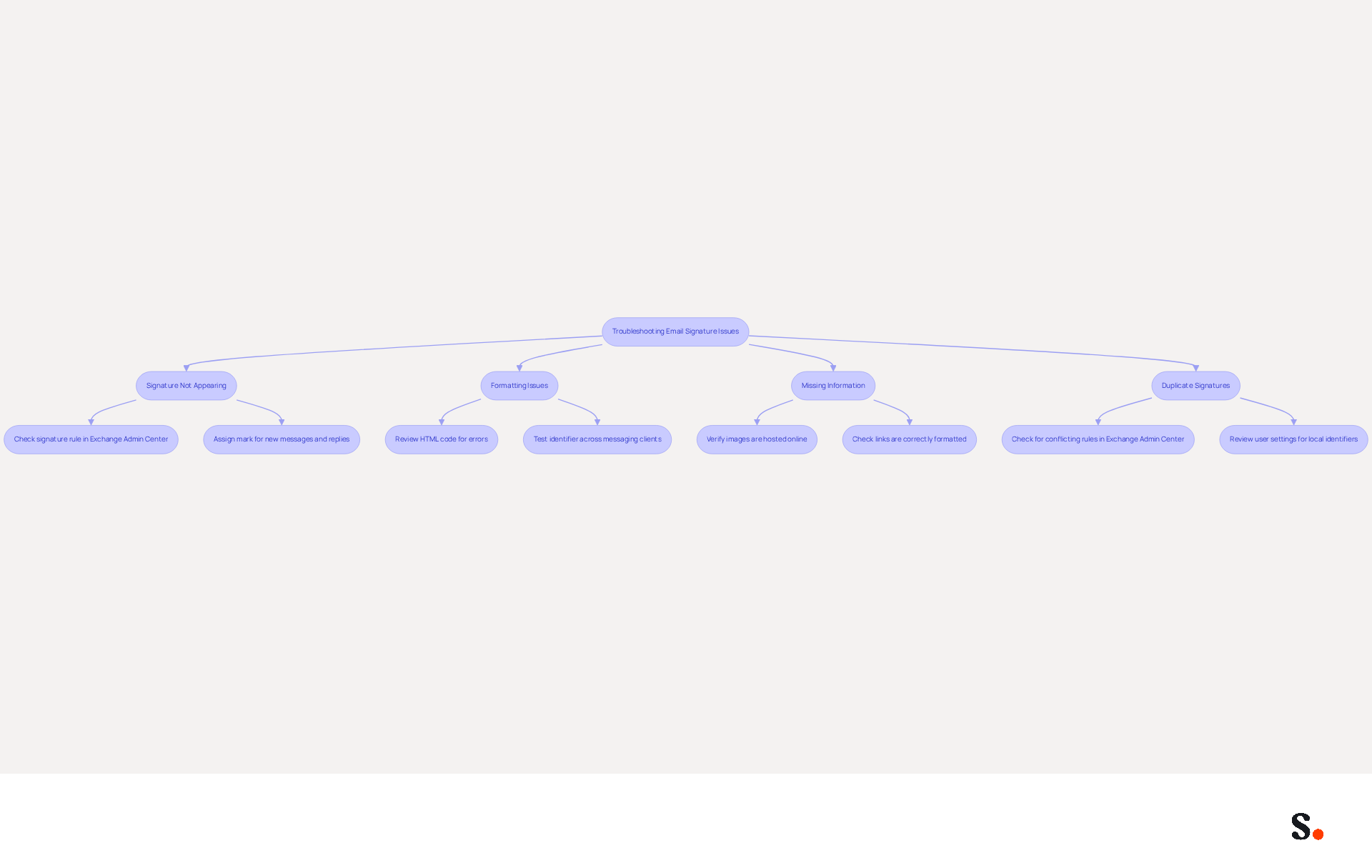
Organizations often struggle with managing messaging identifiers in Office 365, leading to significant communication challenges. Here’s how to effectively troubleshoot these issues:
-
Signature Not Appearing: When signatures fail to appear in outgoing emails, it can lead to confusion and a lack of professionalism in client interactions. Consider the following:
- Confirm that the signature rule is correctly configured in the Exchange Admin Center.
- Ensure the mark is assigned for both new messages and replies/forwards, as default mark assignments account for a significant number of reports regarding missing marks.
-
Formatting Issues: If the signature appears distorted or improperly formatted:
- Review the HTML code for any errors that may affect rendering.
- Test the identifier across various messaging clients to ensure compatibility, as Outlook desktop, web, and mobile applications manage identifiers differently, leading to potential discrepancies.
-
Missing Information: If certain elements, such as images or links, are not displaying:
- Verify that all images are hosted online and accessible, as images may fail to load depending on how they are embedded.
- Check that links are correctly formatted to avoid broken connections.
-
Duplicate Signatures: If users receive multiple signatures in their emails:
- Check for any conflicting rules in the Exchange Admin Center that might be causing overlaps.
- Review user settings to prevent local identifiers from overriding the centralized ones, as this is a common issue in organizations with multiple identifier handling methods.
By addressing these common issues, organizations can centrally manage email signatures in Office 365, which will improve their management of electronic correspondence identifiers and lead to a consistent and professional appearance in all communications. Regular evaluations and testing of digital identifiers are vital, as many businesses recognize that branded footers are crucial for building trust with clients. As Sophie Grant, a Signature Specialist, states, "By addressing these challenges, businesses can unlock the full potential of their signatures, transforming them into strategic assets that enhance engagement and solidify brand identity." Additionally, utilizing automated solutions like Scribe can streamline the troubleshooting process and enhance brand consistency, as Scribe automatically syncs teammate data from your service provider, ensuring that any changes are reflected without manual input. With Scribe's SOC 2 Type II compliance, organizations can also be confident that their data handling meets high security standards. Ultimately, the ability to centrally manage email signatures in Office 365 can significantly impact client perceptions and business success.
Leverage Automation Tools for Efficient Signature Management
Managing identifiers in Office 365 can be a complex task, but automation tools like Scribe simplify this process significantly. Here are some notable benefits of using such tools:
-
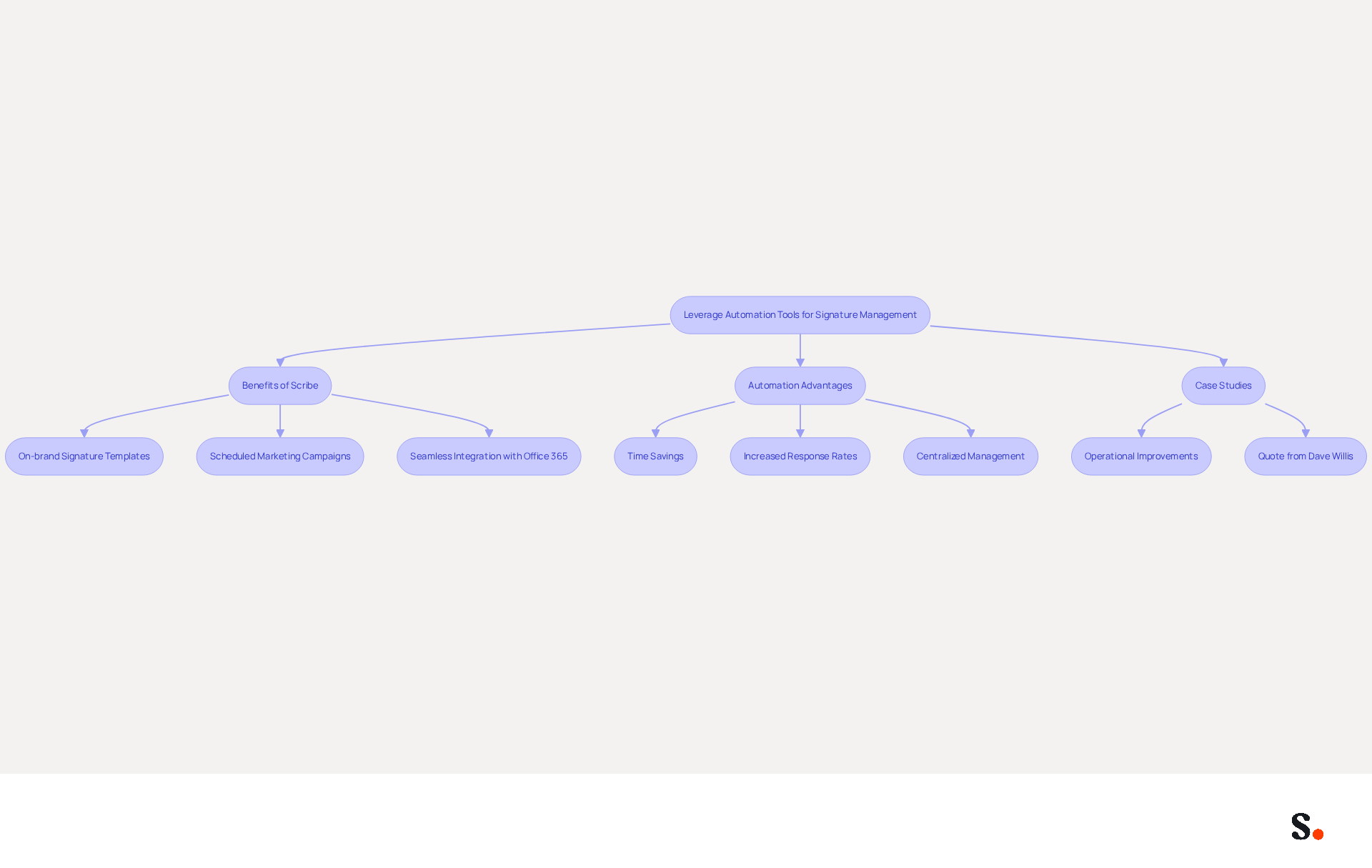
Scribe simplifies the creation and management of electronic identifiers, making updates easy for the entire organization. With Scribe, you can:
- Create on-brand signature templates that ensure consistency across all communications.
- Schedule marketing campaigns directly through email footers, transforming each email into a promotional opportunity.
- Integrate seamlessly with Office 365 for real-time updates, ensuring that all employee endorsements reflect the latest information. Additionally, the application synchronizes signing details directly from your business phone system, ensuring that modifications are automatically updated without any action required from your teammates. This service is also SOC 2 Type II compliant and GDPR compliant, ensuring that your data is secure and managed according to the highest standards.
Organizations utilizing Scribe have reported a 14% increase in lead generation and a 12% average click-through rate on banners, demonstrating how it turns footers into powerful marketing tools.
-
Automation Advantages: Automating email footer oversight can save organizations considerable time and resources. For instance, businesses utilizing efficient oversight tools for digital signatures see a 22% rise in response rates. Furthermore, automating digital identifier oversight can save organizations potentially hours each month, allowing IT teams to concentrate on higher-priority projects. Centralized management can potentially save two hours per employee each year, further illustrating the time-saving advantages of Scribe's automation.
-
Case Studies: Companies that have adopted Scribe's automation capabilities have experienced substantial operational improvements. For example, one organization reported saving 2,505 hours annually, which can be redirected towards strategic initiatives rather than administrative tasks. Moreover, automated synchronization with platforms like Microsoft 365 guarantees that digital identifiers are consistently current, which helps to centrally manage email signatures in Office 365 and minimizes mistakes linked to manual updates.
As Dave Willis, Senior Content Manager, states, "Automating message management helps IT teams eliminate manual updates, reduce support tickets, and maintain brand consistency across all users and devices."
With Scribe, organizations can cut down on the time spent managing signatures, keeping their communications professional and consistent. This not only streamlines operations but also empowers teams to drive growth and innovation.
Conclusion
Organizations often overlook the strategic importance of email signature management, which can lead to inconsistencies and compliance issues. Effective management of email signatures in Office 365 is crucial for maintaining brand consistency and ensuring compliance across all communications. By adopting a centralized approach, organizations can streamline their processes, enhance collaboration among teams, and mitigate risks associated with inconsistent branding and legal requirements. This method simplifies signature management. It also empowers marketing teams to take control after the initial IT setup, ensuring that every email sent reflects the company's identity.
Throughout the article, key steps for setting up centralized email signatures were outlined, including:
- Navigating the Microsoft 365 Admin Center
- Creating rules in the Exchange Admin Center
- Troubleshooting common issues
The importance of automation tools like Scribe was emphasized, demonstrating their ability to reduce manual update time and improve engagement metrics, such as a 12% average click-through rate on signature banners. Additionally, the article highlighted the benefits of compliance with SOC 2 Type II, GDPR, and CCPA, reinforcing the security and reliability of using Scribe for email signature management.
In conclusion, organizations must recognize the strategic value of effective email signature management in Office 365. By implementing these strategies, organizations can not only enhance their brand image but also foster stronger relationships with clients. Embracing these practices not only fosters a professional image but also positions organizations to capitalize on every communication opportunity, ultimately leading to improved client trust and business success.
Frequently Asked Questions
Why is email signature management important in Office 365?
Effective email signature management in Office 365 is essential for ensuring consistent branding and legal compliance across an organization, reflecting the company's identity in every message sent.
What risks do organizations face without a centralized email signature management system?
Organizations may encounter inconsistent branding, legal compliance issues, and inefficiency in updating employee identifiers, which can lead to a fragmented brand image, increased risk of non-compliance, and dissemination of outdated or incorrect information.
What are the consequences of inconsistent branding in email signatures?
Inconsistent branding can confuse recipients and diminish trust in the organization, as employees may use different formats, logos, and disclaimers.
How does legal compliance relate to email signatures?
Many industries require specific disclaimers in email communications, and a lack of centralized oversight complicates the enforcement of these requirements, increasing the risk of non-compliance.
What statistics highlight the need for email signature management?
Recent statistics indicate that 89.9% of professionals rely on a single digital identifier, and only 19% of organizations currently use internal banners for marketing, suggesting a need for proactive management and engagement opportunities.
How can organizations improve their email signature management?
Organizations can centrally manage email signatures within their communications management system, streamlining the process and enhancing collaboration across IT, Marketing, HR, and Compliance teams to align branding and messaging with company objectives.
What are the benefits of adopting best practices and automation in email signature management?
Adopting best practices and utilizing automation can significantly enhance communication and overall brand perception, preventing lost branding opportunities and decreasing trust among clients.
List of Sources
- Understand Email Signature Management in Office 365
- The Best Way to Manage Email Signatures in Microsoft 365 | Rocketseed (https://rocketseed.com/blog/best-way-to-manage-email-signatures-in-microsoft-365)
- 40+ Email Signature Statistics for 2026 (Data + Insights) (https://wavecnct.com/blogs/email-signature-statistics)
- Why Email Signatures Must Be In Your 2026 Marketing Plan | Rocketseed (https://rocketseed.com/blog/2026-marketing-plan-email-signatures)
- Create Organization-wide Email Signatures and Disclaimers - Microsoft 365 admin (https://learn.microsoft.com/en-us/microsoft-365/admin/setup/create-signatures-and-disclaimers?view=o365-worldwide)
- Set Up Centralized Email Signatures in Office 365
- Email signature statistics and trends in 2024 (https://wisestamp.com/blog/email-signature-statistics)
- Create Organization-wide Email Signatures and Disclaimers - Microsoft 365 admin (https://learn.microsoft.com/en-us/microsoft-365/admin/setup/create-signatures-and-disclaimers?view=o365-worldwide)
- Best Email Signature Quotes - Top 10 Inspirational Quotes (https://wisestamp.com/examples/email-signature-quotes)
- 40+ Email Signature Statistics for 2026 (Data + Insights) (https://wavecnct.com/blogs/email-signature-statistics)
- Troubleshoot Common Issues in Email Signature Management
- Outlook Signature Not Working in Office 365: Causes & Fixes (https://exclaimer.com/email-signature-handbook/outlook-signature-not-working-in-office-365)
- Microsoft’s Cloud Email Signatures Solve a Problem for Outlook | Microsoft Community Hub (https://techcommunity.microsoft.com/discussions/exchange_general/microsoft’s-cloud-email-signatures-solve-a-problem-for-outlook/3684035)
- How to solve problems with email signatures in Microsoft 365? (https://mail-signatures.com/articles/problems-email-signatures-office-365)
- Master Managing Email Signatures in Office 365: A Step-by-Step Guide (https://scribe-mail.com/en-US/blog/master-managing-email-signatures-in-office-365-a-step-by-step-guide)
- Leverage Automation Tools for Efficient Signature Management
- 40+ Email Signature Statistics for 2026 (Data + Insights) (https://wavecnct.com/blogs/email-signature-statistics)
- Master Managing Email Signatures in Office 365: A Step-by-Step Guide (https://scribe-mail.com/en-US/blog/master-managing-email-signatures-in-office-365-a-step-by-step-guide)
- Why Scribe is the Best Email Signature Management Tool for Marketers (https://scribe-mail.com/en-US/blog/why-scribe-is-the-best-email-signature-management-tool-for-marketers)
- Automating Email Signatures: How IT Teams Streamline Processes & Reduce Risk (https://exclaimer.com/blog/streamlining-it-processes-automated-email-signatures)
- From IT Burden to Business Value: Rethinking Email Signatures in Microsoft 365 - Petri IT Knowledgebase (https://petri.com/business-value-email-signatures-microsoft-365)
Get started with Scribe
Manage signatures across your whole team
Free 14-day trial — no credit card.