Best Practices for an Email Signature with Headshot That Boosts Branding
While often underestimated, the email signature plays a crucial role in professional branding and communication. A well-designed signature, particularly one
Sophie Grant
Email Signature Specialist, Scribe

Introduction
While often underestimated, the email signature plays a crucial role in professional branding and communication. A well-designed signature, particularly one that includes a headshot, can significantly enhance memorability, credibility, and personal connection in every email sent. Despite their importance, many professionals fail to recognize the impact of a well-crafted email signature.
How can organizations ensure their email signatures not only reflect their identity but also maintain brand consistency across all communications? Organizations must prioritize the design of their email signatures to leverage every communication as a branding opportunity.
Get started with Scribe
See why teams switch to Scribe
Free 14-day trial — no credit card.
Define Essential Elements of a Professional Email Signature
A professional email signature should include the following essential elements:
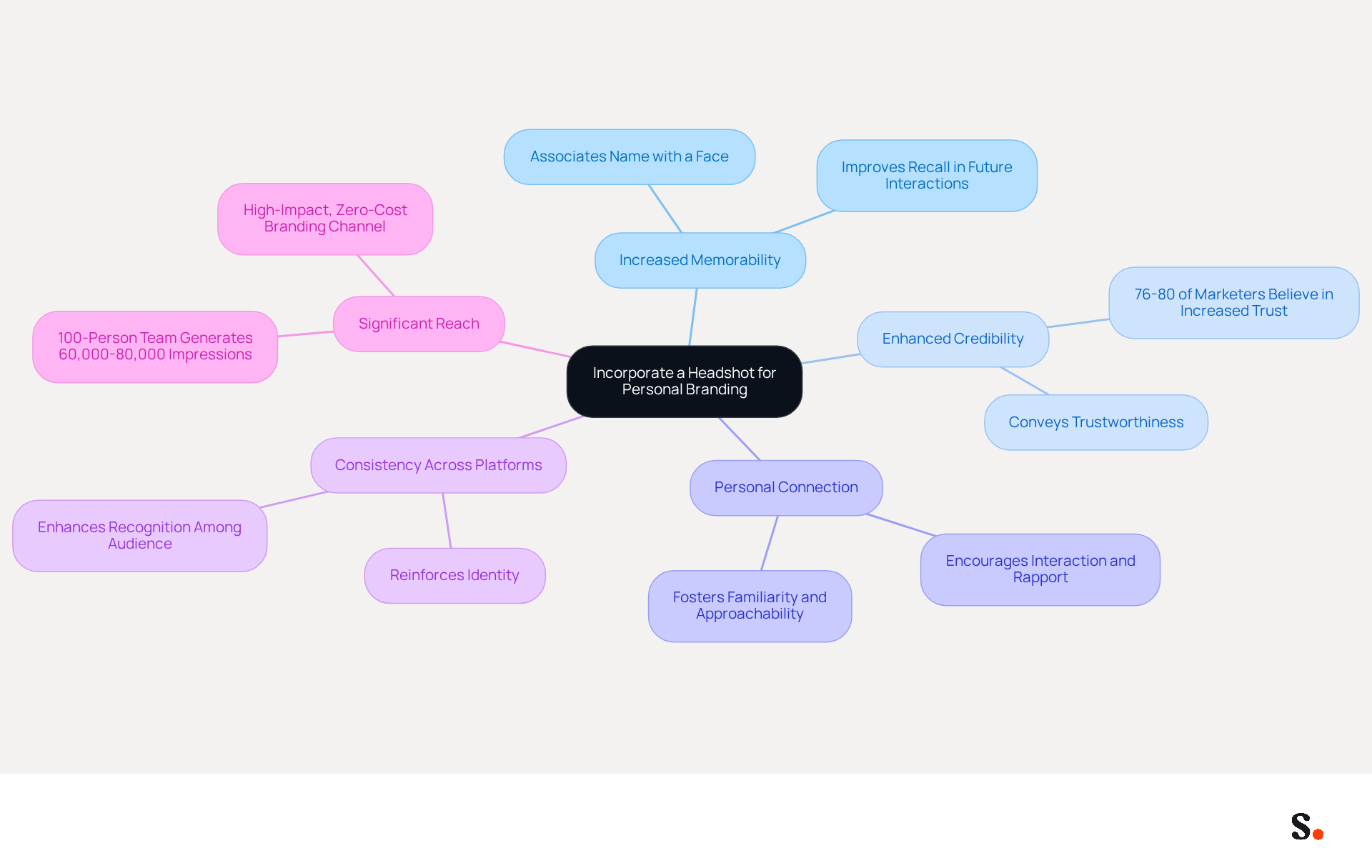
- Full Name: Clearly state your name to establish identity.
- Job Title: Include your position to provide context about your role.
- Company Name: Mention your organization to strengthen association with your name.
- Contact Information: Provide a direct phone number and email address for easy communication.
- Company Logo: Incorporate your logo to enhance visibility of your identity.
- Social Media Links: Add links to professional social media profiles, such as LinkedIn, to encourage networking.
- Legal Disclaimers: If necessary, include any required legal disclaimers relevant to your industry.
These elements convey professionalism and serve as effective marketing tools, making it easier for recipients to connect with you. With Scribe, these elements can be automatically synchronized with your business phone system, ensuring that any updates made in Aircall are reflected in real-time. This seamless integration enhances brand consistency across all communications while maintaining compliance with SOC 2 Type II standards, ensuring that your data is secure and managed effectively.
Incorporate a Headshot to Enhance Personal Branding
Incorporating a high-quality email signature with headshot into your correspondence is essential for effective personal branding. Here’s why:
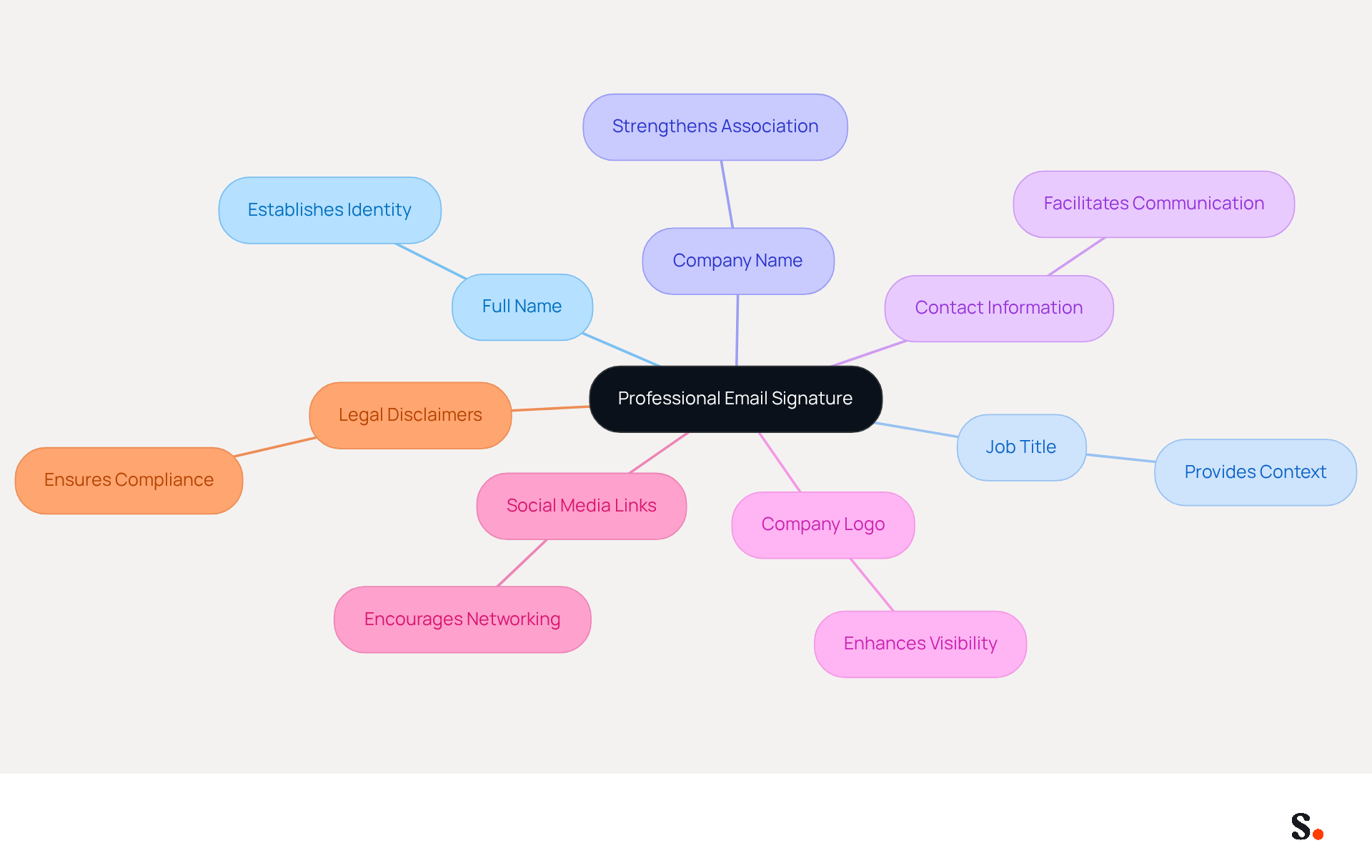
- Increased Memorability: A headshot helps recipients remember you better, as it associates your name with a face. Studies indicate that using an email signature with headshot in your email footer makes it easier for people to remember you, as it connects your name with a real face.
- Enhanced Credibility: A clear, polished image conveys trustworthiness and competence, making your communication more effective. Research indicates that 76-80% of marketers believe customized signatures enhance sender trust, while 64-70% of respondents think a polished branded signature boosts trust and credibility, positioning it as an essential asset for identity.
- Personal Connection: Adding a human element to your messages fosters a sense of familiarity and approachability, which can lead to stronger relationships. Emails with a face are more engaging, encouraging interaction and building rapport.
- Consistency Across Platforms: Use the same headshot across your career profiles (e.g., LinkedIn) to create a cohesive personal brand. This consistency reinforces your identity and enhances recognition among your audience.
- Significant Reach: A 100-person team generates approximately 60,000-80,000 branded signature impressions per month, highlighting the substantial impact of signatures as a marketing tool.
When choosing a headshot, ensure it is high-quality, well-lit, and reflects your work demeanor. Using a poor-quality image can undermine your professional image. Having an email signature with headshot boosts your credibility and enhances brand awareness, making it essential for effective communication. Ultimately, the right headshot can open doors and create lasting impressions in your professional journey.
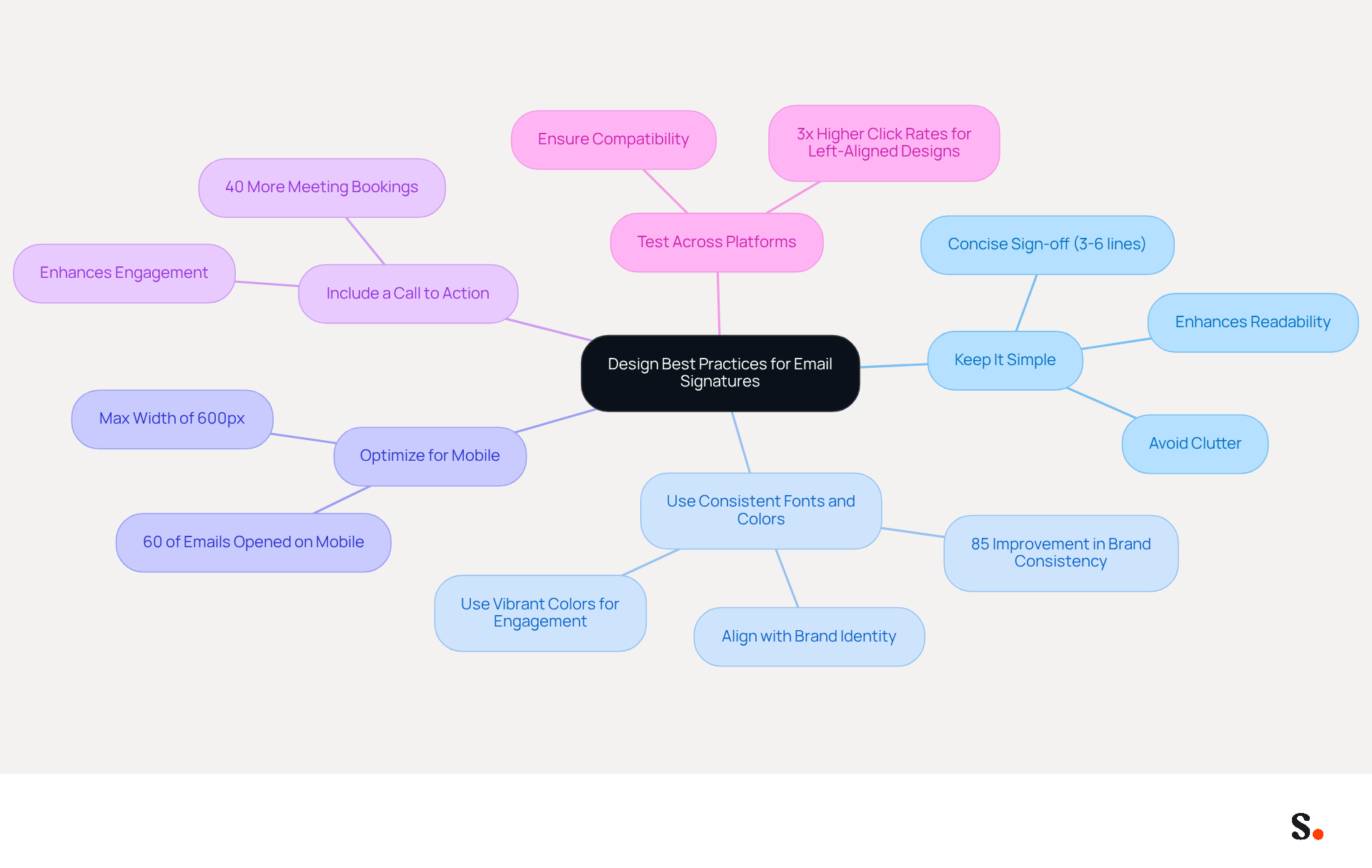
Implement Design Best Practices for Optimal Integration
To create an effective email signature, it is crucial to prioritize clarity and professionalism in design:
- Keep It Simple: A clean design not only enhances readability but also ensures that essential information is easily accessible to your audience. Limit the amount of text and images to avoid clutter, ensuring that your sign-off remains concise, ideally between 3-6 lines, to prevent being flagged by spam filters.
- Use Consistent Fonts and Colors: Align your personal mark with your organization's color palette and font styles. Uniformity across digital identifiers strengthens brand identity and fosters trust. Research shows that teams with centralized management of digital identifiers experience an 85% improvement in brand consistency, which is vital for building trust with your audience. Incorporating vibrant colors, such as green as an accent, can enhance engagement.
- Optimize for Mobile: With 60% of business correspondence opened on mobile devices, ensure your identification displays well on smartphones and tablets. A maximum width of 600px is recommended for mobile-friendliness.
- Include a Call to Action: Adding a subtle call to action, such as a link to your latest blog post or a promotional offer, can significantly enhance engagement. Strategic CTAs can drive 40% more meeting bookings compared to generic links.
- Test Across Platforms: Check how your identifier appears in different messaging clients (e.g., Outlook, Gmail) to ensure compatibility. Testing various layouts can provide insights into what works best for your audience, as left-aligned, single-column designs have been shown to achieve 3x higher click rates for CTAs. Be cautious of the possible drawbacks of including excessive information in internal communication identifiers, which can undermine their effectiveness.
By implementing these design principles, you not only enhance your professional image through an email signature with headshot but also increase the likelihood of meaningful engagement with your audience.
Ensure Brand Consistency with Centralized Management Tools
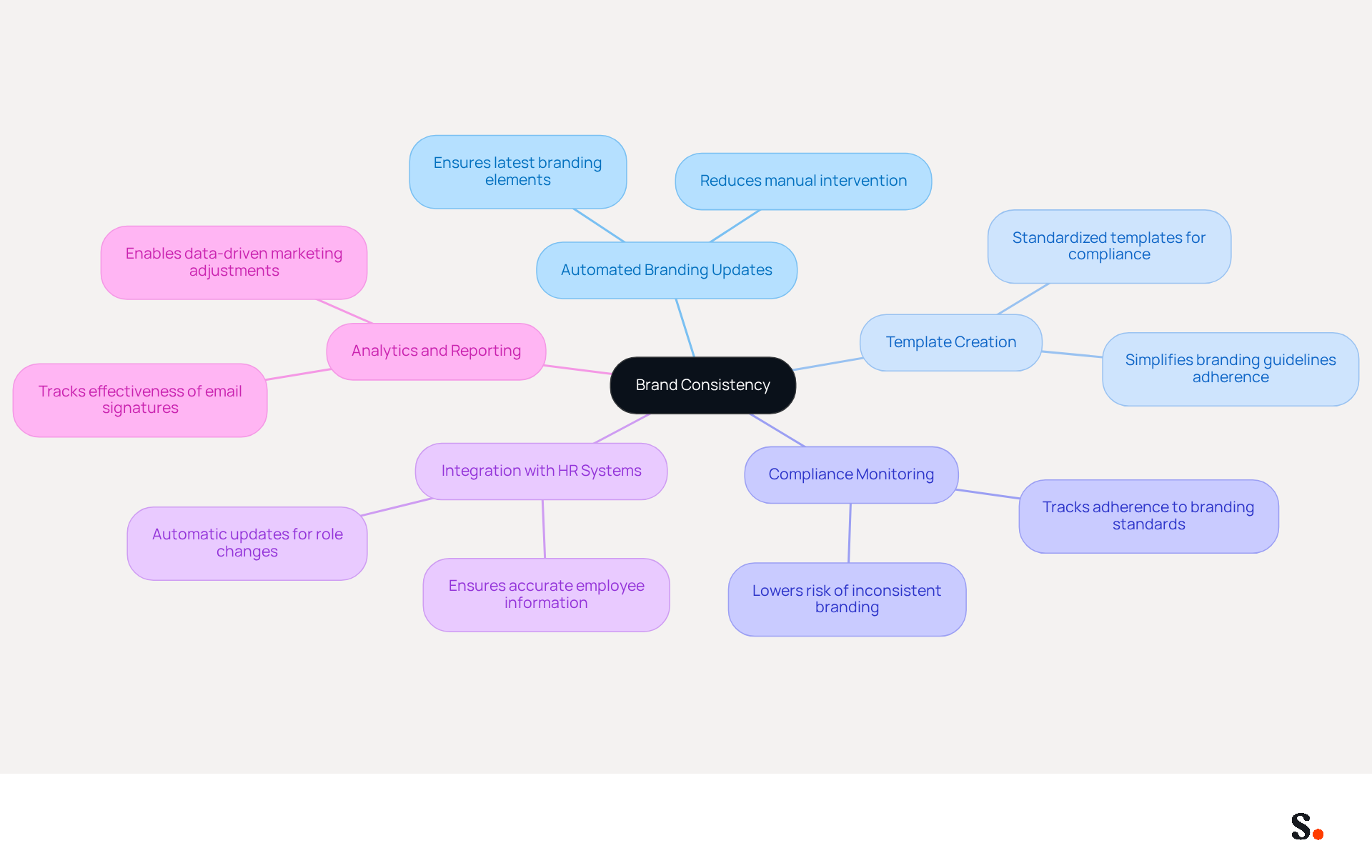
Inconsistent email signatures can undermine brand integrity, making centralized management tools essential for maintaining brand consistency across all employee communications:
- Automated Branding Updates: Centralized tools enable automatic updates to branding elements across the organization, ensuring that all employees utilize the latest components without manual intervention.
- Template Creation: Standardized templates that reflect your identity simplify compliance with branding guidelines, making it easier for employees to maintain consistency.
- Compliance Monitoring: These tools assist in tracking adherence to branding standards, significantly lowering the risk of inconsistent marks that can damage brand reputation.
- Integration with HR Systems: By linking management tools for identifiers with HR systems, organizations can automatically refresh them when employees change roles or depart, ensuring timely and precise information.
- Analytics and Reporting: Utilizing analytics allows businesses to track the effectiveness of digital identifiers as marketing tools, enabling data-driven adjustments that enhance engagement and response rates.
By ensuring that the email signature with headshot is consistently managed, organizations can not only protect their brand image but also enhance engagement metrics significantly.
Conclusion
A well-crafted email signature with a headshot is essential for establishing a strong personal brand and ensuring consistency across communications. By incorporating key elements such as your name, job title, and contact information, along with a professional headshot, the signature conveys professionalism and fosters a personal connection with recipients. This strategy really helps people remember you and builds trust, making it easier for others to recognize and rely on you.
Key insights from the article highlight the importance of design best practices, such as:
- Maintaining simplicity
- Using consistent fonts and colors
- Optimizing for mobile devices
These elements contribute to a polished and engaging email signature that aligns with your organization's branding. Additionally, utilizing centralized management tools ensures that all employees maintain consistent signatures, further protecting brand integrity and enhancing marketing effectiveness.
Ultimately, a well-designed email signature with a headshot is a crucial marketing tool that enhances engagement and strengthens professional relationships. Organizations should prioritize these best practices to maximize the impact of their email communications, ensuring that every interaction reinforces their brand identity and fosters meaningful connections. By implementing these strategies, organizations not only elevate their individual branding but also cultivate a unified and professional image that resonates with their audience.
Frequently Asked Questions
What are the essential elements of a professional email signature?
A professional email signature should include your full name, job title, company name, contact information (direct phone number and email address), company logo, social media links (such as LinkedIn), and any necessary legal disclaimers.
Why is it important to include these elements in an email signature?
Including these elements conveys professionalism and serves as effective marketing tools, making it easier for recipients to connect with you.
How does Scribe enhance the email signature process?
Scribe allows these elements to be automatically synchronized with your business phone system, ensuring that any updates made in Aircall are reflected in real-time.
What standards does Scribe comply with regarding data management?
Scribe maintains compliance with SOC 2 Type II standards, ensuring that your data is secure and managed effectively.
List of Sources
- Define Essential Elements of a Professional Email Signature
- 20 best email signature design examples for 2026 — Stripo.email (https://stripo.email/blog/10-best-email-signature-design-examples)
- 20 Examples of Professional Email Signatures | Letsignit (https://letsignit.com/blog/professional-email-signature)
- Best Practices for Email Signatures for Companies to Boost Branding (https://scribe-mail.com/en-US/blog/best-practices-for-email-signatures-for-companies-to-boost-branding)
- The Complete Email Signature Guide 2026: Best Practices and Policy (https://opensense.com/complete-email-signature-guide)
- Email Signature Best Practices for 2026 (+ 15 Pro Examples) (https://wavecnct.com/blogs/email-signature-best-practices-2026)
- Incorporate a Headshot to Enhance Personal Branding
- Why and When to Include a Headshot in Your Email Signature - Gimmio (https://blog.gimm.io/headshot-in-your-email-signature)
- 40+ Email Signature Statistics for 2026 (Data + Insights) (https://wavecnct.com/blogs/email-signature-statistics)
- How to explode conversions with a headshot email signature (https://photoform.com.au/how-to-explode-conversions-with-a-headshot-email-signature)
- Email Signature Best Practices for 2026 (+ 15 Pro Examples) (https://wavecnct.com/blogs/email-signature-best-practices-2026)
- Create a professional email signature with your headshot using our email signature generator. Boost conversions and enhance your digital presence on any platform! - NEWOLDSTAMP (https://newoldstamp.com/blog/email-signature-with-headshot)
- Implement Design Best Practices for Optimal Integration
- Email Signature Best Practices - NEWOLDSTAMP (https://newoldstamp.com/blog/email-signature-best-practices)
- Top 10+ best practices for email signatures design in 2026 (https://mysignature.io/blog/email-signature-best-practices)
- 20 best email signature design examples for 2026 — Stripo.email (https://stripo.email/blog/10-best-email-signature-design-examples)
- Email Signature Best Practices for 2026 (+ 15 Pro Examples) (https://wavecnct.com/blogs/email-signature-best-practices-2026)
- "Email Signature Trends for 2026: What's In, What's Out" | Crossware posted on the topic | LinkedIn (https://linkedin.com/posts/crossware-ltd_new-year-new-trends-even-for-your-email-activity-7394554686046908416-vD_O)
- Ensure Brand Consistency with Centralized Management Tools
- The impact of email signatures on your branding (https://signitic.com/en/resources/the-impact-of-email-signatures-on-your-branding)
- Why Automated Email Signatures Are a Smart Move for Your Business (https://aabyss.uk/blog/why-automated-email-signatures-are-a-smart-move-for-your-business)
- Automating Email Signatures: How IT Teams Streamline Processes & Reduce Risk (https://exclaimer.com/blog/streamlining-it-processes-automated-email-signatures)
- Email Signature Trends 2026: Centralized Control & Automation | SIGNandGO posted on the topic | LinkedIn (https://linkedin.com/posts/signngo_email-signature-trends-to-watch-in-2026-activity-7401523471786217473-zAVL)
- Email signature statistics: Why every business should optimize their email signatures — Stripo.email (https://stripo.email/blog/email-signature-statistics-why-every-business-should-optimize-their-email-signatures)
Get started with Scribe
See why teams switch to Scribe
Free 14-day trial — no credit card.