Best Practices for Your Gmail Signature: Boost Engagement and Branding
A well-crafted Gmail signature is not merely a formality; it is a crucial element that can significantly impact branding and engagement in professional
Sophie Grant
Email Signature Specialist, Scribe

Introduction
A well-crafted Gmail signature is not merely a formality; it is a crucial element that can significantly impact branding and engagement in professional communications. By implementing best practices, organizations can transform their email signatures into powerful marketing tools that enhance visibility and foster trust. This oversight can hinder their ability to connect meaningfully with clients and partners. To maximize their potential, businesses must ensure their Gmail signatures are not only reflective of their brand identity but also strategically designed to enhance engagement.
Emphasize Simplicity and Clarity in Your Signature
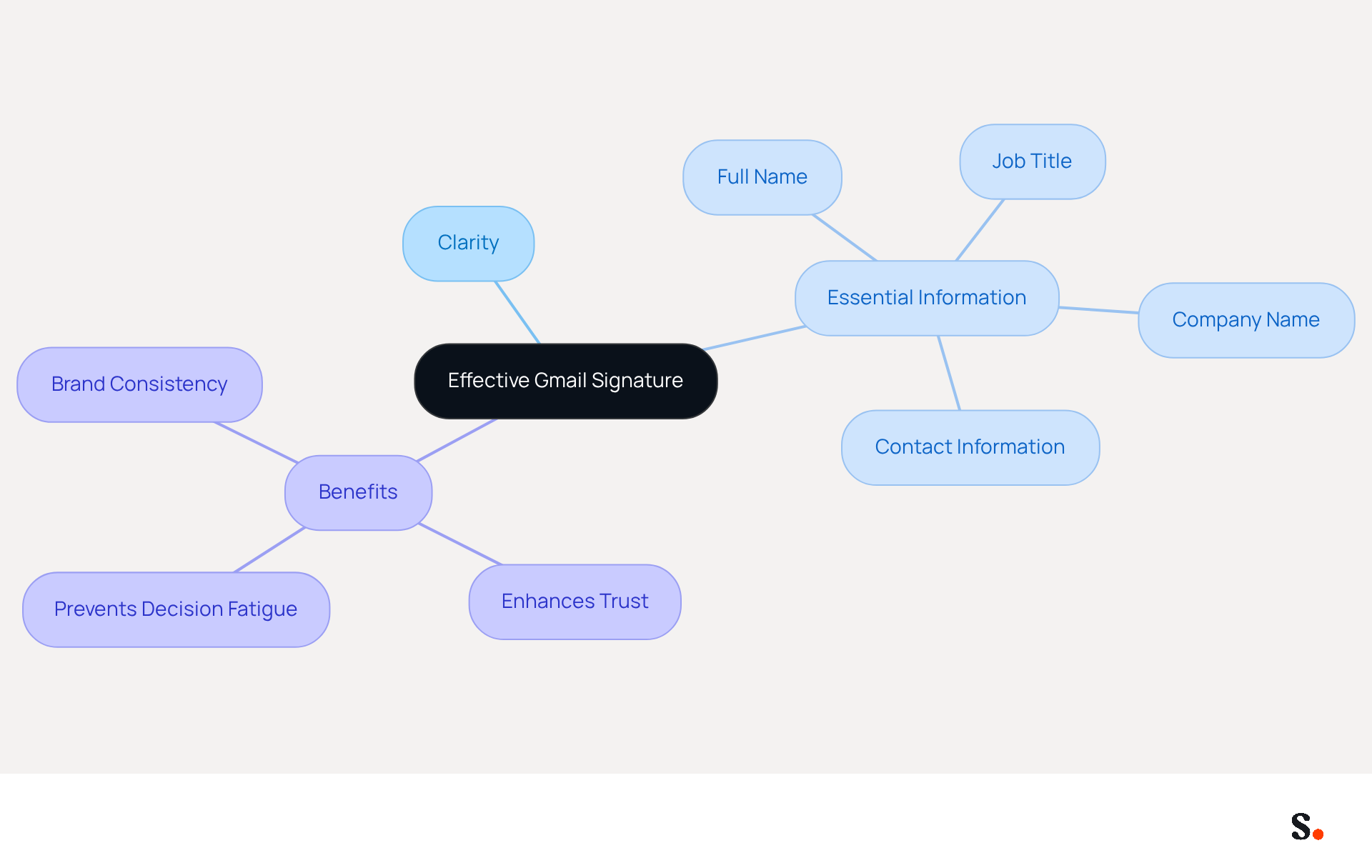
To create an effective gmail signature, you should focus on clarity and essential information. Limit your sign-off in your gmail signature to key elements such as your full name, job title, company name, and primary contact information. Avoid clutter by steering clear of excessive graphics or lengthy quotes. A well-organized gmail signature should be concise, ideally limited to three to five lines, to avoid overwhelming the recipient. For example, a signature might look like this:
John Doe
Digital Marketing Specialist
Scribe
john.doe@scribe-mail.com
(123) 456-7890
This format allows recipients to quickly identify who you are and how to reach you, enhancing the likelihood of engagement. Studies indicate that concise footers, particularly a professional gmail signature, significantly enhance trust and professionalism in email communications, with 80% of businesses considering a branded footer as crucial for establishing trust. Furthermore, maintaining marks within three to four lines helps prevent decision fatigue for recipients, making it simpler for them to locate your contact information. Regular evaluations of electronic correspondence identifiers, ideally performed annually, can ensure compliance with these best practices, preserving clarity and effectiveness in communication.
Moreover, with the seamless integration of the platform with Calendly, any modifications made to your Calendly settings automatically sync with your documents. This feature not only simplifies the management of your communication identifiers but also guarantees brand consistency across all interactions. Scribe demonstrates its commitment to security through its SOC 2 Type II certification and compliance with GDPR and CCPA, emphasizing the significance of a well-designed mark. As Holly Linden observes, "A good email footer helps establish trust and credibility," which aligns with Scribe's goal of providing secure and effective email footer management.
Implement Step-by-Step Signature Setup in Gmail
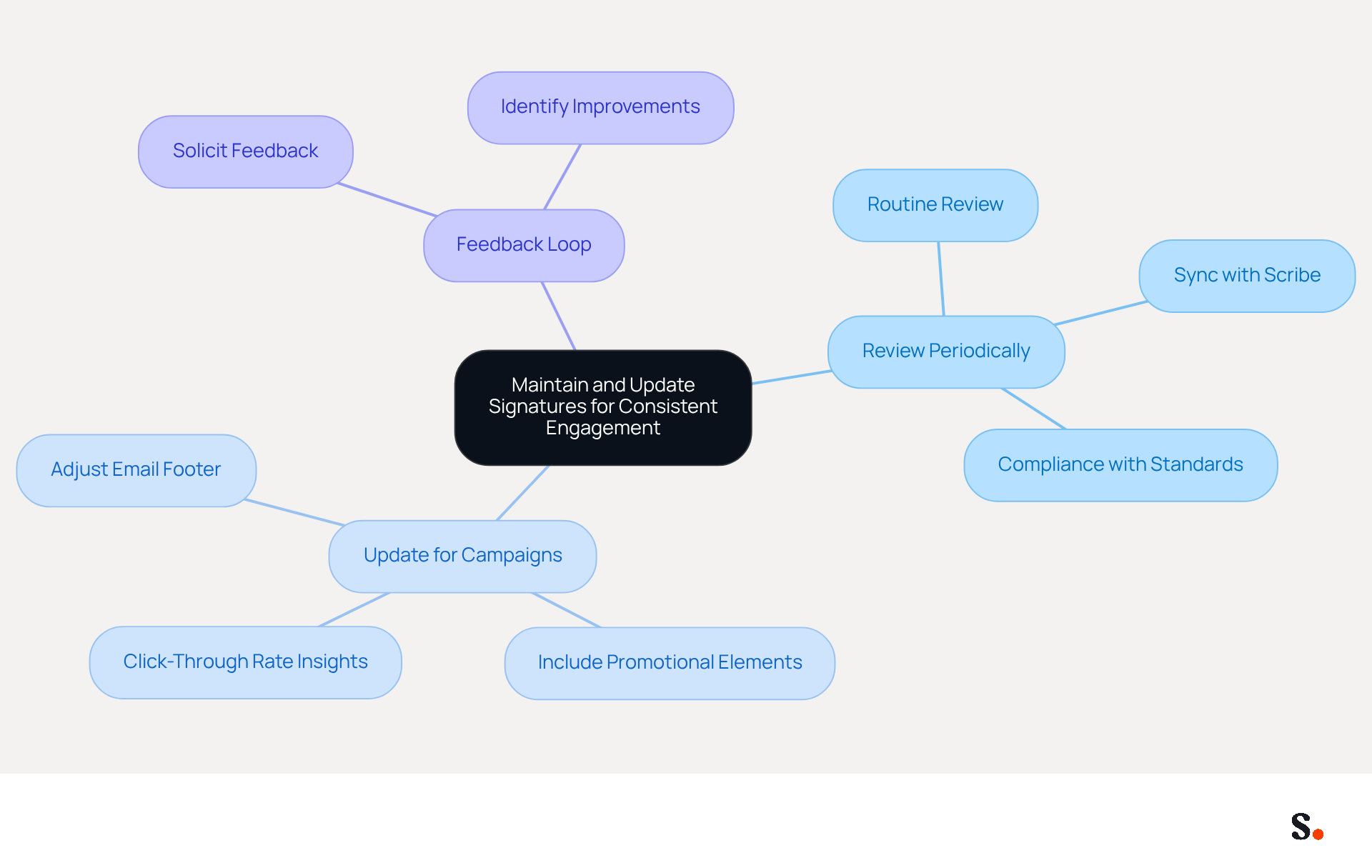
Configuring your gmail signature effectively enhances your professional image and ensures consistency across communications. Syncing your Google Workspace with Scribe streamlines the process, saves you time, and keeps your signature up-to-date. Follow these steps to create a polished signature:
- Open Gmail: Log into your Gmail account.
- Access Settings: Click on the gear icon in the top right corner and select 'See all settings.'
- Navigate to Signature Section: Scroll down to the 'Signature' section under the 'General' tab.
- Create New Signature: Click on 'Create new' and name your new mark.
- Add Details: In the text box, input your details, ensuring to include your name, title, and contact information. In fact, including a call-to-action in your email footer can drive engagement, as evidenced by 52% of professionals who do so. Incorporating a dynamic banner can further improve your email footer, potentially increasing traffic to specific landing pages by 25%.
- Format Your Signature: Use the formatting tools to adjust font size, color, and style as needed. A well-formatted closing can lead to a 15% increase in click-through rates to your company website.
- Save Changes: Scroll down and click 'Save Changes' at the bottom of the page.
When you sync your Google Workspace with Scribe, you save time because there's no need to add your teammates manually. Their data is automatically synced, enabling you to auto-fill their information using Scribe's attribute feature. Any changes in your Google Workspace, such as moving teammates from one group to another or updating their information, will be automatically reflected in Scribe without any input on your part.
By following these steps, you can ensure that your mark is set up correctly and reflects your professional image. Regular updates are crucial; 44.4% of users refresh their contact details 2-4 times a year, ensuring that their information stays current and pertinent. Furthermore, be aware of typical mistakes, such as choosing the 'No signature' option, which can stop your mark from showing in communications. A well-crafted gmail signature not only enhances your professionalism but also strengthens your brand's reputation.
Incorporate Branding and Marketing Elements for Engagement
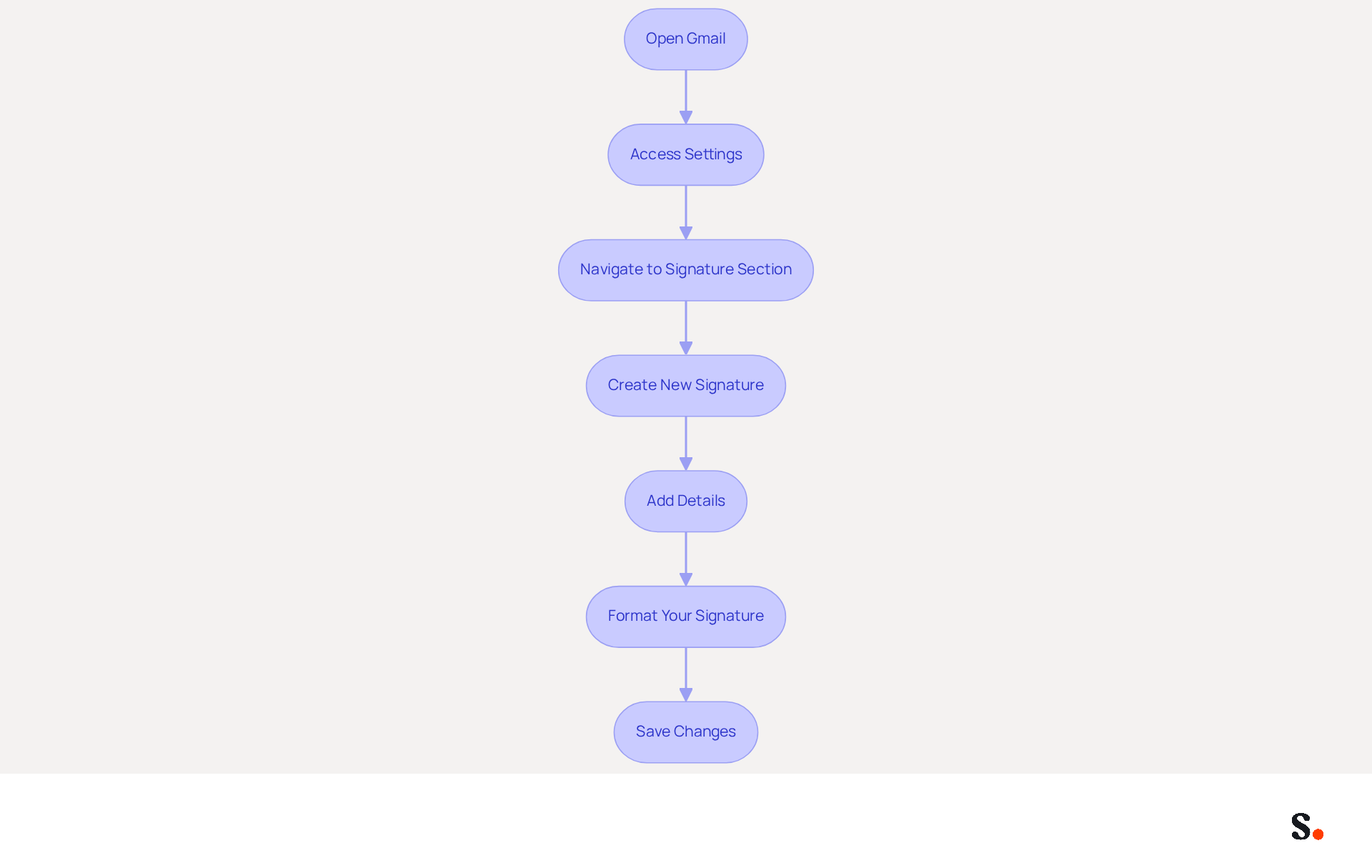
Many businesses overlook the potential of their gmail signature as a marketing tool, missing out on valuable engagement opportunities. To convert your message footer into a powerful marketing tool, it is essential to incorporate branding and marketing elements effectively. Here are some strategies to enhance your email signature:
- Use Your Logo: Including your company logo significantly boosts brand recognition. Ensure the logo is appropriately sized to maintain a balanced appearance alongside the text.
- Color Scheme: Utilize your company colors within the signature to create a cohesive look that aligns with your overall branding strategy. This consistency can enhance the professionalism of your communications.
- Call-to-Action (CTA): Incorporate a CTA, such as a link to your latest blog post or a promotional offer. For instance, you might include a line like 'Check out our latest webinar!' with a hyperlink, encouraging recipients to engage further with your content.
- Social Media Links: Adding icons that link to your social media profiles encourages recipients to connect with Scribe across multiple platforms. This not only boosts engagement but also nurtures a sense of community around your identity.
By integrating these elements, you can turn your gmail signature into a powerful marketing asset that boosts engagement and reinforces your brand identity. With Scribe, every modification made in your Aircall setup will automatically be reflected in your communication identifiers, ensuring that your branding stays consistent across all interactions. Moreover, the integration with Calendly enables automatic updates to your contact information, further enhancing brand consistency. Research indicates that businesses maintaining consistent messaging formats see a 22% increase in response rates, underscoring the importance of a well-designed email signature. Furthermore, 76% of marketers believe that message footers positively impact engagement rates, highlighting the significance of enhancing this frequently neglected element of communication. As Holly Linden observes, incorporating visual components like banners can greatly improve engagement, transforming your message footer into a dynamic marketing tool.
Maintain and Update Signatures for Consistent Engagement
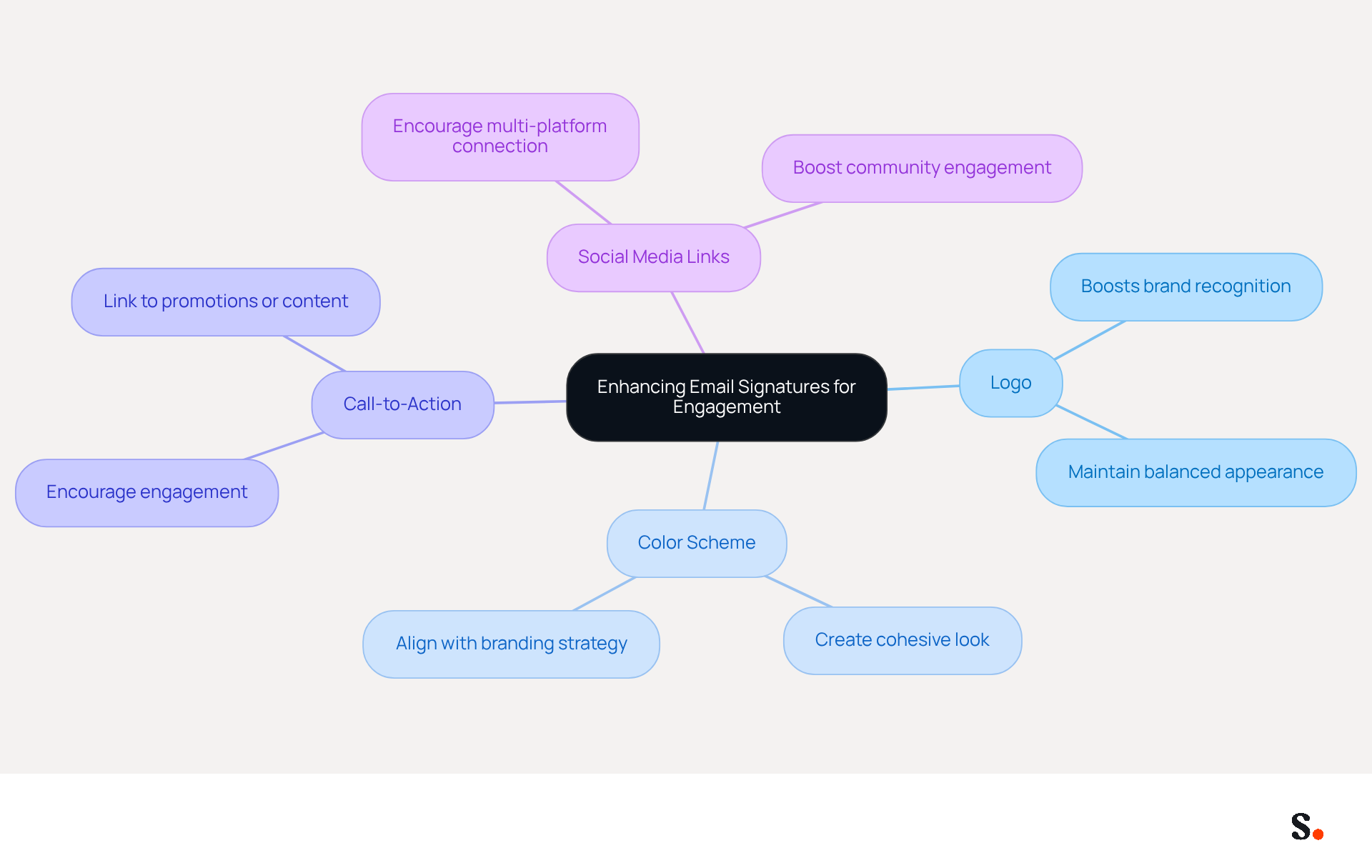
To maintain effective communication, it is crucial to regularly update your gmail signature. Here are some best practices:
- Review Periodically: Establish a routine to review your signature every few months. This helps identify any changes in your contact information, job title, or company branding that need to be reflected. Scribe automatically syncs any changes from your Aircall settings to your email signature, keeping everything consistent. The platform also complies with SOC 2 Type II, GDPR, and CCPA, enhancing trust and security in your email communications.
- Update for Campaigns: When launching a marketing campaign, adjust your email footer to include relevant promotional elements. For instance, adding a temporary banner can effectively highlight a new product or service. Studies show that using banners can lead to a click-through rate of 12%, making them a valuable addition to your campaigns. Scribe's automated updates allow you to implement these changes seamlessly, enhancing your brand's visibility.
- Feedback Loop: Solicit feedback from colleagues or clients regarding the effectiveness of your mark. Insights from others can reveal how well it functions as a marketing tool and where improvements can be made.
Keeping your email footer updated not only boosts engagement but also helps you maintain a professional image. Research shows that 70% of consumers feel frustration when brands do not include a contact detail, emphasizing the importance of maintaining a consistent and professional branding strategy. Moreover, businesses that regularly refresh their branding can produce around 60,000-80,000 branded impressions each month, greatly enhancing visibility and engagement. Additionally, research indicates that 64-70% of participants believe a professional branded message enhances trust and credibility. By adhering to these best practices and leveraging Scribe's automated synchronization features, you can ensure your gmail signature continues to serve its purpose effectively. Failing to keep your email signature current could damage your brand's credibility and reduce audience engagement.
Conclusion
An effective Gmail signature is not just a formality; it is a critical component of professional communication and brand identity. By focusing on simplicity, clarity, and strategic branding elements, organizations can optimize their email signatures to serve as effective marketing tools that drive engagement and establish trust with recipients.
Key practices include:
- Maintaining a concise signature that highlights essential contact information
- Implementing a step-by-step setup process for consistency
- Incorporating branding elements such as logos and calls-to-action
Regular updates are crucial to ensure that signatures reflect current information and marketing campaigns, with Scribe's automated features simplifying this process. The integration of Scribe with platforms like Google Workspace ensures that signatures remain consistent and up-to-date, ultimately enhancing the professional image of the organization.
By following these best practices, you can boost engagement and strengthen brand recognition with every email you send. As businesses increasingly recognize the importance of effective communication, leveraging tools like Scribe can lead to measurable marketing ROI and a stronger connection with audiences. By optimizing your Gmail signature, you not only enhance your professional image but also unlock new avenues for engagement and brand loyalty.
Frequently Asked Questions
What should I include in my Gmail signature?
Your Gmail signature should include your full name, job title, company name, and primary contact information.
How long should my Gmail signature be?
Ideally, your Gmail signature should be concise and limited to three to five lines to avoid overwhelming the recipient.
Why is it important to have a clear Gmail signature?
A clear Gmail signature enhances the likelihood of engagement by allowing recipients to quickly identify who you are and how to reach you.
What impact does a professional Gmail signature have on trust?
Studies indicate that a professional Gmail signature significantly enhances trust and professionalism in email communications, with 80% of businesses considering a branded footer crucial for establishing trust.
How can I prevent decision fatigue for recipients regarding my contact information?
Keeping your signature within three to four lines helps prevent decision fatigue, making it simpler for recipients to locate your contact information.
How often should I evaluate my email signature?
It is recommended to evaluate your email signature annually to ensure compliance with best practices and maintain clarity and effectiveness in communication.
What integration feature does Scribe offer for managing communication identifiers?
Scribe offers seamless integration with Calendly, allowing any modifications made to your Calendly settings to automatically sync with your documents.
What security measures does Scribe have in place?
Scribe demonstrates its commitment to security through its SOC 2 Type II certification and compliance with GDPR and CCPA.
What is the significance of a well-designed email footer according to Holly Linden?
Holly Linden observes that 'A good email footer helps establish trust and credibility,' which aligns with Scribe's goal of providing secure and effective email footer management.
List of Sources
- Emphasize Simplicity and Clarity in Your Signature
- Email Signature Best Practices Guide With Examples - MailerLite (https://mailerlite.com/blog/email-signature-best-practices)
- 8 Best Practices Email Signature Strategies for 2025 — Salesloop (https://salesloop.io/blog/best-practices-email-signature)
- Best Practices for a Post Grad Email Signature That Impresses (https://scribe-mail.com/en-US/blog/best-practices-for-a-post-grad-email-signature-that-impresses)
- Email Signature Best Practices (https://uschamber.com/co/grow/thrive/email-signature-best-practices)
- Implement Step-by-Step Signature Setup in Gmail
- 40+ Email Signature Statistics for 2026 (Data + Insights) (https://wavecnct.com/blogs/email-signature-statistics)
- Email Signature Statistics: A Closer Look at Email Signatures in 2026 (https://mysignature.io/blog/email-signature-statistics)
- Add a good looking signature in Gmail (1 minute guide) (https://wisestamp.com/guides/how-to-add-signature-in-gmail)
- How to Add Signature in Gmail: Step by Step Guide (2026) (https://wpmanageninja.com/how-to-add-signature-in-gmail)
- Incorporate Branding and Marketing Elements for Engagement
- The impact of email signatures on your branding (https://signitic.com/en/resources/the-impact-of-email-signatures-on-your-branding)
- Email signature statistics: Why every business should optimize their email signatures — Stripo.email (https://stripo.email/blog/email-signature-statistics-why-every-business-should-optimize-their-email-signatures)
- Using Email Signatures as a Marketing Tool: Ideas for Generating Leads and Promoting Business (https://blog.ringostat.com/en/using-email-signatures-as-a-marketing-tool-ideas-for-generating-leads-and-promoting-business)
- Home - NEWOLDSTAMP (https://newoldstamp.com)
- Exclaimer Research: 67% of Marketers Expect Email Signatures to Support With Lead Gen In 2023 (https://businesswire.com/news/home/20230612141095/en/Exclaimer-Research-67-of-Marketers-Expect-Email-Signatures-to-Support-With-Lead-Gen-In-2023)
- Maintain and Update Signatures for Consistent Engagement
- 40+ Email Signature Statistics for 2026 (Data + Insights) (https://wavecnct.com/blogs/email-signature-statistics)
- The impact of email signatures on your branding (https://signitic.com/en/resources/the-impact-of-email-signatures-on-your-branding)
- demandgenreport.com (https://demandgenreport.com/industry-news/research-recap-branded-email-signatures-increase-company-recognition-trust/47252)
- Why Email Signatures Are So Important (https://findlight.net/salesacademy/why-email-signatures-are-so-important)
- Why Are Email Signatures Key to Brand Awareness? | QuickMail (https://quickmail.com/role-of-email-signatures-in-brand-awareness)
Get started with Scribe
Create your signature in minutes
Free 14-day trial — no credit card.