Best Practices for Your Work Email Signature Template
In professional communication, the effectiveness of an email signature extends beyond mere identification; it plays a crucial role in shaping brand perception
Sophie Grant
Email Signature Specialist, Scribe

On this page
Introduction
In professional communication, the effectiveness of an email signature extends beyond mere identification; it plays a crucial role in shaping brand perception. An email signature serves as more than just a digital sign-off; it is a vital branding tool that can significantly influence perceptions and engagement.
Creating an effective email signature template means knowing how to convey essential information while also reinforcing your brand identity and professionalism. Yet, with so many design strategies and automation tools available, how can organizations keep their email signatures consistent, compliant, and impactful across different platforms?
This article explores effective strategies for creating and managing email signature templates that not only enhance communication but also strengthen brand integrity.
Define Key Elements of a Professional Email Signature
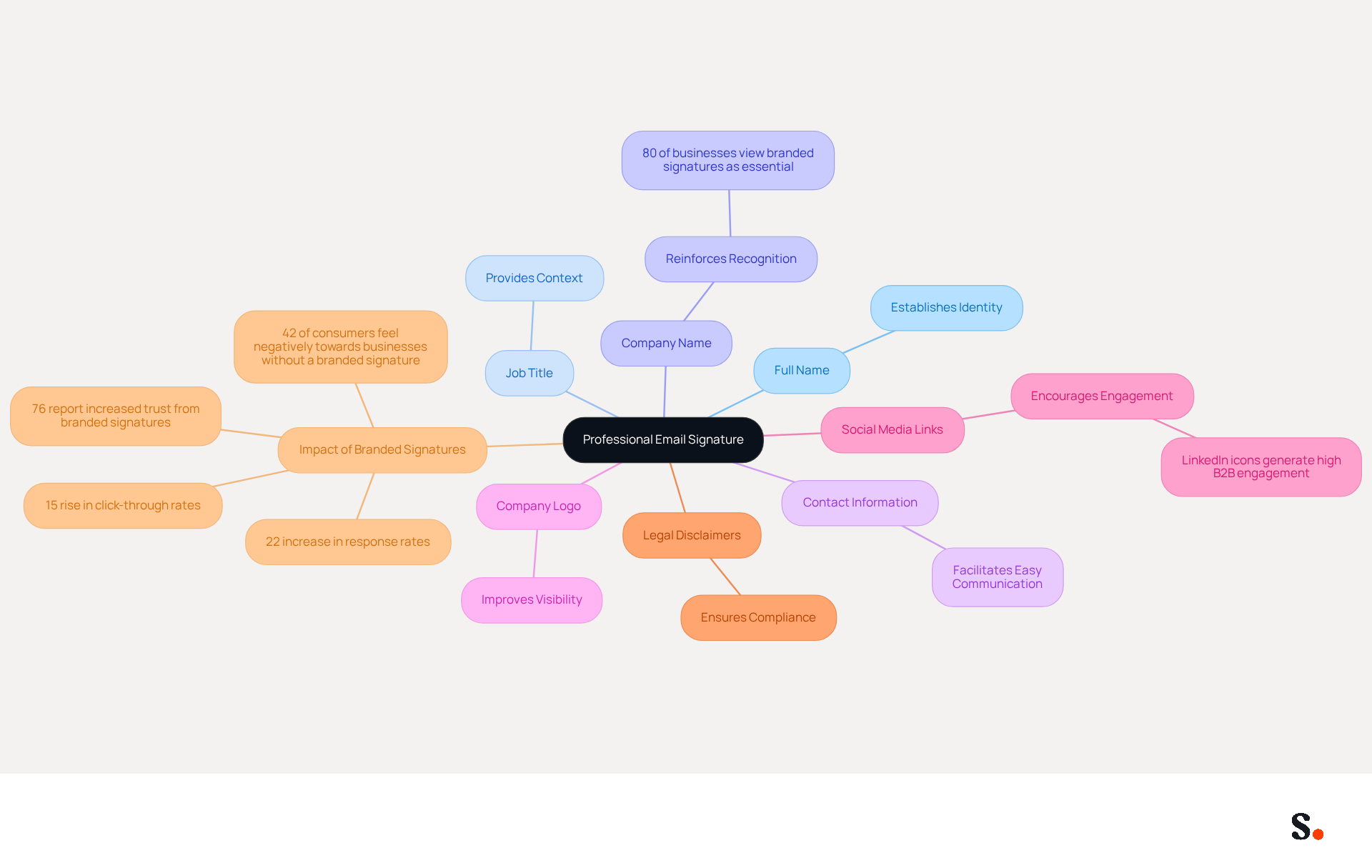
In today's digital landscape, utilizing a work email signature template is not just a formality; it is a critical component of effective communication. A professional email signature should encompass several key elements to ensure clarity, brand consistency, and effective communication:
- Full Name: Clearly stating your name establishes your identity and personal connection with the recipient.
- Job Title: Including your position provides context about your role within the organization, enhancing credibility.
- Company Name: Mentioning your organization reinforces recognition, which is crucial as 80% of businesses view branded signatures as essential.
- Contact Information: Providing a phone number and contact address facilitates easy communication, ensuring recipients can reach you without hassle.
- Company Logo: Including your logo improves visibility, making your communications more recognizable and polished.
- Social Media Links: Adding links to professional social media profiles encourages further engagement and connection with your audience. LinkedIn icons, in particular, generate high B2B engagement.
- Legal Disclaimers: If applicable, including legal disclaimers relevant to your industry is important for compliance and professionalism.
Incorporating these elements into your work email signature template not only ensures your message is clear but also showcases your professionalism and commitment to consistency. Research shows that branded digital identifiers can result in a 22% increase in response rates and a 15% rise in click-through rates to company websites, highlighting their importance as a strategic marketing tool. Moreover, a well-crafted emblem can greatly improve a brand's image, offering a unified visual identity that connects with recipients. Significantly, 42% of consumers have a negative perception of a business that sends a message without a branded identifier, emphasizing the importance of upholding a professional image. Moreover, 76% of participants indicated a rise in trust from branded digital identifiers, further highlighting their significance in effective communication.
Without a work email signature template, your communications may fail to convey the credibility and clarity needed to engage effectively. With Scribe, every modification made in your Aircall setup will automatically be shown in your correspondence identifiers, ensuring smooth updates and improved consistency in your identity. This automated synchronization simplifies management and supports compliance with SOC 2 Type II standards, ensuring secure data handling. By leveraging Scribe's capabilities, Marketing Managers can maintain 100% consistency across all communications effortlessly. Ultimately, neglecting to implement a professional email signature could undermine your credibility and hinder meaningful connections with your audience.
Implement Effective Design Strategies for Email Signatures
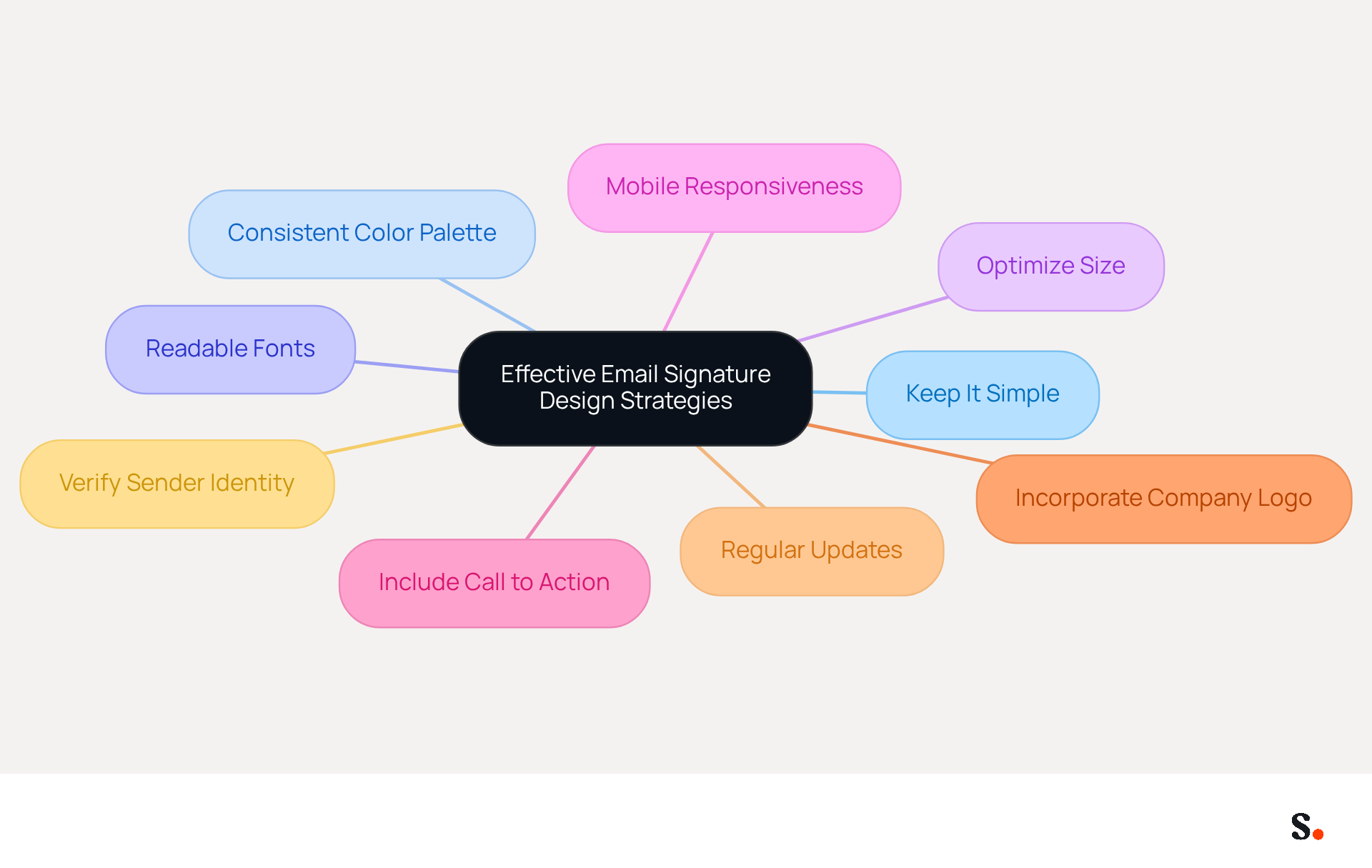
To create an effective email signature design, it is essential to implement strategies that enhance clarity and professionalism:
- Keep It Simple: Limit the number of elements to avoid clutter. A clean design is more effective, ensuring that key information stands out.
- Use a Consistent Color Palette: Stick to your colors to maintain consistency across all communications. This reinforces brand identity and recognition.
- Choose Readable Fonts: Opt for standard fonts that are easy to read on all devices. Avoid overly decorative fonts that may hinder readability.
- Optimize Size: Ensure your mark is no wider than 600 pixels to prevent cropping in various messaging clients, accommodating both desktop and mobile views.
- Mobile Responsiveness: Create your identifier to be mobile-friendly, as 60% of business correspondence is now accessed on mobile devices. This ensures it looks good on all screens.
- Include a Call to Action: If appropriate, add a call-to-action button that directs recipients to your website or a specific landing page. Research shows that signatures featuring strategic CTAs can lead to a significant increase in meeting bookings.
- Incorporate Your Company Logo: Including a company logo in your correspondence enhances brand recognition and adds a professional touch.
- Regular Updates: Keeping contact details current can be a challenge for many businesses. By syncing your Google Workspace and Aircall with Scribe, you can simplify this process, ensuring your information stays current.
- Verify Sender Identity: As confirmed sender identity is becoming a primary trust signal, ensure your communication practices align with current standards to enhance credibility.
By implementing these design techniques, you can create a professional-looking footer that not only appears polished but also effectively conveys your identity and boosts engagement. This not only elevates your brand's image but also fosters trust and engagement with your audience.
Leverage Automation for Consistent and Up-to-Date Signatures
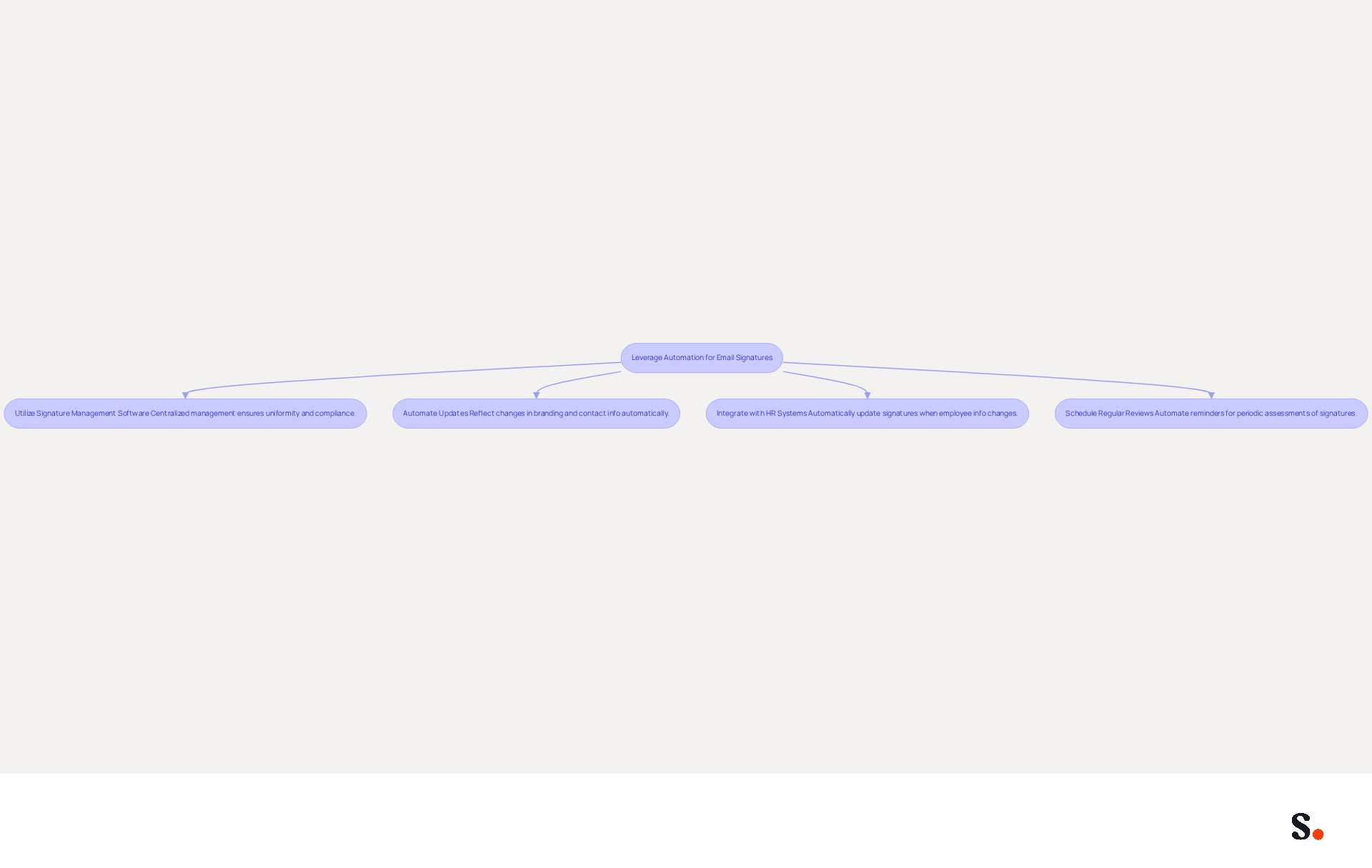
To maintain consistency and relevance in your email signatures, implementing automation strategies is essential:
- Utilize Signature Management Software: Leverage tools like Scribe that facilitate centralized management of digital identifiers across your organization, ensuring uniformity and compliance with GDPR and CCPA. A recent study shows that 78% of marketers believe consistent branded identifiers are vital for cohesive messaging across company communications. Furthermore, by joining Scribe's Affiliate Program, you can earn a 50% commission while promoting brand consistency, transforming your email branding into a tool for both communication and revenue generation.
- Automate Updates: Establish automated updates for identifiers to reflect changes in branding, contact information, or legal disclaimers without requiring manual intervention. Outdated information can lead to miscommunication and damage client trust, so this approach significantly reduces that risk.
- Integrate with HR Systems: Connect your document management tool with HR systems to automatically update markings when employee information changes, enhancing efficiency and accuracy in communications.
- Schedule Regular Reviews: Automate reminders for periodic assessments of signatures to ensure they remain compliant and relevant. Regular evaluations are crucial to prevent deviations from quality standards, assisting in upholding a polished appearance in all correspondence.
By utilizing automation, businesses can save time, reduce errors, and improve their corporate image. When done right, CTAs in footer sections can boost click-through rates significantly, reaching up to 12%, transforming footers into powerful marketing tools that drive engagement and reinforce brand consistency. As Sophie Grant, a Specialist in Digital Signatures, observes, "Utilizing management software for digital signatures enables organizations to convey a consistent and professional image, transforming each message into an opportunity for engagement and promotion." Ultimately, embracing automation in email signature management can significantly enhance your brand's credibility and client trust.
Test and Optimize Signatures for Cross-Platform Compatibility
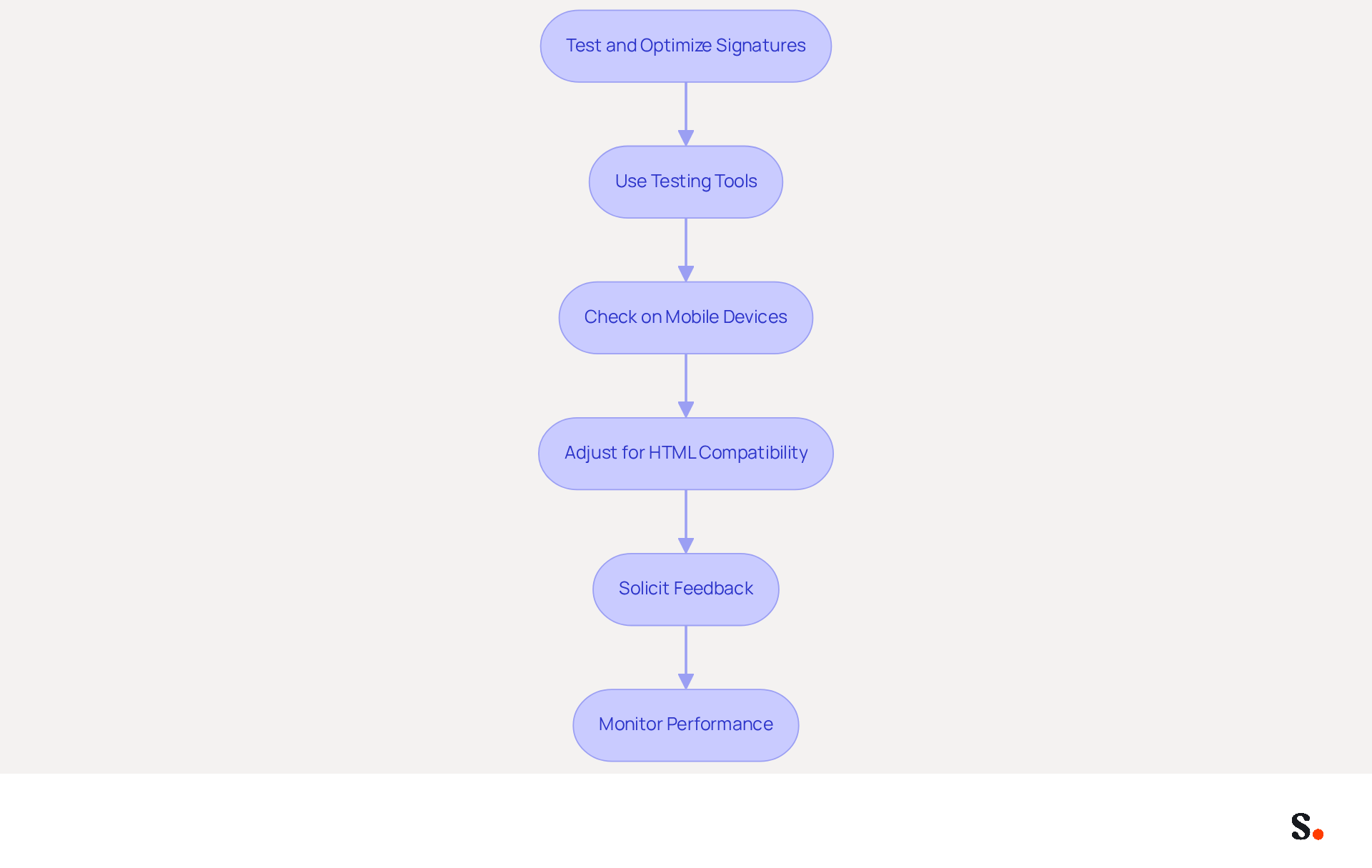
To ensure your email signatures are effective across all platforms, it is crucial to follow specific testing and optimization steps:
- Use Testing Tools: Utilize tools that enable you to preview how your mark appears in various messaging clients, such as Outlook, Gmail, and Apple Mail. This helps identify any discrepancies in formatting or design.
- Check on Mobile Devices: Test your mark on multiple mobile devices to confirm it displays correctly on smaller screens. Since 60% of business correspondence is viewed on mobile devices, a mobile-friendly design is crucial. Messages with branded identifiers receive a 22% higher response rate than those lacking them, underscoring the need for mobile optimization.
- Adjust for HTML Compatibility: Ensure that your email's HTML code is clean and compatible with various email clients to avoid rendering issues. A well-structured HTML format can significantly enhance its appearance across platforms.
- Solicit Feedback: Encourage colleagues to review your mark on their devices and provide feedback on its appearance and functionality. With 44.4% of users updating their contact details 2-4 times a year, regular feedback is essential for maintaining effective information.
- Monitor Performance: Utilize analytics to track engagement with your messages. By analyzing metrics such as click-through rates and conversion rates, you can adjust elements based on performance data, ensuring your identifiers remain effective marketing tools.
Furthermore, consider syncing your Google Workspace with Scribe to simplify management of your messaging branding. This integration streamlines the process by automatically updating your teammates' information, ensuring that any changes in Google Workspace, such as job position updates or group changes, are reflected in Scribe without manual input. This not only improves efficiency but also preserves consistency across all communications. Regularly testing and optimizing your email signatures not only maintains a professional appearance but also ensures they function effectively across all platforms, ultimately enhancing your brand's visibility and engagement.
Conclusion
A well-crafted email signature template is not just a formality; it is a strategic asset that enhances communication and reinforces brand identity. By incorporating key elements such as your full name, job title, company name, and contact information, you establish credibility and facilitate easy communication. Additionally, integrating your company logo and social media links enhances engagement, while legal disclaimers ensure compliance. By leveraging Scribe's automation capabilities, marketing teams can ensure that email signatures are consistently updated, reducing the risk of errors and enhancing compliance.
The article highlights several best practices for designing effective email signatures, including:
- Simplicity
- Mobile responsiveness
- Use of a consistent color palette
These strategies not only improve the visual appeal of your signatures but also enhance readability and engagement. Automation plays a crucial role in keeping signatures up-to-date, reducing errors, and ensuring compliance with regulations like GDPR and CCPA. Regular testing and optimization across various platforms are vital to maintain functionality and effectiveness, ultimately transforming email signatures into powerful marketing tools.
By prioritizing professional email signatures, organizations can transform a simple communication tool into a strategic advantage that drives brand loyalty and engagement. Embracing these best practices not only fosters trust and engagement with your audience but also positions your brand for success in a competitive landscape.
Frequently Asked Questions
What are the key elements of a professional email signature?
A professional email signature should include your full name, job title, company name, contact information, company logo, social media links, and legal disclaimers if applicable.
Why is it important to include a full name in an email signature?
Including your full name establishes your identity and creates a personal connection with the recipient.
How does a job title in an email signature enhance communication?
A job title provides context about your role within the organization, which enhances your credibility.
What role does the company name play in an email signature?
Mentioning your company name reinforces recognition, which is crucial as 80% of businesses view branded signatures as essential.
Why should contact information be included in an email signature?
Providing a phone number and contact address facilitates easy communication, ensuring recipients can reach you without hassle.
How does including a company logo benefit an email signature?
Including your logo improves visibility, making your communications more recognizable and polished.
What is the significance of adding social media links to an email signature?
Adding links to professional social media profiles encourages further engagement and connection with your audience, particularly with LinkedIn icons generating high B2B engagement.
Are legal disclaimers necessary in an email signature?
Yes, including legal disclaimers relevant to your industry is important for compliance and professionalism.
What impact do branded digital identifiers have on response rates?
Research shows that branded digital identifiers can result in a 22% increase in response rates and a 15% rise in click-through rates to company websites.
How does Scribe assist in maintaining email signature consistency?
With Scribe, every modification made in your Aircall setup will automatically be shown in your correspondence identifiers, ensuring smooth updates and improved consistency in your identity.
What are the consequences of not using a professional email signature?
Neglecting to implement a professional email signature could undermine your credibility and hinder meaningful connections with your audience.
List of Sources
- Define Key Elements of a Professional Email Signature
- 40+ Email Signature Statistics for 2026 (Data + Insights) (https://wavecnct.com/blogs/email-signature-statistics)
- The impact of email signatures on your branding (https://signitic.com/en/resources/the-impact-of-email-signatures-on-your-branding)
- Email Signature Trends 2026: What Designers Are Actually Using (https://markaplugin.com/blog/email-signature-trends-2026)
- Implement Effective Design Strategies for Email Signatures
- Email Signature Best Practices - NEWOLDSTAMP (https://newoldstamp.com/blog/email-signature-best-practices)
- Email Signature Trends 2026: What Designers Are Actually Using (https://markaplugin.com/blog/email-signature-trends-2026)
- Why Email Signatures Must Be In Your 2026 Marketing Plan | Rocketseed (https://rocketseed.com/blog/what-are-the-biggest-email-trends-for-2026)
- Email Signature Best Practices for 2026 (+ 15 Pro Examples) (https://wavecnct.com/blogs/email-signature-best-practices-2026)
- Leverage Automation for Consistent and Up-to-Date Signatures
- Maximizing Efficiency with Automated Email Signatures for Internal and External Communications | Crossware365 (https://crossware365.com/blog/maximizing-efficiency-with-automated-email-signatures-for-internal-and-external-communications)
- How to Automate Email Signature Updates | Exclaimer (https://exclaimer.com/email-signature-handbook/automate-email-signature-updates)
- 4 Best Practices for Your Work Email Signature Strategy (https://scribe-mail.com/en-US/blog/4-best-practices-for-your-work-email-signature-strategy)
- Maximize Marketing Impact with Automated Email Signatures Best Practices (https://scribe-mail.com/en-US/blog/maximize-marketing-impact-with-automated-email-signatures-best-practices)
- Why Email Signature Management Software is Essential for Marketing Success (https://scribe-mail.com/en-US/blog/why-email-signature-management-software-is-essential-for-marketing-success)
- Test and Optimize Signatures for Cross-Platform Compatibility
- Email signature statistics: Why every business should optimize their email signatures — Stripo.email (https://stripo.email/blog/email-signature-statistics-why-every-business-should-optimize-their-email-signatures)
- 4 Best Practices for a Modern Email Signature That Engages (https://scribe-mail.com/en-US/blog/4-best-practices-for-a-modern-email-signature-that-engages)
- Email Signature Best Practices for 2026 (+ 15 Pro Examples) (https://wavecnct.com/blogs/email-signature-best-practices-2026)
- Email Signature Trends in Numbers: Infographic [2026] (https://mailtrap.io/blog/email-signature-trends)
- 40+ Email Signature Statistics for 2026 (Data + Insights) (https://wavecnct.com/blogs/email-signature-statistics)
Get started with Scribe
Build a professional email signature
Free 14-day trial — no credit card.