Comment ajouter une signature sur Gmail avec Scribe en 5 étapes
While email signatures may seem like a minor detail, they play a crucial role in shaping professional communication and brand perception. With the right
Sophie Grant
Email Signature Specialist, Scribe
Introduction
While email signatures may seem like a minor detail, they play a crucial role in shaping professional communication and brand perception. With the right approach, a well-crafted signature can serve as a powerful marketing tool, driving engagement and reinforcing brand identity with every email sent. Many users find the process of setting up their signatures in Gmail to be confusing and frustrating, which can lead to inconsistencies that affect their professional image.
How can organizations effectively navigate these challenges and leverage tools like Scribe to create and manage impactful email signatures?
Understand the Importance of Email Signatures
Email footers play a critical role in professional communication, serving functions that extend beyond mere sign-offs. A well-crafted signature can:
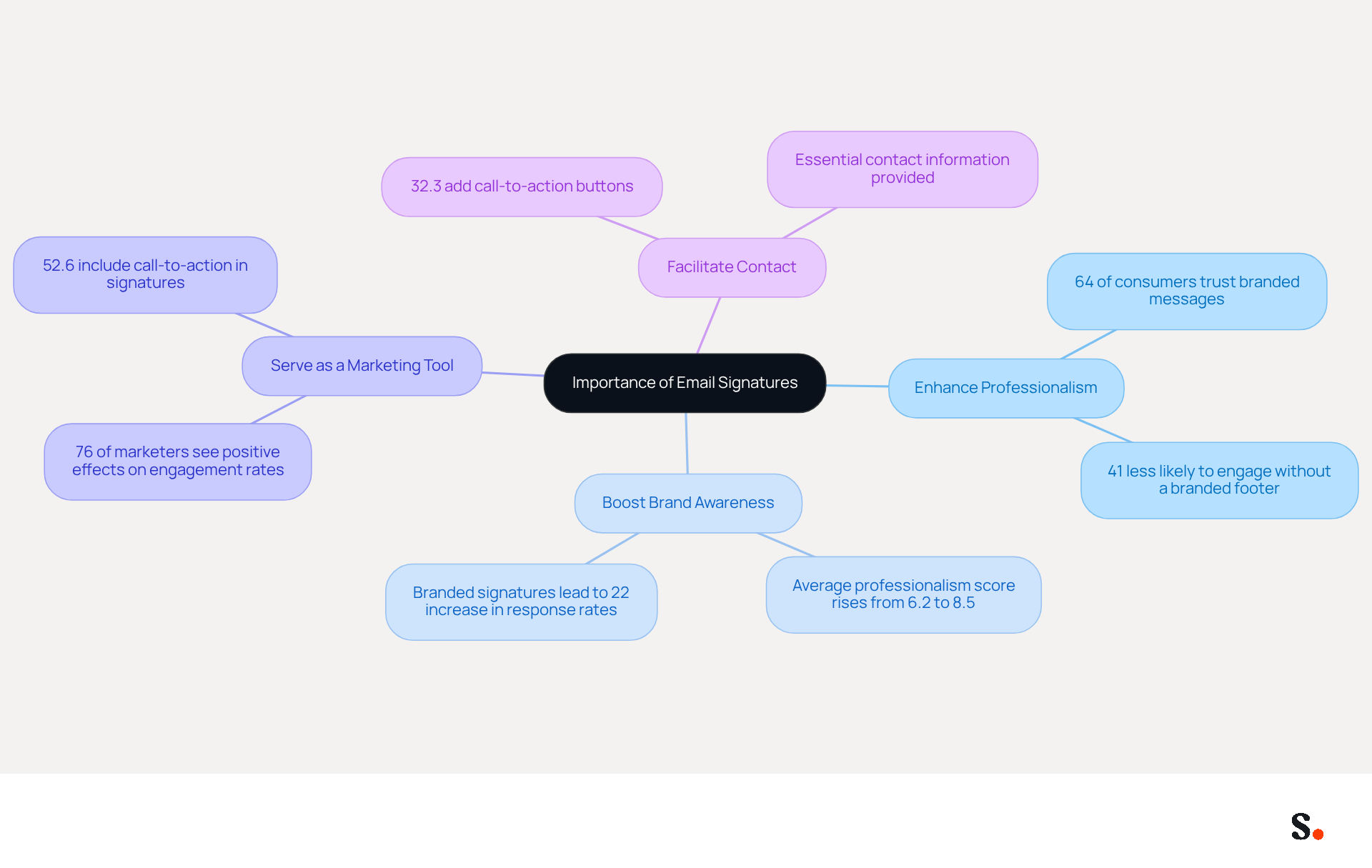
- Enhance Professionalism: Consistent representation in every email fosters trust and credibility with recipients. Research shows that 64% of consumers believe a professional branded message footer enhances their trust in the sender, while 41% are less likely to engage with communications that lack a branded footer.
- Boost Brand Awareness: Incorporating your company logo and branding elements reinforces brand identity with each message sent. A consistent mark can elevate the average score of professionalism from 6.2 to 8.5 out of 10.
- Serve as a Marketing Tool: Signatures can include links to your website, social media profiles, or promotional banners, transforming every message into a marketing opportunity. Businesses that implement consistent branding see a 22% rise in response rates, showcasing their effectiveness as a marketing channel. Furthermore, 76% of marketers think that footers have a positive effect on engagement rates.
- Facilitate Contact: An endorsement provides essential contact information, making it easy for recipients to reach you. Statistics indicate that 52.6% of users incorporate a call-to-action in their messages, and 32.3% add call-to-action buttons, reflecting a proactive approach to engagement.
Utilizing this platform simplifies the management of email footers, ensuring efficiency and consistency. The platform automates the synchronization of messaging identifiers with your business phone system, ensuring that any modifications made in your Aircall configuration are automatically reflected in the application Scribe. This real-time update capability not only enhances brand consistency but also ensures that your data is secure, as Scribe is SOC 2 Type II compliant. Understanding these benefits highlights the importance of investing time in creating a professional email footer, as it not only improves communication but also significantly impacts brand visibility and trust among recipients. Research indicates that email identifiers serve not only as a professional formality but also as a subtle yet effective marketing channel integrated into everyday communications.
Access Gmail Settings for Signature Setup
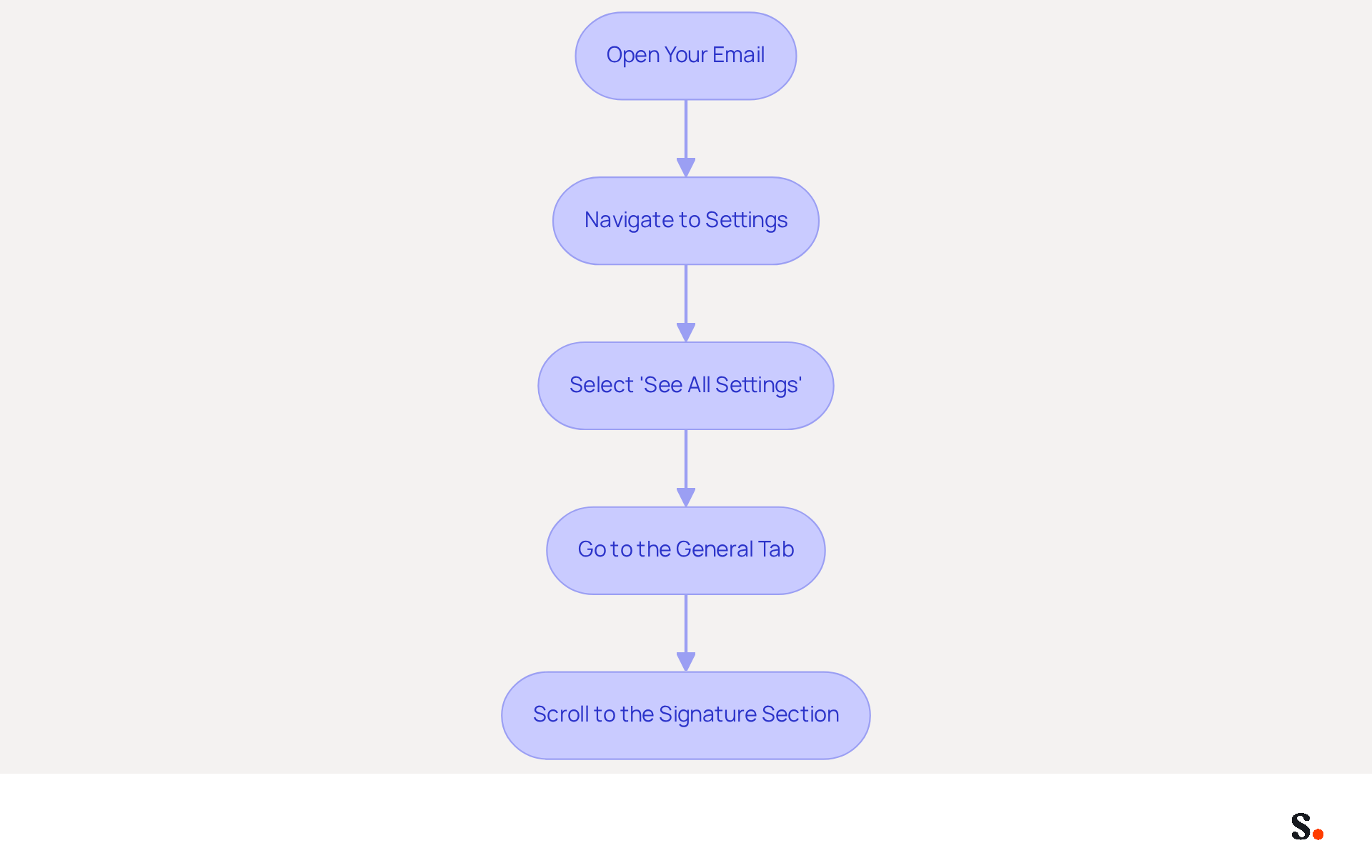
Many users find it confusing and cumbersome to understand comment ajouter une signature sur gmail, yet it is a crucial step in establishing a professional presence. To add a signature in Gmail, follow these steps:
- Open your email: Log into your email account on your desktop.
- Navigate to Settings: Click on the gear icon located in the top right corner of the Gmail interface.
- Select 'See all settings': From the dropdown menu, choose 'See all settings' to access the full settings menu.
- Go to the General Tab: Ensure you are in the 'General' tab, which is the default tab when you open settings.
- Scroll to the Signature Section: Look for the 'Signature' section, which is located further down the page. Here, you will be able to create and manage your messaging identifiers.
A professional communication footer is vital; in fact, 70% of users believe it enhances credibility. Furthermore, branded digital identifiers can result in a 22% boost in response rates and a 15% increase in click-through rates to company websites. Following these steps will help you understand comment ajouter une signature sur gmail effectively.
Create and Customize Your Email Signature
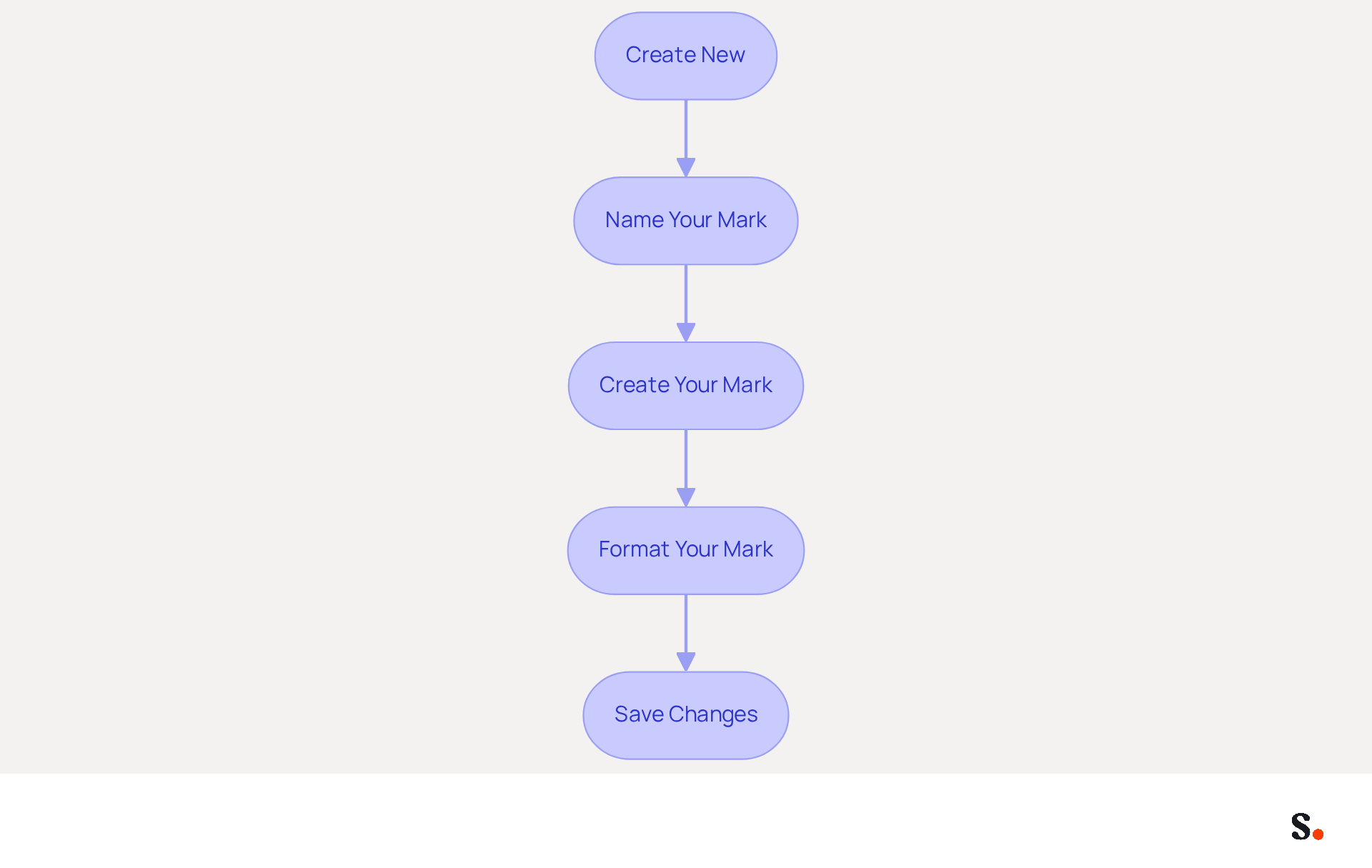
To establish your brand identity and enhance communication, it's essential to learn comment ajouter une signature sur gmail. To create and customize your email signature in Gmail, follow these straightforward steps:
- Click on 'Create New': In the Signature section, select the 'Create New' button to begin the design process for your personal mark.
- Name Your Mark: A pop-up window will prompt you to name your mark. Choose a descriptive name that will assist you in recognizing it later, particularly if you intend to create multiple identifiers for different contexts.
- Create Your Mark: In the text box, input your mark details, including your full name, job title, company name, and contact information. You can also enhance your personal mark by adding links to your social media profiles or website, which can significantly increase engagement.
- Format Your Mark: Utilize the available formatting options to make your mark visually appealing. Adjust the font style, size, and color to align with your brand identity. Consider incorporating your company logo or a professional photo to add a personal touch, as this can reinforce brand recognition and trust.
- Save Changes: After finalizing your design, scroll down and click 'Save Changes' to apply your new mark.
Following these steps will show you comment ajouter une signature sur gmail, creating a personalized message footer that enhances your professional image. It also serves as a powerful branding tool. Scribe ensures that any changes you make in your Aircall setup reflect automatically in your emails, keeping your brand consistent. The platform is SOC 2 Type II compliant, ensuring secure data management. A study indicates that 76% of recipients trust senders who use branded communications, highlighting the importance of a professional email signature. Organizations utilizing consistent branded electronic identifiers report over 22% increases in response rates, and Scribe users experience an average click-through rate of 12% on banner displays. Additionally, remember to update your sign-off regularly, especially after role changes or company rebrands, and consider defining a sign-off policy to maintain consistency across your organization. Regular updates to your email signature can significantly impact your professional image and engagement rates.
Utilize Scribe for Automated Signature Management
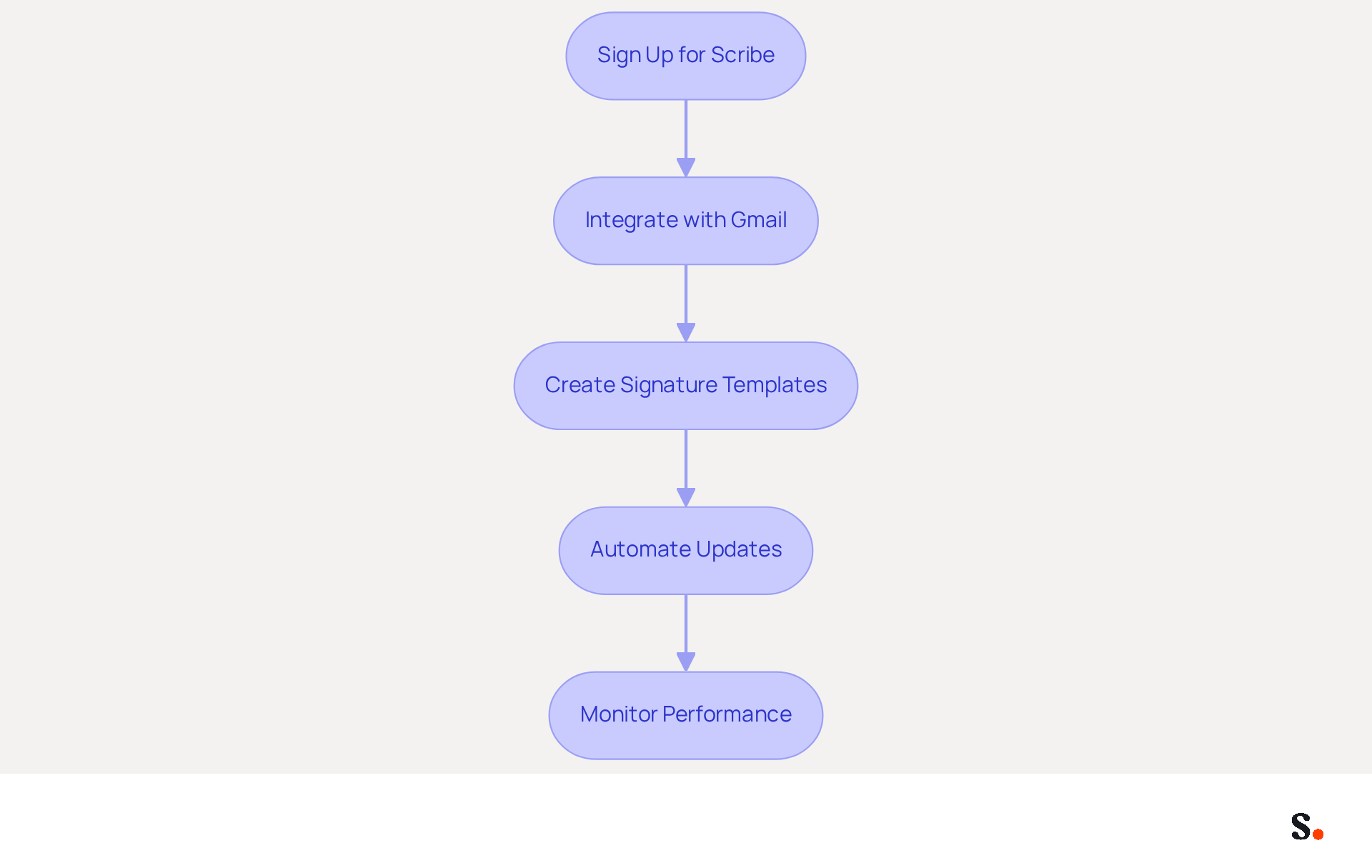
Managing email signatures can be a complex task, but Scribe simplifies this process through automation and real-time synchronization with your business phone system. Here’s how to utilize Scribe effectively:
- Sign Up for Scribe: If you haven’t already, create an account on the platform.
- Integrate with Gmail: Follow the prompts to connect your Gmail account. This will enable the platform to handle your autographs effortlessly.
- Create Signature Templates: Utilize Scribe’s template feature to design on-brand email footers that can be applied throughout your organization.
- Automate Updates: With Scribe, you can schedule modifications to your identifiers. Manual updates can lead to inconsistencies and errors in branding, but Scribe ensures that any changes in branding or contact details are automatically reflected in all communications sent. The tool pulls your teammates' identification details from your business phone system, keeping everything synchronized without requiring action from your team.
- Monitor Performance: Scribe's analytics show that branded banners achieve an average click-through rate of 12%, demonstrating its effectiveness in enhancing your brand’s professionalism and marketing impact.
By utilizing Scribe, you can keep your email signatures up-to-date and consistent, enhancing your brand’s professionalism while meeting SOC 2 Type II standards. This ensures your brand remains consistent and professional, ultimately enhancing your communication strategy.
Troubleshoot Common Signature Issues
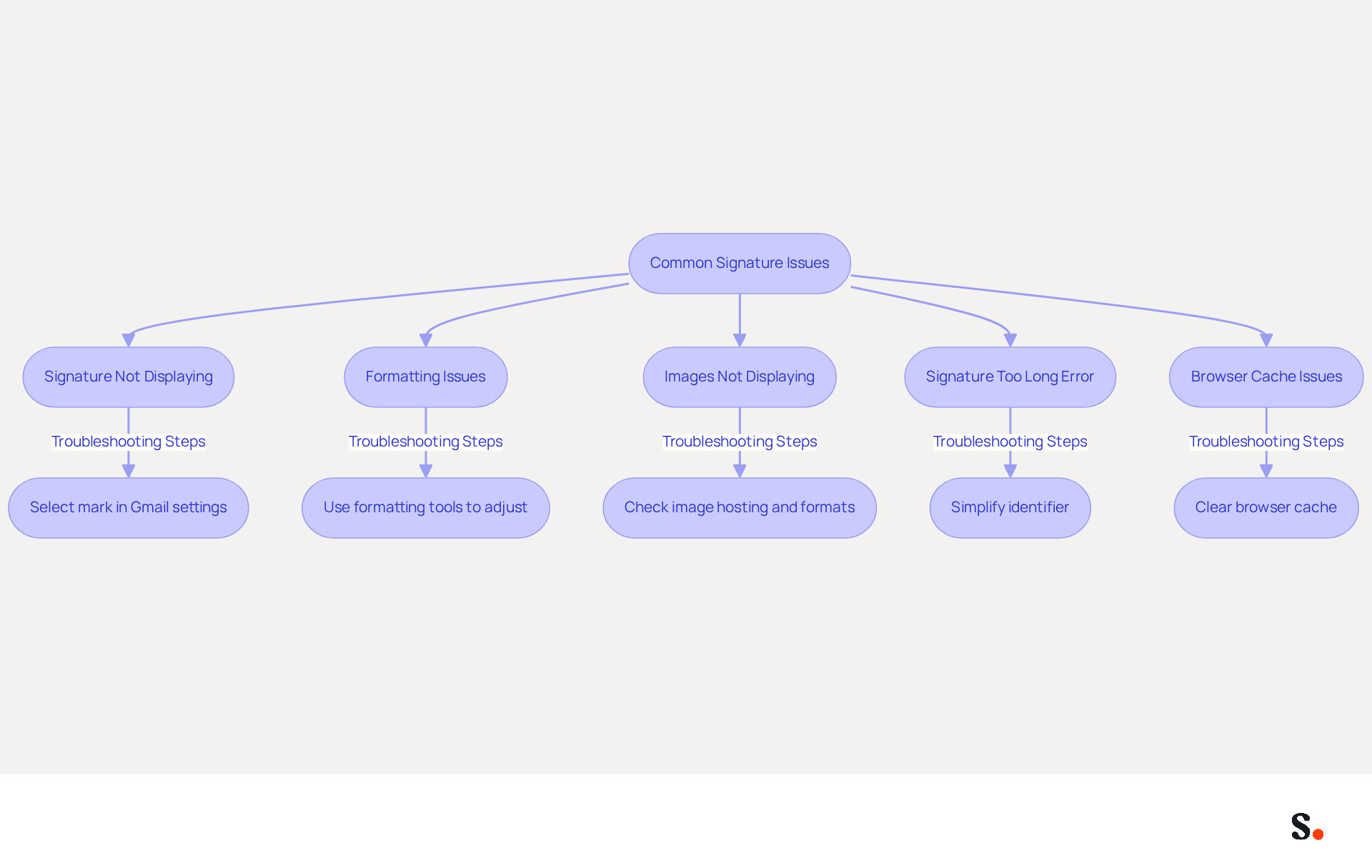
Despite thorough preparation, issues with your correspondence identifier can still arise, impacting your email communication. Here are some common problems and how to troubleshoot them:
- Signature Not Displaying: Ensure that you have selected your mark in the 'Defaults for marks' section of Gmail settings. Confirm that the appropriate mark is assigned for both new emails and replies/forwards. Linking your Google Workspace with Scribe can effectively address this issue, as any changes made in your Workspace will automatically reflect in Scribe, reducing the chances of discrepancies.
- Formatting Issues: If your mark appears misaligned or the formatting is off, utilize the formatting tools in the editor to adjust alignment and spacing. Be aware that various email clients manage forwarded or replied emails in distinct ways, which may lead to altered formatting or compressed images in Gmail. Excessive formatting can lead to rendering problems, so consider simplifying your design. Utilizing Scribe's attribute feature can also assist in maintaining consistent formatting across all sign-offs.
- Images Not Displaying: If images in your email footer are not showing, confirm they are hosted on a reliable public server. You can also try re-uploading the images or using different formats, ensuring they meet the recommended size of 70-100 pixels high by 300-400 pixels wide. Additionally, check for third-party add-ons that may interfere with the email service's formatting. By syncing your Google Workspace with Scribe, you can ensure that any image updates are automatically reflected in your email footers, minimizing the risk of display issues.
- Signature Too Long Error: Encountering a character limit error can hinder your email communication, necessitating a simplification of your identifier. If you encounter this error, simplify your identifier by removing unnecessary elements or reducing the text length. This simplification not only resolves the error but also enhances clarity in your communication. Regularly reviewing your contact details and branding elements is crucial for maintaining your brand image. The synchronization feature of Scribe enables you to manage these details effectively, ensuring your identifiers are always current.
- Browser Cache Issues: Sometimes, clearing your browser cache can resolve problems with displays not appearing correctly. To do this, go to 'More' > 'More tools' > 'Clear browsing data' and select 'Cached images and files.' Refresh your browser after making changes to ensure they take effect.
Implementing these strategies will help you understand comment ajouter une signature sur gmail, ensuring your email signature remains effective and professional, thereby reinforcing your brand's image.
Conclusion
A professional email signature is not just a formality; it is a critical component of effective communication and brand representation. By following the steps outlined in this guide, users can effectively add and customize their signatures in Gmail using Scribe, ensuring that every email sent reflects their professionalism and brand consistency.
Key insights discussed include:
- The importance of email signatures in building trust
- Boosting brand awareness
- Serving as a marketing tool
Scribe simplifies the management of these signatures through automation and real-time updates, allowing marketing teams to maintain control over their branding without constant IT intervention. The platform's compliance with SOC 2 Type II standards further ensures that data security is prioritized, making it a reliable choice for organizations.
A well-designed email signature enhances professionalism and turns each email into a marketing opportunity. As organizations strive for 100% brand consistency and measurable marketing ROI, utilizing Scribe can significantly improve engagement rates and overall communication effectiveness. Investing in a robust email signature management solution like Scribe can redefine how your organization communicates and engages with clients.
Frequently Asked Questions
Why are email signatures important in professional communication?
Email signatures enhance professionalism, boost brand awareness, serve as a marketing tool, and facilitate contact. They help build trust and credibility with recipients, with research showing that 64% of consumers believe a professional branded message footer enhances trust.
How can a well-crafted email signature boost brand awareness?
Incorporating your company logo and branding elements in your email signature reinforces brand identity with each message sent, elevating the average score of professionalism from 6.2 to 8.5 out of 10.
In what ways can email signatures serve as a marketing tool?
Email signatures can include links to your website, social media profiles, or promotional banners, turning every message into a marketing opportunity. Businesses that implement consistent branding see a 22% rise in response rates.
What contact information should be included in an email signature?
An email signature should provide essential contact information, making it easy for recipients to reach you. Many users incorporate calls-to-action in their messages to encourage engagement.
How does Scribe help manage email signatures?
Scribe simplifies the management of email footers by automating the synchronization of messaging identifiers with your business phone system, ensuring real-time updates and brand consistency.
What are the steps to add a signature in Gmail?
To add a signature in Gmail, log into your email account, click on the gear icon for settings, select 'See all settings', go to the 'General' tab, and scroll to the 'Signature' section to create and manage your signature.
What impact do professional email signatures have on user perception?
A professional email signature enhances credibility, with 70% of users believing it improves their perception of the sender. Additionally, branded digital identifiers can lead to a 22% boost in response rates and a 15% increase in click-through rates to company websites.
List of Sources
- Understand the Importance of Email Signatures
- The impact of email signatures on your branding (https://signitic.com/en/resources/the-impact-of-email-signatures-on-your-branding)
- Email Signature Statistics: A Closer Look at Email Signatures in 2026 (https://mysignature.io/blog/email-signature-statistics)
- Exclaimer Research: 67% of Marketers Expect Email Signatures to Support With Lead Gen In 2023 (https://businesswire.com/news/home/20230612141095/en/Exclaimer-Research-67-of-Marketers-Expect-Email-Signatures-to-Support-With-Lead-Gen-In-2023)
- How email signatures can drive brand awareness and organic traffic - NEWOLDSTAMP (https://newoldstamp.com/blog/email-signature-brand-awareness)
- 40+ Email Signature Statistics for 2026 (Data + Insights) (https://wavecnct.com/blogs/email-signature-statistics)
- Access Gmail Settings for Signature Setup
- 40+ Email Signature Statistics for 2026 (Data + Insights) (https://wavecnct.com/blogs/email-signature-statistics)
- Email signature statistics: Why every business should optimize their email signatures — Stripo.email (https://stripo.email/blog/email-signature-statistics-why-every-business-should-optimize-their-email-signatures)
- Email Signature Statistics: A Closer Look at Email Signatures in 2026 (https://mysignature.io/blog/email-signature-statistics)
- Email signature statistics and trends in 2024 (https://wisestamp.com/blog/email-signature-statistics)
- Create and Customize Your Email Signature
- 40+ Email Signature Statistics for 2026 (Data + Insights) (https://wavecnct.com/blogs/email-signature-statistics)
- Get More Leads. Close More Sales. Save Thousands on Software. (https://twilead.com/create-a-professional-email-signature-our-free-tips-and-tools)
- How to create and customize email signatures in Gmail (https://revolgy.com/insights/blog/how-to-create-and-customize-email-signatures-in-gmail)
- 5 Tips For Creating A Professional Email Signature (https://forbes.com/sites/goldiechan/2024/04/07/tips-for-creating-a-professional-email-signature)
- How to create custom Gmail signature (https://foxnews.com/tech/how-to-create-custom-gmail-signature)
- Utilize Scribe for Automated Signature Management
- Why Scribe is the Best Email Signature Management Tool for Marketers (https://scribe-mail.com/en-US/blog/why-scribe-is-the-best-email-signature-management-tool-for-marketers)
- Scribe Integration (https://front.com/integrations/scribe)
- Why Email Signature Management Software is Essential for Marketing Success (https://scribe-mail.com/en-US/blog/why-email-signature-management-software-is-essential-for-marketing-success)
- How to Manage Email Signature Centrally with Scribe: A Step-by-Step Guide (https://scribe-mail.com/en-US/blog/how-to-manage-email-signature-centrally-with-scribe-a-step-by-step-guide)
- Troubleshoot Common Signature Issues
- Fix Your Missing Gmail Signature: 8 Troubleshooting Steps & Best Practices | Newoldstamp - NEWOLDSTAMP (https://newoldstamp.com/blog/gmail-signature-not-showing-up)
- Troubleshoot issues with Gmail signatures - Gmail Help (https://support.google.com/mail/answer/11468381?hl=en)
- Why does my Gmail signature get messed up when someone forwards or replies to my email? | Email Signature Rescue Blog (https://emailsignaturerescue.com/blog/why-does-my-gmail-signature-get-messed-up-when-someone-forwards-or-replies-to-my-email)
- Email Signature Troubleshooting - Problems & Solutions - Gimmio (https://blog.gimm.io/email-signature-troubleshooting)
- Email signature statistics and trends in 2024 (https://wisestamp.com/blog/email-signature-statistics)
Get started with Scribe
Create your signature in minutes
Free 14-day trial — no credit card.