Comment créer une signature sur Gmail : 5 étapes essentielles
In a world where first impressions are often made through email, a poorly crafted signature can diminish your professional image. Crafting a professional email
Sophie Grant
Email Signature Specialist, Scribe
On this page
- Introduction
- Access Gmail Settings to Create Your Signature
- Design and Customize Your Signature for Branding
- Implement Your Signature Across Devices and Platforms
- Troubleshoot Common Issues with Your Gmail Signature
- Leverage Automation Tools for Efficient Signature Management
- Conclusion
- Frequently Asked Questions
- List of Sources
Introduction
In a world where first impressions are often made through email, a poorly crafted signature can diminish your professional image. Crafting a professional email signature serves as a crucial branding tool in today's fast-paced communication landscape. As professionals increasingly rely on email to connect with clients and colleagues, understanding how to create an effective signature on Gmail becomes essential for establishing credibility and enhancing engagement. Yet, many professionals struggle to maintain a signature that looks good on all platforms. Navigating these complexities is essential for ensuring your email signature enhances rather than detracts from your professional presence.
Access Gmail Settings to Create Your Signature
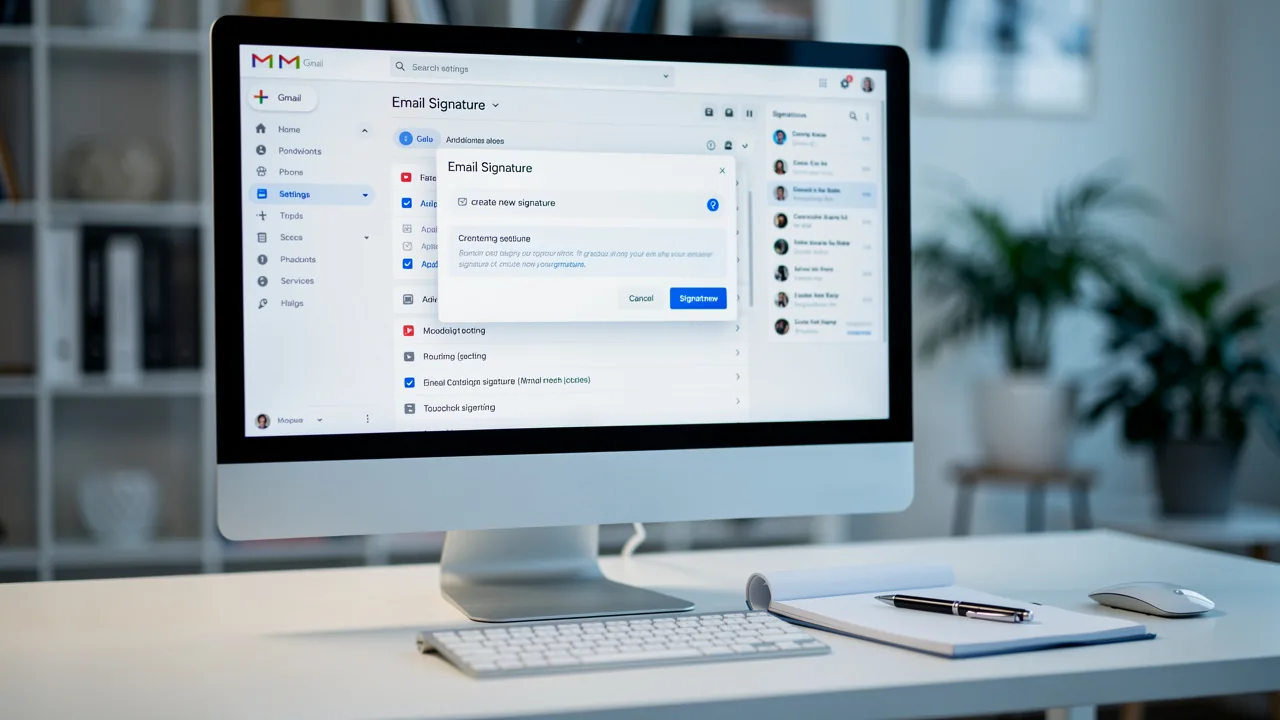
In today's digital landscape, understanding comment créer une signature sur gmail is crucial, as a well-crafted email signature is not just a formality but a vital component of professional communication.
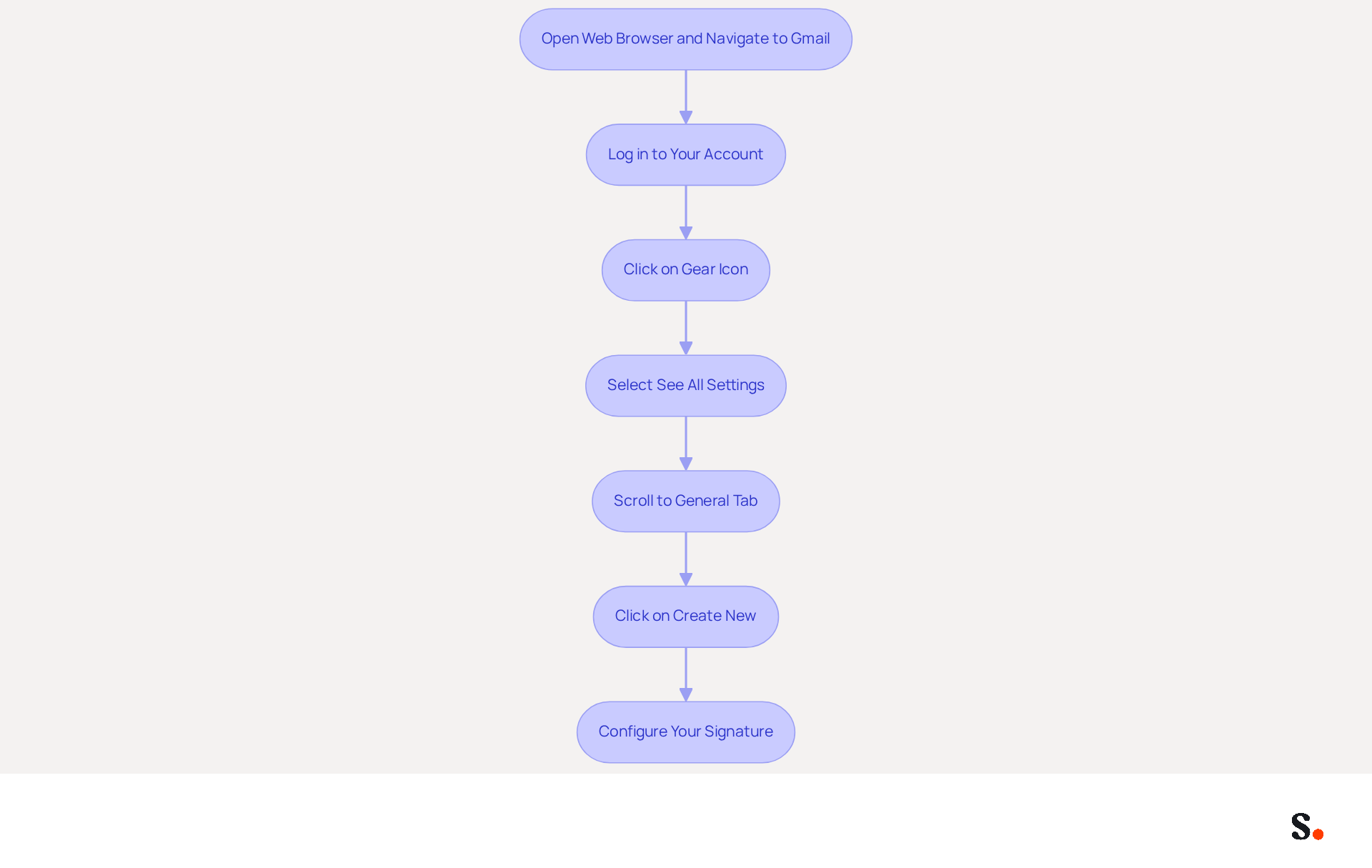
Open your web browser and navigate to Gmail.
Log in to your account if prompted.
In the top right corner, click on the gear icon (⚙️) to access the settings menu.
From the dropdown, select 'See all settings'.
Scroll down to the 'General' tab, where you will find information on comment créer une signature sur gmail.
Click on 'Create new' to begin configuring your personal mark, which includes comment créer une signature sur gmail.
Given that 93% of professionals check their messages daily, a well-crafted email signature is crucial for effective communication.
A professional correspondence footer should contain at least your full name, job title, company name, and one direct contact method.
However, many professionals struggle to include all necessary elements in their email signatures.
Furthermore, adding social media links can boost engagement, as 75.8% of users incorporate these in their profiles.
As you learn comment créer une signature sur gmail, remember that it serves not only as a formal closure to your emails but also as a powerful branding tool.
According to Vasyl Holiney, a Product Marketing Manager, "Email identifiers have evolved into a crucial component of professional communication, serving as a potent means for individuals and businesses to leave a lasting impact on their recipients."
This underscores the fact that 76% of consumers trust companies more when they use distinctive identifiers, highlighting the need for professionals to not only include essential information but also to leverage social media for greater engagement.
With the tool, your email identifiers are automatically synchronized with your business phone system, ensuring that any updates made in your Aircall configuration are reflected in real-time.
This integration saves time and keeps your team's information current, which helps maintain brand consistency in all communications.
Furthermore, Scribe's SOC 2 Type II compliance ensures that your data is handled securely, meeting the highest standards for data protection.
Ultimately, a thoughtfully designed email signature can significantly influence how recipients perceive your professionalism and brand.
Design and Customize Your Signature for Branding
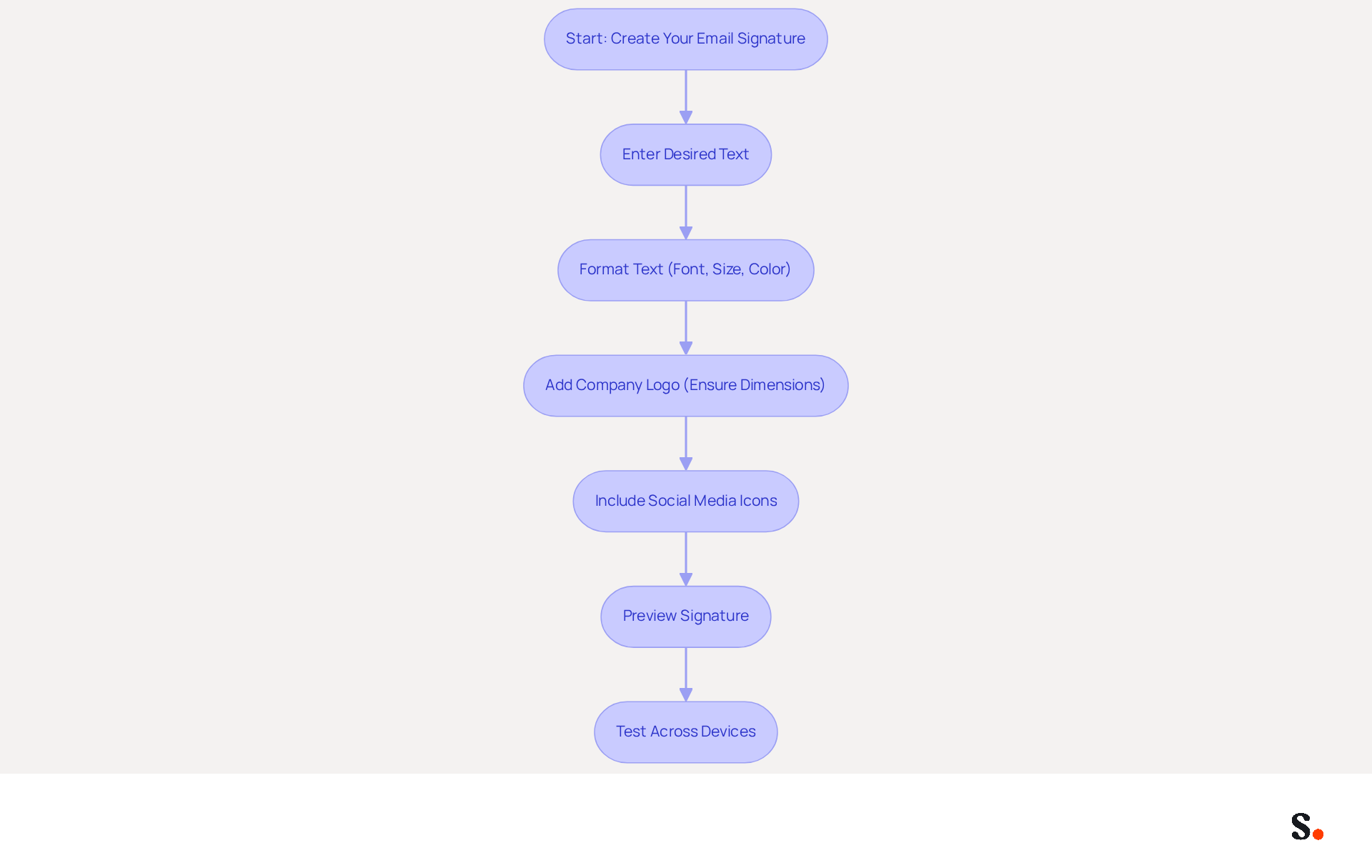
It is essential to know comment créer une signature sur gmail to establish a clear and trustworthy digital presence with a professional email signature. Begin by entering your desired text in the creation dialog, including your name, title, and contact information. This foundational step ensures that your signature conveys essential details clearly.
Utilize the formatting options to adjust the font style, size, and color, aligning them with your identity. A consistent identity enhances customer trust because cohesive presentation boosts recognition and loyalty.
To incorporate images, such as your company logo, click on the image icon and upload the desired file. If the logo is too large, it may distort the signature's appearance, leading to potential miscommunication. Ensure that the logo dimensions do not exceed 200x50 pixels to maintain clarity and prevent loading issues.
Enhance engagement by including social media icons linked to your profiles. This not only promotes your online presence but also encourages interaction with your audience, reinforcing brand visibility.
Before saving, preview your mark to confirm it looks professional and aligns with your branding. Testing across various messaging clients and devices is essential to ensure functionality and formatting, as many recipients maintain at least one personal identifier, with many updating theirs regularly. A well-designed signature can significantly influence how your brand is perceived in the digital landscape.
Ultimately, following these best practices, including comment créer une signature sur gmail, helps you craft a digital identifier that truly reflects your brand and serves as a strong marketing tool, boosting engagement and building trust with your audience.
Implement Your Signature Across Devices and Platforms
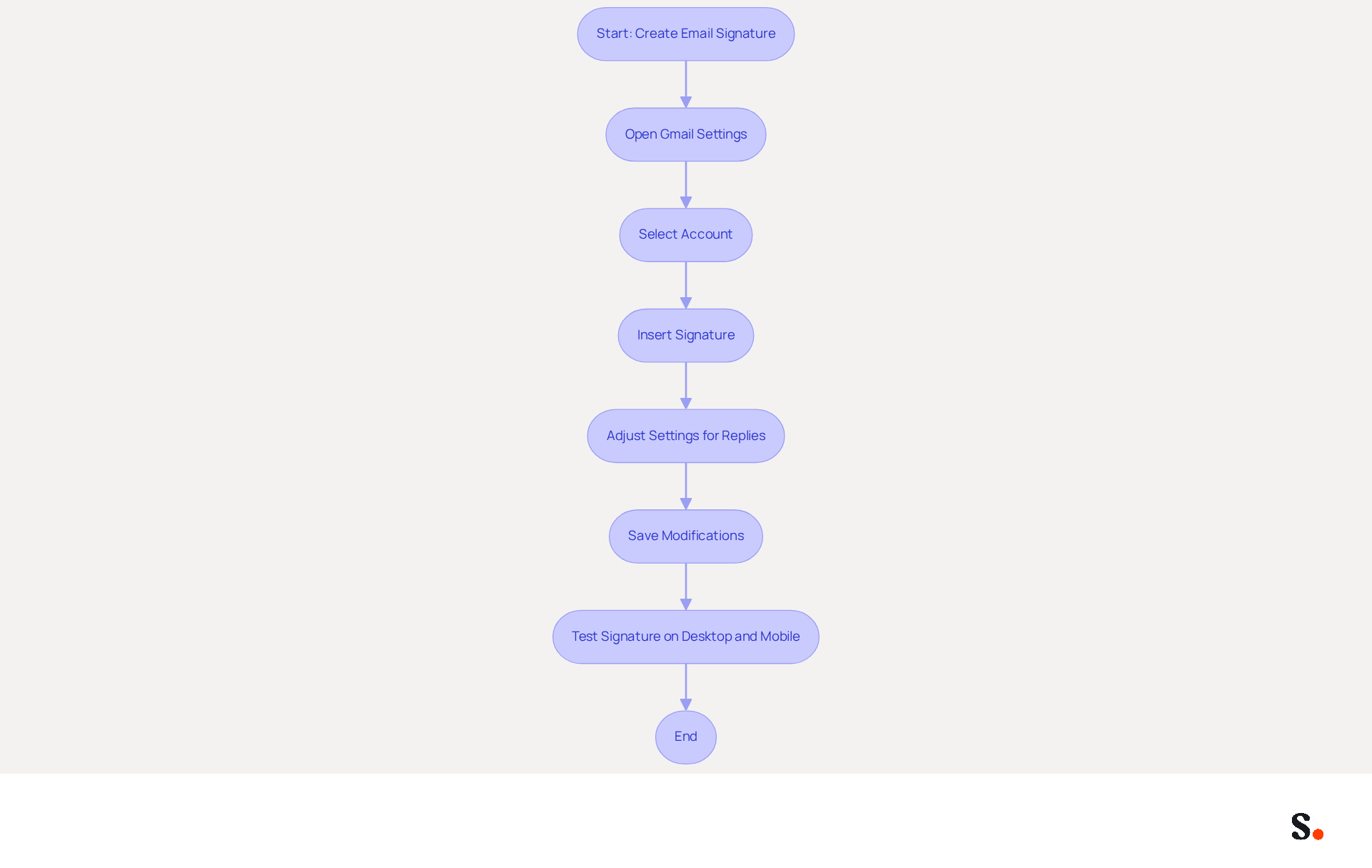
To ensure a professional appearance in your email communications, it's essential to understand comment créer une signature sur gmail effectively. After saving your personal mark in the Gmail settings, you can learn comment créer une signature sur gmail by checking the option 'Insert this mark before quoted text in replies and remove the '-' line that precedes it' to maintain a clean appearance in email threads. Consider using a shorter sign-off for replies to keep conversations cleaner.
To comment créer une signature sur gmail on mobile devices, open the Gmail app and go to Settings. Select your account and scroll down to find instructions on comment créer une signature sur gmail. To ensure clarity and professionalism, you can refer to how to comment créer une signature sur gmail by entering the same text or a simplified version optimized for mobile formatting. Save your modifications and test by sending a draft message from both desktop and mobile devices to confirm that your identifier appears consistently across platforms.
This feature allows you to manage multiple identifiers easily, ensuring your messages are always professional and consistent. Syncing with Scribe automates updates to your identifiers, which means less time spent on manual changes and more focus on your work. This seamless management not only simplifies your messaging process but also aligns with Scribe's commitment to SOC 2 Type II compliance, ensuring secure data handling. This streamlined approach not only enhances your professional image but also optimizes your workflow.
Troubleshoot Common Issues with Your Gmail Signature
Many users experience frustration when their email signatures fail to display correctly, often due to overlooked settings.
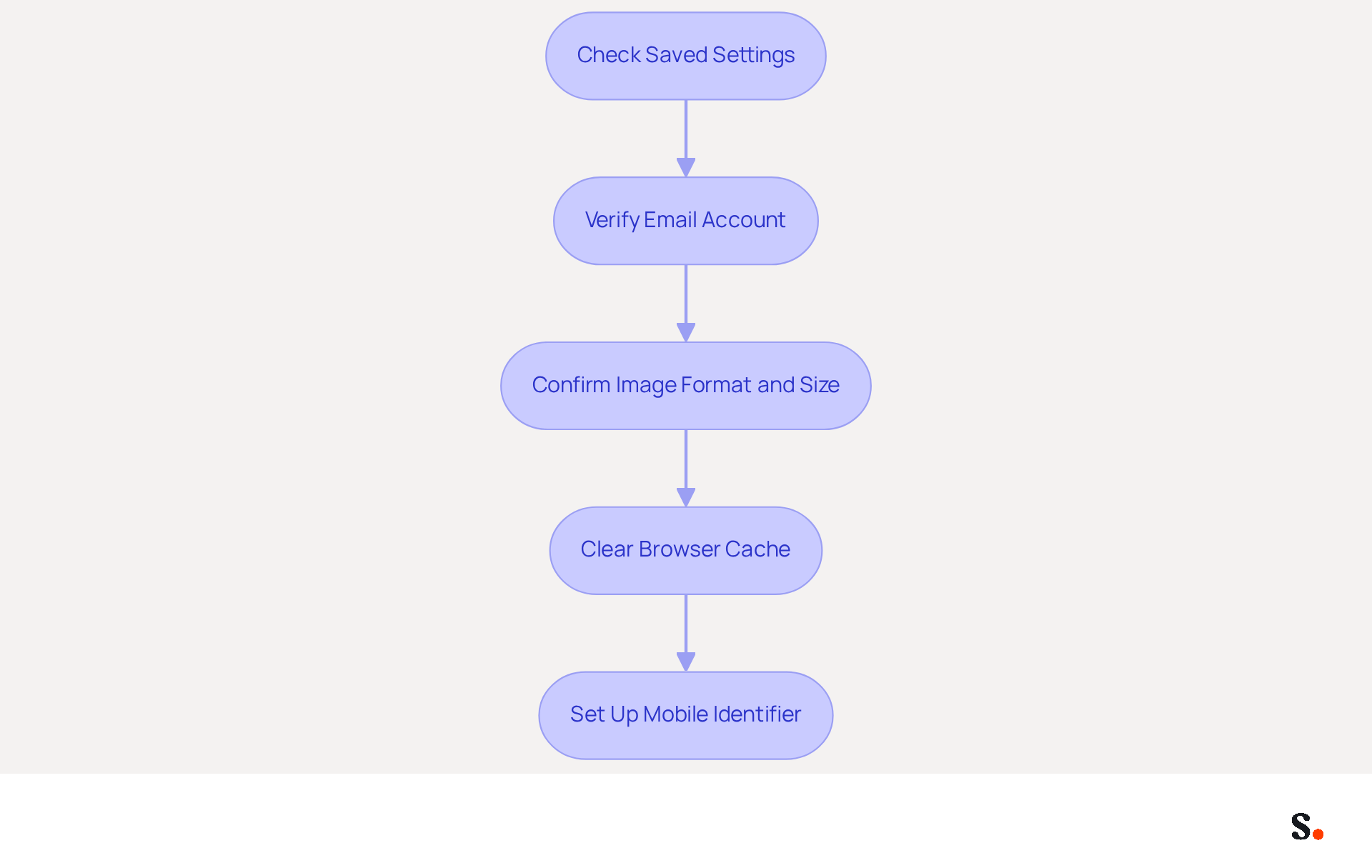
- If your mark isn’t showing in messages, double-check that you’ve saved your settings. Navigate to 'Settings', then 'See all settings', and confirm that your identifier is chosen for both new messages and replies/forwards.
- Make sure you're using the right email account, especially if you have more than one. Signatures are account-specific, and selecting the wrong account can lead to confusion.
- If your images aren’t displaying, check that they’re uploaded correctly and in a supported format, like PNG or JPEG. Recommended image sizes are 70-100 pixels high by 300-400 pixels wide, with a maximum height of 100 pixels and width of 1000 pixels to avoid display issues.
- If your mark still doesn’t appear after saving, try clearing your browser’s cache and cookies. This can address problems associated with outdated information stored in your browser that may disrupt the display.
- For mobile issues, make sure your mobile identification is set up in the app settings. Gmail allows different identifiers for mobile and desktop, so verify that your mobile identifier is set up correctly to ensure consistency across devices.
Addressing these settings not only enhances your email professionalism but also ensures clear communication with your recipients.
Leverage Automation Tools for Efficient Signature Management
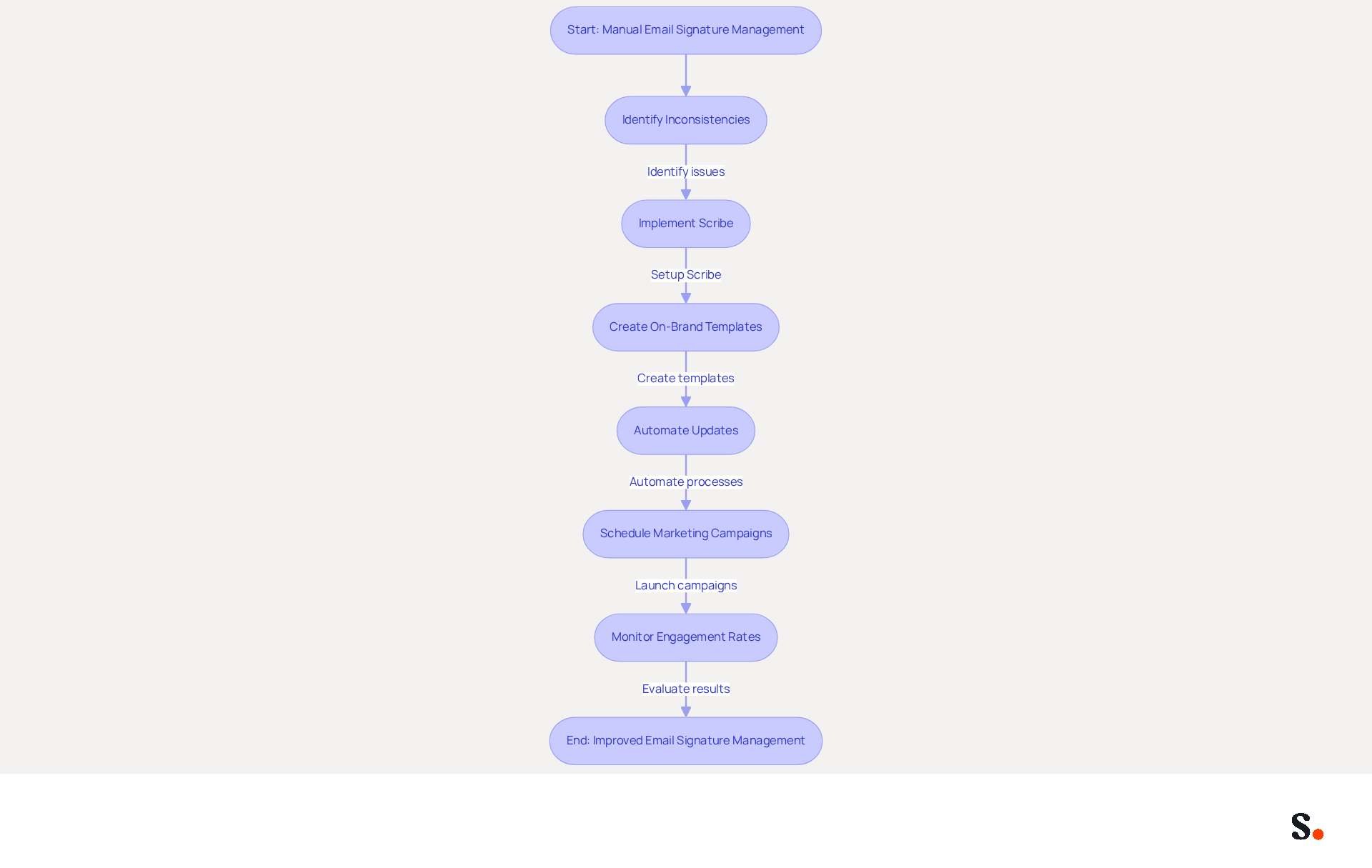
Managing email signatures manually often leads to inconsistencies and increased workload for IT teams. Consider utilizing Scribe, an innovative platform that automates the creation and management of digital identifiers for teams, transforming them into effective marketing tools while ensuring compliance with legal standards, including SOC 2 Type II certification. Scribe enables the creation of on-brand templates that can be deployed to all users with just one click, ensuring professionalism in every message. The platform's automation features enable real-time synchronization of your teammates' identifiers using your business phone system as a data source, ensuring that any modifications are automatically updated without requiring action from your team.
Explore features that allow you to schedule marketing campaigns through email signatures, boosting marketing effectiveness and increasing engagement rates, while also freeing up IT resources to focus on higher-priority tasks. With Scribe, you can count on real people for support, ensuring your concerns are addressed quickly and effectively. Additionally, the organization is committed to environmental sustainability, allocating 1% of revenue to support carbon removal technologies through Stripe Climate. Ensure that the application integrates seamlessly with your existing platforms, such as Google Workspace or Microsoft 365, for a smooth operational experience, allowing for real-time updates and compliance enforcement. Consistently refresh your identifiers through Scribe's automation features to uphold consistency and seize marketing opportunities, ultimately enhancing lead generation and boosting your overall marketing ROI. As Dave Willis, Senior Content Manager, notes, 'Automating email signatures helps IT teams eliminate manual updates, reduce support tickets, and maintain brand consistency across all users and devices.
Conclusion
Establishing a credible digital presence hinges on the creation of a professional email signature in Gmail. By following the outlined steps, users may find it challenging to create a signature that effectively represents their brand. A well-crafted signature can significantly improve communication effectiveness, as it provides essential information and reinforces brand identity.
Throughout the article, key insights were shared on how to:
- Access Gmail settings
- Customize signatures for branding
- Implement them across devices
- Troubleshoot common issues
- Leverage automation tools for efficient management
The importance of including essential elements, such as contact information and social media links, was emphasized, along with the benefits of using Scribe for seamless integration and compliance with security standards like SOC 2 Type II.
This investment can lead to improved professional relationships and opportunities. Using tools like Scribe makes managing email signatures easier and helps maintain brand consistency, which can lead to better marketing results. Ultimately, a well-designed email signature can transform how professionals connect and communicate in the digital landscape.
Frequently Asked Questions
Why is creating an email signature important?
A well-crafted email signature is crucial for professional communication as it serves as a formal closure to emails and acts as a powerful branding tool.
How do I access Gmail settings to create my signature?
Open your web browser, navigate to Gmail, log in to your account, click on the gear icon (⚙️) in the top right corner, select 'See all settings', and scroll down to the 'General' tab to find the signature settings.
What essential information should be included in an email signature?
An email signature should contain at least your full name, job title, company name, and one direct contact method.
How can social media links enhance my email signature?
Including social media links in your email signature can boost engagement, as many users incorporate these links to promote their online presence and encourage interaction with their audience.
What are the best practices for designing and customizing my email signature?
Use the creation dialog to enter your desired text, adjust the font style, size, and color to align with your identity, and incorporate images like your company logo while ensuring they do not exceed 200x50 pixels. Preview your signature and test it across various messaging clients and devices.
How does Scribe ensure data security when creating email signatures?
Scribe's SOC 2 Type II compliance ensures that your data is handled securely, meeting the highest standards for data protection.
What impact does a well-designed email signature have on brand perception?
A thoughtfully designed email signature can significantly influence how recipients perceive your professionalism and brand, enhancing customer trust and recognition.
List of Sources
- Access Gmail Settings to Create Your Signature
- 14 Key Email Signature Statistics to Know in 2026 (https://mailmodo.com/guides/email-signature-statistics)
- Email Signature Trends in Numbers: Infographic [2026] (https://mailtrap.io/blog/email-signature-trends)
- 40+ Email Signature Statistics for 2026 (Data + Insights) (https://wavecnct.com/blogs/email-signature-statistics)
- Email Signature Statistics: A Closer Look at Email Signatures in 2026 (https://mysignature.io/blog/email-signature-statistics)
- Design and Customize Your Signature for Branding
- Why Email Signatures Must Be In Your 2026 Marketing Plan | Rocketseed (https://rocketseed.com/blog/what-are-the-biggest-email-trends-for-2026)
- Email Signature Design Trends in 2026: What Works and What to Drop (https://bulksignature.com/blog/email-signature-design-trends)
- 20 best email signature design examples for 2026 — Stripo.email (https://stripo.email/blog/10-best-email-signature-design-examples)
- Email Signature Trends 2026: What Designers Are Actually Using (https://markaplugin.com/blog/email-signature-trends-2026)
- "Email Signature Trends for 2026: What's In, What's Out" | Crossware posted on the topic | LinkedIn (https://linkedin.com/posts/crossware-ltd_new-year-new-trends-even-for-your-email-activity-7394554686046908416-vD_O)
- Implement Your Signature Across Devices and Platforms
- Create a Gmail signature - Computer - Gmail Help (https://support.google.com/mail/answer/8395?hl=en&co=GENIE.Platform%3DDesktop)
- How to Change Your Email Signature in Gmail: 2026 Guide (https://tryellie.com/blog/how-to-change-your-email-signature-in-gmail)
- Outlook Plans to Synchronize Email Signatures Across Devices - Petri IT Knowledgebase (https://petri.com/outlook-synchronizes-email-signatures)
- How To Add Signature In Gmail In Mobile: iPhone & Android Guide - NEWOLDSTAMP (https://newoldstamp.com/blog/create-gmail-mobile-signature)
- Troubleshoot Common Issues with Your Gmail Signature
- Fix Your Missing Gmail Signature: 8 Troubleshooting Steps & Best Practices | Newoldstamp - NEWOLDSTAMP (https://newoldstamp.com/blog/gmail-signature-not-showing-up)
- Troubleshoot issues with Gmail signatures - Gmail Help (https://support.google.com/mail/answer/11468381?hl=en)
- Email signature statistics: Why every business should optimize their email signatures — Stripo.email (https://stripo.email/blog/email-signature-statistics-why-every-business-should-optimize-their-email-signatures)
- Why Is My Gmail Signature Not Showing Up? Common Causes Explained (https://scribe-mail.com/en-US/blog/why-is-my-gmail-signature-not-showing-up-common-causes-explained)
- Fixing Signature Issues in Gmail (https://teachers.tech/fixing-signature-issues-in-gmail)
- Leverage Automation Tools for Efficient Signature Management
- Top 10 Email Signature Management Tools in 2026 (Compared) (https://mailbutler.io/blog/email/email-signature-management-tools)
- Automating Email Signatures: How IT Teams Streamline Processes & Reduce Risk (https://exclaimer.com/blog/streamlining-it-processes-automated-email-signatures)
- 4 Best Practices for Effective E Mail Signatur Software Use (https://scribe-mail.com/en-US/blog/4-best-practices-for-effective-e-mail-signatur-software-use)
- 4 Best Practices for Automated Email Signature with Office 365 (https://scribe-mail.com/en-US/blog/4-best-practices-for-automated-email-signature-with-office-365)
Get started with Scribe
Create your signature in minutes
Free 14-day trial — no credit card.