Comment modifier une signature sur Outlook : Guide étape par étape
Despite the importance of a polished signature, many users struggle with the technical aspects of modification in Outlook. A well-crafted signature conveys
Sophie Grant
Email Signature Specialist, Scribe
On this page
Introduction
Despite the importance of a polished signature, many users struggle with the technical aspects of modification in Outlook. A well-crafted signature conveys important contact information and reinforces brand identity with every email sent. However, failing to address these challenges can lead to inconsistent branding and missed opportunities for professional engagement. This guide will help you navigate the process of modifying your signature in Outlook, ensuring your communication reflects your professional brand.
Understand Email Signatures in Outlook
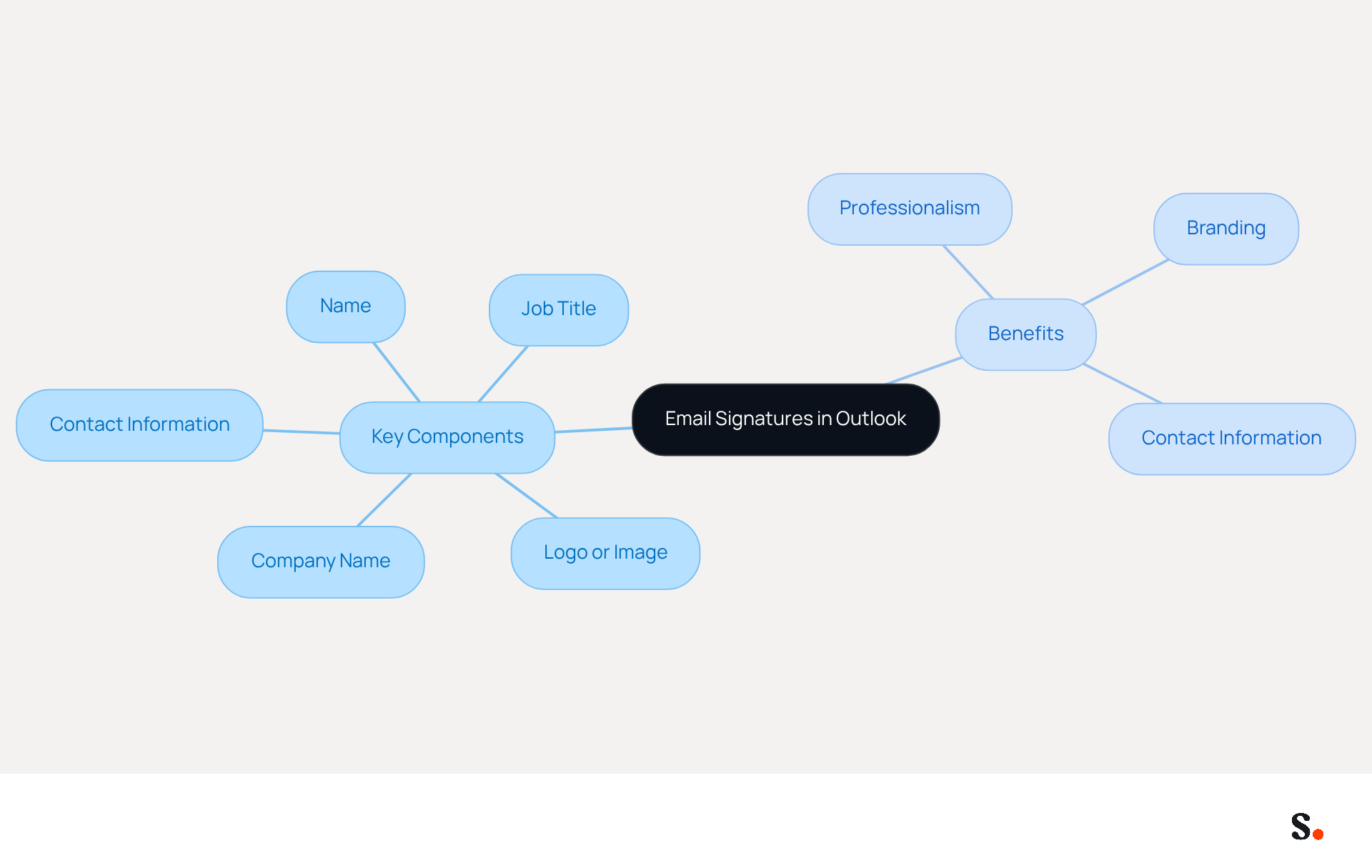
Outlook includes crucial blocks of text and images that are automatically added to the end of your messages. They typically include your name, job title, company name, and contact information. Understanding the essential elements of an email signature is crucial for projecting a professional image and facilitating effective communication. A well-crafted signature not only delivers vital information but also strengthens your identity with every message sent.
Key Components of an Email Signature:
- Name: Your full name for personal identification.
- Job Title: Your position within the company to establish authority.
- Company Name: The title of your organization to enhance recognition.
- Contact Information: Phone number, contact address, and possibly links to social media or a company website.
- Logo or Image: Adding your company logo can really boost your visibility and make your emails stand out.
Benefits of Using Email Signatures:
- Professionalism: A consistent signature adds a touch of professionalism to your emails, which is vital in establishing trust with recipients.
- Branding: It acts as a promotional tool, enhancing your identity with every message. In fact, companies that maintain consistent branding in their email signatures see response rates soar by over 22%, highlighting just how effective this approach can be.
- Contact Information: Ensures that recipients can easily reach you, enhancing communication efficiency and reducing the chances of missed connections. Without a well-crafted signature, recipients may struggle to find your contact information, potentially leading to missed opportunities.
By grasping these components, you can design a mark that not only appears appealing but also fulfills its function efficiently, aiding in a unified brand image and enhanced interaction in your communications. Ultimately, a thoughtfully designed email signature can significantly enhance your professional interactions and brand presence.
Modify Signatures Across Outlook Platforms
Managing email signatures across various platforms can often lead to inconsistencies and inefficiencies. To learn comment modifier une signature sur outlook, follow these steps based on the platform you are using, and consider how Scribe can enhance your email signature management through automated synchronization with Google Workspace and Aircall for consistent branding and time savings.
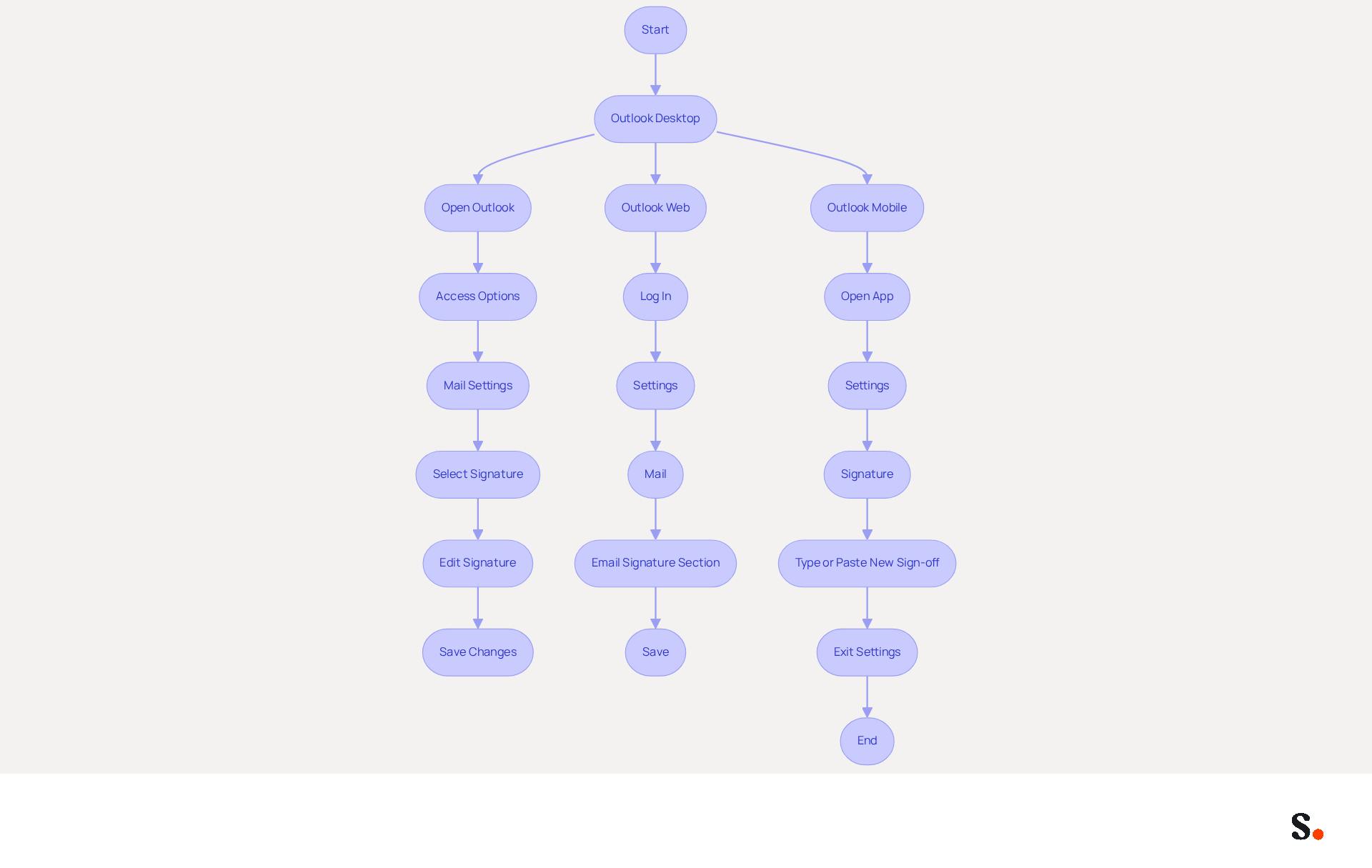
For Outlook Desktop:
- Open Outlook: Launch the Outlook application on your computer.
- Access Options: Click on 'File' in the top left corner, then select 'Options'.
- Mail Settings: In the left pane, choose 'Mail'.
- To learn comment modifier une signature sur outlook, click on the 'Signatures...' button.
- Select Signature: In the 'Select item to edit' box, choose the mark you want to modify.
- To learn how to change your email signature, make your changes in the 'Edit signature' box. You can add text, images, or links as needed, including a LinkedIn link or a digital business card link to enhance trust and facilitate contact sharing.
- Save Changes: Click 'OK' to save your changes and exit the settings.
For Outlook Web:
- Log In: Open your web browser and access your email account.
- Settings: Click on the gear icon in the top right corner and select 'View all email settings'.
- Mail: Navigate to 'Mail' and then 'Compose and reply'.
- To learn comment modifier une signature sur outlook, navigate to the 'Email signature' section and make your desired changes while ensuring a professional appearance.
- Save: Click 'Save' to apply the changes.
For Outlook Mobile:
- Open App: Launch the Outlook app on your mobile device.
- Settings: Tap the menu icon (three lines) in the upper left corner, then tap the gear icon in the lower left.
- Signature: Scroll down to 'Signature' and tap it.
- To learn comment modifier une signature sur outlook, type or paste your new sign-off, considering the inclusion of professional elements.
- Save: Exit the settings; your changes will save automatically.
With Scribe, modifications in your Google Workspace automatically synchronize with your communication details, ensuring brand consistency and saving valuable time. Research indicates that 70% of marketers believe branded electronic identifiers enhance sender trust, making it essential to maintain a professional format for effective communication. Furthermore, companies utilizing consistent branded elements report over a 22% increase in response rates, emphasizing the significance of this frequently overlooked branding tool. Scribe's SOC 2 Type II certification and adherence to GDPR and CCPA further guarantee secure data management, making it an ideal solution for organizations pursuing 100% consistency and measurable marketing ROI from digital identifiers. Utilizing Scribe not only enhances your branding but also significantly improves your communication effectiveness.
Enhance Signatures with Customization Options
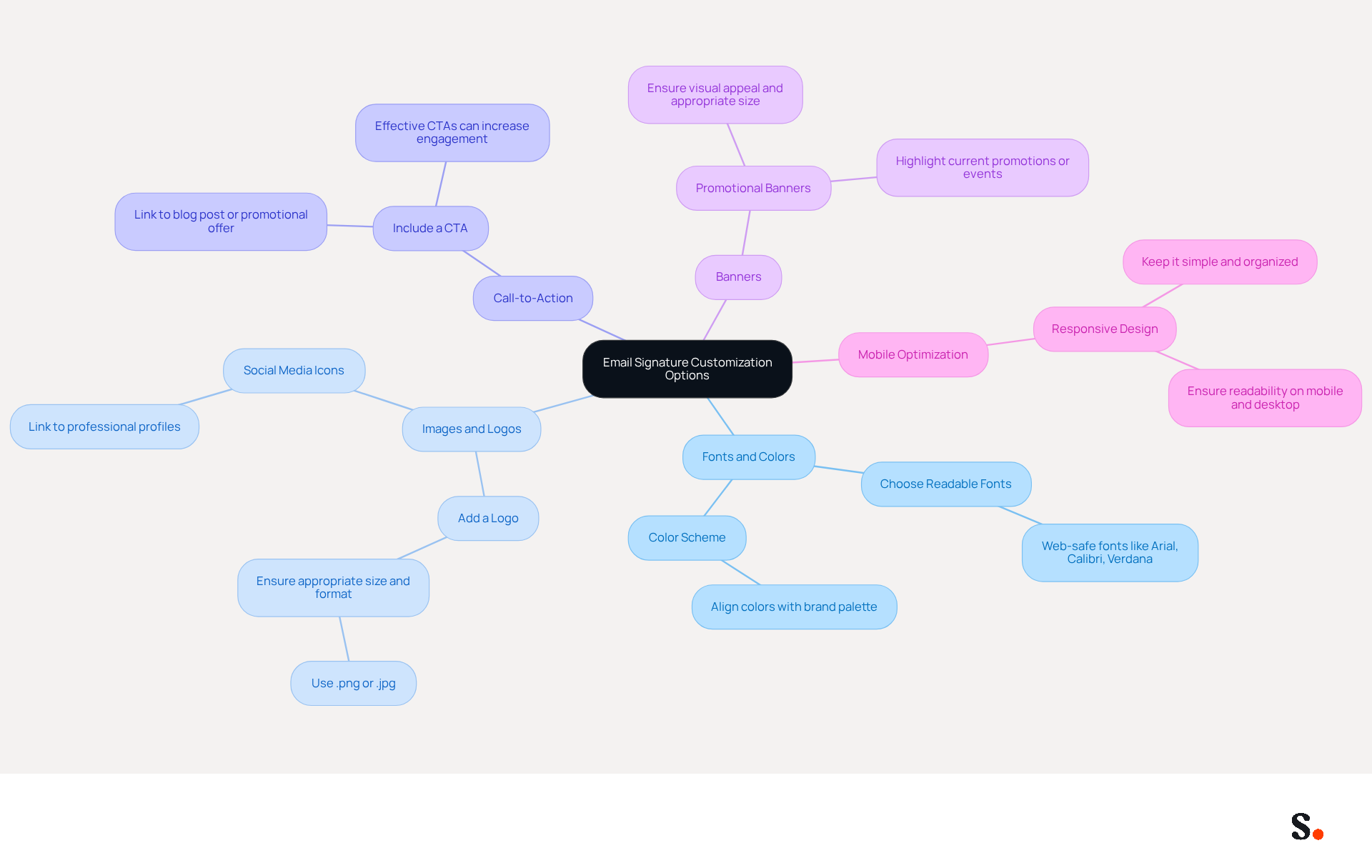
Comment modifier une signature sur Outlook can significantly enhance the effectiveness and visual appeal of your email footer. Many professionals overlook the potential impact of a well-designed email signature, especially when learning comment modifier une signature sur outlook. Here are some options to consider:
- Fonts and Colors:
- Choose Readable Fonts: Choosing web-safe fonts like Arial, Calibri, or Verdana can really help ensure clarity and professionalism.
- Color Scheme: Align the colors of your signature with your palette to maintain consistency and strengthen recognition.
- Images and Logos:
- Add a Logo: Including your company logo reinforces brand identity. Ensure the image is appropriately sized and formatted, preferably in .png or .jpg, to maintain quality across devices.
- Social Media Icons: Incorporate icons linking to your professional social media profiles to encourage engagement and connect with your audience.
- Call-to-Action:
- Include a CTA: Adding a call-to-action, such as a link to your latest blog post or a promotional offer, can drive traffic and enhance engagement. Effective CTAs can increase click rates significantly, with some campaigns reporting a jump from 3% to 15% in engagement.
- Banners:
- Promotional Banners: Utilize a banner image to highlight current promotions or events. Ensure it is visually appealing and appropriately sized to avoid overwhelming the email layout. This is evident as Scribe's users report an impressive average click-through rate of 12% on banner ads, highlighting their effectiveness in driving engagement.
- Mobile Optimization:
- Responsive Design: Ensure your signature is mobile-friendly by keeping it simple and avoiding excessive images or complex layouts. A well-organized sign-off improves readability on both mobile and desktop devices, ensuring that important information is accessible regardless of the platform.
By learning comment modifier une signature sur outlook, you can implement these customization options to create a professional mark that effectively represents your identity and engages your audience. Neglecting to customize your email signature could mean missing out on valuable engagement opportunities. With Scribe, any modifications made in your Aircall configuration will automatically sync to your communication identifiers, ensuring brand consistency across all interactions. Additionally, Scribe complies with SOC 2 Type II, GDPR, and CCPA, providing peace of mind regarding security and compliance. Regular evaluations of communication identifiers can assist in upholding compliance and branding uniformity, ensuring that your messages reflect the most recent updates and standards.
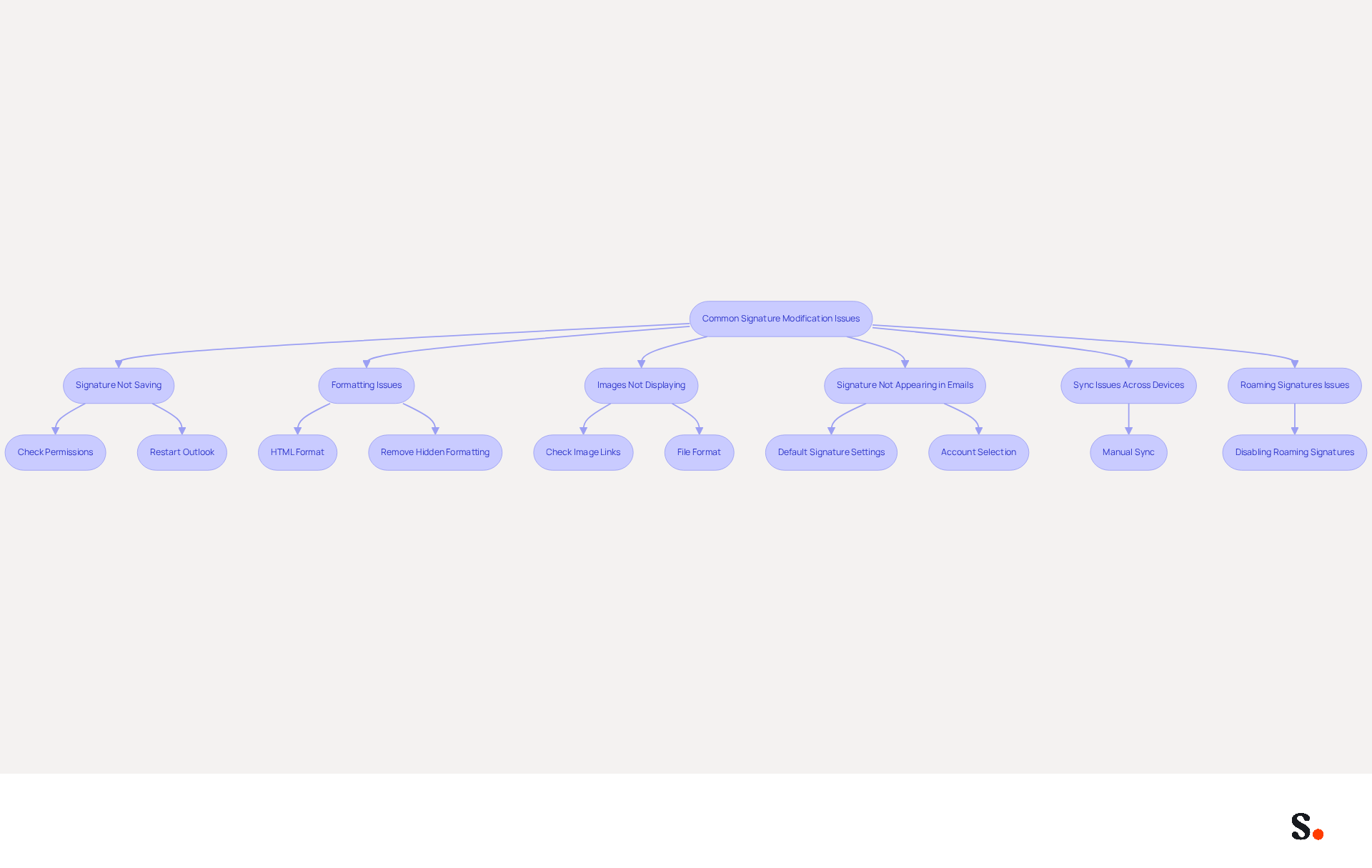
Troubleshoot Common Signature Modification Issues
Users frequently encounter challenges when trying to understand comment modifier une signature sur outlook, leading to potential disruptions in communication. Here are some common problems and solutions:
- Signature Not Saving:
- Check Permissions: Ensure you have the necessary permissions to modify settings in Outlook. Lacking write permissions in the folder can hinder saving.
- Restart Outlook: Sometimes, simply restarting the application can resolve saving issues.
- Formatting Issues:
- HTML Format: Ensure your email format is set to HTML for proper formatting of your sign-off. Check this in 'File' > 'Options' > 'Mail' > 'Compose messages'. When copying from Word, hidden formatting can disrupt the layout of your signature.
- Remove Hidden Formatting: If you copy-pasted your mark, hidden formatting may cause issues. Paste it into a plain text editor first, then copy it back into Outlook.
- Images Not Displaying:
- Check Image Links: Ensure that any images used in your signature are hosted online or properly embedded. Images may not display if they are linked incorrectly or blocked by recipients' settings.
- File Format: Use supported formats like .png or .jpg for images to ensure compatibility.
- Signature Not Appearing in Emails:
- Default Signature Settings: Make sure your signature is set as the default for new emails and replies in the signature settings. 90% of instances where marks do not appear is due to not being assigned as the default mark.
- Account Selection: If you have multiple accounts, ensure you are modifying the identifier for the correct account.
- Sync Issues Across Devices:
- Manual Sync: If signatures are not syncing between devices, try logging out and back into your Outlook account or manually updating the signature on each device. Updates to Outlook can reset local settings, impacting the use of personal identifiers. However, by syncing your Google Workspace with Scribe, you can save time and ensure that any changes made to your teammates' information are automatically reflected in their profiles, eliminating the need for manual updates.
- Roaming Signatures Issues:
- Disabling Roaming Signatures: If your signature keeps disappearing, it may be due to the roaming signatures feature. Disabling this can help restore your personal mark.
Implementing these troubleshooting tips will help you tackle common issues and understand comment modifier une signature sur outlook to keep your email signature working smoothly. Leveraging Scribe's integration with Google Workspace not only streamlines the management of email signatures but also enhances brand consistency across your organization.
Conclusion
Modifying an email signature in Outlook is crucial for effective professional communication and brand representation. Understanding the different platforms - desktop, web, and mobile - enables users to manage their signatures effectively, reflecting their identity and maintaining a polished image. This guide outlines how to modify signatures, highlighting the importance of customization and addressing common issues.
Key insights include the necessity of a well-structured signature that incorporates essential elements such as:
- Name
- Job title
- Contact information
- Branding elements like logos and promotional banners
The article also highlighted the significant impact of consistent branding, with statistics showing that companies can see a 22% increase in response rates when maintaining uniformity in their email signatures. Furthermore, leveraging tools like Scribe can streamline the management process, ensuring that updates are synchronized across platforms while adhering to security standards such as SOC 2 Type II certification and compliance with GDPR and CCPA.
In conclusion, the importance of a well-crafted email signature cannot be overstated. Think of it as a branding tool that boosts professionalism and makes communication more effective. Organizations should prioritize the management of their email signatures, utilizing solutions like Scribe to ensure consistency and efficiency. By doing so, they not only improve their communication effectiveness but also reinforce their brand identity in every interaction. By prioritizing email signature management, organizations can significantly enhance their professional image and communication effectiveness.
Frequently Asked Questions
What is an email signature in Outlook?
An email signature in Outlook is a block of text and images automatically added to the end of your messages, typically including your name, job title, company name, and contact information.
What are the key components of an email signature?
The key components of an email signature include your full name, job title, company name, contact information (such as phone number and address), and optionally, a logo or image.
Why is it important to have a well-crafted email signature?
A well-crafted email signature projects a professional image, facilitates effective communication, delivers vital information, and strengthens your identity with every message sent.
How does an email signature contribute to professionalism?
A consistent email signature adds professionalism to your emails, which is essential for establishing trust with recipients.
In what way does an email signature serve as a branding tool?
An email signature acts as a promotional tool that enhances your identity with every message, and companies with consistent branding in their email signatures see response rates increase by over 22%.
How does an email signature improve communication efficiency?
An email signature ensures that recipients can easily find your contact information, reducing the chances of missed connections and enhancing overall communication efficiency.
What impact can a thoughtfully designed email signature have on professional interactions?
A thoughtfully designed email signature can significantly enhance your professional interactions and brand presence, aiding in a unified brand image and improved communication.
List of Sources
- Understand Email Signatures in Outlook
- Why Email Signatures Must Be In Your 2026 Marketing Plan | Rocketseed (https://rocketseed.com/blog/what-are-the-biggest-email-trends-for-2026)
- The impact of email signatures on your branding (https://signitic.com/en/resources/the-impact-of-email-signatures-on-your-branding)
- 40+ Email Signature Statistics for 2026 (Data + Insights) (https://wavecnct.com/blogs/email-signature-statistics)
- 2026 Marketing Trends: Email Signatures as a Marketing Tool (https://bluechiptt.com/blog/5-marketing-trends-for-2026-and-how-your-email-signature-fits-in)
- "Email Signature Trends for 2026: What's In, What's Out" | Crossware posted on the topic | LinkedIn (https://linkedin.com/posts/crossware-ltd_new-year-new-trends-even-for-your-email-activity-7394554686046908416-vD_O)
- Modify Signatures Across Outlook Platforms
- 40+ Email Signature Statistics for 2026 (Data + Insights) (https://wavecnct.com/blogs/email-signature-statistics)
- Email Signature Statistics: A Closer Look at Email Signatures in 2026 (https://mysignature.io/blog/email-signature-statistics)
- How to Update Your Signature Line in Outlook: A Step-by-Step Guide (https://scribe-mail.com/en-US/blog/how-to-update-your-signature-line-in-outlook-a-step-by-step-guide)
- How To Change An Email Signature In Outlook (https://forbes.com/sites/darreonnadavis/2023/07/15/how-to-change-an-email-signature-in-outlook)
- Make Your Emails Shine: Update Your Outlook Signature (https://brandly.com/blog/how-to-add-change-email-signature-outlook)
- Enhance Signatures with Customization Options
- The Complete Email Signature Guide 2026: Best Practices and Policy (https://opensense.com/complete-email-signature-guide)
- Email Signature Best Practices - NEWOLDSTAMP (https://newoldstamp.com/blog/email-signature-best-practices)
- The impact of email signatures on your branding (https://signitic.com/en/resources/the-impact-of-email-signatures-on-your-branding)
- Exclaimer Research: 67% of Marketers Expect Email Signatures to Support With Lead Gen In 2023 (https://businesswire.com/news/home/20230612141095/en/Exclaimer-Research-67-of-Marketers-Expect-Email-Signatures-to-Support-With-Lead-Gen-In-2023)
- Top 10+ best practices for email signatures design in 2026 (https://mysignature.io/blog/email-signature-best-practices)
- Troubleshoot Common Signature Modification Issues
- How to Update Your Outlook Signature (2026) (https://getinboxzero.com/blog/post/how-to-update-signature-in-outlook)
- How to solve problems with email signatures in Microsoft 365? (https://mail-signatures.com/articles/problems-email-signatures-office-365)
- Outlook Signature Disappears? 6 Common Problems + Fixes (https://conbool.com/blog/outlook-signature-disappears-fixes-problems)
- Outlook Signature Not Working in Office 365: Causes & Fixes (https://exclaimer.com/email-signature-handbook/outlook-signature-not-working-in-office-365)
- How to fix the Signature in new out look? - Microsoft Q&A (https://learn.microsoft.com/en-us/answers/questions/4647799/how-to-fix-the-signature-in-new-out-look)
Get started with Scribe
Create your signature in minutes
Free 14-day trial — no credit card.