Crafting a Company Logo Email Signature: Best Practices for Impact
Creating a company logo email signature presents a unique challenge that extends beyond mere digital sign-off. It serves as a vital touchpoint in professional
Sophie Grant
Email Signature Specialist, Scribe

Introduction
Creating a company logo email signature presents a unique challenge that extends beyond mere digital sign-off. It serves as a vital touchpoint in professional communication that can significantly impact brand perception. By adhering to best practices in design and content, organizations can create signatures that not only reflect their brand identity but also enhance engagement and trust with recipients.
With numerous design elements and compliance requirements, crafting an effective email signature can be daunting for businesses. This article explores the essential components and strategies that can help businesses create impactful email signatures, ensuring they resonate with audiences and uphold brand integrity.
Define Essential Components of an Email Signature
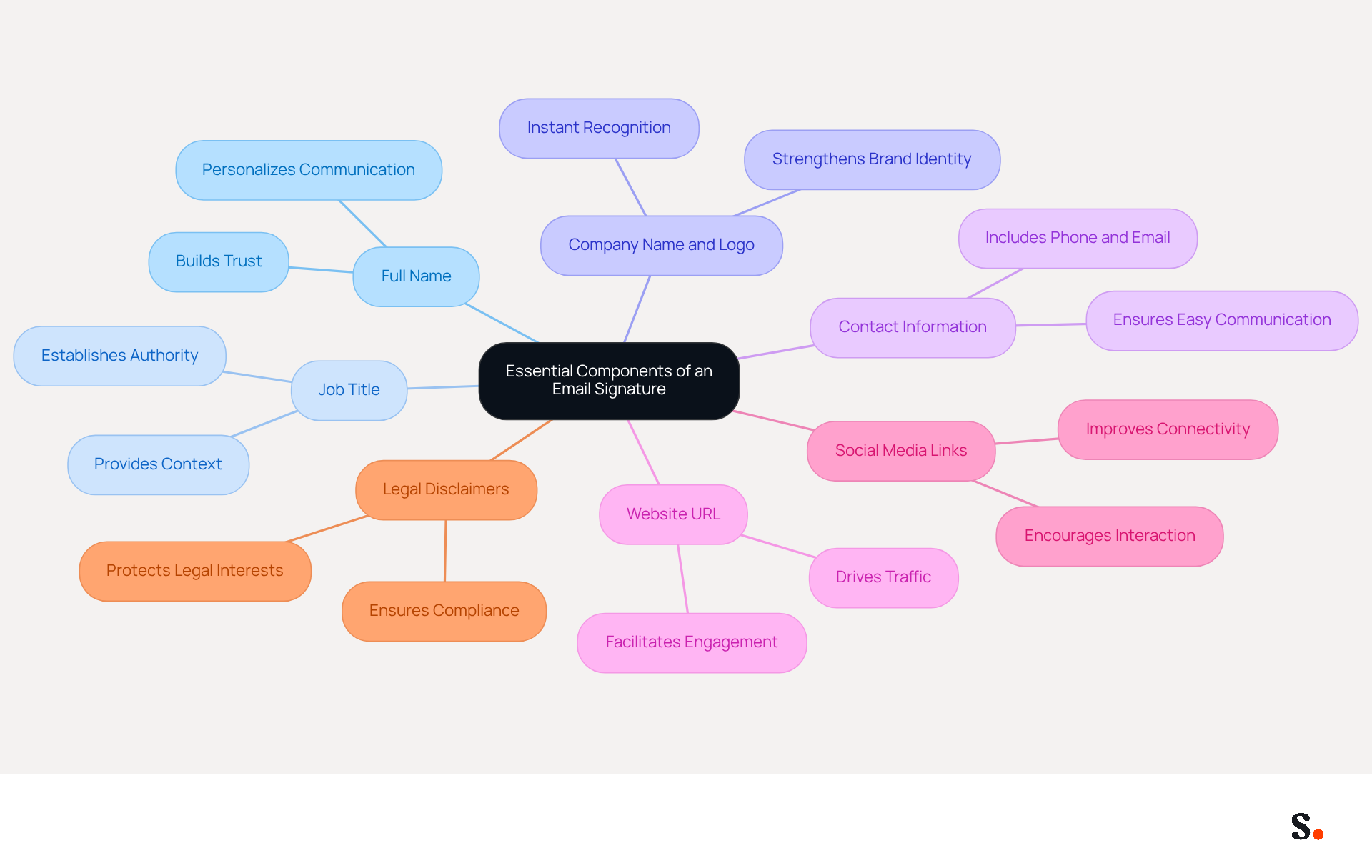
An effective email signature is crucial for establishing professionalism and trust in digital communication. It should include the following essential components:
- Full Name: Clearly stating your full name personalizes communication and fosters trust, as 47% of consumers feel more confident with messages that have professionally branded identifiers.
- Job Title: Including your current position establishes authority and context, helping recipients understand your role within the organization.
- Company Name and Logo: This strengthens brand identity and offers instant recognition, with 43% of consumers anticipating to see a company logo in correspondence.
- Contact Information: Providing a phone number and electronic address ensures easy communication, as 64% of consumers look for contact details in correspondence.
- Website URL: Linking to your company’s website drives traffic and provides more information, facilitating further engagement with potential clients.
- Social Media Links: Incorporating icons that connect to your professional social media profiles improves connectivity, as 43% of consumers anticipate social media links in correspondence.
- Legal Disclaimers: If necessary, adding required legal disclaimers ensures compliance with regulations, particularly in industries like law and finance.
Incorporating these elements helps you craft a digital business card that enhances your professional image with every message. Without these essential components, your email signature may fail to convey professionalism, potentially undermining trust and engagement. This approach has been shown to enhance consistency and engagement significantly, making it a vital strategy for any organization. Ultimately, a well-crafted email signature can be the difference between a missed opportunity and a successful connection.
Design Your Signature to Reflect Brand Identity
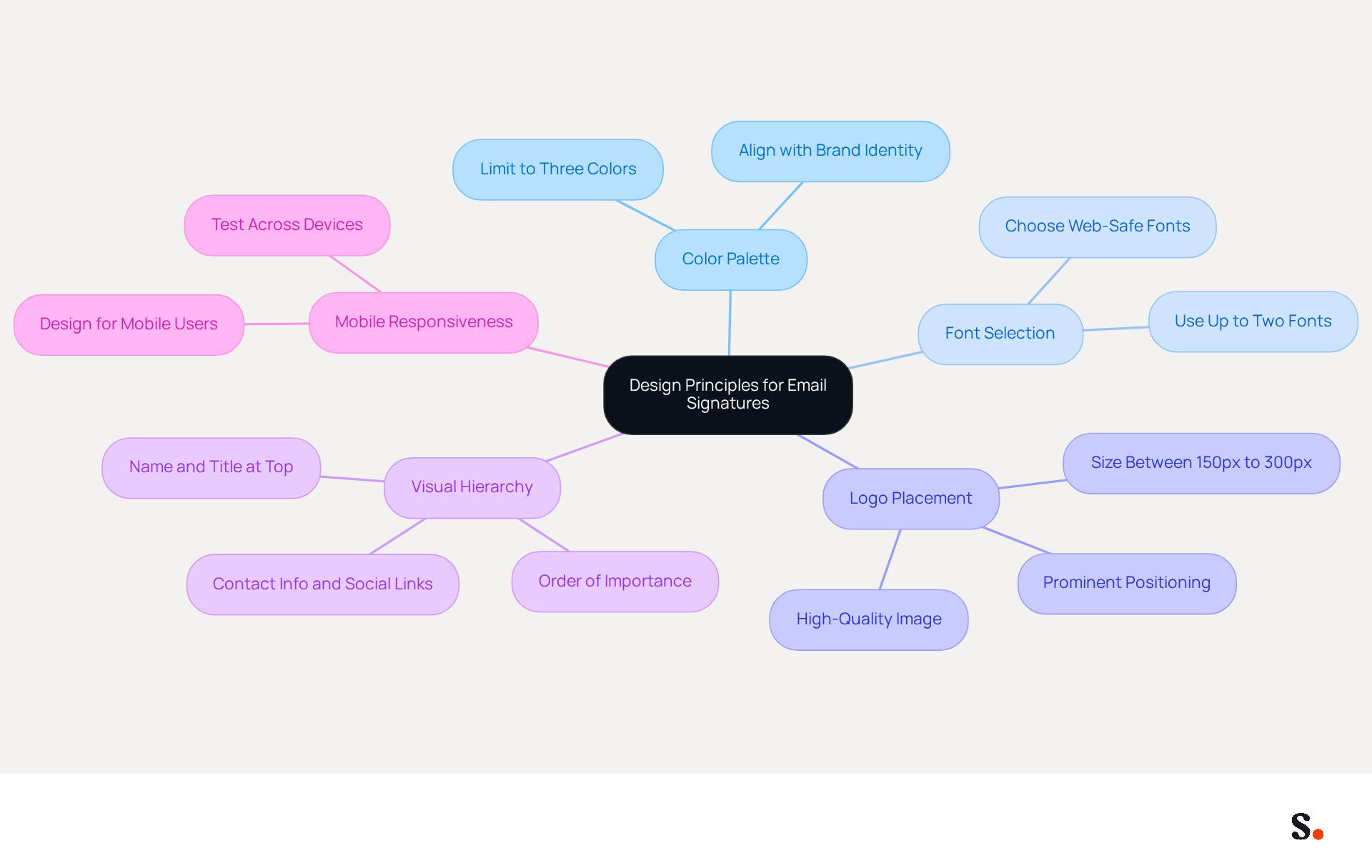
To effectively convey your brand identity through email signatures, adherence to specific design principles is essential:
- Color Palette: Utilize colors that align with your visual identity, limiting your selection to a maximum of three colors to maintain simplicity and coherence.
- Font Selection: Choose fonts that align with your brand’s typography, avoiding more than two different fonts to maintain a cohesive and professional appearance.
- Logo Placement: Position your company logo prominently, ensuring it is high-quality and appropriately sized, typically between 150px to 300px wide, to enhance visibility and recognition.
- Visual Hierarchy: Arrange elements in order of importance, placing your name and title at the top, followed by contact information and social links, to guide the recipient’s attention effectively.
- Mobile Responsiveness: Design with mobile users in mind, as over 60% of business correspondence is accessed on mobile devices. Test the mark across various devices to confirm its appearance and functionality.
Following these design principles ensures your correspondence appears professional and reinforces your brand identity with each company logo email signature included. Organizations that apply consistent identity in their correspondence headers report an 85% enhancement in identity consistency across teams, resulting in a 22% rise in response rates. A case study involving a 50-person sales team demonstrated that redesigning digital communication identifiers with integrated virtual business cards resulted in capturing 312 new CRM contacts in just 30 days, demonstrating how effective identifiers can serve as impactful marketing tools.
Additionally, integrating digital communication identifiers into your marketing technology stack allows for effective tracking and performance evaluation, enhancing their strategic value.
Integrate Your Signature into Email Clients Seamlessly
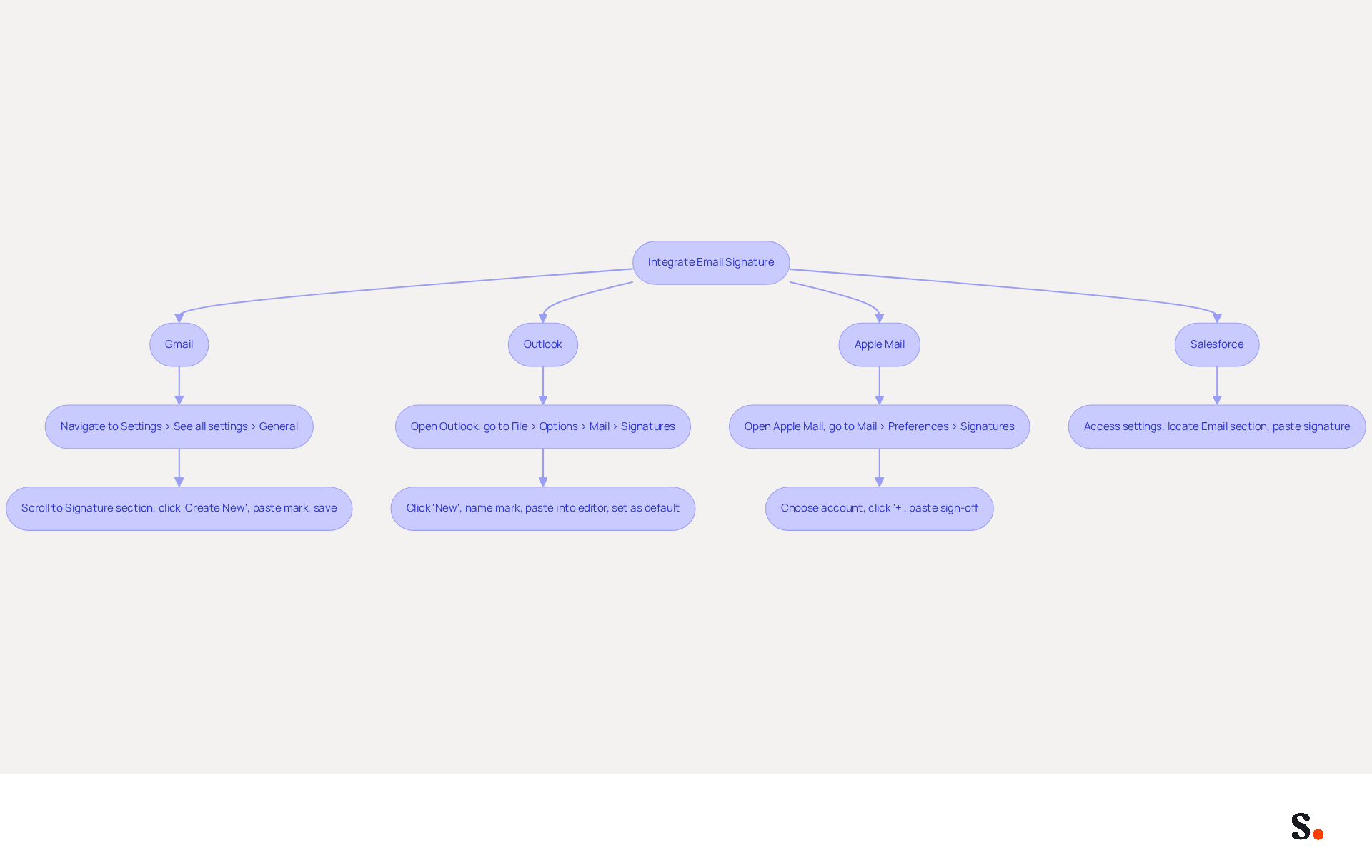
To seamlessly integrate your email signature into various email clients with Scribe, follow these steps:
- Gmail: Navigate to Settings > See all settings > General. Scroll to the Signature section, click 'Create New', and paste your mark into the editor. Save your changes.
- Outlook: Open Outlook and go to File > Options > Mail > Signatures. Click 'New', name your mark, and paste it into the editor. Set it as the default for new messages and replies/forwards.
- Apple Mail: Open Apple Mail, go to Mail > Preferences > Signatures. Choose your account, click the '+' button, and paste your sign-off into the right pane.
- Salesforce: Access your settings, locate the Email section, and paste your signature into the designated field.
Before syncing, ensure you have the necessary permissions as a Super Admin. Syncing your Google Workspace with Scribe saves time and ensures that updates to your teammates' information automatically reflect in their email footers. This streamlined one-click synchronization enables centralized control over messaging identifiers across multiple clients and brands, enhancing your branding efforts while maintaining compliance with security standards like SOC 2 Type II.
Additionally, using attributes to auto-fill identification information can significantly save time and ensure consistency across your team's communications.
It's a good idea to test your signature by sending messages to yourself and colleagues to ensure it looks right on different platforms. This step is crucial for maintaining professionalism in your communications.
Maintain and Update Your Email Signature Regularly
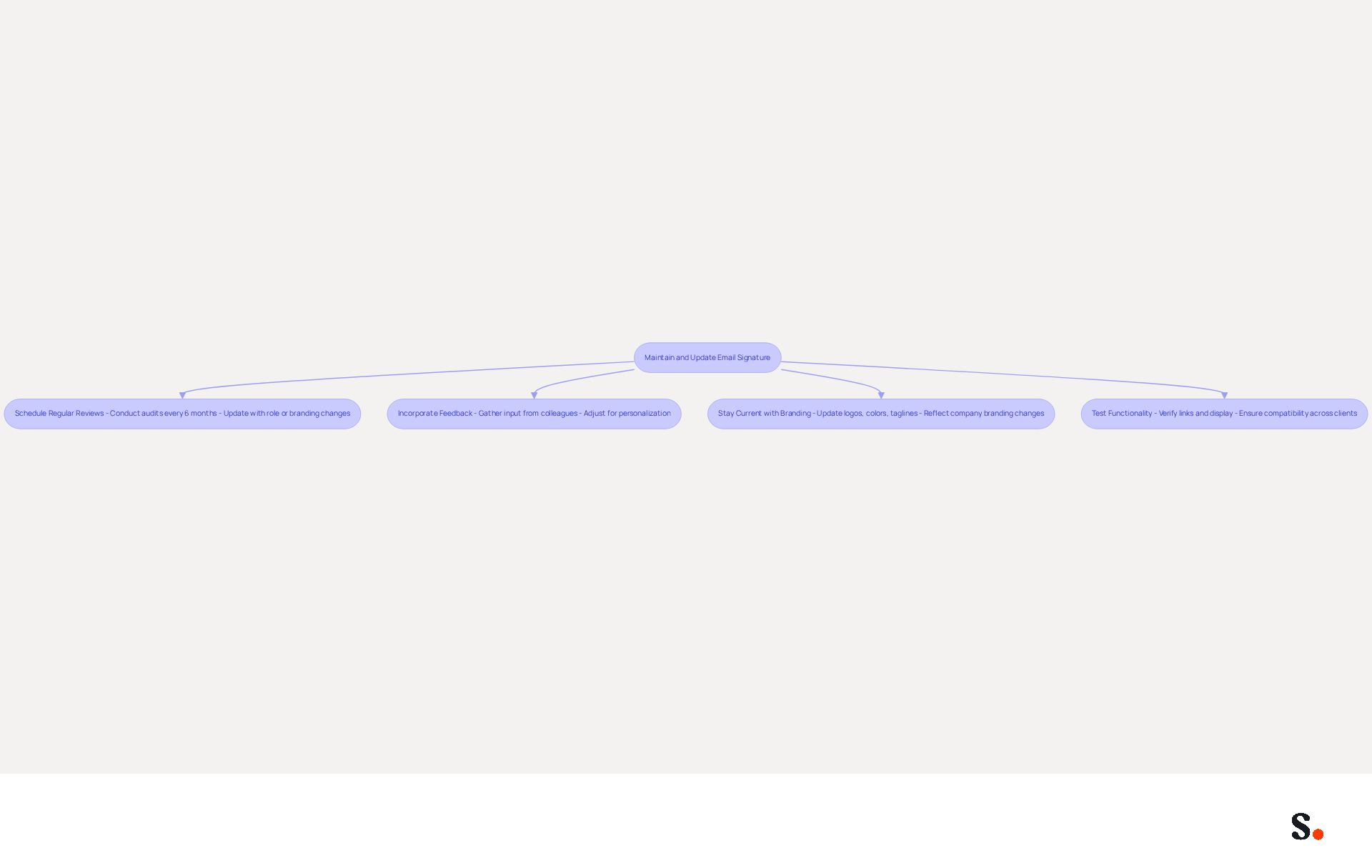
To ensure your email signature remains effective, it's crucial to establish a routine for its maintenance and updates:
- Schedule Regular Reviews: Conducting regular audits is crucial; organizations that implement centralized management solutions achieve 85% better brand consistency. Set a reminder to review your endorsement at least once every six months or whenever there are changes in your role, contact information, or branding.
- Incorporate Feedback: Gather input from colleagues or clients about the document’s effectiveness and make adjustments as necessary. Personalization in digital correspondence can greatly enhance engagement and relatability.
- Stay current with branding by ensuring that your company logo email signature reflects any updates to your company’s branding, such as new logos, colors, or taglines. An effective email signature strategy is vital for reinforcing your professional identity and enhancing brand recognition.
- Test Functionality: Regularly verify the document to confirm all links operate correctly and that it displays properly across various messaging clients. Neglecting to test functionality can diminish engagement opportunities, ultimately affecting your brand's loyalty.
By maintaining and updating your email footer, you guarantee that it continues to act as a powerful marketing tool and a reflection of your professional identity. Furthermore, by syncing your Google Workspace with Scribe, you can save time and ensure that any updates to your teammates' information are automatically reflected in their details. Changes made in your Aircall configuration will also be automatically reflected in Scribe signatures, enhancing the seamless integration and brand consistency across your organization. By neglecting these updates, you risk undermining your professional image and the effectiveness of your communications.
Conclusion
A well-designed email signature is more than just a visual element; it is a strategic asset that reinforces brand identity and professionalism. By incorporating essential components such as your name, job title, and contact information, along with a well-designed logo, organizations can create a powerful digital business card that fosters trust and engagement with every email sent.
The article highlights key best practices for designing an impactful email signature. These include:
- Adhering to brand colors and fonts
- Ensuring mobile responsiveness
- Maintaining a clear visual hierarchy
Regular maintenance and updates are equally crucial, as they ensure that the signature reflects current branding and remains functional across various email clients. Utilizing tools such as Scribe enables organizations to efficiently integrate and uphold brand consistency in their email signatures.
In the end, a thoughtfully designed email signature can greatly enhance engagement and elevate brand recognition. Organizations are encouraged to prioritize the design and maintenance of their email signatures, as this small yet impactful element can lead to enhanced professional communication and measurable marketing ROI. Embracing these best practices not only strengthens brand identity but also positions companies for greater success in their outreach efforts.
Frequently Asked Questions
What is the purpose of an email signature?
An email signature is crucial for establishing professionalism and trust in digital communication.
What are the essential components of an effective email signature?
The essential components include Full Name, Job Title, Company Name and Logo, Contact Information, Website URL, Social Media Links, and Legal Disclaimers if necessary.
Why is including your full name important in an email signature?
Clearly stating your full name personalizes communication and fosters trust, as 47% of consumers feel more confident with messages that have professionally branded identifiers.
How does a job title in an email signature benefit communication?
Including your current position establishes authority and context, helping recipients understand your role within the organization.
What role does the company name and logo play in an email signature?
The company name and logo strengthen brand identity and offer instant recognition, with 43% of consumers anticipating to see a company logo in correspondence.
Why is it important to provide contact information in an email signature?
Providing a phone number and electronic address ensures easy communication, as 64% of consumers look for contact details in correspondence.
How does linking to a website in an email signature benefit engagement?
Linking to your company’s website drives traffic and provides more information, facilitating further engagement with potential clients.
What is the significance of including social media links in an email signature?
Incorporating icons that connect to your professional social media profiles improves connectivity, as 43% of consumers anticipate social media links in correspondence.
When should legal disclaimers be added to an email signature?
Legal disclaimers should be added if necessary to ensure compliance with regulations, particularly in industries like law and finance.
What is the overall impact of a well-crafted email signature?
A well-crafted email signature enhances your professional image with every message and can be the difference between a missed opportunity and a successful connection.
List of Sources
- Define Essential Components of an Email Signature
- Best practices for business email signatures in 2026 (https://bybrand.io/blog/best-practices)
- Best Practices for a Correct Email Signature That Boosts Branding (https://scribe-mail.com/en-US/blog/best-practices-for-a-correct-email-signature-that-boosts-branding)
- Email Signature: Best Practices, Examples, and Design Tips (https://learn.g2.com/email-signature-design)
- Email Signature Best Practices for 2026 (+ 15 Pro Examples) (https://wavecnct.com/blogs/email-signature-best-practices-2026)
- Research Recap: Branded Email Signatures Increase Company Recognition, Trust - Demand Gen Report (https://demandgenreport.com/industry-news/research-recap-branded-email-signatures-increase-company-recognition-trust/47252)
- Design Your Signature to Reflect Brand Identity
- The impact of email signatures on your branding (https://signitic.com/en/resources/the-impact-of-email-signatures-on-your-branding)
- Email Signature Best Practices for 2026 (+ 15 Pro Examples) (https://wavecnct.com/blogs/email-signature-best-practices-2026)
- Email Signature Design Trends in 2026: What Works and What to Drop (https://bulksignature.com/blog/email-signature-design-trends)
- Integrate Your Signature into Email Clients Seamlessly
- Why Email Signatures Must Be In Your 2026 Marketing Plan | Rocketseed (https://rocketseed.com/blog/2026-marketing-plan-email-signatures)
- The ultimate guide to email signatures in 2026 (https://signitic.com/en/resources/email-signature)
- Email Client Market Share: Trends & Statistics 2026 (https://litmus.com/email-client-market-share)
- 40+ Email Signature Statistics for 2026 (Data + Insights) (https://wavecnct.com/blogs/email-signature-statistics)
- Maintain and Update Your Email Signature Regularly
- Why Email Signatures Must Be In Your 2026 Marketing Plan | Rocketseed (https://rocketseed.com/blog/what-are-the-biggest-email-trends-for-2026)
- Top 10+ best practices for email signatures design in 2026 (https://mysignature.io/blog/email-signature-best-practices)
- Email Signature Trends 2026: Centralized Control & Automation | SIGNandGO posted on the topic | LinkedIn (https://linkedin.com/posts/signngo_email-signature-trends-to-watch-in-2026-activity-7401523471786217473-zAVL)
- Retention Marketing with Email Signatures in 2026 | Rocketseed (https://rocketseed.com/blog/retention-marketing-with-email-signatures)
- 4 Best Practices for Your Work Email Signature Strategy (https://scribe-mail.com/en-US/blog/4-best-practices-for-your-work-email-signature-strategy)
Get started with Scribe
Build a professional email signature
Free 14-day trial — no credit card.