Create a Microsoft Email Signature Template in 6 Simple Steps
Crafting a professional email signature presents a unique challenge that extends beyond mere aesthetics; it is a crucial element of brand representation in
Sophie Grant
Email Signature Specialist, Scribe

On this page
- Introduction
- Understand the Importance of Email Signatures
- Gather Requirements for Your Email Signature Template
- Create Your Email Signature Template in Microsoft Outlook
- Customize Your Email Signature for Branding
- Implement Your Email Signature Template Organization-wide
- Troubleshoot Common Email Signature Issues
- Conclusion
- Frequently Asked Questions
- List of Sources
Introduction
Crafting a professional email signature presents a unique challenge that extends beyond mere aesthetics; it is a crucial element of brand representation in every communication. A well-designed email signature not only enhances credibility and trust but also transforms each message into a marketing opportunity, driving engagement and brand awareness. Many professionals find it challenging to create a signature that meets both branding and organizational standards. Navigating this process effectively can significantly enhance brand identity and professionalism in every email sent.
Understand the Importance of Email Signatures
Email identifiers are not just sign-offs; they are essential tools that represent your organization in every communication. A well-crafted email footer enhances your business image by providing key contact details and strengthening brand identity.
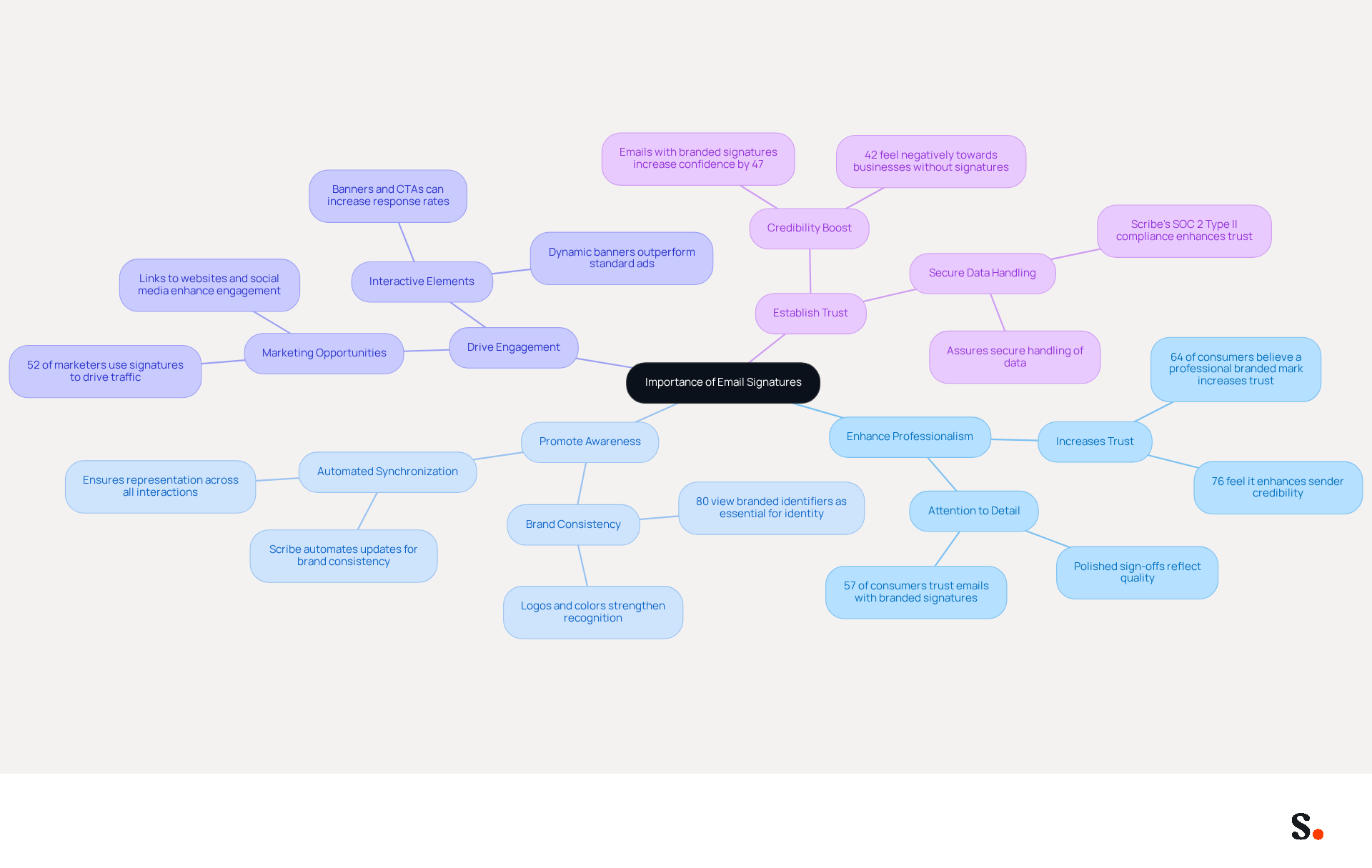
- Enhance Professionalism: A polished sign-off reflects attention to detail, which can improve trust and credibility with recipients. Research shows that 64% of consumers believe a professional branded mark increases trust, while 76% feel it enhances the sender's credibility. Moreover, messages with professionally branded identifiers enhance consumer trust by 47%, underscoring how a well-crafted sign-off can boost engagement.
- Promote Awareness: Incorporating your company logo and colors helps maintain consistency across communications. Indeed, 80% of participants view branded identifiers as essential for a company's identity, emphasizing the significance of visual components in creating a robust presence. With Scribe, you can automate the synchronization of communication identifiers with your business phone system, ensuring that your brand identity is consistently represented across all interactions.
- Drive Engagement: Email footers can include links to your website, social media profiles, or promotional campaigns, effectively turning every message into a marketing opportunity. Statistics indicate that 52% of marketers utilize digital identifiers to drive traffic to their websites, emphasizing their potential as a cost-effective marketing tool. Furthermore, Scribe's automated updates guarantee that any modifications made in your Aircall configuration are promptly reflected in your digital identifiers, enhancing brand consistency and engagement.
- Establish Trust: A professional mark enhances credibility, making recipients more likely to engage with your content. Research indicates that 57% of consumers have confidence in messages from businesses that employ branded identifiers, highlighting the importance of such identifiers in building trust and engagement. With Scribe's SOC 2 Type II compliance, you can be assured that your data is handled securely, further establishing trust with your audience.
Recognizing these benefits shows why investing time in a strong email template is crucial; it not only reflects your brand but also significantly enhances your communication effectiveness.
Gather Requirements for Your Email Signature Template
Before you create your email signature template, it's essential to gather key requirements that will enhance its effectiveness:
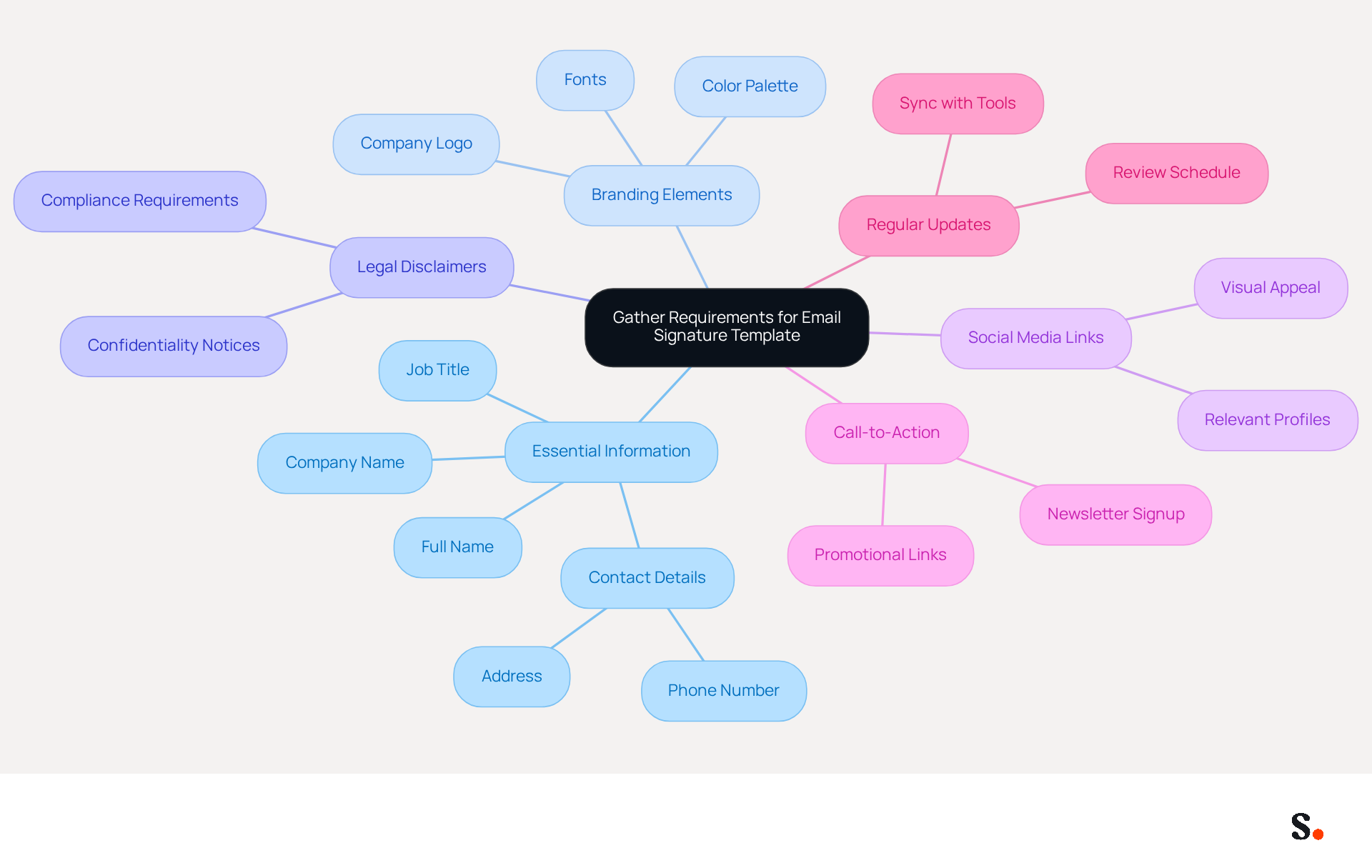
- Essential Information: Include your full name, job title, company name, and contact details such as phone number and address. This basic info builds your credibility and makes it easy for recipients to get in touch.
- Branding Elements: Collect your company logo, color palette, and any specific fonts that align with your brand guidelines. Consistent branding in email footers enhances recognition and trust, making your communications more effective. Limit the number of colors and fonts used to maintain a clean design.
- Legal Disclaimers: Determine if your organization requires any legal disclaimers or confidentiality notices in the closing. Without these disclaimers, you risk non-compliance and potential legal issues, which is crucial for maintaining professionalism.
- Social Media Links: Decide which social media profiles to include, ensuring they are relevant to your professional role. Incorporating social media links can significantly enhance engagement, as messages with such elements receive five times more clicks than plain-text ones.
- Call-to-Action: Consider if you want to include a call-to-action (CTA), such as a link to a current promotion or a newsletter signup. Incorporating CTAs can significantly enhance your marketing efforts and lead to increased engagement, making them a valuable addition to your footer.
- Regular Updates: Remember to consistently review and refresh your contact details to reflect any changes in your information or branding. With Scribe, all modifications made to your Calendly setup automatically sync with your contact details, ensuring effortless updates and brand consistency. This integration simplifies management and supports SOC 2 Type II compliance, ensuring secure data handling.
By preparing these elements, including a Microsoft email signature template, you not only streamline the creation process but also elevate the professionalism of your communications.
Create Your Email Signature Template in Microsoft Outlook
Creating a microsoft email signature template in Microsoft Outlook is essential for effective communication. To create your email signature template, follow these steps:
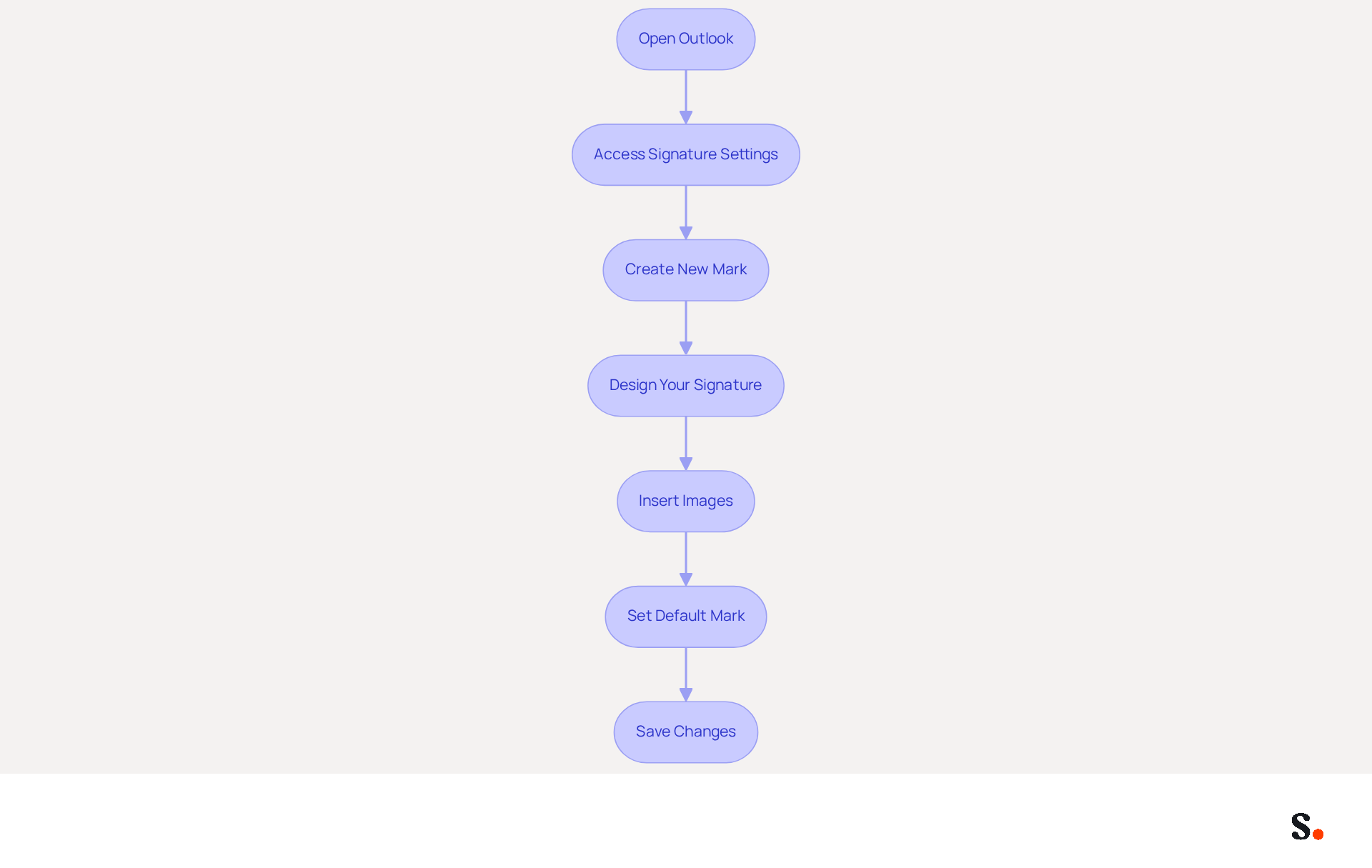
- Open Outlook: Launch the Microsoft Outlook application on your computer.
- Access Signature Settings: Click on 'File' in the top-left corner, then select 'Options'. In the Mail category, click on 'Signatures' to create a microsoft email signature template.
- Create New Mark: Click 'New' to create a new mark. Enter a name for your mark (e.g., 'Professional Mark').
- Design Your Signature: In the editing box, input your gathered information. Use the formatting tools to adjust fonts, colors, and layout as needed. Use color to enhance visibility while keeping the message clear; a well-crafted signature can greatly influence how your brand is perceived.
- Insert Images: If you have a logo, click on the image icon to upload it. Ensure it is suitably sized for correspondence, as large images can undermine the professionalism of your email signature.
- Set Default Mark: Select your new mark as the default for new messages and replies/forwards if desired. This consistency is vital, as research shows that 42% of consumers view businesses without a branded identifier negatively.
- Save Changes: Click 'OK' to preserve your settings.
Your message template is now created and ready for use! A well-crafted microsoft email signature template can make the difference between a missed opportunity and a successful engagement.
Customize Your Email Signature for Branding
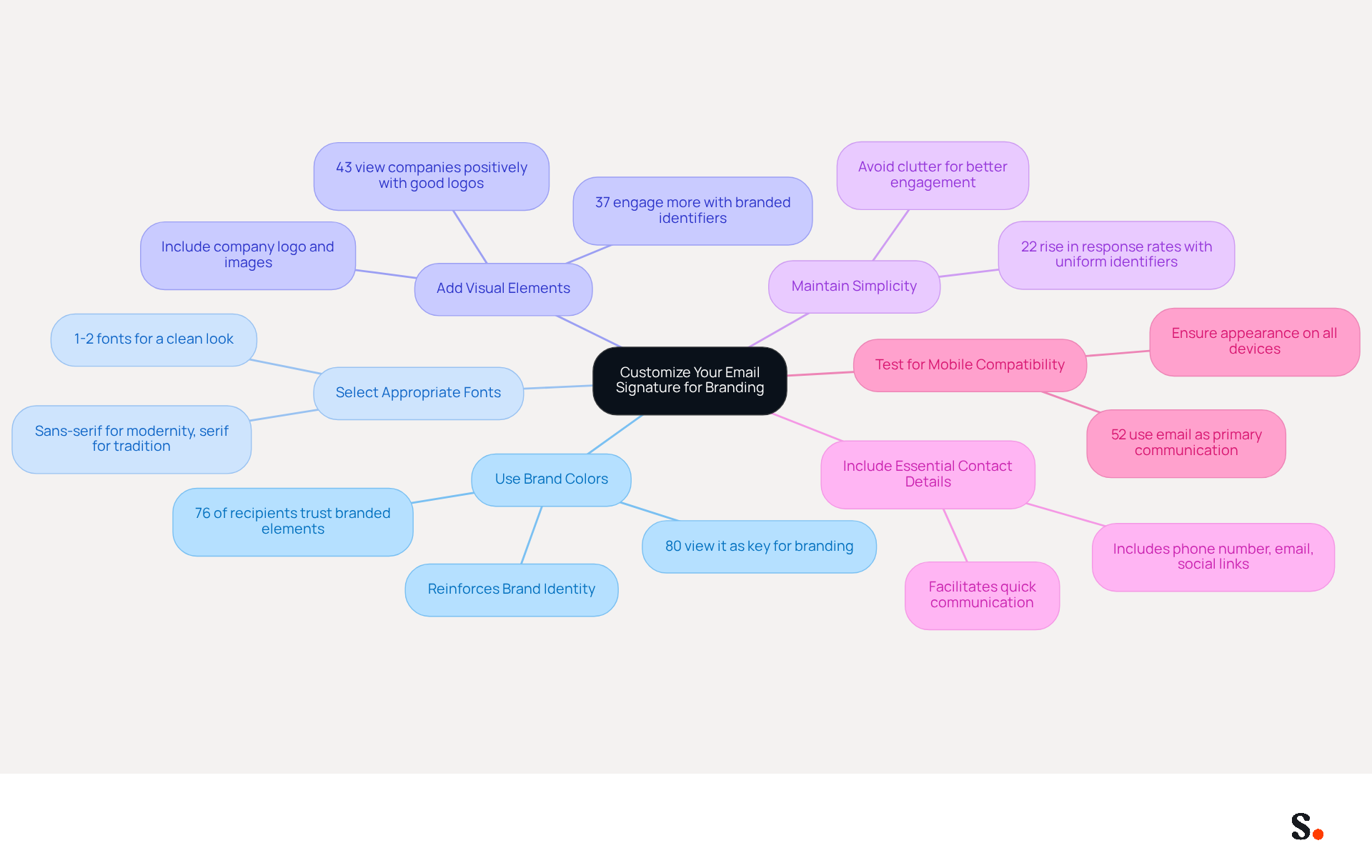
Customizing your email signature is not just about aesthetics; it’s a strategic move that can significantly enhance your brand's identity. Consider the following strategies:
- Use Brand Colors: Incorporate your company’s color palette into the text and background of your email. Using consistent colors reinforces your brand identity, and studies show that 76% of recipients trust senders who use branded elements. Additionally, 80% of businesses view a branded email signature as a key element for branding.
- Select Appropriate Fonts: Choose fonts that represent your identity. Stick to 1-2 fonts to maintain a clean and polished appearance. A clean sans-serif font conveys modernity, while a classic serif font embodies tradition and reliability.
- Add Visual Elements: Include your company logo and relevant images or icons that represent your identity. Ensure they are high-quality and appropriately sized. A professional emblem can enhance how Scribe is perceived, as 43% of consumers are more likely to view companies positively when they have well-designed logos. Moreover, 37% of consumers are more likely to engage with messages featuring branded identifiers, emphasizing their effectiveness in enhancing interaction.
- Maintain Simplicity: Avoid clutter. Cluttered designs can confuse recipients, making it harder for them to engage with your message. A simple, clean design is more effective and easier for recipients to read. Organizations with uniform identifiers experience a 22% rise in response rates.
- Include Essential Contact Details and Social Media Links: Ensure your email includes key contact information such as your phone number, email address, and links to your social media profiles. This facilitates quick communication and enhances brand visibility.
- Test for Mobile Compatibility: Ensure your mark appears well on both desktop and mobile devices. Testing by sending messages to yourself and viewing them on different devices is essential, as 52% of prospects and customers use this method as their primary communication channel.
By personalizing your message footer with a microsoft email signature template, you strengthen your identity and leave a memorable impact with each correspondence. By implementing these strategies, you not only elevate your professionalism but also create lasting impressions that can drive engagement. Furthermore, with Scribe's automated synchronization with Aircall, any modifications made in your Aircall setup will effortlessly reflect in your communication identifiers, ensuring brand consistency across all interactions.
Implement Your Email Signature Template Organization-wide
To ensure a cohesive brand identity, implementing an email signature template organization-wide is essential:
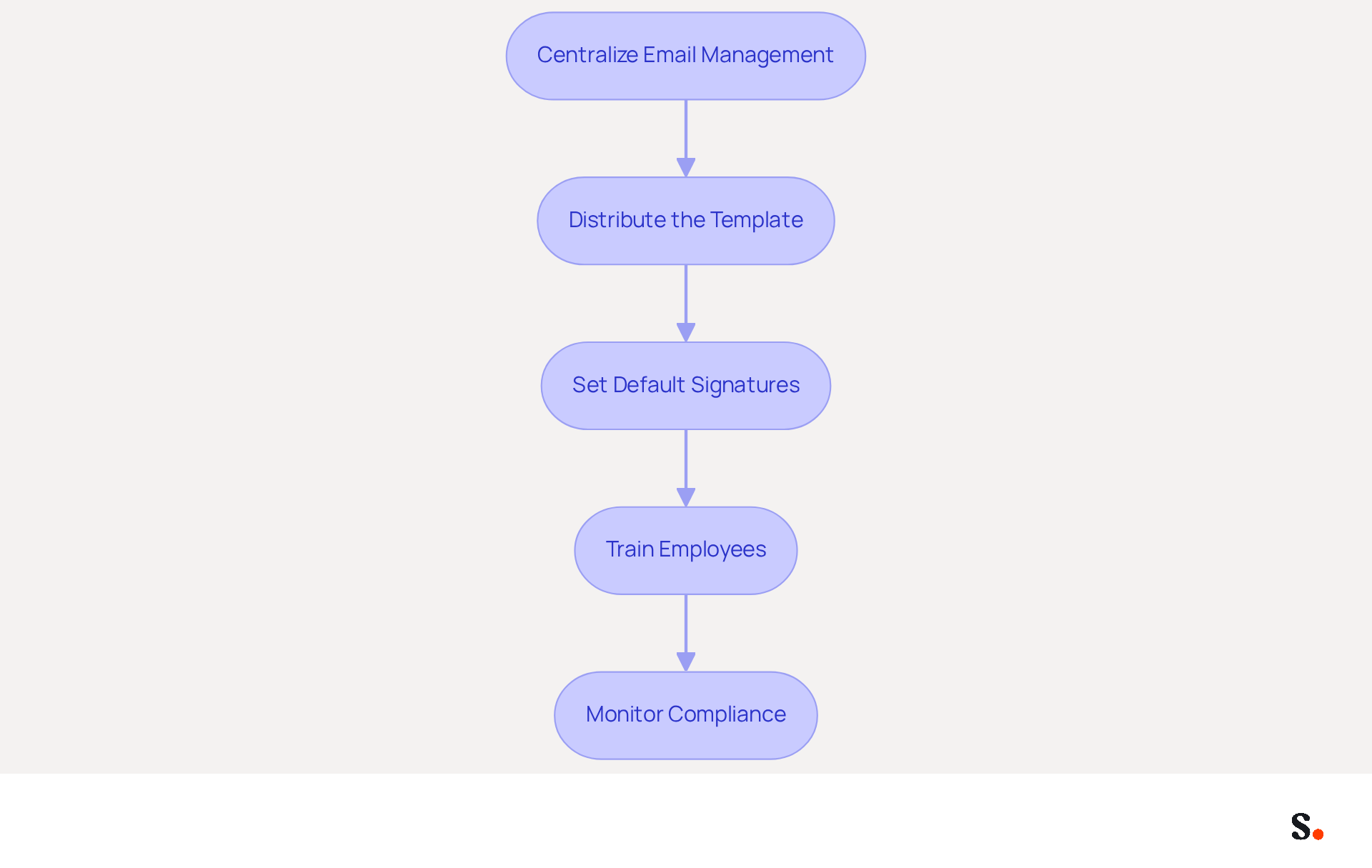
- Centralize Email Management: Scribe enables the automatic filling of teammates' identification details, which streamlines the process and enhances collaboration. This ensures consistency and simplifies updates, allowing for a unified brand presentation.
- Distribute the Template: Share the layout template with all employees, providing clear instructions on how to set it up in their Outlook accounts. This step is vital for ensuring a consistent and professional brand representation with a Microsoft email signature template.
- Set Default Signatures: Configure Scribe to automatically apply the sign-off to all outgoing messages from the organization. This removes the risk of inconsistent markings and ensures every email represents your identity. Furthermore, Scribe's integration with Aircall ensures that any modifications made in your Aircall setup will automatically sync with your Scribe configurations, enhancing consistency across your identity.
- Train Employees: Consider conducting training sessions to help employees understand the significance of the standardized mark and how to implement it effectively. This fosters a culture of professionalism and brand alignment through effective training.
- Monitor Compliance: Regularly check to ensure that all employees are using the correct sign-off. Provide reminders and support as needed to maintain adherence to the branding guidelines. Scribe's automated management of digital identifiers not only streamlines this process but also guarantees SOC 2 Type II compliance for secure data handling.
Implementing a Microsoft email signature template as a standardized communication footer across your organization not only enhances brand consistency but also reinforces professionalism in all interactions. Statistics indicate that branded digital identifiers can lead to a 22% rise in response rates, and 76% of participants claim branded digital identifiers enhance their trust in the sender. Moreover, electronic identifiers serve as a high-impact, no-cost branding channel in 2026, making this initiative a worthwhile investment for your marketing strategy. Failure to standardize your email signatures could lead to a loss of credibility and effectiveness in your communications.
Troubleshoot Common Email Signature Issues
If you encounter issues with your email signature, it’s crucial to address them promptly to maintain your professional image.
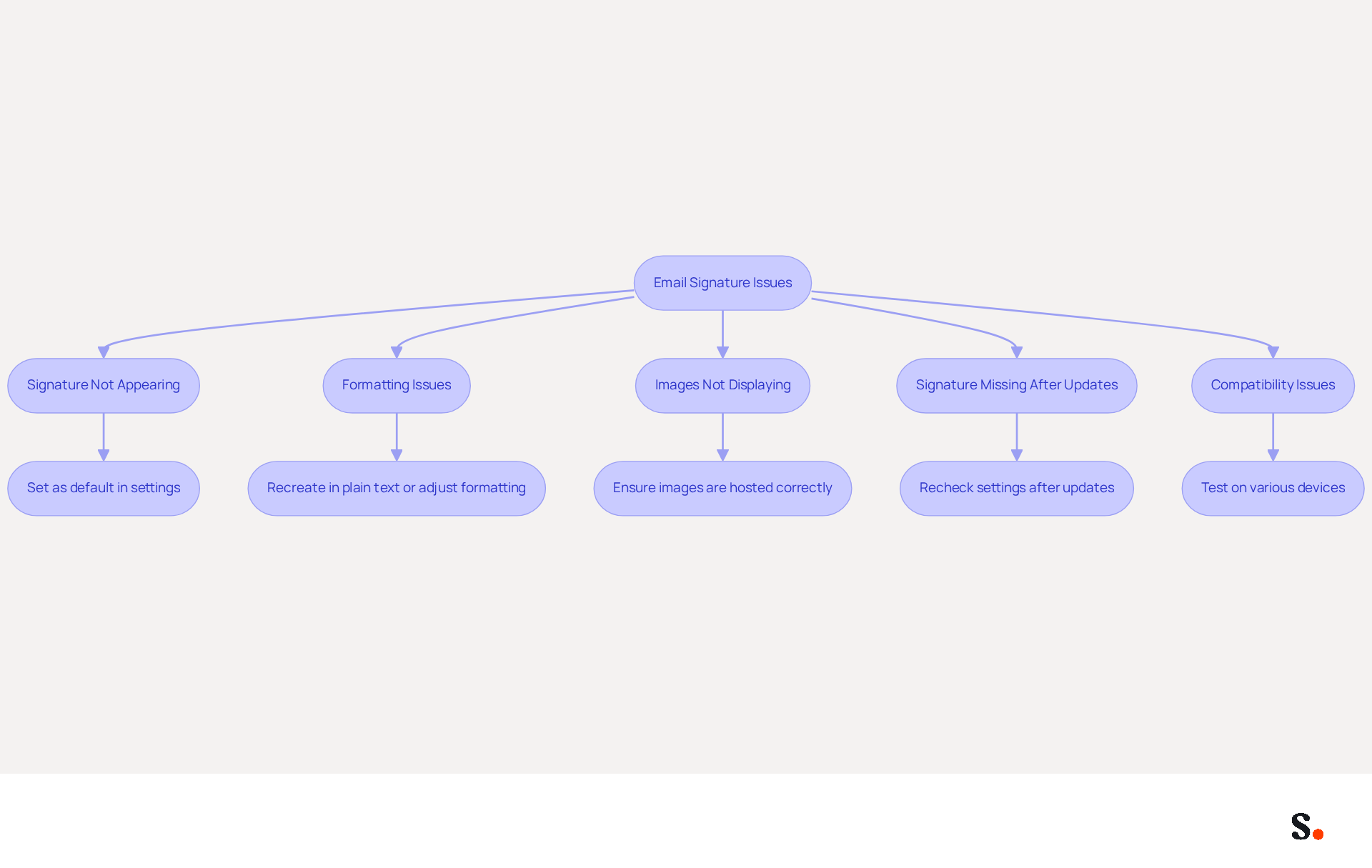
- Signature Not Appearing: Ensure that the mark is set as the default in the settings. Check both new messages and replies/forwards settings. Many users overlook the importance of setting their email signature as default, leading to missed opportunities for professional communication. Regular checks are vital, as 44.4% of individuals update their contact information 2-4 times a year.
- Formatting Issues: If your sign-off looks off, try recreating it in plain text or tweaking the formatting settings in Outlook. Research shows that 52% of workers consider a strong digital identifier crucial for effective communication, underscoring the need for proper formatting.
- Images Not Displaying: Ensure that images are hosted online or embedded correctly. Check the image size and format to ensure compatibility. Images should be set at 72 DPI for most clients and 96 DPI for older Outlook versions to avoid blurriness.
- Signature Missing After Updates: Sometimes, software updates can reset settings. Recheck your identification settings after any updates. Failing to verify your settings after updates can result in a lack of professionalism in your communications. Many organizations have discovered that utilizing a Microsoft email signature template for managing digital signatures effectively strengthens their branding and upholds a professional image.
- Compatibility Issues: Test your identifier on various devices and messaging clients to ensure it displays correctly everywhere. Dynamic digital identifiers have been demonstrated to possess a notably higher click-through rate of 4%, suggesting that appropriate display across platforms is essential for engagement.
By implementing these troubleshooting steps, you not only resolve common issues but also enhance your brand's professionalism and reliability in communication.
Conclusion
Implementing a Microsoft email signature template is a strategic initiative that can transform professional communication. By implementing a standardized approach, organizations can ensure that every email sent reflects their values and professionalism, ultimately leading to improved engagement and trust with recipients.
The article emphasizes the importance of well-crafted email signatures, highlighting how they can enhance professionalism, promote brand awareness, drive engagement, and establish trust. Key elements such as essential contact information, branding components, and legal disclaimers are crucial for creating an effective signature. Furthermore, the implementation of a standardized email signature across an organization can significantly improve brand consistency and communication effectiveness.
Given the importance of digital communication today, investing in a professional email signature template is crucial. By leveraging tools like Scribe, organizations can automate updates and ensure compliance with branding guidelines, ultimately enhancing their marketing efforts. This investment not only enhances professionalism but also transforms every email into an opportunity for engagement and brand reinforcement.
Frequently Asked Questions
Why are email signatures important for organizations?
Email signatures are essential tools that represent your organization in every communication. A well-crafted email footer enhances your business image by providing key contact details and strengthening brand identity.
How do email signatures enhance professionalism?
A polished sign-off reflects attention to detail, improving trust and credibility with recipients. Research shows that 64% of consumers believe a professional branded mark increases trust, while 76% feel it enhances the sender's credibility.
What role do email signatures play in promoting brand awareness?
Incorporating your company logo and colors in email signatures helps maintain consistency across communications. 80% of participants view branded identifiers as essential for a company's identity, emphasizing the significance of visual components.
How can email footers drive engagement?
Email footers can include links to your website, social media profiles, or promotional campaigns, turning every message into a marketing opportunity. Statistics indicate that 52% of marketers utilize digital identifiers to drive traffic to their websites.
How does Scribe help with email signature management?
Scribe automates the synchronization of communication identifiers with your business phone system, ensuring consistent brand representation. It also guarantees that modifications made in your Aircall configuration are promptly reflected in your digital identifiers.
What information should be included in an email signature template?
Essential information includes your full name, job title, company name, and contact details. Additionally, branding elements like your company logo and color palette, legal disclaimers, social media links, and a call-to-action (CTA) should be considered.
Why are legal disclaimers important in email signatures?
Legal disclaimers or confidentiality notices are crucial for maintaining professionalism and compliance, helping to avoid potential legal issues.
How can social media links in email signatures enhance engagement?
Including relevant social media profiles can significantly enhance engagement, as messages with such elements receive five times more clicks than plain-text ones.
What is the importance of regularly updating email signatures?
Regular updates ensure that your contact details reflect any changes in your information or branding. Scribe allows for effortless updates by automatically syncing modifications made to your Calendly setup.
How does Scribe ensure secure data handling for email signatures?
Scribe's SOC 2 Type II compliance assures that your data is handled securely, further establishing trust with your audience.
List of Sources
- Understand the Importance of Email Signatures
- Why Are Email Signatures Key to Brand Awareness? | QuickMail (https://quickmail.com/role-of-email-signatures-in-brand-awareness)
- Why Email Signatures Must Be In Your 2026 Marketing Plan | Rocketseed (https://rocketseed.com/blog/2026-marketing-plan-email-signatures)
- 40+ Email Signature Statistics for 2026 (Data + Insights) (https://wavecnct.com/blogs/email-signature-statistics)
- Master Email Signature Sign Offs: Best Practices for Brand Impact (https://scribe-mail.com/en-US/blog/master-email-signature-sign-offs-best-practices-for-brand-impact)
- Research Recap: Branded Email Signatures Increase Company Recognition, Trust - B2BMX INSIGHTS (https://demandgenreport.com/industry-news/research-recap-branded-email-signatures-increase-company-recognition-trust/47252)
- Gather Requirements for Your Email Signature Template
- Email Signature Best Practices - NEWOLDSTAMP (https://newoldstamp.com/blog/email-signature-best-practices)
- Email Signature Best Practices Guide With Examples - MailerLite (https://mailerlite.com/blog/email-signature-best-practices)
- What to Include in a Business Email Signature (https://rocketseed.com/blog/email-signature-what-to-include)
- 20 Examples of Professional Email Signatures | Letsignit (https://letsignit.com/blog/professional-email-signature)
- Best Practices to Generate Signature Templates for Marketing Success (https://scribe-mail.com/en-US/blog/best-practices-to-generate-signature-templates-for-marketing-success)
- Create Your Email Signature Template in Microsoft Outlook
- Create Outlook email signature (templates, signature generator & tips) (https://wisestamp.com/outlook-email-signature)
- How to Add a Signature in Microsoft Outlook: Step-by-Step Guide (https://scribe-mail.com/en-US/blog/how-to-add-a-signature-in-microsoft-outlook-step-by-step-guide)
- 40+ Email Signature Statistics for 2026 (Data + Insights) (https://wavecnct.com/blogs/email-signature-statistics)
- How to Add a Signature in Outlook (New & Classic) (https://fitsmallbusiness.com/add-a-signature-outlook)
- Create an email signature in Outlook - Microsoft Support (https://support.microsoft.com/en-us/topic/create-an-email-signature-in-outlook-0f6ec33a-94dc-c87b-ad05-3bd04e89f51c)
- Customize Your Email Signature for Branding
- Email Signature Branding: Consistency and Impact | Crossware365 (https://crossware365.com/blog/mastering-email-signature-branding-market-presence)
- Research Recap: Branded Email Signatures Increase Company Recognition, Trust - B2BMX INSIGHTS (https://demandgenreport.com/industry-news/research-recap-branded-email-signatures-increase-company-recognition-trust/47252)
- The benefits of a branded email signature (https://bybrand.io/blog/branded-email-signature)
- The impact of email signatures on your branding (https://signitic.com/en/resources/the-impact-of-email-signatures-on-your-branding)
- "Email Signature Trends for 2026: What's In, What's Out" | Crossware posted on the topic | LinkedIn (https://linkedin.com/posts/crossware-ltd_new-year-new-trends-even-for-your-email-activity-7394554686046908416-vD_O)
- Implement Your Email Signature Template Organization-wide
- Company-Wide Email Signature Management | CloudM (https://cloudm.io/resources/blog/optimize-your-process-with-company-wide-email-signature-management)
- 40+ Email Signature Statistics for 2026 (Data + Insights) (https://wavecnct.com/blogs/email-signature-statistics)
- Why Email Signature Management Matters for Your Business (https://vectorchoice.com/blog/why-email-signature-management-is-more-important-than-you-think)
- 5 Benefits of Using Centrally Managed Email Signatures | Crossware365 (https://crossware365.com/blog/5-benefits-of-using-centrally-managed-email-signatures)
- AdSigner (https://adsigner.com/en/email-signatures/benefits)
- Troubleshoot Common Email Signature Issues
- Email signature statistics: Why every business should optimize their email signatures — Stripo.email (https://stripo.email/blog/email-signature-statistics-why-every-business-should-optimize-their-email-signatures)
- Email Signature Troubleshooting - Problems & Solutions - Gimmio (https://blog.gimm.io/email-signature-troubleshooting)
- Fixing Signature Issues in Gmail (https://teachers.tech/fixing-signature-issues-in-gmail)
- 40+ Email Signature Statistics for 2026 (Data + Insights) (https://wavecnct.com/blogs/email-signature-statistics)
Get started with Scribe
Build a professional email signature
Free 14-day trial — no credit card.