Create an HTML Email Signature on Mac: A Step-by-Step Guide
A professional email signature serves as a crucial branding element, influencing how organizations communicate and market themselves. As remote work and
Sophie Grant
Email Signature Specialist, Scribe
On this page
- Introduction
- Understand HTML Email Signatures and Their Importance
- Create Your HTML Email Signature in Apple Mail
- Step 1: Open Apple Mail Settings
- Step 2: Navigate to Signatures
- Step 3: Create a New Signature
- Step 4: Prepare Your HTML Signature
- Step 5: Paste Your HTML Signature
- Step 6: Test Your Signature
- Troubleshoot Common HTML Signature Issues
- Explore Tools and Resources for Enhanced Signature Management
- Email Signature Generators
- Signature Management Software
- Best Practices Resources
- Conclusion
- Frequently Asked Questions
- List of Sources
Introduction
A professional email signature serves as a crucial branding element, influencing how organizations communicate and market themselves. As remote work and digital communication become the norm, the need for a well-crafted HTML email signature is clearer than ever. This guide outlines the essential steps for creating an HTML email signature on a Mac, highlighting the benefits of using such signatures. However, many organizations struggle with consistency and design in their email signatures. Ultimately, a well-designed email signature can be the difference between a memorable impression and being overlooked in a crowded inbox.
Get started with Scribe
Manage signatures across your whole team
Free 14-day trial — no credit card.
Understand HTML Email Signatures and Their Importance
Digital sign-offs are essential branding tools that enhance your professional image and promote your business. Unlike plain text signatures, formatted signatures allow rich styling, including images, logos, and clickable links. This feature enhances the visual appeal of your emails while opening doors for marketing and engagement.
Benefits of HTML Email Signatures:
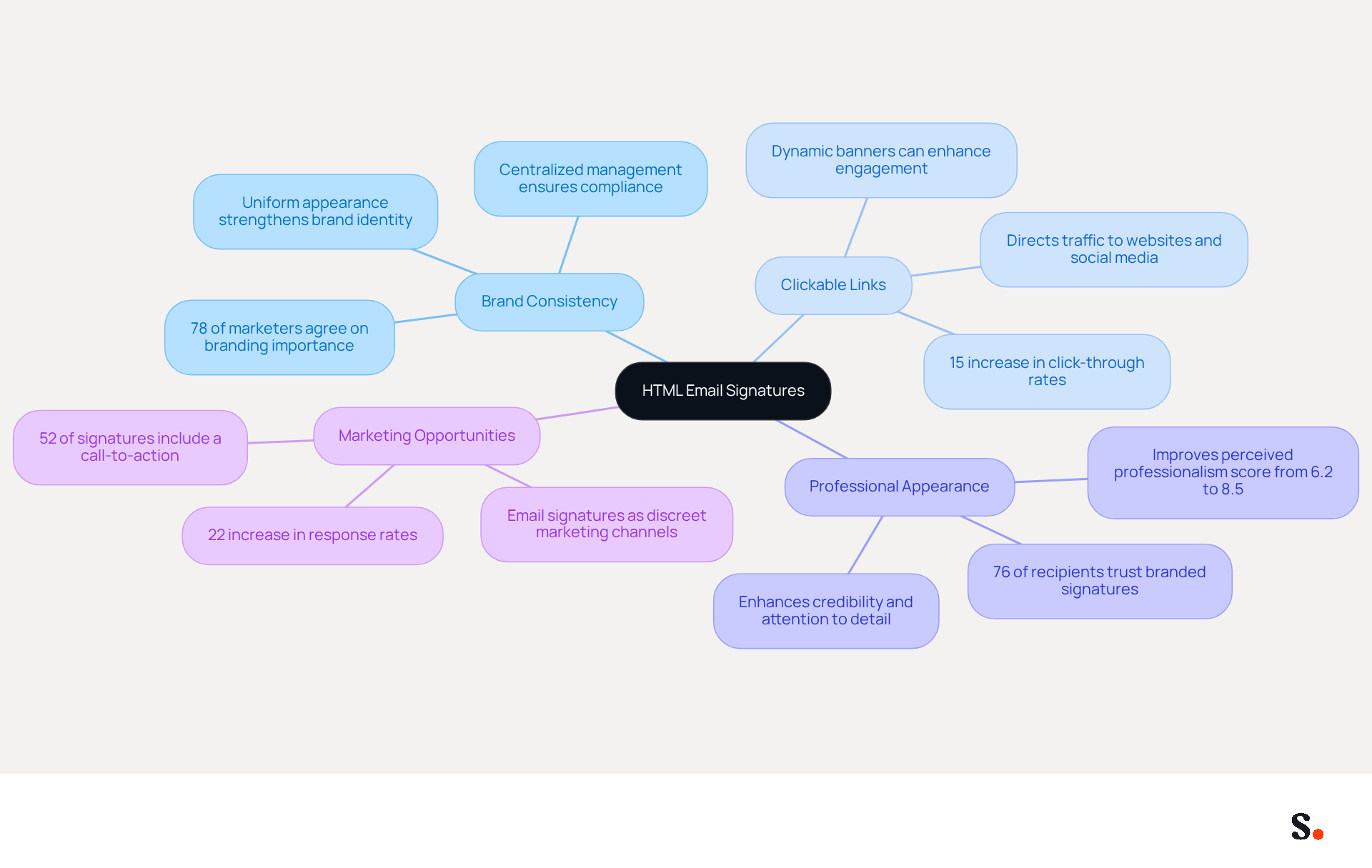
- Brand Consistency: A uniform appearance across all communications strengthens your brand identity, which is essential as 78% of marketers agree that branded elements are important. With Scribe, every modification made in your Aircall setup will automatically be reflected in your digital identifiers, ensuring that your branding stays consistent across all platforms.
- Clickable Links: Directing recipients to your website, social media, or promotional content can increase traffic and engagement. Companies that employ branded email footers report a 15% increase in click-through rates to their websites.
- Professional Appearance: A well-designed sign-off conveys professionalism and attention to detail, enhancing your credibility. Research shows that 76% of recipients believe that branded marks enhance their trust in the sender.
- Marketing Opportunities: Utilize your personal mark to promote special offers, events, or new products, effectively transforming every email into a marketing channel. Dynamic banners in email footers can lead to a 22% increase in click-through rates, showcasing the potential for significant engagement.
Scribe also meets SOC 2 Type II, GDPR, and CCPA standards, ensuring that your security concerns are addressed. By investing in a well-crafted digital signature, you not only enhance your brand's visibility but also build trust with every email you send.
Create Your HTML Email Signature in Apple Mail
Creating an html email signature mac in Apple Mail enhances the effectiveness of your correspondence. With Scribe, every modification made in your Aircall configuration will automatically be reflected in your communication identifiers, which helps maintain a cohesive brand image in all communications. Follow these steps to ensure your signature is both functional and visually appealing:
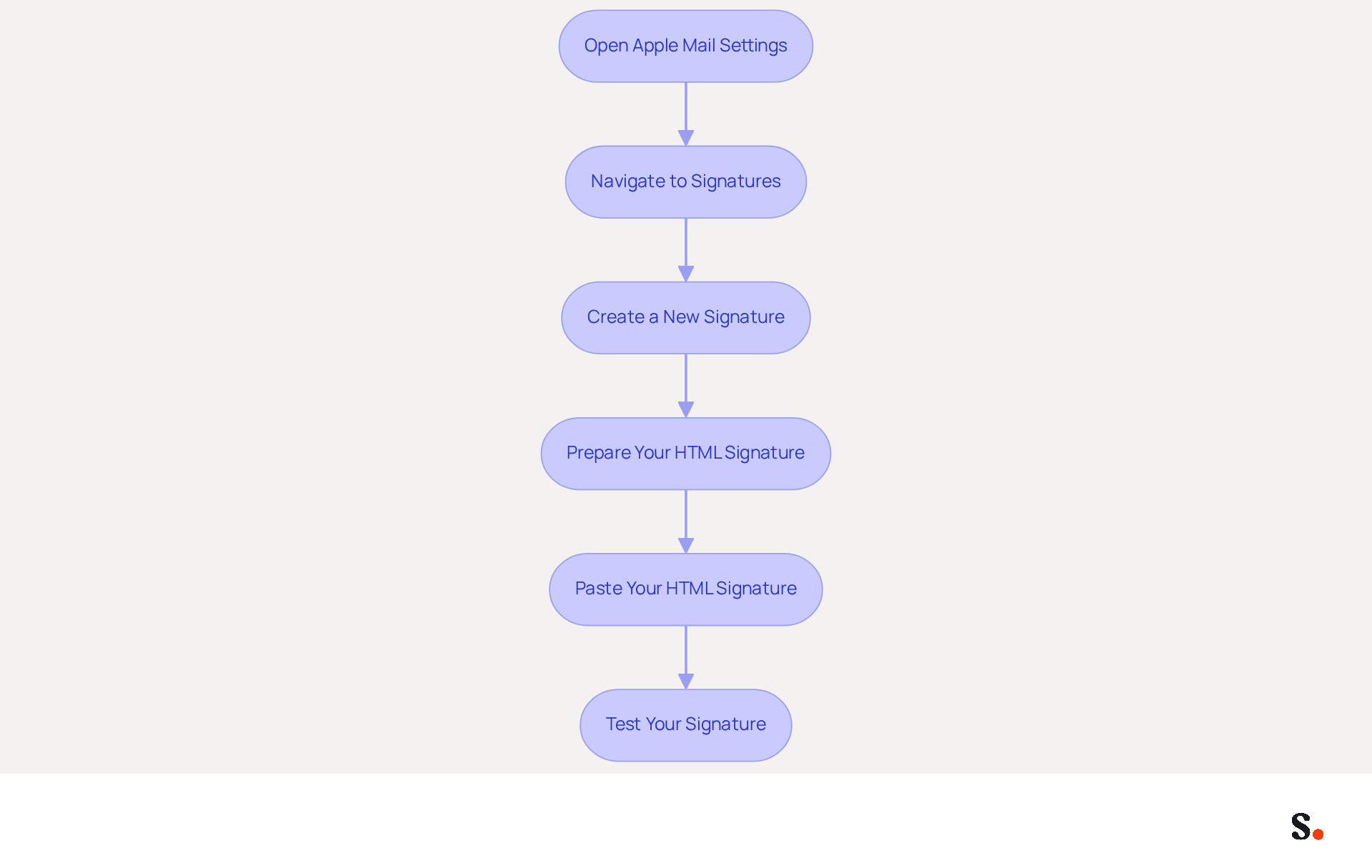
Step 1: Open Apple Mail Settings
- Launch the Apple Mail application.
- Click on the 'Mail' menu in the top left corner.
- Select 'Preferences' (or 'Settings' in older versions).
Step 2: Navigate to Signatures
- In the Preferences window, click on the 'Signatures' tab.
- Choose the email account for which you wish to create the personalized closing.
Step 3: Create a New Signature
- Click the '+' button to add a new signature.
- Name your identifier for easy recognition.
Step 4: Prepare Your HTML Signature
- Open your HTML signature file in a web browser.
- Select all the content (Cmd + A) and copy it (Cmd + C).
Step 5: Paste Your HTML Signature
- Return to the Apple Mail signature settings.
- In the editing area for your label, paste your code (Cmd + V).
- Ensure that the 'Always match my default font' option is unchecked to maintain your HTML formatting.
Step 6: Test Your Signature
- Close the Preferences window and compose a new email to see your signature in action.
- Send a test message to yourself to verify that all links and images display correctly.
By following these steps, you can create a professional html email signature mac that significantly boosts your correspondence effectiveness. Regularly updating your identifier is essential, as 42% of organizations do not monitor communication identifier performance, creating a significant blind spot. Furthermore, a well-maintained HTML communication footer can result in a 22% rise in response rates, making it a valuable asset for your marketing efforts. Remember to use hosted images with HTTPS links to prevent deliverability issues, ensuring your email appears as intended. With Scribe, you can effortlessly manage and update your digital identifiers, ensuring compliance with SOC 2 Type II standards for secure data handling.
Troubleshoot Common HTML Signature Issues
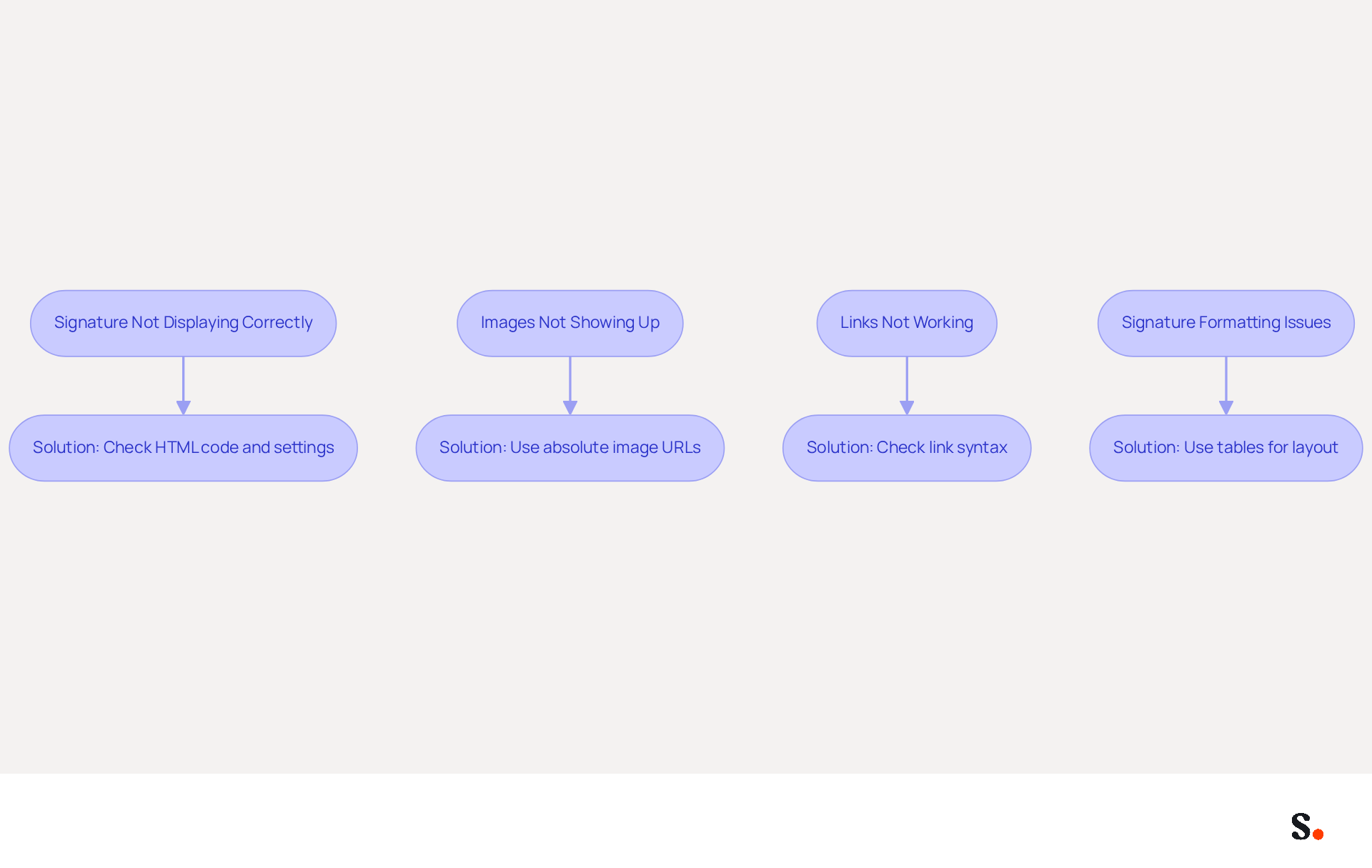
Despite thorough preparation, challenges with email formatting can still arise, impacting the professionalism of your communications. Here are some common problems and their solutions:
-
Issue 1: Signature Not Displaying Correctly
- Solution: Check that the HTML code is pasted correctly and that the 'Always match my default font' option is turned off. If the signature still appears as plain text, try re-pasting it after restarting Apple Mail.
-
Issue 2: Images Not Showing Up
- Solution: Ensure that the image URLs are absolute links (not local paths). If you are using images hosted on your server, make sure they are publicly accessible. It's important to note that images in replies on iPhone or iPad can sometimes show up as file names unless you adjust certain settings.
-
Issue 3: Links Not Working
- Solution: Double-check the HTML code for any typos in the link syntax. Ensure that all links are correctly formatted with the
<a>tag. Research shows that businesses using branded digital identifiers see a 15% increase in website click-through rates, which underscores the importance of having functional links.
- Solution: Double-check the HTML code for any typos in the link syntax. Ensure that all links are correctly formatted with the
-
Issue 4: Signature Formatting Issues
- Solution: Use tables for layout in your HTML signature. This assists in maintaining consistent formatting across various messaging clients. Avoid using CSS styles that may not be supported by all messaging clients. Common formatting errors can result in broken digital identifiers, especially when they are created in incompatible formats such as Microsoft Word.
By being aware of these common issues and their solutions, you can ensure that your HTML email signature Mac remains professional and functional. Addressing these common issues not only enhances the functionality of your email signatures but also reinforces your brand's professionalism in every communication.
Explore Tools and Resources for Enhanced Signature Management
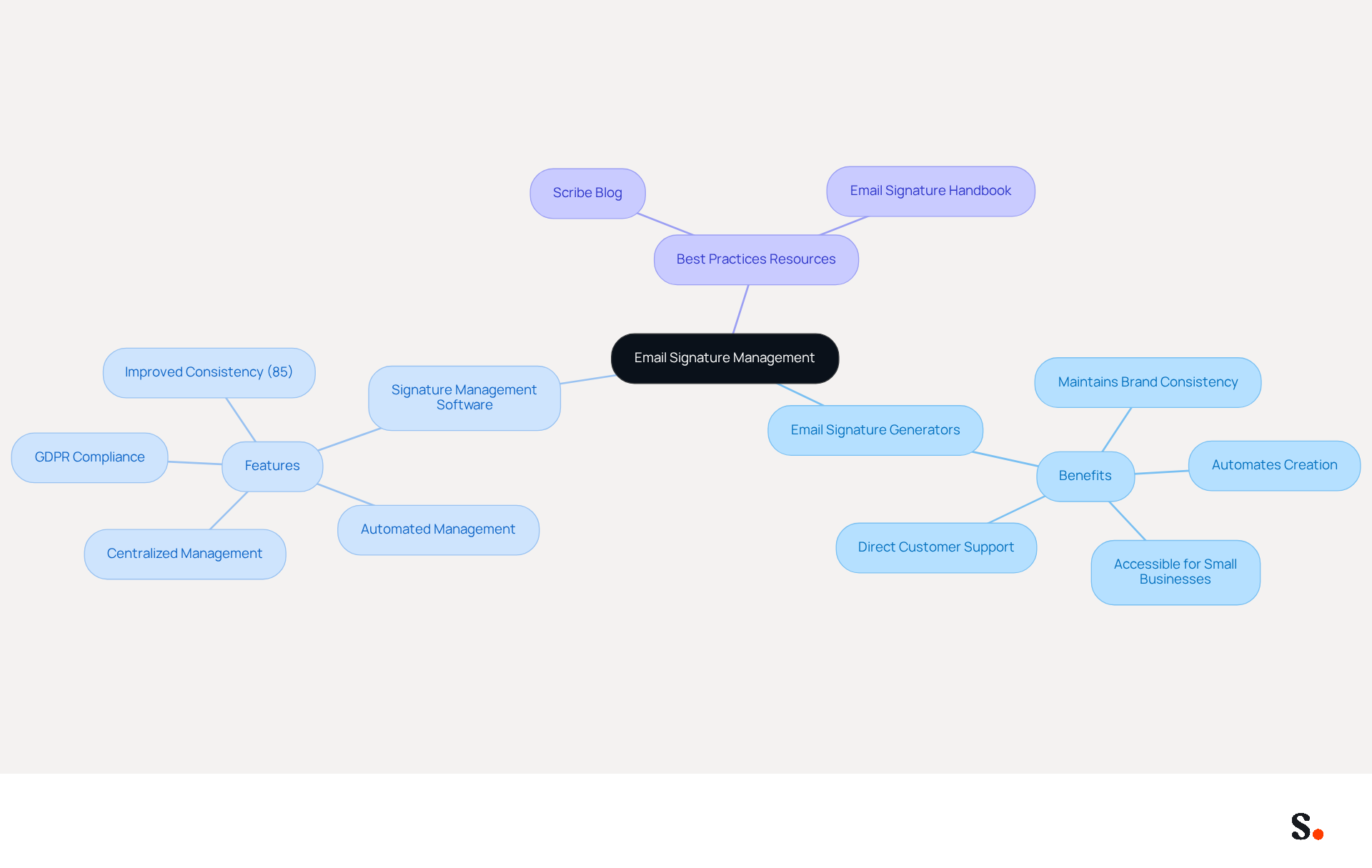
Effective email signature management is crucial for maintaining brand integrity and maximizing marketing potential. To further enhance your email signature management, consider utilizing the following tools and resources:
Email Signature Generators
- Consider using an email signature generator that automates the creation and management of your email footers, helping maintain brand consistency and enhance marketing opportunities. This tool is free for up to two approvals, making it accessible for businesses of all sizes. With this service, you can also rely on direct customer support, allowing you to communicate with a person instead of navigating through automated systems, ensuring your issues are resolved swiftly.
Signature Management Software
- Beyond just creating marks, Scribe provides automated management features that ensure your identifiers are current and compliant, making it a powerful tool for marketing teams. Teams utilizing centralized management for their branding see 85% improved consistency. Additionally, this platform is GDPR compliant, ensuring that your data is handled securely and in accordance with regulations.
Best Practices Resources
- Scribe Blog: Offers insights and best practices for crafting effective HTML email signatures, helping you stay updated on trends and techniques.
- Email Signature Handbook: A comprehensive guide that addresses everything from design principles to technical specifications for creating an HTML email signature Mac, ensuring your designs are both functional and visually appealing.
By leveraging these tools and resources, you can streamline your email signature management process and ensure that your signatures are always on-brand and effective. By adopting these tools, you not only enhance your email signature management but also contribute to a more sustainable future.
Conclusion
Crafting an HTML email signature on a Mac is more than a mere technical task; it’s a strategic initiative that can elevate your brand's visibility and professionalism. Following these steps allows users to create a signature that showcases their unique style while reinforcing their organization’s brand, ensuring every email communicates a consistent message.
This article has underscored the significance of HTML email signatures, highlighting their role in maintaining brand consistency, professionalism, and marketing opportunities. Key insights include:
- The advantages of clickable links that drive traffic
- The importance of proper formatting
- The common challenges that may arise during setup
Tools like Scribe can simplify this process, providing automated management and ensuring compliance with security standards such as SOC 2 Type II, GDPR, and CCPA.
A well-crafted HTML email signature can boost engagement and build trust, turning every email into a valuable marketing opportunity. As organizations aim for complete brand consistency and measurable marketing ROI, utilizing effective email signature management tools is essential. Investing in effective email signature management is not just beneficial; it’s essential for achieving brand consistency and maximizing marketing potential.
Frequently Asked Questions
What is the importance of HTML email signatures?
HTML email signatures are essential branding tools that enhance your professional image and promote your business by allowing rich styling, including images, logos, and clickable links.
How do HTML email signatures contribute to brand consistency?
HTML email signatures provide a uniform appearance across all communications, strengthening brand identity. With Scribe, any modifications made in your Aircall setup are automatically reflected in your digital identifiers, ensuring consistent branding.
What are the benefits of including clickable links in email signatures?
Clickable links in email signatures can direct recipients to your website, social media, or promotional content, which can increase traffic and engagement. Companies with branded email footers report a 15% increase in click-through rates to their websites.
How do HTML email signatures enhance professionalism?
A well-designed email signature conveys professionalism and attention to detail, which enhances credibility. Research indicates that 76% of recipients believe that branded marks increase their trust in the sender.
What marketing opportunities do HTML email signatures provide?
HTML email signatures can be used to promote special offers, events, or new products, effectively turning every email into a marketing channel. Dynamic banners in email footers can lead to a 22% increase in click-through rates.
What security standards does Scribe meet?
Scribe meets SOC 2 Type II, GDPR, and CCPA standards, addressing security concerns related to digital signatures.
How does investing in a well-crafted digital signature benefit a brand?
Investing in a well-crafted digital signature enhances brand visibility and builds trust with every email sent.
List of Sources
- Understand HTML Email Signatures and Their Importance
- 40+ Email Signature Statistics for 2026 (Data + Insights) (https://wavecnct.com/blogs/email-signature-statistics)
- Email signature statistics: Why every business should optimize their email signatures — Stripo.email (https://stripo.email/blog/email-signature-statistics-why-every-business-should-optimize-their-email-signatures)
- The impact of email signatures on your branding (https://signitic.com/en/resources/the-impact-of-email-signatures-on-your-branding)
- Top 10 Benefits Of Email Signatures | Rocketseed (https://rocketseed.com/blog/benefits-of-using-email-signatures)
- Best practices for business email signatures in 2026 (https://bybrand.io/blog/best-practices)
- Create Your HTML Email Signature in Apple Mail
- A Comprehensive Guide to Adding HTML Signatures To Your Email - Footprint Digital (https://footprint.co.uk/e-mails/a-comprehensive-guide-to-adding-html-signatures-to-your-email)
- How to Create and Manage Email Signatures on Mac Mail (Step-by-Step Guide) (https://exclaimer.com/email-signature-handbook/create-email-signatures-for-macs)
- How To Add HTML Signature To Apple Mail (2026) (https://hubspot.com/email-signature-generator/add-html-signature-mail-mac)
- Mastering Apple Mail Signature HTML: Best Practices for Marketing Managers (https://scribe-mail.com/en-US/blog/mastering-apple-mail-signature-html-best-practices-for-marketing-managers)
- 40+ Email Signature Statistics for 2026 (Data + Insights) (https://wavecnct.com/blogs/email-signature-statistics)
- Troubleshoot Common HTML Signature Issues
- Email signature statistics: Why every business should optimize their email signatures — Stripo.email (https://stripo.email/blog/email-signature-statistics-why-every-business-should-optimize-their-email-signatures)
- Email Signature Troubleshooting - Problems & Solutions - Gimmio (https://blog.gimm.io/email-signature-troubleshooting)
- How to solve problems with email signatures in Microsoft 365? (https://mail-signatures.com/articles/problems-email-signatures-office-365)
- Why HTML Email Signatures Break When People Reply | IT Support Essex | Trichromic LLP (https://trichromic.co.uk/news/why-html-email-signatures-break-when-people-reply)
- Explore Tools and Resources for Enhanced Signature Management
- Best Email Signature Management Software: Top 12 Tools (2026)
- NEWOLDSTAMP (https://newoldstamp.com/blog/email-signature-software)
- The Complete Email Signature Guide 2026: Best Practices and Policy (https://opensense.com/complete-email-signature-guide)
- Top 10 Email Signature Management Tools in 2026 (Compared) (https://mailbutler.io/blog/email/email-signature-management-tools)
- Email Signature Best Practices for 2026 (+ 15 Pro Examples) (https://wavecnct.com/blogs/email-signature-best-practices-2026)
- Best Email Signature Generators & Management Software [2026] (https://syncsignature.com/blog/best-email-signature-generators)
Get started with Scribe
Manage signatures across your whole team
Free 14-day trial — no credit card.