Create Your Email Signature in Gmail: A Step-by-Step Guide
Crafting an effective email signature is crucial for establishing a professional image and enhancing brand recognition. An email signature serves as a vital
Sophie Grant
Email Signature Specialist, Scribe
On this page
Introduction
Crafting an effective email signature is crucial for establishing a professional image and enhancing brand recognition. An email signature serves as a vital branding tool that can greatly impact professional communication. Yet, many users face frustrations in creating their signatures, often resulting in inconsistent branding.
How can one navigate these common pitfalls while ensuring their email signature reflects professionalism and brand identity? In this guide, I’ll walk you through the steps to create an impactful email signature in Gmail, sharing troubleshooting tips and best practices along the way.
Without a well-crafted signature, professionals risk undermining their credibility and brand identity. By mastering the art of email signature design, professionals can ensure their communications leave a lasting impression.
Understand the Importance of an Email Signature
An email signature gmail is not just a formality; it serves as a vital representation of your brand in every email. Here are several compelling reasons why a professional email signature is crucial:
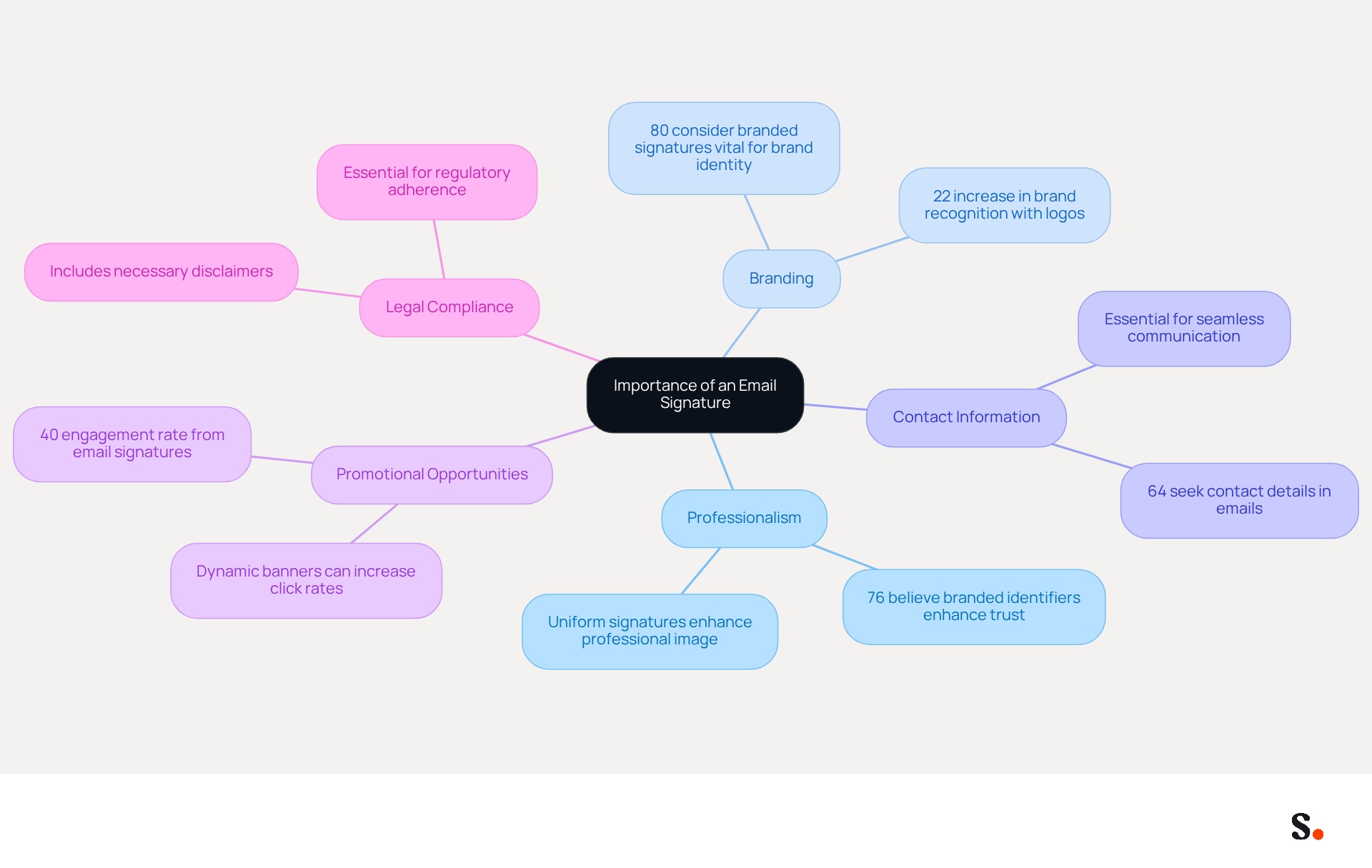
- Professionalism: A well-crafted signature enhances credibility, leaving a positive impression on recipients. Research shows that 76% of recipients believe that branded digital identifiers enhance their trust in the sender, emphasizing the significance of professionalism in online communications. Without a professional email signature gmail, you risk losing the trust of your recipients.
- Branding: Consistent use of logos, colors, and fonts strengthens brand identity and recognition. In fact, 80% of respondents believe that a branded electronic communication footer is vital for a company's brand identity, showcasing its role in maintaining a cohesive brand image. This increase in response rates demonstrates the tangible benefits of a well-designed email signature, as consistent electronic communication identifiers can result in a 22% rise in response rates.
- Contact Information: An email signature gmail provides recipients with immediate access to your contact details, facilitating seamless communication. A notable 64% of consumers seek contact details in electronic correspondence, highlighting their practical usefulness.
- Promotional Opportunities: Email footers can include links to your website, social media profiles, or promotional banners, effectively transforming each message into a promotional channel. Research shows that marketing through digital identifiers can engage audiences at a rate of 40%, far surpassing traditional methods, emphasizing their effectiveness in driving interaction.
- Legal Compliance: In certain industries, including disclaimers or legal information in your email footer is essential for regulatory adherence. This ensures that your communications are not only effective but also compliant with industry standards.
Furthermore, with Scribe's automated synchronization of correspondence identifiers with Aircall, any modifications made in your Aircall setup will be reflected in your identifiers, ensuring brand consistency. Scribe meets SOC 2 Type II standards, which means your data is managed securely, and integrates effortlessly with Calendly for automatic updates to the footer. As Sophie Grant, a Specialist in Branded Communications, observes, 'Branded identifiers assist in enhancing brand recognition and awareness.' Investing in a professional email signature gmail is not just about aesthetics; it’s a strategic move that can significantly enhance your brand's visibility and trustworthiness.
Follow Step-by-Step Instructions to Create Your Signature in Gmail
Enhancing your professional communication through a well-crafted email signature Gmail can significantly impact your brand's visibility. With Scribe, you can ensure that your correspondence identifiers are not only professionally designed but also automatically synchronized with your Aircall configuration, enhancing brand consistency across all communications. This allows marketing teams to maintain consistent branding without relying heavily on IT resources, streamlining their efforts. Follow these steps to set up your signature:
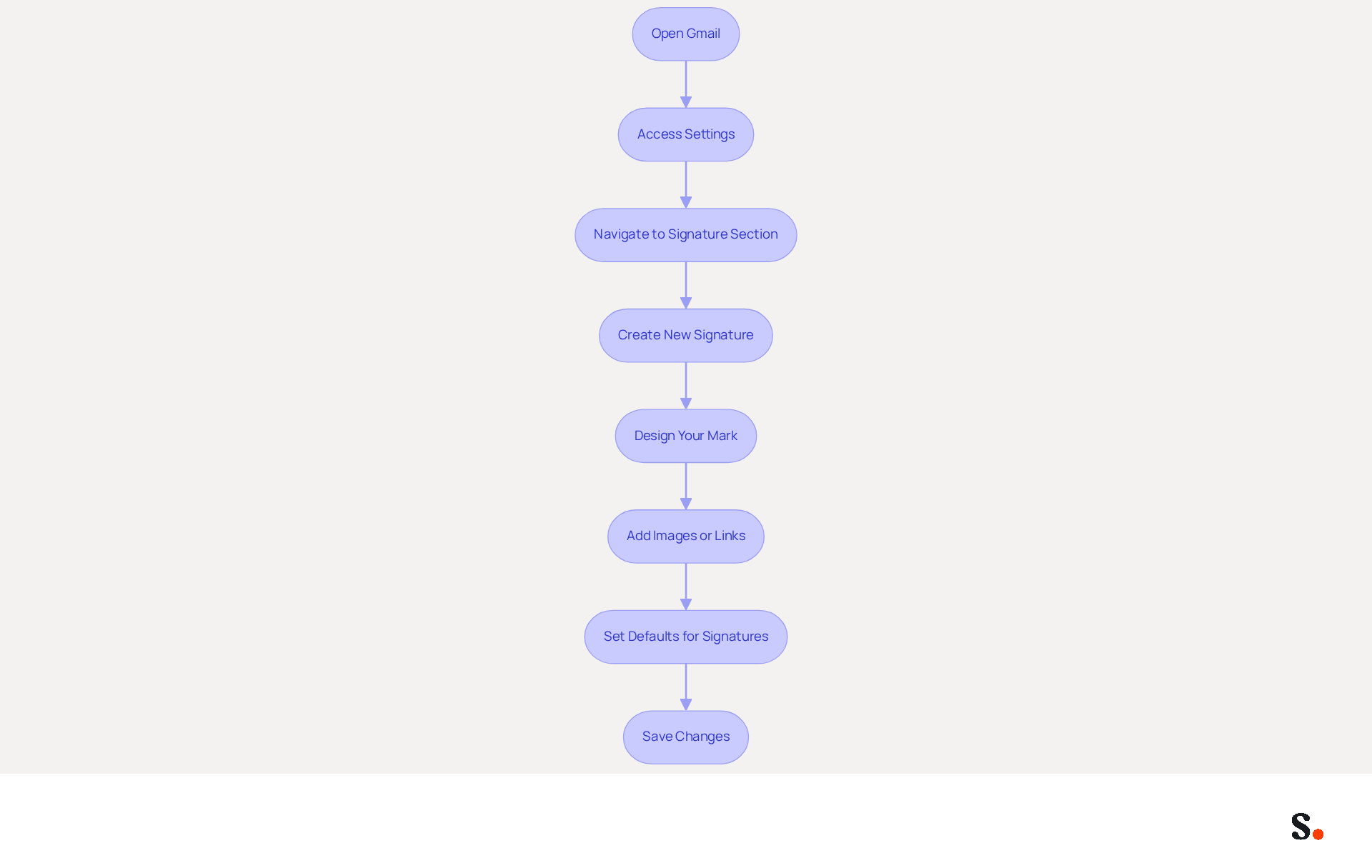
- Open Gmail: Log into your Gmail account on your computer.
- Access Settings: Click on the gear icon in the top right corner and select 'See all settings'.
- Navigate to Signature Section: In the 'General' tab, scroll down to the 'Signature' section.
- Create New Signature: Click on '+ Create New'. You will be prompted to name your personal mark. Choose a name that helps you identify it later.
- Design Your Mark: In the text box, type your mark text. Use the formatting toolbar to adjust font style, size, and color. Include essential details such as your name, title, company name, and contact information.
- Add Images or Links: To include a logo or social media icons, click on the 'Insert Image' icon to upload images. For hyperlinks, highlight the text you want to link, click the 'Link' icon, and enter the URL. Remember, 75.8% of marketers incorporate social media links in their correspondence, with Instagram (69.3%) and Facebook (62.1%) being the most favored options.
- Set Defaults for Signatures: Below the box, choose when to apply this (for new messages and replies/forwards).
- Save Changes: Scroll to the bottom of the page and click 'Save Changes'. Your email signature Gmail is now configured and will appear in your outgoing messages.
Statistics indicate that 62% of users utilize electronic identifiers for promotion, with 45% employing them consistently. Furthermore, Scribe features an average click-through rate of 12% on banners, showcasing its effectiveness as a promotional tool. It's important to keep your identifiers fresh; after all, 44.4% of users update theirs every six months or so. With Scribe, managing these updates becomes effortless, allowing you to maintain compliance with SOC 2 Type II standards for secure data handling. With Scribe, you can ensure your branding remains not only current but also impactful, driving engagement and recognition.
Troubleshoot Common Issues with Gmail Signatures
Despite having a well-crafted email signature in Gmail, users often face challenges that can undermine their professionalism. Here are some common problems and how to troubleshoot them:
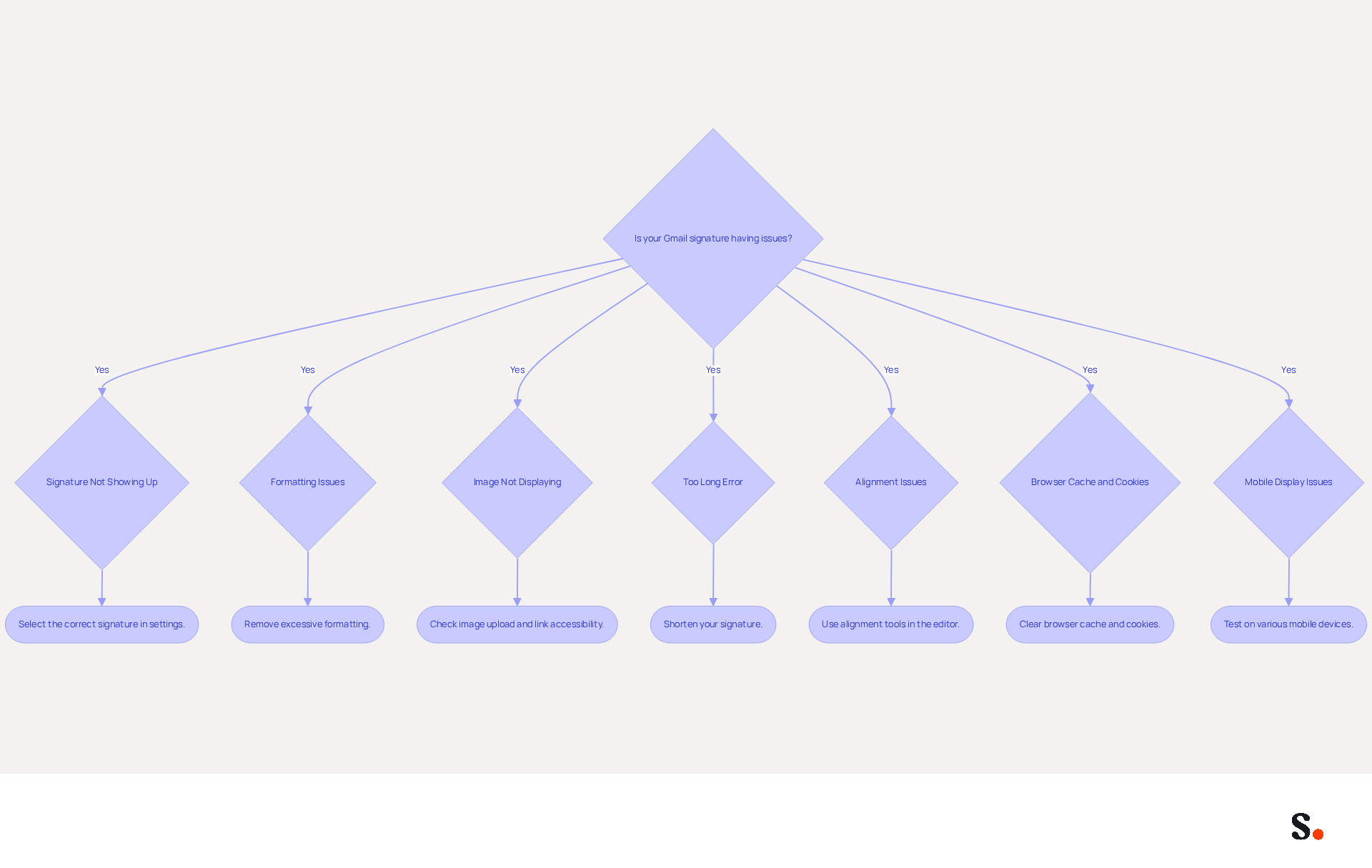
- Signature Not Showing Up: Ensure that you have selected the correct signature in the settings. Check if the 'No signature' option is chosen instead of your created identifier. This is a frequent issue, as many users overlook the email signature feature in Gmail. Syncing your Google Workspace with Scribe ensures that your email signature is always current, minimizing the likelihood of this issue.
- Formatting Issues: If your email signature in Gmail appears different when sent, it may be due to excessive formatting. Simplify your mark by removing unnecessary styles or using plain text. Overly complex formatting can lead to inconsistencies across different email clients, such as the email signature in Gmail. The integration of the tool assists in preserving uniform formatting by automatically implementing your organization's established standards.
- Image Not Displaying: If your images aren't showing up in your email signature in Gmail, check that they're uploaded correctly and that the links are accessible. Images should be hosted on a reliable server with public sharing settings. For instance, to ensure visibility, images from Google Drive must be set to 'Anyone with the link' in your email signature. Scribe's features can help manage image hosting and ensure visibility across all platforms.
- Too Long Error: Gmail has a character limit for email signatures, typically around 10,000 characters. Many users struggle with character limits in their email signature, which leads to errors when saving their signatures. Shortening your sign-off can help. Scribe allows you to easily manage and edit autographs for your email signature to stay within these limits.
- Alignment Issues with Email Signature: If your mark appears misaligned, utilize the alignment tools in the editor to modify the layout. Proper alignment enhances the professional appearance of your emails, especially when it comes to your email signature in Gmail. Scribe's tools can assist in ensuring that all approvals are aligned correctly across your team.
- Browser Cache and Cookies: If you encounter display problems, clearing your browser's cache and cookies may resolve display issues, as outdated information may influence how your name appears.
- Mobile Display Issues: Always check how your email signature appears on mobile devices, as it may seem truncated in the Gmail app. Testing on various devices ensures that your email signature maintains professionalism in all communications.
Furthermore, syncing your Google Workspace with Scribe can greatly enhance your management of correspondence identifiers. By automatically updating your teammates' information, such as job positions or group changes, you can avoid many of these common issues. Addressing these issues is vital to maintaining professionalism in your communications.
Explore Tools and Resources for Enhanced Email Signature Management
To enhance your email signature Gmail management, leveraging the right tools is essential. Consider utilizing the following resources:
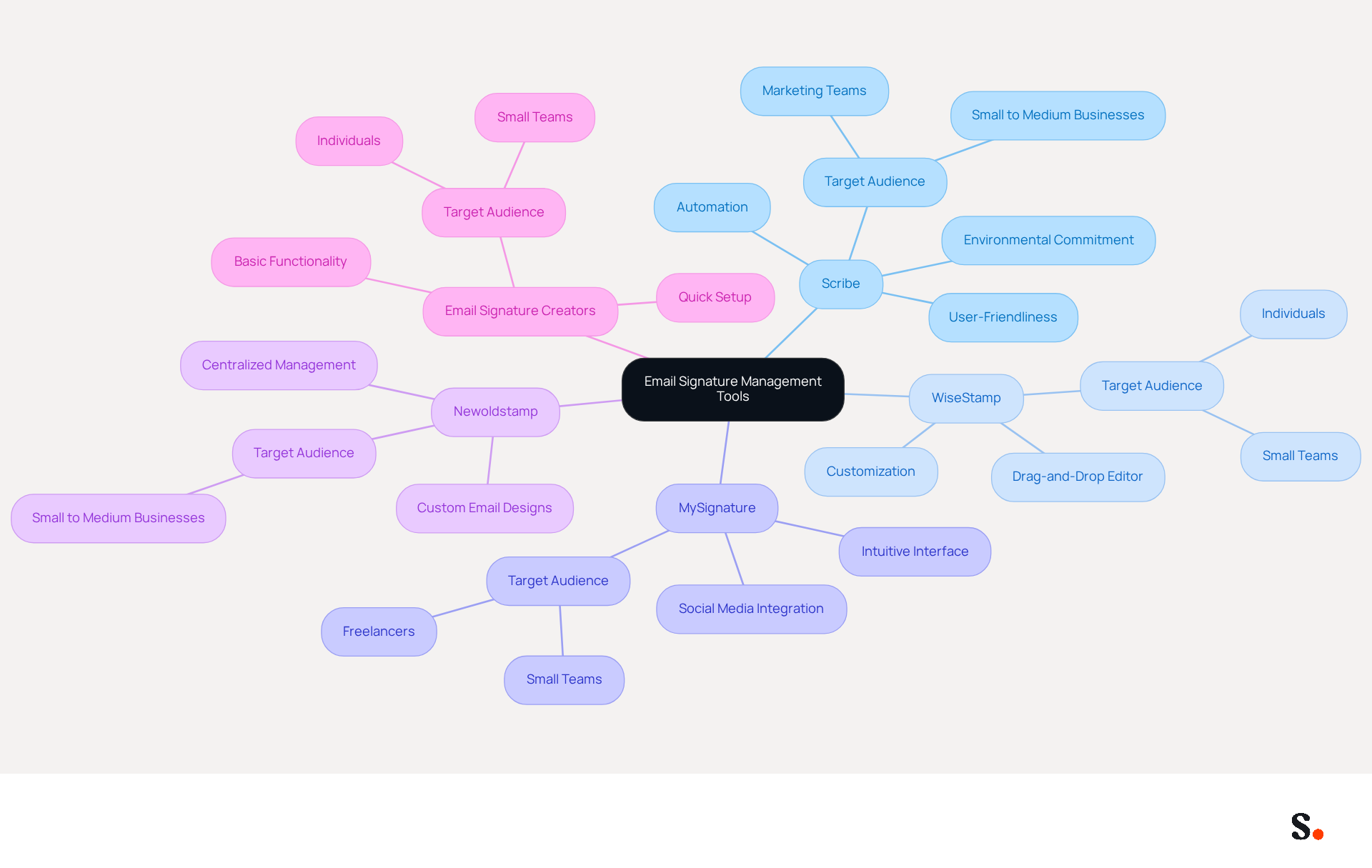
- Scribe: An innovative platform that automates the creation and management of email signatures, allowing for easy updates and brand consistency across your team. Scribe automates sign-offs, ensuring they are always up-to-date and improving marketing prospects with every message sent. Significantly, Scribe allows Marketing teams to manage their electronic identifiers independently after the initial IT configuration, reducing reliance on IT and streamlining the management process. Additionally, the organization is dedicated to exceptional customer support, offering hands-on assistance to resolve issues swiftly, and allocates 1% of its revenue to promote carbon removal technologies, demonstrating a commitment to environmental sustainability. Scribe meets SOC 2 Type II certification standards and complies with GDPR and CCPA, which means your messages are managed securely.
- WiseStamp: A popular generator for professional correspondence identifiers that provides customizable templates and integrates effortlessly with various clients, simplifying the creation of polished identifiers. Its drag-and-drop editor allows for flexible design options.
- MySignature: This tool offers an intuitive interface for creating and managing digital identities, with options for incorporating social media icons and promotional banners. It is particularly suited for freelancers and small teams looking for simplicity and speed.
- Newoldstamp: A comprehensive management solution for electronic correspondence identifiers that enables businesses to create, oversee, and analyze identifiers across teams. It is designed for small to medium businesses, offering quick setup and custom email designs.
- Email Signature Creators: Various online tools, such as HubSpot's Email Creator, can assist you in crafting email endings quickly. These tools are perfect for individuals or small teams requiring basic signing functionality without extensive features.
By utilizing these tools, you can simplify the process of creating and managing your digital identifiers, ensuring they remain professional and effective. Remarkably, firms with 100 staff can produce around 60,000-80,000 branded impressions each month, emphasizing the considerable visibility and branding potential of effective management of digital signatures. With Scribe's SAML single sign-on integration and GDPR compliance, you can also ensure secure management of your email signatures. Effective management of digital signatures can significantly elevate your brand's presence in the market.
Conclusion
Crafting a professional email signature in Gmail presents a unique opportunity to elevate brand visibility and credibility. Following these steps enables users to create signatures that effectively represent their brand and foster trust with recipients.
Throughout this guide, we have emphasized the importance of a well-designed email signature, highlighting its role in establishing professionalism, facilitating communication, and providing promotional opportunities. Key insights include:
- The necessity of maintaining brand consistency
- The benefits of integrating tools like Scribe for seamless management
- The significance of troubleshooting common issues to ensure that signatures appear as intended across all devices
Investing time and resources in email signature management can lead to substantial gains in brand recognition and engagement. Organizations are encouraged to leverage tools like Scribe, which not only simplify the process but also ensure compliance with security standards such as SOC 2 Type II, GDPR, and CCPA. By prioritizing effective email signature management, businesses can transform each email into a powerful marketing channel, driving engagement and reinforcing their brand identity with every message sent.
Frequently Asked Questions
Why is an email signature important?
An email signature is crucial as it serves as a vital representation of your brand, enhancing professionalism, credibility, and trust among recipients.
How does a professional email signature enhance credibility?
A well-crafted email signature leaves a positive impression on recipients, with research indicating that 76% of recipients believe branded digital identifiers enhance their trust in the sender.
What role does branding play in an email signature?
Consistent use of logos, colors, and fonts in an email signature strengthens brand identity and recognition, with 80% of respondents believing it is vital for a company's brand identity.
How can an email signature improve response rates?
A well-designed email signature can lead to a 22% increase in response rates by maintaining cohesive brand image through consistent electronic communication identifiers.
What contact information should be included in an email signature?
An email signature should provide recipients with immediate access to your contact details, as 64% of consumers seek this information in electronic correspondence.
Can an email signature be used for promotional purposes?
Yes, email footers can include links to your website, social media profiles, or promotional banners, turning each message into a promotional channel and engaging audiences at a rate of 40%.
Are there legal compliance considerations for email signatures?
In certain industries, including disclaimers or legal information in your email footer is essential for regulatory adherence, ensuring effective and compliant communications.
How does Scribe enhance email signature management?
Scribe automates the synchronization of correspondence identifiers with Aircall, ensuring any modifications in your Aircall setup are reflected in your identifiers for brand consistency.
What standards does Scribe meet regarding data management?
Scribe meets SOC 2 Type II standards, ensuring that your data is managed securely.
How does Scribe integrate with other tools?
Scribe integrates effortlessly with Calendly for automatic updates to the email footer, enhancing the efficiency of managing email signatures.
List of Sources
- Understand the Importance of an Email Signature
- The benefits of a branded email signature (https://bybrand.io/blog/branded-email-signature)
- The impact of email signatures on your branding (https://signitic.com/en/resources/the-impact-of-email-signatures-on-your-branding)
- Research Recap: Branded Email Signatures Increase Company Recognition, Trust - B2BMX INSIGHTS (https://demandgenreport.com/industry-news/research-recap-branded-email-signatures-increase-company-recognition-trust/47252)
- All the Best Email Signature Practices for Marketing Success (https://scribe-mail.com/en-US/blog/all-the-best-email-signature-practices-for-marketing-success)
- 40+ Email Signature Statistics for 2026 (Data + Insights) (https://wavecnct.com/blogs/email-signature-statistics)
- Follow Step-by-Step Instructions to Create Your Signature in Gmail
- Email signature statistics and trends in 2024 (https://wisestamp.com/blog/email-signature-statistics)
- 14 Key Email Signature Statistics to Know in 2026 (https://mailmodo.com/guides/email-signature-statistics)
- Email Signature Statistics: A Closer Look at Email Signatures in 2026 (https://mysignature.io/blog/email-signature-statistics)
- Email Signature Essentials: Key Statistics to Know for 2023 (https://blog.hubspot.com/marketing/email-signature-statistics)
- Troubleshoot Common Issues with Gmail Signatures
- Solving a Gmail signature problem (https://signitic.com/en/guides/solving-a-gmail-signature-problem)
- Fix Your Missing Gmail Signature: 8 Troubleshooting Steps & Best Practices | Newoldstamp - NEWOLDSTAMP (https://newoldstamp.com/blog/gmail-signature-not-showing-up)
- What To Do When Your Gmail Signature is Not Showing Up (https://appointlet.com/blog/gmail-signature-not-showing-up)
- Email Signature Troubleshooting - Problems & Solutions - Gimmio (https://blog.gimm.io/email-signature-troubleshooting)
- Troubleshoot issues with Gmail signatures - Gmail Help (https://support.google.com/mail/answer/11468381?hl=en)
- Explore Tools and Resources for Enhanced Email Signature Management
- 40+ Email Signature Statistics for 2026 (Data + Insights) (https://wavecnct.com/blogs/email-signature-statistics)
- 10 Best Email Signature Software Reviewed In 2026 (https://thecmo.com/tools/best-email-signature-software)
- Best Email Signature Management Software: Top 12 Tools (2026)
- NEWOLDSTAMP (https://newoldstamp.com/blog/email-signature-software)
- Scribe vs. Competitors: Best Email Signature Design Service for Marketers (https://scribe-mail.com/en-US/blog/scribe-vs-competitors-best-email-signature-design-service-for-marketers)
- Top 10 Email Signature Management Tools in 2026 (Compared) (https://mailbutler.io/blog/email/email-signature-management-tools)
Get started with Scribe
Create your signature in minutes
Free 14-day trial — no credit card.