Create Your Email Signature in Outlook Web App: A Step-by-Step Guide
A well-crafted email signature in the Outlook Web App is essential for establishing a strong professional presence. Crafting a signature that embodies a
Sophie Grant
Email Signature Specialist, Scribe
Introduction
A well-crafted email signature in the Outlook Web App is essential for establishing a strong professional presence. Crafting a signature that embodies a company's identity enhances professionalism, boosts engagement, and opens marketing avenues. Many users struggle with the technical aspects of signature customization, which can lead to a lack of uniformity in branding.
Effectively creating and troubleshooting an email signature that aligns with brand identity is essential for maximizing its impact. Addressing these challenges is crucial for ensuring that email signatures reinforce, rather than undermine, brand identity.
Understand the Importance of an Email Signature
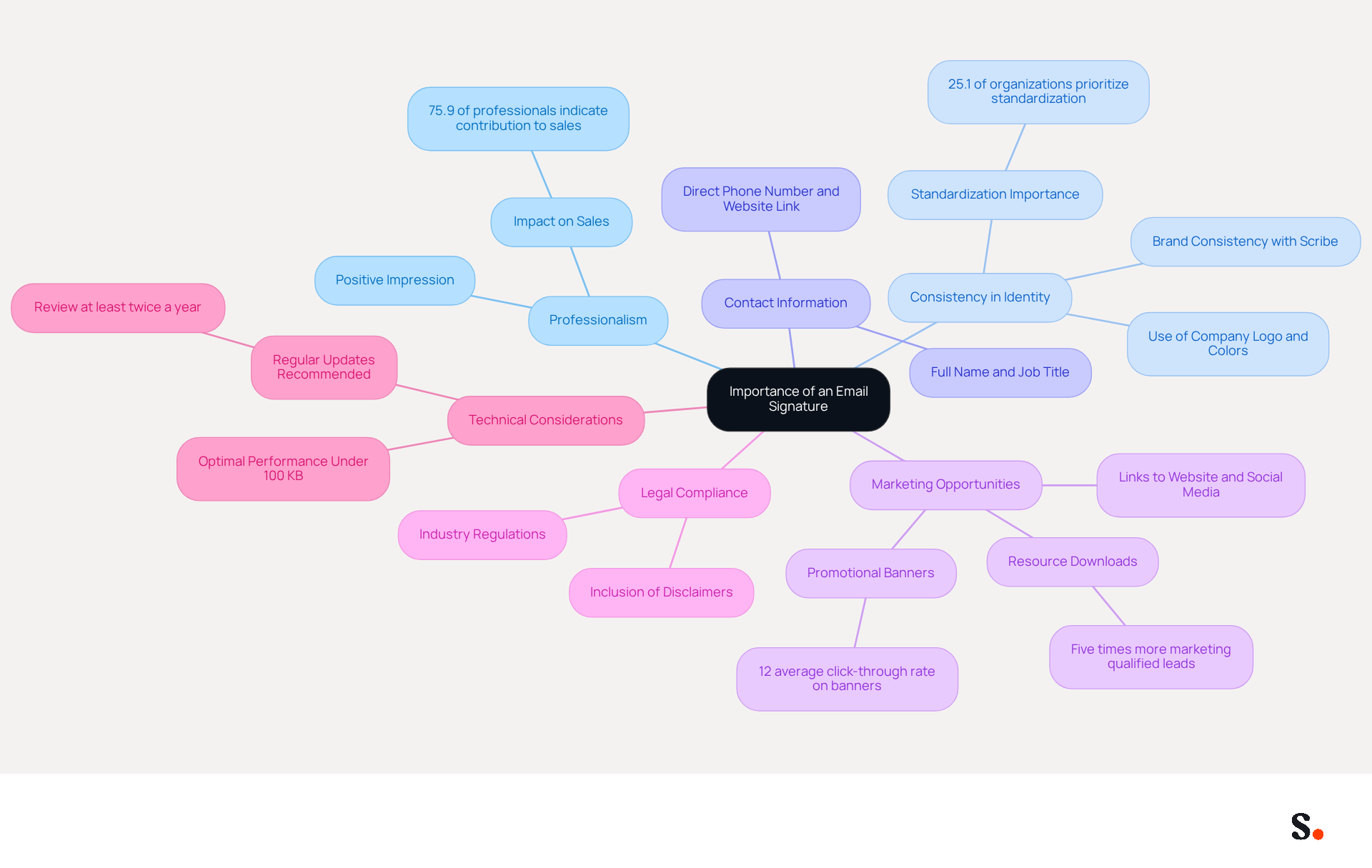
A well-crafted email signature in Outlook Web App is not merely a formality; it is a crucial element of professional communication that can significantly impact business interactions. Here are several compelling reasons why a well-crafted email signature is essential:
- Professionalism: A thoughtfully designed signature reflects professionalism and attention to detail, leaving a positive impression on recipients. In fact, 75.9% of professionals indicate that an email footer contributes to moving toward or closing a sale, underscoring its impact on business interactions.
- Consistency in Identity: Incorporating your company logo, colors, and tagline ensures consistency across all communications, reinforcing your identity. This is essential, as 25.1% of organizations prioritize standardizing their marks to maintain a cohesive professional image. With Scribe, you can achieve 100% brand consistency by automatically syncing digital identities across platforms, ensuring that any updates are reflected in real-time without additional effort.
- Contact Information: It's essential to include your full name, job title, company name, direct phone number, and website link to facilitate effective communication.
- Marketing Opportunities: Email footers can include links to your website, social media profiles, or promotional banners, transforming every email into a marketing opportunity. Statistics indicate that marketing elements with resource downloads can produce five times more marketing qualified leads than generic calls to action. Scribe's average click-through rate on banners is 12%, showcasing its effectiveness in driving engagement.
- Legal Compliance: In certain industries, including disclaimers or legal information in your email footer is necessary to comply with regulations, ensuring that your communications meet industry standards.
- Technical Considerations: To maintain optimal performance, it is recommended that digital identifiers remain under 100 KB to avoid bloating messages. Furthermore, reviewing and updating electronic correspondence identifiers at least twice a year is a recommended approach to ensure precision and professionalism. With Scribe, any modifications made in your Google Workspace or Aircall setup will automatically be reflected in your correspondence, saving you time and ensuring consistency.
By recognizing these aspects, you can appreciate the importance of creating a well-thought-out digital identifier that aligns with your brand's goals and enhances your professional image. Ultimately, investing in an email signature in Outlook Web App can be the difference between a missed opportunity and a successful business connection.
Follow Step-by-Step Instructions to Create Your Signature
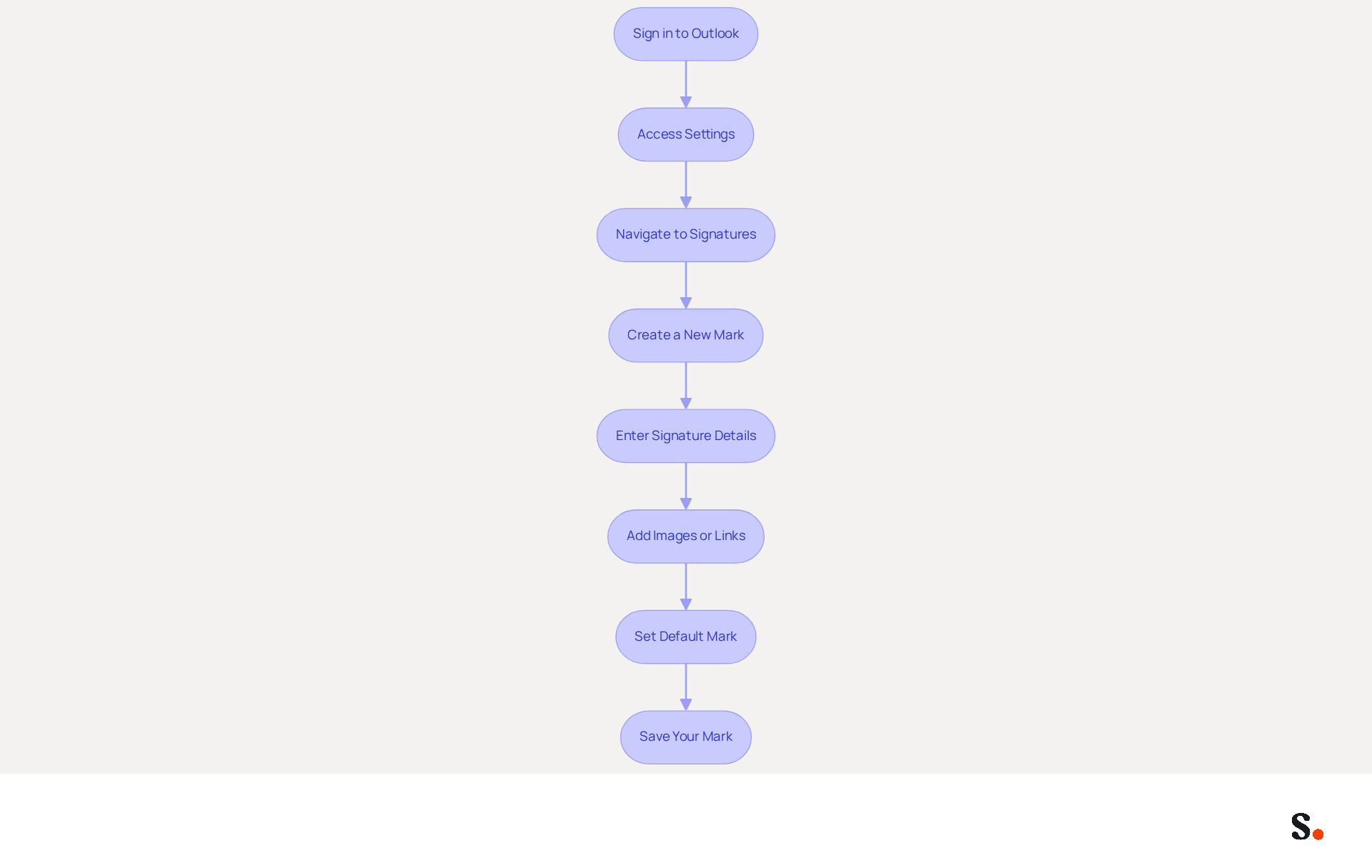
Establishing an email signature in Outlook Web App is essential for effective communication. Follow these steps to set up your signature:
- Sign in to Outlook: Open your web browser and navigate to the Outlook Web App. Log in using your credentials.
- Access Settings: Click on the gear icon (⚙️) in the upper right corner to open the Settings menu.
- Navigate to Signatures: In the Settings menu, select 'View all Outlook settings' at the bottom. Then, click on 'Mail' and select 'Compose and reply'.
- Create a New Mark: Click on the '+ New mark' button. A text box will appear for you to input your details.
- Enter Signature Details: Type your name, job title, company name, and any other relevant information. Use the formatting toolbar to adjust font size, color, and style as needed.
- Add Images or Links: To include a logo or social media links, use the image icon to upload images and the link icon to add hyperlinks.
- Set Default Mark: Decide if you want this mark to be automatically added to new messages and replies/forwards by selecting the appropriate options.
- Save Your Mark: Once satisfied with your mark, click the 'Save' button at the bottom of the settings window.
By completing these steps, you will create your email signature in Outlook Web App. A well-crafted email footer not only enhances your professional image but also fosters better engagement with your audience. Research shows that emails featuring branded signatures can achieve a 22% higher response rate, underscoring the importance of this enhancement in your communication strategy.
Customize Your Signature for Brand Consistency
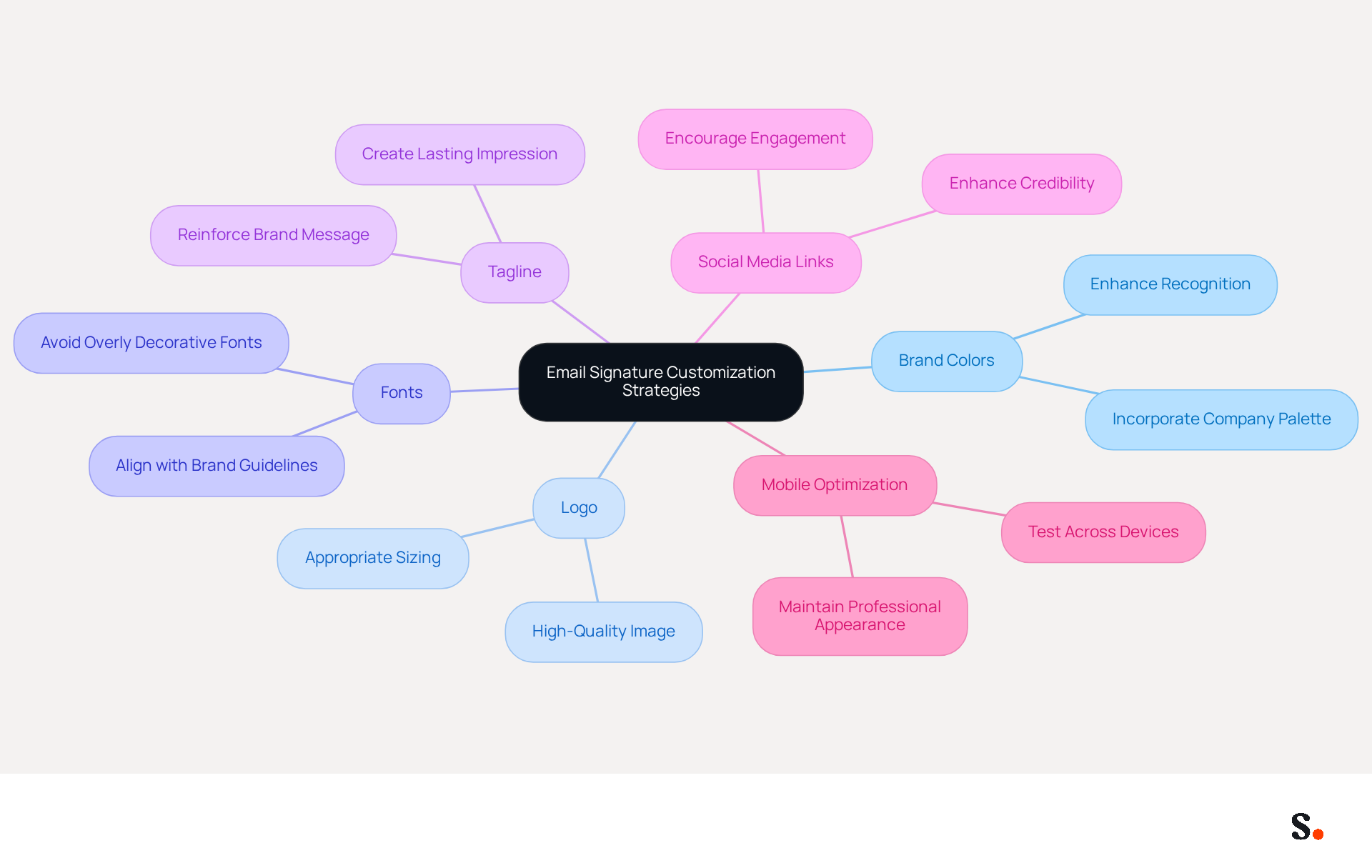
To effectively align your email signature with your brand identity, consider these essential customization strategies:
- Use Brand Colors: Incorporate your company’s color palette into the signature design. This can be accomplished through text color or background color, enhancing recognition of the identity.
- Include Your Logo: Adding your company logo enhances visibility. Ensure the logo is high quality and appropriately sized to maintain professionalism.
- Choose Appropriate Fonts: Use fonts that align with your guidelines. Avoid overly decorative fonts that may distract from the message, as clarity is key to effective communication.
- Add a Tagline: If your company has a tagline, include it in your email footer to reinforce your message and create a lasting impression.
- Social Media Links: Include icons that link to your company’s social media profiles. This encourages recipients to engage with your brand across multiple platforms, enhancing overall interaction and credibility.
- Mobile Optimization: Many professionals struggle with ensuring their email signatures look good on all devices, which can lead to inconsistent branding. It's crucial to test how your signature looks on various devices to ensure it maintains its professional appearance.
By personalizing your email correspondence in these ways, including your email signature in Outlook Web App, you create a unified image that strengthens your professional communications. Scribe ensures that any changes you make in your Aircall settings are instantly reflected in your email signatures, streamlining your branding efforts. Scribe's SOC 2 Type II certification and compliance with GDPR and CCPA ensure secure data handling, making these adjustments not just aesthetic but also strategic for your marketing efforts. Consistent branding in electronic communications can lead to a 22% increase in response rates, and with an average click-through rate of 12% on banner displays, these enhancements can significantly boost your marketing ROI.
Troubleshoot Common Issues with Email Signatures
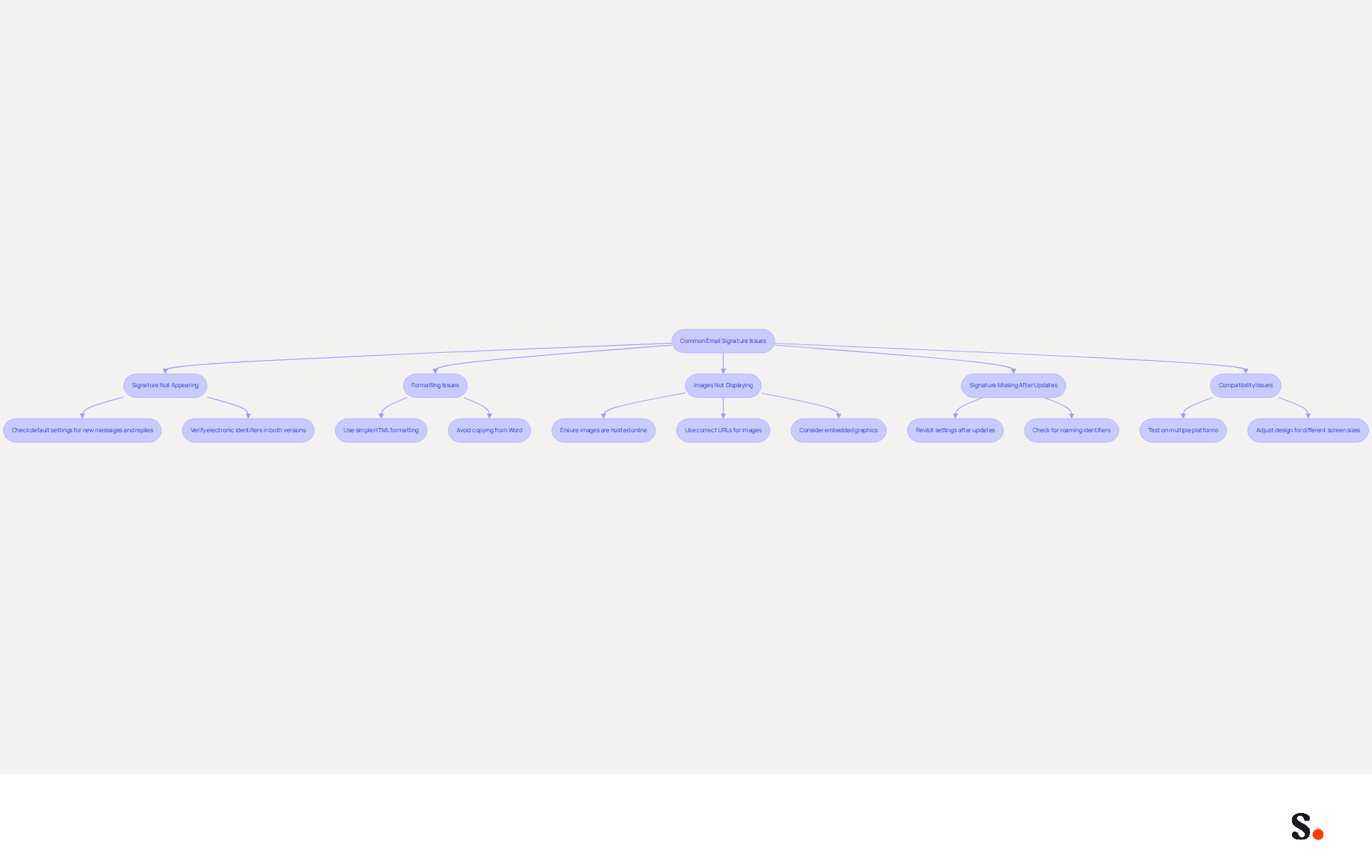
Despite thorough preparation, many users face challenges with their email signature in Outlook Web App that can undermine their professionalism. Here are some common problems and how to resolve them:
- Signature Not Appearing: If your signature isn’t showing up in new emails, first check your settings. Make sure it’s set as the default for both new messages and replies or forwards. This is crucial, as the email signature in Outlook Web App handles reply and forward markings differently, which can lead to confusion. Additionally, confirm that your electronic identifiers are configured correctly in both desktop and web versions of Outlook.
- Formatting Issues: If the layout looks different when sending messages, ensure you are using simple HTML formatting. Avoid copying and pasting from Word or other applications, as this can introduce unwanted styles that disrupt the layout. Many users have reported that formatting issues often stem from using rich text editors, complicating the appearance of the text. To prevent these problems, consider using proper HTML code or a free email footer generator.
- Images Not Displaying: If images in your email signature in Outlook Web App are not showing up, ensure they are hosted online and use the correct URL. Alternatively, upload them directly through the signing editor. Remember that linked images may not display due to email client settings blocking them, so using embedded graphics is recommended.
- Signature Missing After Updates: Sometimes, updates to Outlook can reset settings. If your email signature in Outlook Web App disappears, revisit the settings to reapply it. This is a frequent issue, as updates can remove default assignment configurations, leading to further inconsistencies. Be aware that roaming identifiers can also cause them to vanish, so check your settings accordingly.
- Compatibility Issues: If your signature appears differently on various devices, test it on multiple platforms (desktop, mobile) to ensure consistency. Adjust the design as necessary to accommodate different screen sizes. Users have discovered that signatures may not synchronize correctly across devices, especially when using roaming options, which can result in unforeseen alterations. Furthermore, exercise caution as Outlook may freeze or crash when selecting certain messages due to problematic message formats or large images.
Addressing these issues not only improves your email signature in Outlook Web App management but also enhances your professional image in every interaction. With Scribe's automated management of digital identifiers, you can streamline updates and ensure compliance with GDPR and SOC 2 Type II standards, allowing for effortless synchronization with Google Workspace. Furthermore, Scribe's SAML single sign-on integration enhances security and simplifies access management, ensuring that your email signature management remains efficient and secure.
Conclusion
Crafting an effective email signature is more than a technical requirement; it is a strategic imperative for enhancing communication and brand identity. A well-designed signature serves as a digital business card, ensuring that each email serves as a marketing touchpoint and leaves a lasting impression on recipients.
Throughout this guide, we have highlighted the importance of a professional email signature, emphasizing its role in establishing credibility, ensuring brand consistency, and providing essential contact information. Step-by-step instructions have been provided to facilitate the creation of a signature, along with customization tips to align it with your brand identity. Additionally, common troubleshooting issues have been addressed, ensuring that users can maintain a polished and professional appearance in their communications.
Investing time in your email signature can really boost engagement and response rates. By leveraging tools like Scribe, organizations can achieve seamless integration and compliance, ensuring that their email signatures not only reflect their brand but also enhance their marketing efforts. By prioritizing your email signature, you position your brand for greater recognition and engagement in every interaction.
Frequently Asked Questions
Why is a well-crafted email signature important?
A well-crafted email signature is crucial for professional communication as it reflects professionalism, contributes to business interactions, and can significantly impact sales.
How does an email signature contribute to professionalism?
A thoughtfully designed email signature leaves a positive impression on recipients, showcasing attention to detail and professionalism.
What percentage of professionals believe an email footer impacts sales?
75.9% of professionals indicate that an email footer contributes to moving toward or closing a sale.
How can an email signature ensure consistency in identity?
By incorporating your company logo, colors, and tagline, an email signature reinforces brand identity and maintains a cohesive professional image.
What is the benefit of using Scribe for email signatures?
Scribe allows for 100% brand consistency by automatically syncing digital identities across platforms, ensuring real-time updates without additional effort.
What essential information should be included in an email signature?
An email signature should include your full name, job title, company name, direct phone number, and website link to facilitate effective communication.
How can email signatures serve as marketing opportunities?
Email footers can include links to websites, social media profiles, or promotional banners, turning every email into a marketing opportunity and potentially generating more leads.
What is the average click-through rate on banners using Scribe?
Scribe's average click-through rate on banners is 12%, indicating its effectiveness in driving engagement.
Are there legal considerations for email signatures?
Yes, in certain industries, including disclaimers or legal information in your email footer is necessary to comply with regulations.
What technical considerations should be kept in mind for email signatures?
Digital identifiers should remain under 100 KB to avoid bloating messages, and it's recommended to review and update them at least twice a year for precision and professionalism.
How does Scribe help with maintaining email signature consistency?
Any modifications made in your Google Workspace or Aircall setup will automatically be reflected in your correspondence through Scribe, saving time and ensuring consistency.
List of Sources
- Understand the Importance of an Email Signature
- Top 10+ best practices for email signatures design in 2026 (https://mysignature.io/blog/email-signature-best-practices)
- Email Signature Design Trends in 2026: What Works and What to Drop (https://bulksignature.com/blog/email-signature-design-trends)
- Why Email Signatures Must Be In Your 2026 Marketing Plan | Rocketseed (https://rocketseed.com/blog/what-are-the-biggest-email-trends-for-2026)
- Email Signature Best Practices for 2026 (+ 15 Pro Examples) (https://wavecnct.com/blogs/email-signature-best-practices-2026)
- "Email Signature Trends for 2026: What's In, What's Out" | Crossware posted on the topic | LinkedIn (https://linkedin.com/posts/crossware-ltd_new-year-new-trends-even-for-your-email-activity-7394554686046908416-vD_O)
- Follow Step-by-Step Instructions to Create Your Signature
- Email signature statistics: Why every business should optimize their email signatures — Stripo.email (https://stripo.email/blog/email-signature-statistics-why-every-business-should-optimize-their-email-signatures)
- Create Outlook email signature (templates, signature generator & tips) (https://wisestamp.com/outlook-email-signature)
- How to add and change an email signature in Outlook | Microsoft Support (https://support.microsoft.com/en-us/outlook/mail/how-to-add-and-change-an-email-signature-in-outlook)
- How to Add an Email Signature in Outlook (2026) (https://emailsignature.to/email-setup/how-to-add-signature-outlook)
- How to Add a Signature in Outlook (2026 Microsoft Guide) | Reclaim (https://reclaim.ai/blog/how-to-add-a-signature-in-outlook)
- Customize Your Signature for Brand Consistency
- The impact of email signatures on your branding (https://signitic.com/en/resources/the-impact-of-email-signatures-on-your-branding)
- Email Signature Branding: Consistency and Impact | Crossware365 (https://crossware365.com/blog/mastering-email-signature-branding-market-presence)
- Why Are Email Signatures Key to Brand Awareness? | QuickMail (https://quickmail.com/role-of-email-signatures-in-brand-awareness)
- "Email Signature Trends for 2026: What's In, What's Out" | Crossware posted on the topic | LinkedIn (https://linkedin.com/posts/crossware-ltd_new-year-new-trends-even-for-your-email-activity-7394554686046908416-vD_O)
- Troubleshoot Common Issues with Email Signatures
- justanswer.com (https://justanswer.com/email/lyeqn-email-signatures-no-longer-loading-automatically.html)
- Email signature edits are not saved in the new settings pane in Outlook for Mac | Microsoft Support (https://support.microsoft.com/en-us/support/known-issues/signature-edits-not-saved-new-settings-pane)
- Outlook Signature Disappears? 6 Common Problems + Fixes (https://conbool.com/blog/outlook-signature-disappears-fixes-problems)
- How to solve problems with email signatures in Microsoft 365? (https://mail-signatures.com/articles/problems-email-signatures-office-365)
- Outlook Signature Not Working in Office 365: Causes & Fixes (https://exclaimer.com/email-signature-handbook/outlook-signature-not-working-in-office-365)
Get started with Scribe
Create your signature in minutes
Free 14-day trial — no credit card.