Create Your Email Signature with Scribe's AI Email Signature Generator
In a digital landscape where first impressions matter, a professional email signature is crucial for establishing brand identity and credibility. With the rise
Sophie Grant
Email Signature Specialist, Scribe
Introduction
In a digital landscape where first impressions matter, a professional email signature is crucial for establishing brand identity and credibility. With the rise of remote communication, the importance of a well-crafted signature has never been clearer, as it can significantly impact first impressions and ongoing engagement.
Let’s delve into how Scribe's AI email signature generator can streamline your signature creation, ensuring brand consistency and opening up marketing opportunities to enhance your communication effectiveness.
Identifying and addressing common pitfalls in email signature creation is essential for maximizing professionalism.
Understand the Importance of a Professional Email Signature
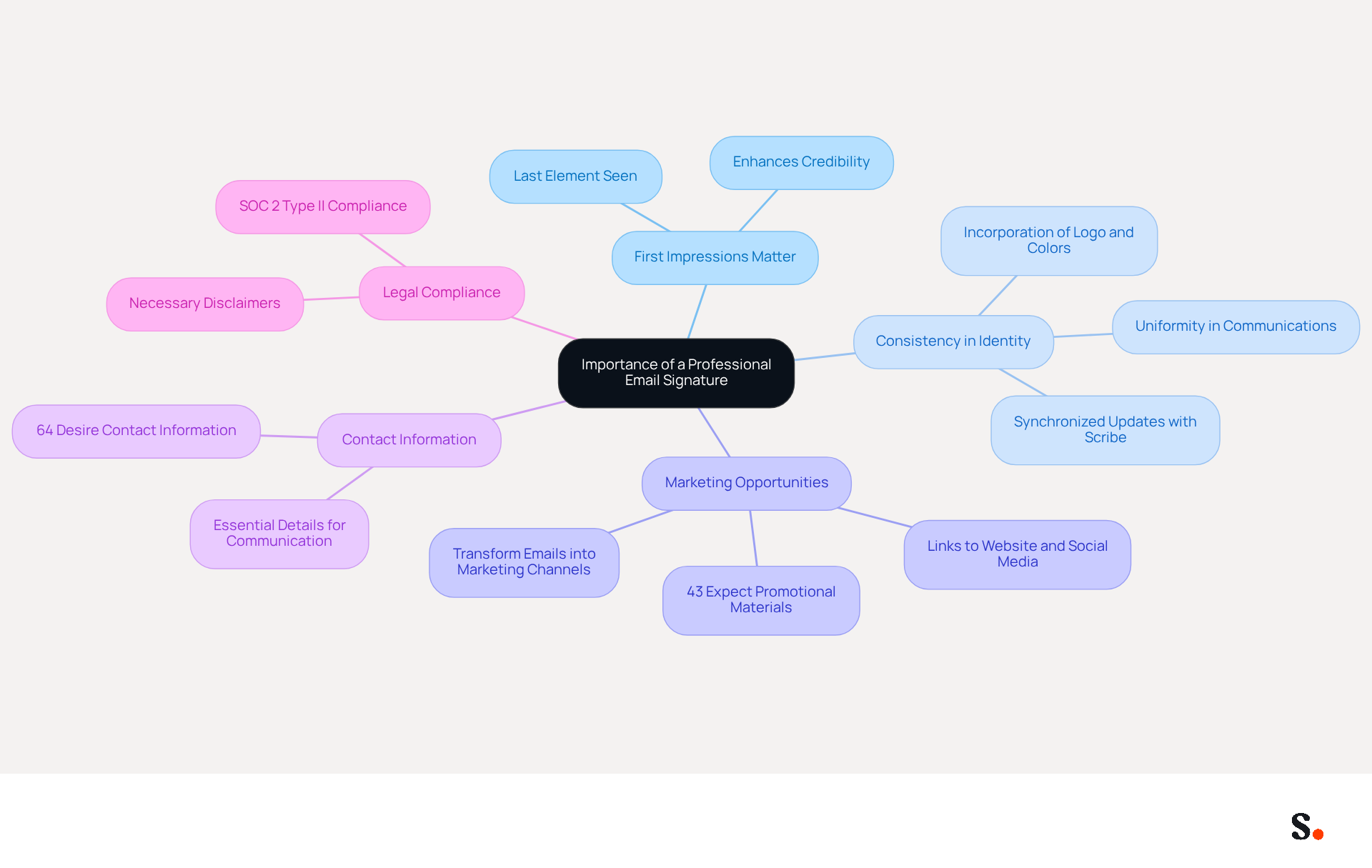
A professional digital sign-off is not just a formality; it is a critical component of your brand identity. Here are key reasons why investing in a professional email signature is essential:
- First Impressions Matter: Often the last element a recipient sees, your email signature is crucial for communication. A well-crafted mark enhances your credibility and professionalism, making a lasting impression.
- Consistency in Identity: Maintaining uniformity in all communications reinforces your identity. Incorporating your logo, colors, and fonts in your email helps ensure this consistency, which is essential for recognition. With Scribe, you can ensure that your communications are automatically updated and synchronized with your business phone system and Google Workspace, providing seamless brand consistency across all interactions.
- Marketing Opportunities: Email footers can serve as effective marketing tools. By incorporating links to your website, social media, or promotional banners, you can drive traffic and engagement, transforming every message into a potential marketing channel. Research shows that 43% of consumers expect to see promotional materials in their emails, emphasizing the potential for enhanced engagement. Scribe's automated synchronization features ensure that any modifications in your Google Workspace or Aircall settings will be reflected in your communications without any manual input, saving you time and allowing you to focus on your core business activities.
- Contact Information: A signatory provides essential contact details, facilitating easy communication. Including your name, title, company, phone number, and website ensures recipients can reach you without hassle. Significantly, 64% of consumers desire contact information in their correspondence footers, highlighting the practical advantages of having a professional closing.
- Legal Compliance: In certain industries, including disclaimers or legal information in your correspondence is necessary. A professional endorsement helps ensure compliance with these regulations, safeguarding your business. Scribe is SOC 2 Type II compliant, ensuring that your data is secure while you manage your correspondence effectively.
Understanding these points makes it clear that investing time in a professional digital signature can significantly enhance your brand and communication strategy. With 80% of participants believing that a branded digital mark is essential for a company's identity, the significance of this element cannot be overstated.
Explore Features of AI Email Signature Generators
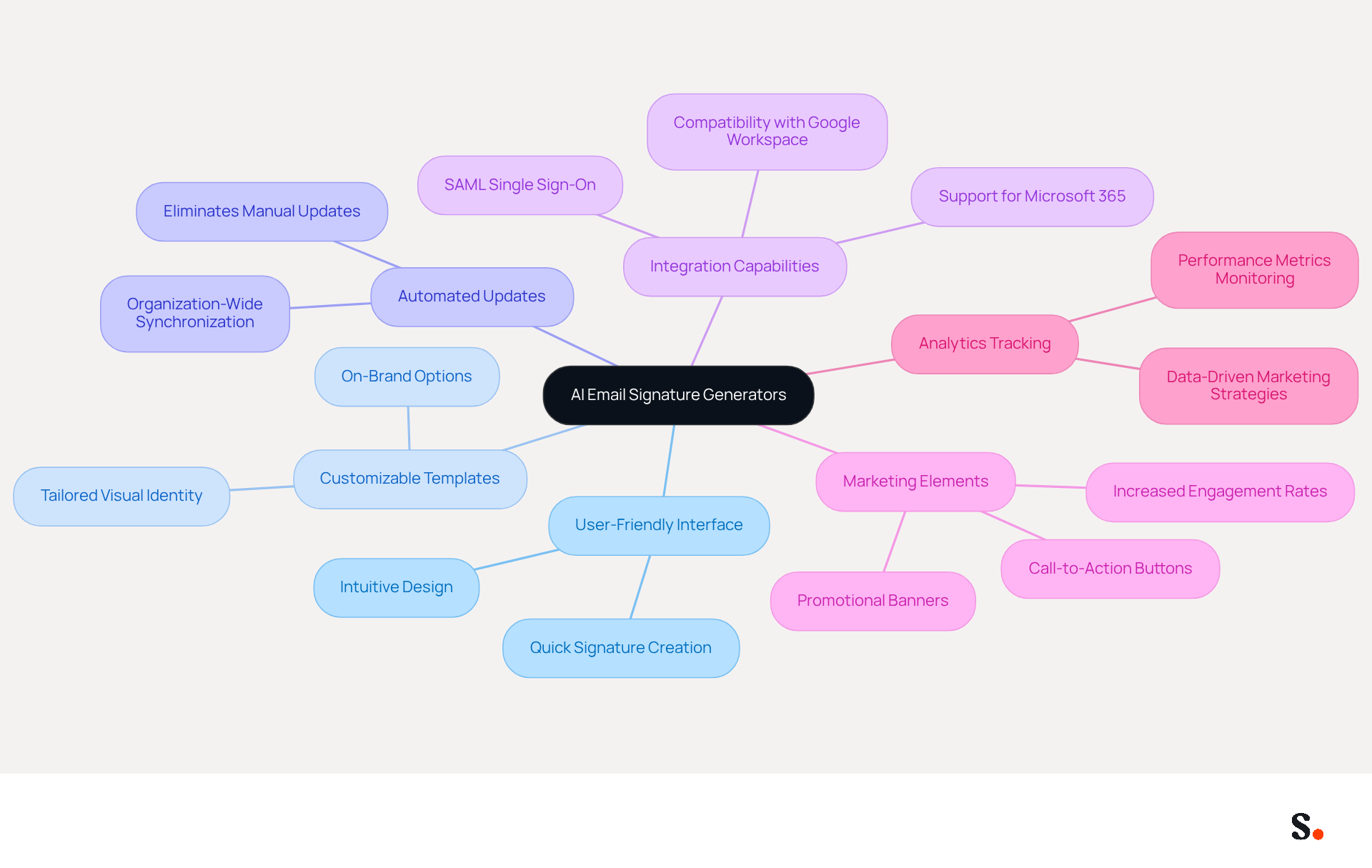
AI email signature generators like Scribe not only simplify the signature creation process but also enhance brand consistency across communications. Key functionalities include:
- User-Friendly Interface: Scribe boasts an intuitive interface that makes it easy for anyone to create a unique signature quickly.
- Customizable Templates: Users can select from a variety of on-brand templates that can be easily tailored to reflect their company's visual identity. This guarantees uniformity among all team members' signatures, enhancing brand recognition.
- Automated Updates: A standout feature of this tool is its capability to automatically refresh identifiers organization-wide. Any changes made to the template are instantly reflected in all users' profiles, eliminating the need for manual updates. Manual updates can lead to inconsistencies and errors in email signatures. This automated synchronization is powered by Scribe's integration with business phone systems and communication providers, ensuring that signature information is always current and precise.
- Integration Capabilities: This tool seamlessly connects with popular communication platforms like Google Workspace and Microsoft 365, facilitating easy implementation across various systems. Additionally, the platform supports SAML single sign-on, enhancing security and user access management, enabling employees to access it through their identity provider.
- Marketing Elements: The platform enables users to integrate promotional banners and call-to-action buttons directly into their messages, transforming every communication into a potential marketing opportunity. Studies show that adding these elements can boost engagement rates significantly, with click rates rising from 3% to 15%. Additionally, Scribe's average click-through rate on banners is 12%, demonstrating its effectiveness as a marketing performance metric.
- Analytics Tracking: Insights into performance metrics are offered, allowing users to monitor engagement and enhance their marketing strategies effectively. With Scribe's SOC 2 Type II compliance, organizations can trust that their data is secure while utilizing these powerful features.
These features save time and make communications more effective, making Scribe a powerful tool for businesses aiming to leverage their branding for marketing success. By adopting Scribe, businesses can utilize an ai email signature generator to transform their email signatures into strategic assets that drive engagement and reinforce brand identity.
Create Your Email Signature with Scribe: A Step-by-Step Guide
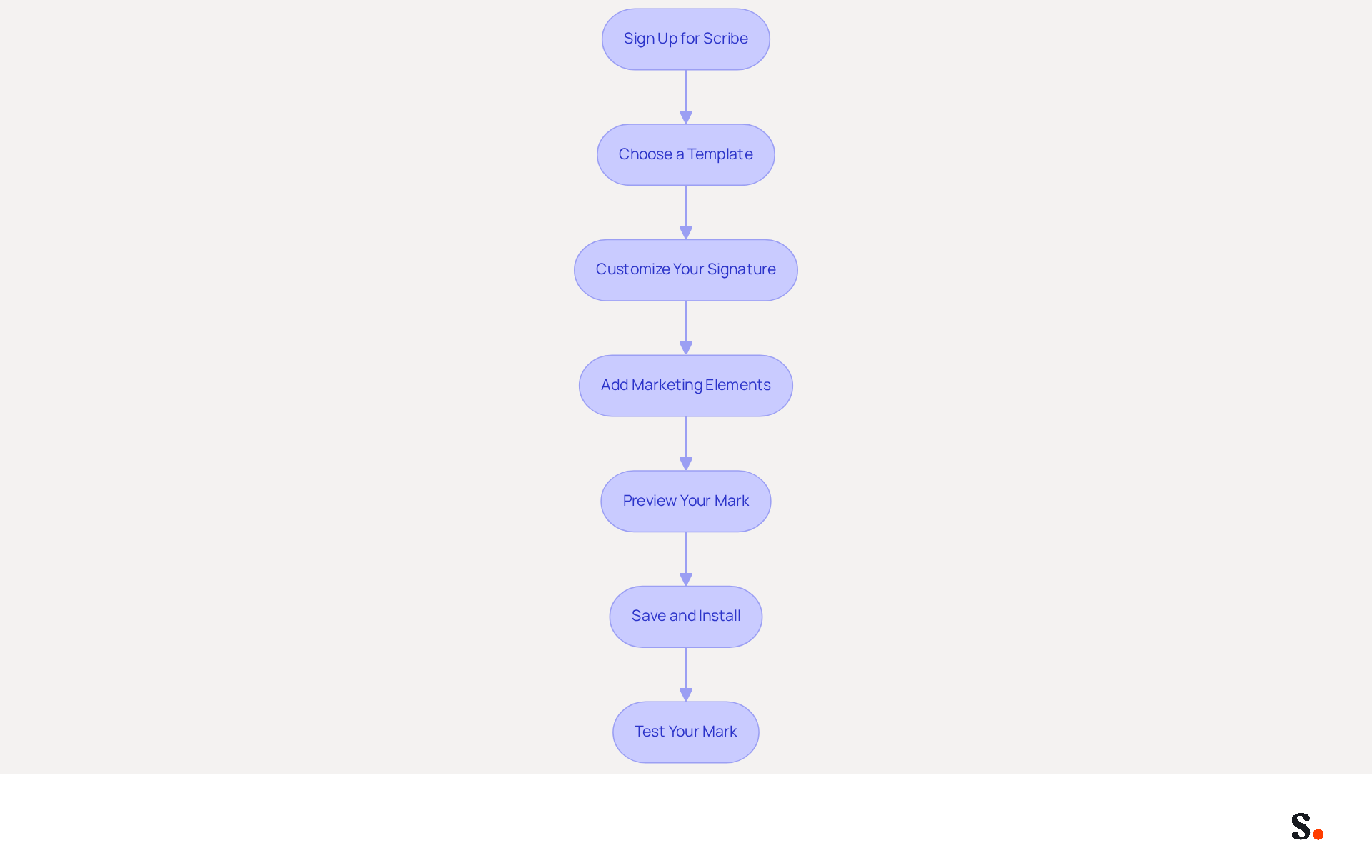
Many professionals overlook the importance of a well-crafted email signature, which can significantly impact their professional image. Creating your message footer using Scribe is a straightforward task that enhances your professional image while ensuring security and efficiency. Follow these steps to design a polished signature:
- Sign up for Scribe by visiting the Scribe website and creating an account to access the ai email signature generator.
- Choose a Template: Browse through the available templates and select one that aligns with your visual identity, ensuring consistency in branding.
- Customize Your Signature: Input your information, including your name, title, company name, phone number, and website. Upload your logo and select colors that reflect your brand.
- Add Marketing Elements: Incorporate promotional banners or call-to-action buttons to drive traffic to your website or highlight special offers. Studies show that adding a call to action can increase engagement significantly, with many users reporting a boost of up to 30%. Over half of users (52.6%) include a call-to-action in their message footer, reflecting the expectation of promotional elements.
- Preview Your Mark: Utilize the preview feature to see how your mark will look in messages. Make adjustments as needed to ensure a professional look.
- Save and Install: Once satisfied, store your mark and follow Scribe's instructions to set it up in your messaging client, such as Gmail or Outlook. By syncing your Google Workspace with Scribe, you can save time as your teammates' data will be automatically updated, allowing for effortless management.
- Test Your Mark: Send a test message to yourself or a colleague to verify that the mark displays correctly and that all links function properly. Ensure compatibility across various messaging clients to maintain professionalism.
By following these steps, you can create an effective digital identifier with an ai email signature generator that not only boosts your professional image but also serves as a powerful marketing tool, enhancing brand recognition and trust. Remember, maintaining standardized electronic identifiers for all employees can generate 60,000-80,000 branded impressions per month for a 100-employee company, maximizing your marketing potential. Plus, with Scribe's SOC 2 Type II compliance, you can be confident that your data is managed securely. Ultimately, a well-designed email signature can be the difference between being remembered or forgotten in a crowded marketplace.
Troubleshoot Common Issues in Email Signature Creation
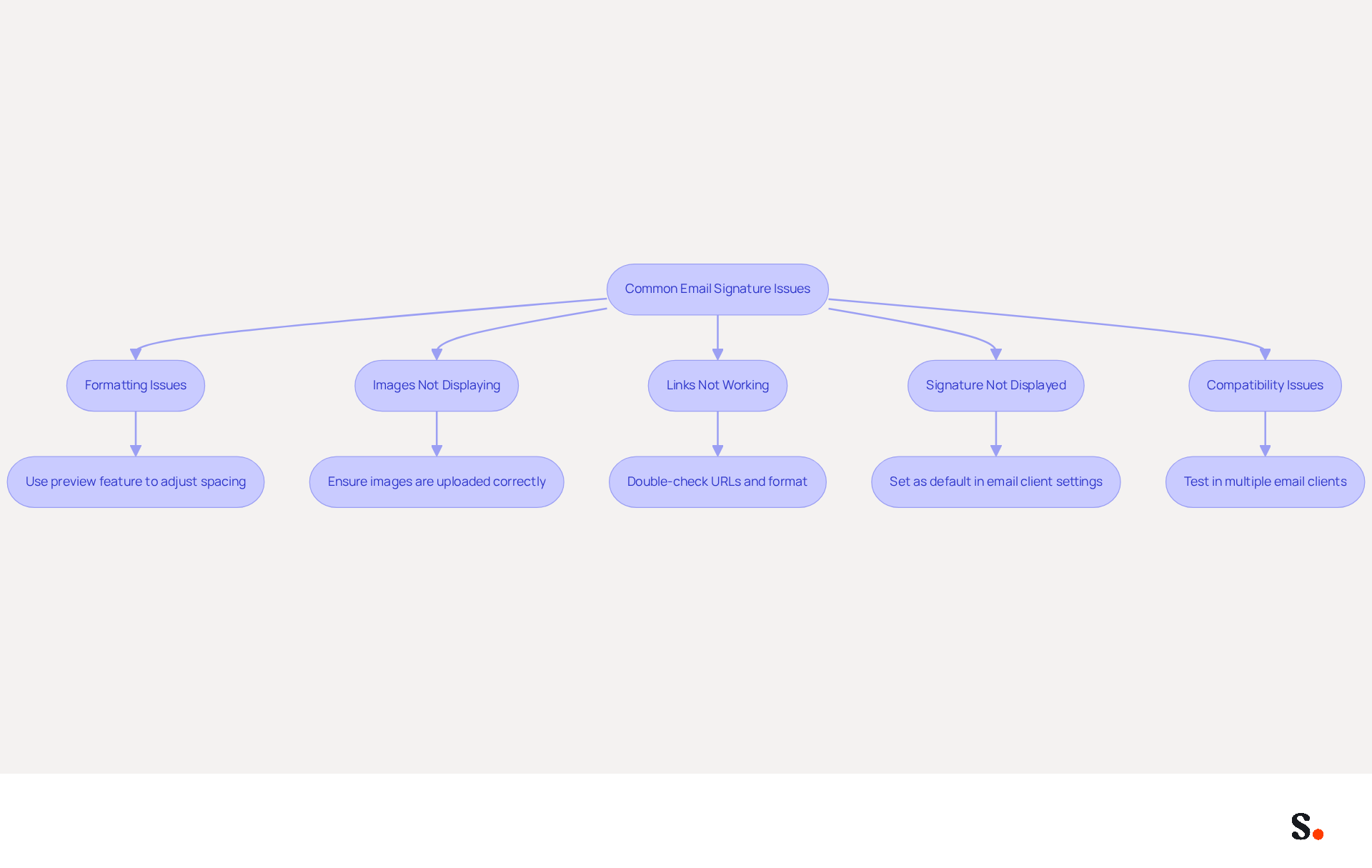
While creating your email footer with Scribe is generally straightforward, several common issues may arise that require attention. Here are effective troubleshooting tips to help you resolve them:
- Formatting Issues: If your signature appears misaligned or the formatting looks off, utilize the preview feature to adjust spacing and alignment before saving. To manage line spacing effectively, utilize 'Shift Enter' instead of 'Enter' to avoid double spacing. Avoid copying and pasting from word processors, as this can introduce unwanted formatting errors.
- Images Not Displaying: Should images fail to display in your email, ensure they are uploaded correctly and in a supported format (e.g., PNG, JPEG). Additionally, check that the file size is not excessively large, as this may hinder the display of your images.
- Links Not Working: If hyperlinks in your email are malfunctioning, double-check the URLs entered. Ensure they are complete and correctly formatted, including 'http://' or 'https://'. This is vital, as 52.6% of users include calls-to-action in their email footers, making functional links essential for engagement.
- Signature Not Displayed in Emails: If your identifier does not show up in sent emails, confirm that you have set it as the default option in your email client settings. Follow the installation instructions provided by Scribe to ensure proper setup. Remember, if markings are inserted on the server side, they may not show up in the sender's Sent Items folder, which can lead to potential legal issues.
- Compatibility Issues: If your mark appears differently across various email clients, remember that some platforms may render HTML differently. Testing your mark in multiple clients can help ensure consistency and professionalism.
By syncing your Google Workspace with Scribe, you can save time and ensure that any changes made to your teammates' information are automatically reflected in their email footers. This automated synchronization not only enhances consistency across the label but also supports compliance with SOC 2 Type II standards, ensuring secure data handling. Moreover, integrating with Aircall enables effortless updates to your correspondence identifiers, further improving your brand's professionalism. By following these troubleshooting tips, you can swiftly resolve common issues and ensure that your message footer functions as intended, enhancing your professional communication. By addressing these issues, you not only enhance your email communication but also reinforce your brand's credibility and professionalism.
Conclusion
A professional email signature is essential for establishing a strong brand identity and effective communication. With Scribe's AI email signature generator, organizations can create digital signatures that are visually appealing, consistent, and compliant with industry standards. This tool empowers marketing teams to take control of their email signatures, transforming them into powerful marketing assets that drive engagement and reinforce brand recognition.
Throughout this guide, we have highlighted the importance of a well-crafted email signature, emphasizing its role in making lasting impressions, ensuring legal compliance, and providing essential contact information. Key features of Scribe, such as automated updates, customizable templates, and integration capabilities with platforms like Google Workspace and Microsoft 365, further streamline the signature creation process. Additionally, the troubleshooting tips provided ensure that users can effectively address common issues, maintaining professionalism in their communications.
Ultimately, investing in a professional email signature through Scribe is a vital step for any organization looking to enhance its brand presence and communication strategy. When businesses leverage Scribe's capabilities, they truly maximize their marketing potential, making sure every email sent contributes to a cohesive brand image. Embrace the power of a well-designed email signature; it is not just an enhancement but a necessity for organizations aiming to stand out in a competitive landscape.
Frequently Asked Questions
Why is a professional email signature important?
A professional email signature is crucial for brand identity, making a lasting impression, ensuring consistency in communications, and providing essential contact information.
How does a professional email signature enhance first impressions?
It is often the last element a recipient sees, and a well-crafted signature enhances credibility and professionalism, leaving a positive and lasting impression.
What role does consistency play in a professional email signature?
Consistency in email signatures reinforces brand identity by incorporating logos, colors, and fonts, which helps ensure recognition across all communications.
How can email signatures serve as marketing tools?
Email footers can include links to websites, social media, or promotional banners, driving traffic and engagement, and transforming every message into a potential marketing channel.
What percentage of consumers expect to see promotional materials in their emails?
Research shows that 43% of consumers expect to see promotional materials in their emails.
What essential contact information should be included in an email signature?
An email signature should include your name, title, company, phone number, and website to facilitate easy communication.
Why is legal compliance important in email signatures?
In certain industries, including disclaimers or legal information is necessary to ensure compliance with regulations, which a professional email signature can help facilitate.
How does Scribe ensure compliance and security in email signatures?
Scribe is SOC 2 Type II compliant, ensuring that your data is secure while managing your correspondence effectively.
What do participants believe about branded digital marks?
80% of participants believe that a branded digital mark is essential for a company's identity, highlighting its significance in communication strategies.
List of Sources
- Understand the Importance of a Professional Email Signature
- Research Recap: Branded Email Signatures Increase Company Recognition, Trust - Demand Gen Report (https://demandgenreport.com/industry-news/research-recap-branded-email-signatures-increase-company-recognition-trust/47252)
- Top 10 Benefits Of Email Signatures | Rocketseed (https://rocketseed.com/blog/benefits-of-using-email-signatures)
- How to Write an Email Signature That Boosts Your Brand (https://scribe-mail.com/en-US/blog/how-to-write-an-email-signature-that-boosts-your-brand)
- Why Email Signatures Must Be In Your 2026 Marketing Plan | Rocketseed (https://rocketseed.com/blog/2026-marketing-plan-email-signatures)
- Email Signature Trends 2026: Centralized Control & Automation | SIGNandGO posted on the topic | LinkedIn (https://linkedin.com/posts/signngo_email-signature-trends-to-watch-in-2026-activity-7401523471786217473-zAVL)
- Explore Features of AI Email Signature Generators
- Why Email Signatures Must Be In Your 2026 Marketing Plan | Rocketseed (https://rocketseed.com/blog/what-are-the-biggest-email-trends-for-2026)
- Scribe vs. Competitors: Best Email Signature Design Service for Marketers (https://scribe-mail.com/en-US/blog/scribe-vs-competitors-best-email-signature-design-service-for-marketers)
- Top 10 AI Email Signature Generators in 2026 (https://lister.ai/ai-tools/top-10-ai-email-signature-generators)
- Create an Effective Email Signature for Software Developers with Scribe (https://scribe-mail.com/en-US/blog/create-an-effective-email-signature-for-software-developers-with-scribe)
- 10 Best AI Email Signature Generators (Tested 2026) (https://scaledmail.com/blogs/ai-generated-signature-guide)
- Create Your Email Signature with Scribe: A Step-by-Step Guide
- 40+ Email Signature Statistics for 2026 (Data + Insights) (https://wavecnct.com/blogs/email-signature-statistics)
- Email signature statistics: Why every business should optimize their email signatures — Stripo.email (https://stripo.email/blog/email-signature-statistics-why-every-business-should-optimize-their-email-signatures)
- Best Practices for a Correct Email Signature That Boosts Branding (https://scribe-mail.com/en-US/blog/best-practices-for-a-correct-email-signature-that-boosts-branding)
- Create an Effective Email Signature for Software Developers with Scribe (https://scribe-mail.com/en-US/blog/create-an-effective-email-signature-for-software-developers-with-scribe)
- Best Practices for Email Signatures for Business Owners (https://scribe-mail.com/en-US/blog/best-practices-for-email-signatures-for-business-owners)
- Troubleshoot Common Issues in Email Signature Creation
- How to solve problems with email signatures in Microsoft 365? (https://mail-signatures.com/articles/problems-email-signatures-office-365)
- 40+ Email Signature Statistics for 2026 (Data + Insights) (https://wavecnct.com/blogs/email-signature-statistics)
- WiseStamp Sets a New Standard for Email Signature Creation (https://prnewswire.com/news-releases/wisestamp-sets-a-new-standard-for-email-signature-creation-302689811.html)
Get started with Scribe
Let AI build your signature — from a screenshot
Free 14-day trial — no credit card.