Edit Your Email Signature in Office 365: A Step-by-Step Guide
Editing email signatures in Office 365 presents a unique challenge that, when addressed, can significantly enhance a business's brand visibility. As
Sophie Grant
Email Signature Specialist, Scribe
Introduction
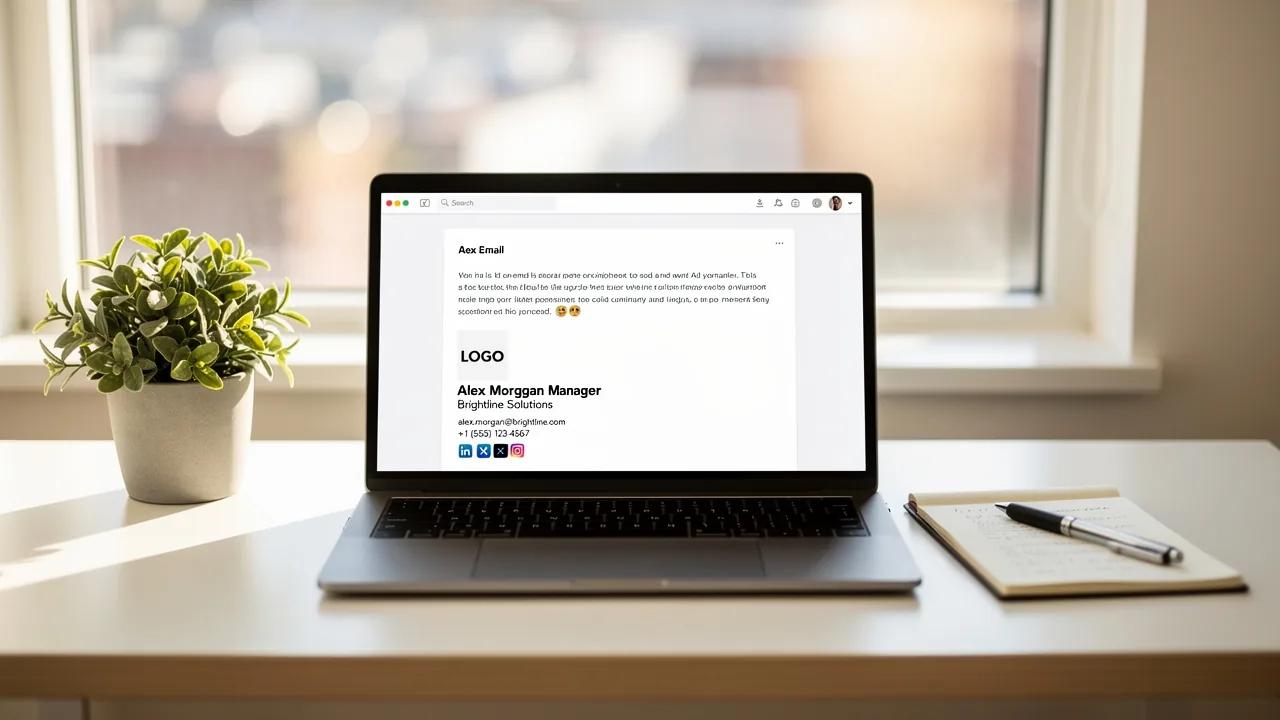
Editing email signatures in Office 365 presents a unique challenge that, when addressed, can significantly enhance a business's brand visibility. As organizations increasingly recognize the importance of consistent branding, a well-crafted email signature serves as a strategic touchpoint that reinforces identity and drives engagement. Yet, many users struggle with the editing process, which can be quite daunting. This leads to the important question: how can businesses manage and optimize their email signatures to look professional and support marketing goals? This guide offers a step-by-step approach to editing email signatures in Office 365 and highlights how automation tools like Scribe can enhance management and brand consistency.
Understand the Importance of Email Signatures in Marketing
Many businesses underestimate the potential of email footers, missing out on a key opportunity to enhance brand visibility and engagement. They provide a consistent branding opportunity with every message sent, reinforcing your company's identity. A well-crafted signature can:
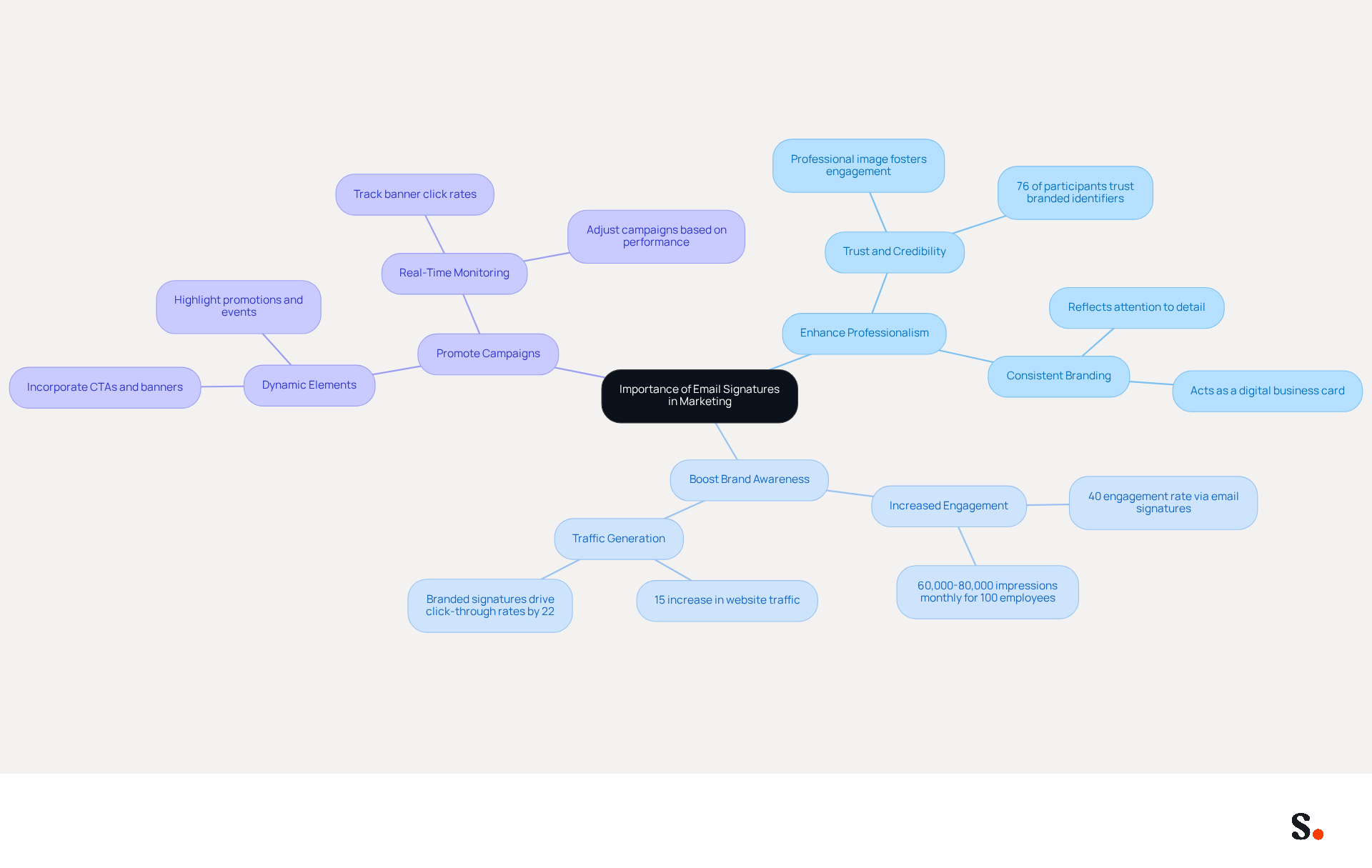
- Enhance Professionalism: Including essential details such as your name, title, and company logo presents a polished image to recipients, fostering trust and credibility. This is significant, as 76% of participants indicate that branded digital identifiers enhance their trust in the sender.
- Boost Brand Awareness: By incorporating links to your website or social media profiles, you can drive traffic and increase engagement. A firm with 100 employees produces roughly 60,000-80,000 branded impressions monthly, resulting in significant visibility without extra distribution expenses.
- Promote Campaigns: Signatures can feature dynamic banners or calls-to-action (CTAs) that highlight current promotions or events, effectively turning every message into an opportunity. Research indicates that messages with branded identifiers can boost click-through rates by 22% and lead to a 15% rise in traffic to company websites.
Understanding these benefits underscores the importance of an effective communication footer that aligns with your marketing goals, ensuring that every interaction acts as a strategic touchpoint for your brand. With Scribe, you can automate management of messaging signatures effortlessly. By syncing your Google Workspace or Aircall configurations with Scribe, any modifications made to your team’s information are automatically updated in their details, saving time and ensuring brand consistency. Scribe's SOC 2 Type II compliance ensures that your information is managed securely, offering reassurance as you improve your communication strategy.
Access and Edit Your Email Signature in Office 365
Editing email signature Office 365 is a straightforward process that can significantly enhance your professional communication. To do so and leverage Scribe's capabilities for streamlined management, follow these steps:
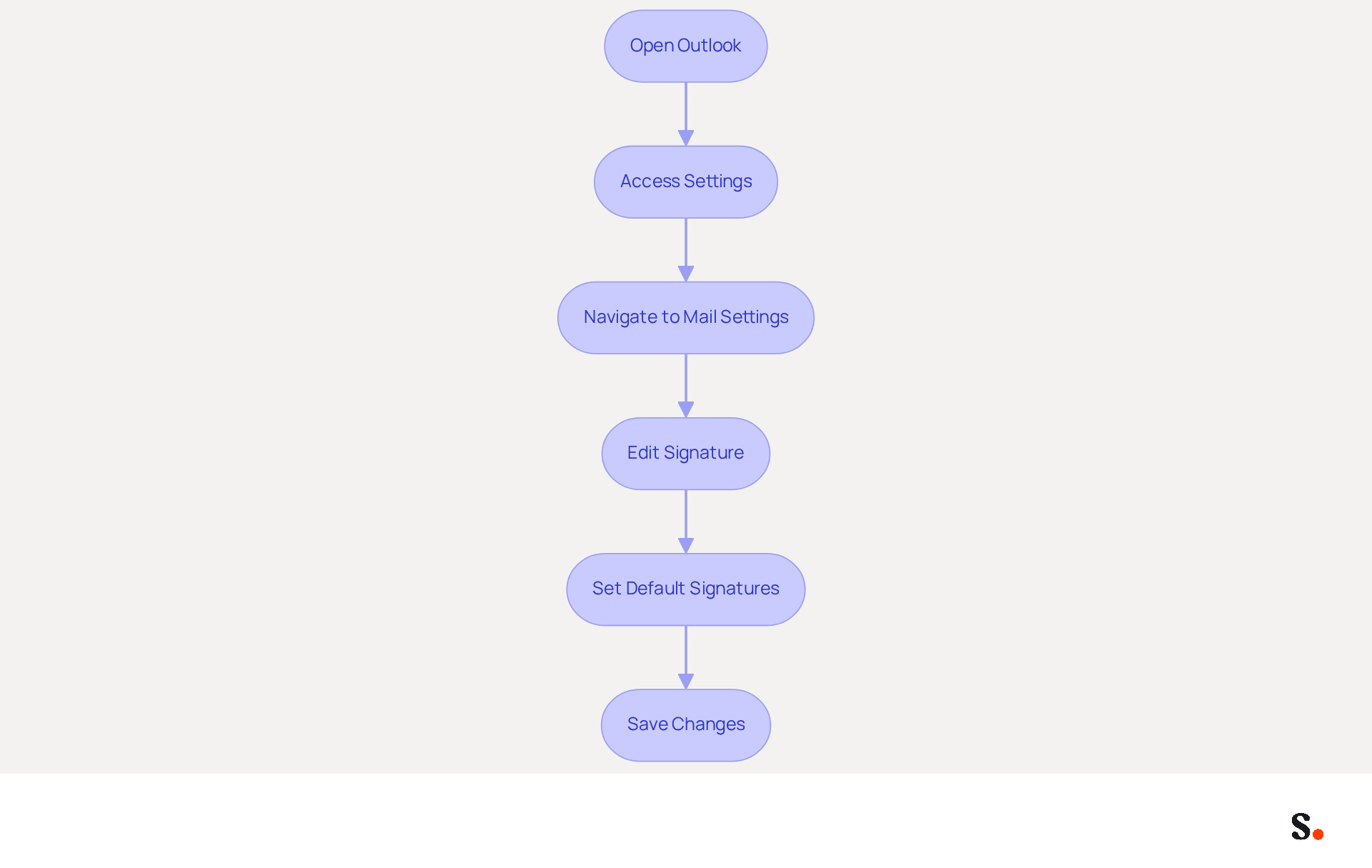
- Open Outlook: Launch the Outlook application or navigate to Outlook on the web.
- Access Settings: Click on the gear icon (⚙️) in the top right corner to open the Settings menu.
- Navigate to Mail Settings: In the Settings menu, select 'View all Outlook settings' at the bottom, then go to 'Mail' > 'Compose and reply'.
- Edit Signature: In the 'Email footer' section, you can create a new footer or modify an existing one. Type your desired text for your sign-off and format it using the available tools (font, size, color). Ensure to include essential elements such as your name, job title, company name, contact information, and social media links for a professional appearance.
- Set Default Signatures: Choose whether to automatically include your signature on new messages and replies/forwards by selecting the appropriate options.
- Save Changes: Click 'Save' to apply your changes.
To grant permission for Scribe to connect with your service provider enables one-click synchronization. This requirement may pose a challenge for some users, as not all have Super Admin access. By syncing your Google Workspace with Scribe, you can automate updates to your teammates' information, saving time and ensuring consistency across your organization. Any changes in your Google Workspace, such as moving teammates from one group to another or updating their information, will be automatically reflected in Scribe without any input on your part. Incorporating a well-designed message footer can significantly enhance your brand's visibility. Notably, messages featuring branded identifiers see a 22% higher response rate than those without. Moreover, businesses using dynamic digital identifiers enjoy an average click-through rate (CTR) of 4%, compared to the typical 2.5% for promotional messages. It's also important to consider any legal disclaimers that may be necessary for your industry. By following these steps, you can edit email signature Office 365 to position your brand for greater engagement and compliance in a competitive landscape.
Troubleshoot Common Issues When Editing Email Signatures
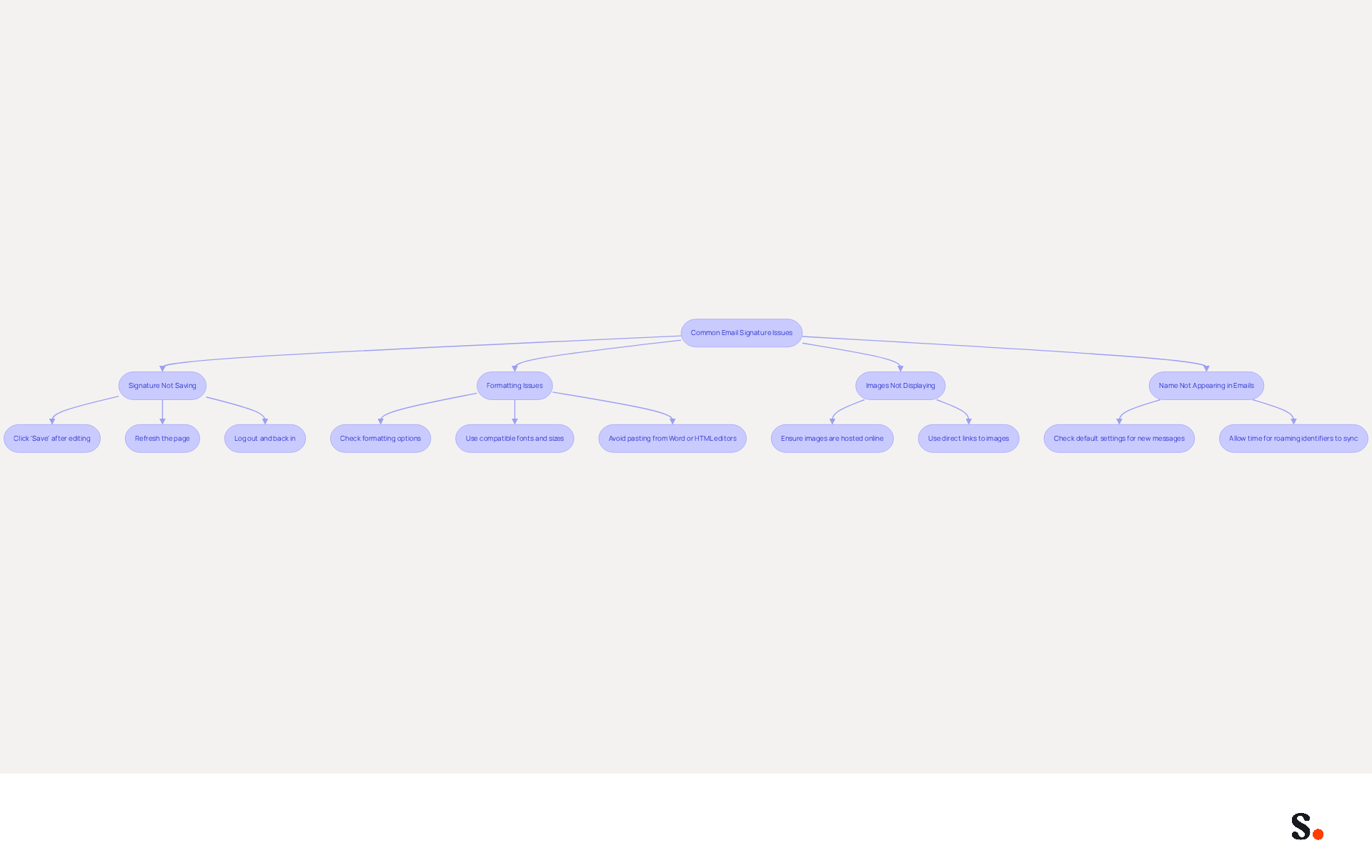
Editing your email signature in Office 365 can present several challenges that require effective troubleshooting strategies. Here are solutions to help you address these common issues:
- Signature Not Saving: If your changes aren't saving, ensure you click 'Save' after editing. If the problem persists, try refreshing the page or logging out and back in. Many users find they must re-save their message identifiers each day for them to display correctly in new messages and replies.
- Formatting Issues: If your mark appears differently than expected, check the formatting options. Ensure that you are using compatible fonts and sizes, as some may not display correctly across different email clients. Frequent challenges experienced by users occur when marks are pasted from Word or HTML editors, resulting in layout inconsistencies. Additionally, names may appear differently on mobile devices compared to desktop views, which is a common issue.
- Images Not Displaying: If images in your email footer are not showing up, ensure they are hosted online and accessible. Use direct links to images rather than embedding them directly. Users often face issues with images being blocked or failing to load based on how they are embedded, which can affect the document's appearance.
- Name Not Appearing in Emails: If your name is not showing in new emails, double-check your settings to ensure it is set as the default for new messages and replies. Outlook may implement different rules for new messages compared to replies and forwards, resulting in absent identifiers if no default is assigned for replies. If roaming identifiers are enabled, allow time for them to sync by avoiding simultaneous changes in Outlook desktop and web.
By addressing these common issues, you can effectively edit your email signature in Office 365 to maintain a professional appearance that enhances your brand's credibility and communication effectiveness. Additionally, syncing your Google Workspace with the application can streamline this process significantly. By automating the updates of your teammates' information, you save time and ensure that any changes in your Google Workspace are reflected without manual input. This proactive approach not only enhances your email signature but also reinforces your brand's professionalism in every communication.
Leverage Automation for Efficient Email Signature Management
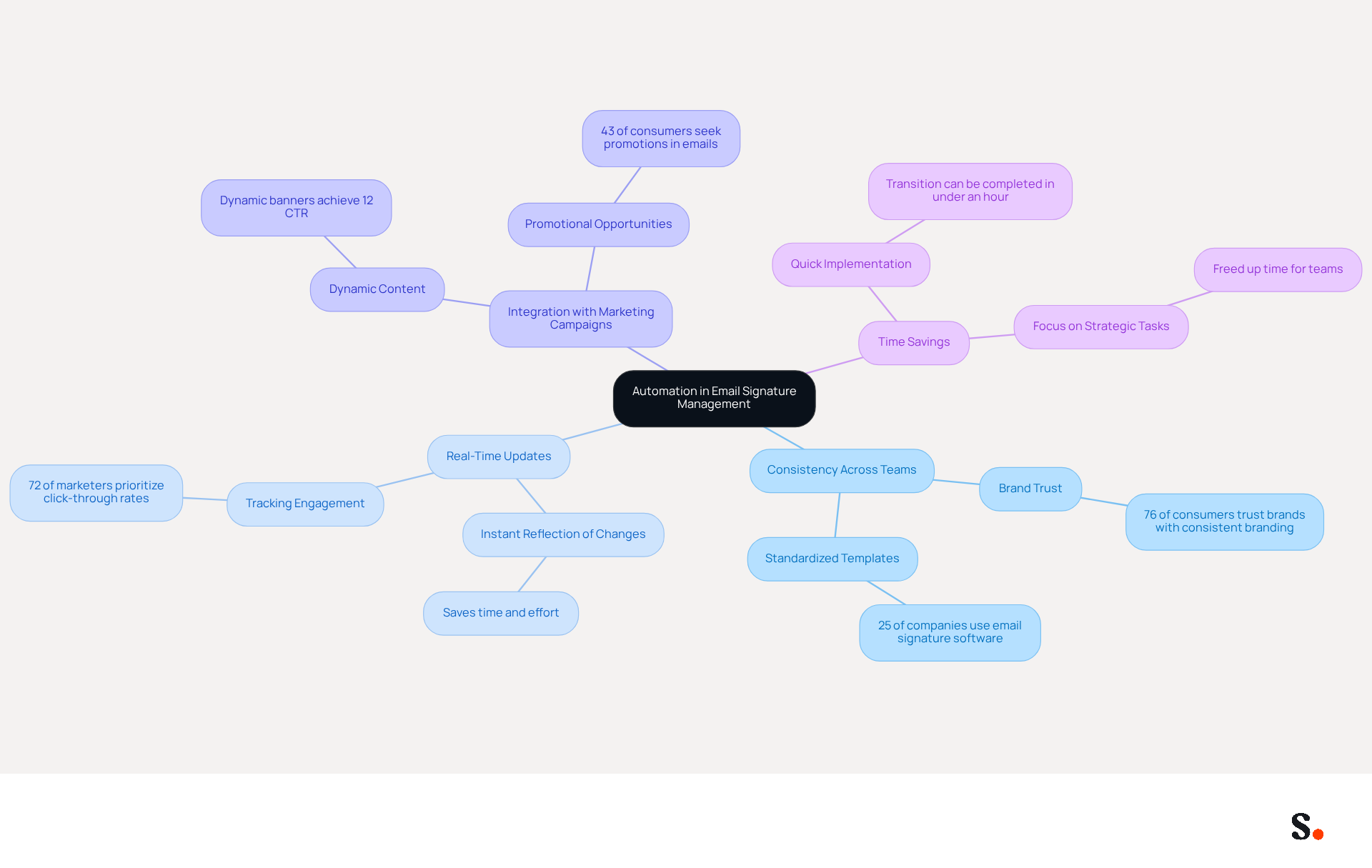
To maximize the effectiveness of your digital identifiers, leveraging automation tools like Scribe is essential. Here’s how automation can benefit your email signature management:
- Consistency Across Teams: Automated systems ensure that all team members use the same signature format, maintaining brand consistency. Research shows that 76% of consumers have greater trust in brands with consistent branding, emphasizing the significance of uniformity in establishing trust.
- Real-Time Updates: With automation, any changes made to the template are instantly reflected across all users, eliminating the need for manual updates. Many organizations struggle to track the effectiveness of their communication strategies. Tracking clicks on links in email footers offers insights into customer engagement, with 72% of marketers emphasizing click-through rates. Scribe's integration with Google Workspace and business phone systems allows for seamless synchronization, ensuring that any updates to your teammates' information are automatically reflected in their email footers, saving time and effort.
- Integration with Marketing Campaigns: Automated email footers can include dynamic content, such as promotional banners or CTAs, that can be updated based on ongoing marketing campaigns. Dynamic banners have been shown to achieve click-through rates exceeding 12%, significantly enhancing engagement compared to standard promotional messages.
- Time Savings: By automating document management, you free up valuable time for your team, allowing them to focus on more strategic tasks. The shift to automated digital identifiers can usually be completed in under an hour, enabling IT to implement standardized templates swiftly and offering immediate efficiency enhancements. Additionally, the platform is SOC 2 Type II compliant, ensuring that your data is secure while streamlining the management process.
Using an automated solution like Scribe can help you edit email signature Office 365 more effectively and enhance your signature management, making your communications work harder for you. Additionally, conducting an email identity review and defining governance policies before implementing automation are essential steps to ensure brand consistency and compliance.
Conclusion
Editing an email signature in Office 365 presents a unique challenge that, when addressed strategically, can significantly elevate brand visibility. By following these steps, you help craft a polished email footer that truly reflects your company's identity, ultimately fostering trust and engagement with recipients.
The article highlights the importance of email signatures in marketing, emphasizing their role in boosting brand awareness and promoting campaigns. Key insights include:
- The significant impact of branded identifiers on click-through rates
- The advantages of using automation tools like Scribe for efficient management
With Scribe, organizations can ensure real-time updates and maintain brand consistency across all communications, saving time and enhancing overall effectiveness.
In today's competitive landscape, using email signatures as a marketing tool is more important than ever. By adopting automated solutions, businesses can not only streamline their signature management but also maximize their marketing ROI. This shift not only simplifies management but also amplifies the impact of every email sent, allowing companies to transform each email into a strategic touchpoint that reinforces their brand and drives engagement with every message.
Frequently Asked Questions
Why are email signatures important in marketing?
Email signatures enhance brand visibility and engagement, providing a consistent branding opportunity with every message sent, which reinforces your company's identity.
How do email signatures enhance professionalism?
Including essential details such as your name, title, and company logo in your email signature presents a polished image to recipients, fostering trust and credibility. Research shows that 76% of participants believe branded digital identifiers enhance their trust in the sender.
How can email signatures boost brand awareness?
By incorporating links to your website or social media profiles in your email signature, you can drive traffic and increase engagement. A firm with 100 employees can produce roughly 60,000-80,000 branded impressions monthly, resulting in significant visibility without extra distribution costs.
In what ways can email signatures promote campaigns?
Email signatures can feature dynamic banners or calls-to-action (CTAs) that highlight current promotions or events, effectively turning every message into an opportunity. Messages with branded identifiers can boost click-through rates by 22% and lead to a 15% increase in traffic to company websites.
How does Scribe help with managing email signatures?
Scribe automates the management of messaging signatures by syncing your Google Workspace or Aircall configurations, ensuring that any modifications made to your team’s information are automatically updated, saving time and ensuring brand consistency.
What security measures does Scribe provide for managing email signatures?
Scribe is SOC 2 Type II compliant, ensuring that your information is managed securely while you improve your communication strategy.
List of Sources
- Understand the Importance of Email Signatures in Marketing
- 40+ Email Signature Statistics for 2026 (Data + Insights) (https://wavecnct.com/blogs/email-signature-statistics)
- Research Recap: Branded Email Signatures Increase Company Recognition, Trust - Demand Gen Report (https://demandgenreport.com/industry-news/research-recap-branded-email-signatures-increase-company-recognition-trust/47252)
- Why Email Signatures Must Be In Your 2026 Marketing Plan | Rocketseed (https://rocketseed.com/blog/2026-marketing-plan-email-signatures)
- 2026 Marketing Trends: Email Signatures as a Marketing Tool (https://bluechiptt.com/blog/5-marketing-trends-for-2026-and-how-your-email-signature-fits-in)
- The impact of email signatures on your branding (https://signitic.com/en/resources/the-impact-of-email-signatures-on-your-branding)
- Access and Edit Your Email Signature in Office 365
- How To Add An Email Signature in Outlook (2026) (https://hubspot.com/email-signature-generator/add-signature-outlook)
- Email signature statistics: Why every business should optimize their email signatures — Stripo.email (https://stripo.email/blog/email-signature-statistics-why-every-business-should-optimize-their-email-signatures)
- 40+ Email Signature Statistics for 2026 (Data + Insights) (https://wavecnct.com/blogs/email-signature-statistics)
- How To Change An Email Signature In Outlook (https://forbes.com/sites/darreonnadavis/2023/07/15/how-to-change-an-email-signature-in-outlook)
- Troubleshoot Common Issues When Editing Email Signatures
- Outlook Signature Not Working in Office 365: Causes & Fixes (https://exclaimer.com/email-signature-handbook/outlook-signature-not-working-in-office-365)
- How to solve problems with email signatures in Microsoft 365? (https://mail-signatures.com/articles/problems-email-signatures-office-365)
- 40+ Email Signature Statistics for 2026 (Data + Insights) (https://wavecnct.com/blogs/email-signature-statistics)
- Email Signature Statistics: A Closer Look at Email Signatures in 2026 (https://mysignature.io/blog/email-signature-statistics)
- Microsoft Outlook Classic Email Signatures Picture Display Issues - Microsoft Q&A (https://learn.microsoft.com/en-us/answers/questions/5982071/microsoft-outlook-classic-email-signatures-picture)
- Leverage Automation for Efficient Email Signature Management
- Why Email Signatures Must Be In Your 2026 Marketing Plan | Rocketseed (https://rocketseed.com/blog/2026-marketing-plan-email-signatures)
- Master Automatic Email Signatures: Boost Branding and Efficiency (https://scribe-mail.com/en-US/blog/master-automatic-email-signatures-boost-branding-and-efficiency)
- Automating Email Signatures: How IT Teams Streamline Processes & Reduce Risk (https://exclaimer.com/blog/streamlining-it-processes-automated-email-signatures)
- How to Automate Email Signatures for Effective Marketing Campaigns (https://scribe-mail.com/en-US/blog/how-to-automate-email-signatures-for-effective-marketing-campaigns)
- 40+ Email Signature Statistics for 2026 (Data + Insights) (https://wavecnct.com/blogs/email-signature-statistics)
Get started with Scribe
Manage signatures across your whole team
Free 14-day trial — no credit card.