How to Add a Permanent Signature in Gmail: A Step-by-Step Guide
A permanent email signature can be a game-changer in professional communication, yet many overlook its significance. It serves as a vital component that
Sophie Grant
Email Signature Specialist, Scribe

On this page
- Introduction
- Understand the Importance of a Permanent Email Signature
- Follow Step-by-Step Instructions to Add Your Signature in Gmail
- Troubleshoot Common Issues When Adding Your Gmail Signature
- Explore Tools and Resources for Optimizing Your Email Signature
- Conclusion
- Frequently Asked Questions
- List of Sources
Introduction
A permanent email signature can be a game-changer in professional communication, yet many overlook its significance. It serves as a vital component that enhances brand identity and fosters trust. Creating a consistent and polished signature allows individuals to convey professionalism while leveraging their email footers as subtle marketing tools that drive engagement. This often results in confusion and missed opportunities for effective communication.
What steps can you take to ensure your Gmail signature effectively reflects your brand and adheres to best practices?
Understand the Importance of a Permanent Email Signature
A permanent digital sign-off is essential for establishing a strong professional identity. Here are several reasons why having a permanent email signature is crucial:
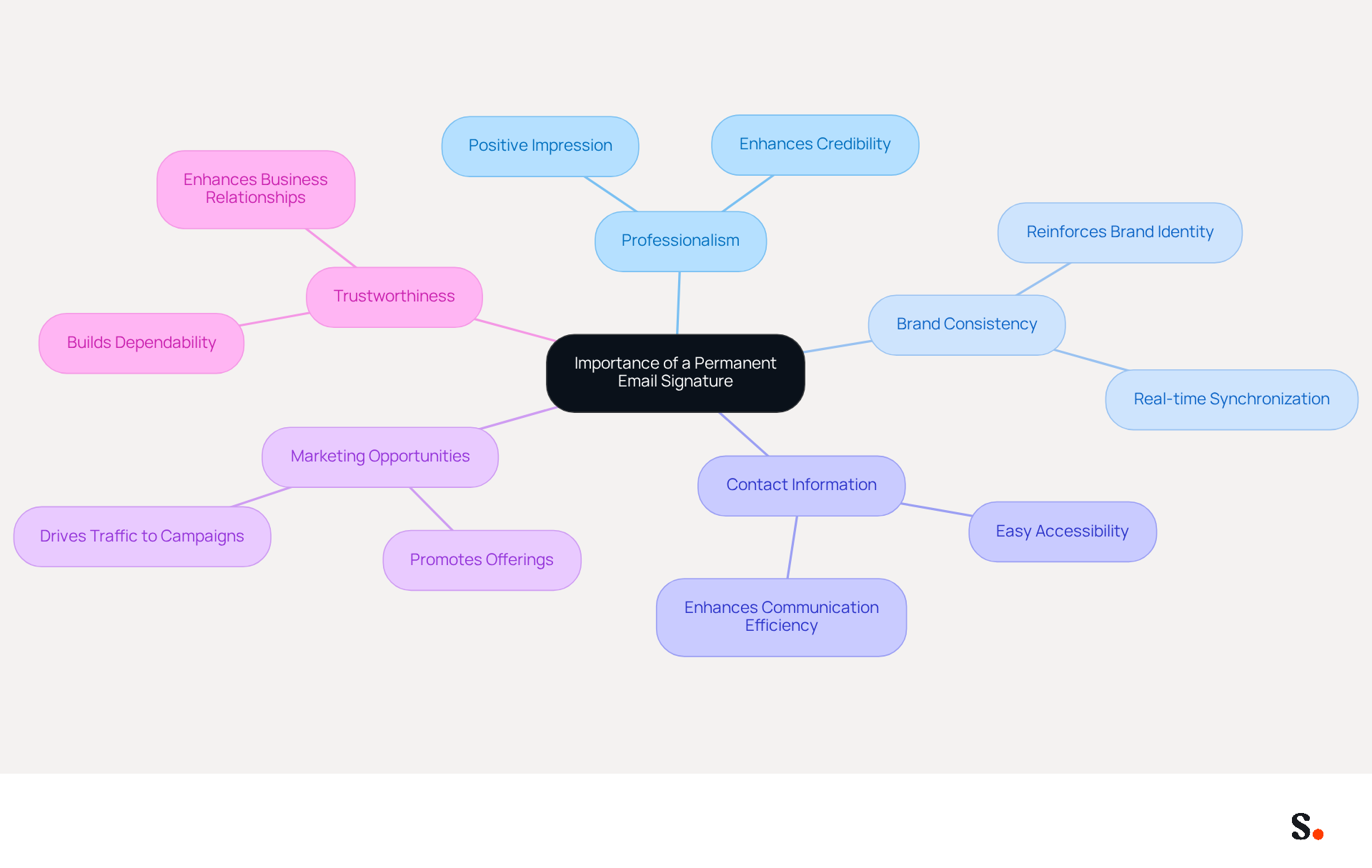
- Professionalism: A well-designed signature conveys professionalism and attention to detail, making a positive impression on recipients. The professionalism of your electronic correspondence significantly enhances your credibility and the image of Scribe in various work contexts.
- Brand Consistency: Consistent branding across all communications reinforces your brand identity. A mark that incorporates your logo, colors, and fonts aids in preserving this consistency, ensuring that every message aligns with your brand image. With Scribe, your electronic identifiers are automatically synchronized with your business phone system, ensuring that any modifications made in your Aircall configuration are reflected in real-time, enhancing brand consistency.
- Contact Information: Including your contact details ensures that recipients can easily reach you, enhancing communication efficiency. This is essential in today’s fast-paced business landscape, where messages with identifiers receive significantly more clicks than those without.
- Marketing Opportunities: Email footers can serve as a subtle marketing tool, allowing you to promote your latest offerings, social media links, or upcoming events. Incorporating links to these elements can significantly enhance engagement and drive traffic to your campaigns. Scribe's automated management of digital signatures enables effortless updates, guaranteeing your marketing messages remain up-to-date and conserving your time by automatically filling in sign-offs from your business phone system.
- Trustworthiness: A professional mark enhances trustworthiness in your communications, making you seem more dependable and credible. This credibility can lead to stronger business relationships and increased opportunities. Furthermore, Scribe is SOC 2 Type II compliant, guaranteeing that your data is secure while you manage your identifiers.
Recognizing these advantages highlights the importance of investing time in creating a lasting digital identifier that truly represents your brand and professionalism. For example, case studies have demonstrated that including customer narratives in communication can boost trust and engagement, ultimately resulting in higher conversions and customer loyalty. With emails being the primary form of business communication, a well-crafted closing can significantly enhance your communication strategy and elevate your professional presence.
Follow Step-by-Step Instructions to Add Your Signature in Gmail
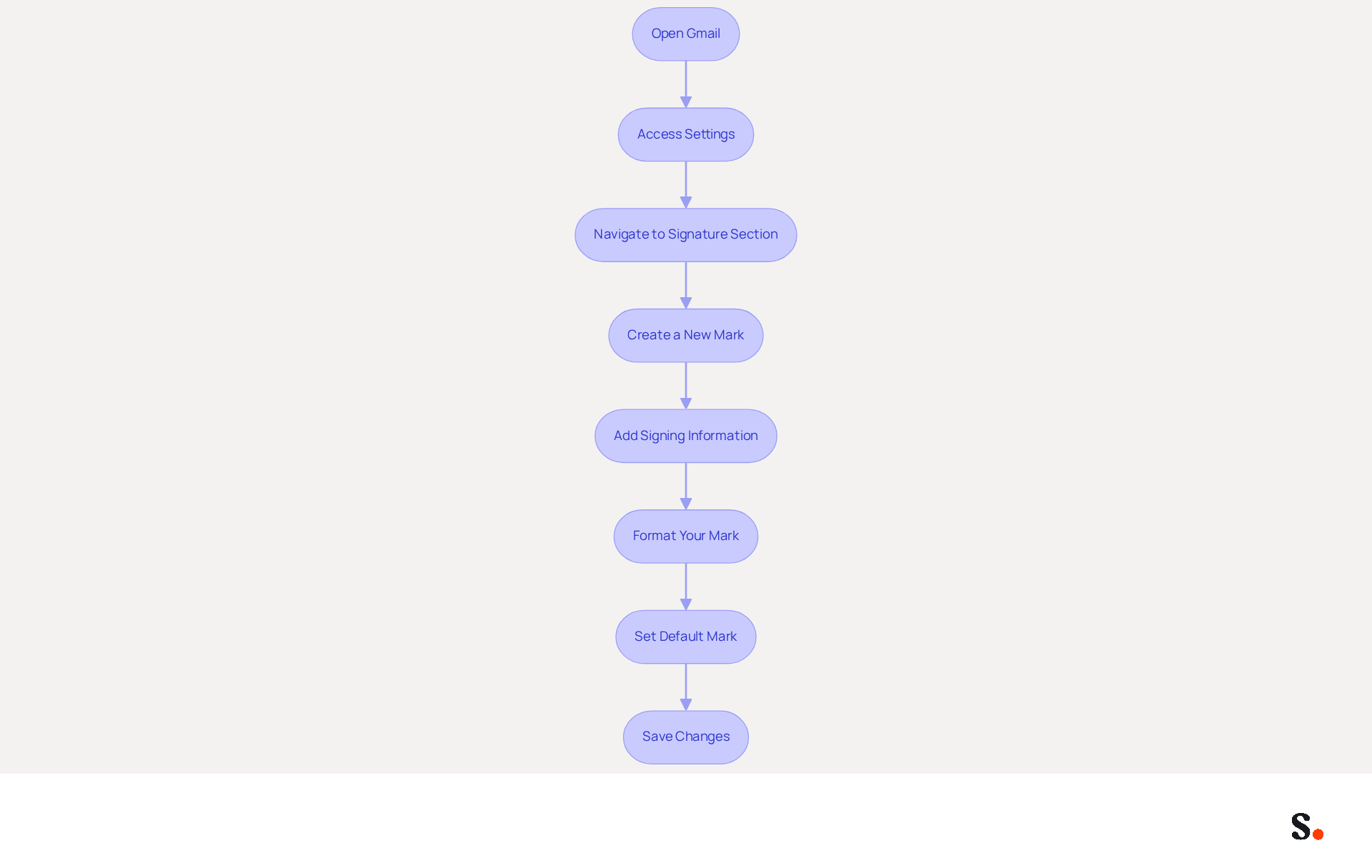
How to add a permanent signature in Gmail is a straightforward process that can significantly enhance your professional communications. To add a permanent signature in Gmail, follow these steps:
- Open Gmail: Log into your Gmail account on your computer.
- Access Settings: Click on the gear icon in the top right corner of the Gmail interface, then select 'See all settings'.
- Navigate to Signature Section: In the 'General' tab, scroll down until you find the 'Sign-off' section.
- Create a New Mark: Click on the '+ Create new' button. A dialog box will appear prompting you to name your mark.
- Add Signing Information: In the text box, enter your desired text for your sign-off. Include your name, title, company name, contact information, and any other relevant details.
- Format Your Mark: Use the formatting options to customize your mark. Change the font, size, color, and add images or links as needed.
- Set Default Mark: If you have multiple marks, select which one to use as your default for new messages and replies/forwards.
- Save Changes: Scroll down to the bottom of the settings page and click 'Save Changes' to apply your new email footer.
Following these steps will help you learn how to add a permanent signature in Gmail, improving your communications.
Incorporating a well-crafted message footer can greatly enhance your marketing initiatives. Statistics indicate that companies utilizing branded email footers experience a 15% increase in website click-through rates and a 22% rise in response rates. Furthermore, with 85% of users accessing their inboxes on mobile devices, ensuring your signature is mobile-friendly is crucial for maximizing engagement.
This tool simplifies the process with one-click synchronization to Google Workspace. Gaining access to this feature may require administrative permissions, which could be a barrier for some users. You can choose which teammates to sync, ensuring that any modifications in your Google Workspace, such as relocating teammates from one group to another or updating their details, will be automatically reflected in the application without any input on your part. As highlighted in case studies, businesses utilizing dynamic digital identifiers report higher inbound profile views and enhanced brand consistency. By optimizing your Scribe contact information, you can turn every email into a marketing tool while ensuring compliance with security standards like SOC 2 Type II. Ultimately, a well-crafted email signature not only reflects your brand but also serves as a strategic tool for engagement and outreach.
Troubleshoot Common Issues When Adding Your Gmail Signature
To ensure a seamless email experience, it is crucial to understand how to add a permanent signature in Gmail for both new emails and replies. To understand how to add a permanent signature in Gmail, check the settings under the 'Signature' section to confirm that 'My mark' is selected. Syncing your Google Workspace with Scribe saves time by automatically updating your teammates' data. This allows for efficient management of information without manual input, including the capability to auto-fill detail information using our attribute feature, enhancing efficiency.
Here are some common issues you may encounter and how to resolve them:
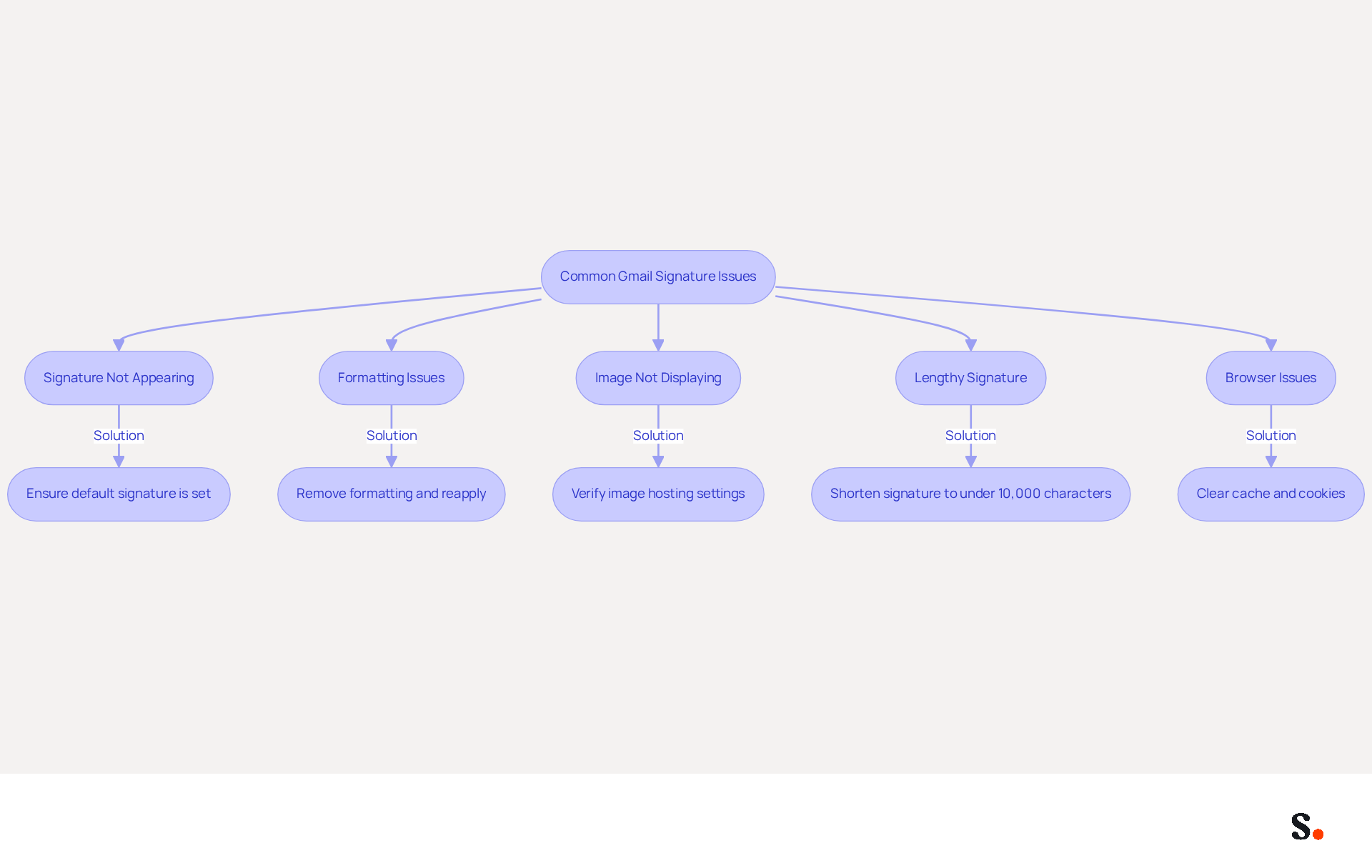
- Signature Not Appearing: Ensure that your mark is set as the default for both new emails and replies. To confirm that the correct mark is selected, check the settings under the 'Signature' section, which will show you how to add a permanent signature in Gmail.
- Formatting Issues: If your mark displays incorrectly, remove all formatting and reapply it. Copying from other sources can introduce unwanted formatting, which may disrupt the appearance.
- Image Not Displaying: For images in your email footer that aren’t showing, verify that they are hosted online and accessible. If using Google Drive, adjust the sharing settings to ensure public access.
- Lengthy Signature: Gmail imposes a character limit of 10,000 characters for these elements. If you encounter an error regarding length, shorten your name by eliminating unnecessary details to comply with this limit.
- Browser Issues: Users often face challenges when accessing Gmail due to browser-related issues. If problems persist, clear your browser cache and cookies. Alternatively, try accessing Gmail in incognito mode to rule out any interference from extensions.
Understanding these common issues and their solutions helps you manage your Gmail identity effectively and reinforces your professional image in every correspondence.
Explore Tools and Resources for Optimizing Your Email Signature
To elevate your email signature's effectiveness, consider integrating various tools and resources that enhance both aesthetics and functionality:
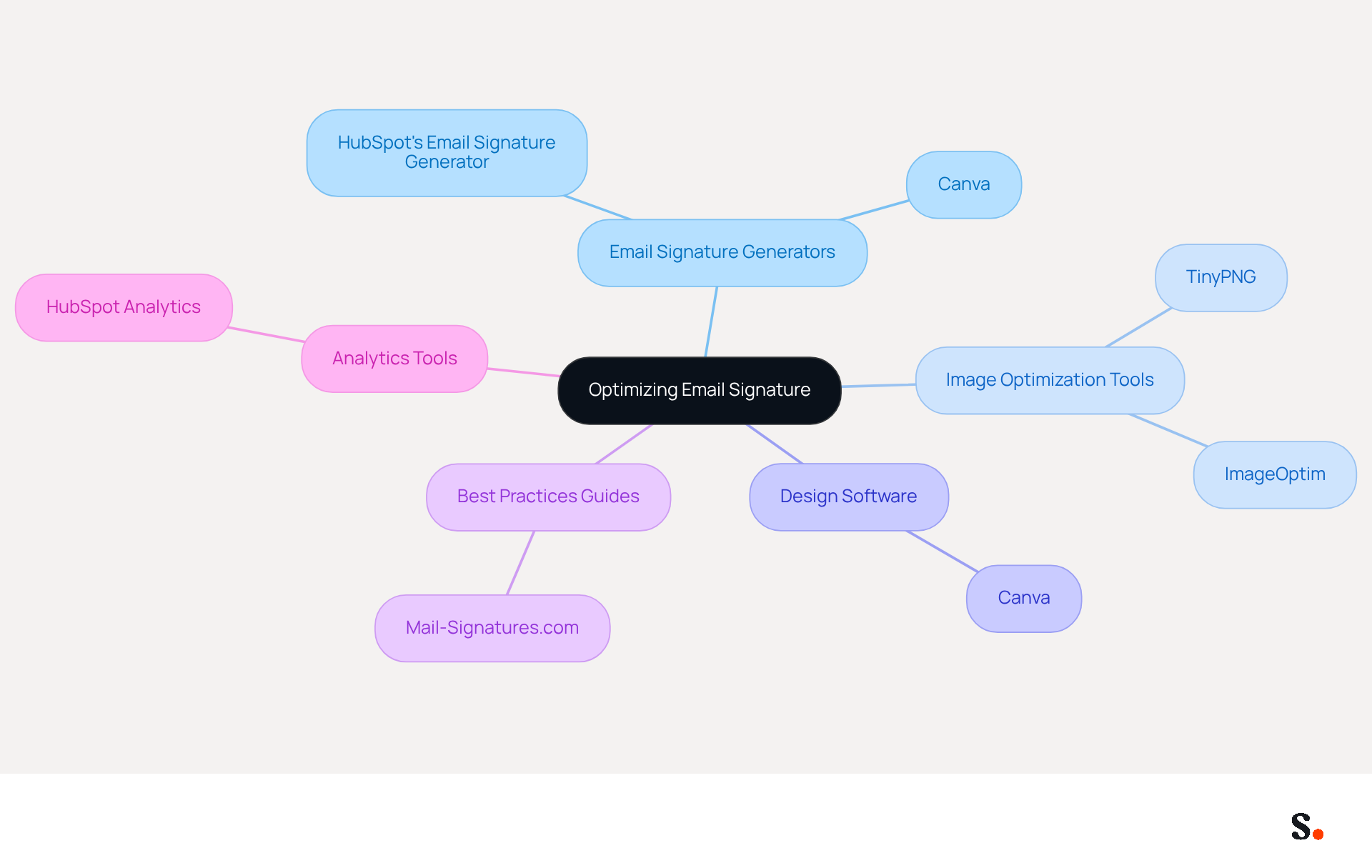
- Email Signature Generators: Tools like HubSpot's Email Signature Generator enable quick and easy creation of professional signatures. HubSpot's Email Signature Generator offers native handwritten support, adding a personal touch to your professional communications. These generators typically offer templates that help create visually appealing signatures that reflect your brand identity.
- Image Optimization Tools: Utilize tools such as TinyPNG or ImageOptim to compress images without sacrificing quality. This guarantees that your mark loads swiftly and appears accurately across different devices, which is vital considering that nearly half of all messages are accessed on mobile devices. Balancing image quality with loading speed can be challenging, but it's essential for effective communication. Remember to keep your message footer size under 100 KB for optimal loading speed.
- Design Software: Platforms like Canva provide customizable templates for digital correspondences, enabling you to create distinctive designs that represent your brand. Canva's user-friendly interface simplifies the design process, making it accessible even for those without advanced skills.
- Best Practices Guides: Refer to resources that outline optimal approaches for electronic correspondences, including ideal dimensions, color schemes, and content recommendations. Websites like Mail-Signatures.com provide comprehensive guides that can help you adhere to industry standards.
- Analytics Tools: Utilize analytics tools to effectively monitor your messaging performance. This can assist you in understanding how effective your mark is in driving engagement and leads, allowing for data-driven adjustments to your strategy.
Ultimately, a well-crafted email signature can transform your communications into powerful marketing tools that resonate with your audience.
Conclusion
A permanent email signature is essential for establishing a strong professional identity and fostering trust in communications. By establishing a consistent and polished signature, individuals can significantly improve their credibility and ensure that their communications reflect their professional image. This guide has outlined the essential steps to create and manage a permanent signature in Gmail, emphasizing its importance in today’s business landscape.
Throughout the article, key insights were shared, including the benefits of a well-crafted signature, such as:
- Increased professionalism
- Brand consistency
- Marketing opportunities
The step-by-step instructions provided a clear pathway for users to add their signatures effectively, while troubleshooting tips addressed common issues that may arise during the process. Additionally, the exploration of tools and resources for optimizing email signatures highlighted the potential for enhancing engagement and driving traffic through strategic design and analytics.
In conclusion, taking the time to create a professional email signature can significantly enhance your presence in the business world. Using tools like Scribe helps maintain brand consistency while ensuring compliance with essential security standards. Embrace the power of a well-designed email signature to transform every correspondence into an opportunity for connection and engagement, ultimately driving success in your professional endeavors.
Frequently Asked Questions
Why is a permanent email signature important?
A permanent email signature is essential for establishing a strong professional identity, conveying professionalism, ensuring brand consistency, providing contact information, creating marketing opportunities, and enhancing trustworthiness.
How does a well-designed email signature convey professionalism?
A well-designed signature demonstrates attention to detail and professionalism, making a positive impression on recipients and enhancing your credibility and the image of Scribe in various work contexts.
What role does brand consistency play in email signatures?
Consistent branding across all communications reinforces your brand identity. A signature that incorporates your logo, colors, and fonts helps maintain this consistency, ensuring that every message aligns with your brand image.
How does Scribe enhance brand consistency in email signatures?
Scribe automatically synchronizes your electronic identifiers with your business phone system, ensuring that any modifications made in your Aircall configuration are reflected in real-time, which enhances brand consistency.
Why is including contact information in an email signature important?
Including contact details ensures that recipients can easily reach you, enhancing communication efficiency, which is crucial in today’s fast-paced business landscape.
How can email footers serve as marketing opportunities?
Email footers can promote your latest offerings, social media links, or upcoming events, enhancing engagement and driving traffic to your campaigns. Scribe's automated management of digital signatures allows for effortless updates to these marketing messages.
What does it mean for Scribe to be SOC 2 Type II compliant?
Being SOC 2 Type II compliant means that Scribe guarantees the security of your data while you manage your identifiers, enhancing trustworthiness in your communications.
How can a well-crafted email signature impact business relationships?
A professional email signature enhances trustworthiness, making you seem more dependable and credible, which can lead to stronger business relationships and increased opportunities.
List of Sources
- Understand the Importance of a Permanent Email Signature
- Top 10 Benefits Of Email Signatures | Rocketseed (https://rocketseed.com/blog/benefits-of-using-email-signatures)
- Marketing Benefits of an Email Signature (https://blog.adwhite.com/marketing-benefits-of-an-email-signature)
- Four Reasons to Have a Professional Email Signature - PEAKUP TEKNOLOJİ A.Ş. (https://peakup.org/blog/four-reasons-to-have-a-professional-email-signature)
- The Importance Of Email Signatures | Email Marketing Blog | Mail Blaze (https://mailblaze.com/thinking/email-signatures-in-email-marketing)
- The advantages of using a signature for your email (https://signitic.com/en/resources/advantages-of-using-a-signature-for-your-email)
- Follow Step-by-Step Instructions to Add Your Signature in Gmail
- 100 Compelling Email Statistics for 2026 | PGM Solutions (https://porchgroupmedia.com/blog/100-compelling-email-statistics-to-inform-your-strategy-in-2023)
- 40+ Email Signature Statistics for 2026 (Data + Insights) (https://wavecnct.com/blogs/email-signature-statistics)
- Email Signature Statistics: A Closer Look at Email Signatures in 2026 (https://mysignature.io/blog/email-signature-statistics)
- Email signature statistics: Why every business should optimize their email signatures — Stripo.email (https://stripo.email/blog/email-signature-statistics-why-every-business-should-optimize-their-email-signatures)
- Troubleshoot Common Issues When Adding Your Gmail Signature
- Read our guide for troubleshooting Gmail signatures issues (https://wisestamp.com/guides/how-to-fix-gmail-signature-not-showing)
- Fix Your Missing Gmail Signature: 8 Troubleshooting Steps & Best Practices | Newoldstamp - NEWOLDSTAMP (https://newoldstamp.com/blog/gmail-signature-not-showing-up)
- Why Is My Gmail Signature Not Showing Up? Common Causes Explained (https://scribe-mail.com/en-US/blog/why-is-my-gmail-signature-not-showing-up-common-causes-explained)
- Troubleshoot issues with Gmail signatures - Gmail Help (https://support.google.com/mail/answer/11468381?hl=en)
- Solving a Gmail signature problem (https://signitic.com/en/guides/solving-a-gmail-signature-problem)
- Explore Tools and Resources for Optimizing Your Email Signature
- Email Signature Best Practices Guide With Examples - MailerLite (https://mailerlite.com/blog/email-signature-best-practices)
- Pro tips for optimizing your email signature (https://tbhcreative.com/blog/email-signature-marketing-design)
- Free Email Signature Generator: Create Email Signatures | Canva (https://canva.com/create/email-signatures)
- Free Email Signature Template Generator by HubSpot (2026) (https://hubspot.com/email-signature-generator)
- How to optimize your email signature (https://mitratech.com/resource-hub/blog/how-to-optimize-your-email-signature)
Get started with Scribe
Create your signature in minutes
Free 14-day trial — no credit card.