How to Add a Signature in Outlook on iPhone: A Step-by-Step Guide
Email signatures are crucial in professional communication. They serve as branding tools and help establish trust with recipients. This guide will walk you
Sophie Grant
Email Signature Specialist, Scribe
Introduction
Email signatures are crucial in professional communication. They serve as branding tools and help establish trust with recipients. This guide will walk you through adding and customizing your signature in Outlook on iPhone, so every email you send looks polished and cohesive.
Technical issues can arise, leading to signatures that fail to appear as intended. Not addressing these issues can lead to miscommunication and diminish your professional image.
Understand Email Signatures in Outlook
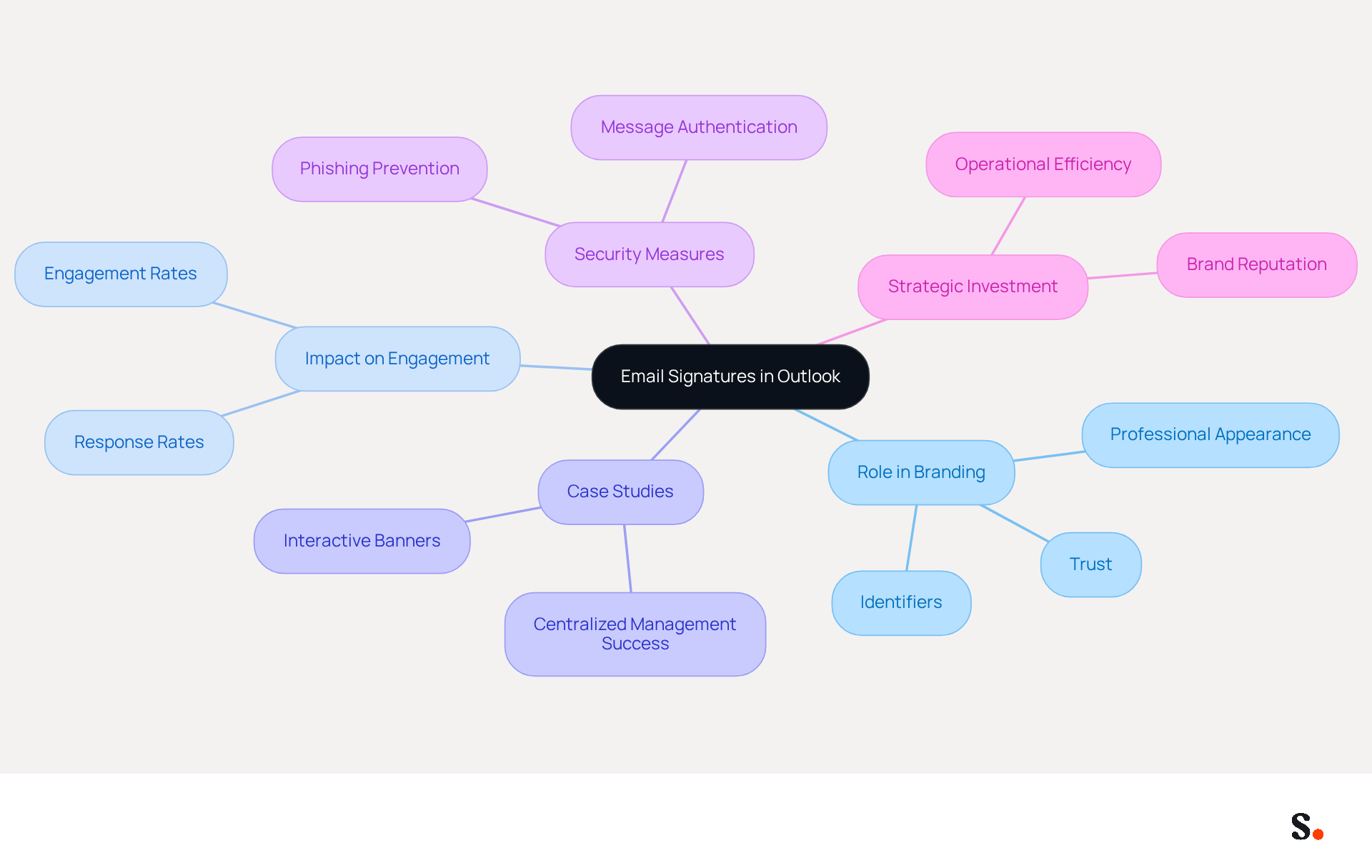
Email footers play a pivotal role in professional communication, serving as both identifiers and branding tools. Typically, they include the sender's name, title, company name, contact information, and often a logo or a quote. In Outlook, sign-offs provide essential contact information and serve as effective branding tools that reinforce your company's identity with each message.
The role of electronic correspondence identifiers in branding is critical and should not be overlooked. Organizations that maintain consistent communication formats experience a 22% increase in response rates, highlighting their role in enhancing engagement. Moreover, 80% of businesses consider branded electronic identifiers essential for establishing trust with recipients. This trust is essential, as 76% of recipients indicate a more positive view of companies that employ professional communication formats.
Let’s look at some case studies that illustrate how email identifiers can significantly impact branding. For example, organizations that have adopted centralized management of digital identities have effectively preserved consistency in their image while improving their professional appearance. By embedding clickable elements such as banners and calls to action, these organizations have transformed their digital identifiers into dynamic marketing tools, achieving engagement rates of 40%, significantly higher than traditional marketing campaigns.
In 2026, the significance of electronic identifiers in marketing continues to increase, with experts highlighting their role in strengthening identity and ensuring adherence to legal standards. Without proper security measures, organizations risk falling victim to phishing attacks and identity theft, and centralized management plays a crucial role in this aspect. Scribe's automated synchronization with Google Workspace not only guarantees that any modifications in your team’s information are automatically updated, saving time, but also improves consistency in branding. Additionally, Scribe's SAML single sign-on integration provides secure access management, further streamlining the process. As businesses increasingly acknowledge the importance of electronic correspondence as a primary communication channel, enhancing email footers becomes a strategic investment in brand reputation and performance. Investing in effective email footers is not just about aesthetics; it’s a strategic move that can significantly enhance brand reputation and operational efficiency.
Create and Customize Your Signature in Outlook on iPhone
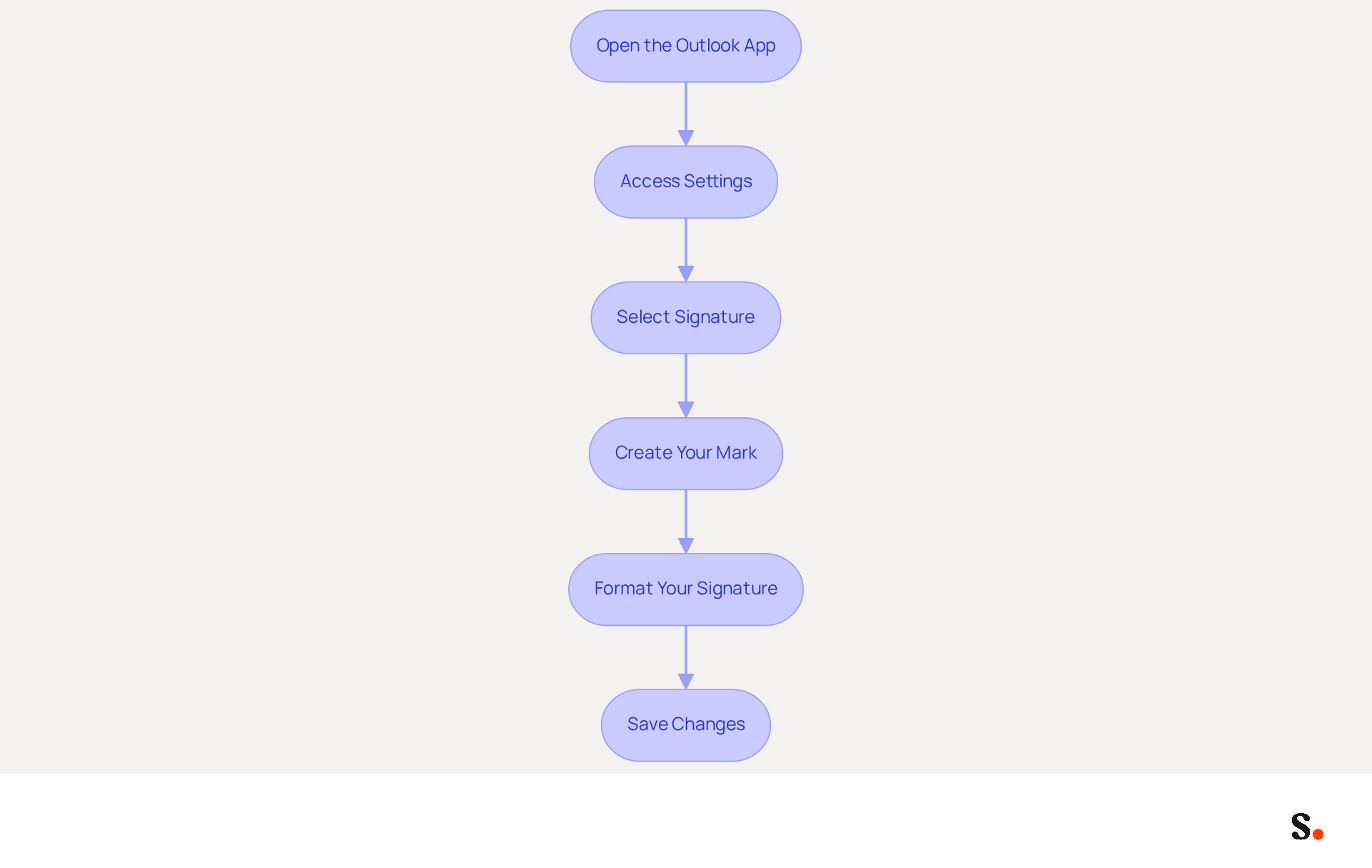
Learning how to add signature in Outlook on iPhone is essential for effective communication. To create and customize your email signature, follow these steps:
- Open the Outlook App: Launch the Outlook app on your iPhone.
- Access Settings: Tap the three horizontal lines in the upper left corner to open the menu, then tap the gear icon in the lower left corner to access settings.
- Select Signature: Scroll down and tap on 'Signature'.
- Create Your Mark: In the box, type your desired mark. Include your name, title, company name, and contact information. To enhance your personal mark, consider adding a logo or a personal touch, such as a quote. Adding call-to-action buttons can significantly boost engagement; in fact, 32.3% of users include them in their email footers.
- Format Your Signature: Use the formatting options available to adjust the font style, size, and color to align with your organization's identity. A branded digital footer is considered essential for a company's identity by 80% of participants, making this step crucial for effective communication.
- Save Changes: Once you are satisfied with your mark, tap 'Save' to apply the changes.
By following these steps, you will understand how to add signature in Outlook on iPhone, allowing you to create a professional email signature that truly reflects your brand and improves your communication. Significantly, branded digital identifiers can enhance response rates by 22%, emphasizing their efficiency as a marketing tool. Furthermore, case studies show that companies employing digital footers effectively can generate 60,000-80,000 impressions monthly, highlighting the potential influence of a well-designed footer.
Moreover, by syncing your Google Workspace with the application, you can save time as your teammates' data is automatically updated, ensuring that any changes, such as job position updates, are reflected in the system without manual input. This seamless integration not only enhances brand consistency but also simplifies management of digital identifiers, making it easier for marketing teams to maintain a cohesive brand image. Scribe's distinctive features, such as automated updates and easy management, enable marketing teams to manage their communications independently after the initial IT setup. As we enter 2024, the incorporation of AI and automation tools in digital correspondence is anticipated to become more widespread, further improving their efficiency. As digital communication evolves, ensuring your email signature is both professional and engaging will be crucial for standing out in a crowded inbox.
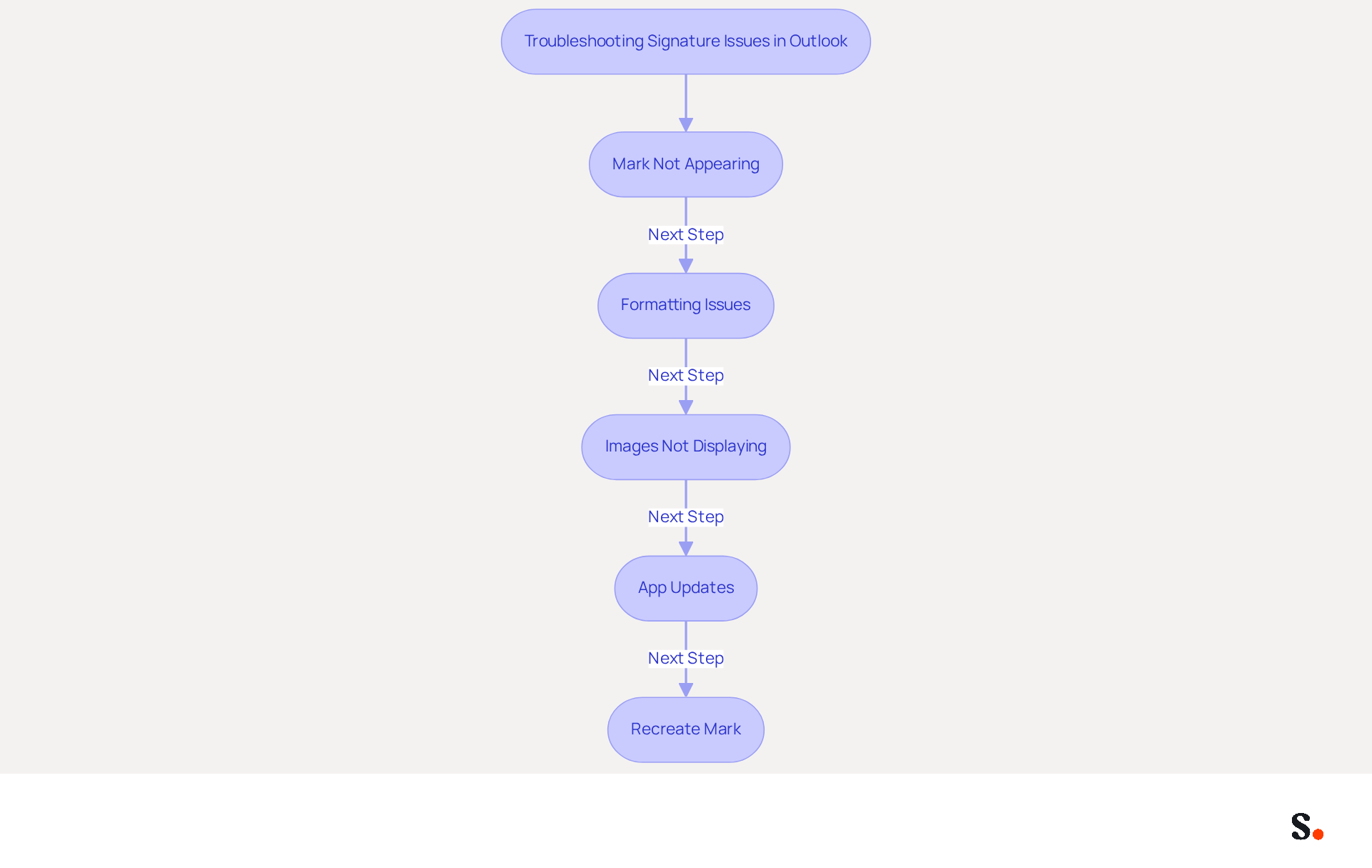
Troubleshoot Common Signature Issues in Outlook
Experiencing issues with how to add signature in Outlook on iPhone can disrupt your professional communication. Consider the following troubleshooting tips:
- Mark Not Appearing: To maintain consistency, verify the formatting options if your sign-off looks different when sent. Signatures may not automatically appear in replies or forwarded emails, which can lead to confusion.
- Formatting Issues: If your sign-off appears different when sent, check the formatting options. Using HTML format can enhance compatibility and maintain the intended appearance across different devices.
- Images Not Displaying: If images in your email are not showing up, verify that they are properly uploaded and that the image links are accessible. It is known that images may not display correctly due to default iOS settings, so re-uploading the images may be necessary. It's important to note that the Outlook iOS app has a known limitation regarding image display, which can influence how your email footer appears.
- App Updates: Ensure that your Outlook app is updated to the latest version, as updates often fix bugs and improve functionality. A recent update has resolved some known issues for users, so keeping the app current is crucial.
- Recreate Mark: Persistent issues with how to add signature in Outlook on iPhone can hinder professional communication; consider removing your current mark and creating a new one. This can assist in addressing any underlying issues that may be impacting the performance of the document.
By addressing these issues promptly, you ensure your communications reflect your brand's professionalism. Additionally, connecting Scribe with Google Workspace enables automatic updates of your email signatures, conserving time and ensuring brand consistency throughout your organization. The automatic syncing capabilities of the application ensure that any modifications in your Google Workspace, such as relocating teammates or updating their details, will be shown in Scribe without any manual input. Furthermore, Scribe's SOC 2 Type II certification ensures that your data is handled securely, complying with GDPR and CCPA regulations. Statistics show that 42% of consumers have a negative perception of a business when they receive a message lacking a branded identifier, emphasizing the significance of maintaining a consistent and professional communication presence.
Leverage Your Signature as a Marketing Tool
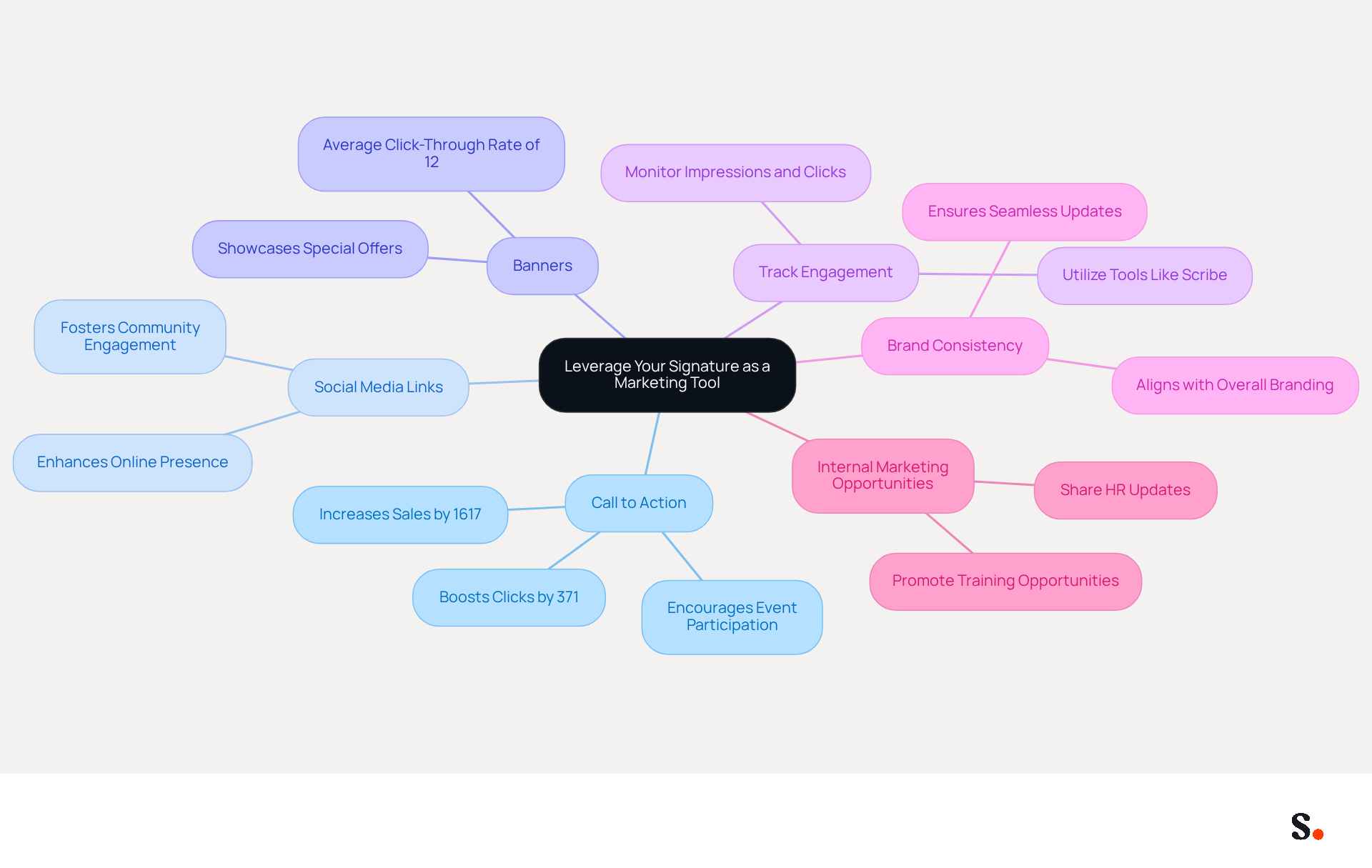
Your email footer can be more than just a sign-off; it can be a strategic asset for your marketing efforts. Here are several effective ways to leverage your signature:
- Include a Call to Action: Research indicates that clear calls to action can boost clicks by 371% and sales by 1617%, driving greater engagement with your brand and enhancing conversion rates. Incorporate a clear call to action (CTA) in your email footer, directing recipients to your latest blog post, a promotional offer, or an upcoming event.
- Promote Social Media Links: Add icons linking to your social media profiles to enhance your online presence. This not only encourages recipients to connect with you across platforms but also fosters community engagement.
- Use Banners: Think about adding a promotional banner to your email footer to showcase special offers or new products. Visual elements such as banners can attract attention and drive traffic effectively. Users of Scribe have experienced an impressive average click-through rate of 12% on banners, highlighting their role in driving engagement.
- Track Engagement: Without effective tools, tracking engagement can be challenging. Utilize advanced management tools like Scribe to monitor impressions, clicks, and click-through rates (CTR) within your email block. Analyzing this data can provide insights that help refine your marketing strategies over time, ensuring that your efforts yield the best results.
- Maintain Brand Consistency: Ensure that your personal mark aligns with your overall branding, including colors, fonts, and logos. With Scribe, every modification made in your Aircall setup will automatically be reflected in your branding components, ensuring seamless updates and consistent branding across all communications. Additionally, Scribe is SOC 2 Type II certified and compliant with GDPR and CCPA, ensuring secure data handling and compliance with industry standards.
- Promote Internal Marketing Opportunities: Utilize your communication footer to share HR updates, policies, and training opportunities, enhancing employee engagement and advocacy for Scribe.
By strategically enhancing your email signature, you position your brand for greater visibility and engagement in the competitive landscape of 2026.
Conclusion
Crafting a professional email signature in Outlook on your iPhone is essential for effective communication and brand representation. By following the outlined steps, users can add and customize their signatures, ensuring that every email sent reflects their professionalism and aligns with their organization's branding.
This guide highlights key insights, such as the need for consistency in email signatures and how digital identifiers can build trust. Additionally, email footers can serve as effective marketing tools. From troubleshooting common issues to leveraging signatures for increased engagement, the information provided equips users with the knowledge to optimize their email communication effectively.
In a rapidly changing digital landscape, a well-crafted email signature plays a crucial role in communication. Organizations are encouraged to view their email footers as dynamic marketing assets that can drive engagement and enhance brand visibility. By utilizing tools like Scribe, which offers seamless integration and automated updates, businesses can ensure their email signatures remain consistent and impactful, ultimately leading to improved response rates and a stronger brand presence in the marketplace.
Frequently Asked Questions
What is the purpose of email signatures in Outlook?
Email signatures serve as identifiers and branding tools in professional communication, typically including the sender's name, title, company name, contact information, and often a logo or quote.
How do email signatures impact branding and communication?
Consistent email signatures can lead to a 22% increase in response rates and 80% of businesses consider them essential for establishing trust with recipients, which is crucial for a positive perception of the company.
What are some benefits of centralized management of digital identities?
Centralized management helps preserve consistency in branding and improves professional appearance, allowing organizations to embed clickable elements like banners and calls to action, which can significantly enhance engagement rates.
What role do electronic identifiers play in marketing?
Electronic identifiers are increasingly important in marketing as they strengthen brand identity and ensure compliance with legal standards, while also helping to prevent phishing attacks and identity theft.
How does Scribe enhance email signature management?
Scribe automates synchronization with Google Workspace, ensuring that any changes in team information are automatically updated, which saves time and improves branding consistency. Additionally, Scribe's SAML single sign-on integration provides secure access management.
Why should businesses invest in effective email footers?
Investing in effective email footers is a strategic move that can enhance brand reputation and operational efficiency, making them an important aspect of professional communication.
List of Sources
- Understand Email Signatures in Outlook
- How an email signature can boost your professional image – Daily Business (https://dailybusinessgroup.co.uk/2026/03/how-an-email-signature-can-boost-your-professional-image)
- The impact of email signatures on your branding (https://signitic.com/en/resources/the-impact-of-email-signatures-on-your-branding)
- WiseStamp's "In The Eyes of The Customer" Report Reveals that Branded Email Signatures Receive Double the Total Fixations of Unbranded Email Signatures (https://prnewswire.com/news-releases/wisestamps-in-the-eyes-of-the-customer-report-reveals-that-branded-email-signatures-receive-double-the-total-fixations-of-unbranded-email-signatures-302823803.html)
- Why Team Email Signatures Matter More Than You Think: The Hidden Impact on Brand Trust and Customer Experience (https://getmailbird.com/why-team-email-signatures-matter-brand-trust)
- Why Email Signatures Must Be In Your 2026 Marketing Plan | Rocketseed (https://rocketseed.com/blog/2026-marketing-plan-email-signatures)
- Create and Customize Your Signature in Outlook on iPhone
- Add a Professional Outlook Mobile Signature (2 Min) (https://wisestamp.com/guides/how-to-add-outlook-mobile-signature)
- Email Signature Statistics: A Closer Look at Email Signatures in 2026 (https://mysignature.io/blog/email-signature-statistics)
- Create signature in Outlook for iPhone - Microsoft Q&A (https://learn.microsoft.com/en-us/answers/questions/4644083/create-signature-in-outlook-for-iphone)
- 40+ Email Signature Statistics for 2026 (Data + Insights) (https://wavecnct.com/blogs/email-signature-statistics)
- Email signature statistics and trends in 2024 (https://wisestamp.com/blog/email-signature-statistics)
- Troubleshoot Common Signature Issues in Outlook
- Image won't display in email signature on Outlook IOS APP - Microsoft Q&A (https://learn.microsoft.com/en-us/answers/questions/4736615/image-wont-display-in-email-signature-on-outlook-i)
- justanswer.com (https://justanswer.com/email/ntdhq-iphone-15-use-outlook-gmail-signature.html)
- Email Signature Statistics: A Closer Look at Email Signatures in 2026 (https://mysignature.io/blog/email-signature-statistics)
- 40+ Email Signature Statistics for 2026 (Data + Insights) (https://wavecnct.com/blogs/email-signature-statistics)
- Troubleshooting problems with emails and email signatures on mobile devices (https://codetwo.com/kb/signature-problems-mobile-devices)
- Leverage Your Signature as a Marketing Tool
- Why Email Signatures Must Be In Your 2026 Marketing Plan | Rocketseed (https://rocketseed.com/blog/2026-marketing-plan-email-signatures)
- The Ultimate Guide to Email Signature Call-to-Action - NEWOLDSTAMP (https://newoldstamp.com/blog/the-ultimate-guide-to-email-signature-call-to-action)
- 4 Best Practices for Your Outlook Signature Line in Marketing (https://scribe-mail.com/en-US/blog/4-best-practices-for-your-outlook-signature-line-in-marketing)
- The ultimate guide to email signatures in 2026 (https://signitic.com/en/resources/email-signature)
- Why and how to add an effective CTA to your email signature? (https://signitic.com/en/resources/why-and-how-to-add-an-effective-cta-to-your-email-signature)
Get started with Scribe
Create your signature in minutes
Free 14-day trial — no credit card.