How to Change Your Email Signature Block: A Step-by-Step Guide
Despite their importance, email signature blocks are frequently neglected in digital communications. A well-crafted signature not only conveys essential
Sophie Grant
Email Signature Specialist, Scribe
On this page
Introduction
Despite their importance, email signature blocks are frequently neglected in digital communications. A well-crafted signature not only conveys essential contact information but also serves as a powerful marketing tool, capable of increasing engagement and building trust with recipients. This often results in confusion and a lack of professionalism in communications. Finding a streamlined approach can significantly enhance brand consistency and marketing effectiveness.
In this guide, we will explore a step-by-step approach to changing email signature blocks, addressing common challenges, and leveraging tools like Scribe for seamless management.
Understand the Importance of Email Signature Blocks
In today's digital landscape, contact blocks are more than just signatures; they are essential tools for establishing professionalism and trust. A well-designed email signature enhances professionalism, builds credibility, and serves as an effective marketing tool. Here are key reasons why email signature blocks are vital:
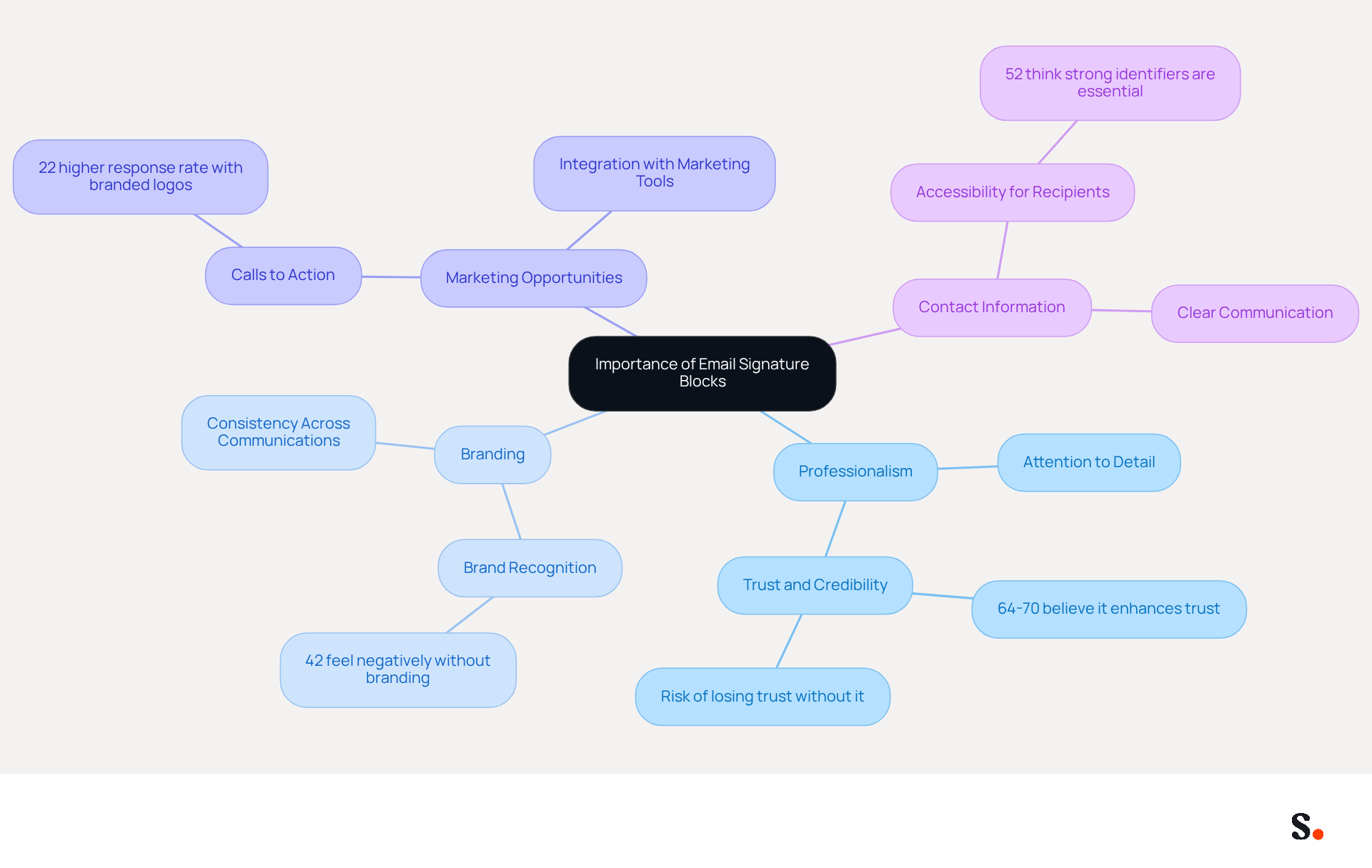
- Professionalism: A consistent and well-structured signature reflects attention to detail, fostering a positive impression on recipients. Research shows that 64-70% of participants believe a professional branded sign-off enhances trust and credibility, highlighting its significance in business communication. Without a professional signature, businesses risk losing trust and credibility among their clients.
- Branding: Signatures can incorporate logos, colors, and fonts that align with your brand, reinforcing brand recognition. This underscores the fact that 42% of consumers feel less favorable toward businesses that fail to include a branded identifier in their communications, emphasizing the importance of upholding a professional image. With Scribe, your email identifiers are automatically synchronized with your business phone system, ensuring that any updates to your team's information are reflected in real-time, enhancing brand consistency across all communications.
- Marketing Opportunities: Including calls to action, links to social media, or promotional banners can transform your email into a marketing channel, potentially increasing engagement and lead generation. Emails with branded logos receive a 22% higher response rate than those without, demonstrating the effectiveness of this approach. Scribe's automated management of contact information allows for seamless integration with tools like Aircall, ensuring that your marketing efforts are consistently represented in every message.
- Contact Information: An autograph provides a clear way for recipients to reach you, ensuring they have all necessary details readily available. This accessibility is vital, as 52% of professionals think a strong electronic correspondence identifier is essential for establishing trust with clients. Neglecting to provide clear contact information can lead to missed opportunities and diminished trust. With Scribe's SOC 2 Type II compliance, you can be confident that your data is secure while managing your digital identifiers effectively.
Recognizing these elements highlights the value of investing time in understanding how to change signature block, especially with Scribe's features that empower marketing teams to manage their blocks independently after the initial IT setup. Investing in a well-crafted email signature is not just a detail; it's a strategic move that can significantly impact your business relationships.
Follow Step-by-Step Instructions to Change Your Signature Block
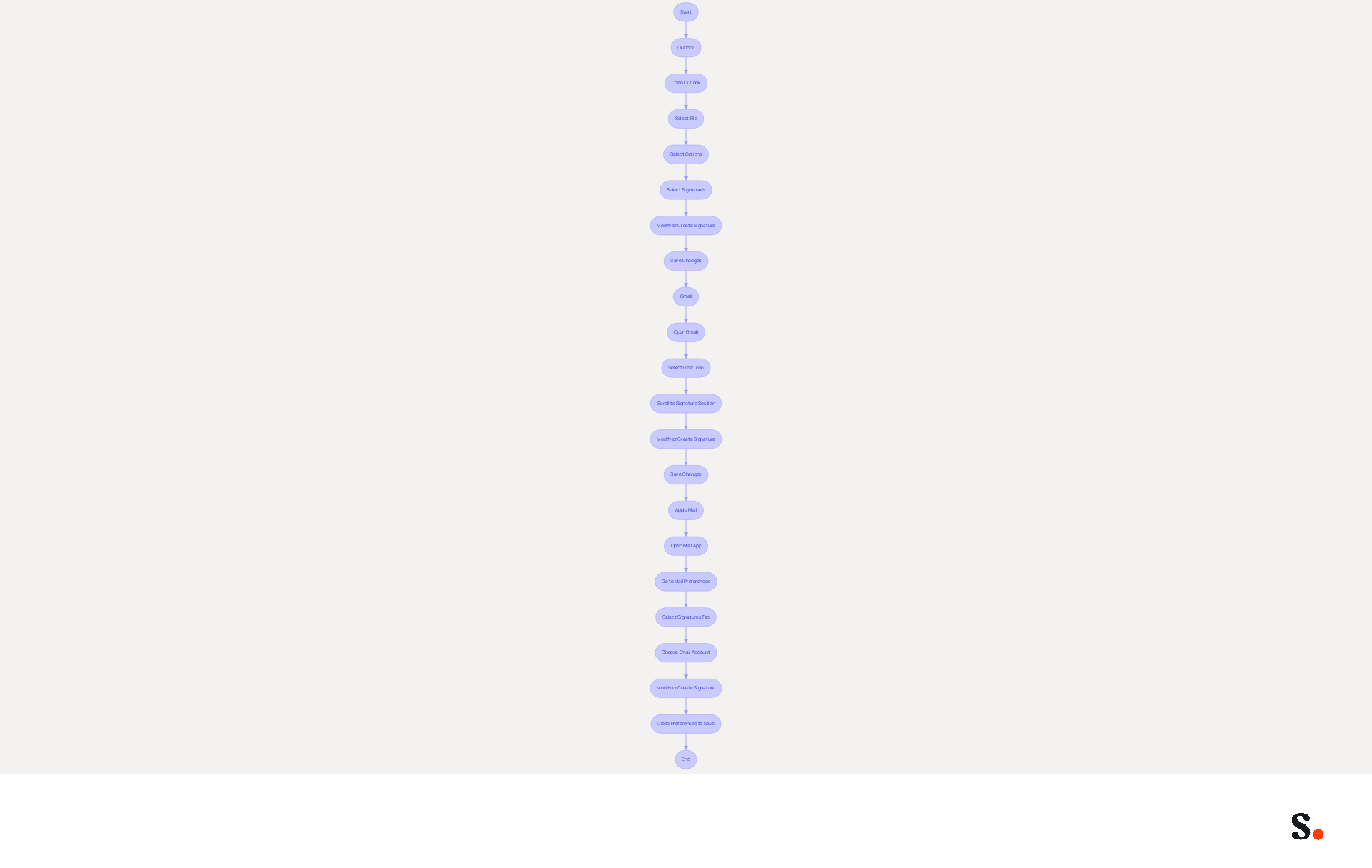
Learning how to change signature block can often be a cumbersome task, especially when navigating different email clients. Below are step-by-step instructions for popular platforms, along with how Scribe can streamline this process:
For Outlook:
- Open Outlook and select the File tab.
- Select Options from the menu.
- In the Mail category, select Signatures.
- In the Signatures and Stationery dialog box, select the signature you wish to modify or press New to create a new one.
- Make your changes in the editing box, then press Save.
For Gmail:
- Open Gmail and select the gear icon in the top right corner to access Settings.
- Under the General tab, scroll down to the Signature section.
- Choose the mark you wish to modify or tap Create new. Gmail enables the creation of multiple identifiers for various purposes, which can be chosen when drafting a message.
- Make your desired changes in the text box, then scroll down and select Save Changes.
For Apple Mail:
- Open the Mail app and go to Mail > Preferences.
- Click on the Signatures tab.
- Choose the email account you wish to modify the details for.
- Select the sign-off you wish to modify or click the + button to create a new one.
- Edit your name in the right pane and close the preferences window to save.
Following these steps will teach you how to change signature block to keep your email signature up to date across various platforms. Maintaining a professional and branded communication footer is essential, as 42% of consumers indicate feeling negatively toward a business when they receive a message without a branded footer. Furthermore, integrating features like call-to-action buttons can boost engagement; 32.3% of users employ them in their email to promote specific actions, such as scheduling meetings or subscribing to newsletters. Ultimately, a well-maintained email signature not only reflects your professionalism but also fosters trust and engagement with your audience.
Troubleshoot Common Issues When Changing Signature Blocks
While updating your contact information block is typically straightforward, understanding how to change the signature block may present several challenges that require attention. Here are solutions to help you troubleshoot:
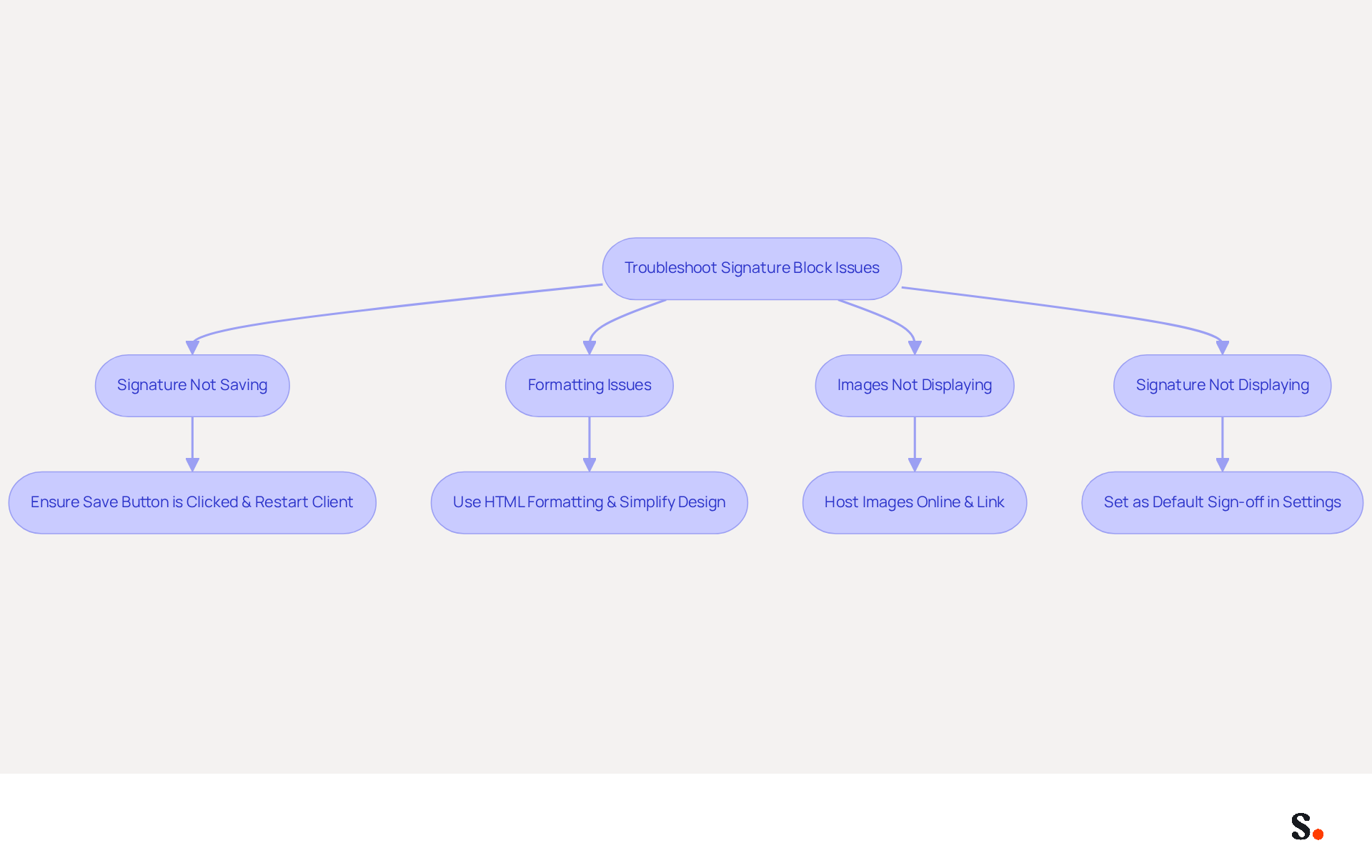
- Signature Not Saving: If your changes aren’t saving, ensure you are clicking the Save button after editing. Users often find that their changes do not save, leading to frustration and wasted time. Restarting the messaging client can resolve this issue. It refreshes the application and may apply the changes correctly.
- Formatting Issues: If your mark appears differently when sent, verify that you are using HTML formatting. Streamlining your design can assist in maintaining consistency across different messaging clients, as intricate designs may not display properly. This approach helps avoid common display issues that many users face with improperly embedded images.
- Images Not Displaying: To ensure images appear in your email footer, host them online and link to them rather than copying and pasting directly into the footer. This prevents display issues that can occur when images are not properly embedded.
- Signature Not Displaying: If your sign-off isn’t showing in new messages, double-check that it is set as the default sign-off in your settings. This step is crucial, as failing to set it as default can lead to confusion and missed branding opportunities.
Moreover, syncing your Google Workspace with Scribe can greatly enhance your management of electronic signatures. By automatically updating your teammates' information, any changes made in Google Workspace-such as job position updates or group changes-will be reflected in the application without any manual input. This saves time and ensures your digital identifiers stay current and consistent across your organization. With Scribe, marketing teams can manage their branding independently after the initial IT setup, ensuring 100% brand consistency and measurable marketing ROI from their communications.
By addressing these common issues and leveraging the benefits of Google Workspace integration, you can discover how to change the signature block to significantly enhance your email signature management process.
Leverage Tools and Resources for Efficient Signature Management
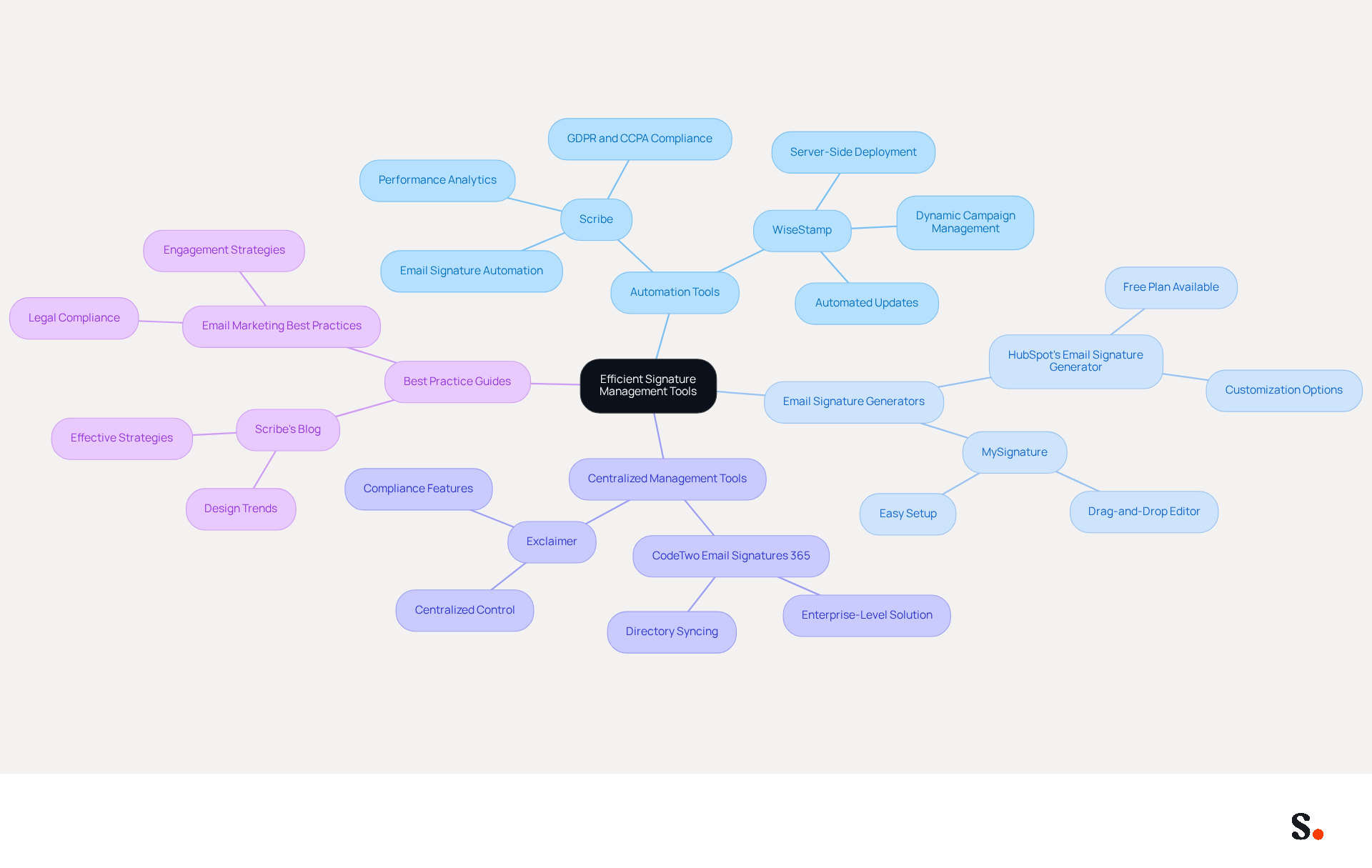
To effectively manage your message identifiers, leveraging specialized tools is essential. Here are some recommended resources:
- Scribe: This platform automates email signature creation and management, allowing for team updates with just one click. By auto-filling your teammates' identification details, this tool ensures brand consistency and maximizes marketing opportunities, making it an essential tool for businesses seeking consistency and efficiency. Scribe is SOC 2 Type II certified and complies with GDPR and CCPA, ensuring security and compliance. In 2026, 48% of marketers utilize email management tools to drive traffic to their websites, emphasizing the increasing significance of such solutions. Furthermore, companies utilizing Scribe have reported an average click-through rate of 12% on banner ads, demonstrating its effectiveness in engaging audiences.
- Email Signature Generators: Tools like HubSpot's Email Signature Generator or MySignature enable rapid creation of professional email endings, providing templates and customization options tailored to individual needs.
- Centralized Management Tools: For larger organizations, centralized management tools are essential. They enforce policy guidelines across all employees, ensuring uniformity and compliance. Organizations that implement consistent branding have reported a 22% rise in response rates, highlighting the effectiveness of maintaining a unified brand image.
- Best Practice Guides: Resources such as Scribe's blog on best practices for email signatures provide valuable insights into design trends and effective strategies for maximizing the impact of your email communications. Moreover, studies show that companies utilizing digital identifiers as marketing tools have seen a 40% rise in engagement rates, further highlighting the potential of well-managed online branding.
By leveraging these tools and resources, particularly Scribe's capabilities, you can discover how to change signature block to significantly enhance your email signature management process, ensuring that your signatures remain on-brand and effective in driving engagement. Utilizing these resources can transform your email signature management into a strategic advantage.
Conclusion
An effective email signature is essential for establishing professionalism and credibility in communication. Understanding how to change your email signature effectively can significantly impact your business relationships and overall brand perception. Scribe empowers marketing teams to manage their email signatures effectively, ensuring consistency and professionalism across all communications.
This guide has shown how crucial email signature blocks are for building trust and professionalism. Key steps for changing signatures in popular email platforms like Outlook, Gmail, and Apple Mail have been outlined, along with troubleshooting tips for common issues. Additionally, leveraging tools such as Scribe can streamline the management process, allowing for quick updates and ensuring compliance with security standards like SOC 2 Type II, GDPR, and CCPA.
In conclusion, optimizing email signature management is a strategic investment that can enhance engagement and brand consistency. By utilizing Scribe's capabilities, organizations can not only maintain a professional image but also transform their email signatures into effective marketing channels. Prioritizing your email signature strategy could be the key to unlocking greater engagement and brand loyalty.
Frequently Asked Questions
Why are email signature blocks important in today's digital landscape?
Email signature blocks are essential tools for establishing professionalism and trust. A well-designed signature enhances professionalism, builds credibility, and serves as an effective marketing tool.
How does a professional email signature affect trust and credibility?
Research shows that 64-70% of participants believe a professional branded sign-off enhances trust and credibility, making it significant in business communication. Without a professional signature, businesses risk losing trust among clients.
What role does branding play in email signatures?
Email signatures can incorporate logos, colors, and fonts that align with your brand, reinforcing brand recognition. 42% of consumers feel less favorable toward businesses that fail to include a branded identifier in their communications.
How can email signatures serve as marketing opportunities?
Including calls to action, links to social media, or promotional banners can transform emails into marketing channels, potentially increasing engagement and lead generation. Emails with branded logos receive a 22% higher response rate than those without.
What contact information should be included in an email signature?
An email signature should provide clear contact details, ensuring recipients have all necessary information readily available. This accessibility is vital, as 52% of professionals think a strong electronic correspondence identifier is essential for establishing trust with clients.
How does Scribe enhance the management of email signatures?
Scribe automatically synchronizes email identifiers with your business phone system, ensuring that updates to your team's information are reflected in real-time, enhancing brand consistency across all communications.
What compliance does Scribe offer regarding data security?
Scribe is SOC 2 Type II compliant, ensuring that your data is secure while managing your digital identifiers effectively.
Why should businesses invest time in creating a well-crafted email signature?
Investing in a well-crafted email signature is a strategic move that can significantly impact business relationships, as it reflects attention to detail and professionalism.
List of Sources
- Understand the Importance of Email Signature Blocks
- Email signature marketing: everything you need to know (https://templafy.com/email-signature-marketing-everything-you-need-to-know)
- 40+ Email Signature Statistics for 2026 (Data + Insights) (https://wavecnct.com/blogs/email-signature-statistics)
- Exclaimer Research: 67% of Marketers Expect Email Signatures to Support With Lead Gen In 2023 (https://businesswire.com/news/home/20230612141095/en/Exclaimer-Research-67-of-Marketers-Expect-Email-Signatures-to-Support-With-Lead-Gen-In-2023)
- Email signature statistics: Why every business should optimize their email signatures — Stripo.email (https://stripo.email/blog/email-signature-statistics-why-every-business-should-optimize-their-email-signatures)
- Why Email Signatures Are So Important (https://findlight.net/salesacademy/why-email-signatures-are-so-important)
- Follow Step-by-Step Instructions to Change Your Signature Block
- How to Change Your Email Signature in Gmail (https://linkedin.com/pulse/how-change-your-email-signature-gmail-newoldstamp-wegje)
- How to Change Email Signature in Gmail (Desktop Guide + Tips) - NEWOLDSTAMP (https://newoldstamp.com/blog/change-email-signature-in-gmail)
- Email Signature Statistics: A Closer Look at Email Signatures in 2026 (https://mysignature.io/blog/email-signature-statistics)
- How To Change An Email Signature In Outlook (https://forbes.com/sites/darreonnadavis/2023/07/15/how-to-change-an-email-signature-in-outlook)
- 40+ Email Signature Statistics for 2026 (Data + Insights) (https://wavecnct.com/blogs/email-signature-statistics)
- Troubleshoot Common Issues When Changing Signature Blocks
- CodaBears | Email Signature Mistakes That Hurt Your Brand (https://codabears.com/en/product/blog/10-email-signature-mistakes-how-to-fix-them--10_Email_Signature_Mistakes)
- How to solve problems with email signatures in Microsoft 365? (https://mail-signatures.com/articles/problems-email-signatures-office-365)
- Common email signature management challenges | Focus Group (https://focusgroup.co.uk/resources/blog/email-signature-management-challenges)
- Email Signature Troubleshooting - Problems & Solutions - Gimmio (https://blog.gimm.io/email-signature-troubleshooting)
- Leverage Tools and Resources for Efficient Signature Management
- Best Email Signature Management Software: Top 12 Tools (2026)
- NEWOLDSTAMP (https://newoldstamp.com/blog/email-signature-software)
- Email Signature Trends 2026: Centralized Control & Automation | SIGNandGO posted on the topic | LinkedIn (https://linkedin.com/posts/signngo_email-signature-trends-to-watch-in-2026-activity-7401523471786217473-zAVL)
- How to Benefit from Email Signature Software (https://bulksignature.com/blog/why-you-should-start-using-email-signature-software-now)
- Why Email Signature Management Software is Essential for Marketing Success (https://scribe-mail.com/en-US/blog/why-email-signature-management-software-is-essential-for-marketing-success)
- Email Signature Manager for Any Scale | WiseStamp (https://wisestamp.com)
Get started with Scribe
Build a professional email signature
Free 14-day trial — no credit card.