How to Insert Signature in Yahoo Mail: A Step-by-Step Guide
Inserting a signature in Yahoo Mail is not merely a technical task; it is crucial for establishing a professional digital presence. With millions of active
Sophie Grant
Email Signature Specialist, Scribe

Introduction
Inserting a signature in Yahoo Mail is not merely a technical task; it is crucial for establishing a professional digital presence. With millions of active users relying on Yahoo for communication, creating a polished email signature can significantly enhance brand consistency and engagement. Navigating the settings can be confusing for many users, making it difficult to ensure their signatures display correctly.
What best practices can help users craft an effective signature that represents them while aligning with their organization's branding? This guide outlines essential steps to add and customize an email signature in Yahoo Mail, ensuring effective communication and a professional image.
Get started with Scribe
Manage signatures across your whole team
Free 14-day trial — no credit card.
Access Yahoo Mail Settings to Add Your Signature
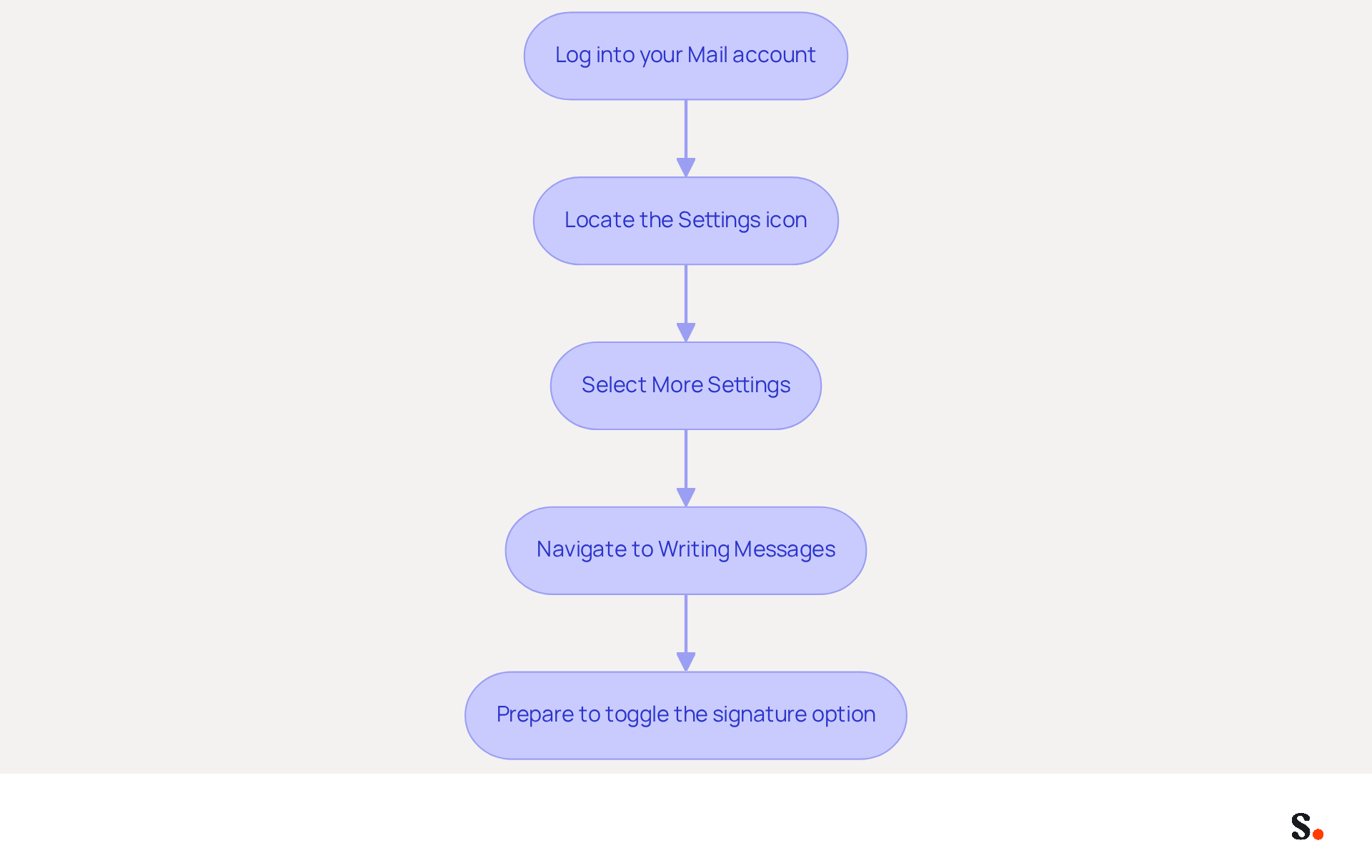
- Log into your Mail account: Open your preferred web browser and navigate to the Mail login page. Enter your credentials to access your inbox.
- Locate the Settings icon: Once logged in, look for the gear icon located in the upper right corner of the Yahoo Mail interface. This icon represents the settings menu.
- Select More Settings: Click on the gear icon, and from the dropdown menu, select 'More Settings' to access additional configuration options.
- Navigate to Writing Messages: In the left sidebar of the settings page, find and click on 'Writing messages'. This section includes options related to message creation, encompassing settings for personal identifiers.
- Prepare to toggle the signature option: Here, you will find the option to enable or disable your message identifier. Ensure you are prepared to move on to the next phase of understanding how to insert signature in yahoo mail.
Effective email signature management is crucial for maintaining brand consistency and ensuring secure communication. By integrating Scribe's SAML single sign-on, your organization can securely manage digital identifiers, while our GDPR compliance protects your data handling practices. This automation streamlines updates and supports compliance with SOC 2 Type II standards, ensuring that your email signatures are managed securely and efficiently.
Current Statistics on Mail User Demographics (2026): Mail boasts approximately 225 million active users, with a significant portion of its audience being younger demographics. About 60% of Gen Z adults and 51% of Millennials engage with Yahoo at least monthly, highlighting the platform's relevance among younger users. These statistics show just how important it is to manage digital signatures effectively, as 52% of users think that knowing how to insert signature in yahoo mail is vital for successful communication with clients.
Expert Opinions on Managing Email Footers Effectively: To maximize the impact of your footer, consider incorporating call-to-action buttons and social media icons, as 75.8% of users include these elements in their footers. Regular updates to your email footer can also enhance brand consistency and engagement, with 44% of users refreshing their footers multiple times a year.
Case Studies on Email Management in a Popular Mail Service: Organizations utilizing this platform have successfully leveraged message identifiers for marketing purposes, with 18.8% of users employing them to generate leads. This illustrates the potential of electronic identifiers as effective marketing tools, especially when integrated with platforms like Scribe, which automates management and ensures brand consistency across communications. Failing to manage digital identifiers effectively can lead to lost credibility and strained client relationships.
Create and Customize Your Email Signature
Understanding how to insert signature in Yahoo Mail is essential for creating a professional email signature and effective communication.
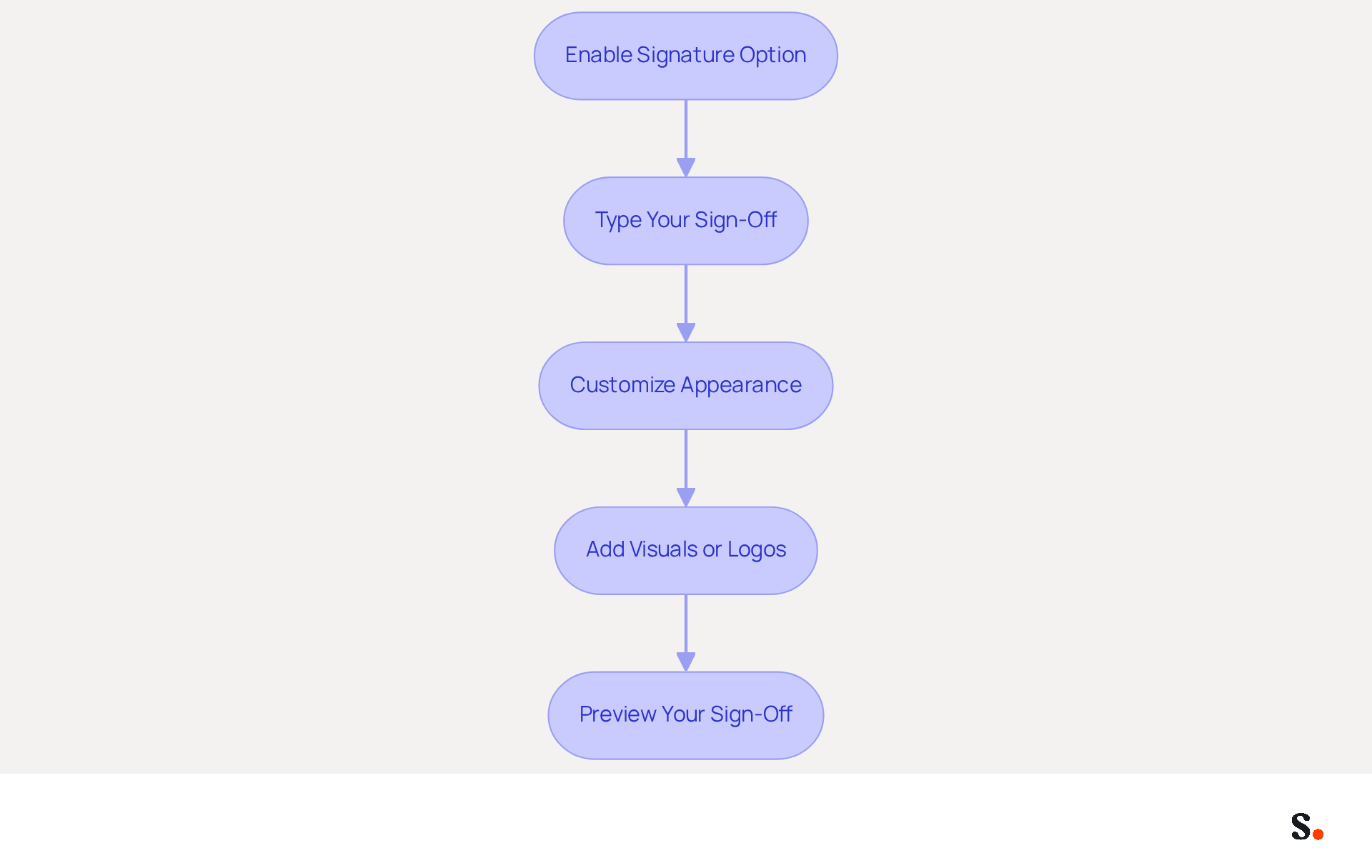
- Enable the Signature option: Navigate to the 'Writing email' settings in Yahoo Mail. Locate the toggle switch for the signing feature and click it to enable the option, allowing you to create your mark.
- In the provided text box, type your desired sign-off. This should include essential details such as your name, job title, company name, and contact information. For example:
- John Doe
- Digital Marketing Specialist
- Scribe
- johndoe@scribe.com
- Customize the appearance: Utilize the formatting options available to enhance the visual appeal of your sign-off. Adjust font style, size, and color as needed. Consider adding links to your social media profiles or your company website to increase engagement.
- Add visuals or logos: Click the icon in the editor to add a logo or visual. You can upload a picture from your computer or provide a URL link to the picture. Make sure the graphic is the right size for your emails, ideally 300x100 pixels for logos.
- Preview your sign-off: Before finalizing, check how your sign-off will look in outgoing messages. Make any necessary adjustments to ensure it looks professional and aligns with your brand image.
Ultimately, understanding how to insert signature in Yahoo Mail not only enhances your professionalism but also significantly impacts engagement rates.
Insert and Save Your Signature in Yahoo Mail
To ensure your email signature is effective, follow these essential steps for customization and testing, including how to insert signature in yahoo mail.
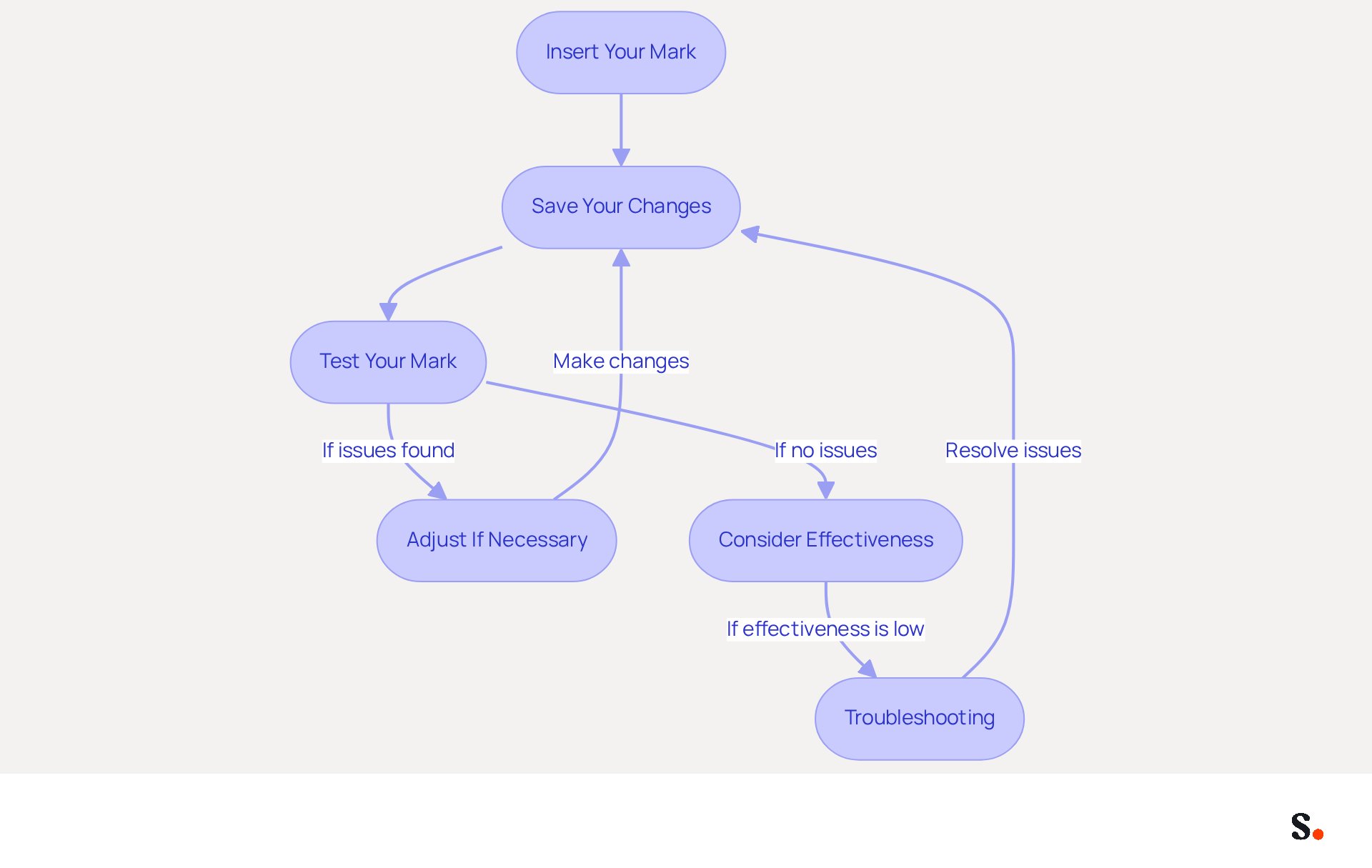
- Insert your mark: After customizing your mark, ensure it appears in the text box for your mark. This confirms that your design is ready for use.
- Save your changes: Scroll to the bottom of the settings page and click the 'Save' button to apply your new configuration settings. This step is essential to ensure that your identification is active for all outgoing messages.
- Test your mark: To confirm that your mark has been successfully added, compose a new message. Your sign-off should automatically show up at the bottom of the message body. If it does not appear, check the settings to confirm how to insert signature in yahoo mail is properly set up.
- Adjust if necessary: If you see any issues with your identifier's appearance or content, go back to the 'Writing message' settings to make necessary changes.
- Consider effectiveness: It's important to test your email footer since nearly 29% of users want to boost their branding and awareness through it. Ensuring your mark is visually appealing and functional can significantly impact engagement rates.
- Troubleshooting: If you encounter issues saving your mark, check for common problems such as browser compatibility or settings not being properly saved. Surveys show that 44.4% of users refresh their identifiers two to four times a year, underscoring the need for regular updates to stay effective.
Troubleshoot Common Issues with Email Signatures
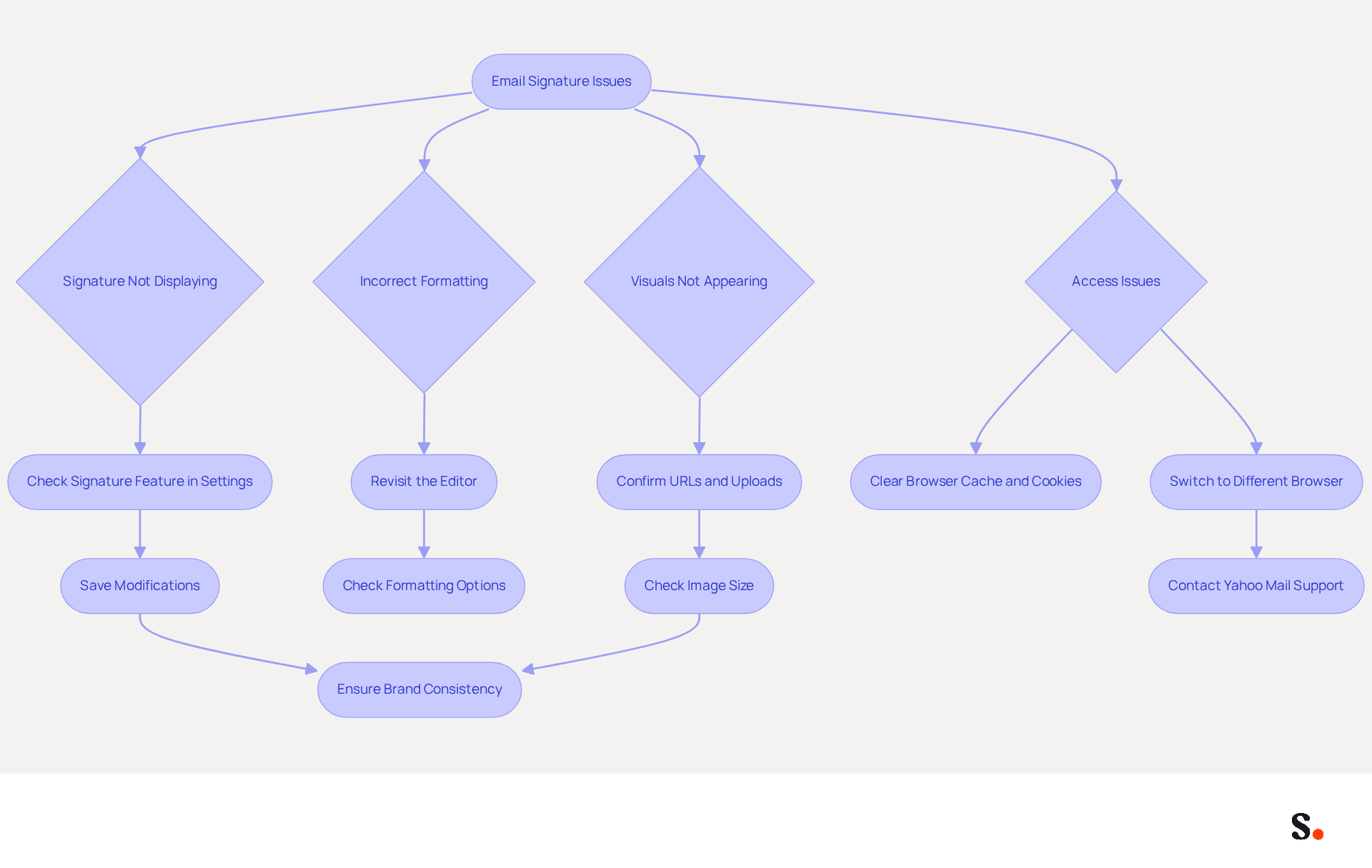
When your email signature fails to display correctly, it can undermine your professional image. If your mark does not appear in new messages, first check how to insert signature in Yahoo Mail by ensuring that the signature feature is activated in your settings. It's essential to save any modifications made to ensure that your authentication is active. Scribe ensures that any changes in your Aircall configuration sync automatically with your email branding. This guarantees brand consistency across all communications. Furthermore, updates in your Google Workspace, such as modifications to team members or their details, will also reflect in Scribe without any manual input.
Should your mark appear with incorrect formatting, revisit the editor. Check that you are utilizing the appropriate formatting options and that any images are correctly uploaded. Consider this: 42% of consumers view businesses negatively if their messages lack a branded sign-off. A polished sign-off is crucial, as 64-70% of respondents believe a professional branded sign-off increases trust and credibility. Scribe's automated management enables effortless updates, which is helpful for users learning how to insert signature in Yahoo Mail, ensuring your mark remains professional and consistent.
If visuals within your branding are not appearing, confirm that the URLs are correct and that the visuals have been uploaded properly. Additionally, ensure that the images are not excessively large, as this can lead to display issues. Failure to correct these issues may result in diminished trust from your audience. A polished sign-off is essential, as 42% of consumers have a negative perception of businesses that send messages without a branded sign-off. With Scribe, any updates to your Google Workspace will automatically reflect in your email footers, saving you time and ensuring accuracy.
If you encounter issues while accessing your Mail, try clearing your browser's cache and cookies. Alternatively, switching to a different browser may help determine if the problem persists. This step can frequently resolve compatibility issues that influence the visibility of marks.
If you’re still facing challenges, don’t hesitate to reach out to Yahoo Mail support for tailored assistance. Consistently refreshing your contact details can ensure that your information stays up-to-date and precise, enhancing your brand's professionalism. Be cautious with oversized or excessively promotional banners in message footers, as they can trigger spam filters and detract from the overall effectiveness of your footer. With Scribe's SOC 2 Type II compliance, you can trust that your data handling is secure while managing your email signatures efficiently.
Conclusion
Mastering the insertion of a signature in Yahoo Mail is crucial for elevating professional communication and reinforcing brand consistency. By following the outlined steps, users can effectively create, customize, and manage their email signatures, which serve as a vital component of their digital identity.
The article provided a comprehensive guide on:
- Accessing Yahoo Mail settings
- Creating and customizing signatures
- Troubleshooting common issues
Key insights included:
- The importance of a well-designed signature for engagement
- The necessity of regular updates to maintain professionalism
- The role of automated tools like Scribe in ensuring brand consistency across communications
Research shows that a polished email signature can significantly influence how recipients perceive a business, highlighting the importance of thoughtful design.
A professional email signature goes beyond aesthetics; it strategically enhances credibility and builds trust with clients and partners. As organizations increasingly rely on digital communication, mastering the art of email signatures becomes crucial. The implementation of these best practices will not only enhance your email communications but also solidify your brand's reputation in the digital landscape.
Frequently Asked Questions
How do I access Yahoo Mail settings to add my signature?
To access Yahoo Mail settings, log into your Mail account, then locate the gear icon in the upper right corner. Click on it and select 'More Settings' from the dropdown menu.
Where do I find the option to add a signature in Yahoo Mail?
After selecting 'More Settings', navigate to 'Writing messages' in the left sidebar. Here, you will find the option to enable or disable your message identifier, which includes the signature settings.
Why is effective email signature management important?
Effective email signature management is crucial for maintaining brand consistency and ensuring secure communication. It helps in managing digital identifiers securely and efficiently.
How does Scribe enhance email signature management?
Scribe integrates SAML single sign-on for secure management of digital identifiers and ensures GDPR compliance, protecting data handling practices while streamlining updates and supporting compliance with SOC 2 Type II standards.
What are the current statistics on Yahoo Mail user demographics?
As of 2026, Yahoo Mail has approximately 225 million active users, with 60% of Gen Z adults and 51% of Millennials engaging with the platform at least monthly, indicating its relevance among younger users.
What do users think about knowing how to insert a signature in Yahoo Mail?
About 52% of users believe that knowing how to insert a signature in Yahoo Mail is vital for successful communication with clients.
What expert opinions exist on managing email footers effectively?
Experts suggest incorporating call-to-action buttons and social media icons in email footers, as 75.8% of users include these elements. Regular updates to footers can enhance brand consistency and engagement, with 44% of users refreshing their footers multiple times a year.
How can organizations leverage message identifiers for marketing?
Organizations using Yahoo Mail have successfully employed message identifiers for marketing purposes, with 18.8% of users utilizing them to generate leads, showcasing their potential as effective marketing tools.
List of Sources
- Access Yahoo Mail Settings to Add Your Signature
- How Many People Use Yahoo? Statistics & Facts (2026) (https://kristian-larsen.com/info/how-many-people-use-yahoo)
- 38 Yahoo Statistics For 2026 (Insights + Trends) (https://searchendurance.com/yahoo-statistics)
- Most Popular Email Providers by Number of Users (2026) (https://sellcell.com/blog/most-popular-email-provider-by-number-of-users)
- Yahoo Statistics for 2026: Email Usage, Facts, and Trends (https://clean.email/blog/email-providers/yahoo-statistics)
- Email Signature Statistics: A Closer Look at Email Signatures in 2026 (https://mysignature.io/blog/email-signature-statistics)
- Create and Customize Your Email Signature
- Email Signature Trends in Numbers: Infographic [2026] (https://mailtrap.io/blog/email-signature-trends/amp)
- Email Signature Statistics (2026) (https://emailsignature.to/statistics/email-signature-statistics)
- How To Add A Signature In Yahoo Mail (2026) (https://hubspot.com/email-signature-generator/add-signature-yahoo-mail)
- 40+ Email Signature Statistics for 2026 (Data + Insights) (https://wavecnct.com/blogs/email-signature-statistics)
- Email Signature Statistics: A Closer Look at Email Signatures in 2026 (https://mysignature.io/blog/email-signature-statistics)
- Insert and Save Your Signature in Yahoo Mail
- Google and Yahoo Updated Email Authentication Requirements for 2025 (https://securityboulevard.com/2025/11/google-and-yahoo-updated-email-authentication-requirements-for-2025)
- Email Signature Statistics: A Closer Look at Email Signatures in 2026 (https://mysignature.io/blog/email-signature-statistics)
- Email Signature Trends in Numbers: Infographic [2026] (https://mailtrap.io/blog/email-signature-trends)
- 40+ Email Signature Statistics for 2026 (Data + Insights) (https://wavecnct.com/blogs/email-signature-statistics)
- Gmail & Yahoo Mail Changes in 2024: What They Mean For You (https://emailtooltester.com/en/blog/gmail-yahoo-mail-authentication-changes)
- Troubleshoot Common Issues with Email Signatures
- 40+ Email Signature Statistics for 2026 (Data + Insights) (https://wavecnct.com/blogs/email-signature-statistics)
- Email signature statistics: Why every business should optimize their email signatures — Stripo.email (https://stripo.email/blog/email-signature-statistics-why-every-business-should-optimize-their-email-signatures)
- Email Signature Statistics: A Closer Look at Email Signatures in 2026 (https://mysignature.io/blog/email-signature-statistics)
Get started with Scribe
Manage signatures across your whole team
Free 14-day trial — no credit card.