How to Set Up Email Signature: A Step-by-Step Guide for Marketing Managers
Email signatures are often overlooked, yet they hold significant potential for marketing managers seeking to elevate brand visibility and professionalism. By
Sophie Grant
Email Signature Specialist, Scribe

On this page
- Introduction
- Understand the Importance of Email Signatures in Marketing
- Create Your Email Signature: Essential Components to Include
- Integrate Your Signature into Email Clients: Step-by-Step Instructions
- Manage and Optimize Your Email Signatures for Consistency
- Conclusion
- Frequently Asked Questions
- List of Sources
Introduction
Email signatures are often overlooked, yet they hold significant potential for marketing managers seeking to elevate brand visibility and professionalism. By turning each email into a marketing opportunity, a well-designed signature can greatly enhance engagement and trust.
So, how can marketing professionals create email signatures that truly reflect their brand and drive results? This guide will outline key strategies and proven practices for crafting effective email signatures, enabling marketing managers to refine their communication strategies and ensure consistent branding across all platforms.
Understand the Importance of Email Signatures in Marketing
Email footers, often overlooked, hold substantial potential for enhancing marketing strategies. Here’s why:
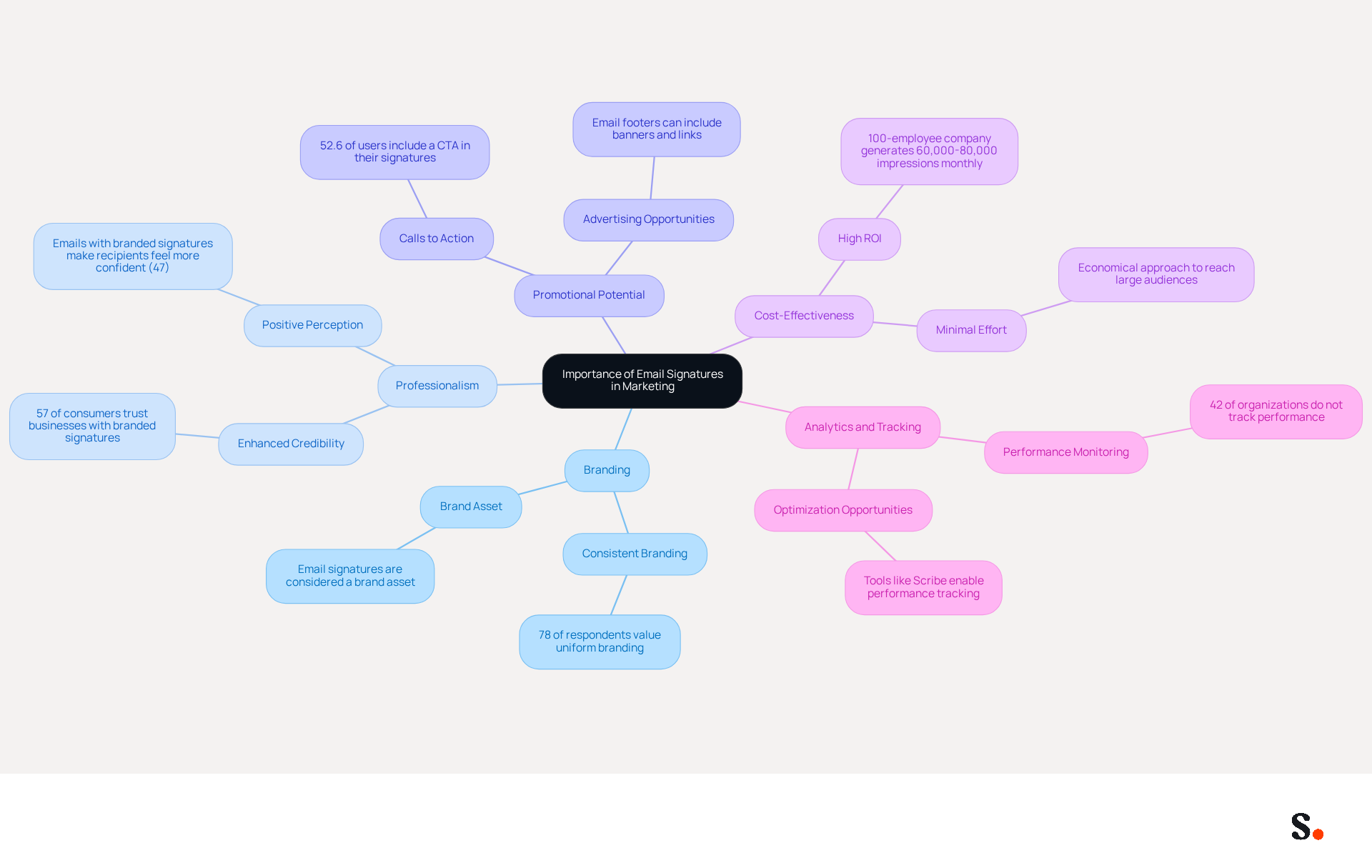
- Each message sent is an opportunity to reinforce your identity. A well-designed mark keeps your branding consistent across communications. This is crucial, as 78% of respondents rated uniform branding as a key function of a digital footer. With Scribe, any modifications made in your Aircall configuration will automatically be reflected in your digital identifiers, ensuring seamless brand consistency.
- Professionalism: A refined communication footer enhances the credibility of your messages, making you seem more professional to clients and partners. Interestingly, 57% of consumers say that branded digital identifiers are essential for trusting a business's message.
- Promotional Potential: Email footers can include advertising banners, links to social platforms, and calls to action, converting every message into a promotional opportunity. This strategy is effective, as over half of users (52.6%) include a CTA in their email footers, driving engagement.
- Cost-Effectiveness: Utilizing digital identifiers for marketing is an economical approach that can generate significant returns, reaching a large audience with minimal effort. A 100-employee company can generate approximately 60,000-80,000 branded impressions per month, showcasing the extensive reach of this channel.
- Analytics and Tracking: With tools like Scribe, you can monitor the performance of your identifiers, enabling you to optimize them for better results. This capability is vital because 42% of organizations don’t monitor messaging performance, leaving them blind to engagement metrics. Furthermore, syncing your Google Workspace with Scribe saves time by automatically updating your teammates' information, ensuring that any changes are reflected in their profiles without manual input.
By acknowledging these elements, marketing managers can better understand the strategic function of digital identifiers in their overall marketing initiatives. Recognizing the value of digital identifiers can transform how marketing managers approach their communication strategies in the coming years.
Create Your Email Signature: Essential Components to Include
Understanding how to set up email signature is crucial for crafting an effective email signature and establishing a professional identity in your communications. Ensure it includes the following essential components:
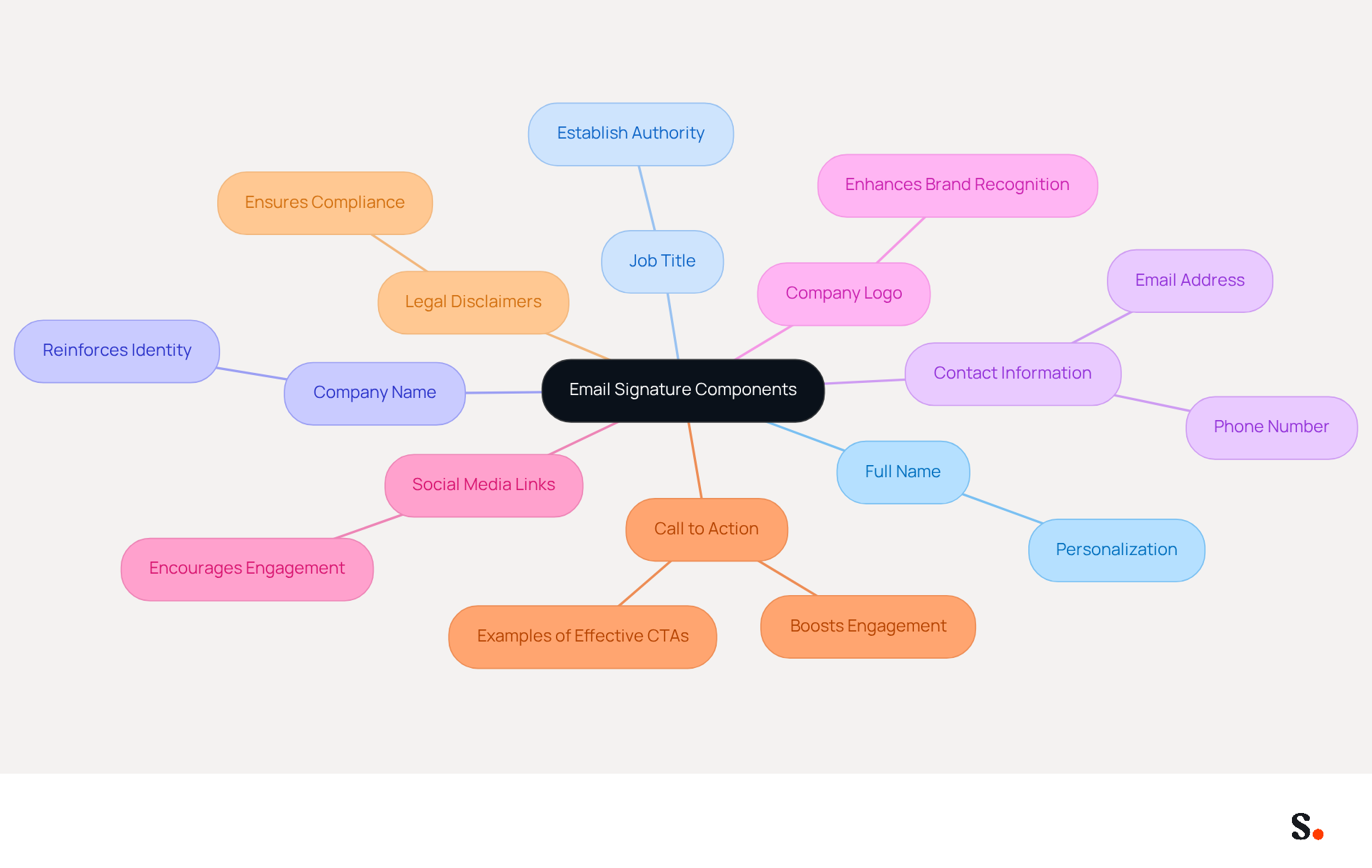
- Full Name: Clearly state your name to personalize your communication.
- Job Title: Include your position to establish authority and context.
- Company Name: This reinforces identity and helps recipients recognize your organization.
- Contact Information: Provide your phone number and email address for easy communication.
- Company Logo: A high-quality logo enhances brand recognition and adds a professional touch.
- Social Media Links: Include icons linking to your professional social media profiles to encourage engagement.
- Call to Action: Including a well-placed CTA has been shown to boost engagement, with clients reporting increased demo requests after adding such elements.
- Legal Disclaimers: If necessary, include any legal disclaimers relevant to your industry, ensuring compliance with regulations.
When you include these components, you create a signature that’s not just professional but also demonstrates how to set up email signature that supports your marketing objectives. Best practices recommend utilizing simple HTML tables for layout, as they are more effectively supported by clients like Outlook, and maintaining a minimalist approach to prevent clutter. Consistently reviewing and updating your identifier ensures it stays effective and pertinent, enhancing your brand's presence in every communication.
Scribe streamlines the management of your email signatures, providing guidance on how to set up email signature updates effortlessly and ensuring consistency across all communications. To enable one-click synchronization, you must grant Scribe permission to connect with your email provider, and you need to be a Super Admin of your email provider to provide these permissions. Many users find it cumbersome and time-consuming to learn how to set up email signature. All modifications made in your connected sources, such as your business phone system or Aircall, are automatically reflected in your identifiers. This automation not only streamlines your workflow but also ensures your signatures are always up-to-date and compliant with security standards, as Scribe is SOC 2 Type II certified. Furthermore, case studies have demonstrated that a well-managed messaging strategy can result in higher conversions and improved alignment with marketing objectives. By leveraging Scribe's automated solutions, you can enhance your email signature strategy and drive better engagement with your audience.
Integrate Your Signature into Email Clients: Step-by-Step Instructions
Understanding how to set up email signature in popular email clients is essential for maintaining a professional image and ensuring consistent communication.
For Gmail:
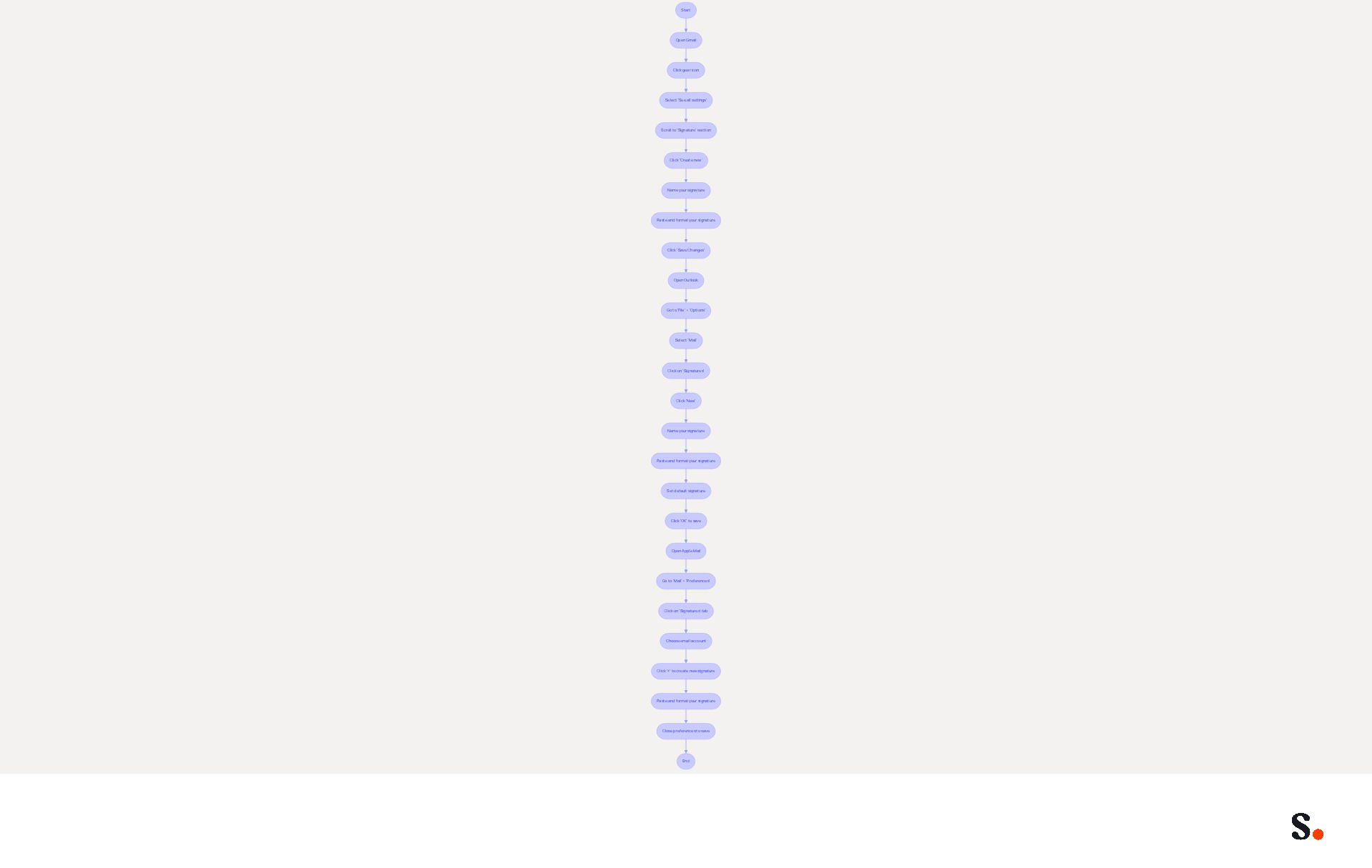
- Open Gmail and click on the gear icon in the top right corner.
- Select 'See all settings'.
- Scroll down to the 'Signature' section.
- Click 'Create new' and name your mark.
- Paste your autograph into the text box and format it as desired, ensuring it includes essential elements like your name, title, and a clear call to action.
- Scroll down and click 'Save Changes'.
For Outlook:
- Open Outlook and go to 'File' > 'Options'.
- Select 'Mail' and then click on 'Signatures'.
- Click 'New' to create a new sign-off.
- Name your unique mark and paste your mark content into the editor, ensuring it adheres to best practices for design and readability.
- Set your default sign-off for new messages and replies/forwards.
- Click 'OK' to save your changes.
For Apple Mail:
- Open Apple Mail and go to 'Mail' > 'Preferences'.
- Click on the 'Signatures' tab.
- Choose the email account you wish to add the closing line to.
- Click the '+' button to create a new sign.
- Paste your autograph into the right-hand pane and format it as needed, keeping in mind the significance of mobile optimization.
- Close the preferences window to save your changes.
Following these steps helps you understand how to set up email signature consistently across all your messages. Keep in mind, a well-crafted email signature can really boost your response rates and strengthen your brand presence.
Manage and Optimize Your Email Signatures for Consistency
To ensure your email signatures effectively represent your brand, implementing strategic management practices is essential:
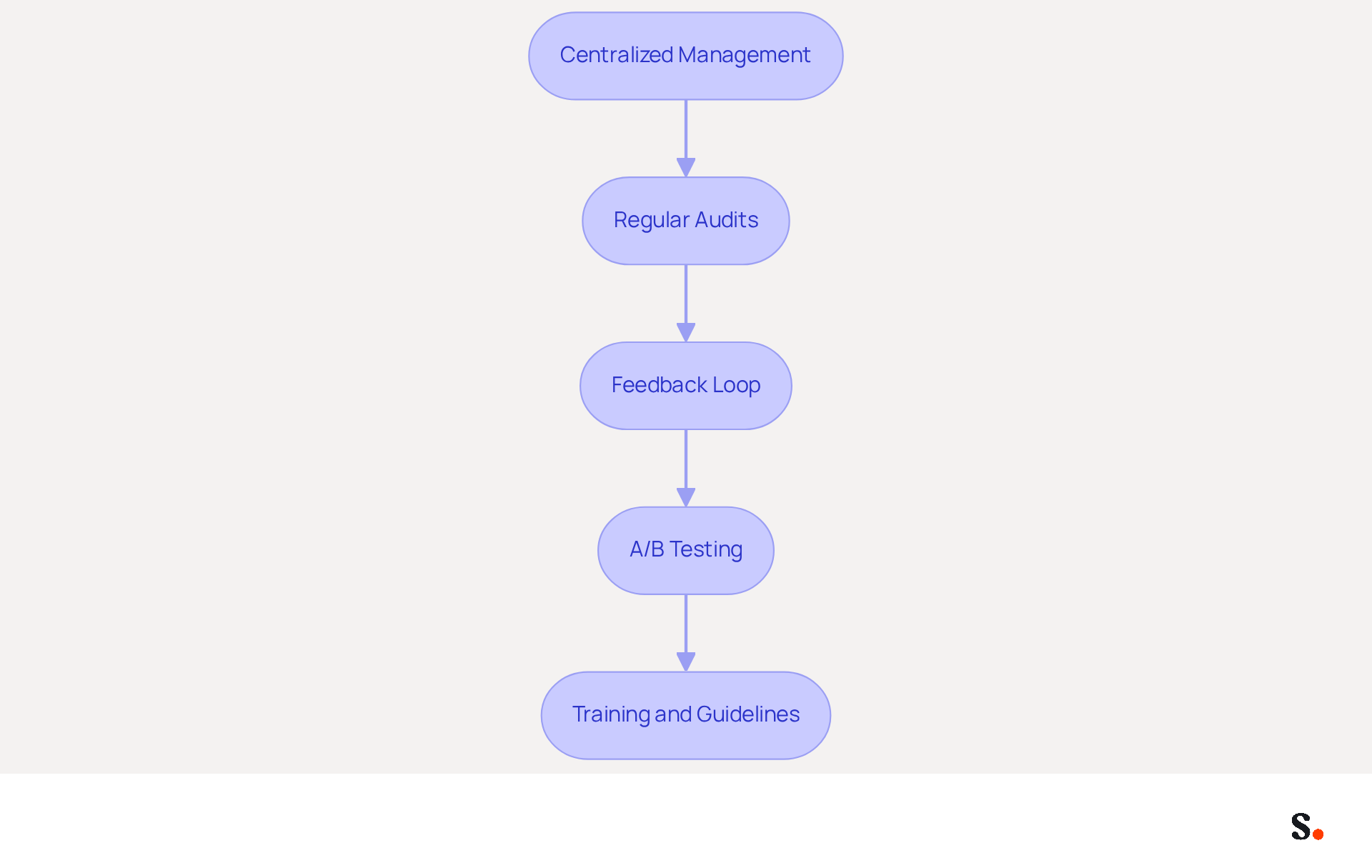
- Centralized Management: Utilize Scribe to manage electronic identifiers across your organization. This method keeps all identifiers consistent and current, eliminating the need for individual updates from each employee. Centralized management saves your team valuable time by automating updates, ensuring compliance with necessary disclaimers and confidentiality statements.
- Regular Audits: Conduct periodic reviews of your digital identifiers to confirm they reflect current branding, contact information, and marketing campaigns. Regular audits are essential to maintaining brand standards and avoiding confusion that can erode client trust.
- Feedback Loop: Encourage team members to provide feedback on the effectiveness of email identifiers. Insights from employees can guide adjustments that enhance engagement and professionalism, as effective branding can drive up to 40% higher engagement through strategic call-to-action placement.
- A/B Testing: Experiment with different design variations and calls to action to identify which versions yield the best engagement rates. A/B testing can uncover valuable insights into user behavior, enabling data-driven decisions that enhance the performance of digital signatures.
- Training and Guidelines: Provide training for employees on the significance of digital identifiers and instructions for effective usage. Ensuring that all team members comprehend the importance of consistent branding can enhance the overall professionalism of communications.
By implementing these strategies, you can maintain a professional and consistent brand image across all communications, maximizing the marketing potential of your digital identifiers. Ultimately, the way you manage your digital identifiers can be a decisive factor in your company's success.
Conclusion
Email signatures represent a critical yet often underestimated aspect of professional communication. Organizations can leverage email signatures to create a consistent brand image, build trust, and enhance engagement with clients and partners.
Throughout this guide, we have outlined key components of an effective email signature, including the necessity of including essential information such as your name, job title, and contact details. The integration of promotional elements and calls to action can transform each email into a marketing opportunity, while tools like Scribe facilitate seamless management and compliance, ensuring that signatures remain up-to-date and reflective of current branding.
In conclusion, managing email signatures effectively can greatly influence marketing success and brand consistency. By adopting best practices and utilizing tools like Scribe, marketing managers can optimize their email signatures to enhance professionalism and maximize engagement and ROI. Prioritizing email signature strategies can yield significant advantages in a competitive market.
Frequently Asked Questions
What is the importance of email signatures in marketing?
Email signatures, or footers, are important in marketing as they reinforce brand identity, enhance professionalism, provide promotional opportunities, and are cost-effective for reaching a large audience.
How do email signatures contribute to brand consistency?
A well-designed email signature ensures consistent branding across communications. Modifications made in your Aircall configuration will automatically reflect in your digital identifiers, maintaining brand uniformity.
What role do email signatures play in establishing professionalism?
A refined email footer enhances the credibility of messages, making businesses appear more professional. 57% of consumers consider branded digital identifiers essential for trusting a business's message.
How can email signatures be used for promotional purposes?
Email footers can include advertising banners, links to social media, and calls to action (CTAs), turning every message into a promotional opportunity. Over half of users include a CTA in their email footers to drive engagement.
What are the cost benefits of using email signatures for marketing?
Utilizing digital identifiers for marketing is cost-effective, allowing companies to generate significant returns with minimal effort. A company with 100 employees can achieve approximately 60,000-80,000 branded impressions per month.
How can analytics and tracking improve email signature performance?
Tools like Scribe allow monitoring of the performance of digital identifiers, enabling optimization for better results. This is crucial as 42% of organizations do not track messaging performance, missing out on engagement metrics.
How does syncing Google Workspace with Scribe benefit email signature management?
Syncing Google Workspace with Scribe saves time by automatically updating teammates' information in their profiles, ensuring that any changes are reflected without manual input.
List of Sources
- Understand the Importance of Email Signatures in Marketing
- Key Marketing Trends to Watch in 2026 (https://exclaimer.com/blog/top-marketing-trends-2026)
- 40+ Email Signature Statistics for 2026 (Data + Insights) (https://wavecnct.com/blogs/email-signature-statistics)
- Why Email Signatures Must Be In Your 2026 Marketing Plan | Rocketseed (https://rocketseed.com/blog/2026-marketing-plan-email-signatures)
- Using Email Signatures for Marketing | CloudM (https://cloudm.io/resources/blog/using-email-signatures-for-marketing-how-every-email-can-boost-your-brand)
- The ultimate guide to email signatures in 2026 (https://signitic.com/en/resources/email-signature)
- Create Your Email Signature: Essential Components to Include
- Top 10+ best practices for email signatures design in 2026 (https://mysignature.io/blog/email-signature-best-practices)
- Email Signature Best Practices for 2026 (+ 15 Pro Examples) (https://wavecnct.com/blogs/email-signature-best-practices-2026)
- Why Email Signatures Must Be In Your 2026 Marketing Plan | Rocketseed (https://rocketseed.com/blog/what-are-the-biggest-email-trends-for-2026)
- Best practices for business email signatures in 2026 (https://bybrand.io/blog/best-practices)
- Integrate Your Signature into Email Clients: Step-by-Step Instructions
- Email Signature Best Practices - NEWOLDSTAMP (https://newoldstamp.com/blog/email-signature-best-practices)
- Email Signature Design Trends in 2026: What Works and What to Drop (https://bulksignature.com/blog/email-signature-design-trends)
- The ultimate guide to email signatures in 2026 (https://signitic.com/en/resources/email-signature)
- Professional Email Signatures - The Ultimate Guide (https://boostit.com.au/the-ultimate-guide-for-a-professional-business-email-signature)
- Email Signature Best Practices for 2026 (+ 15 Pro Examples) (https://wavecnct.com/blogs/email-signature-best-practices-2026)
- Manage and Optimize Your Email Signatures for Consistency
- Why Email Signatures Must Be In Your 2026 Marketing Plan | Rocketseed (https://rocketseed.com/blog/what-are-the-biggest-email-trends-for-2026)
- 4 Best Practices for Your Work Email Signature Strategy (https://scribe-mail.com/en-US/blog/4-best-practices-for-your-work-email-signature-strategy)
- Email Signature Best Practices for 2026 (+ 15 Pro Examples) (https://wavecnct.com/blogs/email-signature-best-practices-2026)
- Company-Wide Email Signature Management | CloudM (https://cloudm.io/resources/blog/optimize-your-process-with-company-wide-email-signature-management)
Get started with Scribe
Signatures for every role on your team
Free 14-day trial — no credit card.