How to Update Your Signature Line in Outlook: A Step-by-Step Guide
Many professionals overlook the importance of email signatures, yet these digital identifiers are crucial for projecting professionalism and brand consistency
Sophie Grant
Email Signature Specialist, Scribe
Introduction
Many professionals overlook the importance of email signatures, yet these digital identifiers are crucial for projecting professionalism and brand consistency. As organizations increasingly recognize the value of a well-crafted signature, many professionals face challenges in keeping their email signatures current in Outlook, which can hinder their ability to reflect their brand's identity effectively. This guide provides a comprehensive, step-by-step approach to updating email signatures in Outlook, enabling users to enhance their professional image and optimize engagement.
Understand the Importance of Email Signatures in Outlook
Many professionals underestimate the critical role email signatures play in effective communication. Email signatures serve multiple important functions:
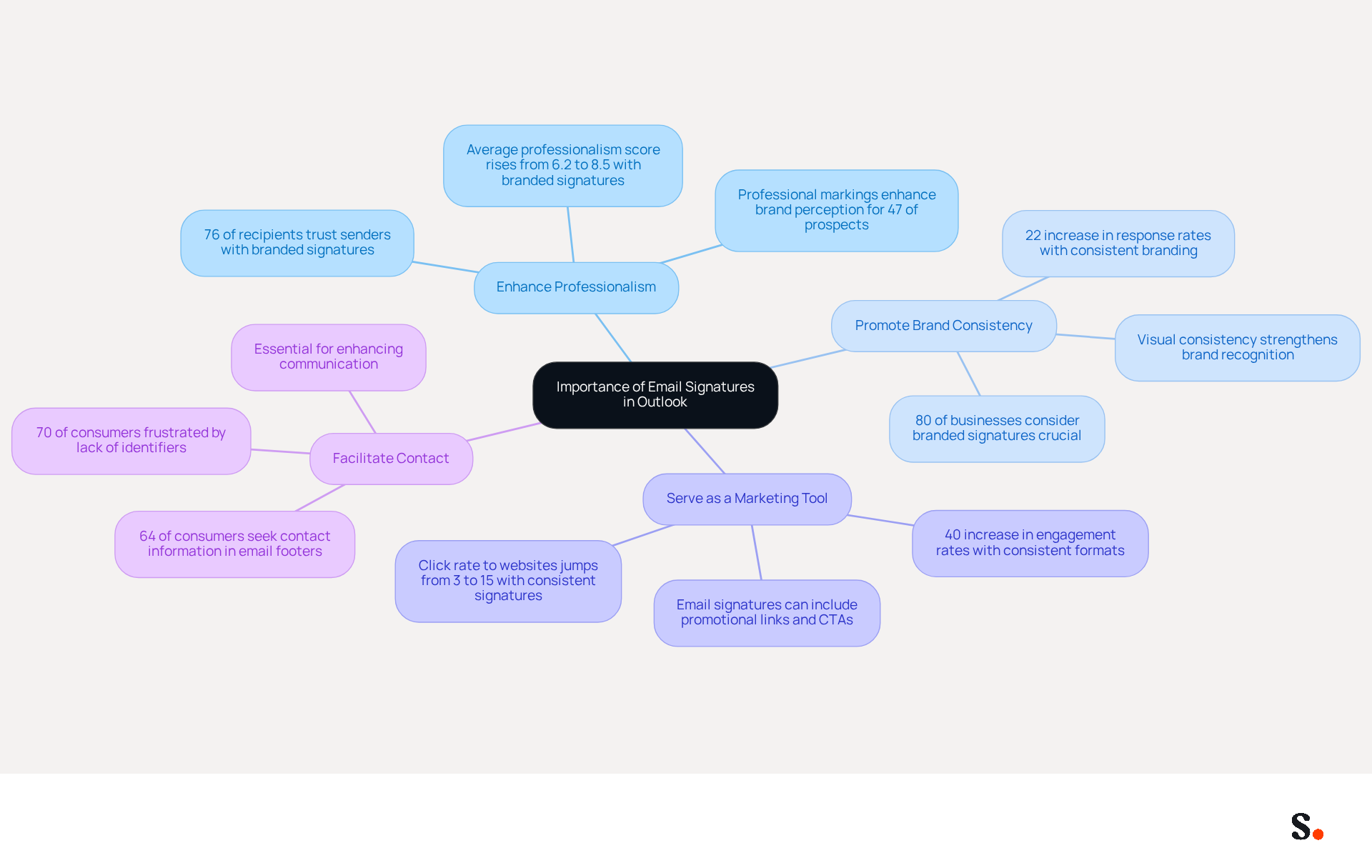
- Enhance Professionalism: A well-crafted email signature lends a polished appearance to your correspondence, significantly boosting your credibility and trustworthiness. Did you know that 76% of recipients feel more trust in a sender with a branded digital identifier? Additionally, 47% of prospects state that professional markings enhance their perception of the brand.
- Promote Brand Consistency: Consistent branding across all communications reinforces your company's identity and values. Maintaining consistency in electronic communication can lead to a 22% increase in response rates, as it helps recipients recognize and remember your brand more effectively.
- Serve as a Marketing Tool: Email footers can be transformed into powerful marketing assets by including links to your website, social media profiles, or promotional banners. This strategic application of digital identifiers can greatly enhance engagement, with research indicating that organizations employing consistent formats see a 40% rise in engagement rates.
- Facilitate Contact: An effective email footer provides essential contact information, making it easier for recipients to reach you. In fact, 64% of consumers seek contact information in message footers, highlighting their significance in enhancing communication.
Grasping these advantages emphasizes the importance of keeping your contact information updated in Scribe, similar to how you should update your signature line in Outlook, ensuring that it represents your professional image and aligns with your marketing objectives. Neglecting to update the signature line in Outlook could result in missing out on valuable connections and opportunities.
Access Signature Settings in Outlook
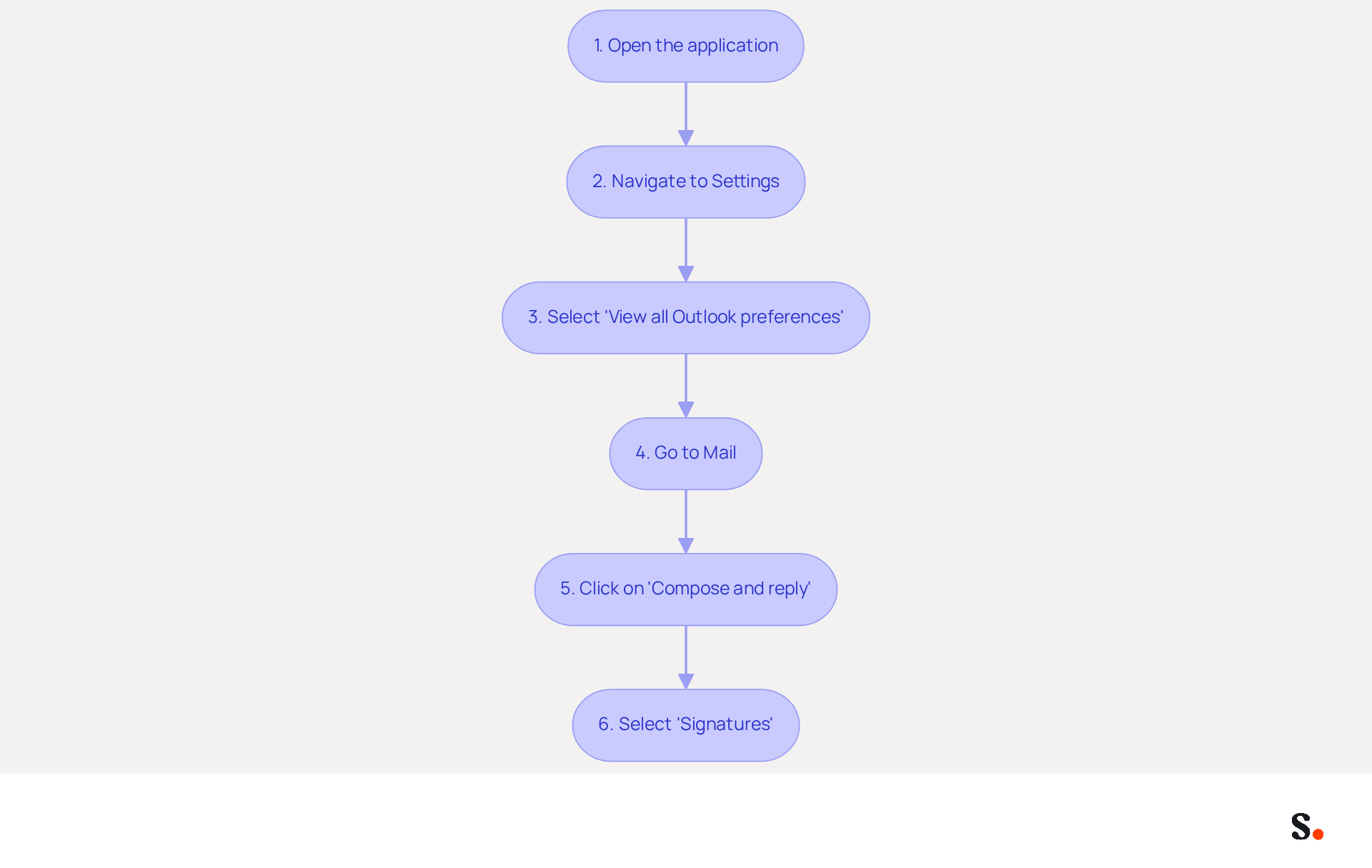
Updating the signature line in Outlook is crucial for maintaining professionalism and brand consistency. To update your email signature in Outlook, follow these steps:
- Open the application: Launch the email program on your computer.
- Navigate to Settings: Click on the gear icon (⚙️) located in the top-right corner of the window.
- Select 'View all Outlook preferences': Scroll down and click on this option to access the complete options menu.
- Go to Mail: In the settings menu, select 'Mail' from the left sidebar.
- Click on 'Compose and reply': This will direct you to the area where you can manage your email identifiers.
- Select 'Signatures': Here, you can view, create, or modify your existing marks.
By following these steps, you can access the settings and prepare to update the signature line in Outlook.
- Expert Advice: Did you know that 76% of recipients feel more confident in a business when they see a branded email signature? Regularly updating your electronic correspondence footer is essential for maintaining brand consistency and professionalism. Furthermore, 44.4% of users modify their email footers 2-4 times annually, emphasizing the significance of keeping your footer fresh and relevant.
- User Experiences: Many organizations have reported challenges during the transition to the new Outlook, particularly with managing email identifiers. Users often face challenges when transitioning to the new Outlook, particularly in managing their email signatures. A case study revealed that users encountered problems with their marks vanishing, highlighting the necessity for careful management and regular updates to ensure compliance and brand integrity. This can lead to inconsistencies in branding and a lack of professionalism in communications. By adopting a centralized method for managing sign-offs, businesses can streamline this process and improve their communication effectiveness. Ensuring your email signature is current not only reflects your brand's professionalism but also enhances trust with your recipients.
Create or Modify Your Signature Across Platforms
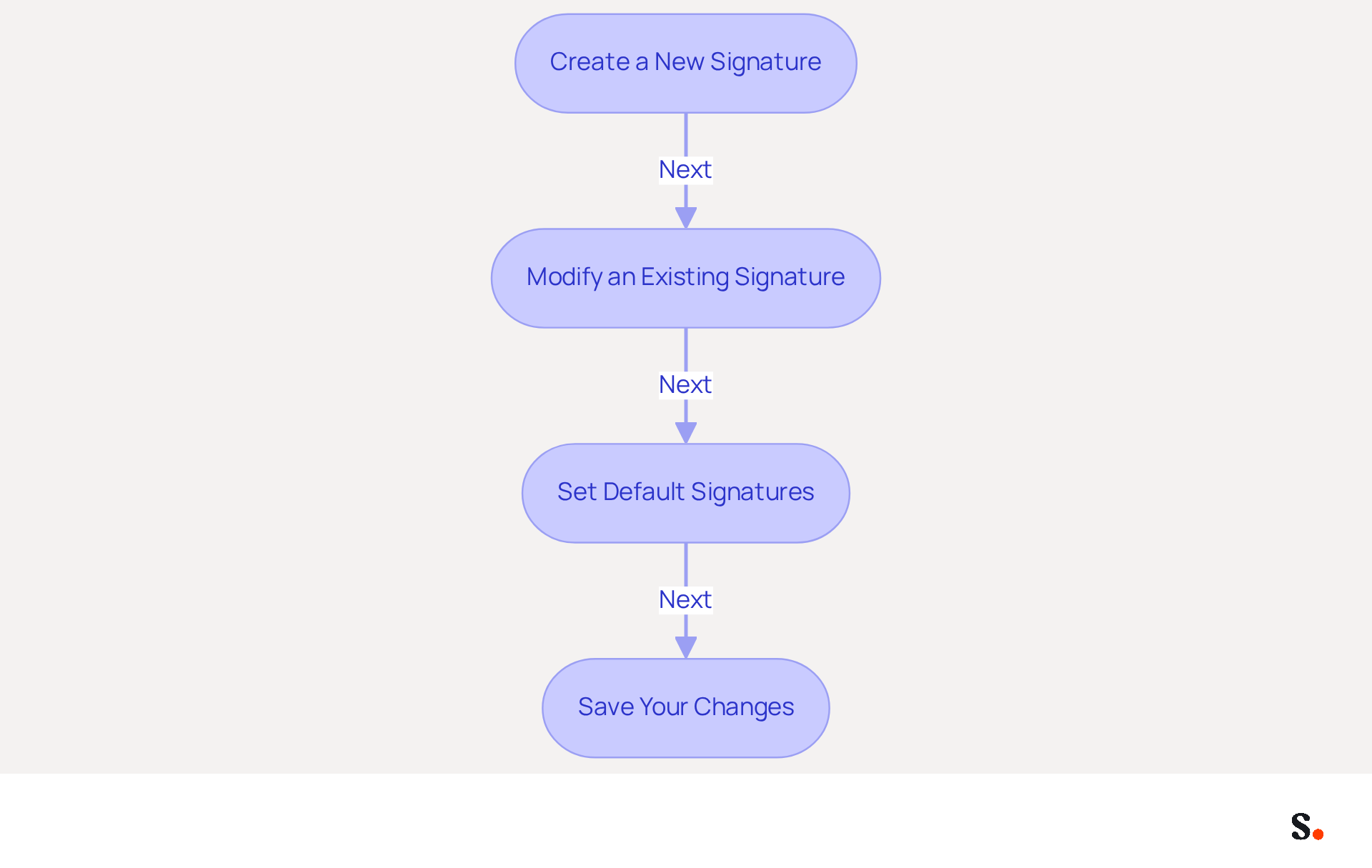
Creating or modifying your email signature in Outlook can be streamlined with Scribe, ensuring accuracy and professionalism:
-
Create a New Signature:
- Click the 'New' button to initiate a new signature.
- Assign a name to your mark (e.g., 'Professional Mark').
- In the text box, input your content for signing, including your name, title, company name, and contact information.
- Use the formatting tools to make your text look polished (font size, color, etc.).
-
Modify an Existing Signature:
- Select the signature you wish to edit from the list.
- Click the 'Edit' button to make changes.
- Update the text in the box, ensuring that the design aligns with your brand's identity.
-
Set Default Signatures:
- Choose which signature to apply for new emails and replies/forwards by selecting from the dropdown menus.
-
Save Your Changes:
- After creating or modifying your signature, click 'Save' to apply the changes.
Following these steps helps you keep your contact information current and reinforces your professional identity, particularly when you update your signature line in Outlook. With Scribe, your identifiers are automatically synchronized with your business phone system, ensuring that any updates made in your Aircall configuration are reflected in real-time. This automation not only saves time but also ensures compliance with data security standards, as Scribe is SOC 2 Type II compliant. Keep in mind, messages with branded footers can achieve a 22% higher response rate, making it crucial to invest time in creating a professional footer that resonates with your audience. Investing in a professional email signature can significantly enhance your communication effectiveness and brand perception.
Troubleshoot Common Signature Issues
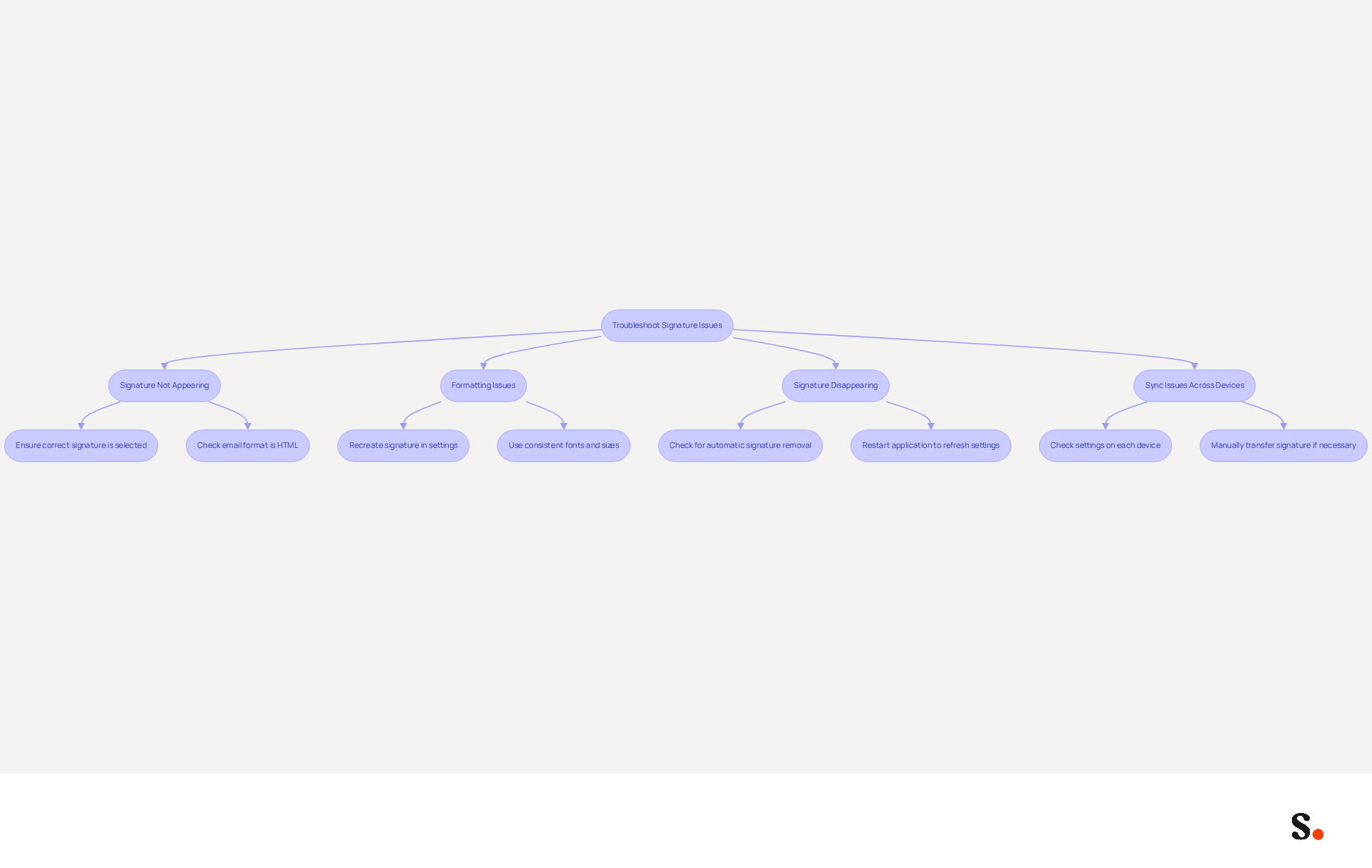
Despite clear guidance, many users struggle with how to update their contact details and update the signature line in Outlook effectively. Here are some common problems and how to troubleshoot them:
-
Signature Not Appearing:
- Ensure that the correct signature is selected for new emails and replies/forwards in the signature settings. In 90% of instances, the absence of the signatory is due to it not being set as the default option.
- Check if the email format is set to HTML, as plain text may not display logos correctly.
-
- If your signature is misaligned or incorrectly formatted, recreate it in the signature settings. Utilizing simple layouts and inline images can result in more uniform appearances.
- Ensure that you are using consistent fonts and sizes to avoid discrepancies.
-
- If your signature disappears after sending an email, check your Outlook settings for any automatic signature removal options. Users frequently discover that their email identifiers disappear after applying an Office update, especially when moving from older versions.
- Restart the application to refresh it and verify your configurations.
-
Sync Issues Across Devices:
- When using Outlook on multiple devices, make sure to check the settings on each one to ensure your signatures are synced. Microsoft 365 utilizes roaming identifiers to sync email templates, but the synchronization process is not always dependable.
- Manually transfer your mark from one device to another if necessary. Users must create distinct identifiers for each mobile device, as identifiers made on desktop versions may not display correctly on mobile.
By effectively addressing these challenges, users can significantly enhance their process to update the signature line in Outlook.
Conclusion
Many professionals underestimate the impact of their email signatures on their overall communication effectiveness. Updating your email signature in Outlook is a vital step in maintaining a professional image and ensuring brand consistency in all communications. A well-designed signature boosts credibility and promotes your brand, making it essential for effective communication.
This guide outlines key steps for accessing signature settings and creating or modifying signatures. Following these steps ensures your email signature reflects your current contact information and branding objectives. Keeping your signature updated is crucial, as it affects how recipients view your professionalism and trustworthiness.
Investing time in perfecting your email signature can lead to significant professional advantages. Using tools like Scribe streamlines this process, ensuring security compliance and enhancing marketing effectiveness. Prioritizing email signature management improves communication and fosters valuable connections. A well-managed email signature significantly enhances your professional interactions.
Frequently Asked Questions
Why are email signatures important in Outlook?
Email signatures are important because they enhance professionalism, promote brand consistency, serve as a marketing tool, and facilitate contact. A well-crafted signature boosts credibility and trustworthiness, while consistent branding can increase response rates.
How do email signatures enhance professionalism?
A well-crafted email signature gives a polished appearance to correspondence, significantly boosting credibility and trustworthiness. Research shows that 76% of recipients feel more trust in a sender with a branded digital identifier.
What role do email signatures play in brand consistency?
Email signatures promote brand consistency by reinforcing the company's identity and values across all communications. This consistency can lead to a 22% increase in response rates, helping recipients recognize and remember the brand.
Can email signatures be used as a marketing tool?
Yes, email signatures can serve as powerful marketing assets by including links to websites, social media profiles, or promotional banners. Organizations that use consistent formats in their signatures see a 40% rise in engagement rates.
How do email signatures facilitate contact?
An effective email signature provides essential contact information, making it easier for recipients to reach you. Research indicates that 64% of consumers look for contact information in message footers.
What should I keep updated in my email signature?
It is important to keep your contact information updated in Scribe, similar to updating your signature line in Outlook, to ensure it accurately represents your professional image and aligns with your marketing objectives. Neglecting to update it could result in missed connections and opportunities.
List of Sources
- Understand the Importance of Email Signatures in Outlook
- The impact of email signatures on your branding (https://signitic.com/en/resources/the-impact-of-email-signatures-on-your-branding)
- Why Email Signatures Must Be In Your 2026 Marketing Plan | Rocketseed (https://rocketseed.com/blog/2026-marketing-plan-email-signatures)
- Maximize Marketing Impact with Your Email Signature and Degree (https://scribe-mail.com/en-US/blog/maximize-marketing-impact-with-your-email-signature-and-degree)
- Research Recap: Branded Email Signatures Increase Company Recognition, Trust - B2BMX INSIGHTS (https://demandgenreport.com/industry-news/research-recap-branded-email-signatures-increase-company-recognition-trust/47252)
- Top 10 Benefits Of Email Signatures | Rocketseed (https://rocketseed.com/blog/benefits-of-using-email-signatures)
- Access Signature Settings in Outlook
- 40+ Email Signature Statistics for 2026 (Data + Insights) (https://wavecnct.com/blogs/email-signature-statistics)
- Email Signatures vanishing - New Outlook | Microsoft Community Hub (https://techcommunity.microsoft.com/discussions/outlookgeneral/email-signatures-vanishing---new-outlook/4418809)
- The New Outlook for Windows: An IT Guide to Email Signatures (https://exclaimer.com/email-signature-handbook/new-outlook-windows-email-signatures)
- 100 Professional Email Signature Quotes: Best Ideas - NEWOLDSTAMP (https://newoldstamp.com/blog/email-signature-quotes)
- Outlook Statistics For 2026: Key Trends Shaping the Future (https://clean.email/blog/email-providers/outlook-statistics)
- Create or Modify Your Signature Across Platforms
- Email signature statistics: Why every business should optimize their email signatures — Stripo.email (https://stripo.email/blog/email-signature-statistics-why-every-business-should-optimize-their-email-signatures)
- New University Email Signature Generator (https://news.arizona.edu/uannounce/new-university-email-signature-generator)
- New UIC email brand signature | Inside AHS | University of Illinois Chicago (https://ahs.uic.edu/inside-ahs/news-stories/new-uic-email-brand-signature)
- St Augustine Campus News | Welcome to The University of the West Indies at St. Augustine, Trinidad and Tobago (https://sta.uwi.edu/news/notices/notice.asp?id=26806)
- Troubleshoot Common Signature Issues
- Outlook Signature Disappears? 6 Common Problems + Fixes (https://conbool.com/blog/outlook-signature-disappears-fixes-problems)
- Email Signatures vanishing - New Outlook | Microsoft Community Hub (https://techcommunity.microsoft.com/discussions/outlookgeneral/email-signatures-vanishing---new-outlook/4418809)
- Outlook Signature Not Working in Office 365: Causes & Fixes (https://exclaimer.com/email-signature-handbook/outlook-signature-not-working-in-office-365)
- Microsoft Says Outlook Outage Is Completely Resolved - CNET (https://cnet.com/news-live/microsoft-outlook-exchange-online-service-outage)
- How to solve problems with email signatures in Microsoft 365? (https://mail-signatures.com/articles/problems-email-signatures-office-365)
Get started with Scribe
Create your signature in minutes
Free 14-day trial — no credit card.