Master Automatic Email Replies for Vacation: Boost Engagement Now
Automatic email replies during vacation are frequently underestimated, yet they present a valuable opportunity for enhancing communication and engagement. By
Sophie Grant
Email Signature Specialist, Scribe
Introduction
Automatic email replies during vacation are frequently underestimated, yet they present a valuable opportunity for enhancing communication and engagement. By implementing effective automatic replies, professionals can maintain clarity and professionalism, ensuring that their absence does not disrupt ongoing conversations. Organizations can turn these automated messages into effective marketing tools that inform and engage recipients.
We will explore effective strategies for crafting automatic email replies that resonate with various audiences, incorporate marketing elements, and ultimately boost engagement, all while ensuring seamless communication during periods of absence.
Get started with Scribe
See why teams switch to Scribe
Free 14-day trial — no credit card.
Define Key Components of Automatic Replies
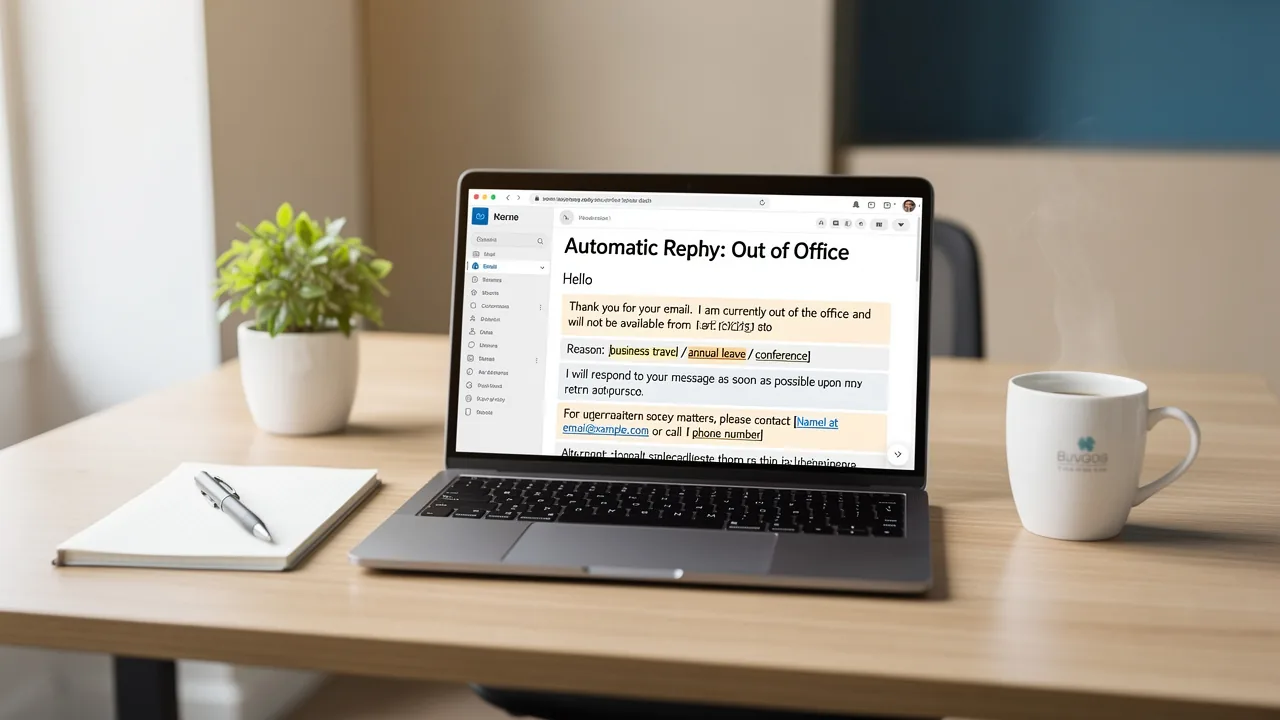
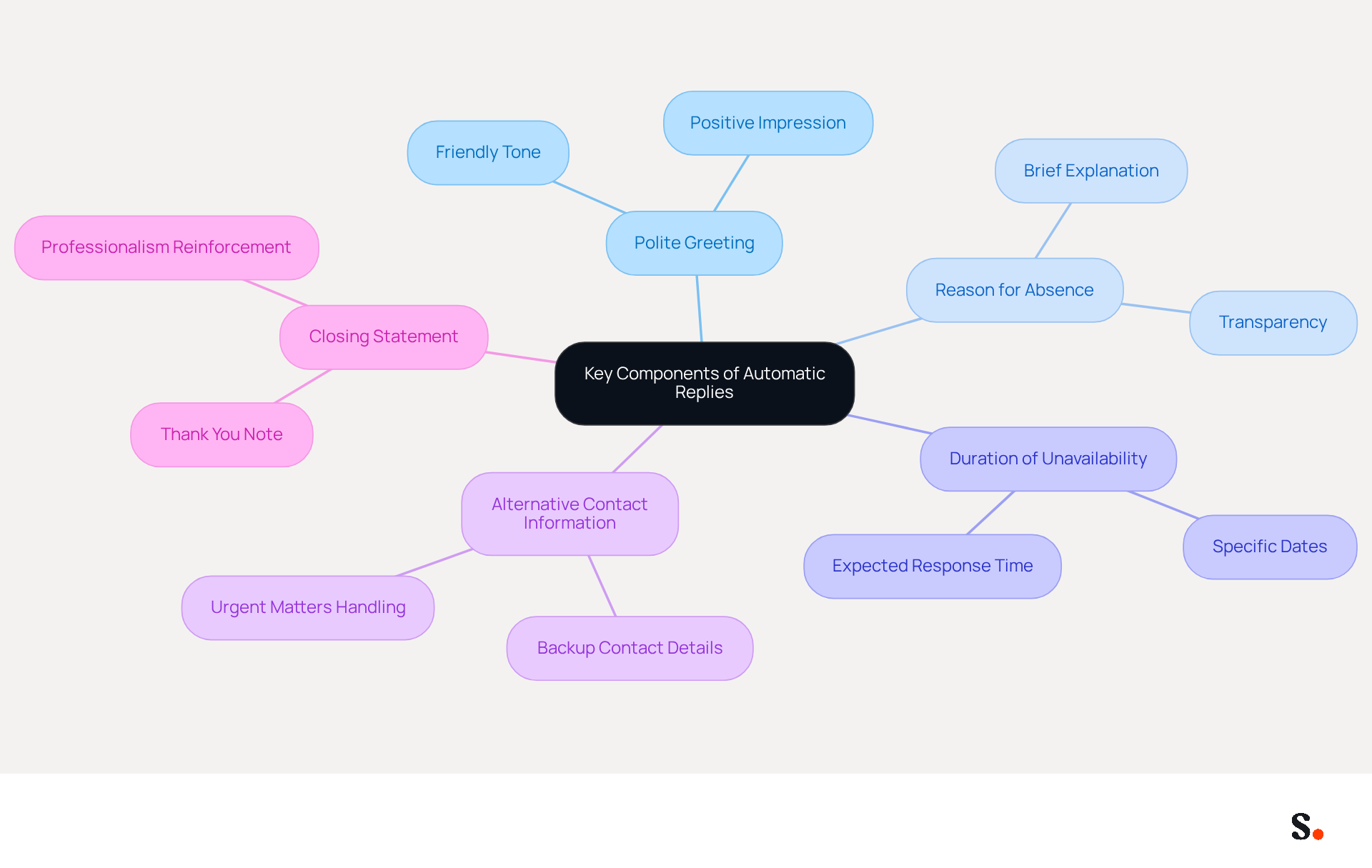
To create effective automatic replies, it is crucial to incorporate specific key components that enhance communication:
- Polite Greeting: Start with a friendly greeting to set a positive tone, as this can enhance the recipient's experience.
- Reason for Absence: Clearly state that you are unavailable and provide a brief reason if appropriate (e.g., on vacation, at a conference). This context helps maintain transparency without oversharing.
- Duration of Unavailability: Specify the dates you will be away and when the sender can expect a response. Clear return dates are crucial; without them, employees may feel uncertain about when to expect a response. Dmitri Leonov emphasizes that providing a clear return date is essential for setting expectations and avoiding confusion.
- Alternative Contact Information: If applicable, provide contact details for someone who can assist in your absence. This ensures urgent matters are addressed promptly, reducing frustration for senders. Research indicates that providing alternative contacts greatly improves communication during absences.
- Closing Statement: End with a courteous closing, thanking the sender for their understanding. A well-crafted closing reinforces professionalism and leaves a positive impression.
Incorporating these elements ensures that your automatic email replies for vacation are thorough and professional, helping to maintain standards of interaction even when you are not available. For example, a simple out-of-office message that includes automatic email replies for vacation can greatly minimize follow-up confusion and maintain clarity in interactions. Furthermore, with the global revenue from digital marketing projected to reach $12.33 billion in 2024, effective communication strategies are more crucial than ever.
Tailor Messages for Different Audiences
To enhance the effectiveness of your automatic replies, consider tailoring your messages based on the audience:
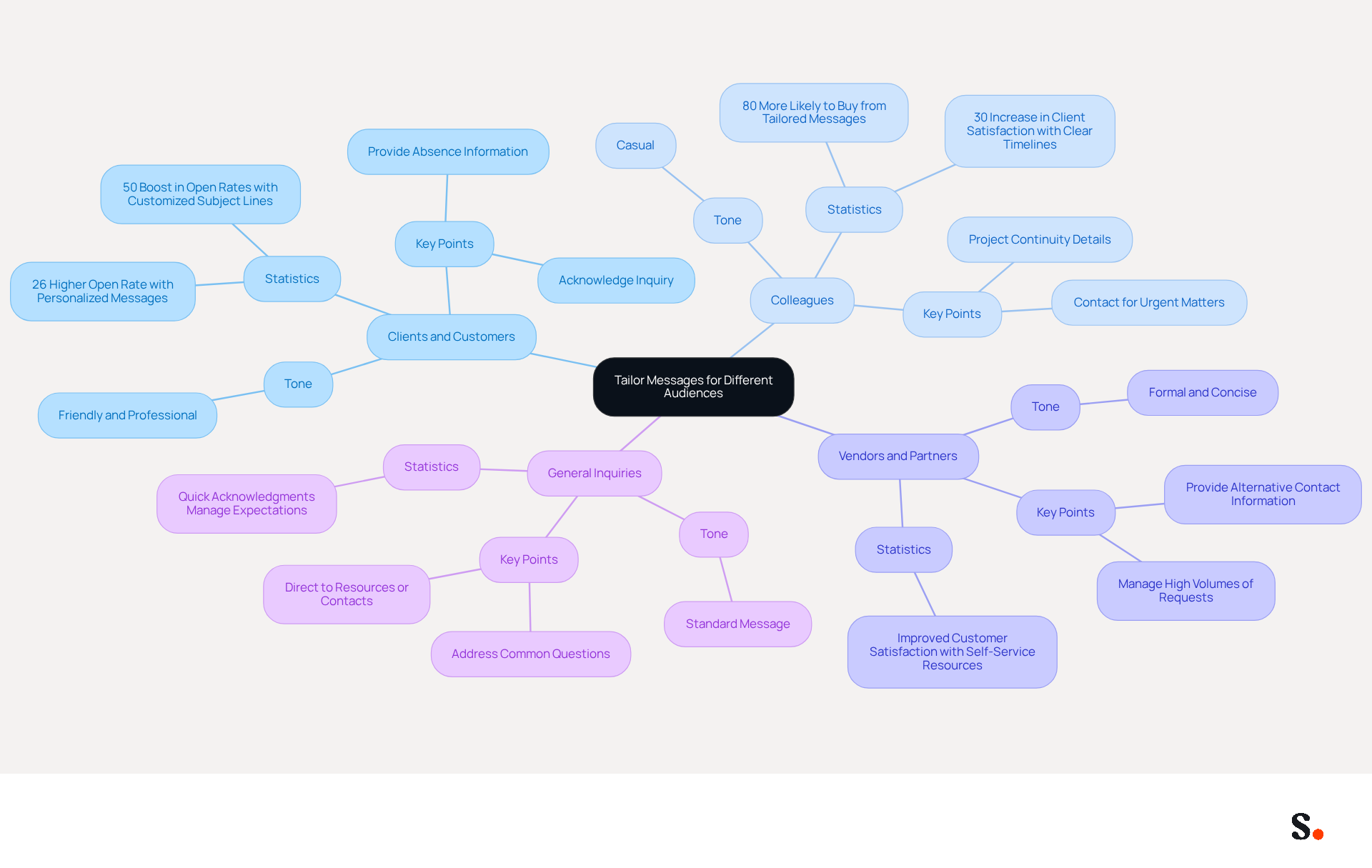
- Clients and Customers: Use a friendly and professional tone, acknowledging their inquiry and providing relevant information about your absence. Personalized messages can lead to a 26% higher open rate, while customized subject lines boost open rates by 50%. This highlights the value of tailored content.
- Colleagues: Maintain a more casual tone, and include details about project continuity or who to contact for urgent matters. When businesses set clear timelines for responses, they boost client satisfaction by 30%. Plus, 80% of people are more likely to buy from tailored messages, showing how crucial clarity is in communication.
- Vendors and Partners: Be formal and concise, ensuring they know how to reach someone else if needed. Using automatic email replies for vacation can help manage high volumes of requests, empowering users with self-service resources, ultimately improving customer satisfaction.
- General Inquiries: For general inquiries, provide a standard message that addresses common questions and directs them to resources or contacts. Confirmation messages act as quick acknowledgments when customers reach out through digital communication, helping to manage expectations during peak times.
By segmenting your audience and customizing your replies, you can create a more engaging experience that meets the specific needs of each group. Customizing messages not only increases relevance but also cultivates stronger connections, as 80% of individuals are more inclined to make a purchase from a personalized communication. Furthermore, with nearly 90% of marketers intending to sustain or boost their investment in messaging campaigns, effective communication strategies not only improve engagement but also drive business success.
Incorporate Marketing Elements for Engagement
Transforming automatic replies into effective marketing tools requires strategic implementation:
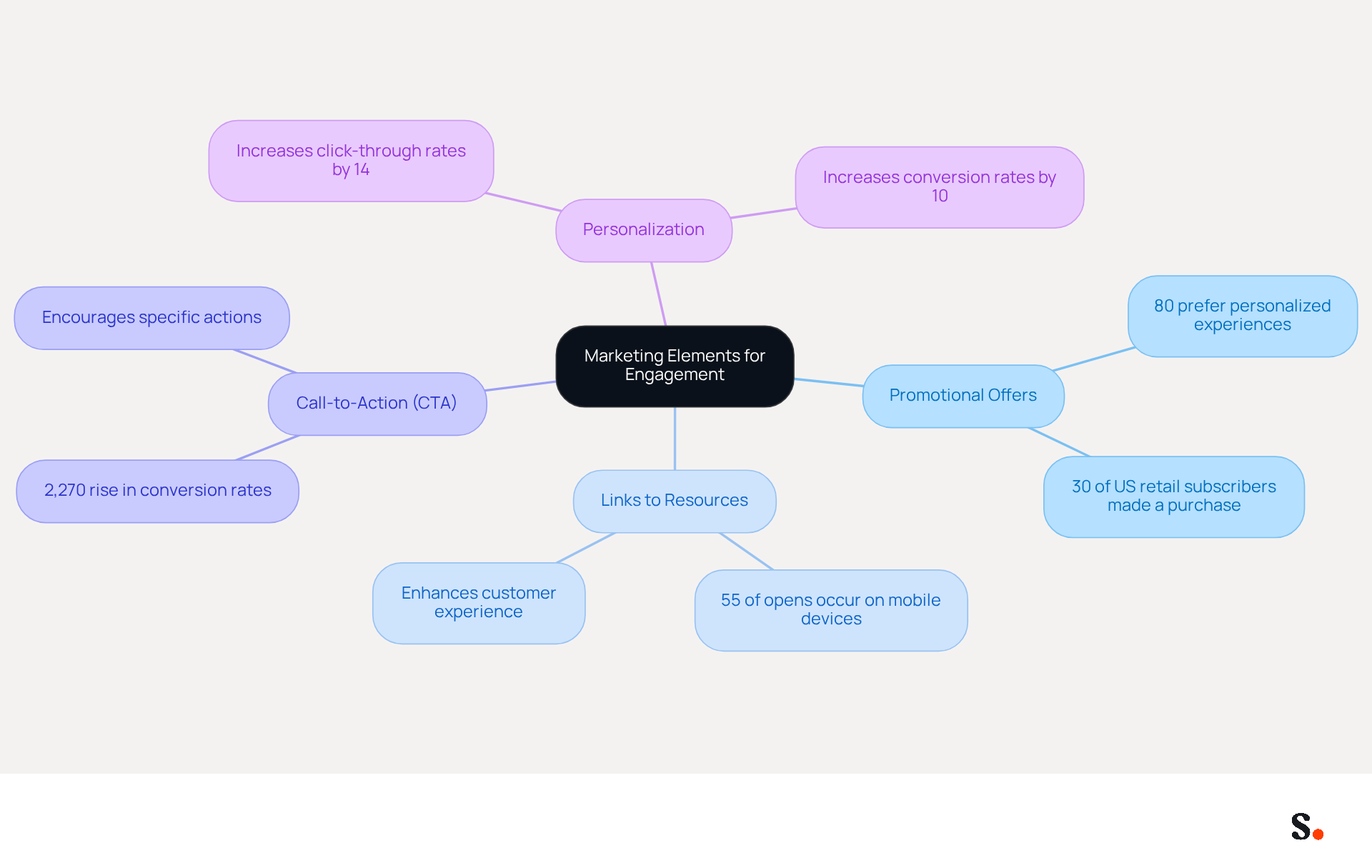
- Promotional Offers: Highlight ongoing promotions or discounts that recipients can utilize. This not only informs recipients but also encourages engagement; 80% of customers prefer brands that offer personalized experiences. In fact, 30% of US retail subscriber lists have made a purchase from the retailer, demonstrating how effective promotional offers can be.
- Links to Resources: Guide recipients to relevant blog posts, FAQs, or product pages that may address their inquiries or spark their interest. This tactic can enhance customer experience and keep your brand top-of-mind, particularly when 55% of opens now occur on mobile devices.
- Call-to-Action (CTA): Encourage specific actions, such as signing up for a newsletter or following your social media accounts. Effective CTAs can greatly enhance engagement, as automated emails achieve a 2,270% rise in conversion rates, highlighting the significance of incorporating them in your automated messages.
- Personalization: Incorporate the recipient's name and reference their inquiry to create a more tailored experience. Personalized messages can increase click-through rates by 14% and conversion rates by 10%, making your communication memorable and impactful.
Incorporating these marketing elements into your automatic email replies for vacation can increase their worth and sustain audience involvement, even during your absence. This strategy not only keeps your brand relevant but also fosters a connection with recipients, encouraging them to interact with your content further. Ultimately, these strategies can redefine customer interactions and drive significant business growth.
Implement Automatic Replies Across Email Platforms
Many professionals find it challenging to handle automatic email replies for vacation while they are absent. To effectively set up automatic replies across various email platforms, follow these streamlined steps:
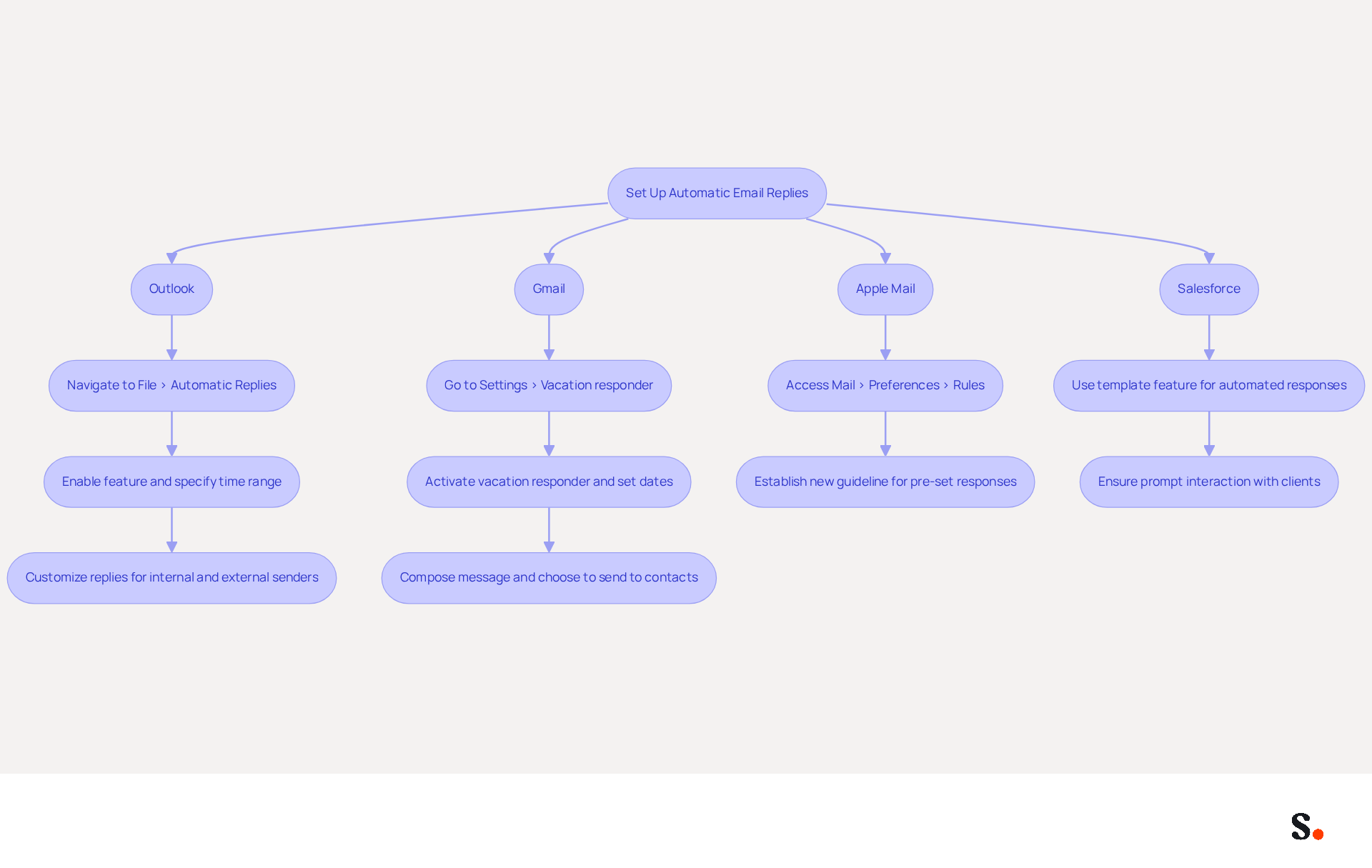
- Outlook: Navigate to File > Automatic Replies. Enable the feature and specify the time range for your automatic email replies for vacation. To ensure clarity, customize your automatic email replies for vacation for both internal and external senders.
- Gmail: Go to Settings > Vacation responder. To set up automatic email replies for vacation, activate it, set your desired dates, and compose your message. You can also choose to send responses only to contacts, which aids in managing feedback more effectively.
- Apple Mail: Access Mail > Preferences > Rules. Establish a new guideline that activates pre-set responses based on particular criteria, enabling customized interactions.
- Salesforce: Use the template feature to create automated responses for specific cases or inquiries, ensuring prompt interaction with clients.
By following these steps, you can ensure professional communication and consistent interactions, such as using automatic email replies for vacation. Research indicates that clear automated messages can reduce unnecessary follow-ups by up to 30%. For example, case studies demonstrate that organizations utilizing automated responses effectively, such as in the 'Support Ticket Acknowledgment' scenario, enhance customer satisfaction by confirming receipt of inquiries and outlining next steps, ultimately fostering trust and engagement. Additionally, be mindful of the timing and frequency of automatic email replies for vacation to avoid annoying recipients, and always include contact information for someone who can assist in your absence to further improve the clarity and effectiveness of your automatic email replies for vacation. Ultimately, the use of automatic email replies for vacation can transform how organizations manage client communications.
Conclusion
Effective automatic email replies are crucial for maintaining communication standards during absences. Organizations can maintain professional communication by implementing well-structured messages. These should include:
- A polite greeting
- Reason for absence
- Duration of unavailability
- Alternative contact information
- A courteous closing
This method helps set clear expectations and reduces confusion for those reaching out, reinforcing the importance of thoughtful communication strategies.
Tailoring automatic replies to different audiences - clients, colleagues, vendors, and general inquiries - further enhances their effectiveness. By customizing messages to suit the recipient's needs, organizations can foster stronger connections and improve engagement rates. Incorporating marketing elements, such as promotional offers and calls-to-action, transforms these replies into valuable marketing tools that keep the brand relevant and encourage interaction, even during periods of absence.
Ultimately, using automatic email replies strategically can enhance customer satisfaction and boost engagement. By prioritizing clear communication and audience-specific messaging, organizations can not only manage expectations but also leverage these interactions to drive business growth. By adopting these practices, organizations can turn every absence into an opportunity for engagement and growth.
Frequently Asked Questions
What are the key components of effective automatic replies?
The key components of effective automatic replies include a polite greeting, a reason for absence, the duration of unavailability, alternative contact information, and a closing statement.
Why is a polite greeting important in automatic replies?
A polite greeting sets a positive tone and enhances the recipient's experience, making the communication more pleasant.
What should be included in the reason for absence?
The reason for absence should clearly state that you are unavailable and provide a brief explanation if appropriate, such as being on vacation or at a conference, to maintain transparency without oversharing.
How important is it to specify the duration of unavailability?
Specifying the duration of unavailability is crucial as it informs the sender of the dates you will be away and when they can expect a response, helping to set clear expectations and avoid confusion.
What should I do if I want to provide alternative contact information?
If applicable, you should provide contact details for someone who can assist in your absence, ensuring that urgent matters are addressed promptly and reducing frustration for senders.
How should I conclude my automatic reply?
You should end with a courteous closing statement, thanking the sender for their understanding, which reinforces professionalism and leaves a positive impression.
Why is it important to incorporate these elements in automatic replies?
Incorporating these elements ensures that your automatic email replies are thorough and professional, helping to maintain standards of interaction even when you are not available.
List of Sources
- Define Key Components of Automatic Replies
- 4 Best Practices for Your Auto-Reply Message Out of Office (https://scribe-mail.com/en-US/blog/4-best-practices-for-your-auto-reply-message-out-of-office)
- 49 Top Email Marketing Statistics (https://forbes.com/advisor/business/software/email-marketing-statistics)
- Automatic Replies: The Simple Tech Tweak Your Business Can’t Afford to Ignore - The Unite Group (https://theunitegroup.co.uk/2025/11/04/automatic-replies)
- 10 Outstanding Out of Office Email Templates You Can Use in 2026 - Vtiger CRM Blog (https://vtiger.com/blog/10-outstanding-out-of-office-email-templates-you-can-use-in-2026)
- 5 Secrets for Writing the Perfect Out-of-Office Email (https://time.com/4205415/out-office-email-autoreply-autoresponder-2)
- Tailor Messages for Different Audiences
- Adapted Creativities: How to Customize your Messages to Win Over Different Audiences - Adsmurai (https://adsmurai.com/en/articles/adapted-creativities-how-to-customize-your-messages-to-win-over-different-audiences)
- 100 Compelling Email Statistics for 2026 | PGM Solutions (https://porchgroupmedia.com/blog/100-compelling-email-statistics-to-inform-your-strategy-in-2023)
- 49 Top Email Marketing Statistics (https://forbes.com/advisor/business/software/email-marketing-statistics)
- 4 Best Practices for Your Automatic Response Email Template (https://scribe-mail.com/en-US/blog/4-best-practices-for-your-automatic-response-email-template)
- Automated Email Responses: Best Practices (https://intercom.com/learning-center/automated-email-response)
- Incorporate Marketing Elements for Engagement
- Unleash the Full Power of the Email Auto-Reply (https://entrepreneur.com/living/unleash-the-full-power-of-the-email-auto-reply/238054)
- 23 Email Marketing Automation Examples That Actually Work | Coffee + Dunn (https://coffee-dunn.com/blog/email-marketing-automation-examples)
- Email Marketing Statistics | Ultimate List | CodeCrew (https://codecrew.us/blog/email-marketing-stats-you-need-to-know-the-ultimate-list)
- How to write an email autoresponder your audience loves - Emma (https://myemma.com/blog/how-to-write-an-email-autoresponder-your-audience-loves)
- Boost Your Marketing with Email Autoresponders (https://twilio.com/en-us/blog/insights/email-autoresponders)
- Implement Automatic Replies Across Email Platforms
- How to set up out of office automatic replies in Outlook | Microsoft Support (https://support.microsoft.com/en-us/outlook/mail/how-to-set-up-out-of-office-automatic-replies-in-outlook)
- Send an automatic reply when you're out of office - Computer - Gmail Help (https://support.google.com/mail/answer/25922?hl=en&co=GENIE.Platform%3DDesktop)
- How to Set up Auto Replies in Gmail: OOO and Other Responses | Automation | Gmelius (https://gmelius.com/blog/auto-reply-for-gmail)
Get started with Scribe
See why teams switch to Scribe
Free 14-day trial — no credit card.