Master Best Email Signature Design for Maximum Engagement
While often overlooked, an email signature is a crucial element of business communication that can significantly enhance brand visibility and engagement. To
Sophie Grant
Email Signature Specialist, Scribe

Introduction
While often overlooked, an email signature is a crucial element of business communication that can significantly enhance brand visibility and engagement. To achieve this, companies must focus on creating email signatures that are not only functional but also engaging and action-oriented. We will explore the key elements and strategies that can turn a simple sign-off into a powerful marketing tool.
Establish Brand Consistency in Email Signatures
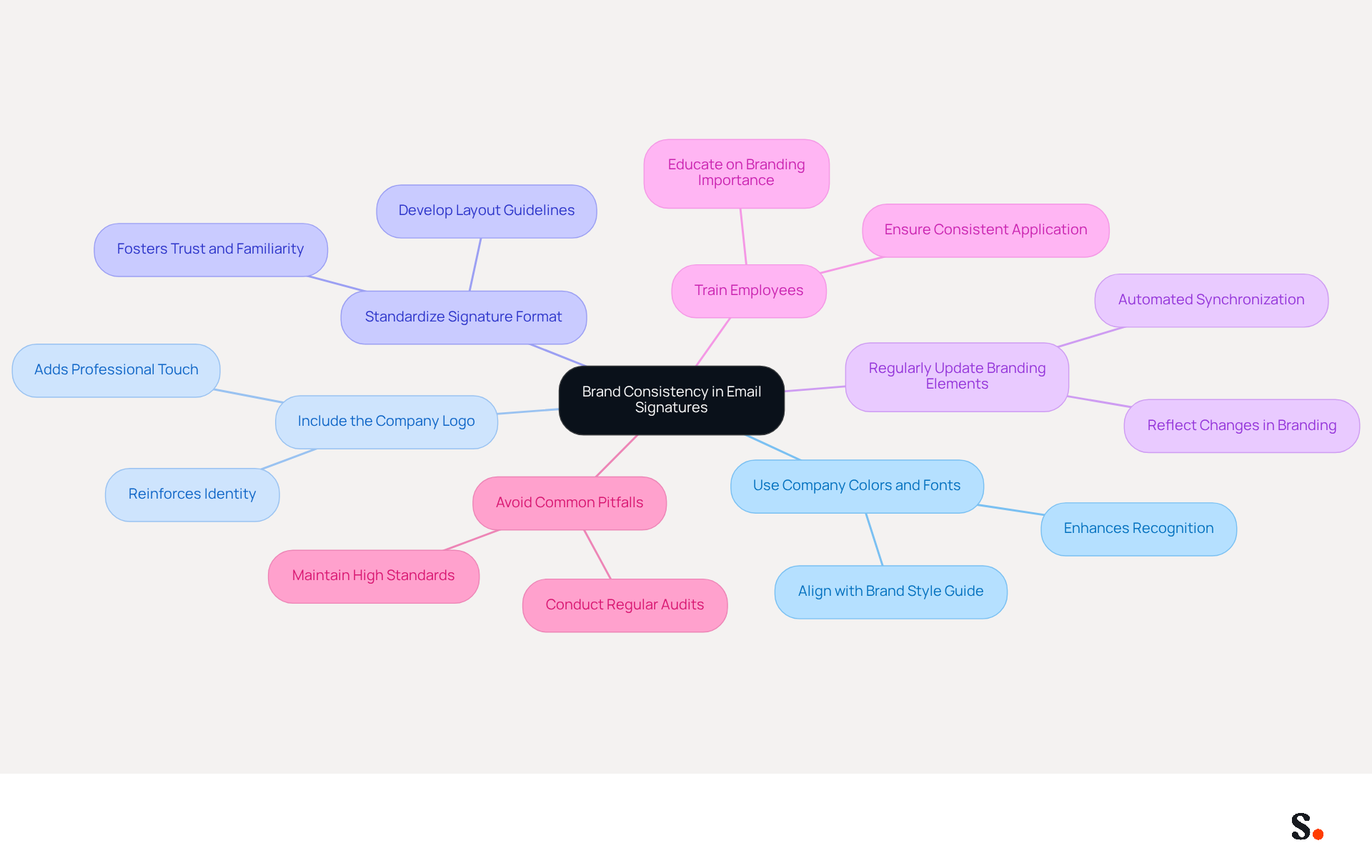
To ensure brand consistency in email signatures, it is essential to follow established best practices:
- Use Company Colors and Fonts: Align the colors and fonts in your correspondence with your brand's style guide. This visual consistency strengthens the connection between your communications and overall branding, enhancing recognition.
- Include the Company Logo: Always feature your company logo in the signature. This not only reinforces identity but also adds a professional touch, making your emails more credible.
- Standardize Signature Format: Develop a standardized format for all employees to follow, including layout, font size, and spacing. A consistent format enables recipients to identify your identity instantly, fostering trust and familiarity.
- Regularly Update Branding Elements: Keep all branding elements current by reflecting any changes, such as new logos or color schemes. Scribe's automated synchronization ensures that any changes in your business phone system or communication provider are updated in real-time, maintaining consistency and meeting security standards like SOC 2 Type II. This centralized management can lead to three times greater campaign engagement, showcasing how automation effectively maintains consistency.
- Train Employees: Educate your team on the significance of consistency in branding and how to apply it in their communication identifiers. This training guarantees that everyone comprehends their role in representing the organization through written communications.
- Avoid Common Pitfalls: Be mindful of common issues such as outdated information or poor image quality, which can detract from professionalism. Outdated information or poor image quality can undermine your brand's professionalism. Conducting regular audits of signatures helps keep standards high.
By implementing these practices, companies can significantly enhance their brand visibility and create a unified image across all communication channels, particularly through the best email signature design. Ultimately, a unified branding approach can significantly impact your bottom line, driving revenue growth and customer loyalty.
Include Essential Elements in Your Email Signature
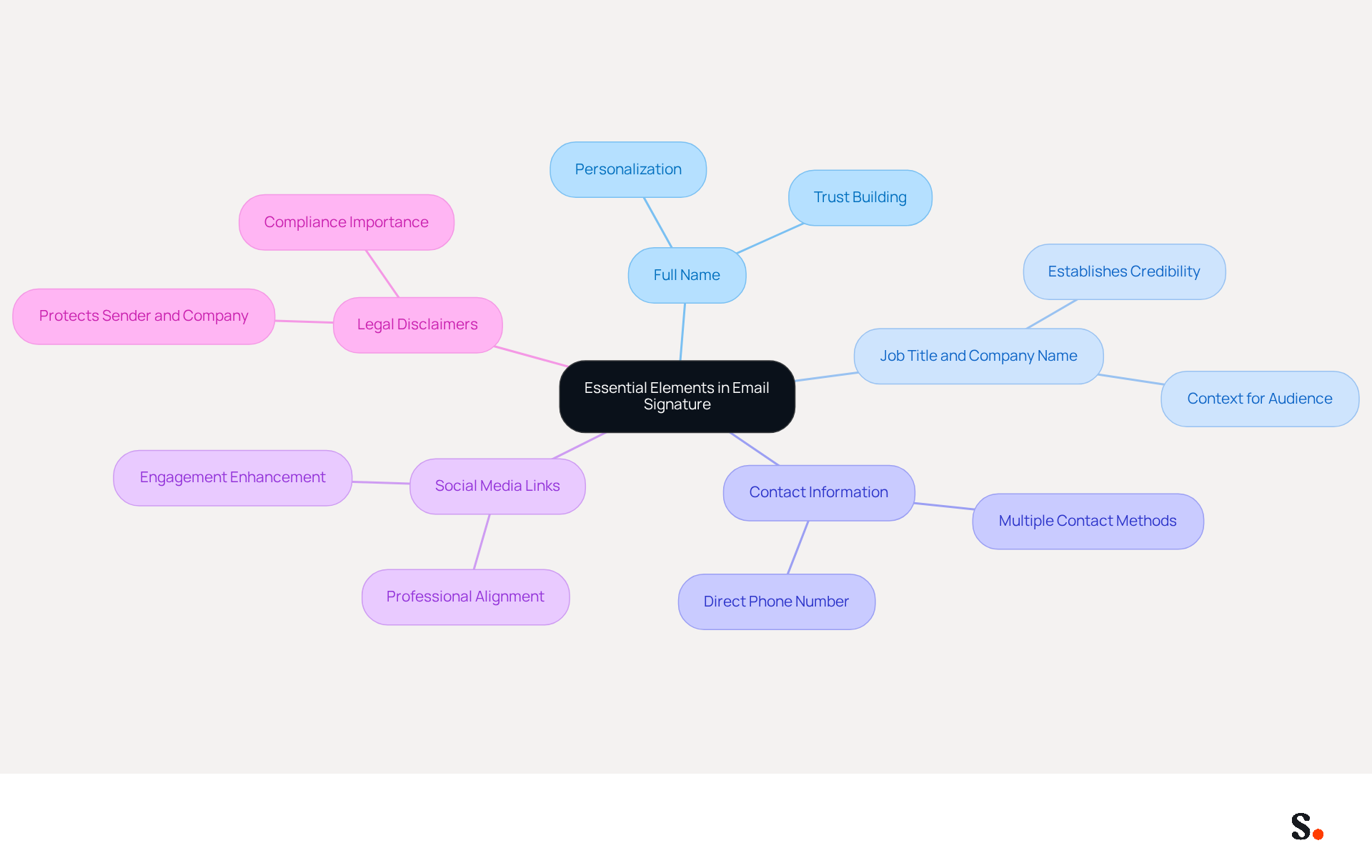
To create an effective email signature, it is essential to incorporate key elements that enhance communication and professionalism:
- Full Name: Clearly state the sender's full name to personalize the communication and foster trust. This is crucial because 90% of email users have at least one signature, and including the sender's name boosts recognition.
- Job Title and Company Name: Including the sender's job title and the company name establishes credibility and provides context for the audience. This is essential for ensuring that the individual comprehends the sender's role and the organization they represent.
- Contact Information: Provide various methods for individuals to reach out, such as phone numbers and contact addresses. This increases the likelihood of follow-up communication, making it easier for potential clients or partners to connect. A professional email signature typically includes direct contact methods, which are essential for effective communication.
- Social Media Links: Add links to relevant social media profiles to encourage users to connect on other platforms. Ensure these links are professional and align with the company's image. Incorporating recognizable social media icons rather than text links streamlines the design and improves visual engagement, making it easier for recipients to engage with the brand.
- Legal Disclaimers: If applicable, include any necessary legal disclaimers or confidentiality notices to protect the company and the sender. This is particularly important in regulated industries, where compliance is crucial.
When you include these elements, the best email signature design enhances digital correspondences, making them more informative and functional, which improves the overall communication experience. Regular updates to these identifiers are recommended to ensure that all information remains current and precise, as outdated details can lead to missed opportunities. This proactive approach not only maintains professionalism but also builds trust with recipients.
With Scribe, the process of managing these approvals is streamlined through automated synchronization with platforms like Google Workspace and Aircall. This means that any changes made in your Google Workspace, such as moving teammates from one group to another or updating their information, will be automatically reflected in Scribe without any input on your part. Furthermore, Scribe's SOC 2 Type II compliance guarantees that your data is protected, enabling you to concentrate on creating impactful messages while maintaining brand consistency. It is recommended to review electronic correspondence identifiers at least twice a year to refresh design details and confirm the accuracy of job titles, phone numbers, and links.
Optimize Email Signatures for Compatibility and Engagement
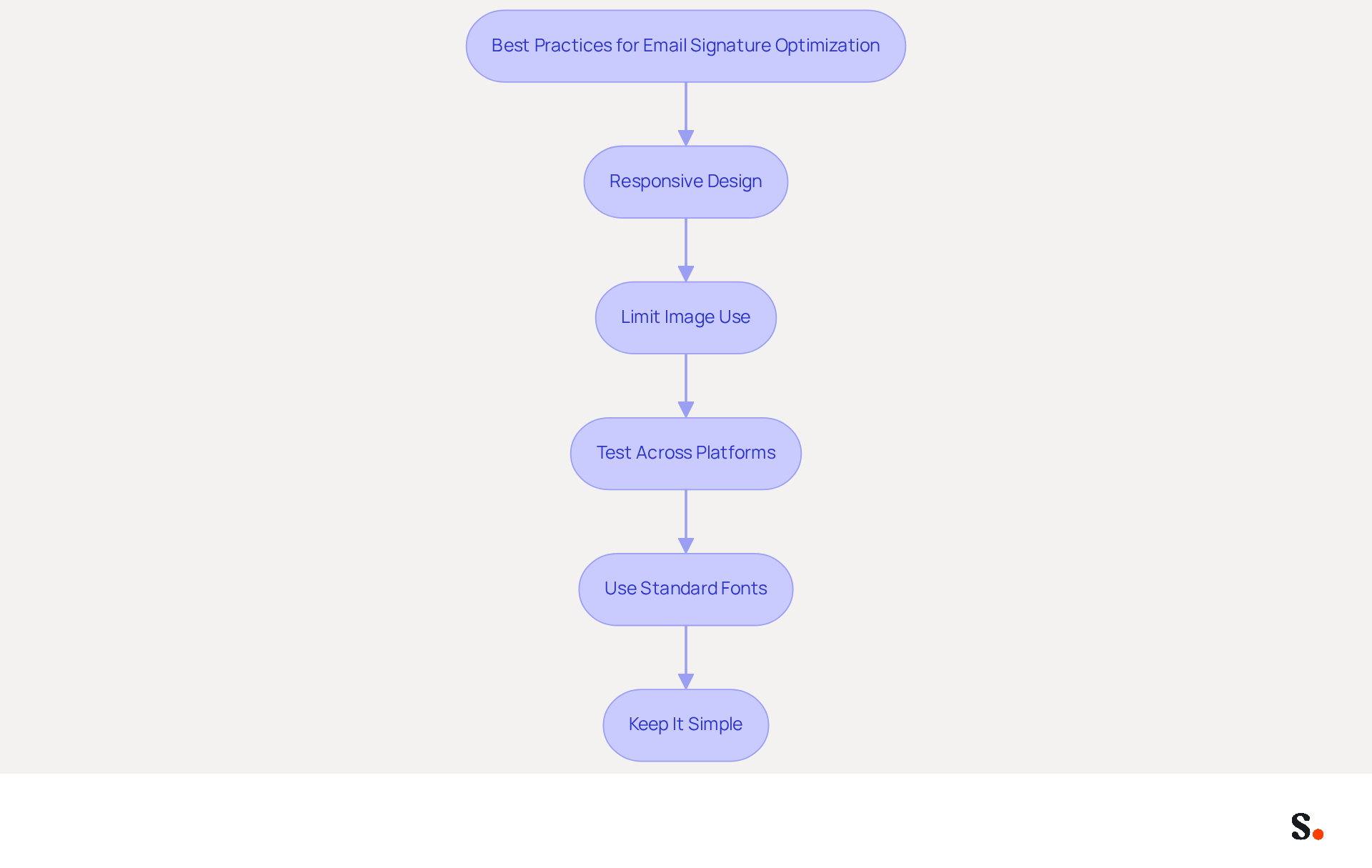
To enhance the effectiveness of their communications, businesses must prioritize the best email signature design for compatibility and engagement. Consider the following best practices:
- Responsive Design: Ensure that the signature is designed to be responsive, meaning it adjusts to different screen sizes. This is essential for mobile users, who account for 60% of business correspondence openings. Mobile message open rates can vary greatly depending on how well the design is optimized for different inboxes, underscoring the importance of thorough testing.
- Limit Image Use: While images can enhance visual appeal, excessive use can lead to display issues. Use images sparingly and ensure they are optimized for web use to reduce loading times and maintain professionalism.
- Test Across Platforms: Before finalizing the signature, test it across various messaging clients (e.g., Outlook, Gmail, Apple Mail) and devices (desktop and mobile) to ensure consistent appearance and functionality. This lack of testing can lead to inconsistent email signature appearances, potentially harming professional image. Without proper testing, businesses risk losing credibility and engagement with their audience.
- Use Standard Fonts: Stick to web-safe fonts that are widely supported across email clients. Recommended font sizes for body text are 14-16px, which helps prevent rendering issues and maintains a polished appearance, enhancing the overall professionalism of the document.
- Keep It Simple: Avoid cluttering the mark with excessive information or design elements. A clean, simple design is more likely to engage recipients and effectively convey the sender's professionalism, making it the best email signature design. Regular evaluations of digital identifiers are crucial to maintain uniformity and precision, as outdated details can diminish trustworthiness.
With Scribe's automated sync with Aircall, any changes you make in Aircall will automatically update in your Scribe profiles, ensuring brand consistency and effortless updates. Furthermore, Scribe's SOC 2 Type II compliance ensures secure data management, making it an ideal solution for organizations aiming to uphold professionalism and security in their communications. Ultimately, neglecting these practices can undermine the professionalism and effectiveness of business communications.
Incorporate Call-to-Action Elements for Enhanced Engagement
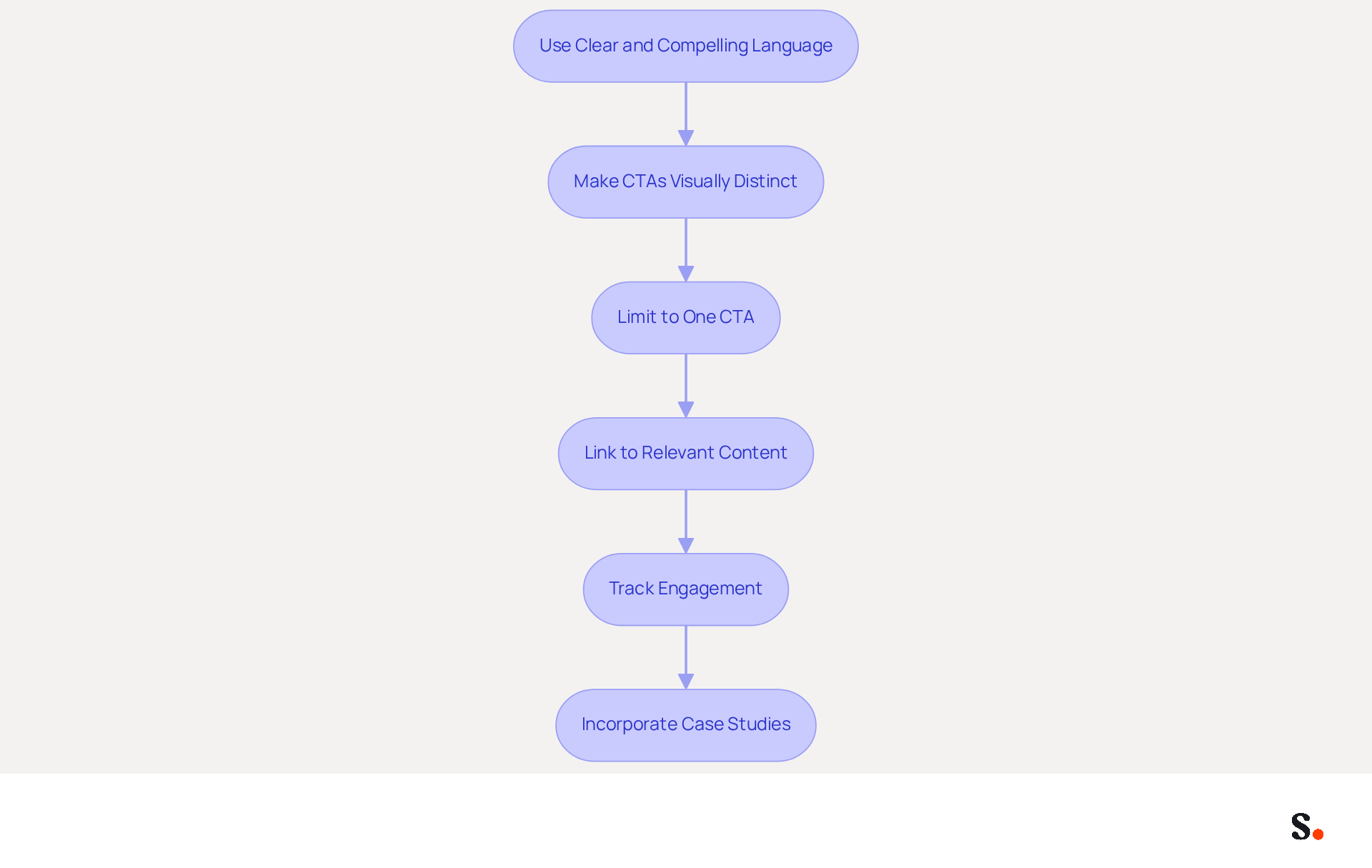
Incorporating effective call-to-action elements in email signatures can significantly enhance engagement and conversion rates.
- Use Clear and Compelling Language: Employ action-oriented phrases like 'Sign Up Now' or 'Learn More' to encourage immediate action from the audience. Research indicates that personalized CTAs can boost conversions by 202% compared to standard ones, underscoring the value of tailored messaging.
- Make CTAs Visually Distinct: Utilize buttons or bold text to ensure the CTA stands out within the signature. This visual distinction draws attention and significantly increases the likelihood of clicks, as buttons can enhance conversion rates by 28% compared to hyperlinks (Campaign Monitor).
- Limit to One CTA: To avoid overwhelming individuals, focus on a single primary CTA. This strategy simplifies decision-making and directs attention effectively, aligning with best practices that suggest one primary objective per message. Multiple CTAs can confuse recipients, leading to indecision and inaction.
- Link to Relevant Content: Ensure that the CTA directs users to valuable content, such as a landing page, promotional offer, or company blog. This relevance improves user experience and drives further engagement, as messages with a CTA can increase clicks by 371% and sales by 1617% (WordStream).
- Track Engagement: Implement tracking links to monitor the performance of CTAs in digital correspondence. This data helps identify what works for your audience, making it easier to refine future strategies. For instance, incorporating UTM parameters can help identify which campaigns drive traffic and conversions.
- Incorporate Case Studies: Consider including case studies that illustrate the effectiveness of CTAs in digital correspondence. For example, an inline CTA offering 'Book a demo' resulted in 20% of 216 recipients taking action, showcasing the potential impact of well-placed CTAs.
By effectively incorporating these CTA strategies, businesses can transform their email signatures into the best email signature design that serves as powerful marketing tools to drive engagement and conversions, ultimately enhancing their overall communication strategy. Ultimately, the best email signature design can act as a strategic asset in driving business success.
Conclusion
An effective email signature serves as a strategic asset, enhancing brand visibility and engagement beyond mere aesthetics. By adhering to best practices in design, companies can ensure that their email signatures reflect their brand identity consistently while also serving as powerful marketing tools. This can ultimately lead to improved customer relationships and higher conversion rates.
Key insights from this article highlight the importance of:
- Brand consistency
- Essential elements
- Compatibility
- Incorporation of compelling call-to-action elements
Utilizing company colors, logos, and standardized formats reinforces brand identity, while including vital contact information and social media links enhances communication. Furthermore, optimizing signatures for various devices and platforms ensures that they are accessible and visually appealing to all recipients. Finally, effective CTAs can significantly boost engagement, making email signatures a vital component of any marketing strategy.
In today's digital landscape, a well-designed email signature plays a crucial role in communication. Organizations should leverage tools like Scribe to streamline the management of their email signatures, ensuring brand consistency and compliance with security standards such as SOC 2 Type II. By implementing these strategies, organizations can turn their email signatures into powerful tools that enhance their professional image and strengthen client relationships.
Frequently Asked Questions
What are the best practices for establishing brand consistency in email signatures?
Best practices include using company colors and fonts, including the company logo, standardizing signature format, regularly updating branding elements, training employees, and avoiding common pitfalls.
Why is it important to use company colors and fonts in email signatures?
Using company colors and fonts aligns with the brand's style guide, strengthening the connection between communications and overall branding, which enhances recognition.
How does including the company logo in email signatures benefit a business?
Including the company logo reinforces identity and adds a professional touch, making emails more credible.
What should a standardized email signature format include?
A standardized format should include layout, font size, and spacing to enable recipients to identify the sender's identity instantly, fostering trust and familiarity.
How can companies ensure their branding elements are current?
Companies should regularly update branding elements to reflect any changes, such as new logos or color schemes. Scribe's automated synchronization helps maintain consistency by updating changes in real-time.
What role does employee training play in maintaining brand consistency?
Training employees on the significance of consistency in branding ensures that everyone understands their role in representing the organization through written communications.
What common pitfalls should companies avoid in email signatures?
Companies should avoid outdated information and poor image quality, as these can detract from professionalism. Regular audits of signatures can help maintain high standards.
How can a unified branding approach impact a company's bottom line?
A unified branding approach can enhance brand visibility and create a consistent image across communication channels, ultimately driving revenue growth and customer loyalty.
List of Sources
- Establish Brand Consistency in Email Signatures
- How to manage brand consistency in email marketing - Emma (https://myemma.com/blog/how-to-manage-brand-consistency-in-email-marketing)
- Why brand consistency matters? - Miller Graphics (https://millergraphics.com/blog/the-importance-of-brand-consistency)
- The Power of Brand Cohesion in Email Marketing Strategy | Mailjet (https://mailjet.com/blog/marketing/brand-cohesion)
- Email Signature Best Practices for 2026 (+ 15 Pro Examples) (https://wavecnct.com/blogs/email-signature-best-practices-2026)
- Why Email Signatures Must Be In Your 2026 Marketing Plan | Rocketseed (https://rocketseed.com/blog/what-are-the-biggest-email-trends-for-2026)
- Include Essential Elements in Your Email Signature
- 4 Best Looking Email Signatures to Boost Your Brand Visibility (https://scribe-mail.com/en-US/blog/4-best-looking-email-signatures-to-boost-your-brand-visibility)
- Email Signature Design Trends in 2026: What Works and What to Drop (https://bulksignature.com/blog/email-signature-design-trends)
- Email Signature Best Practices (https://uschamber.com/co/grow/thrive/email-signature-best-practices)
- Email Signature Best Practices for 2026 (+ 15 Pro Examples) (https://wavecnct.com/blogs/email-signature-best-practices-2026)
- 20 best email signature design examples for 2026 — Stripo.email (https://stripo.email/blog/10-best-email-signature-design-examples)
- Optimize Email Signatures for Compatibility and Engagement
- The little detail that makes customers take you more seriously: How to optimize your email signature - NEWOLDSTAMP (https://newoldstamp.com/blog/optimize-email-signature)
- Email Signature Best Practices for 2026 (+ 15 Pro Examples) (https://wavecnct.com/blogs/email-signature-best-practices-2026)
- 4 Best Practices for a Modern Email Signature That Engages (https://scribe-mail.com/en-US/blog/4-best-practices-for-a-modern-email-signature-that-engages)
- 30 Mobile Email Optimization Statistics Every E-Commerce Brand Must Know in 2026 - Mailmend: The Best Email Deliverability Software (https://mailmend.io/blogs/mobile-email-optimization-statistics)
- Email Signature Best Practices in 2026 | BrandaSign (https://brandasign.com/blog/email-signature-best-practices-2026)
- Incorporate Call-to-Action Elements for Enhanced Engagement
- Email call to action best practices: The complete guide [2026] — Stripo.email (https://stripo.email/blog/email-call-action-best-practices-examples)
- 4 Best Practices for a Typical Email Signature That Boosts Marketing (https://scribe-mail.com/en-US/blog/4-best-practices-for-a-typical-email-signature-that-boosts-marketing)
- Why and how to add an effective CTA to your email signature? (https://signitic.com/en/resources/why-and-how-to-add-an-effective-cta-to-your-email-signature)
- The Ultimate Guide to Email Signature Call-to-Action - NEWOLDSTAMP (https://newoldstamp.com/blog/the-ultimate-guide-to-email-signature-call-to-action)
- A Strategic Guide to Calls-to-Action (CTAs) in Email Marketing: Best Practices for Success (https://litmus.com/blog/click-tap-and-touch-a-guide-to-cta-best-practices)
Get started with Scribe
Build a professional email signature
Free 14-day trial — no credit card.