Master Email Signature Templates for Outlook: Key Strategies for Success
The effectiveness of email signatures in digital communications is often underestimated, yet they play a crucial role in establishing a professional image. By
Sophie Grant
Email Signature Specialist, Scribe
Introduction
The effectiveness of email signatures in digital communications is often underestimated, yet they play a crucial role in establishing a professional image. By mastering email signature templates, organizations can enhance their brand identity and leverage these signatures as powerful marketing tools. Yet, many organizations struggle to effectively utilize email signatures for maximum impact.
What strategies can organizations implement to ensure their email signatures are both visually appealing and effective in driving engagement and maintaining brand consistency?
Identify Key Elements of Effective Email Signatures
Using email signature templates for Outlook is crucial for establishing professionalism and brand identity in communications. It should include the following key elements:
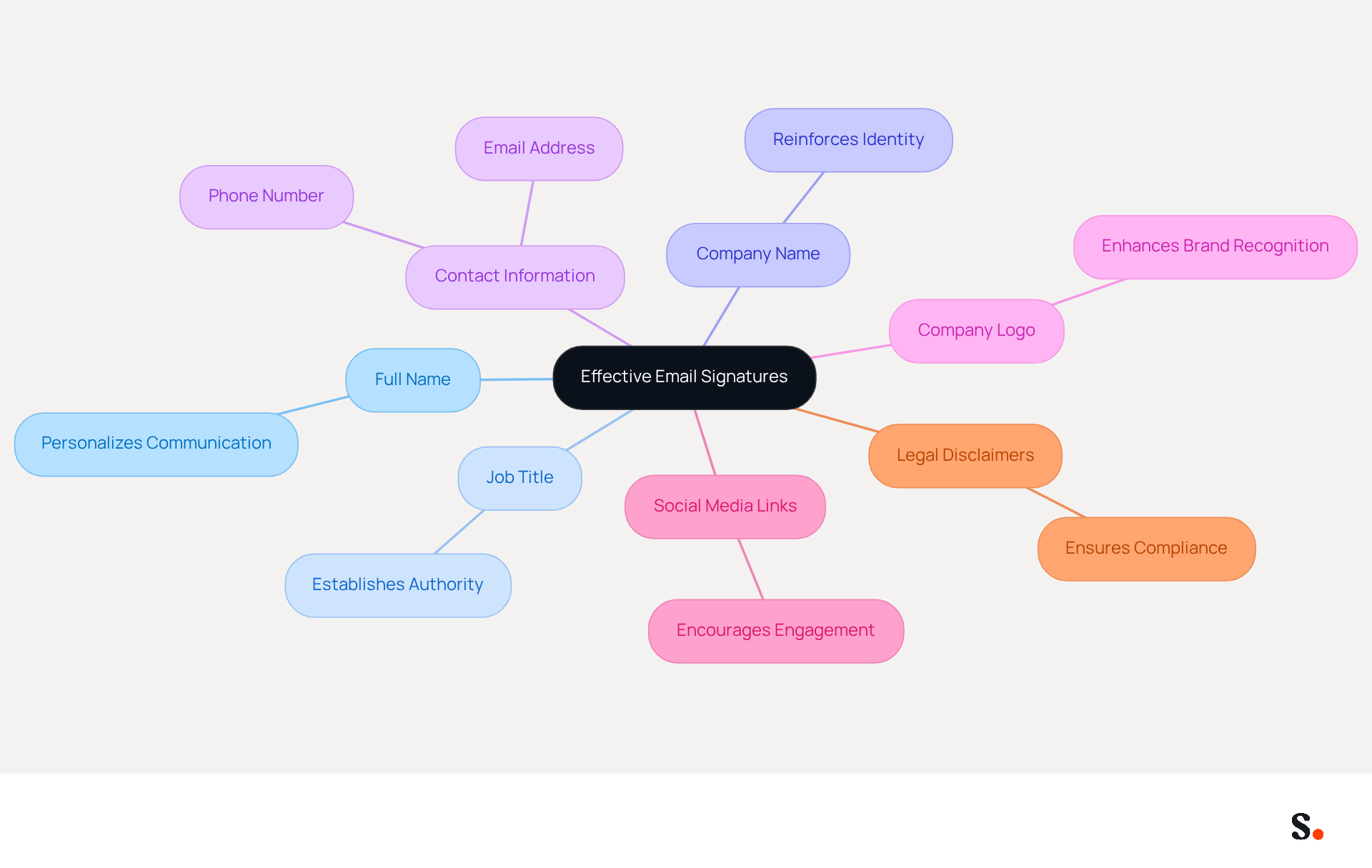
- Full Name: Clearly state the sender's name to personalize the communication.
- Job Title: Include the sender's position to establish authority and context.
- Company Name: Mention the organization to reinforce identity.
- Contact Information: Provide essential contact details such as phone number and email address for easy follow-up.
- Company Logo: Incorporate the company logo to enhance brand recognition.
- Social Media Links: Add links to professional social media profiles to encourage further engagement.
- Legal Disclaimers: If necessary, include any legal disclaimers relevant to your industry.
Including these elements allows businesses to create email signature templates for Outlook that are both professional and effective marketing tools. Scribe simplifies this process by automatically syncing your email signatures with your business phone system, ensuring that any changes made in your Aircall configuration are reflected in your correspondence. This integration keeps everything consistent and lets you update signatures in real-time, so your team doesn’t have to lift a finger. Furthermore, Scribe's SOC 2 Type II compliance ensures that your data is protected, adhering to the highest standards for employee data management and automation of identifiers. This not only enhances your brand's image but also fosters trust and reliability in your communications.
Incorporate Branding Strategies for Consistency
Inconsistent email signatures can undermine a company's professional image and brand trust, making the use of email signature templates for Outlook essential. To ensure brand consistency in email signatures, consider the following strategies:
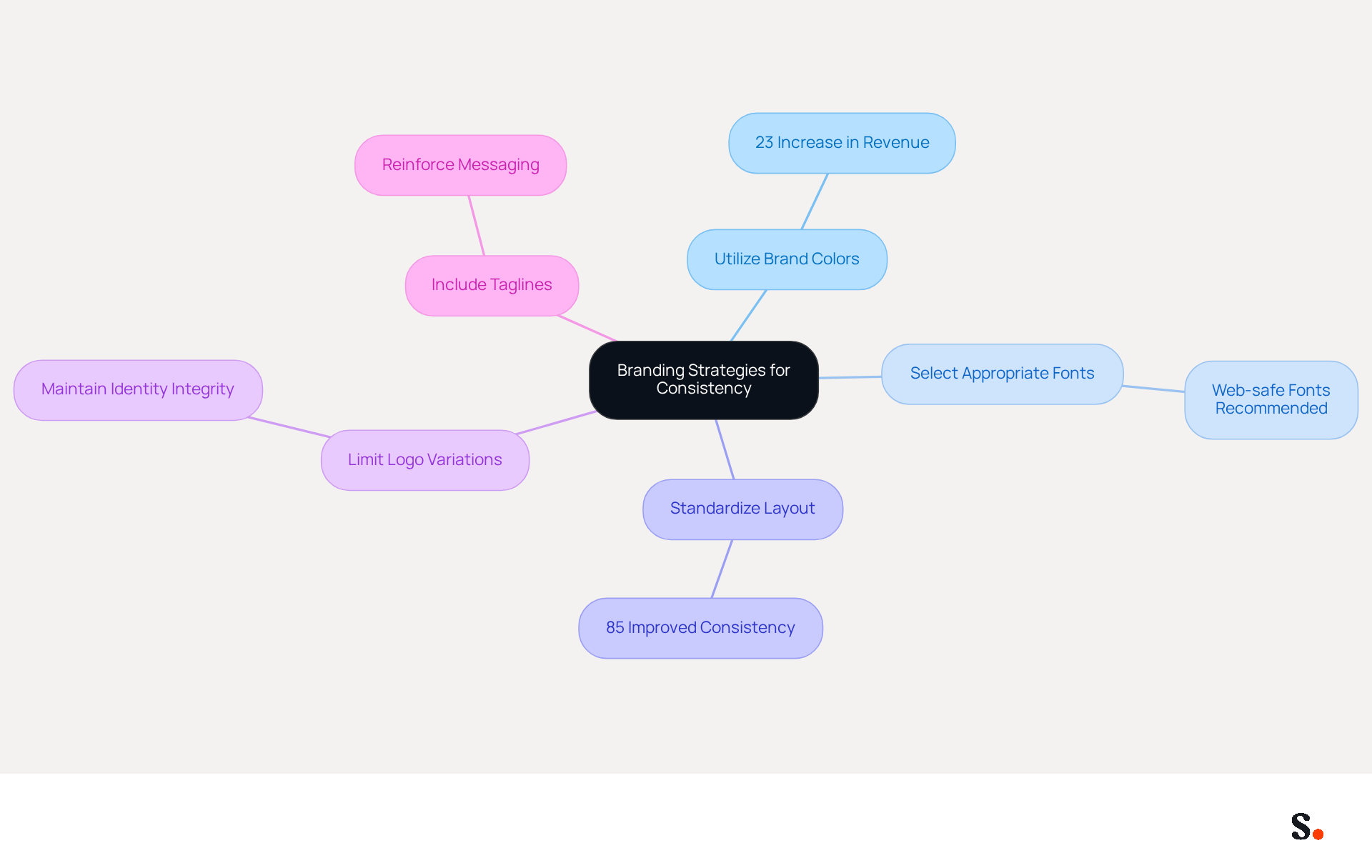
- Utilize Brand Colors: Integrate your company's color palette to create a visually cohesive identity. Consistent branding can lead to a 23% increase in revenue across all channels.
- Select Appropriate Fonts: Choose web-safe fonts like Arial or Helvetica that align with your guidelines to maintain a professional appearance and ensure compatibility across devices.
- Standardize Layout: Develop a uniform format for all endorsements within the organization to ensure consistency. Organizations utilizing centralized signature management report 85% improved consistency across teams.
- Limit Logo Variations: Use only the primary logo to avoid confusion and maintain identity integrity. This helps strengthen identity and trust with clients.
- Include Taglines: If applicable, add a company tagline to reinforce messaging. A refined digital identifier can improve professionalism and make a company more memorable.
Plus, with Scribe's automated sync with Aircall, any changes you make in Aircall will automatically update in your Scribe profiles. This smooth integration ensures that your correspondence identifiers remain uniform and current, further enhancing corporate integrity.
By implementing these strategies, businesses can create professional communication elements, such as email signature templates for Outlook, that not only appear polished but also enhance brand recognition and trust. Ultimately, these strategies not only enhance professionalism but also foster stronger client relationships and brand loyalty.
Optimize Email Signatures for Outlook Compatibility
To achieve optimal display of your email signature in Outlook, it is essential to follow specific optimization strategies:
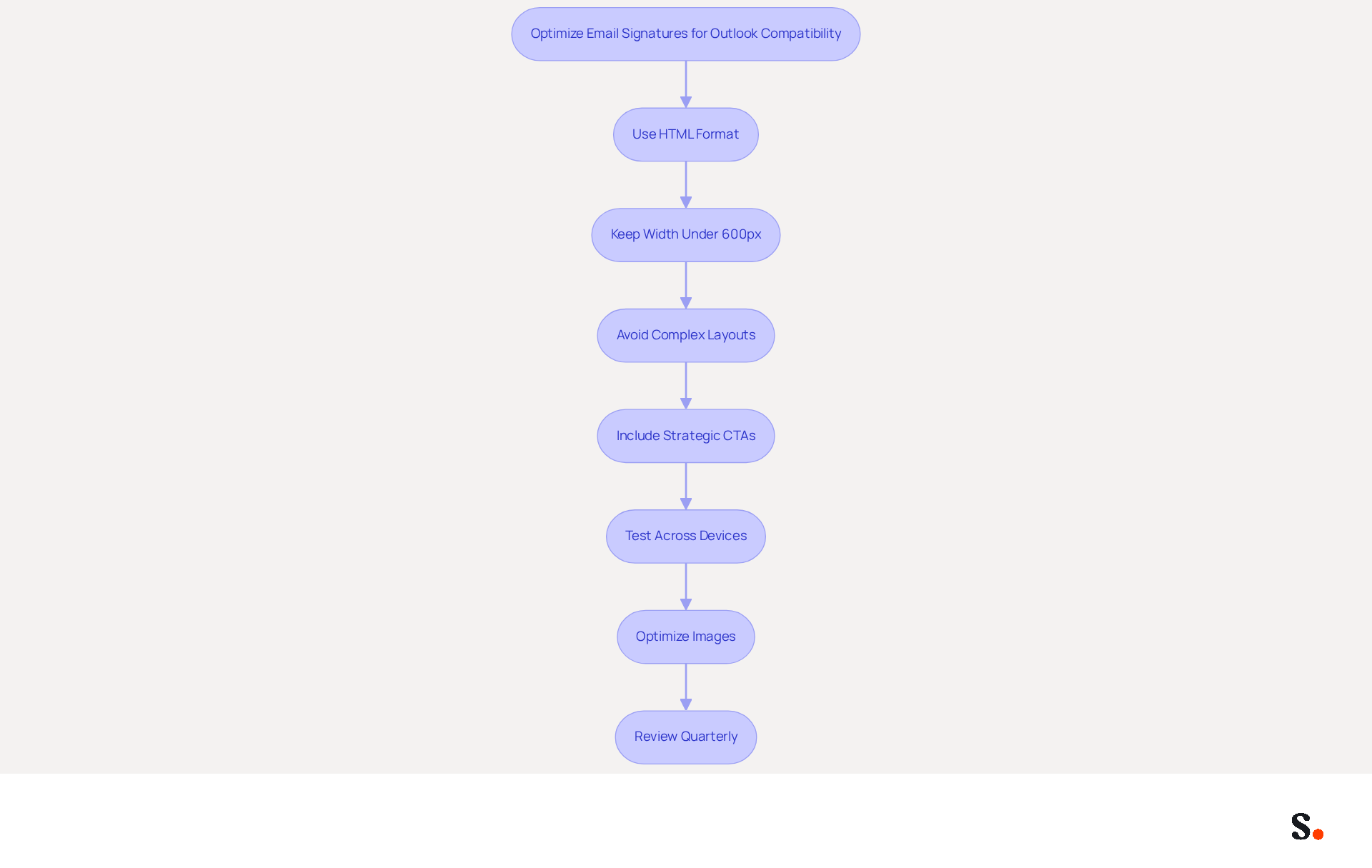
- Use HTML Format: Create your identifier in HTML to ensure compatibility across various messaging clients.
- Keep Width Under 600px: Limit the width of your email footer to prevent display issues in Outlook, as elements wider than this may not render properly.
- Avoid Complex Layouts: Choose straightforward, single-column designs to ensure consistent rendering across devices and messaging clients.
- Include Strategic CTAs: Make sure to include clear calls to action in your email footer; this will help engage your audience and achieve your communication goals.
- Test Across Devices: Always verify your email signature across various devices and messaging clients to ensure it displays correctly, as discrepancies can lead to miscommunication.
- Optimize Images: Use appropriately sized images and include alt text to enhance accessibility and ensure images load correctly.
- Review Quarterly: Regularly assess and refresh your electronic correspondences to reflect any changes in branding or personnel, ensuring they remain effective and relevant.
To enable one-click synchronization with Scribe, ensure you grant the necessary permissions as a Super Admin of your service provider. This enables effortless updates to your communication identifiers, reflecting any modifications in your team’s details automatically. By following these guidelines, organizations can significantly enhance their communication effectiveness and brand consistency through the use of email signature templates for Outlook. Furthermore, teams utilizing centralized management with Scribe experience 85% improved brand consistency and three times greater campaign interaction. With Scribe's one-click synchronization feature, syncing your Google Workspace ensures that any changes in your team’s information are automatically updated in your messages, saving time and enhancing security compliance with SOC 2 Type II standards.
Integrate Call-to-Action Elements for Enhanced Engagement
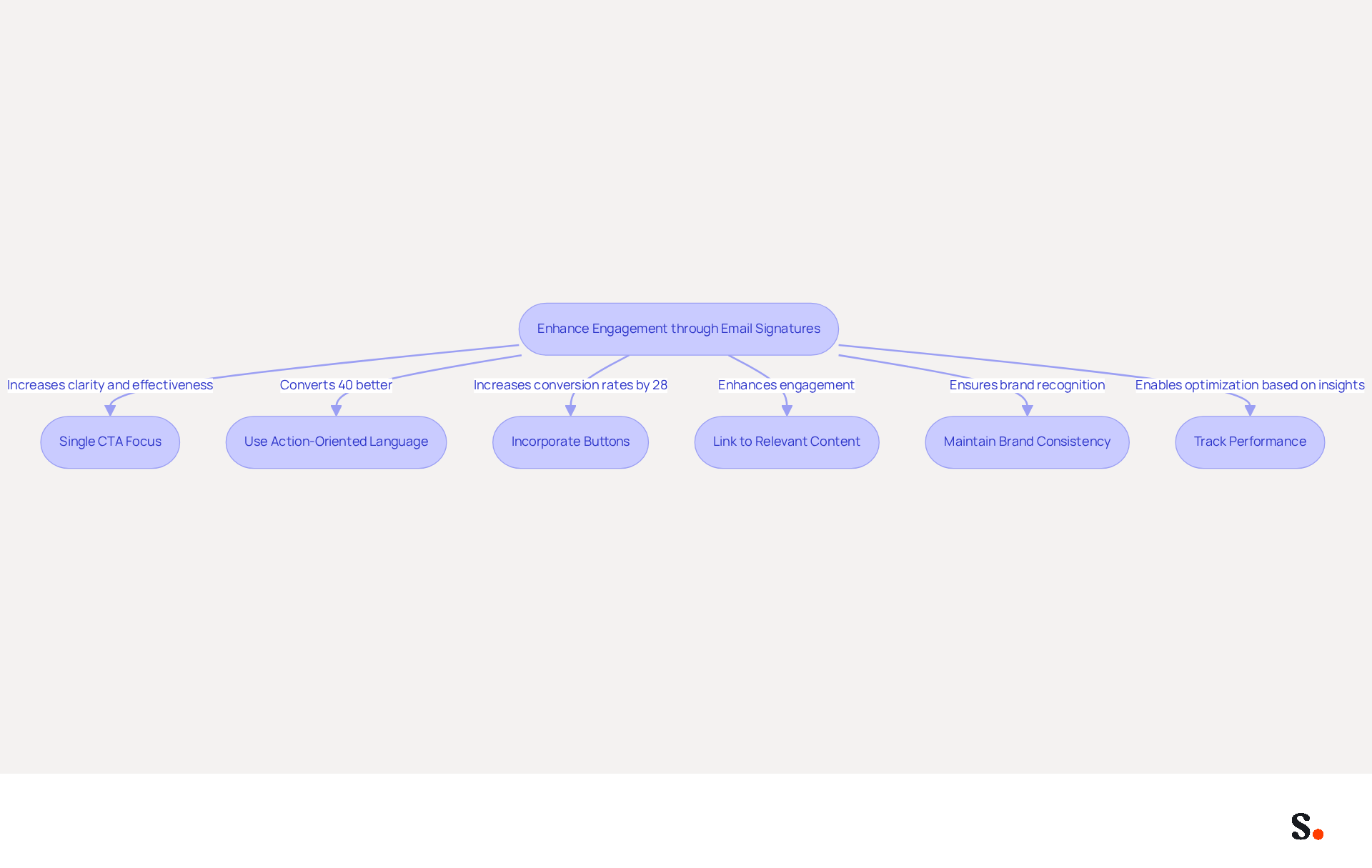
To effectively engage your audience through email signatures, implementing targeted call-to-action strategies is essential:
- Single CTA Focus: Focusing on a single CTA can enhance clarity and effectiveness, potentially leading to a click-through rate of up to 7%.
- Use Action-Oriented Language: Phrases like 'Schedule a Demo' or 'Download Our Guide' encourage immediate action. Studies show that strategic CTAs often convert 40% better than their generic counterparts, making the choice of wording crucial. Additionally, personalized CTAs convert 202% better than standard ones, emphasizing the importance of tailoring your message.
- Incorporate Buttons: Using buttons can increase conversion rates by up to 28% compared to hyperlinks, making it more likely that recipients will engage.
- Link to Relevant Content: Ensure that the CTA directs recipients to valuable content or offers that align with their interests. Without relevant content, recipients may disengage, missing out on valuable interactions.
- Maintain Brand Consistency: Ensure that your communication reflects your brand's visual identity, including colors and fonts. Consistent branding enhances recognition and professionalism.
- Track Performance: Tracking performance is crucial; without it, businesses may overlook insights that could refine their marketing strategies. Ongoing monitoring enables optimization based on recipient behavior, ensuring that your message remains an effective marketing tool.
By integrating these elements, businesses can transform their email signatures into powerful marketing tools using email signature templates for Outlook that drive engagement and conversions. Ignoring these strategies could result in missed opportunities for engagement and conversion.
Conclusion
Establishing a professional image through email signatures is crucial for effective communication and brand identity. Effective strategies help organizations create email signatures that convey essential information and act as powerful marketing tools to boost engagement and brand recognition.
Key elements such as including full names, job titles, company logos, and contact information are foundational to creating effective email signatures. Additionally, maintaining brand consistency through the use of brand colors, standardized layouts, and appropriate fonts is crucial for fostering trust and professionalism. Optimizing signatures for Outlook compatibility and integrating clear calls to action can significantly improve engagement rates; research shows that personalized CTAs significantly outperform standard ones, leading to higher conversion rates.
Using these best practices can make email communications more effective and turn email signatures into valuable marketing tools. By utilizing tools like Scribe, which offers seamless integration and compliance with security standards such as SOC 2 Type II, businesses can achieve 100% brand consistency and measurable marketing ROI. Ultimately, neglecting these strategies could hinder an organization's ability to connect meaningfully with clients and prospects.
Frequently Asked Questions
What are the key elements of an effective email signature?
The key elements of an effective email signature include the sender's full name, job title, company name, contact information, company logo, social media links, and any necessary legal disclaimers.
Why is it important to include a full name in an email signature?
Including a full name personalizes the communication and helps establish a connection with the recipient.
How does a job title in an email signature benefit the sender?
A job title establishes authority and provides context about the sender's role within the organization.
What role does the company name play in an email signature?
Mentioning the company name reinforces the organization's identity and helps recipients recognize the sender's affiliation.
Why should contact information be included in an email signature?
Providing essential contact details, such as phone number and email address, allows for easy follow-up and communication.
How does incorporating a company logo in an email signature enhance communication?
Including a company logo enhances brand recognition and contributes to a professional appearance in communications.
What is the purpose of adding social media links to an email signature?
Social media links encourage further engagement and allow recipients to connect with the sender on professional platforms.
When should legal disclaimers be included in an email signature?
Legal disclaimers should be included if they are relevant to the industry or necessary for compliance purposes.
How does Scribe assist in creating email signature templates for Outlook?
Scribe simplifies the process by automatically syncing email signatures with the business phone system, ensuring consistency and real-time updates without requiring manual changes.
What compliance standard does Scribe adhere to for data protection?
Scribe is SOC 2 Type II compliant, ensuring that employee data management and automation of identifiers meet high standards for protection and reliability.
List of Sources
- Identify Key Elements of Effective Email Signatures
- The impact of email signatures on your branding (https://signitic.com/en/resources/the-impact-of-email-signatures-on-your-branding)
- Email Signature Best Practices for 2026 (+ 15 Pro Examples) (https://wavecnct.com/blogs/email-signature-best-practices-2026)
- Email signature statistics: Why every business should optimize their email signatures — Stripo.email (https://stripo.email/blog/email-signature-statistics-why-every-business-should-optimize-their-email-signatures)
- 40+ Email Signature Statistics for 2026 (Data + Insights) (https://wavecnct.com/blogs/email-signature-statistics)
- Research Recap: Branded Email Signatures Increase Company Recognition, Trust - B2BMX INSIGHTS (https://demandgenreport.com/industry-news/research-recap-branded-email-signatures-increase-company-recognition-trust/47252)
- Incorporate Branding Strategies for Consistency
- Email Signature Design Trends in 2026: What Works and What to Drop (https://bulksignature.com/blog/email-signature-design-trends)
- Top 10+ best practices for email signatures design in 2026 (https://mysignature.io/blog/email-signature-best-practices)
- How to manage brand consistency in email marketing - Emma (https://myemma.com/blog/how-to-manage-brand-consistency-in-email-marketing)
- Email Signature Trends 2026: Centralized Control & Automation | SIGNandGO posted on the topic | LinkedIn (https://linkedin.com/posts/signngo_email-signature-trends-to-watch-in-2026-activity-7401523471786217473-zAVL)
- Why Email Signatures Must Be In Your 2026 Marketing Plan | Rocketseed (https://rocketseed.com/blog/what-are-the-biggest-email-trends-for-2026)
- Optimize Email Signatures for Outlook Compatibility
- Email Signature Best Practices for 2026 (+ 15 Pro Examples) (https://wavecnct.com/blogs/email-signature-best-practices-2026)
- How to Update Your Outlook Signature (2026) (https://getinboxzero.com/blog/post/how-to-update-signature-in-outlook)
- How to standardize email signature for a company - Microsoft Q&A (https://learn.microsoft.com/en-us/answers/questions/1469436/how-to-standardize-email-signature-for-a-company)
- How to solve problems with email signatures in Microsoft 365? (https://mail-signatures.com/articles/problems-email-signatures-office-365)
- Email Signature Troubleshooting - Problems & Solutions - Gimmio (https://blog.gimm.io/email-signature-troubleshooting)
- Integrate Call-to-Action Elements for Enhanced Engagement
- How to Leverage an Email Signature Marketing Campaign for CX (https://gorgias.com/blog/email-signature-marketing)
- Email call to action best practices: The complete guide [2026] — Stripo.email (https://stripo.email/blog/email-call-action-best-practices-examples)
- The Ultimate Guide to Email Signature Call-to-Action - NEWOLDSTAMP (https://newoldstamp.com/blog/the-ultimate-guide-to-email-signature-call-to-action)
- 4 Best Practices for Classic Email Signatures That Drive Engagement (https://scribe-mail.com/en-US/blog/4-best-practices-for-classic-email-signatures-that-drive-engagement)
- Using Email Signatures as a Marketing Tool: Ideas for Generating Leads and Promoting Business (https://blog.ringostat.com/en/using-email-signatures-as-a-marketing-tool-ideas-for-generating-leads-and-promoting-business)
Get started with Scribe
Build a professional email signature
Free 14-day trial — no credit card.