Master Email Signature Word Templates for Effective Branding
An effective email signature is not merely a digital sign-off; it is a crucial branding asset that enhances professional communication. By mastering the art of
Sophie Grant
Email Signature Specialist, Scribe

Introduction
An effective email signature is not merely a digital sign-off; it is a crucial branding asset that enhances professional communication. By mastering the art of email signature word templates, organizations can ensure their brand identity is consistently represented across all correspondence.
Navigating the numerous design elements and integration options can be overwhelming for businesses, making it crucial to create signatures that are both professional and engaging.
This article explores best practices for designing impactful email signatures that resonate with recipients and maximize engagement while reinforcing brand identity.
Define Key Elements of an Effective Email Signature Template
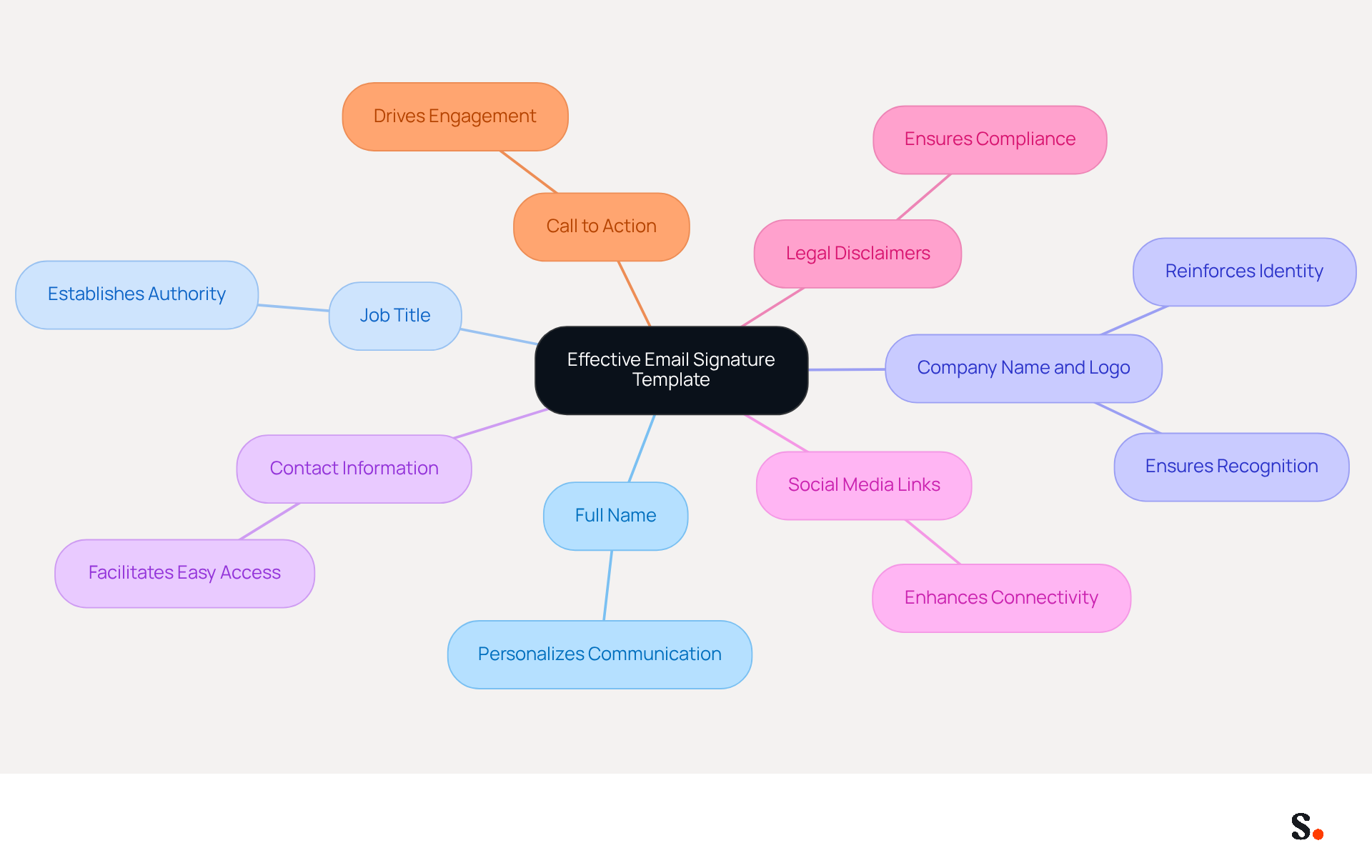
An effective email signature word template is essential for maximizing communication impact and fostering professional connections. It should encompass several key elements:
- Full Name: Clearly stating the sender's name personalizes communication, fostering a connection with recipients.
- Job Title: Including the sender's position establishes authority and provides context, enhancing credibility.
- Company Name and Logo: This reinforces identity and ensures immediate recognition, which is crucial for recall.
- Contact Information: Essential details such as phone number, email address, and website link facilitate easy access for recipients, promoting engagement.
- Social Media Links: Adding links to professional social media profiles enhances connectivity and encourages further interaction with the brand.
- Legal Disclaimers: Depending on the industry, including legal disclaimers is necessary to protect the company and comply with regulations.
- Call to Action: A subtle prompt, such as a link to a recent blog post or a promotional offer, can effectively drive engagement and lead generation.
Incorporating these key elements ensures professionalism and transforms email signatures into effective marketing tools using an email signature word template. Interestingly, 67% of marketers believe that digital identifiers can significantly boost lead generation, emphasizing their strategic significance. Moreover, consistent branding in message footers can result in a 22% rise in response rates, illustrating the concrete advantages of well-designed footers. Research indicates that organizations adopting these optimal methods have effectively acquired new prospects and improved their image, underscoring the importance of investing in efficient templates.
Design a Personalized and On-Brand Email Signature
Creating an email signature word template is essential for establishing a strong brand identity. To design a signature that reflects your brand effectively, consider the following tips:
- Utilize Company Colors and Fonts: Ensure that the logo reflects Scribe's color palette and typography to maintain consistency. Consistent use of color schemes across digital communications can greatly improve trust in the organization. Furthermore, using web-safe fonts guarantees that the email footer displays correctly across various email clients.
- Incorporate Visual Elements: Use the Scribe logo and relevant graphics that align with the visual identity. Incorporating a logo enhances brand recognition and can boost response rates by making the mark more memorable.
- Keep It Simple: Avoid clutter by limiting the number of elements. A clean design is more effective and professional, keeping text concise with 3-6 lines to avoid clutter. Overloading identifiers with too many details can create confusion and detract from the key information.
- Responsive Design: It's important to test how your signature looks on different devices since many people check emails on their phones. Ensuring that the mark appears well on both desktop and mobile devices is crucial for effective communication.
- Personal Touch: Consider adding a headshot or a personal logo to make the signature more relatable and engaging. A professional headshot can increase response rates and build trust with recipients.
- Consistent Layout: Use a structured layout that logically guides the reader's eye through the information. This consistency not only improves readability but also strengthens the professionalism of the organization.
By adhering to these design principles, businesses can create an email signature word template that effectively conveys their identity and improves the overall communication experience. With Scribe, every modification made in your Aircall configuration will automatically be reflected in your correspondence identifiers, ensuring effortless updates and improved brand consistency. Moreover, adherence to legal obligations such as GDPR and CAN-SPAM is essential for ensuring that digital identifiers meet required standards, and Scribe's SOC 2 Type II certification ensures secure data management. Case studies indicate that organizations adopting these best practices have experienced enhanced engagement rates, with Scribe achieving an average click-through rate of 12% on banners, demonstrating how effective digital identifiers can enhance engagement.

Integrate Email Signature Templates with Popular Platforms
Integrating email signature word templates with popular platforms is essential for maintaining brand consistency and professionalism.
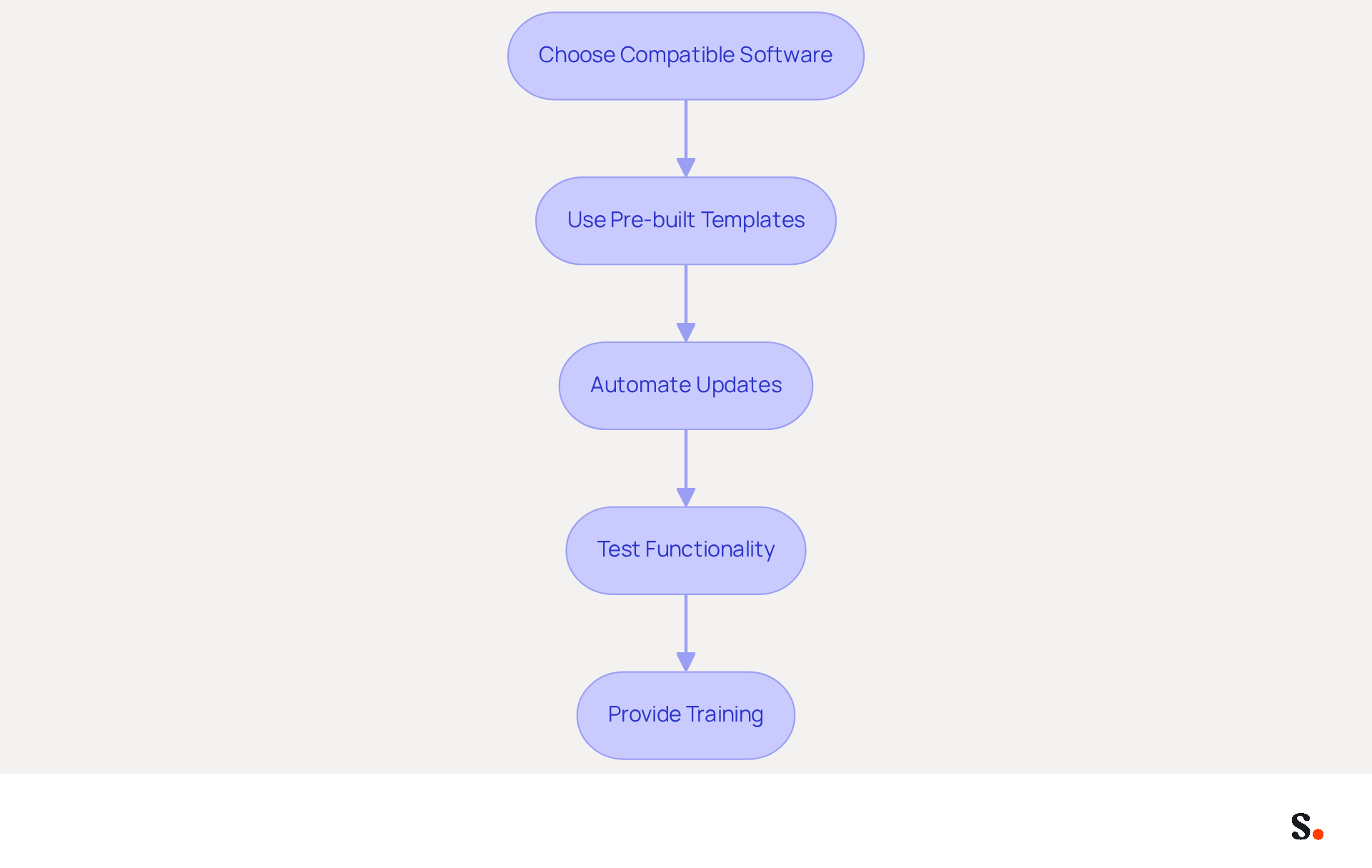
- Choose Compatible Software: Select email signature management software that supports integration with your email platform (e.g., Google Workspace, Microsoft 365). This ensures compatibility and ease of use.
- Use Pre-built Templates: Many platforms provide pre-built templates that can be tailored to suit your identity. Utilizing these templates saves time and ensures compatibility, reinforcing brand identity.
- Automate Updates: Implement systems that allow for automatic updates of credentials across all users. Scribe allows you to sync your Google Workspace, automatically updating your teammates' contact details whenever their job roles or group assignments change. This not only maintains consistency but also enhances professionalism and saves valuable time.
- Test Functionality: Before launching the identifier, evaluate it across various messaging clients to ensure it appears correctly and operates as intended. Testing functionality is essential to prevent potential issues that may undermine professionalism.
- Provide Training: Offer training sessions for employees on how to use the management tool effectively, ensuring everyone understands how to maintain consistency.
Organizations are increasingly recognizing the value of centralized solutions for managing digital identifiers, which not only enhances brand consistency but also simplifies the process of updating the email signature word template across different teams. Research indicates that branded digital identifiers can lead to a 22% increase in response rates and a 15% rise in click-through rates to company websites, making this integration a significant branding opportunity. With Scribe's SOC 2 Type II compliance, you can trust that your management of digital identifiers is secure and efficient. Embracing these integration strategies not only elevates your brand's presence but also streamlines communication across your organization.
Test and Optimize for Cross-Platform Compatibility
To maintain a professional image, businesses must ensure their email signature word template is compatible across various platforms.
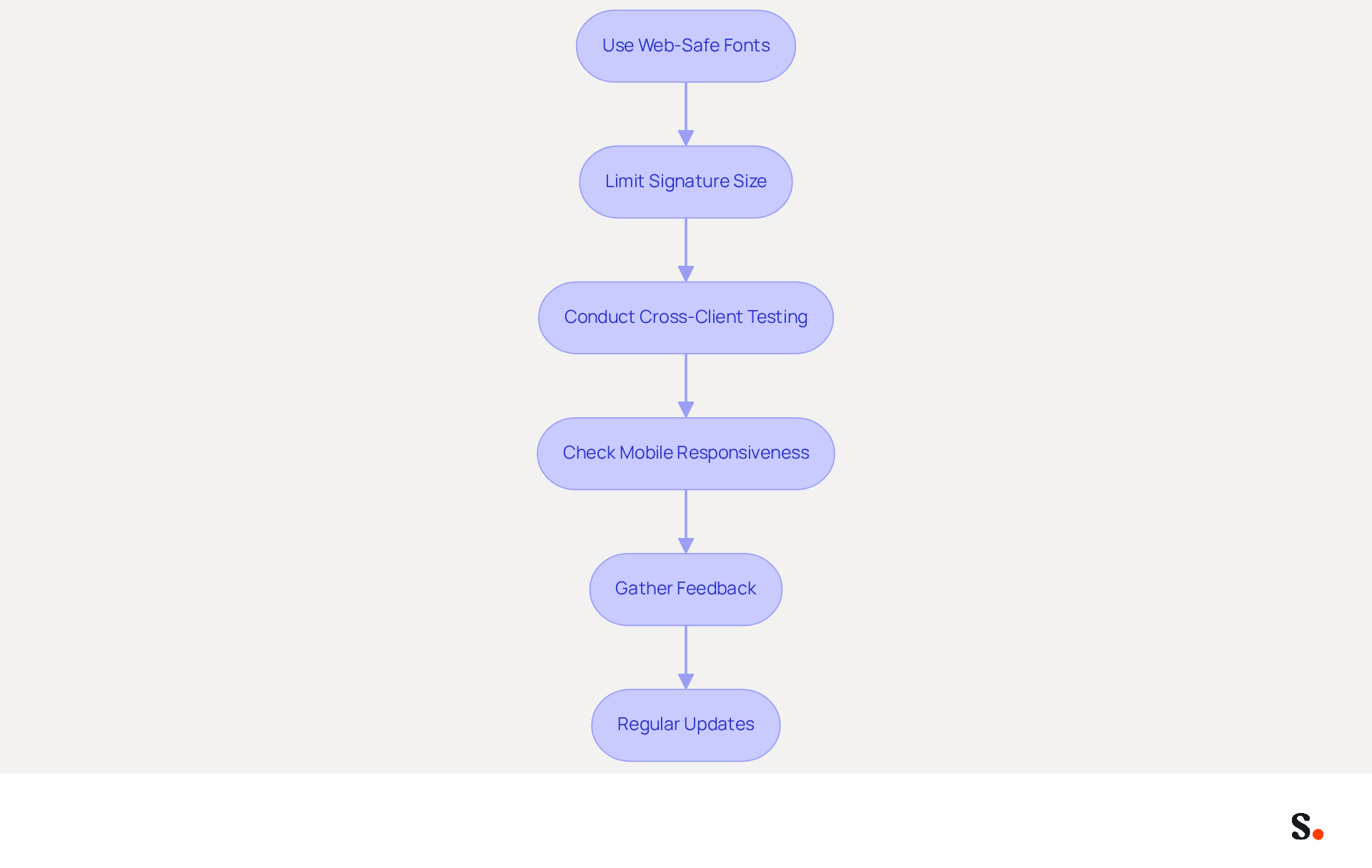
- Use Web-Safe Fonts: Opt for standard fonts that are widely supported across email clients to prevent rendering issues. This is vital as 42% of consumers express negative sentiments towards businesses lacking a branded identity, emphasizing the significance of professionalism.
- Limit Signature Size: Keep the width under 600 pixels to ensure proper display on most devices. An email signature word template that is optimized can boost click-through rates to company websites by 15%.
- Conduct Cross-Client Testing: Test the signature in multiple messaging clients (e.g., Outlook, Gmail, Apple Mail) to identify discrepancies in rendering. Without regular testing, businesses risk inconsistent branding and communication issues, as 89.9% of professionals utilize a single digital identifier, indicating a need for active management.
- Check Mobile Responsiveness: Ensure the email is mobile-friendly by testing it on various devices and screen sizes. Given that 42% of all messages are opened on mobile devices, ensuring mobile-friendliness is crucial for maximizing engagement.
- Gather Feedback: Encourage team members to provide input on the design and functionality, making adjustments as necessary. By collaborating, teams can continuously enhance the effectiveness of their email signature word template.
- Regular Updates: Periodically review and refresh the branding element to reflect any changes in branding or technology. Failing to update branding elements can result in missed opportunities for engagement and response, as organizations that uphold consistent branded digital identifiers report over 22% increases in response rates, highlighting the significance of keeping them up to date.
Furthermore, with Scribe's integration with Aircall, any modifications made in your Aircall setup will automatically be reflected in your Scribe profiles, ensuring seamless synchronization and improved consistency. By rigorously testing and optimizing an email signature word template for cross-platform compatibility, businesses can ensure a consistent and professional appearance in all communications, ultimately enhancing brand recognition and trust. Inconsistent email signatures can undermine brand trust and recognition, making regular updates essential.
Conclusion
Crafting an effective email signature template is essential for reinforcing brand identity and enhancing communication. By focusing on key elements such as personal details, company branding, and legal disclaimers, organizations can transform their email signatures into powerful marketing tools. Integrating these signatures with popular platforms helps businesses maintain a consistent and professional brand image.
Throughout the article, essential strategies for designing personalized and on-brand email signatures were discussed. Utilizing company colors, incorporating visual elements, and ensuring mobile responsiveness are crucial for creating a signature that resonates with recipients. Additionally, the importance of testing for cross-platform compatibility and regularly updating signatures is crucial for enhancing engagement and response rates.
A well-designed email signature does more than look good; it plays a key role in building brand recognition and trust. Organizations leveraging Scribe's capabilities can achieve 100% brand consistency while enjoying measurable marketing ROI from their email signatures. By neglecting email signature design, organizations may inadvertently undermine their branding efforts and miss valuable opportunities for engagement.
Frequently Asked Questions
What is the purpose of an effective email signature template?
An effective email signature template maximizes communication impact and fosters professional connections.
What are the key elements of an effective email signature?
The key elements include the sender's full name, job title, company name and logo, contact information, social media links, legal disclaimers, and a call to action.
Why is including the sender's full name important in an email signature?
Including the sender's full name personalizes communication and fosters a connection with recipients.
How does a job title in an email signature enhance credibility?
A job title establishes authority and provides context, which enhances the sender's credibility.
What role does the company name and logo play in an email signature?
The company name and logo reinforce identity and ensure immediate recognition, which is crucial for recall.
Why is contact information essential in an email signature?
Contact information, such as phone number, email address, and website link, facilitates easy access for recipients and promotes engagement.
How can social media links in an email signature benefit communication?
Adding links to professional social media profiles enhances connectivity and encourages further interaction with the brand.
What is the significance of including legal disclaimers in an email signature?
Legal disclaimers are necessary to protect the company and comply with regulations, depending on the industry.
What is a call to action in an email signature, and why is it important?
A call to action is a subtle prompt, such as a link to a recent blog post or promotional offer, that can effectively drive engagement and lead generation.
What are the benefits of using an email signature template with these key elements?
Incorporating these elements ensures professionalism, transforms email signatures into effective marketing tools, and can significantly boost lead generation and response rates.
List of Sources
- Define Key Elements of an Effective Email Signature Template
- Email Signature Best Practices for 2026 (+ 15 Pro Examples) (https://wavecnct.com/blogs/email-signature-best-practices-2026)
- The benefits of a branded email signature (https://bybrand.io/blog/branded-email-signature)
- Exclaimer Research: 67% of Marketers Expect Email Signatures to Support With Lead Gen In 2023 (https://businesswire.com/news/home/20230612141095/en/Exclaimer-Research-67-of-Marketers-Expect-Email-Signatures-to-Support-With-Lead-Gen-In-2023)
- The impact of email signatures on your branding (https://signitic.com/en/resources/the-impact-of-email-signatures-on-your-branding)
- 4 Best Practices for Your Google Email Signature Template (https://scribe-mail.com/en-US/blog/4-best-practices-for-your-google-email-signature-template)
- Design a Personalized and On-Brand Email Signature
- The Complete Email Signature Guide 2026: Best Practices and Policy (https://opensense.com/complete-email-signature-guide)
- New email signature generator is available (https://news.siu.edu/2026/03/031926-new-email-signature-generator-is-available.php)
- 20 best email signature design examples for 2026 — Stripo.email (https://stripo.email/blog/10-best-email-signature-design-examples)
- Free Email Signature Template Generator by HubSpot (2026) (https://hubspot.com/email-signature-generator)
- Email Signature Best Practices - NEWOLDSTAMP (https://newoldstamp.com/blog/email-signature-best-practices)
- Integrate Email Signature Templates with Popular Platforms
- Top email signature trends for companies in 2026 (https://bybrand.io/blog/trends-email-signatures)
- 40+ Email Signature Statistics for 2026 (Data + Insights) (https://wavecnct.com/blogs/email-signature-statistics)
- Company Email Signature Management for Google Workspace | Rocketseed (https://rocketseed.com/blog/google-workspace-email-signature-manager-for-companies)
- Google Workspace Email Signature Management Software | SyncSignature (https://syncsignature.com/google-workspace-signature-management)
- How to combine automation and email signatures (https://signitic.com/en/resources/how-to-combine-automation-and-email-signatures)
- Test and Optimize for Cross-Platform Compatibility
- 100 Professional Email Signature Quotes: Best Ideas - NEWOLDSTAMP (https://newoldstamp.com/blog/email-signature-quotes)
- 40+ Email Signature Statistics for 2026 (Data + Insights) (https://wavecnct.com/blogs/email-signature-statistics)
- Email signature statistics and trends in 2024 (https://wisestamp.com/blog/email-signature-statistics)
- Email signature statistics: Why every business should optimize their email signatures — Stripo.email (https://stripo.email/blog/email-signature-statistics-why-every-business-should-optimize-their-email-signatures)
- 4 Best Practices for a Modern Email Signature That Engages (https://scribe-mail.com/en-US/blog/4-best-practices-for-a-modern-email-signature-that-engages)
Get started with Scribe
Build a professional email signature
Free 14-day trial — no credit card.