Master iPhone Mail Signature HTML for Effective Marketing Strategies
Crafting an impactful email signature on iPhone Mail presents a unique challenge that extends beyond mere digital sign-off. It serves as a strategic marketing
Sophie Grant
Email Signature Specialist, Scribe

Introduction
Crafting an impactful email signature on iPhone Mail presents a unique challenge that extends beyond mere digital sign-off. It serves as a strategic marketing tool capable of enhancing brand visibility and engagement. Marketers can enhance their email signatures by mastering HTML design to create visually appealing and on-brand representations that convey professionalism and drive conversions. Navigating the complexities of design choices and technical specifications can be daunting for organizations, leading to missed opportunities in brand representation and engagement.
Understand HTML Signature Basics for iPhone Mail
Crafting an effective iPhone Mail signature HTML is essential for enhancing email communication. To achieve this, consider the following fundamentals:
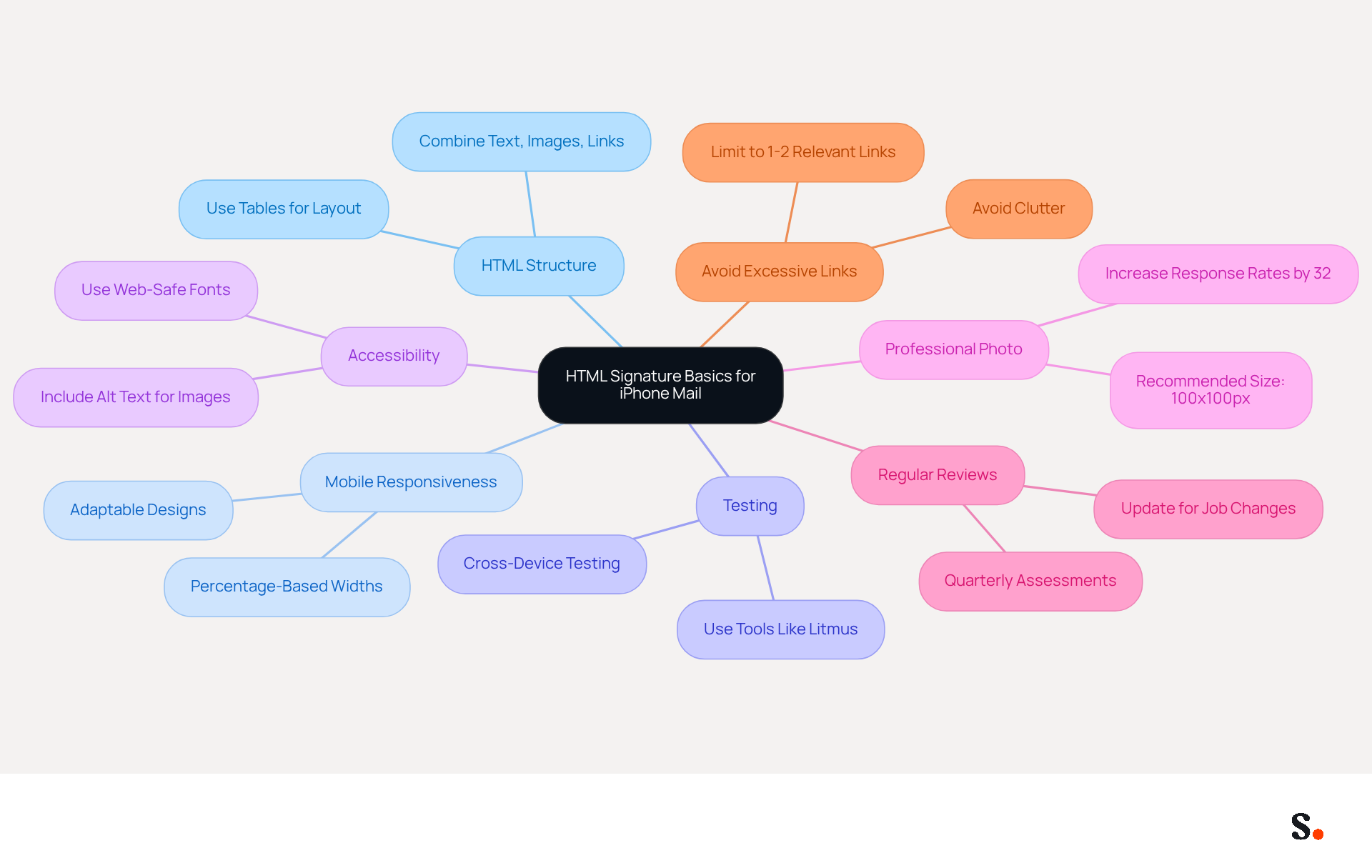
- HTML Structure: An HTML identifier should combine text, images, and links within a simple structure. Use tables for layout to ensure compatibility across different messaging clients.
- Mobile Responsiveness: With over 60% of business communications accessed on mobile devices, designs must be adaptable. Use percentage-based widths for tables and images to help them scale properly on smaller screens.
- Testing: It is crucial to test your HTML design across different devices and email clients to confirm proper rendering. Testing your design with tools like Litmus is crucial to ensure it appears correctly across various platforms.
- Accessibility: Enhance accessibility by including alt text for images and using web-safe fonts. This not only improves user experience but also aligns with best practices in digital marketing.
- Professional Photo: Including a professional headshot in your email footer can increase response rates by approximately 32%, making it a valuable addition to enhance engagement.
- Regular Reviews: Frequently assess your correspondence identifiers to ensure they stay up-to-date and adhere to branding standards. This practice helps avoid outdated information and maintains professionalism.
- Avoid Excessive Links: Be cautious of including too many links or complex designs, as these can negatively impact email deliverability and user experience.
By adhering to these principles, marketers can significantly improve their email communication effectiveness.
Ensure Brand Consistency with On-Brand HTML Signatures
Maintaining brand consistency in iPhone mail signature HTML is essential for effective communication and recognition. Consider the following best practices:
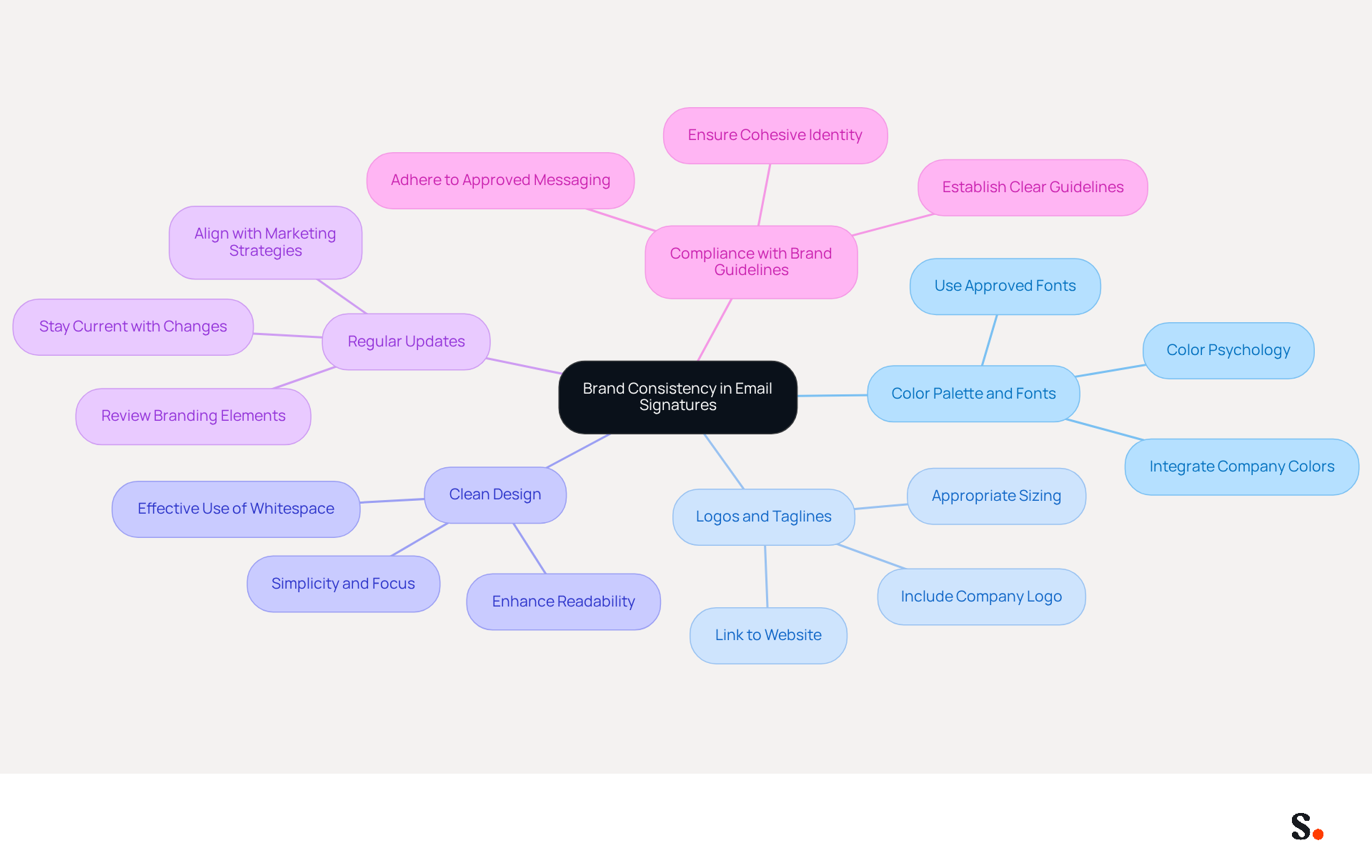
- Incorporate Your Company's Color Palette and Fonts: Integrating your company's colors and fonts into the design establishes a visual link with your identity and improves recognition. In fact, 78% of participants rated consistent identity representation as one of the most crucial email functions.
- Include Logos and Taglines: Adding your company logo and a tagline reinforces identity. Ensure that the logo is appropriately sized and linked to your website for added functionality. A well-crafted emblem not only enhances the organization's image but also boosts the company's trustworthiness.
- Maintain a Clean Design: A cluttered design can confuse recipients, leading to miscommunication. Keep the design simple and focused, using whitespace effectively to enhance readability. This clarity not only enhances understanding but also drives engagement and response rates, as research shows that businesses using consistent identifiers experience a 22% rise in response rates.
- Regular Updates: It's wise to regularly review and refresh your branding elements to stay current with any changes, like new logos or taglines. This practice ensures alignment with evolving marketing strategies and maintains engagement with recipients.
- Compliance with Brand Guidelines: Ensure that all endorsements adhere to your company's branding guidelines, including the use of approved images, colors, and messaging. Establishing clear guidelines is crucial for maintaining a cohesive identity and ensuring all teams are aligned in their messaging and visuals.
Implementing these strategies can significantly elevate your brand's visibility and effectiveness in every email interaction, particularly through your iPhone mail signature HTML. Effective email footers act as strategic assets in branding and promotional efforts, transforming each email into a potential lead generation tool.
Leverage HTML Signatures for Marketing Campaigns
HTML identifiers can significantly enhance marketing effectiveness when strategically utilized. Here are effective strategies to leverage them:
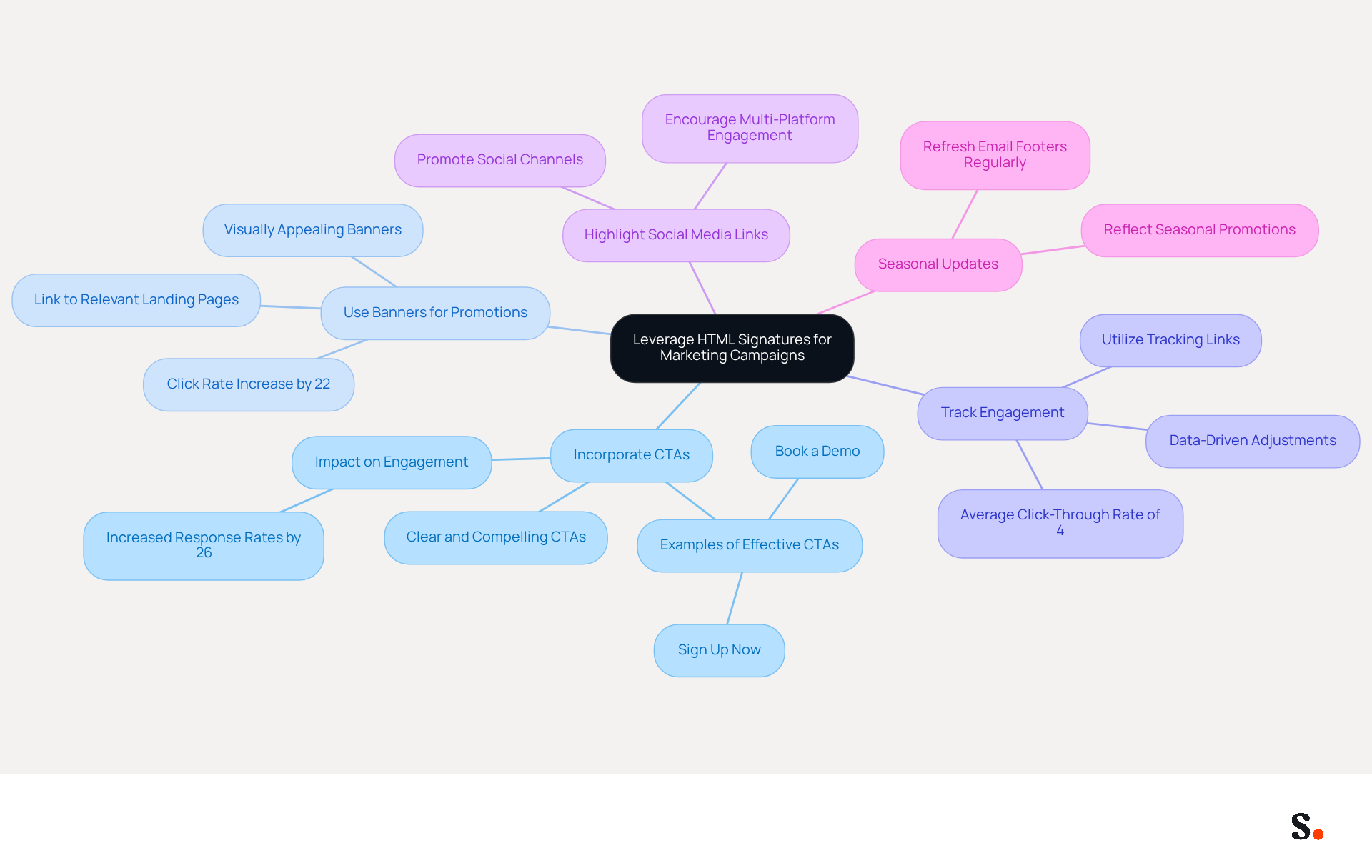
- Incorporate Call-to-Actions (CTAs): Embed clear and compelling CTAs in your email footer, such as links to promotional offers, upcoming events, or new products. This approach can motivate recipients to engage right away, significantly enhancing engagement.
- Use Banners for Promotions: Adding a visually appealing promotional banner to your email can draw attention to specific campaigns. Ensure the banner links directly to the relevant landing page, maximizing the chances of conversion. Organizations using promotional banners in their footers have seen click rates increase by 22%, illustrating the potential influence of well-crafted digital footers on promotional efforts.
- Track Engagement: Utilize tracking links in your email footers to measure engagement effectively. This allows you to analyze the number of clicks your CTAs receive, enabling data-driven adjustments to your strategies for improved performance. Email footers have an average click-through rate of 4%, which is considerably higher than traditional marketing emails, which average 2.5%.
- Highlight Social Media Links: Include icons linking to your social media profiles. This not only promotes your social channels but also encourages recipients to engage with your identity across multiple platforms, expanding your reach.
- Seasonal Updates: Regularly refresh your email footer to reflect seasonal promotions or campaigns. This keeps your communications fresh and relevant, encouraging recipients to engage with your identity and take advantage of timely offers.
By applying these approaches, businesses can convert their digital identifiers into powerful tools that boost engagement and increase conversions. Ultimately, leveraging these strategies can transform your email footers into vital components of your marketing arsenal. Furthermore, syncing your Google Workspace with Scribe enables automatic updates of your teammates' contact details, saving time and ensuring brand consistency across all communications. This distinctive characteristic allows marketing teams to manage their identifiers autonomously after the initial IT configuration, further optimizing the process.
Automate Email Signature Management for Efficiency
Effective email signature management is crucial for maintaining brand consistency and professionalism. To enhance efficiency in email signature management, consider the following automation strategies:
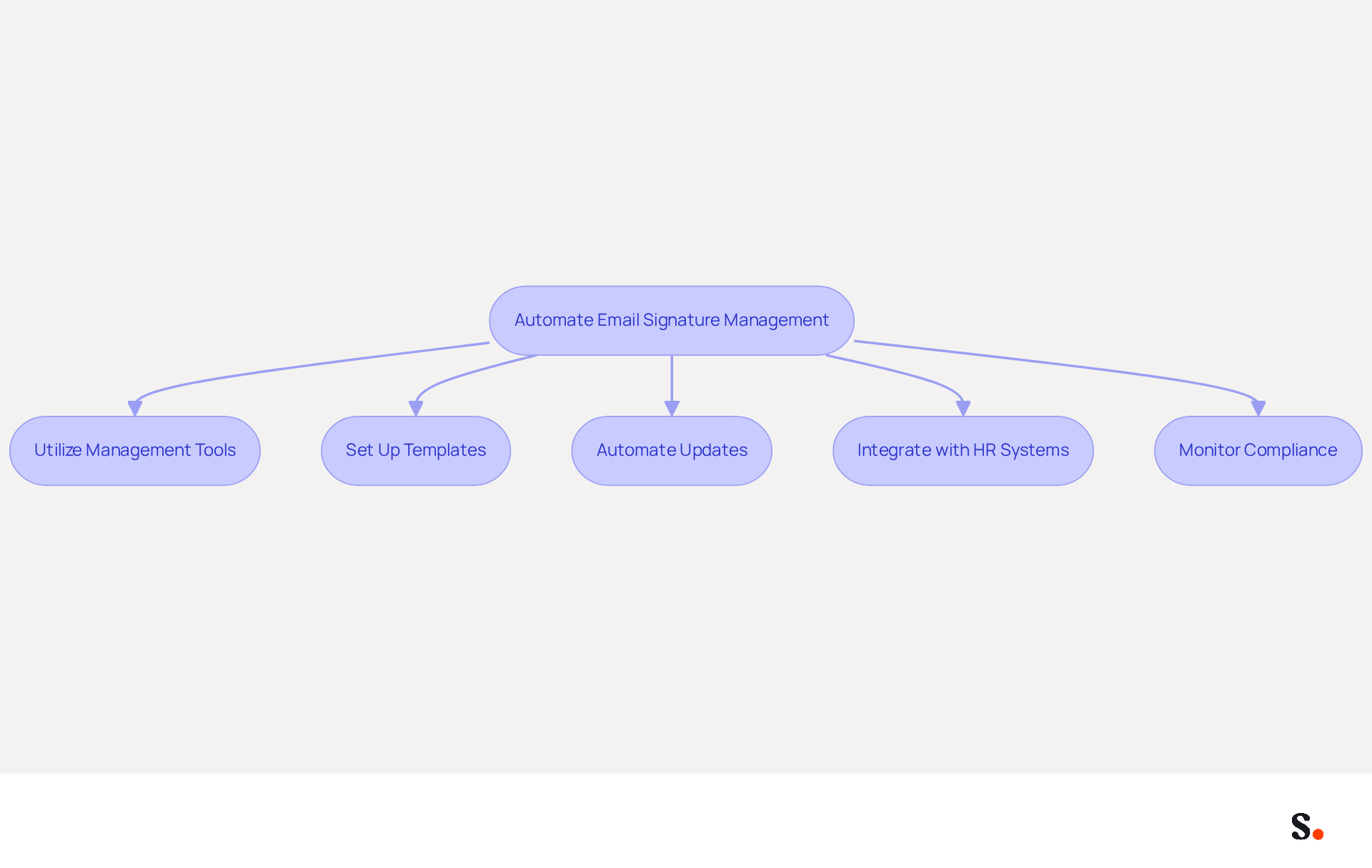
- Utilize Management Tools for Signatures: Implement resources like Scribe that enable centralized control of email identifiers. This allows for swift updates across all users automatically.
- Set Up Templates: Create standardized templates that conform to your guidelines. This ensures all employees use consistent signatures, reinforcing brand identity.
- Automate Updates: Schedule regular updates for identifiers to reflect changes in branding, promotions, or contact information. This reduces the risk of outdated information being sent to clients.
- Integrate with HR Systems: Connect your email management with HR systems to automatically update details when employees join or leave the company. This guarantees that marks are consistently up to date.
- Monitor Compliance: Use software that tracks compliance with branding guidelines. This aids in maintaining consistency and ensures that all approvals meet company standards.
Ultimately, streamlined email signature management can significantly enhance your organization's communication effectiveness.
Conclusion
Creating an impactful iPhone Mail signature using HTML is crucial for effective communication and brand representation. Marketers can create effective email signatures that are both visually appealing and functional by mastering HTML fundamentals. Key strategies discussed include:
- Ensuring brand consistency through the use of company colors, logos, and taglines.
- Leveraging HTML signatures for marketing campaigns by incorporating compelling CTAs and promotional banners.
- Automating email signature management with tools like Scribe, allowing marketing teams to maintain control and efficiency, ensuring that all communications reflect the latest branding and messaging.
Using these best practices can turn email signatures into valuable marketing tools that boost brand visibility and engagement. As organizations strive for 100% brand consistency and measurable marketing ROI, adopting effective HTML signature strategies is not just beneficial; it is essential for achieving marketing success and brand consistency.
Frequently Asked Questions
What is the importance of crafting an HTML signature for iPhone Mail?
Crafting an effective HTML signature for iPhone Mail enhances email communication by providing a professional appearance and improving engagement.
What should be considered in the HTML structure of an email signature?
The HTML structure should combine text, images, and links within a simple layout, using tables to ensure compatibility across different messaging clients.
Why is mobile responsiveness important for email signatures?
Mobile responsiveness is important because over 60% of business communications are accessed on mobile devices, so designs must be adaptable to scale properly on smaller screens.
How can I test my HTML email signature design?
You can test your HTML design across different devices and email clients using tools like Litmus to confirm proper rendering and appearance.
What accessibility features should be included in an email signature?
To enhance accessibility, include alt text for images and use web-safe fonts, which improves user experience and aligns with best practices in digital marketing.
How can a professional photo in an email signature impact response rates?
Including a professional headshot in your email footer can increase response rates by approximately 32%, making it a valuable addition for enhancing engagement.
How often should I review my email signature?
It is important to frequently assess your email signature to ensure it stays up-to-date and adheres to branding standards, helping to avoid outdated information and maintain professionalism.
What should I avoid when creating an HTML email signature?
Avoid including too many links or complex designs, as these can negatively impact email deliverability and user experience.
List of Sources
- Understand HTML Signature Basics for iPhone Mail
- Email Signature Best Practices for 2026 (+ 15 Pro Examples) (https://wavecnct.com/blogs/email-signature-best-practices-2026)
- Top 10+ best practices for email signatures design in 2026 (https://mysignature.io/blog/email-signature-best-practices)
- Email Signature Design Trends in 2026: What Works and What to Drop (https://bulksignature.com/blog/email-signature-design-trends)
- The Complete Email Signature Guide 2026: Best Practices and Policy (https://opensense.com/complete-email-signature-guide)
- 40+ Email Signature Statistics for 2026 (Data + Insights) (https://wavecnct.com/blogs/email-signature-statistics)
- Ensure Brand Consistency with On-Brand HTML Signatures
- The impact of email signatures on your branding (https://signitic.com/en/resources/the-impact-of-email-signatures-on-your-branding)
- Branding statistics you need to know in 2026 (https://dash.app/blog/branding-statistics)
- Email Signature Branding: Consistency and Impact | Crossware365 (https://crossware365.com/blog/mastering-email-signature-branding-market-presence)
- Why Email Signatures Must Be In Your 2026 Marketing Plan | Rocketseed (https://rocketseed.com/blog/2026-marketing-plan-email-signatures)
- Master Signature Templates for Outlook: Boost Brand Consistency and Engagement (https://scribe-mail.com/en-US/blog/master-signature-templates-for-outlook-boost-brand-consistency-and-engagement)
- Leverage HTML Signatures for Marketing Campaigns
- Why Email Signatures Must Be In Your 2026 Marketing Plan | Rocketseed (https://rocketseed.com/blog/2026-marketing-plan-email-signatures)
- 10 ideas for marketing campaigns in email signatures (https://signitic.com/en/resources/10-ideas-for-marketing-campaigns-in-email-signatures)
- 6 Ways to Use Email Signature to Support Marketing Campaigns (https://clearout.io/blog/use-email-signature-to-support-marketing-campaigns)
- How to Run a Successful Email Signature Marketing Campaign - NEWOLDSTAMP - NEWOLDSTAMP (https://newoldstamp.com/blog/email-signature-marketing-guide)
- The Ultimate Guide to Email Signature Call-to-Action - NEWOLDSTAMP (https://newoldstamp.com/blog/the-ultimate-guide-to-email-signature-call-to-action)
- Automate Email Signature Management for Efficiency
- Best Email Signature Management Software: Top 12 Tools (2026)
- NEWOLDSTAMP (https://newoldstamp.com/blog/email-signature-software)
- Why Scribe is the Best Email Signature Management Tool for Marketers (https://scribe-mail.com/en-US/blog/why-scribe-is-the-best-email-signature-management-tool-for-marketers)
- Email Signature Trends 2026: Centralized Control & Automation | SIGNandGO posted on the topic | LinkedIn (https://linkedin.com/posts/signngo_email-signature-trends-to-watch-in-2026-activity-7401523471786217473-zAVL)
- Company Email Signature Management (2026) (https://hubspot.com/email-signature-generator/email-signature-management)
- The True Cost of Manual Email Signature Management (2026) (https://exclaimer.com/email-signature-handbook/manual-email-signature-management-costs)
Get started with Scribe
Create your signature in minutes
Free 14-day trial — no credit card.